

Next-Gen App & Browser Testing Cloud
Trusted by 2 Mn+ QAs & Devs to accelerate their release cycles


Most Common Types of Bugs in Software Testing
Explore the common types of bugs in software testing with examples. Learn effective strategies to avoid bugs and keep your software running smoothly.

Zikra Mohammadi
December 30, 2025
In software development, even minor bugs can impact functionality, performance, or user experience. Identifying and addressing these bugs through testing is crucial. Since bugs can take many forms, understanding the different types of bugs helps teams prioritize fixes, improve software quality, and prevent recurring bugs throughout the development lifecycle, ensuring a more reliable software application.
Overview
A software bug is an error causing unexpected behavior or requirement failure. Testing identifies different types of bugs that affects functionality, usability, performance and security.
Different Types of Bugs in Software Testing
- Functional Bugs: Features don’t work as intended or does not match the requirements or specifications, leading to incorrect outputs or failed processes.
- Usability Bugs: Software meets functional requirements but hinders user experience due to poor design, unclear navigation, or inefficient workflows.
- Compatibility Bugs: Software works in some environments but fails in others.
- Regression Bugs: Previously working features break after updates or code changes.
- Logical Bugs: Incorrect logic produces wrong results even when code runs without errors.
- Syntax Bugs: Code violates language rules, preventing compilation or execution.
- Performance Bugs: Slow, unresponsive, or unstable behavior under load or large datasets.
- Security Bugs: Vulnerabilities that expose data or allow unauthorized access.
- Heisenbugs: Bugs that disappear or change behavior when observed or debugged.
- Boundary Bugs: Failures at edge cases or limits, such as array indices or maximum values.
- Concurrency Bugs: Issues arising from simultaneous execution, like race conditions or deadlocks.
What Are Software Bugs?
Software bugs, also called defects or issues, occur when a software application behaves differently from its expected requirements or specifications. These bugs can range from minor interface glitches to critical failures such as crashes, incorrect outputs, or security vulnerabilities.
Bugs in software applications often arise from unexpected conditions, incorrect logic, or interactions between different modules. Some defects appear consistently, while intermittent defects surface only under specific circumstances, revealing deeper design or coding issues.
Once a bug is identified, the next step is to determine its impact and decide how urgently it needs to be fixed. For a deeper breakdown of how to prioritize fixes, it’s important to understand bug severity and priority.
11 Types of Bugs in Software Testing
Bugs can take many forms in software testing, each of which affects an application in a different way. Recognizing the different types of bugs is important for testers and developers alike, so they can identify and fix the issues.
1. Functional Bugs
Functional bugs cause deviations in the expected behavior of features in a software application as defined by requirements or specifications. They occur when a feature does not perform its intended task, directly affecting the user experience. Functional bugs are among the most common and immediately noticeable defects in software applications.
These bugs break the expected outcomes for users. For example, a user interacting with a button, form, or workflow in a software application expects specific results; functional defects cause these elements to behave differently than intended, leading to errors, blocked processes, or incorrect outputs.
Examples:
- Authentication issues: Login forms rejecting valid credentials or allowing access with invalid ones.
- eCommerce workflow errors: “Add to Cart” or “Checkout” features failing to update the cart or complete transactions correctly.
- Search and filtering issues: Search returns no results or incorrect results despite valid input queries.
- Form submission errors: Contact forms, registration forms, or surveys failing to submit data or showing incorrect validation messages.
You can perform functional testing to check that every feature behaves exactly as specified in the requirements; verify all input combinations, workflows, and edge cases so nothing breaks unexpectedly.
2. Usability Bugs
Usability bugs occur when a software application functions technically but is difficult, confusing, or inefficient for users to interact with. These defects arise from design or interface flaws such as unclear navigation, inconsistent elements, poor readability, low contrast, tiny buttons, or broken accessibility features.
They prevent users from performing tasks smoothly, reducing productivity and satisfaction. Unlike functional bugs, the software may “work,” but usability bugs frustrate users, hinder adoption, and can lead to software abandonment if not addressed through careful UX testing and validation.
- Poor navigation: Users struggle to locate key features due to confusing menus or layouts.
- Inconsistent interface elements: Buttons, labels, or icons behave differently across screens or sections.
- Accessibility issues: Features fail to support users with impairments, such as missing screen reader compatibility.
- Mobile responsiveness issues: Interfaces do not adapt properly across devices, causing layout or interaction issues.
- Unreadable text or insufficient contrast: Information is hard to read, leading to misinterpretation or missed actions.
For more patterns you’re likely to encounter, see this overview of common UI bugs.
Also, perform usability testing by walking through the interface as a user would; focus on navigation, clarity, and error messages to make the experience smooth and intuitive.
3. Compatibility Bugs
Compatibility bugs occur when a software application functions correctly in one environment but fails or behaves inconsistently in others. These defects arise due to differences in operating systems, browsers, devices, screen sizes, resolutions, or hardware configurations.
For example, a feature may work in Chrome but break in Safari, or a mobile app may crash on older Android versions while running smoothly on iOS. Compatibility bugs lead to unpredictable user experiences, hinder adoption, and require thorough cross-platform, cross-browser, and multi-device testing to ensure consistent functionality.
Examples:
- Cross-browser issues: Web forms display or behave incorrectly in Safari or Edge while working in Chrome.
- OS version problems: Mobile apps crash on older Android versions but run smoothly on iOS.
- Screen size/layout issues: Overlapping text or broken layouts on different screen sizes or resolutions.
- Browser-specific functionality: JavaScript or CSS is not working in certain browser versions.
Perform compatibility testing across devices, browsers, and operating systems; verify that your website or mobile app works consistently for every environment your users might have.
4. Regression Bugs
Regression bugs occur when previously working functionality breaks after changes such as new features, updates, bug fixes, or code refactoring. Unlike new defects, regressions represent a backward step in software quality, often emerging at module integration points or due to overlooked dependencies.
They can affect critical workflows and user-facing features. Regression bugs emphasize the importance of re-running existing test suites, using version control, and verifying third-party updates to ensure that software continues to function as expected after modifications.
Examples:
- Search functionality failure: A previously working search stops returning correct results after adding a new module.
- Login regression: Login fails after updating the authentication module.
- Bug report generation: Previously accurate reports now display incorrect data.
- UI behavior regression: Buttons or menus stop functioning after adding a new feature.
Perform regression testing after every code change or release; retest previously working features to ensure new updates haven’t broken existing functionality.
5. Logical Bugs
Logical bugs occur when incorrect algorithms, flawed logic, or misunderstandings of business rules produce unexpected results in a software application, even though the code runs without syntax errors. Unlike functional bugs that break features outright, logical bugs allow features to operate while generating inaccurate outputs, making them particularly insidious.
These defects are dangerous because the application appears to function correctly on the surface, masking errors in calculations, decision-making processes, or workflows. In critical domains like finance, healthcare, or inventory management, logical bugs can cause significant business or operational consequences.
Examples:
- Conditional workflow errors: Users are routed to incorrect screens or given wrong permissions due to faulty logic in role-based access.
- Data processing mistakes: Reports, dashboards, or summaries showing inaccurate totals because of flawed aggregation or business rules.
- Assignment/routing errors: Support tickets, leads, or tasks assigned to the wrong users or queues due to incorrect conditional rules.
- Inventory discrepancies: Stock levels updated incorrectly in order or warehouse management systems, causing overselling or shortages.

Note: Test websites and mobile apps across 3000+ real environments. Try TestMu AI Today!
6. Syntax Bugs
Syntax bugs occur when code violates the rules of the programming language, such as missing semicolons, unmatched parentheses, incorrect variable names, or inconsistent indentation. These bugs prevent the software application from compiling or executing correctly, often causing immediate failures when the code runs.
Although they are the most basic type of programming error, syntax bugs can still appear in complex applications or under tight development timelines. Modern development environments and automated tools help catch these errors early, reducing their occurrence before the software reaches testing.
Examples:
- Missing punctuation or brackets: Forgetting a closing bracket } or semicolon ; in a function that prevents compilation.
- Incorrect variable names: Using userNmae instead of userName, causing undefined variable errors.
- Wrong function calls: Calling processData() with the wrong number of arguments or misspelling the function name.
- Inconsistent indentation: Test script failing due to misaligned blocks or tabs/spaces mismatch.
- Typographical errors in keywords: Using pritn() instead of print() in test scripts, causing immediate execution failure.
7. Performance Bugs
Performance bugs affect the speed, responsiveness, and scalability of a software application. They can degrade resource usage, slow down interfaces, or make the software application unreliable under high load, large datasets, or peak traffic conditions. These bugs usually do not stop the application from functioning, but negatively impact user experience and software stability.
Examples:
- Memory leaks: Mobile app becomes increasingly unresponsive over time because of unhandled memory usage.
- Slow data processing: Reports or dashboards take several minutes to load due to unoptimized algorithms.
- UI lag: Web page freezes when multiple users access it simultaneously.
- Search delays: Search functionality or filters respond slowly when handling large datasets.
- High resource usage: CPU or memory spikes during normal operations, affecting overall performance.
Use techniques like performance testing to measure response times, memory usage, and throughput; simulate real-world and peak loads to spot slowdowns before they affect users.
8. Security Bugs
Security bugs are vulnerabilities in a software application that can be exploited by attackers, putting sensitive data, system integrity, or user privacy at risk. These defects are among the most critical because they can lead to data breaches, financial losses, and damage to an organization’s reputation.
Examples:
- SQL injection: Inadequate input validation allows attackers to manipulate database queries.
- Cross-Site Scripting (XSS): Malicious scripts injected into web pages affect other users.
- Authentication bypass: Weak login or session management lets unauthorized users access accounts.
- Sensitive data exposure: Configuration files, credentials, or personal data visible or transmitted unencrypted.
Implement security testing, including penetration tests and vulnerability scans; actively try to break access controls and exploit inputs to uncover hidden vulnerabilities.
9. Heisenbugs
Heisenbugs are elusive defects in software applications that change behavior or vanish when someone tries to observe or debug them. Common in complex, concurrent, or multi-threaded systems, these bugs arise due to timing variations, memory allocation changes, or the act of debugging itself.
They are difficult to reproduce, making isolation and analysis challenging. Heisenbugs often occur in real-time systems, embedded software, or applications where execution timing is critical, requiring specialized, non-intrusive monitoring to detect without altering program behavior.
Examples:
- Log statement masking bug: Adding a debug log changes thread timing and hides the defect.
- Race condition: Variable updates yield inconsistent results depending on thread execution order.
- Memory allocation shift: Memory addresses change during debugging, hiding the problem.
- Timing-sensitive failure: Bug occurs only under specific thread-scheduling scenarios.
- Intermittent crash: Application crashes sporadically, making reproduction unpredictable.
10. Boundary Bugs
Boundary bugs occur when software fails at the edges of allowable input ranges, such as maximum/minimum values, array indices, or date limits. They typically arise from off-by-one errors, improper input validation, or unhandled edge cases.
They can cause crashes, incorrect outputs, or memory corruption, especially when processing large datasets, extreme values, or date transitions. Detecting them requires careful testing of edge conditions, including negative numbers, zero, maximum lengths, and overflow scenarios.
Examples:
- Array index out of bounds: Accessing an element beyond the array length causes crashes.
- Maximum file size failure: Uploading a file at the system limit triggers errors.
- Negative number handling: The system accepts negative inputs, where only positives are allowed.
- Date overflow: Calculations fail when processing month-end or year-end dates.
- Integer overflow: Arithmetic operations exceed the allowed range, causing incorrect results.
11. Concurrency Bugs
Concurrency bugs arise when multiple components of a software application execute simultaneously, causing unpredictable or incorrect behavior. They often appear in multi-threaded or distributed systems as race conditions, deadlocks, or resource contention issues.
They are difficult to reproduce because timing differences influence outcomes, and standard testing may not detect them. Detecting and fixing them requires specialized tools like race detectors, thread analyzers, and careful attention to synchronization, locking mechanisms, and coordination in distributed systems.
Examples:
- Deadlock: Two threads wait indefinitely for each other, halting execution.
- Race condition: Simultaneous access to a shared variable produces inconsistent results.
- Resource contention: Multiple threads compete for memory or CPU, degrading performance.
- Lost updates: Updates from one thread overwrite another’s changes.
- Thread-safe misuse: Improper use of thread-safe libraries causes an inconsistent application state.
Every bug follows a journey from discovery to closure. Learn more about the bug lifecycle.
Impact of Bugs in the Software Development Life Cycle
Bugs can ripple across the entire Software Development Life Cycle (SDLC). Their presence shapes timelines, influences design decisions, affects team morale, and directly impacts user trust.
Understanding the real cost of bugs requires looking beyond the immediate technical fix and considering the broader implications on process, business, and culture.
- Delays and increased development costs: Every bug has a cost, and that cost escalates the later it is discovered. A defect caught during design or code review may take minutes to resolve, while the same issue found in production could consume days of firefighting, patching, and redeploying.
- Technical debt and compromised architecture: Bugs are often patched under time pressure. Quick fixes may resolve the symptom but introduce fragile logic or duplicate code. Over time, these band-aid solutions accumulate as technical debt, making the codebase harder to maintain and increasing the likelihood of new bugs.
- Lack of user trust and brand reputation: From the user’s perspective, frequent bugs translate directly into unreliability. A crash-prone mobile app or a website that loses shopping cart data can drive customers to competitors overnight. In consumer-facing products, negative reviews spread quickly, amplifying the reputational damage.
- Long-term maintainability challenges: Frequent bugs often reveal deeper issues in architecture, such as overly complex dependencies or unclear ownership of modules.
- Security vulnerabilities and compliance risks: Some bugs open the door to exploitation. A buffer overflow, injection flaw, or misconfigured permission system can give attackers a foothold into critical infrastructure.
Without deliberate refactoring, these hidden flaws worsen over time. Teams begin to fear changing critical parts of the code because each update feels like pulling on a loose thread that unravels the entire system. The result is “bug-driven development,” where engineering velocity is governed more by defect patterns than by planned strategy.
Beyond immediate security incidents, bugs can also push organizations out of compliance with industry regulations. For example, defects that mishandle personal data may violate GDPR or HIPAA requirements, leading to fines and investigations. In these cases, the financial and reputational impact is compounded by legal exposure.
Teams often rely on dedicated platforms to track and resolve defects. Here’s a comparison of leading bug tracking tools.
Using TestMu AI AI Test Insights for Smarter Bug Reporting
Bug reporting has traditionally been one of the more frustrating aspects of quality assurance. Teams often rely on spreadsheets, manual logs, or siloed dashboards, which makes it difficult to track trends, prioritize fixes, or communicate the real impact of issues to stakeholders.
TestMu AI Test Insights addresses these pain points by combining AI analysis, automation, and integrations into a unified platform designed to make bug reporting not just easier, but smarter.
It brings real-time execution data into a single view, delivering insights into performance, coverage, and results that guide data-driven decisions. By offering a transparent picture of current test health, it helps teams spot gaps, prioritize improvements, and refine their testing approach over time.
To get started, check out this TestMu AI Test Insights guide.
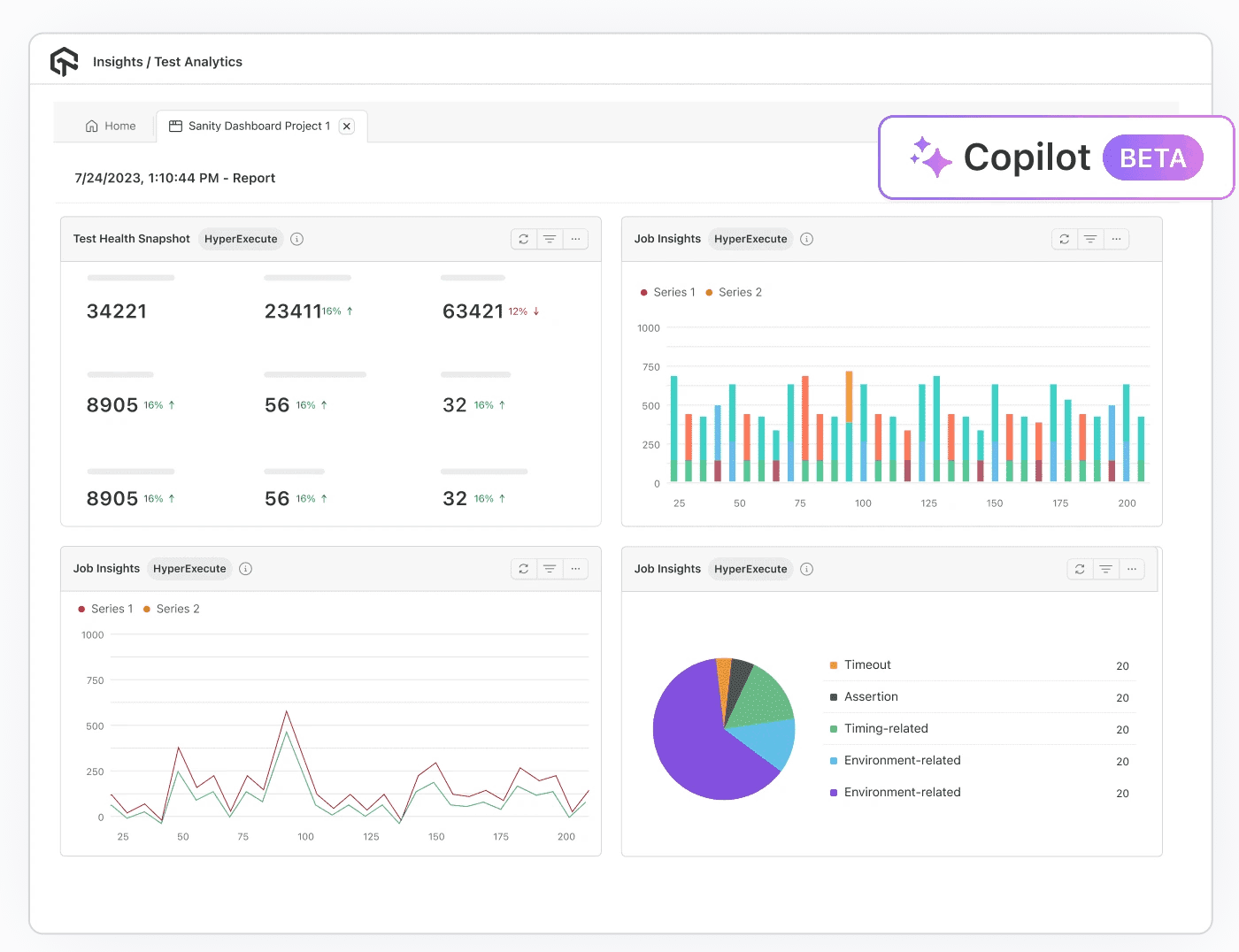
Features:
- Test summary report: Summarizes execution outcomes and status distribution in a clear format. Teams gain instant visibility into pass/fail ratios, skipped cases, and completion trends. Instead of combing through logs, stakeholders see at a glance whether testing efforts are on track.
- Error insights report: Identifies error patterns, clusters similar failures, and highlights the most frequent causes of instability. This turns repetitive bug triage into a structured process, accelerating root cause analysis.
- All trends report: Reveals long-term test performance and stability trends. By tracking metrics over time, QA leaders can identify modules that repeatedly fail, monitor release readiness, and allocate resources more effectively.
- Browser and OS report: Cross-browser and cross-platform issues are notoriously hard to catch. This report breaks down results by operating system and browser, making compatibility gaps visible before users encounter them.
- Resource and concurrency report: Provides insights into how tests behave under parallel execution and resource constraints. This is essential for diagnosing flaky tests or performance bottlenecks that only appear under load.
- AI CoPilot dashboard: Offers real-time monitoring and AI-powered recommendations. The dashboard not only surfaces failures but also provides context and suggested next steps. Teams can interact with the data directly, drill into problem areas, and act quickly.
- Custom widgets and reports: Not all stakeholders need the same level of detail. With customizable dashboards and reports, teams can highlight the metrics most relevant to their role. Developers can dive into logs and error insights, while executives may prefer high-level pass/fail trends or release readiness indicators.
- Test Intelligence: It goes beyond basic reporting by applying AI to optimize testing at a deeper level. TestMu AI Test Intelligence detects flaky tests that undermine confidence, helping teams stabilize results and focus on meaningful failures.

Effective Strategies for Avoiding Software Bugs
One of the smartest strategies in software development is preventing bugs before they occur. Preventing bugs is not about chasing perfection but about engineering stability, saving time, and reducing effort as the product evolves.
The strategies below, when applied consistently, can significantly reduce defect rates and strengthen the overall quality of your software.
- Clear communication is essential: Many defects don’t come from poor coding; they come from poor communication. Unclear requirements, missing details, or misunderstood priorities often cause developers to implement the wrong thing correctly. By the time these issues surface, fixing them can be costly.
- Write tests before you write code: Test-Driven Development (TDD) is more than a buzzword. Writing tests before implementation forces developers to clarify expected behavior upfront. This discipline ensures features are scoped properly and encourages writing cleaner, more modular code.
- Automate wherever possible: Manual testing has its place, but it doesn’t scale. Automation testing serves as a fast feedback loop, catching regressions before they creep into production. When combined with continuous integration pipelines, automated tests can run with every commit, giving developers immediate confirmation of stability.
- Code reviews: Peer reviews uncover logic flaws, identify risky shortcuts, and spread knowledge across the team. But the real benefit comes when reviews focus on design intent rather than just syntax.
- Test boundaries and odd cases: Most developers naturally test the “happy path.” Yet, the nastiest bugs almost always live at the edges of empty inputs, maximum values, simultaneous requests, or unusual user behavior. Stress-testing these boundaries exposes weaknesses that might never appear during standard usage but can cause catastrophic failures when triggered in production.
- Everyone is responsible for quality: Bug prevention is not just the tester’s job. Developers, product owners, and managers all influence quality. A culture where quality is shared responsibility leads to proactive behavior: developers write better tests, product owners refine requirements more carefully, and managers allocate time for refactoring instead of rushing every feature.
To minimize this risk, keep communication transparent and continuous. Developers, testers, and stakeholders should share a common understanding of requirements.
A practical insight here: TDD doesn’t need to cover every single function. Teams that adopt TDD rigidly often burn out. Instead, focus on writing tests first for critical or error-prone areas.
One useful practice is to celebrate quality wins, not just speed. A sprint that closes with zero high-severity bugs should be recognized as much as one that delivers a flashy new feature.
For a practical walkthrough on finding issues during testing, see this guide on how to find bugs in websites.
Conclusion
Understanding the various types of bugs is key to developing better software. Each type brings its own set of challenges that testers and developers must be prepared for. By recognizing these types of bugs and using smart detection, clear reporting, and strong prevention methods, teams can cut down on defects and improve overall quality.
At this point, it is also worth clarifying the distinction between a bug vs defect, since the terms are often used interchangeably but carry different implications in professional testing and development.
Apart from understanding different types of bugs, writing clear, detailed bug reports is also important to speed up resolution. You can check out this advanced guide on writing a bug report that explains how to do it effectively.


Frequently asked questions
Did you find this page helpful?
More Related Hubs
TestMu AI forEnterprise
Get access to solutions built on Enterprise
grade security, privacy, & compliance
- Advanced access controls
- Advanced data retention rules
- Advanced Local Testing
- Premium Support options
- Early access to beta features
- Private Slack Channel
- Unlimited Manual Accessibility DevTools Tests