
Power Your Software Testing with AI Agents and Cloud
The Native AI-Agentic Cloud Platform to Supercharge Quality Engineering. Test Intelligently and Ship Faster.


- TestMu AI (Formerly LambdaTest)
- /
- Learning Hub
- /
- What Is Vibe Coding and How Does It Work? [2026]
What Is Vibe Coding and How Does It Work? [2026]
Learn what Vibe Coding is, how it works, and how to get started. Explore tools, real-world case studies, benefits, and how KaneAI strengthens AI-generated apps.
Last Updated on:
On This Page
- What Is Vibe Coding?
- How Does Vibe Coding Work?
- Vibe Coding vs. Traditional Coding
- Getting Started with Vibe Coding
- Vibe Coding in Action
- Pairing Vibe Coding With Natural Language Testing
- Where Vibe-Coded Apps Get Tested
- Who Is Vibe Coding For?
- Best Vibe Coding Tools in 2026
- Real-World Case Studies
- Core Benefits of Vibe Coding
- Risks and Limitations
- Conclusion
Software development has traditionally required learning programming languages, frameworks, and complex tooling before you can build even a simple application.
This barrier has prevented many people with good ideas from turning them into working products. Vibe Coding changes that dynamic by allowing people to describe what they want to build in plain language while AI generates the underlying code.
Vibe Coding goes beyond making coding easier. It makes software creation faster, more accessible, and more conversational. By shifting the developer’s role from writing every line of code to guiding AI with clear instructions, teams can prototype, iterate, and launch products far more quickly.
As AI models continue to improve, Vibe Coding is becoming a powerful way for both developers and non-developers to turn ideas into functional software with minimal friction.
Overview
Vibe Coding is a software development approach where you describe what you want to build in natural language while AI generates the code. You build applications by prompting tools like Claude and validate them using KaneAI by TestMu AI to ensure rapid, reliable deployment.
Key Steps in the Vibe Coding Process
- Describe the Outcome: In the first step, vibe coders explain the desired product, feature, or functionality in clear, natural language to guide the AI assistant.
- AI Interprets the Request: During this step, the AI assistant analyzes the natural language prompt to generate relevant code, interface elements, and supporting infrastructure.
- Evaluate the Result: Builders run or preview the generated output to confirm it behaves as expected and aligns with the intended functionality.
- Refine with Feedback: Users provide follow-up instructions or share error messages so the AI can adjust the code and improve the result.
- Release or Deploy: In the final step, developers publish the completed application directly from the development environment once the project works correctly.
Top Vibe Coding Tools
- Best for browser-based development: Lovable is a browser-based tool requiring no setup that allows users with zero coding experience to build applications quickly.
- Best for zero-setup prototyping: Replit is a browser-based platform that allows beginners with zero coding experience to quickly start building and hosting applications.
- Best for instant web apps: Bolt.new is a browser-based tool requiring little setup, making it easy for beginners to build applications quickly.
- Best for developer editor integration: Cursor is an AI tool that integrates directly into an existing editor and works with the current codebase to generate features.
- Best for command-line AI assistance: Claude Code is a command-line tool that integrates directly into the developer's workflow to assist with codebase modifications and feature generation.
- Best for autonomous coding tasks: Cline is an AI coding assistant that helps developers build and test applications directly within their existing local development setup.
- Best for in-editor generation: Claude is an AI assistant that can generate complete HTML layouts, such as landing pages, directly inside Visual Studio Code.
How KaneAI Improves Testing
- Best for agentic quality engineering: KaneAI by TestMu AI enables teams to plan, author, and evolve tests using natural language, utilizing AI test automation to validate rapidly built features.
- Define the Test Intent: To begin testing, QA teams describe the behavior or user flow to be verified, which KaneAI converts into structured testing scenarios.
- Generate Automated Tests: The KaneAI system automatically creates executable test scripts covering UI interactions, validations, and expected outcomes based on natural language.
- Run Tests Across Environments: KaneAI executes automated tests across a wide range of browsers, operating systems, and real devices to ensure consistent application behavior.
- Adapt to Interface Changes: To handle updates, KaneAI minimizes manual maintenance by intelligently adjusting tests based on the original intent when the application UI evolves.
- Review Results and Insights: After test execution, teams analyze detailed reports, logs, and session recordings to identify issues and improve application quality.
- Best for open-source natural language testing: Playwright MCP is an open-source tool that applies natural language testing using Claude and Playwright's Model Context Protocol for browser-based UX validation.
- Best for Selenium-based prompt-driven testing: Selenium, combined with Cursor AI and the MCP Selenium server, turns plain English user journeys into runnable scripts without rewriting the existing test stack.
What is the Purpose of Vibe Coding?
Vibe Coding is a software development approach where you describe what you want to build in plain, everyday language and let an AI assistant write the actual code for you. Instead of typing functions, debugging syntax errors, and memorizing programming languages, you guide an AI tool through conversation, telling it your goals, constraints, and desired outcomes.
In short: Vibe Coding means using natural language prompts to instruct AI tools to generate, refine, and debug code on your behalf, so you can build software without writing every line yourself.
How Does Vibe Coding Actually Work?
At its core, Vibe Coding replaces manual code-writing with a prompt-driven feedback loop between you and an AI model. Here is the typical workflow most developers and non-developers follow:
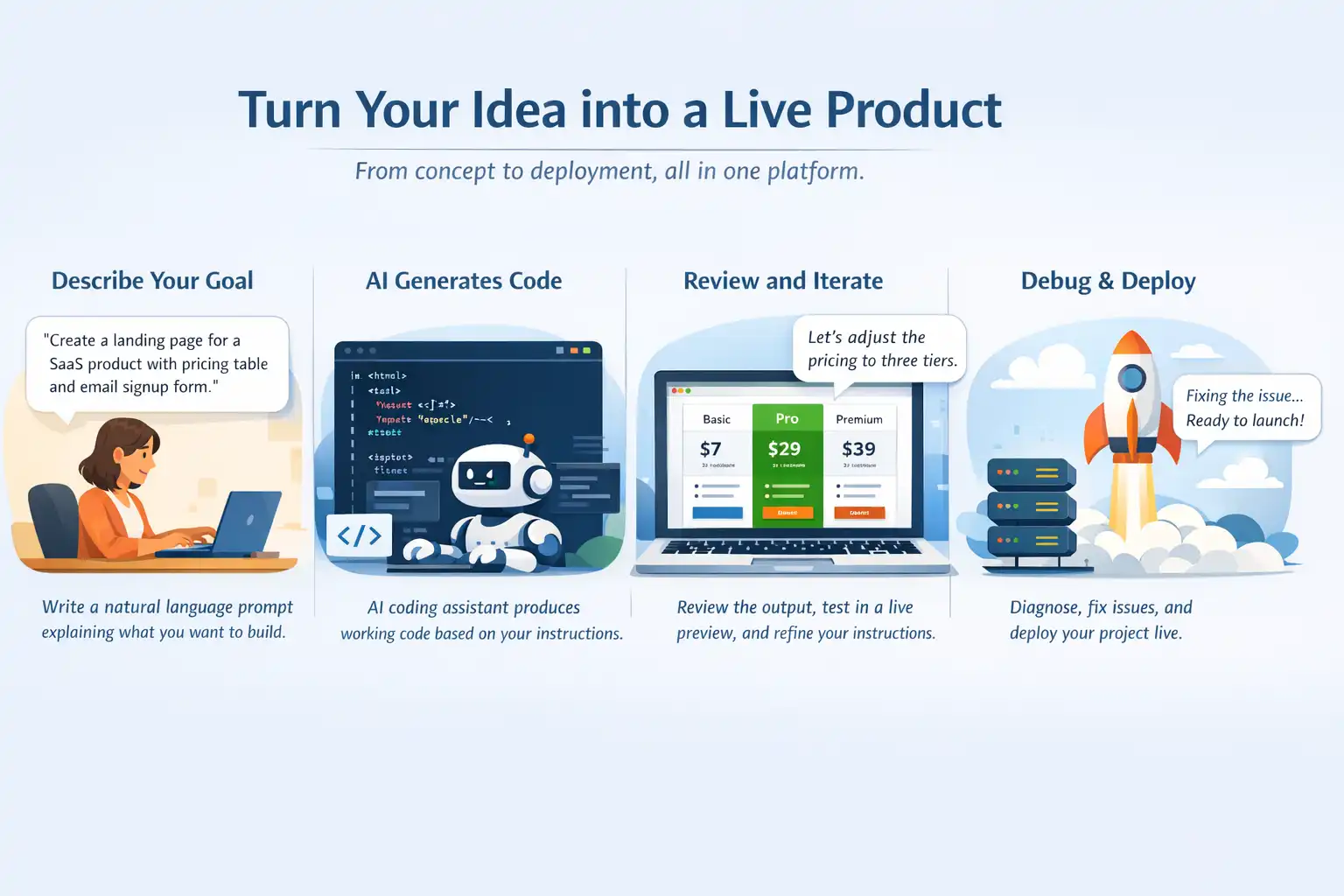
The Vibe Coding Workflow
- Describe Your Goal: Write a natural language prompt explaining what you want to build. For example: "Create a landing page for a SaaS product with a hero section, pricing table, and email signup form."
- AI Generates Code: The AI coding assistant interprets your intent and produces working code, often including HTML, CSS, JavaScript, backend logic, and even database schemas.
- Review and Iterate: Review the output, test it in a live preview, and refine your instructions. If the pricing table needs three tiers instead of two, simply tell the AI to adjust.
- Debug Conversationally: When something breaks, paste the error message into the chat or describe the unexpected behavior. The AI diagnoses the issue and suggests fixes.
- Deploy: Many Vibe Coding platforms let you ship directly from the same environment, going from idea to live product without switching tools.
This loop of prompting, generating, reviewing, and refining is what makes Vibe Coding feel fundamentally different from traditional software development. Your role shifts from code author to code director.

Vibe Coding vs. Traditional Coding: Key Differences
Understanding how Vibe Coding compares to traditional development is essential for deciding when to use each approach. Here is a side-by-side breakdown:
| Aspect | Vibe Coding | Traditional Coding |
|---|---|---|
| Primary Input | Natural language prompts | Programming language syntax |
| Skill Required | Prompt crafting, intent clarity | Deep language fluency, algorithms |
| Speed to Prototype | Hours to minutes | Days to weeks |
| Code Ownership | AI-generated, human-directed | Fully human-written |
| Best For | MVPs, landing pages, internal tools | Complex systems, security-critical apps |
| Debugging Style | Conversational, paste error messages | Manual log analysis, breakpoints |
| Learning Curve | Low (natural language) | Steep (syntax, frameworks, tooling) |
The most productive teams in 2026 are not choosing one over the other. They use a hybrid approach: Vibe Coding for rapid prototyping and boilerplate generation, combined with traditional development for performance-critical code, security implementations, and novel algorithms.
How to Get Started with Vibe Coding
Vibe Coding lets you build software by describing what you want in natural language while AI generates the code. Instead of writing everything from scratch, developers guide AI tools with prompts and iterate quickly.
Getting started is simple: choose an AI coding assistant, describe your goal clearly, and refine the generated code through conversation and testing.
- Pick the Right Tool for Your Level: Your first choice is the platform. If you have zero coding experience, start with Lovable, Replit, Bolt.new, or KaneAI by TestMu AI. These tools are browser-based, require little to no setup, and make it easy to start building or testing applications quickly.
- Choose a Simple First Project: Your first Vibe Coding project should be small enough to complete in one session but meaningful enough to be interesting. Ideal first projects include a personal bio page, a recipe finder, a simple to-do list app, or a calculator.
- Write Prompts That Get Great Results: The single biggest skill in Vibe Coding is prompt writing. The clearer and more specific your description, the closer the output will be to what you actually want.
If you are already a developer looking to add AI to your workflow, tools like Cursor or Claude Code integrate directly into your existing editor and work with your current codebase; once they generate features, you can test apps built with Cline and similar AI coding assistants.
Avoid starting with a full SaaS platform, multi-user authentication, or real payment processing. Complex projects expose you to failures before you understand the workflow.
A weak prompt like "build me an app" produces generic, often broken results. A strong prompt describes the problem, the users, the key features, the constraints, and the desired feel.
Example Prompt Templates
Prompt Templates are predefined natural language examples that guide users in writing effective AI testing scenarios. They help ensure clarity, consistency, and better results when generating automated workflows or validations.
Template A: Landing Page
Create a responsive product landing page for [product name], a [one-line description].
Include: a hero section with headline and CTA button, three feature cards with icons,
a pricing table with two tiers (Free and Pro), and an email signup form at the bottom.
Design: Clean, modern, with [color] as the primary color. Mobile-friendly.
Template B: Web App / Tool
Build a [tool name] web app that [main function].
Users should be able to: [feature 1], [feature 2], [feature 3].
Data should be stored in [localStorage / a database]. Include basic error handling and loading states.
Framework: React. Style: Tailwind CSS. Keep the code clean and well-commented.
Template C: Bug Fix / Iteration
The current code has a bug: [describe what goes wrong and when].
Expected behavior: [what should happen].
Actual behavior: [what is happening].
Here is the relevant code: [paste section]. Please identify the issue and fix it, explaining what caused the problem.- Does this do what I asked?
- Does it make logical sense?
- Are there any obvious security issues, like hardcoded credentials or missing input validation?
- Does the UI actually look right in a browser?
You do not need to understand every line, but you should understand the overall structure and behavior.
Deploy early, even when the project feels incomplete. Seeing your work live and getting real feedback is more valuable than endlessly refining in a local environment.
Vibe Coding in Action: Creating a Landing Page with Claude
Let's use a simple landing page template and generate a working webpage using Claude inside Visual Studio Code. By providing a structured prompt, Claude can generate the complete HTML layout, including sections like the hero banner, feature cards, pricing table, and signup form.
Within minutes, you can preview the page locally and start iterating on the design through prompts.
Template A: Landing Page
Create a responsive product landing page for [product name], a [one-line description].
Include: a hero section with headline and CTA button, three feature cards with icons,
a pricing table with two tiers (Free and Pro), and an email signup form at the bottom.
Design: Clean, modern, with [color] as the primary color. Mobile-friendly.- Using Template: Open VS Code, open Claude (sidebar or terminal), and paste this prompt:
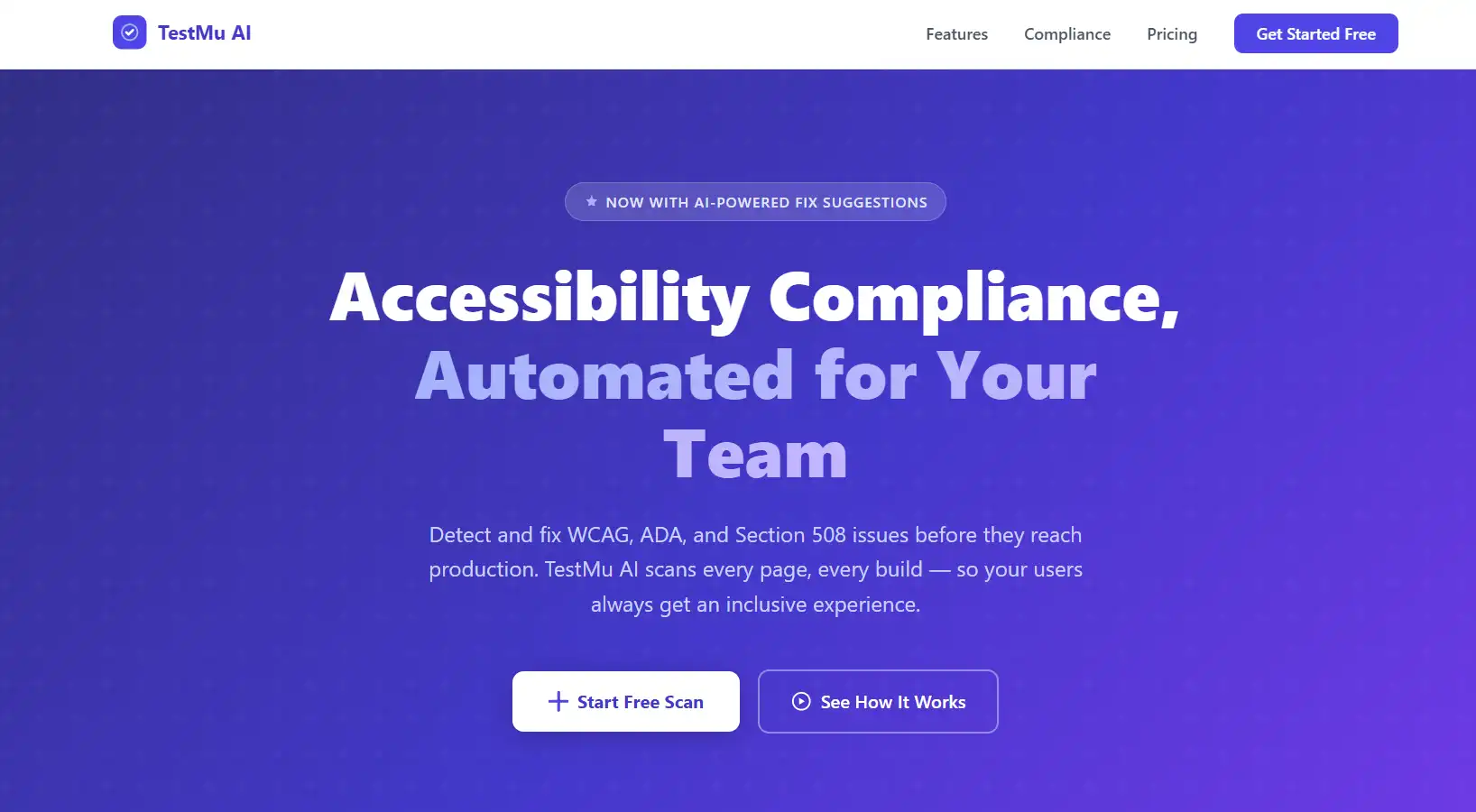
Create a responsive product landing page for TestMu AI Accessibility Automation, a tool that helps engineering teams automatically detect and fix WCAG, ADA, and Section 508 compliance issues across web and mobile apps. Include: a hero section with a headline and CTA button, three feature cards covering Full Page Scan, Automated Test Schedules, and Actionable Recommendations, a pricing table with two tiers (Free and Pro), and an email signup form at the bottom. Design: Clean, modern, with indigo as the primary color. Mobile-friendly.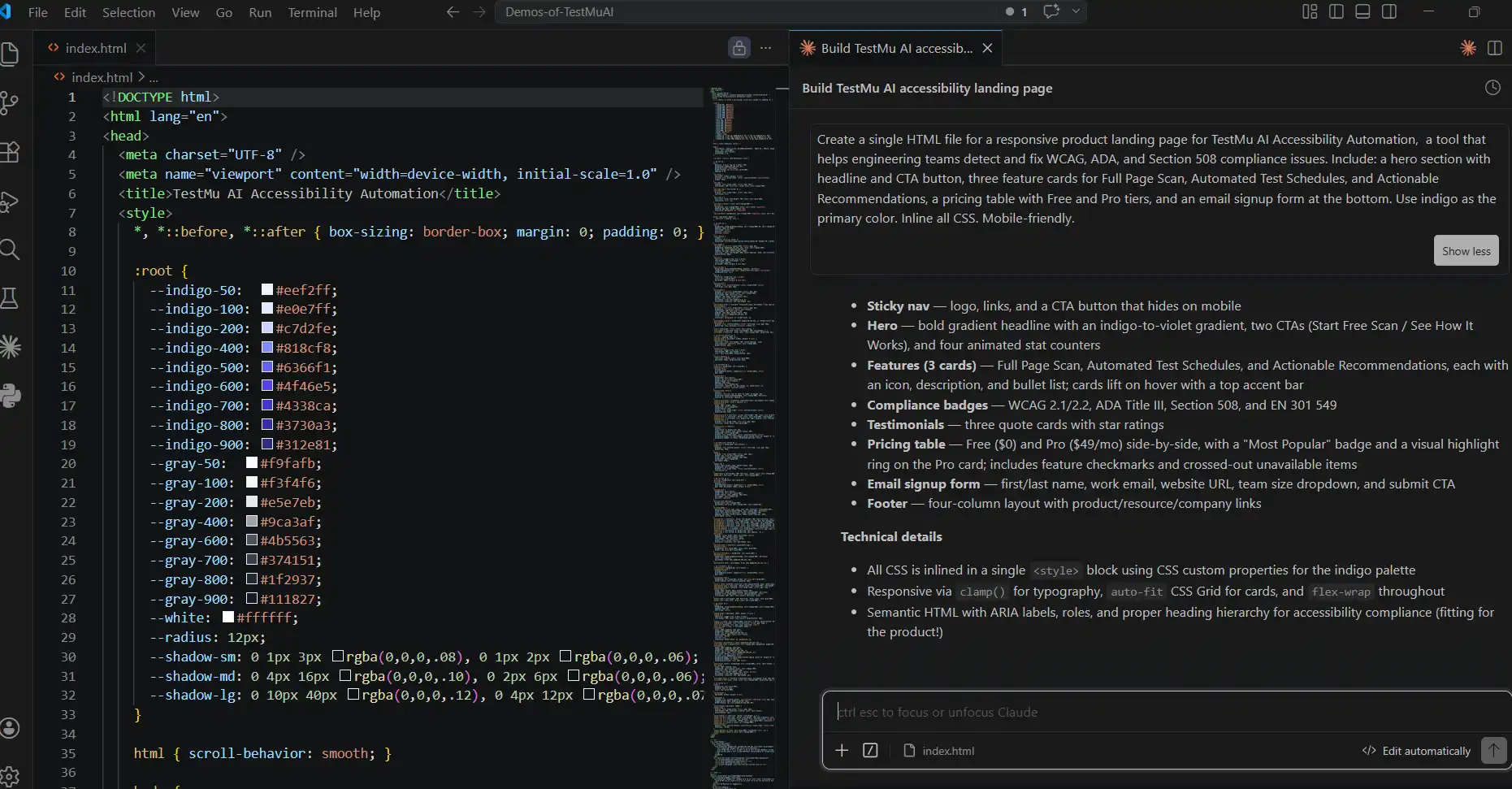 Claude generates a single index.html file. Install the Live Server extension in VS Code if you don't have it, right-click the file and select Open with Live Server: your page runs on localhost:5500.
Note: I’m using the Live Server extension in VS Code to run and preview my local HTML pages directly in the web browser.
Result:
Common Mistakes Beginners Make:
- Over-scoping the first project: Starting with a complex multi-feature app leads to inconsistent outputs and frustration. Start small, get a win, then expand.
- Accepting code without testing: AI-generated code looks plausible even when it is broken. Always run it and click through the result.
- Vague prompts: "Make it better" or "fix the design" rarely work. Be specific about what better means and what you want changed.
- Ignoring errors: When the AI produces broken output, paste the exact error message back into the chat. Do not try to describe the error in your own words.
- Skipping version control: Even in Vibe Coding, use Git. Before you ask the AI to make a large change, commit what you have so you can roll back if it breaks.
Vibe Coding's biggest promise is speed. Its biggest vulnerability is quality. When AI generates code at unprecedented rates, traditional testing creates a bottleneck. For developers shipping AI-built apps from editors like Cursor, you can test apps built with Cursor across real browsers and devices.
Manually writing test cases for every AI-generated feature is slow, often impractical, and fundamentally at odds with the fast-moving, iterative rhythm that makes Vibe Coding valuable in the first place.
Platforms like TestMu AI (formerly LambdaTest), the world's first agentic quality engineering platform, offer generative AI tools like KaneAI, designed specifically for the era of AI-generated code. It brings the same natural language, intent-driven philosophy to software testing that Vibe Coding brings to software development.
TestMu AI: LambdaTest’s New Home — the same platform you trust, with AI-powered capabilities at its core.
Pairing Vibe Coding With Natural Language Testing
One challenge that becomes obvious once a team starts building this way is that AI-generated code tends to arrive faster than human-written tests can keep up with. If testing stays manual, the speed gained during development is quickly lost during validation.
A natural fit, then, is to apply the same prompt-driven approach to testing. KaneAI by TestMu AI is one such AI testing tool. It lets teams plan, author, and evolve tests using natural language, similar to how Vibe Coding lets developers describe features in plain English.
Using vibe testing with KaneAI, you can describe what you want to build while QA defines what needs to be verified, both working from the same intent-driven workflow without switching between tools or scripting languages.
Teams looking for an open-source complement to this approach can explore vibe testing with Playwright MCP, which applies the same natural language testing philosophy using Claude and Playwright's Model Context Protocol for browser-based UX validation.
For teams whose automation foundation is Selenium, the same prompt-driven model is detailed in Vibe testing with Selenium, which uses Cursor AI and the MCP Selenium server to turn plain English user journeys into runnable Selenium scripts without rewriting the existing test stack.
How KaneAI Works:
- Natural Language Test Creation: Write test objectives in plain English. KaneAI uses natural language processing to interpret these instructions and convert them into automated test scripts. This approach supports modern NLP testing, allowing teams to create and manage tests without coding expertise.
- GitHub Pull Request Integration (2026): KaneAI integrates directly into the GitHub pull request workflow. Developers comment
@KaneAI Validate this PR, and KaneAI analyzes the diff, PR description, and README, generates relevant tests, runs them across 3,000+ browsers, OS, and device combinations, and returns a full report inside GitHub. - Self-Healing Test Automation: When vibe-coded UIs change during rapid iteration, KaneAI detects UI updates during execution and automatically adjusts tests based on the original intent, reducing manual maintenance.
- Two-Way Editing: Switch between natural language and code views while keeping both synchronized, allowing technical and non-technical team members to collaborate on QA.
- Agent Skills for Adaptive Testing: Leverages TestMu AI Agent Skills to interpret high-level test intent, dynamically plan execution steps, and adapt workflows in real time. This allows tests to go beyond predefined scripts, handling multi-step user journeys and unexpected UI changes with minimal manual intervention.
- Scale: Run generated tests in parallel across 3,000+ combinations of browsers, operating systems, and real devices, ensuring vibe-coded apps work consistently across environments.
Let's take a simple test scenario from one of our templates mentioned earlier, the Landing Page template.
- Set Up the LT Tunnel: From your TestMu AI dashboard, go to Real Time → Desktop. In the top header, click the Tunnel icon, then click Configure New Tunnel.
- Select the Tunnel Download Option: Switch to the CLI Command tab and click Download Link to download the LT binary. Once downloaded, move the binary file into the same folder as your project.
- Start the Tunnel from VS Code Terminal: Open the terminal in VS Code and run:
Wait until the terminal confirms the tunnel is running before moving to the next step../LT --user <your_email> --key <your_access_key> --env ht-prod -v -n saniya-tunnel - Author the Test in KaneAI: Open KaneAI and paste the following into the description area:
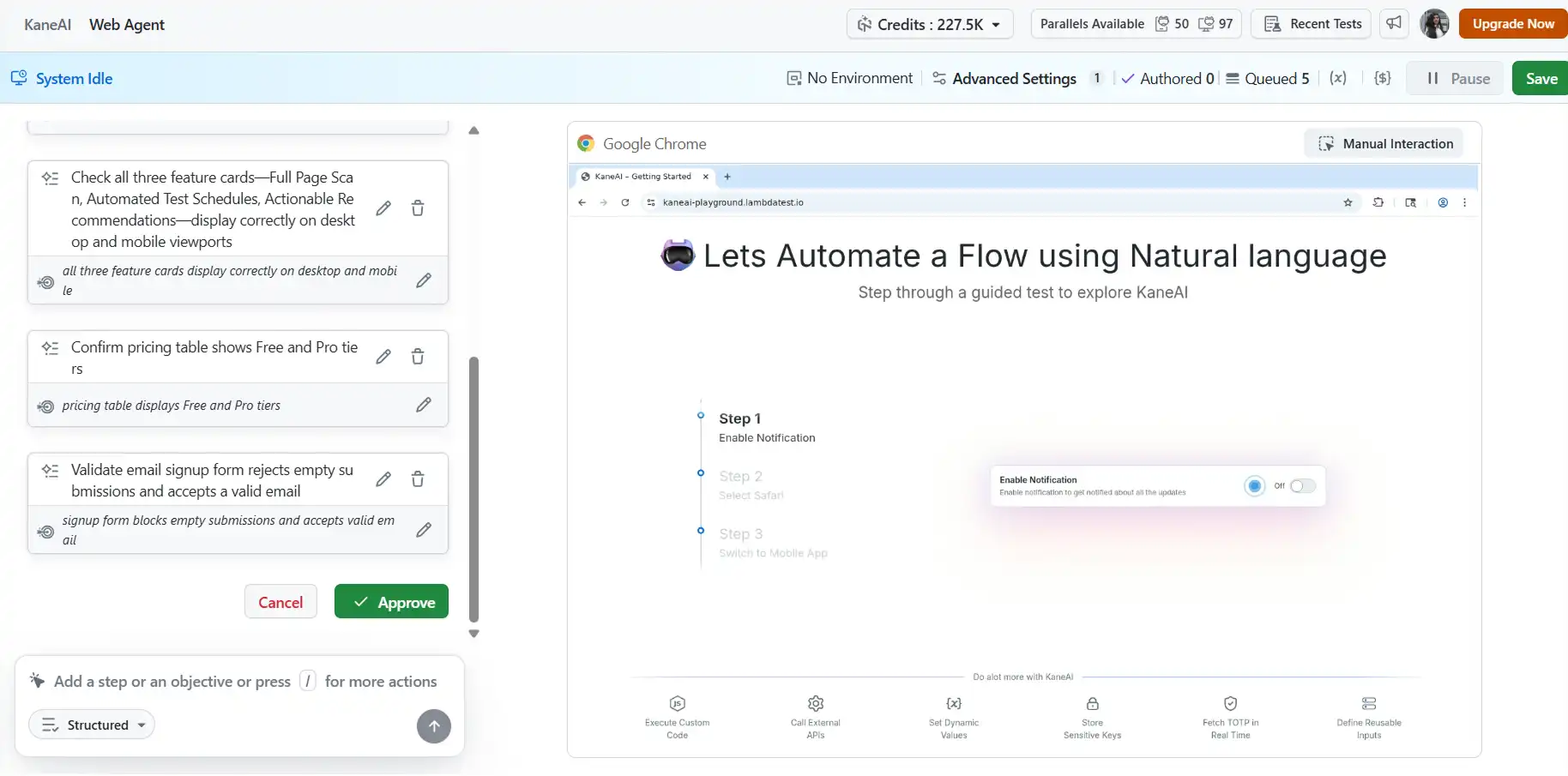
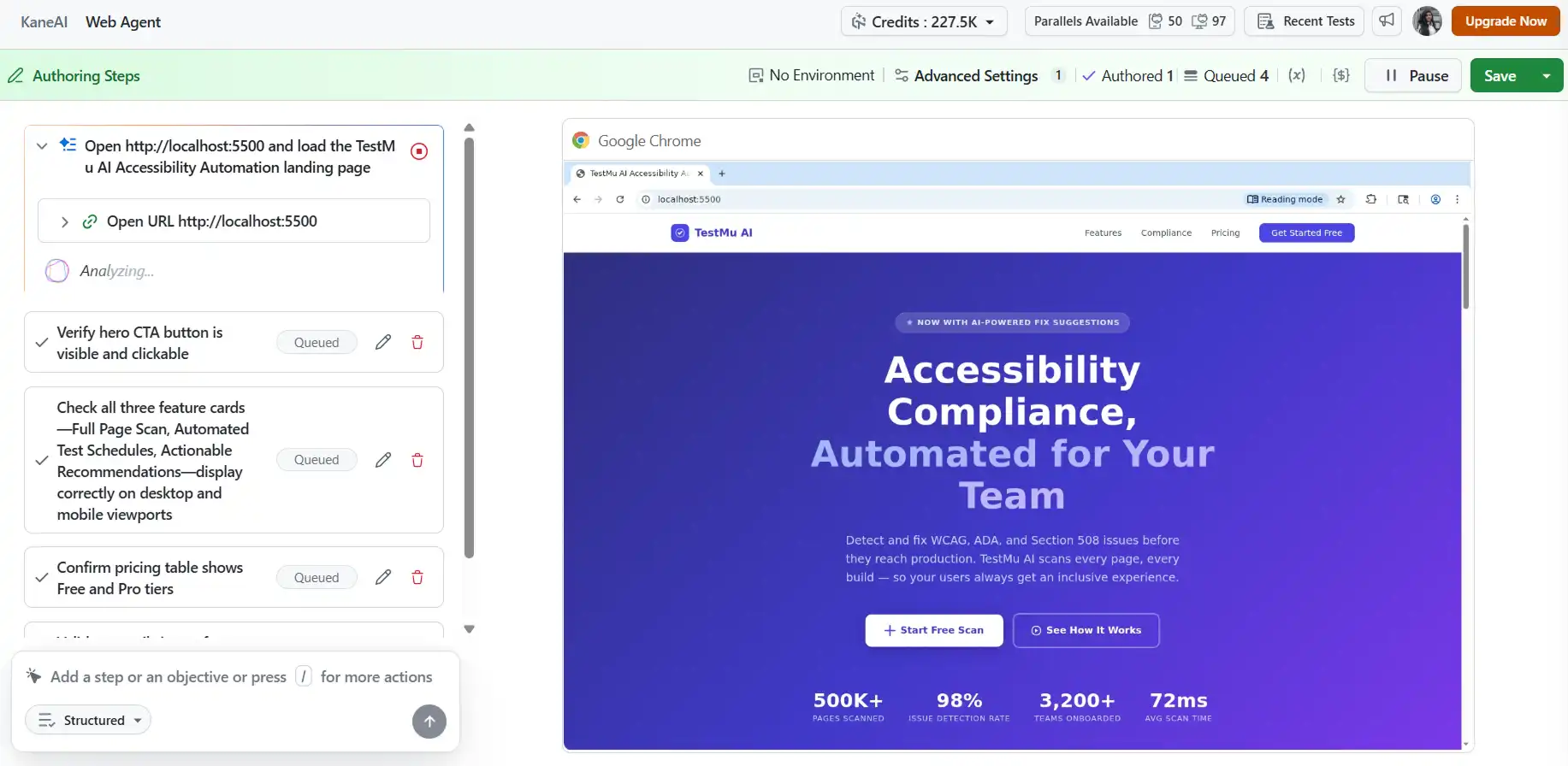
1. Test the TestMu AI Accessibility Automation landing page running on localhost:5500. 2. Verify the hero CTA button is visible and clickable. Check all three feature cards, Full Page Scan, Automated Test Schedules, and Actionable Recommendations, display correctly on desktop and mobile viewports. 3. Confirm the pricing table shows Free and Pro tiers. 4. Validate the email signup form rejects empty submissions and accepts a valid email. - Connect the Tunnel: After pasting your description, select Desktop Browser as the test type. Click the Settings icon, then from the left navigation panel go to Network → Tunnel. Select your tunnel name, in this case, saniya-tunnel, and click Author Test.
- Approve and Watch It Run: KaneAI opens the Agent Runner screen with a breakdown of the steps it will execute. Review them and click Approve to start execution.
- Step-by-Step Execution: On the left panel, you will see the step-by-step test progress in real time, while the right panel shows the live browser session as KaneAI interacts with your page.


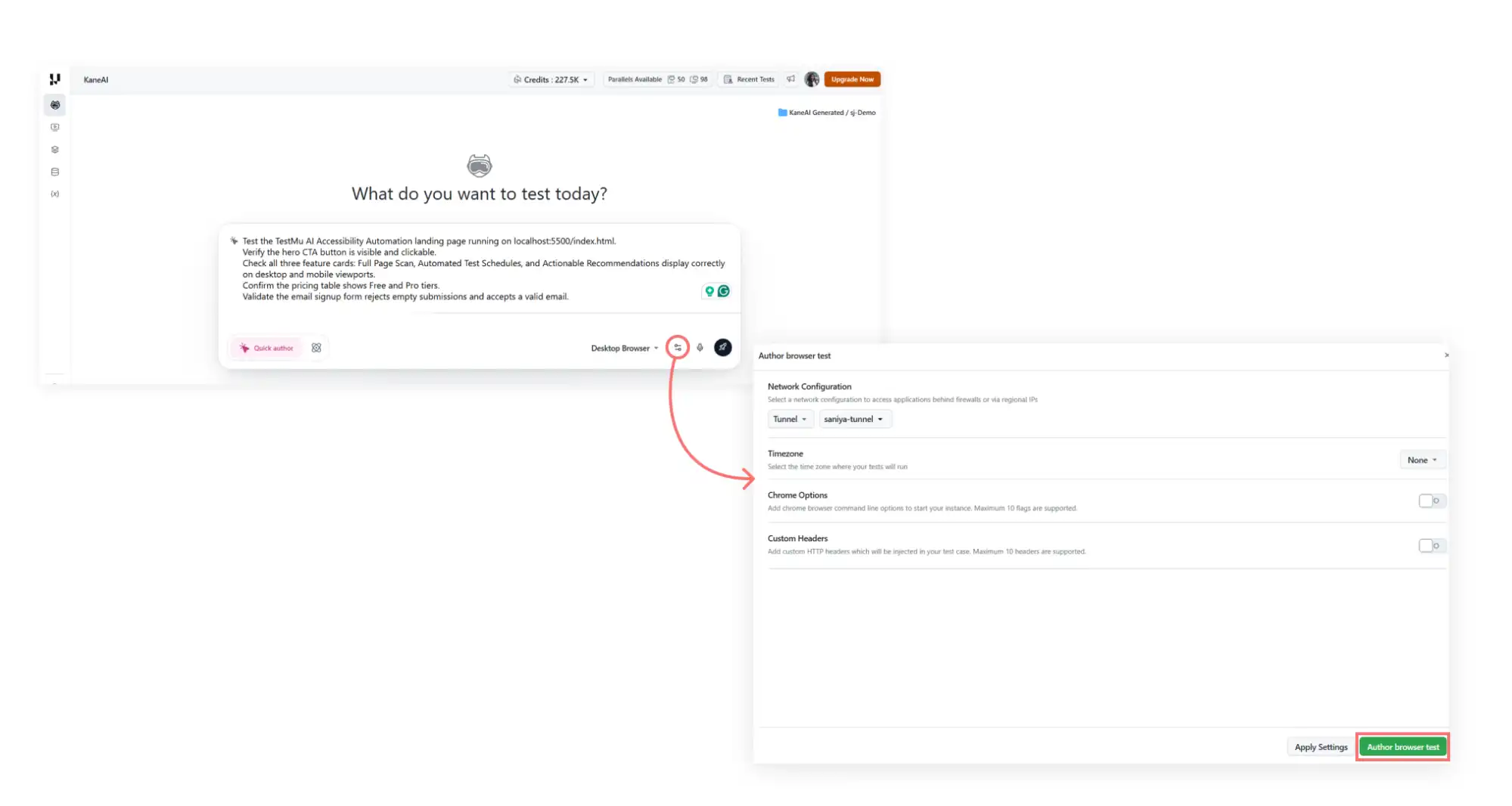
To get started with testing your Locally Hosted Page with KaneAI, follow this support documentation on KaneAI Tunnel and to write tests with KaneAI, check out this guide on creating web tests with TestMu AI KaneAI.
Where Vibe-Coded Apps Actually Get Tested
Writing tests in natural language only solves half the problem. Those tests still need somewhere to run, ideally across the same browsers, devices, and conditions real users will encounter. Doing this locally tends to fall apart quickly once a project moves past the prototype stage.
This is where a cloud browser environment becomes useful. Platforms such as Browser Cloud exist for this purpose, providing on-demand browser sessions that AI agents and test suites can drive at scale. A few capabilities tend to matter most for teams working in this prompt-driven style:
- Parallel browser sessions: Running AI-generated test suites across multiple browsers and operating systems at once avoids the bottleneck of sequential local runs.
- Secure tunneling to local apps: Vibe-coded projects frequently live on localhost or behind a VPN during early iterations. A tunnel lets remote agents reach them without firewall workarounds.
- Session recordings and logs: Video, network, and console captures help reconstruct what happened when an AI-generated feature behaves unexpectedly, which is often more useful than reading a stack trace alone.
- Authentication persistence: Reusing logged-in sessions avoids repeating sign-in flows on every test run, which adds up across long CI pipelines.
- Framework compatibility: Support for Playwright, Puppeteer, and Selenium covers most automation stacks that Vibe Coding tools generate by default.
The broader point is that AI-driven development tends to expose where testing infrastructure was already weak. Cloud browsers are one of several pieces that help close that gap. For instance, if you want to test apps built with Codex, test apps built with Windsurf, or work with similar AI coding agents, a cloud browser environment is the natural place to validate them across real browsers and devices.

Who Is Vibe Coding For? Real-World Use Cases
Vibe Coding is for founders, developers, marketers, students, and data scientists—anyone looking to build or ship software faster using natural language and AI-powered tools.
Vibe Coding has dramatically lowered the barrier to software creation. Here is who benefits most:
- Founders and Entrepreneurs: Startup founders use Vibe Coding to build MVPs without hiring a full engineering team. 25 percent of Y Combinator's W25 batch had codebases that were 95 percent AI-generated.
- Marketers and Designers: Marketing professionals create product landing pages, A/B test variants, and campaign microsites by describing the desired layout and content to an AI tool.
- Professional Developers: Experienced engineers use Vibe Coding to eliminate repetitive boilerplate, scaffold new projects quickly, and focus expertise on complex problems that AI cannot solve well.
- Students and Career Changers: People learning to code use Vibe Coding as a bridge, studying AI-generated output to learn programming patterns and language syntax in context.
- Data Scientists and Analysts: Data professionals quickly generate data pipelines, visualization dashboards, and analysis scripts by describing their goals in plain language.
Best Vibe Coding Tools in 2026
The Vibe Coding ecosystem has expanded rapidly, with over 138 Vibe Coding tools now available to help developers and non-developers build applications using natural language prompts. Below are some of the most widely used Vibe Coding tools, organized by category:
AI-Powered IDEs (For Developers)
AI-powered IDEs help developers write, edit, and understand code faster with built-in AI assistance. As part of the growing ecosystem of AI tools for developers, these platforms can generate code, explain logic, fix errors, and provide context-aware suggestions directly inside the development environment.
- Cursor: The leading AI IDE for professional developers. Offers deep codebase context awareness, clean code generation, and multi-model support.
- Claude Code: An agentic coding tool from Anthropic that operates directly in your terminal. Stands out when correctness, testing support, and careful reasoning matter most.
- GitHub Copilot: The most widely adopted AI coding assistant, deeply integrated into VS Code and JetBrains IDEs.
App Builders (For Non-Developers and Rapid Prototyping)
App builders allow non-developers and product teams to create applications using simple prompts or visual interfaces instead of writing code. They are ideal for rapid prototyping, letting users quickly build, test, and deploy functional apps with minimal setup.
- Lovable: End-to-end Vibe Coding platform that helped vibe-code 25 million projects in its first year.
- Bolt.new: Excellent for rapid demos and hackathon-style prototyping.
- Replit: Browser-based platform supporting 50+ languages with an AI agent that can automate entire coding tasks.
- v0 by Vercel: Great for beginners building simple functional web apps from natural language descriptions.
If you are evaluating which platform to start with, you may also find it helpful to compare tools in more detail. For example, we recently explored the differences between Lovable vs Replit in a dedicated comparison guide to help builders choose the right platform for their workflow.
Real-World Case Studies: Verified Vibe Coding Wins
The following case studies are drawn from verifiable, publicly documented sources. Each shows a different facet of how Vibe Coding is applied across industries, team sizes, and skill levels.
Case Study 1: Indie Developer Hits $1M ARR in 17 Days
| Who | Tool Used | Key Result |
|---|---|---|
| Pieter Levels (indie developer) | Cursor + Grok 3 | $1M ARR in 17 days |
In February 2025, indie developer Pieter Levels used Cursor and Grok 3 to build a browser-based multiplayer flight simulator from scratch. Starting with prompt-driven AI snippets for shaders, UI components, and data models, he had a fully functioning demo in three hours. The game reached one million dollars in annual recurring revenue within seventeen days and continues generating approximately $50,000 per month through branded in-game advertising.
Case Study 2: Monzo Co-Founder Builds Recipe App with Voice Prompts
| Who | Tool Used | Key Result |
|---|---|---|
| Tom Blomfield (co-founder, Monzo Bank) | Windsurf + voice coding | 30,000 lines of code in ~100 hours |
Monzo co-founder Tom Blomfield used Windsurf AI combined with voice commands to build Recipe Ninja, an AI recipe generator, in approximately 100 hours. He documented the process on his blog, noting that what would have taken a traditional development team roughly a year was produced through conversational prompting. Blomfield described each iteration taking one to two minutes, with an entire to-do list resolved in under thirty minutes.
Case Study 3: Toronto Venture Studio Ships 5 Products in 10 Weeks
| Who | Tool Used | Key Result |
|---|---|---|
| Kyrylai ML team (8-person team, Toronto) | Cursor Team Plan + Claude Sonnet | 1 production product + 3 POCs in 2.5 months |
A recent case study by Kyrylai highlights how Vibe Coding enabled a high-velocity ML team to launch quickly. The team needed to build a machine learning function from scratch within a single quarter. An eight-person group adopted the Cursor Team Plan and relied heavily on Claude Sonnet. Within that short timeframe, they delivered:
- One production product used by 100 companies
- One semi-production tool
- Three proof-of-concept projects
- An internal LLM evaluation framework
The team maintained an impressive development pace, averaging 26.1 pull requests per week with an average merge time of just 10.2 hours.
Case Study 4: Booking.com Sees 30% More Merge Requests After AI Training
| Who | Tool Used | Key Result |
|---|---|---|
| Booking.com (global travel platform) | AI coding assistants (GenAI pilot) | 30% increase in merge requests |
Booking.com conducted a 700-person generative AI pilot program to evaluate how generative AI affects developer productivity. The company reported a 16% overall productivity lift from AI. After developers received structured training on how to provide clear, explicit, and context-rich instructions to AI coding assistants, teams saw up to a 30% increase in merge requests per developer, along with higher reported job satisfaction.
Case Study 5: Y Combinator W25: 25% of Startups Running on 95% AI Code
| Who | Tool Used | Key Result |
|---|---|---|
| Y Combinator Winter 2025 batch | Various (Cursor, Claude, Copilot) | Batch grew 10%/week |
According to managing partner Jared Friedman, a quarter of the W25 startup batch have 95% of their codebases generated by AI. These startups are led by highly technical founders who are deliberately using AI-driven development to move faster, not as a substitute for coding skills. Collectively, the Winter 2025 cohort has been growing at about 10% per week.
Case Study 6: Fintech Platform Speeds Up Testing with KaneAI
| Who | Tool Used | Key Result |
|---|---|---|
| Fintech company (100,000+ merchants) | KaneAI by TestMu AI | 3x faster test creation |
A fintech platform processing millions of transactions struggled with a Selenium-based testing suite where frequent UI and API changes broke scripts, forcing engineers to spend nearly 40% of their time fixing tests. After adopting KaneAI by TestMu AI, teams wrote tests in plain English that generated automation across Selenium, Playwright, and Cypress. In six months, test creation became 3x faster, maintenance dropped 65%, and automated test coverage doubled.
Core Benefits of Vibe Coding
The rapid adoption of Vibe Coding is driven by several tangible advantages that are reshaping how software gets built.
- Dramatic Speed Gains: Tasks that previously took days can now be completed in hours or minutes.
- Accessibility for Non-Coders: Anyone who can clearly describe what they want can participate in building software.
- Reduced Context Switching: Conversational AI keeps developers in flow and reduces cognitive overhead.
- Faster Prototyping and Validation: Build, test, and iterate on a working prototype in a single sitting.
- Lower Entry Costs: Startups can direct resources toward product-market fit rather than large engineering headcounts.
Risks and Limitations You Should Know
AI-assisted development can accelerate building software, but teams should be aware of several risks and limitations before relying heavily on it.
- Security Vulnerabilities: AI-generated code consistently shows a higher rate of security flaws than human-written code: SQL injection, hardcoded API keys, missing input validation, and overly permissive configurations. Treat every AI output as a first draft requiring security review before production deployment.
- Technical Debt Accumulation: Accepting AI-generated code without understanding its architecture quickly builds up technical debt, including unnecessary complexity, inconsistent design patterns, and undocumented dependencies.
- Debugging Complexity: When AI-generated code fails, diagnosing the root cause can be harder than fixing code you wrote yourself, since the AI may have made architectural choices you do not fully understand.
Recommendation: Use Vibe Coding freely in the sandbox phase for idea validation and prototyping. Then apply traditional engineering discipline, including testing, code review, security auditing, and refactoring, before moving to production.
For the full breakdown, including what a browser suite actually caught across six live vibe-coded apps and which test type catches each defect class, see our guide to vibe coding risks.
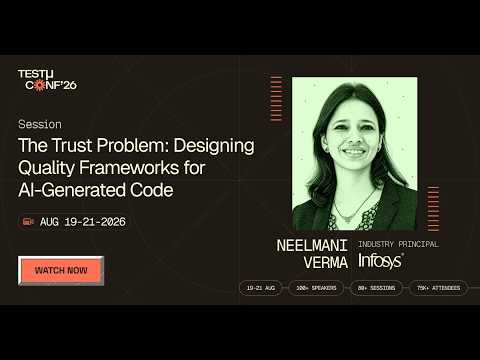
In this TestMu Conf 2026 session, Neelmani Verma covers The Trust Problem: Designing Quality Frameworks for AI-Generated Code, examining the new class of defects QE teams inherit from Copilot and ChatGPT output, code that is confident, syntactically perfect, and semantically wrong, and what it takes to test software you did not write and cannot fully predict.
Conclusion (From Vibe Coding to Vibe Engineering)
Engineering discipline is the difference, and most of it is process rather than tooling. We set out the stages in our guide to a vibe coding QA process.
As the practice has matured, a more disciplined variant has emerged: vibe engineering. Coined in late 2025, vibe engineering describes the practice of combining AI coding agents with professional software engineering practices such as automated testing, planning, documentation, and structured code reviews.
AI app testing tools like KaneAI by TestMu AI help bridge the gap between Vibe Coding and the engineering discipline. They bring the natural language, intent-driven philosophy of Vibe Coding into the quality assurance phase, allowing teams to test as quickly as they build.
As AI-driven development continues to evolve, the teams that succeed will be the ones that pair speed with structure, turning Vibe Coding into reliable, production-ready engineering.
Citations
- Man Builds $1-Million Business Using AI In Just 17 Days
- Vibecoding A Production App - Tom Blomfield
- Case Study: How Vibe Coding Powered a High-Velocity ML Team
- Booking.com uses DX to measure AI's impact on developer productivity
- YC's current cohort have codebases that are almost entirely AI-generated
- Fintech Industry Accelerated Testing with KaneAI
Author

Saniya Gazala
Blogs: 44


Saniya Gazala is a Product Marketing Manager and Community Evangelist at TestMu AI with 2+ years of experience in software QA, manual testing, and automation adoption. She holds a B.Tech in Computer Science Engineering. At TestMu AI, she leads content strategy, community growth, and test automation initiatives, having managed a 5-member team and contributed to certification programs using Selenium, Cypress, Playwright, Appium, and KaneAI. Saniya has authored 15+ articles on QA and holds certifications in Automation Testing, Six Sigma Yellow Belt, Microsoft Power BI, and multiple automation tools. She also crafted hands-on problem statements for Appium and Espresso. Her work blends detailed execution with a strategic focus on impact, learning, and long-term community value.


Frequently asked questions
Did you find this page helpful?
More Related Learning Hubs

TestMu AI forEnterprise
Get access to solutions built on Enterprise
grade security, privacy, & compliance
- Advanced access controls
- Advanced data retention rules
- Advanced Local Testing
- Premium Support options
- Early access to beta features
- Private Slack Channel
- Unlimited Manual Accessibility DevTools Tests