
Power Your Software Testing with AI Agents and Cloud
The Native AI-Agentic Cloud Platform to Supercharge Quality Engineering. Test Intelligently and Ship Faster.


- TestMu AI (Formerly LambdaTest)
- /
- Blog
- /
- iOS 27: What's New and What Breaks for App Testing
iOS 27: What's New and What Breaks for App Testing
iOS 27 removes the Liquid Glass opt-out, requires the scene life cycle, and ships Xcode 27 test changes. See what breaks and how to test on real iOS 27 devices.
Published on:
Rebuild an iOS app with Xcode 27 and it can fail before the first screen appears. Apple's iOS 27 release notes say apps built with the latest SDK must adopt the scene-based life cycle or they fail to launch, and every app built with the iOS 27 SDK must include a launch screen.
Apple released iOS 27, Xcode 27 and Safari 27 on September 14, 2026, and iOS 27.0.1 followed on September 28 with no published CVE entries, according to Apple's security releases page.
This guide covers the iOS 27 new features that change what you test, what breaks when you rebuild, what Xcode 27, Appium and Safari 27 change for automation, and how to run suites on real iOS 27 devices on TestMu AI. For point-release history, keep the latest iOS version page bookmarked.
TL;DR
iOS 27 is Apple's 2026 iPhone operating system, released on September 14, 2026, that makes Liquid Glass mandatory for apps built with Xcode 27 and requires those apps to use the scene-based life cycle. For testers, the release also brings Xcode 27, which runs simulators and physical devices in Device Hub, and a Safari that reports iOS 18_7 in its user agent.
- Liquid Glass opt-out: No Liquid Glass opt-out survives the move to Xcode 27. Apple's documentation says the system ignores the UIDesignRequiresCompatibility key for apps built for iOS 27 or later, so screenshot baselines of rebuilt apps need a refresh.
- Scene-based life cycle: An app built with the iOS 27 SDK that still uses the app-delegate-only life cycle fails to launch. Apps built with that SDK also need a launch screen, or the App Store rejects them once it accepts iOS 27 SDK builds.
- Xcode 27 requirements: Xcode 27 runs only on Apple silicon Macs with macOS Tahoe 26.6 or later and supports on-device debugging on iOS 17 and later, so a device matrix with iOS 15 or 16 needs a second, older Xcode runner.
- Safari user agent: Safari on iOS 27 reports "CPU iPhone OS 18_7" next to "Version/27.0" in its user agent string. Code that reads the iOS version from the OS token misidentifies iOS 27, so read the Version token or use feature detection.
- Real iOS 27 devices: TestMu AI's real device cloud runs iOS 27 on physical iPhones from the iPhone 18 Pro back to the iPhone 12 Pro, so one suite can check the newest and oldest hardware on the same OS version.
What Is New in iOS 27?
Most iOS 27 new features are aimed at iPhone users, but several change what a UI test sees on screen or how an app behaves underneath it. The table maps each change in Apple's release notes to the test it affects.
| Change | What changed in iOS 27 | What to test |
|---|---|---|
| Liquid Glass | Refined for readability and contrast, with a system slider that sets the look from ultraclear to fully tinted | Contrast of custom controls at both ends of the slider, and screenshot baselines of every screen with bars or tabs |
| Selectable SwiftUI Text | Text with .textSelection(.enabled) now uses the system text selection gestures in iOS 27 SDK builds | Custom tap and long-press gestures on selectable Text; Apple suggests .highPriorityGesture() for gestures that must win |
| Search scope bar | UISearchController with center placement shows the scope bar on the same row as the search field | Locators and screenshots that expect the scope bar on its own row |
| App Intents | The calendar.deleteEvents schema is renamed to calendar.deleteEvent, and photos.asset entities may need new properties to compile | Siri and Shortcuts flows that call your intents |
| HealthKit permissions | Users can grant an app access to limited history or full history | Empty and partial-data states in health features |
| System TLS rules | MDM, app installation and software update processes require TLS 1.2 or later with ATS-compliant cipher suites and certificates | Enterprise and over-the-air distribution servers that install test builds on devices |
Apple's iOS 27 page also says app launches are up to 30% faster, measured by Apple on an iPhone 11 Pro Max running iOS 26.6 against prerelease iOS 27. Re-measure launch-time budgets on iOS 27 devices, older models included, before you compare a new build against numbers recorded on iOS 26.
iOS 27 Supported Devices and Release Timeline
iOS 27 runs on every iPhone that ran iOS 26: iPhone 11 and later, plus iPhone SE (2nd generation and later), per Apple's iOS 27 page. Apple Intelligence features need an iPhone 16 model or later, iPhone 15 Pro, or iPhone 15 Pro Max, so AI-dependent flows need their own device list.
The releases so far, from Apple's security releases page, release notes and developer releases feed:
| Version | Date | What it means for testing |
|---|---|---|
| iOS 27.0 | September 14, 2026 | The baseline release; Xcode 27 and Safari 27 shipped the same day |
| iOS 27.0.1 | September 28, 2026 | Bug fixes with no published CVE entries, including iPhone 18 Pro and Pro Max restarts when Face ID fails to authenticate |
| iOS 27.1 | SDK in Xcode 27.1, released October 15, 2026; iPhone Duo available from October 23, 2026 | Comes with an iPhone Duo Simulator runtime; on iOS 27.1 and later, a UIView's default layout margins are zero |
| iOS 27.2 | Developer beta 4 (24B5110a) on October 13, 2026 | In developer beta; the changes to test are listed under iOS 27.2 beta below |
Apple's iPhone Duo announcement sets availability from Friday, October 23, 2026, with pre-orders from October 16, and describes iOS 27 as tailored for iPhone Duo.
The Xcode 27.1 release notes list SDKs for iOS 27.1 and iPadOS 27, plus known issues in the iPhone Duo Simulator runtime, such as StandBy being unavailable. If you support the foldable, add it to the matrix as its own iOS 27.1 row.
In October 2026, the TestMu AI real device list for app automation showed iOS 27 on these models, next to the other iOS versions that belong in the same matrix:
| iOS version | Example real device models |
|---|---|
| iOS 27 | iPhone 18 Pro, iPhone 18 Pro Max, iPhone 17, iPhone 17 Pro Max, iPhone 13, iPhone 13 Mini, iPhone 12 Pro, iPad Pro 13 (2024), iPad 10.9 (2022) |
| iOS 26 | iPhone Air, iPhone 17 Pro, iPhone 17, iPhone 16 Pro, iPhone 15 Pro, iPhone 14 Pro, iPhone 13, iPad Pro 13 (2025), iPad Air (2022) |
| iOS 18 | iPhone 16 Pro, iPhone 16 Plus, iPhone 16, iPhone 15 Pro, iPhone 14, iPhone 13, iPhone 11 |
| iOS 17 | iPhone 15 Pro Max, iPhone 15 Pro, iPhone 15, iPhone 13 Pro Max, iPhone 12 Mini, iPhone SE (2020), iPad Pro 11 (2024) |
Device inventory changes as devices are updated, so filter the live device list by OS version before you pin a model in CI.
Keep iOS 26 in the matrix while users upgrade: Apple's security releases page still lists iOS 26 updates, including iOS 26.7.1. The iOS version fragmentation guide covers how to weight older versions in a test plan.
iOS 27.2 Beta Changes for Testers
Apple is testing iOS 27.2 with developers now. Beta 4 (24B5110a) arrived on October 13, 2026, and Xcode 27.2 beta 3, which carries the iOS 27.2 SDK, followed on October 14, according to Apple's developer releases feed.
Apple's iOS 27.2 beta 4 release notes list these changes for apps and test suites:
- Layout margins - on iOS 27.1 and later, the default layout margins for a UIView are zero. To inherit the view controller's margins, set preservesSuperviewLayoutMargins to true on the subview, and re-check screenshot baselines of padded layouts.
- Tracking prompt in the EU - App Tracking Transparency adds an expanded prompt and yearly re-prompting for EU users, and the expanded prompt is required for users in France, Germany, Italy, Poland and Romania. The new request API has been renamed twice during the beta and is now requestTrackingAuthorizationPreferringExpandedInterface, so check consent tests against that name.
- StoreKit testing - SKTestSession now resets intro offer eligibility right after clearTransactions(), passes storefront and locale changes through Storefront.updates, and respects dialogsDisabled for failed purchases. A new known issue lets a user unbundle a subscription that belongs to a subscription bundle instead of getting an error.
- Simulator cloning - cloning a simulator that runs the 27.2 runtime might fail because of incorrect file permissions, which breaks parallel runs that clone devices. The notes give a find command to run against the source device's data folder as a workaround.
- Health app - the redesigned Health app is not in beta 4 after appearing in the previous beta for testing only, and Apple says it returns in an upcoming beta.
The Xcode 27.2 beta 3 release notes add issues that affect test runs on the newest hardware and tools:
- Screenshots and recordings on iPhone Duo may be black for up to a few minutes after the device boots, so wait before you capture baselines.
- VoiceOver, the Accessibility Inspector and other accessibility tools cannot convey screen content on an iPhone Duo inside Device Hub.
- Device Hub now accepts keyboard and mouse input for simulators running versions before iOS 18, including iOS 17.
- A JSON-based project format, .xcproj, is easier to merge and for coding agents to edit, and it also opens in earlier versions of Xcode 27.
Run the 27.2 beta in nightly jobs on a spare device or simulator, keep release gates on iOS 27.0.1, and re-read each beta's notes before you trust a red build, since features can come and go between betas.
What Breaks When You Build With the iOS 27 SDK?
Most of these changes apply when you build with the iOS 27 SDK in Xcode 27, not when an existing build runs on an iOS 27 device. A suite can pass on iOS 27 devices today and fail right after the toolchain upgrade, so run it once on the Xcode 27 build before you change anything else.
| Change | What you see in tests | Fix |
|---|---|---|
| Scene-based life cycle required | The app fails to launch | Move to the UIKit scene-based life cycle before you switch the build to Xcode 27 |
| Launch screen required | The App Store rejects the upload once it accepts iOS 27 SDK builds | Add UILaunchScreen or UILaunchStoryboardName to Info.plist |
| UIDesignRequiresCompatibility ignored | Liquid Glass bars, tab bars and controls appear in every screenshot | Re-baseline visual tests, and check custom tab bar and navigation bar styling |
| TabView selection | TabView might crash when its selection points to a hidden or unavailable tab | Keep the selection on a visible tab |
| MetricKit types | A missing-symbol or launch crash in code that references ScrollHitchTimeMetric or the old hitch ratio type | Recompile with the latest SDK and use HitchTimeMetric |
| @State macro | Views that give a @State property an initial value and also assign it in an initializer no longer compile in some cases | Drop the initial value at the declaration when the initializer sets it |
| canOpenURL: deprecated | Deprecation warnings | Open the URL and handle the failure, or use universal links |
| On Demand Resources deprecated | Deprecation warnings for NSBundleResourceRequest | Move asset delivery to Background Assets |
Apple's Adopting Liquid Glass guide names UIDesignRequiresCompatibility as the key that keeps an app looking as it did under previous SDKs while it ships with the latest ones, which made it the Liquid Glass opt-out.
Apple's UIDesignRequiresCompatibility documentation states that the system ignores the key when you build for iOS 27 or later, so the compatibility mode that displayed an app as it looked under previous SDKs no longer applies to those builds.
Treat the first iOS 27 SDK build as a visual change to every screen and re-baseline screenshots before you review diffs.
Apple's upcoming requirements page lists no iOS 27 SDK deadline yet. Since April 28, 2026, uploads must be built with Xcode 26 and the iOS 26 SDK, and since September 9, 2026, apps must target iOS 13 or later.

Note: Rebuilding with Xcode 27? Run the new build on real iOS 27 iPhones and iPads on TestMu AI before you merge, so launch failures and Liquid Glass layout shifts surface in one pass. Start testing for free!
Xcode 27 Changes for UI Testing
Xcode 27 includes Swift 6.4 and the iOS 27 SDK, installs and runs only on Apple silicon Macs, and needs macOS Tahoe 26.6 or later. It supports on-device debugging on iOS 17 and later.
Keep a second runner on an older Xcode for any iOS 15 or 16 devices still in your matrix, and move the rest of the CI fleet to Apple silicon before you switch builds to Xcode 27.
- Device Hub - simulators and physical devices open in Device Hub, which can also pair iPhones and iPads running iOS 27 over the network without a cable. During parallel testing, simulators may not show in Device Hub while they run tests.
- Crash severity in test plans - a test plan can treat a crash of the app under test during UI testing as off, a warning, a failure (the default) or a fatal failure.
- XCUIVoiceOverService - a new XCTest API drives VoiceOver from UI tests and checks focus, spoken output and navigation. Pair it with manual iOS VoiceOver checks on a real device.
- Launch tests per configuration - a new launch test template opts into runsForEachTargetApplicationUIConfiguration, so one test runs across every orientation, localization and appearance the app supports.
- Cross-framework assertions - an XCTest assertion called inside a Swift Testing test, or the reverse, raises a runtime warning when it fails, controlled by a new test plan setting.
- Agents in Xcode - coding agents can boot simulators, install and launch apps, synthesize touch events and capture screenshots to check UI behavior.
Swift Package Manager can now repeat tests until a condition is met, which helps reproduce a flaky package test from the command line after the toolchain upgrade:
swift test --maximum-repetitions 50 --repeat-until failAppium and XCUITest on iOS 27
Appium tracked Xcode 27 and iOS 27 support in issue 22368, which lists the XCUITest driver and WebDriverAgent changes made for it and was closed on September 20, 2026. These items from that issue change how a working iOS suite behaves:
- No Simulator.app - Xcode 27 opens simulators in Device Hub, so older XCUITest driver versions fail when they try to open the Simulator window. Update the driver, or set appium:isHeadless as a workaround.
- WebDriverAgent builds - building WebDriverAgent with Xcode 27 needed a higher iOS deployment target. The maintainers note that iOS 27 also works with a WebDriverAgent built by Xcode 26.
- Lock commands - locking the device might not work on iOS 27 before XCUITest driver 11.17.5.
- System UI order - the order of system UI elements changed in iOS 27, so flows that pick a system alert or permission button by position need updating. Locate those elements by accessibility ID or label instead.
- Keyboard on real devices - a WebDriverAgent keyboard issue reports that the keyboard dismisses and reappears during automated text input on real iOS 27 devices. The maintainers traced it to XCTest and closed it as not planned.
Text entry in a web context takes a different path. A Safari search on a real iPhone 18 Pro with iOS 27.0 typed its query intact, and the session capabilities show the stack it ran on:
{
  "automationName": "XCUITest",
  "browserName": "Safari",
  "deviceName": "iPhone 18 Pro",
  "platformName": "ios",
  "platformVersion": "27.0",
  "realDevice": true
}
For native app suites, the getting started with XCUITest docs cover running XCUITest on real devices. If you are also planning the next driver upgrade, what's new in Appium 4 covers the changes in Appium's next major version.
Safari 27 Changes for Web Testers
Read navigator.userAgent in Safari on a real iPhone 18 Pro with iOS 27.0 and the OS token reports 18_7, while the Version token reports 27.0:
Mozilla/5.0 (iPhone; CPU iPhone OS 18_7 like Mac OS X) AppleWebKit/605.1.15 (KHTML, like Gecko) Version/27.0 Mobile/15E148 Safari/604.1In WebKit bug 298260, WebKit engineers explain that Safari's OS version is frozen on purpose, that all Apple platforms will report 18_7, and that the Safari version is a good analog for the OS version on iOS.
- Read the Version/27.0 token when a test needs the Safari major version, and use feature detection for behavior checks.
- Update analytics, device detection and UA-based routing tests that parse "iPhone OS", since they will bucket iOS 27 traffic as iOS 18.
- Check expected strings against the current iOS user agents list instead of hardcoding an OS version.
According to WebKit, the Safari 27.0 feature count rose from 58 to 80 after the first beta in June, and WebKit added 60% more fixes after announcing 525 at WWDC, reaching a total of 844.
These Safari 27 changes alter what automated web tests see:
- Full-page screenshots - WebDriver full-page screenshots were clipped to the viewport before this release, so full-page baselines captured on Safari 26 will not match new captures.
- Subpixel inline layout - inline layout now places elements with subpixel precision, and CSS Zoom was rebuilt, so text and inline elements can shift by a fraction of a pixel in visual diffs.
- Scroll anchoring - content no longer jumps when something loads above it, which changes assertions on scroll position after lazy content arrives.
- Digital Credentials - new WebDriver commands simulate wallet payloads, wait indefinitely for a credential response, and simulate a user rejecting the request.
- Safari MCP - on a Mac, safaridriver --mcp lets coding agents read the DOM, network requests, screenshots and console output once "Allow remote automation and external agents" is checked in Safari's Developer settings.
- Customizable select - appearance: base-select restyles the select element and its picker, an opt-in change that resets dropdown screenshots on pages that adopt it.
A plain pixel diff flags those fractional text shifts across a whole site. TestMu AI's visual AI testing uses Smart Ignore to filter rendering noise such as sub-pixel font variation and anti-aliasing, so a Safari 27 re-baseline surfaces real layout changes instead of one-pixel noise on every screenshot.

How to Test Your App on iOS 27 With TestMu AI
TestMu AI's real device cloud runs iOS 27 on physical iPhones and iPads, so launch behavior, Face ID and keyboard input come from the real OS rather than a simulator. These steps run a first check:
- Pick the devices - filter the device list by iOS 27, and pair at least one iOS 27 model with the same model on iOS 26, such as iPhone 17 on both.
- Set the capabilities - set platformName to ios, platformVersion to 27 and isRealMobile to true. Without isRealMobile, the session runs on a simulator.
- Connect - point the driver at https://mobile-hub.lambdatest.com/wd/hub with your username and access key.
- Run and review - upload the .ipa built with Xcode 27 or install it from TestFlight, run the suite, and review the video, device logs and network logs of each session.
This Node.js script runs a Safari search on a real iPhone 18 Pro with iOS 27 using selenium-webdriver, then prints the page title and the user agent:
const { Builder, By, until } = require('selenium-webdriver');

const capabilities = {
  browserName: 'Safari',
  'LT:Options': {
    platformName: 'ios',
    deviceName: 'iPhone 18 Pro',
    platformVersion: '27',
    isRealMobile: true,
    build: 'iOS 27 Release Check',
    name: 'Safari search on iOS 27',
    w3c: true,
  },
};

const hub = 'https://' + process.env.LT_USERNAME + ':' + process.env.LT_ACCESS_KEY +
  '@mobile-hub.lambdatest.com/wd/hub';

(async () => {
  const driver = await new Builder().usingServer(hub).withCapabilities(capabilities).build();
  try {
    await driver.get('https://ecommerce-playground.lambdatest.io/');

    // The mobile layout renders two search inputs; type into the visible one
    const boxes = await driver.findElements(By.css('input[name="search"]'));
    let search;
    for (const box of boxes) {
      if (await box.isDisplayed()) { search = box; break; }
    }
    await search.sendKeys('iPhone');
    await driver.executeScript('arguments[0].form.submit()', search);

    await driver.wait(until.elementLocated(By.css('.product-layout')), 30000);
    console.log('Title:', await driver.getTitle());
    console.log('UA:', await driver.executeScript('return navigator.userAgent'));
    await driver.executeScript('lambda-status=passed');
  } catch (err) {
    await driver.executeScript('lambda-status=failed');
    throw err;
  } finally {
    await driver.quit();
  }
})();
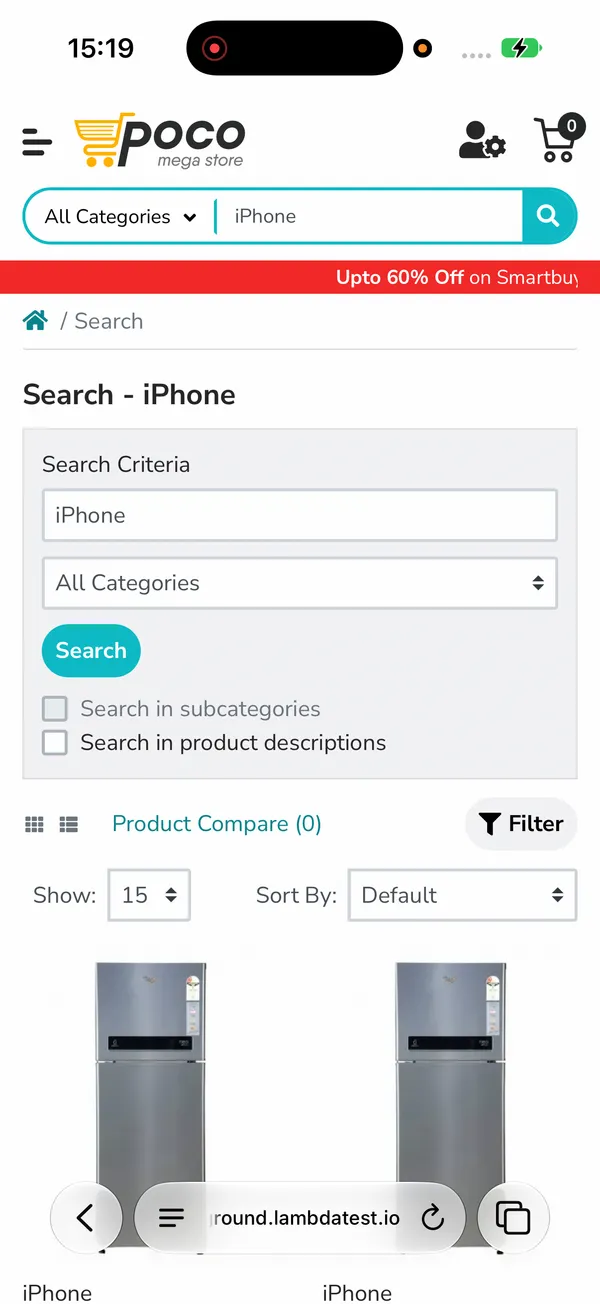
The session passes on iOS 27.0, prints "Search - iPhone" as the title, and returns the frozen 18_7 user agent shown in the Safari section. The final screen shows the results under Safari's floating toolbar:
- Face ID failure paths - iOS 27.0.1 fixed iPhone 18 Pro and Pro Max restarts when Face ID fails to authenticate. Real devices simulate successful and failed Face ID matches, so biometric login fallbacks can run on the model that had the bug.
- Coverage beyond iOS 27 - the same account reaches 10,000+ real Android and iOS devices, with network profiles from 2G to 5G and offline, and geolocation from 170+ countries.
- iPhone 18 Pro - the test on iPhone 18 page covers real iPhone 18 Pro and Pro Max devices plus their iOS 27 simulators for earlier checks.
Getting Started With iOS 27 Testing
Rebuild the app with Xcode 27 on an Apple silicon runner, then run the full suite once on an iOS 27 device and an iOS 26 device before you change anything else. Fix the scene life cycle and launch screen first, then re-baseline screenshots for Liquid Glass and update any test that picks system alerts by position.
When the Xcode 27 build passes, run it through app automation on TestMu AI, following the app testing on real devices docs, across the iOS 27 and iOS 26 devices your users actually carry.
Author

Sai Krishna
Blogs: 23

Sai Krishna is Director of Engineering at TestMu AI, where he leads agentic AI for quality engineering, building AI agents that autonomously drive mobile and conversational test automation. His current focus is Agent Testing and Model Context Protocol (MCP) support for mobile. He is a core contributor and member of the Appium open-source project and the creator of AppiumTestDistribution and appium-device-farm. With over 14 years of experience including more than 9 years at Thoughtworks as a Principal Consultant, he holds a BSc in Electronics and speaks regularly at TestMu and Appium Conf on Appium, mobile automation, and agentic AI in testing.
Reviewer

Srinivasan Sekar
Reviewer
Srinivasan Sekar is Director of Engineering at TestMu AI, where he leads engineering and open-source initiatives behind the Selenium and Appium automation grid and owns TestMu AI's MCP Server. A committer to Appium and a contributor to Selenium, WebdriverIO, Taiko, and AppiumTestDistribution, he brings over 15 years of experience in quality engineering and open-source technologies. He is the author of the Apress book 'The MCP Standard: A Developer's Guide to Building Universal AI Tools with the Model Context Protocol,' a Certified Kubernetes and Cloud Native Associate, and an international conference speaker. Before TestMu AI he spent over eight years at Thoughtworks as a Principal Consultant and Quality Architect. Srinivasan holds a B.Tech in Information Technology from Anna University.


iOS 27 FAQs
Did you find this page helpful?
More Related Blogs

TestMu AI forEnterprise
Get access to solutions built on Enterprise
grade security, privacy, & compliance
- Advanced access controls
- Advanced data retention rules
- Advanced Local Testing
- Premium Support options
- Early access to beta features
- Private Slack Channel
- Unlimited Manual Accessibility DevTools Tests