
Test Your Website on Real Desktop and Mobile Browsers
Run live and automated cross browser tests on Chrome, Safari, Firefox, and Edge across 3,000+ browser-OS combinations. No setup, no device lab.

- TestMu AI (Formerly LambdaTest)
- /
- Blog
- /
- 71 Best Chrome Extension Ideas for 2026
71 Best Chrome Extension Ideas for Developers and Testers in 2026
Chrome extension ideas for 2026: 71 best extensions for debugging, testing, productivity, SEO, security, and blogging, with live user counts and key features.
Last Updated on:
On This Page
- Best Chrome Extension Ideas for Developers and Testers
- 1. LT Debug
- 2. BugBug
- 3. Fake Filler
- 4. TestMu AI Chrome Extension
- 5. Loom
- 6. WAVE Evaluation Tool
- 7. Clear Cache
- 8. Page Ruler
- 9. Lighthouse
- 10. Window Resizer
- 11. ModHeader
- 12. Requestly
- 13. JSONView
- 14. VisBug
- 15. Ghostery
- 16. Octotree
- 17. daily.dev
- 18. WhatFont
- 19. JSON Formatter
- 20. React Developer Tools
- 21. Dark Reader
- 22. Session Buddy
- 23. Marker.io
- 24. Wappalyzer
- 25. ColorZilla
- Best Chrome Extension Ideas for Higher Productivity
- Best Chrome Extension Ideas for SEO
- Best Chrome Extension Ideas for Security Purposes
- Best Chrome Extension Ideas for Bloggers
- Conclusion
Google Chrome is one of the most widely used browsers, and its extension support is a big reason developers and testers pick it. According to Statcounter, Chrome held 66.36% of the worldwide browser market in September 2026, ahead of Safari, Edge, and Firefox.

The Chrome Web Store has extensions and developer tools for CSS, fonts, colors, testing, screenshots, and more. This list groups 71 of them by use case, with each entry's Chrome Web Store user count and key features.
TL;DR
The best Chrome extension ideas for developers and testers in 2026 are LT Debug for debugging network requests and React Developer Tools for inspecting React component trees. LT Debug is free, and each pick below covers one more use case with its Chrome Web Store user count.
- Best for debugging: LT Debug - this free Chrome extension modifies headers, blocks and throttles requests, and inspects CSS from one panel, with 4,000+ Chrome Web Store users.
- Best for productivity: OneTab - this Chrome extension collapses every open tab into a single list page, so saved links stay one click away and Chrome uses less memory.
- Best for SEO: Keywords Everywhere - this Chrome extension shows search volume, cost per click, and Google Ads competition beside Google results while you research keywords.
- Best for security: Malwarebytes Browser Guard - this Chrome extension blocks malware, scam sites, trackers, and ads, and has 12,000,000+ users on its Chrome Web Store listing.
- Best for bloggers: Grammarly - this Chrome extension checks spelling, grammar, punctuation, and tone in real time in the browser, with 40,000,000+ Chrome Web Store users.
To check how your pages look across 3,000+ browser and OS combinations, the TestMu AI Chrome extension runs real-time and screenshot tests from your browser tab.
What Are the Best Chrome Extension Ideas for Developers and Testers?
Top extensions include LT Debug, Fake Filler, Loom, WAVE, Lighthouse, ModHeader, React DevTools, and JSONView for debugging and testing workflows.
Pair these extensions with your web development tools to debug network requests, fill test forms, check accessibility, and review code without leaving Chrome.
1. LT Debug

LT Debug, a free extension from TestMu AI, has 4,000+ users on the Chrome Web Store.
LT Debug is a free debugging extension from TestMu AI. It bundles web design, development, and debugging tools into one Chrome panel.
Features:
- Replay on TestMu AI Cloud - Record user flow using the Chrome Recorder panel (DevTools > More tools > Recorder), then replay or retest it as an automated test on TestMu AI Cloud across 3,000+ browser and OS combinations.
- CSS Inspector - You will be able to inspect the CSS properties of each element of the website with the help of this function.
- Color Picker - This feature will give you HEX, HSS, and CSS values of the color for the area you select.
- Modify Headers - Add, edit, or remove an HTTP request header on a specific website or URL. It allows you to test a specific header for a website request.
- Block Requests - Blocks HTTP requests based on your specific URL conditions.
- Throttler Response - Reduce the network speed for all network requests. Choose one URL to slow down while the others remain at normal speed. Delay (in milliseconds) for the desired URL.
- Add/Remove Query Param - Change and control URL query parameters. It reads and arranges the current web page's key and value pairs.
- Redirect Requests - Specify which page should be automatically redirected to. For example, you could want to redirect http://testmuai.com/111 to http://testmuai.com/222.
The best feature of this extension is "More Tools," a collection of free online tools, libraries, and utilities. It has a collection of handy tools for testers and developers for code prettifying, data formation, test data generators, hash calculators, and more.

Note: Debug web issues faster. Download LT Debug from the Chrome Web Store, or sign up for TestMu AI to test across 3,000+ browser and OS combinations.
2. BugBug

BugBug Test Recorder is a free Chrome extension that lets you easily record and automate e2e tests without writing a single line of code. The web recorder captures your interactions in real-time and converts them into structured test steps that can be edited and replayed anytime. Its Chrome Web Store listing shows 10,000+ users.
Features:
- Codeless Test Recording - Automatically captures clicks, typing, selections, and navigations as test steps in your browser.
- Edit & Rewind Functionality - Record or replay tests from any step in the sequence, making test creation and debugging faster.
- Built-in inbox testing - Automatically test email flows like signups and e-mail confirmations without external tools.
- Automatic Selectors - BugBug prioritizes stable selector generation using data-testid attributes, eliminating the need to write selectors manually.
- Smart Waits for Stability - Automatically waits for elements to be visible and ready, reducing test flakiness.
3. Fake Filler

Fake Filler is a form filler that fills every input field on a page with randomly generated fake data, so form developers and testers do not have to type values manually. Its Chrome Web Store listing shows 400,000+ users.
Features:
- Fill out all your fields (or a keyboard shortcut) automatically with a single mouse click.
- Covers most typical use situations, but you can change the settings to meet your needs.
- Syncs your preferences across all browsers where the extension has been installed.
4. TestMu AI (Formerly LambdaTest) Chrome Extension

The TestMu AI Chrome extension has 6,000+ users on the Chrome Web Store.
The TestMu AI Chrome extension lets developers and testers run live interactive and automated cross-browser testing across 3,000+ browser and OS combinations on the cloud. Choose a browser configuration or a saved list and launch tests directly from your browser tab.
Features:
- Screenshot Testing - Run automated screenshot tests of your websites or web apps across up to 25 browser and OS configurations at a time.
- Schedule Screenshots - Schedule screenshots with a preferred date, time, and configuration so they are captured automatically.
- Real-time Testing - Enter the URL, select the browser, and launch a live test on any of the 3,000+ browser and OS combinations.
- Favorites - Save your preferred browser and OS combinations and test on them instantly.
- Geolocation Testing - Run geolocation tests to see how your website looks and behaves from different countries on different browsers.
- List - Save configurations to your lists and start tests instantly.
To add the TestMu AI Chrome extension to your browser:
- Visit the Chrome Web Store on the Chrome browser.
- Search for "TestMu AI" in the search bar.
- Click "Add to Chrome."
- Approve the permission request pop-up by clicking "Add extension."
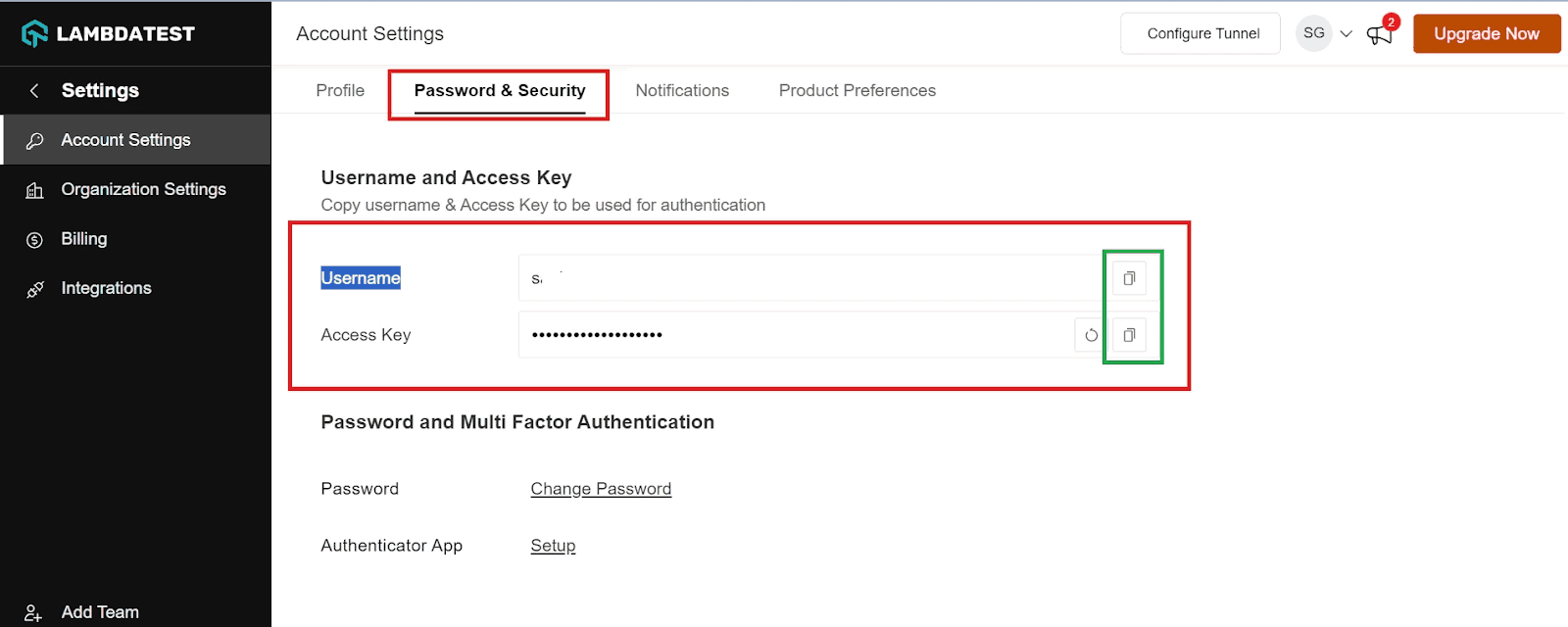
To set up your profile in the extension:
- Sign up for free or log into your TestMu AI account.
- Click the extension icon at the top right of the browser and select TestMu AI. Enter your registered email and access key, which you can find in the Profile section of your TestMu AI account.
- Click Apply to finish the setup.
This video shows the setup process and how to take automated screenshots with the TestMu AI extension.
Note: Check how your website looks across 3,000+ browser and OS combinations. Download the TestMu AI Chrome extension
5. Loom

Loom is a screen recording extension that captures your screen and camera. Once a video is recorded, you share its link with your team, which helps developers and testers explain bugs or script errors. Its Chrome Web Store listing shows 8,000,000+ users.
Features:
- Records your screen, camera, microphone, and internal audio.
- Saves videos to the cloud automatically and shares them with a URL.
- Gets notifications whenever someone views, reacts to, or comments on your video and writes comments and emoji reactions.
6. WAVE Evaluation Tool

WAVE Evaluation Tool is a web accessibility assessment tool created by WebAIM.org. It induces icons and indicators into your website to provide visual feedback regarding the accessibility of your web content. WAVE not only detects many accessibility and Web Content Accessibility Guidelines (WCAG) issues but also makes a human review of web content more accessible. Its Chrome Web Store listing shows 700,000+ users.
Features:
- Encourages human evaluation and solves accessibility issues for websites.
- Performs complete analysis within the Chrome browser, enabling the secure valuation of intranet, local, password-protected, and other sensitive websites.
These features make WAVE a practical starting point for accessibility testing.

7. Clear Cache

The Clear Cache extension clears your cache and browsing data with a single click. You can delete your cache quickly and without confirmation dialogs, pop-ups, or other annoyances. Its Chrome Web Store listing shows 1,000,000+ users.
Features:
- Helps you specify which and how much of your data to clear, including App Cache, Cache, Cookies, Downloads, File Systems, Form Data, History, Indexed DB, Local Storage, Plugin Data, Passwords, and WebSQL.
- Erases cookies globally for specific domains or for everything except those you choose.
8. Page Ruler

The Page Ruler extension lets you measure distances (in pixels) on a webpage. When you move your mouse around the page, it draws a rectangle ruler. The ruler's width, height, start, and end are all labeled with matching metrics in pixels. Its Chrome Web Store listing shows 500,000+ users.
Features:
- Allows no background activities.
- Allows you to rapidly turn the add-on on or off through the ON/OFF switch.
- Supports touch-enabled devices as well as desktop computers with a mouse.
- Available for Chrome, Firefox, Edge, and Opera.
9. Lighthouse

Lighthouse is an open-source, automated tool for enhancing web app performance, quality, and correctness. It audits a page by running a series of tests against it and then generating a report on how well the page performed. You can then use the failing tests to determine what you need to do to enhance your app. Its Chrome Web Store listing shows 1,000,000+ users.
Features:
- Supports any webpage, whether public or requires authentication.
- Runs through Chrome DevTools, from the command line, or as a Node module.
- Prevents regressions on your website through Lighthouse CI.
10. Window Resizer

Window Resizer extension resizes the browser window to simulate different screen sizes and resolutions. Web designers and developers use it to test their layouts on various browser resolutions. The list of resolutions is editable (add/delete/reorder). Its Chrome Web Store listing shows 800,000+ users.
You can change the width/height of the window, its position, the icon (phone, tablet, laptop, desktop), and even whether the changed dimensions apply to the whole window or just the viewport.
Features:
- Edits, deletes, and reorders preset to suit your needs.
- Uses the keyboard to open and navigate the pop-up or add global shortcuts to the tools you use the most.
- Displays a Tooltip with the current viewport and window size.
- Synchronizes your settings across all your devices or exports or imports settings manually.
11. ModHeader

ModHeader lets you add, modify, and remove HTTP request and response headers.
Features:
- Request and response headers can be added, modified, and removed.
- Set X-Forwarded-For, Authorization, Access-Control-Allow-Origin, Content-Security-Policy, and your custom headers with ModHeader.
- Change cookies in request and response headers, with an advanced Content-Security-Policy editor.
- Change one URL to another.
12. Requestly

Requestly is an open-source developer tool for testing and debugging web applications. It intercepts, modifies, and debugs network requests. With a simple interface, collaborative features, active support, and no VPN concerns, Requestly brings Charles Proxy-style request debugging directly to the browser. Its Chrome Web Store listing shows 300,000+ users.
Features:
- Set up API redirection and switch environments, for example from production to staging.
- Change API Replies (Fixed Response or Programmatic Override). Change HTTP Headers.
- Share debugging sessions, console logs, network logs, and environment details with teammates.
- Inbuilt Mock Server.
- Insert external JavaScript & CSS on any website.
- Block & Throttle Requests.
13. JSONView

JSONView formats and highlights JSON documents and lets you collapse arrays and objects. Typically, when a JSON document (content type "application/json") is encountered, the browser displays plain text. JSONView will display the raw content even if the JSON document contains mistakes. Its Chrome Web Store listing shows 100,000+ users.
Features:
- With the JSONview extension, colors are assigned to numbers, booleans, and strings.
- Arrays and objects can both be compacted and enlarged.
- All of the links are clickable.
To check that a JSON file is well formed, use the free JSON validator tool from TestMu AI.
14. VisBug

VisBug is an open-source web design debug tool built using JavaScript. With this extension, you can brainstorm new UI by experimenting on a web page, as shown in the picture above. Also, you can edit text images and designs without making changes in DevTool. Its Chrome Web Store listing shows 200,000+ users.
Features:
- Point, click, move, resize, and tamper with any page, in any condition, as if it were an artboard.
- Examine design, spacing, distance, accessibility, and alignment.
- Fine-tune layouts and content in the real-world environment on any device size.
- Use Adobe/Sketch skills to edit text and substitute images.
15. Ghostery Tracker Ad Blocker

Ghostery is a privacy extension that blocks ads, trackers, and cookie consent pop-ups. Its Chrome Web Store listing shows 2,000,000+ users.
Features:
- Eliminate distracting website ads, including YouTube and Facebook, for a cleaner browsing experience.
- Safeguard your data by preventing trackers from collecting it and maintaining anonymity online.
- Remove intrusive cookie consent pop-ups automatically, ensuring hassle-free browsing while advocating for your privacy rights.
16. Octotree

Octotree adds an IDE-like code tree, quick search, and bookmarks to GitHub, so developers and testers can browse repositories without clicking through dozens of pages. Its Chrome Web Store listing shows 200,000+ users.
Features:
- It supports private repositories and GitHub theme
- Its performance does not affect the size of repositories
17. daily.dev

daily.dev is a news aggregator for developers. It collects developer articles and discussions from sources such as the GitHub Blog, Hacker News, Dev.to, and freeCodeCamp and shows them in your new tab. Its Chrome Web Store listing shows 400,000+ users.
Features:
- Discuss posts, problems, and errors with other developers in the community.
- You can bookmark posts, sync your data across devices, and read later whenever you want.
- There is also a Progressive Web App (PWA) for mobile devices for your no-network worries.
18. WhatFont

WhatFont identifies the fonts used on a web page. All you need to do is hover your cursor over the fonts, and you will get the details of the font styles, sizes, and everything. It also recognizes the services used to serve web fonts. Typekit and Google Font API are supported. Its Chrome Web Store listing shows 3,000,000+ users.
19. JSON Formatter

JSON Formatter is an alternative to JSONView that turns raw JSON into a collapsible, hierarchical view in the browser window. Its Chrome Web Store listing shows 2,000,000+ users.
Features:
- Syntax highlighting
- Optional dark mode
- Collapsible nodes
- Clickable URLs (optional)
20. React Developer Tools

The open-source React JavaScript library has its developer tools called React Developer Tools. It lets developers inspect the component tree when they work with React. Its Chrome Web Store listing shows 5,000,000+ users.
After installing the extension, two icons should appear on the Chrome toolbar. Components are one, and Profiler is the other. Components shows the React component tree on the page, and Profiler shows render performance data.
21. Dark Reader

Dark Reader creates dark themes for websites by inverting bright colors, which reduces eye strain during night browsing. Its Chrome Web Store listing shows 7,000,000+ users.
With Dark Reader, you control brightness, contrast, sepia filter, font settings, and more. Dark Reader is ad-free and does not collect user data.
22. Session Buddy

Session Buddy extension saves and restores sets of open tabs. Click on the extension, which will list the opened tabs as the current session. When you save the session, it will appear as a single tab. Its Chrome Web Store listing shows 1,000,000+ users.
Features:
- Save open tabs in collections that you can recover later, which reduces clutter and frees up memory.
- Following a crash, restore your open tabs.
- See and control each open tab individually.
- To quickly find what you're looking for, search open tabs and collections.
23. Marker.io

Marker.io is a Chrome extension that lets you report bugs directly from your Chrome browser to your PM tool. You don't have to leave your website or web application. Its Chrome Web Store listing shows 30,000+ users.
Features:
- Capture and annotate screenshots.
- Create detailed bug reports with one click.
- Integration with project management tools.
- Collaborative feedback gathering with team members.
- Customizable fields for specific issue tracking.
24. Wappalyzer

With Wappalyzer, you can see how websites are built: Content Management System (CMS), Framework, JavaScript libraries, and more, right from your browser. Its Chrome Web Store listing shows 3,000,000+ users.
Features:
- Identifies technologies used on websites.
- Provides instant insights into a site's tech stack
- Recognizes a wide range of web technologies.
- Integrates with third-party services.
25. ColorZilla

ColorZilla makes it easy for designers and front-end developers to choose any color from any webpage. With one click, ColorZilla reads the color of any pixel on the page so you can paste it into your CSS. Its Chrome Web Store listing shows 4,000,000+ users.
Features:
- Eyedropper for color picking.
- Color history and palette generator.
- Gradient generator.
- Measure elements on the page.
- Zoom in for pixel-perfect accuracy.
What Are the Best Chrome Extension Ideas for Higher Productivity?
Top productivity extensions include Save to Google Drive, Briskine, Scribe, Todoist, and tools for task management and workflow optimization.
These extensions help you manage tasks, track time, handle email, and stay focused while you browse.
26. Save to Google Drive

This extension saves web content directly to your Google Drive. With the Save to Google Drive browser action or the "Print" option in Chrome, you can save the page currently displayed as a PDF. You need to click on this extension, and it will save the webpage, Image, Video, HTML Audio, Documents, and many more. Its Chrome Web Store listing shows 7,000,000+ users.
Once saved, you can open it from Google Drive and rename it. You can also automatically convert Microsoft Excel files into Google Sheets format.
Features:
- It adds browser action to store the current page.
- Creates a right-click context menu for saving media and links.
- Programmable via an options page.
- Use the Chrome Print menu to save the current page as a PDF.
27. Briskine

Briskine speeds up email writing with ready-made templates. For example, you need to write "h" and press the tab twice, and it will generate the receiver name. Its Chrome Web Store listing shows 100,000+ users.
Furthermore, Briskine provides keyboard shortcuts for LinkedIn, Microsoft, and Gmail, in addition to email writing templates. Shortcuts let you move around without reaching for the mouse.
28. Scribe

Scribe creates step-by-step guides for onboarding and training material. You can open it from the extension and start recording from there. Once the recording is done, you can stop recording, which will be stored in the Scribe. Its Chrome Web Store listing shows 2,000,000+ users.
Features:
- Automatically generates step-by-step instructions.
- Images, steps, and text that can be changed.
- Simple sharing.
- Quickly integrate with any knowledge base or CMS.
- Automatic redaction of sensitive data.
29. Todoist for Chrome

Todoist for Chrome allows you to manage and save your daily tasks. You can save all links in Chrome with this extension. Discover a blog that interests you. It's simple to save it in Todoist so you can read it later. Do you have a draft of an email open in Google Docs? The document can be saved as a task so you can return to it later. Its Chrome Web Store listing shows 500,000+ users.
You can access a list of all your Todoist tasks by clicking on the Todoist icon in the Chrome extension tray.
Features:
- Take immediate action to record and organize chores as they come to mind.
- With due dates and reminders, remember deadlines.
- Create enduring habits by setting repeating deadlines, such as "every Monday."
- Assign tasks to others so that you can work on projects together.
- Use priority levels to order your chores.
30. Toggl Track

Toggl Track extension will add a timer to any website and keep real-time track of your productivity. Toggl lets you track your output on both desktop and mobile platforms. Its Chrome Web Store listing shows 300,000+ users.
The timer can be started and stopped using the Toggle button found in the Chrome extension. This button will automatically appear on all those pages whenever you use a website. You can determine how much time you spend on a task by clicking start and stop at the end of the work.
Features:
- Track time inside the web apps you already use, with metadata uploaded immediately.
- While not using your computer, turn on idle detection to stop the timer.
- Get reminders to take a break at predetermined intervals with a Pomodoro timer.
31. ClickUp

ClickUp for Chrome lets you create tasks, track time, and capture screenshots without leaving the page you are on. Its Chrome Web Store listing shows 200,000+ users.
Features:
- Making tasks and adding websites to tasks.
- Time tracking is simple with ClickUp tasks.
- Take screenshots, annotate them, and modify them.
- Make tasks and include emails in the tasks.
- Take quick notes in the browser.
32. Just Read

Just Read is a reader-mode extension. One click strips a page down to its main content. It will remove Page styling, Ads, pop-ups, comments, and other distracting elements. Its Chrome Web Store listing shows 200,000+ users.
Features:
- Make use of the white and dark default themes.
- Change your theme using CSS or a graphical editor.
- Employ a theme that has already been created by someone else.
- Automate the Just Read format for particular websites.
- Launch Just Read using a keyboard shortcut.
33. RightInbox

RightInbox helps you with Email monitoring, recurring emails, email notes, email reminders, follow-up emails, templates, mail merge, signatures, CRM, etc. It helps you spend less time tracking and drafting Gmail messages. Its Chrome Web Store listing shows 100,000+ users.
Features:
- Get a reminder of crucial emails.
- Navigate who is opening your emails.
- Use an email template to write emails faster.
- Depending on whether the last email was opened or not, send follow-up emails.
34. Momentum

Momentum replaces the new tab page with a dashboard that keeps your daily focus in view. It includes to-do lists, the weather, daily images, and quotes. Its Chrome Web Store listing shows 2,000,000+ users.
Features:
- Every day, a new motivational image, quote, and mantra.
- Friendly reminders to do your most crucial task.
- Simple to use task manager.
- Shortcuts for your favorite apps and websites.
- Search engines like Google, Bing, DuckDuckGo, and Ecosia.
35. 1Password

When you are working as a team, you must handle many passwords to access many tools and websites, and there are some standard websites and tools that every member is accessing from a common account. In both scenarios, you will require one tool like 1Password to manage your team and personal passwords. With 1Password, you must remember only one password to access the all-password list. Its Chrome Web Store listing shows 7,000,000+ users.
Features:
- Your password creation, storage, and filling are all handled by 1Password.
- You can create many accounts to categorize website access per the team or organization's requirements.
36. Forest

The Forest extension visualizes your focus time as a growing forest: the longer you stay on task, the more trees grow. All you need to do is stay focused on the site you are working on and not shift to the site you added to the block list. Its Chrome Web Store listing shows 900,000+ users.
Features:
- Add the website you want to avoid to the block list.
- Gives a good statistical representation of your productivity with trees.
37. MightyText

The MightyText extension sends and receives your phone's text messages from your desktop, so you do not have to pick up your phone while working. Its Chrome Web Store listing shows 200,000+ users.
38. Hunter

As mentioned in the name, you can hunt the email addresses of specific departments, such as support, sales marketing, etc., in a single click. You can go to the website and click on the extension, which will give you a complete list of emails related to the websites.
Hunter filters the email addresses it finds by department. Click "Save" next to a person to add them to a leads list, then sync your leads to Salesforce, HubSpot, Pipedrive, Zoho, and other CRMs. Its Chrome Web Store listing shows 600,000+ users.
39. OneTab

OneTab solves your tab problem. This Google Chrome extension takes all of your open tabs and places them in a convenient list on a single tab page. Every saved link stays one click away, and fewer open tabs means less memory used by Chrome. Its Chrome Web Store listing shows 2,000,000+ users.
40. StayFocusd

StayFocusd is Google Chrome's productivity extension that helps you focus on work by limiting your time on time-sucking websites. When you've used up your allotted time, the sites you've blocked will be unavailable for the rest of your day. StayFocusd is highly configurable. You can block or allow entire websites, subdomains, paths, pages, and even in-page content like videos, images, and forms. Its Chrome Web Store listing shows 700,000+ users.
41. Email Tracker for Gmail, Mailsuite-Mailtrack

Email Tracker for Gmail, Mailsuite-Mailtrack is a free Chrome app for Gmail that shows you if someone opened your email if it was opened, when it was opened, and how many times they opened it. You can even filter out certain emails based on whether someone opened them. It helps you confirm that clients received your email. Its Chrome Web Store listing shows 3,000,000+ users.
What Are the Best Chrome Extension Ideas for SEO?
Best SEO extensions include Keywords Everywhere, Similarweb, Redirect Path, and SEO Meta in 1 Click for keyword analysis and website audits.
SEO teams use these extensions for on-page audits, keyword research, backlink checks, and redirect tracing without leaving the browser.
42. Keywords Everywhere

Keywords Everywhere has 1,000,000+ users on its Chrome Web Store listing and shows three data points for keywords on Google:
- Monthly search volume,
- Cost per click, and
- Google Ads competition.
Since it is an in-browser extension, switching back and forth between Google keywords and the open browser page is no longer necessary with this extension installed.
Features:
- SEO Hardness Metrics
- Trend graph
- On the widgets on the right side of Google, you can see long-tail keywords, related keywords, "people also search for," and trending keywords.
- The top 5000 keywords and estimated organic traffic for all Google pages and websites.
- For domains that appear in organic search results, Moz link metrics.
- Backlinks for the domain and webpage
- See the Tags widget, SERP Metrics, Video Insights, and Search Insights widget on YouTube.
43. Similarweb

Similarweb shows traffic and engagement metrics for any website in one click. This extension is helpful for people interested in researching various market trends and those looking for new and efficient SEO tactics. Its Chrome Web Store listing shows 1,000,000+ users.
Features:
- You may determine a specific website's position worldwide, a specific nation, and its category.
- Find out everything, including the bounce rate and total website visitors.
- The major nations that drive website traffic and the percentage of visits from each may be seen.
- Learn about the traffic types that lead consumers to a particular website.
44. Redirect Path

Redirect Path notifies you of 301, 302, 404, and 500 HTTP status codes and client-side redirects like JavaScript and Meta redirects, bringing any potential problems to your attention immediately. Its Chrome Web Store listing shows 300,000+ users.
In addition to highlighting errors and redirects, the plugin shows various HTTP headers (such as server types and caching headers) and the server IP Address upon clicking a button.
45. SEO Meta in 1 Click

With only one click, SEO Meta in 1 Click displays all meta tags and key SEO data for a web page. This comprises the number of images without alt text, the lengths of the titles and descriptions, the URL, and the headers' order of presentation. Its Chrome Web Store listing shows 1,000,000+ users.
Features:
- Length of the title and description.
- URL (and meta-canonical URL also) (and meta-canonical URL too).
- Meta-robots.
- Putting headers in the order as they appear in HTML (H1, H2, H3, H4, H5, and H6).
- Several ALT-tagged and untagged photos, and many more.
46. SEOquake

SEOquake is a dashboard that tracks both domain-level and page-level performance. Its SEO toolbox, which enables users to examine backlinks and track keyword rank, is one of its primary features. It also gives on-page SEO advice. Its Chrome Web Store listing shows 1,000,000+ users.
Features:
- Examine any significant metrics immediately.
- Obtain a comprehensive SERPs analysis and export the information in CSV format.
- Instantly determine keyword difficulty.
- Provide the search query's parameters.
- Perform a thorough SEO assessment on a page, looking for mobile compatibility.
47. vidIQ Vision for YouTube

The goal of this Chrome extension for YouTube SEO is to increase the impact of your videos so they receive more views and generate more engagement. vidIQ Vision for YouTube helps you understand how videos are ranked in search, what makes them related, and what material your target audience is searching for. Its Chrome Web Store listing shows 4,000,000+ users.
Features:
- Get the links to "Related Videos" together.
- Understand how your videos ranked in search results.
- Get informed about sources the "Recommended Videos" use.
- Get an insight into how the growth of an audience fits with social media.
48. SEO Minion

SEO Minion speeds up routine SEO checks. It can analyze on-page SEO, check for broken links, and evaluate SERPs in real-time. Its Chrome Web Store listing shows 200,000+ users.
Features:
- On-page SEO analysis - Examine the HTML of any webpage to view vital information that will aid in optimizing the on-page SEO and alert you to any problems.
- Link highlights - Highlight all links to view all links for any internal and external pages.
- Broken link check - Examine broken links, look at every link on a page, and request a report of problems.
- Hreflang Checker - Verify the accuracy of the Hreflang tag and see whether any return tags are present.
49. Ahrefs SEO Toolbar

Ahrefs SEO Toolbar analyzes your website and your competitor's website and helps you audit and optimize your website for trending keywords. Also, it creates page SEO reports, broken link checks, trace redirection, and offers a country changer for the search result. Its Chrome Web Store listing shows 400,000+ users.
Features:
- On-page SEO report - You may access an on-page SEO report when viewing any website by clicking the extension icon or using a keyboard shortcut. The report contains the page's title and description. Indexability, crawl ability, content structure, and word count.
- Link Audit - Based on the filters you provide, this extension can read all the outbound links on a page and highlight them. External links, internal links, no-follow links, user-generated content links, sponsored links, and combinations of these.
50. Glimpse

Glimpse (Google Trends Supercharged) adds absolute search volume to Google Trends, sends alerts on trending topics, and shows the keywords people look up. Its Chrome Web Store listing shows 200,000+ users.
Features:
- See the precise number of searches for any keyword using Google Trends' search volume information.
- Configure Google Trends alerts to receive notifications when a topic becomes popular.
- Comprehensive keyword research.
- Study of long-tail keywords.
51. Ubersuggest

Once you get this Chrome extension, you only need to search on Google, YouTube, and Amazon to use Ubersuggest. You get information about keywords and search terms. Also, you can get more keywords and SEO insights by clicking "see all" in the search field if you want additional information on any particular phrase you searched for. Its Chrome Web Store listing shows 600,000+ users.
Features:
- Graphs and trends are also available with the Ubersuggest extension. These graphs show monthly desktop and mobile searches for a specific keyword, breaking out the total monthly search volume.
- You will get the average authority of the ranking websites (domain score) and the specific number of referring domains in the top 10 results, broken down in a speech bubble that appears above the organic results (backlinks).
- Customizable location and language.
52. PageSpeed Insights (MV3)

PageSpeed Insights is a simple Chrome extension that will save you time checking different pages' page load speed. You need to add this extension, and when you open it, it will redirect you to PageSpeed Insight, where you can thoroughly analyze your website page speed. Its Chrome Web Store listing shows 40,000+ users.
53. Link Grabber

Link Grabber is an easy-to-use hyperlink extractor or hyperlink grabber for HTML pages. Grab links from HTML pages and show them in a separate tab. Use it to find duplicate links, spot external links, and search the links on a page. Its Chrome Web Store listing shows 200,000+ users.
54. Detailed SEO Extension

The Detailed SEO Extension offers instant webpage analysis, highlighting crucial on-page SEO elements. It presents a comprehensive overview of page structure, including internal and external backlinks, schema markup, images, word count, and robot tags (both regular and X-robots). Its Chrome Web Store listing shows 600,000+ users.
What Are the Best Chrome Extension Ideas for Security Purposes?
Top security extensions include Malwarebytes Browser Guard, DuckDuckGo Privacy Essentials, Privacy Badger, and Trend Micro ID Protection.
These extensions block trackers, flag phishing and scam sites, and warn you before you enter data on a risky page.
55. Malwarebytes Browser Guard

Malwarebytes Browser Guard tries to block advertisements and trackers, malware, shady websites, and potentially unwanted apps to safeguard your security and privacy (PUPs). Following installation, the extension will automatically strive to shield your browser from any harmful or undesired information and activities. Its Chrome Web Store listing shows 12,000,000+ users.
If you choose the Malwarebytes symbol and then press the Let's Go button, you can check a specific website. The extension will provide information on what was blocked, along with how many, if any, instances of unwanted content it could block on the current website.
Features:
- Blocks trackers and advertising from third parties that monitor your online activities.
- Catch the tech support scammers.
- Stops trackers from following you across the Internet and displaying the same ads to you repeatedly.
56. Trend Micro ID Protection

Trend Micro ID Protection scans every website you visit for potentially malicious information. It blocks unwanted advertisements, notifies you if you visit a fraudulent or scam website, and displays a warning if you visit a phishing or harmful website capable of obtaining your password or personal information. It can even protect you from fake news by comparing the dependability of content on a specific site to other sources. Its Chrome Web Store listing shows 100,000+ users.
Features:
- Maintain the privacy and security of your Facebook, Twitter, and Instagram accounts.
- Disable all advertisements on Facebook, YouTube, Reddit, and other websites, including banner ads and pop-ups.
- Stop trackers from gathering your data by blocking them.
- Obtain total defense against phishing attacks, malicious websites, and online fraud.
57. DuckDuckGo Privacy Essentials

DuckDuckGo Privacy Essentials Chrome extension is designed to disable third-party cookies and hidden trackers, prevent sites from fingerprinting you to gather precise facts about your browser and system, upgrade connections to HTTPS encryption, and set DuckDuckGo as your default search engine. Its Chrome Web Store listing shows 4,000,000+ users.
Features:
- Most hidden trackers (3rd-party scripts) are automatically stopped from loading, preventing organizations from gathering and exploiting data from these trackers (e.g., sales, advertisements, etc.).
- Many websites you visit should use an encrypted (HTTPS) connection by default, which protects your data from Wi-Fi snoopers and network bystanders like your Internet provider.
- By preventing corporations from combining certain information about your browser and device settings, you can prevent them from building a unique identifier for you.
58. Privacy Badger

Instead of maintaining lists of what to block, Privacy Badger detects trackers based on their behavior. Privacy Badger sends the Global Privacy Control signal to opt you out of data sharing and selling, while the "Do Not Track" signal is sent to firms to instruct them not to monitor you. If trackers ignore your requests, Privacy Badger will evolve to block them. Its Chrome Web Store listing shows 1,000,000+ users.
Features:
- Privacy Badger substitutes click-to-activate placeholders for potentially beneficial trackers (video players, comments widgets, and so on).
- Eliminates incoming link click monitoring on Facebook and Google, with additional privacy safeguards on the way.
59. Netcraft Extension

The Netcraft Extension add-on operates by scanning web pages and alerting users to potential phishing attacks. When you visit a dubious website, this Chrome extension will display a warning message in the browser toolbar. This makes protecting your identity, data, and devices from attackers easier. Its Chrome Web Store listing shows 70,000+ users.
Features:
- The Netcraft anti-phishing community is an extensive neighborhood watch program, empowering the most vigilant and knowledgeable members to protect everyone.
- Protects credit card information from being stolen by shopping site skimmers or web miners from stealing your computer's processing power.
- Even if you stumble across a shopping site skimmer that Netcraft still needs to identify, the plugin can secure your credit card information.
- Examine the site's qualities and compare them to those depicted by bogus sites.
60. Avast Online Security & Privacy

Avast Online Security & Privacy is an antivirus extension that guards against viruses and malware. It also has a web tracking blocker, a significant function for such a "minimal" application. Web trackers are programs that run on websites to collect information about how visitors interact with the site. Its Chrome Web Store listing shows 5,000,000+ users.
Whether you're on a banking website or any other site where you share your credit card information, it can be dangerous. This Chrome extension prevents these scripts from gathering your personal information. As a result, you don't have to be concerned about security when conducting online transactions.
61. Disconnect

Disconnect shows and blocks the websites that track you. It also avoids being tracked by thousands of third-party websites. Its Chrome Web Store listing shows 400,000+ users.
Also, Disconnect can prevent malware insertion via advertisements and widget packing, as well as side jacking/embedded attacks via social network widgets
62. Decentraleyes

Decentraleyes, a free, open-source extension, prevents websites from using CDN (content delivery network) services that track users through third-party sites. Instead, it checks if the site has a local copy of the file you're trying to view and serves that copy to your browser. Its Chrome Web Store listing shows 200,000+ users.
The Decentraleyes extension blocks requests to more than 100 centralized web services. Some of the most popular ones include Google Fonts, Cloudflare, and local copies of popular web libraries such as jQuery and AngularJS are used to optimize your web experience. This means your website loads faster and reduces the amount of data transferred over the internet.
63. Click&Clean

Click&Clean is an easy-to-use Chrome extension that lets you quickly delete your browsing data, delete temporary files, and clear your internet activity. What sets Click&Clean apart from similar solutions is that you don't have to close Chrome to clean your browsing data. Click&Clean cleans your browsing data and frees up your hard drive space. The Click&Clean extension is available in the Chrome toolbar and can be accessed with a simple click. Its Chrome Web Store listing shows 1,000,000+ users.
What Are the Best Chrome Extension Ideas for Bloggers?
Best blogger extensions include Grammarly for writing, Buffer for social media scheduling, Read Aloud, and Google Dictionary for content creation.
These extensions help bloggers write cleaner copy, schedule social posts, save research, and check what powers other sites.
64. Grammarly

Grammarly (listed as "Grammarly: AI Writing Assistant and Grammar Checker App") gives real-time suggestions to help you write better online, regardless of what you're doing in your browser. Its Chrome Web Store listing shows 40,000,000+ users.
Beyond proofreading, it flags clarity and writing style issues alongside spelling, grammar, and punctuation.
Features:
- Grammar checking.
- Spelling checking.
- Punctuation checking.
- Tone detection.
65. Buffer

Buffer lets you create and schedule social media posts from any page on the web. Its Chrome Web Store listing shows 200,000+ users.
Features:
- Buffer currently supports Instagram, Facebook, Twitter, TikTok, LinkedIn, and Pinterest channels, as well as 30+ integrations with third-party apps such as Zapier, Pocket, Feedly, IFTTT, and others.
- It also provides a landing page to promote your business and allows users to manage and modify their creative work using Canva, Google Drive, OneDrive, and Dropbox.
66. Read Aloud

Read Aloud uses text-to-speech technology, which converts text into audio. Read Aloud can read PDFs, Google Documents, Google Play Books, Amazon Kindle, and EPUB files. This Chrome extension is compatible with many websites, including news, blogs, fan fiction, periodicals, textbooks, school and class websites, and online university course materials. This Chrome extension is designed for users who prefer to listen to content rather than read it, individuals with learning challenges, and children learning to read. Its Chrome Web Store listing shows 6,000,000+ users.
67. Google Dictionary (by Google)

Have you ever encountered a word you didn't recognize when performing online research? Instead of opening a new tab and Googling it, quickly highlight the word and click the Google Dictionary extension to acquire the definition. Its Chrome Web Store listing shows 4,000,000+ users.
Features:
- Any word can be defined by double-clicking it in a little pop-up bubble.
- With the toolbar dictionary, you may see the full definition of any word or phrase.
- Keep track of the words you've looked up so you can practice them later.
- Foreign words are automatically translated into your preferred language.
68. Office Editing for Docs, Sheets & Slides

Check out Office Editing for Docs, Sheets & Slides if you and your coworkers work on computers with various operating systems or want to collaborate on a live document together. This extension allows you to simply drop Microsoft Office files into Google Drive to see and modify them without installing the software on your computer.
After installing the extension, Office files you drag into Chrome, open in Gmail, and Google Drive, and other services will be opened in Docs, Sheets, and Slides for reading and editing.
Features:
- Google Documents, Sheets, and Slides allow you to view and edit Microsoft Word, Excel, and PowerPoint files.
- You can save each file in its original Office format or convert it to Docs, Sheets, or Slides to gain access to additional capabilities such as inviting people to collaborate on editing, commenting, chatting, and more.
69. Evernote Web Clipper

With the help of the browser extension Evernote Web Clipper, you can save intriguing web content straight to your Evernote account. This is especially useful for content research, where you can capture ideas as they come in and make them available across all your devices. Its Chrome Web Store listing shows 2,000,000+ users.
Features:
- Use it to store articles, graphics, screenshots, and images in your Evernote notes.
- Take screenshots of the entire website or only the areas you need, without sidebars and advertisements.
- Put keywords on everything you save to make it simple to find your ideas, research, pictures, and more later.
- You can save meaningful stuff in the notepad and add titles.
70. WhatRuns

The WhatRuns addon allows you to detect what powers any website you visit with a single click. It detects tools and services ranging from developer tools and Ad Networks to WordPress Plugins and Themes. Its Chrome Web Store listing shows 400,000+ users.
Features:
- WhatRuns displays almost everything that powers a website, such as development tools companies pay for, which CDN they use, how they track their visits, and so on.
- Stay up by knowing when a website begins or stops using technology. Follow websites, and WhatRuns notifies you when this occurs.
71. AdBlocker Ultimate

With AdBlocker Ultimate, you can enjoy a free and enhanced ad-blocking experience. It removes all ads without exceptions, including "acceptable" ads and whitelisted advertisers. Block tracking and malware for uninterrupted browsing. AdBlocker Ultimate is designed to ensure you can focus solely on the content you desire. Its Chrome Web Store listing shows 2,000,000+ users.
Features:
- Block all website ads, including Facebook and YouTube.
- Block malware and tracking.
- Improve browser performance by removing junk content.
- No "acceptable" ads or whitelisted ad networks.
Conclusion
Start with the extensions that match your daily work, such as LT Debug for network debugging, WAVE for accessibility checks, or Keywords Everywhere for SEO research, and remove any you stop using to keep Chrome fast.
Your next step: install the TestMu AI Chrome extension and run a real-time or screenshot test of your site across different browser and OS combinations. The TestMu AI Chrome extension documentation walks through setup and each testing mode.
Author

Bhawana
Blogs: 75


Bhawana is a Community Evangelist at TestMu AI with over 3 years of experience creating technically accurate, strategy-driven content in software testing. She has authored 50+ blogs on test automation, cross-browser testing, mobile testing, and real device testing. She also serves as Product Marketing Manager for Kane CLI, the command-line tool that runs browser automation from the terminal using natural-language flows in a real Chrome browser. Bhawana is certified in KaneAI, Selenium, Appium, Playwright, and Cypress, reflecting her hands-on knowledge of modern automation practices. On LinkedIn, she is followed by 6000+ QA engineers, testers, AI automation testers, and tech leaders.
Reviewer

Shubham Suri
Reviewer
Shubham Suri is a Lead Member of Technical Staff at TestMu AI, building the frontend and web interfaces of the quality engineering platform. He works across React.js, HTML5, CSS3, Bootstrap, jQuery, JavaScript, and Angular to create and maintain webpages and web applications. He brings around a decade of experience in web and frontend development, with earlier roles as a Software Engineer at Hard Shell Technologies and an IT Analyst at Cyrus Group. Shubham holds a B.Tech in Computer Science from Uttar Pradesh Technical University.


Chrome Extensions FAQs
Did you find this page helpful?
More Related Blogs

TestMu AI forEnterprise
Get access to solutions built on Enterprise
grade security, privacy, & compliance
- Advanced access controls
- Advanced data retention rules
- Advanced Local Testing
- Premium Support options
- Early access to beta features
- Private Slack Channel
- Unlimited Manual Accessibility DevTools Tests