

Power Your Software Testing with AI Agents and Cloud
The Native AI-Agentic Cloud Platform to Supercharge Quality Engineering. Test Intelligently and Ship Faster.


- TestMu AI (Formerly LambdaTest)
- /
- Blog
- /
- How to Automate PR Testing with AI, Without Writing a Single Test
GitHub PR Testing with KaneAI: Automated Test Generation on Every Pull Request
How QE teams get automated test generation, execution, and root cause analysis on every pull request, with no test scripts to write.
Published on:
On This Page
Let's be honest about how testing actually works at most software teams.
Most teams have the same problem: PRs move faster than test coverage can keep up. QA is stretched, developers are not writing E2E tests, and bugs are still slipping into staging, or worse, production.
Shift-left testing pointed us in the right direction. But telling developers to write more tests did not make writing tests cheaper. The gap between "code merged" and "confidence validated" never really closed.
This walkthrough shows how QE teams are closing that gap with automated pull request verification, using KaneAI's GitHub App to get test generation, execution, and RCA on every PR, without anyone writing a test script.
Why the PR Stage Is the Highest-Leverage Moment in Your SDLC
Most teams find bugs after merge, not before. Not because they lack tools, but because writing meaningful test coverage for every PR is slow and inconsistent. Teams cut corners, run generic suites, and ship with gaps they do not know exist.
By the time the bug surfaces, the developer has moved on and the context is gone.
KaneAI fixes this at the source. It turns pull request verification into an automatic step: every PR gets coverage generated from the actual diff, run in parallel, with results back before code review is done.

Note: Bring KaneAI into your own pull requests. Install the TestMu AI Cloud GitHub App and validate your next PR with a single comment. Get it on GitHub Marketplace
How KaneAI Works on a GitHub PR
The KaneAI GitHub App integration puts an AI testing agent directly inside your pull request workflow, so PR verification runs in the same place the code review already happens. When a developer opens a PR and comments @KaneAI Validate this PR, the agent takes over: no test scripts to write, no environment to configure, no dashboard to check.
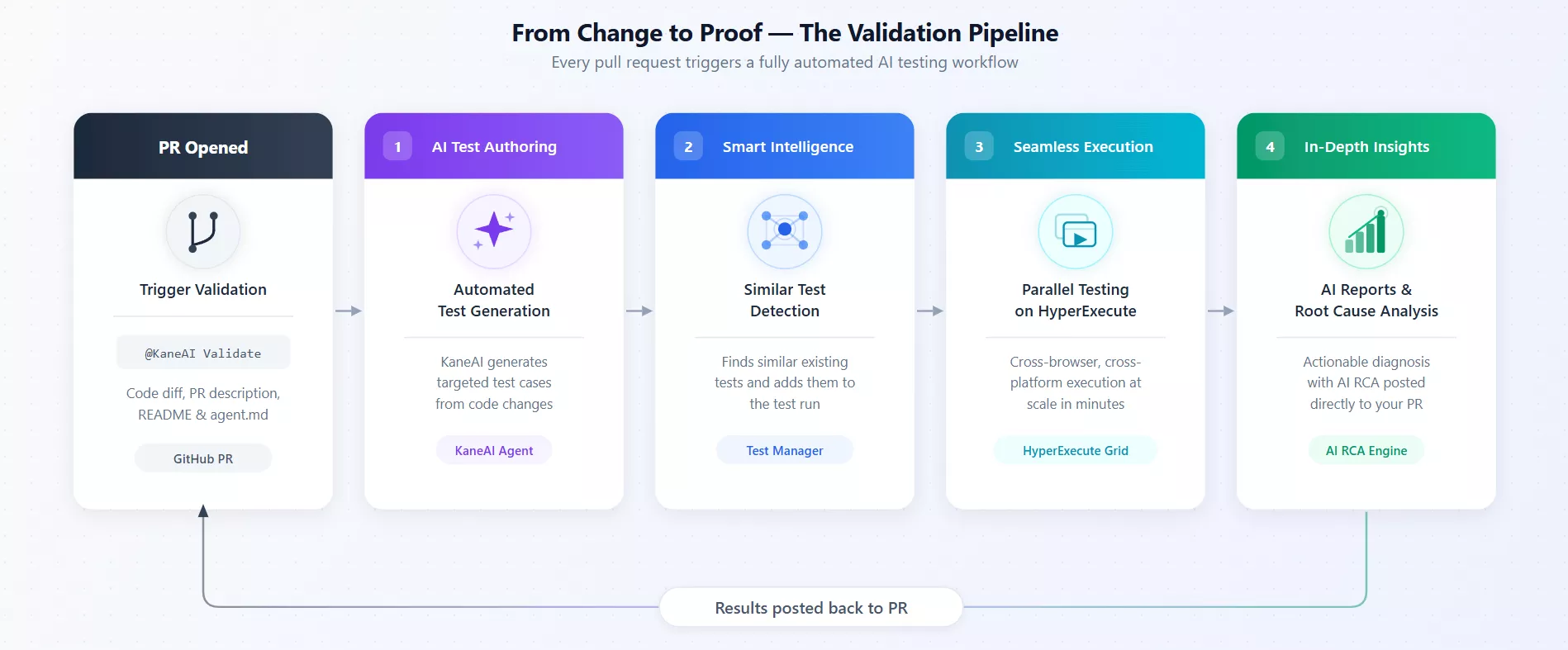
Here is what happens when KaneAI is connected to your GitHub repository:
- Developer opens a pull request (as normal). Nothing changes in how developers work. They push a branch, open a PR, write a description.
- Comment triggers the AI. Any team member posts @KaneAI Validate this PR in the PR thread. That is the only manual step.
- KaneAI reads the PR. It analyzes the code diff, the PR description, the repository README, and any custom agent instructions in agent.md. It builds an understanding of what changed and why.
- Test cases are generated. KaneAI writes test cases that reflect actual business logic, not generic boilerplate. It also scans your existing test library for semantically similar tests and adds those to the run.
- Tests run in parallel on HyperExecute. Everything runs across browsers, devices, and operating systems simultaneously. You get a first signal in under a minute.
- Results appear inside the PR. A progress tracker comment appears in the PR thread and updates in real time. When execution completes, KaneAI posts a final report: pass/fail per test case, an AI-generated Root Cause Analysis for any failures, and a PR approval recommendation.
The developer never leaves GitHub. The QE engineer reviews outcomes, not scripts.
What KaneAI Brings to Every PR
Under the hood, several capabilities work together to make every pull request a self-validating artifact, from test generation to root cause analysis, all inside GitHub.
- Automated AI Test Authoring: KaneAI reads the code diff, PR description, README, and agent.md to generate tests tied to actual application logic. Every test reflects the specific changes in that PR.
- Smart Intelligence and Semantic Test Matching: On every PR, KaneAI scans your existing test inventory for semantically similar tests relevant to what changed. Those tests run alongside newly generated ones. Tests written two sprints ago contribute to today's validation, automatically.
- AI Root Cause Analysis: When tests fail, KaneAI correlates screenshots, DOM state, network request logs, and stack traces into a readable, actionable diagnosis posted directly in the PR. No log-diving. No guesswork.
- PR Approval Recommendation: Based on results and failure severity, KaneAI recommends whether to approve, request changes, or investigate further. Every recommendation is permanently recorded in PR history.
- AI Test Management Traceability: Every generated test case is stored in AI test management with a unique TC ID linked directly from the PR comment. Your test inventory becomes a compounding asset.
What Automatic PR Testing Actually Changes
Shift-left has been a goal for a decade. Here is what it actually looks like when PR verification fires automatically at the moment of change, not at the end of the sprint.
Quality at the Point of Change
Every PR gets E2E coverage with no human initiating it. Tests are generated from the actual diff, not a predefined suite. Bugs are caught before review, before merge, before downstream impact, and coverage no longer depends on QA bandwidth or scheduling windows. An AI QA agent is what makes that possible on your own product: it takes intent in natural language, authors and runs the checks itself, and heals the steps that drift when the UI changes, so a QE engineer signs off on the plan instead of hand-writing every scenario a diff touches.
Consistent Coverage, Every PR
Right now, knowing which tests to run depends on who reviews the PR. That knowledge lives in one person's head and breaks down as teams grow. KaneAI reads the code change, identifies what needs to be tested, and pulls the right existing tests automatically, the same coverage quality for every developer, every time, regardless of experience level.
Quality as a Continuous Signal
Traditional QA sits at the end: build, test, ship. By the time a bug is found, it is expensive to fix and PRs are piled up waiting. With KaneAI, every PR gets its own parallel run, failures come with root cause analysis not just a status, and results are posted in the PR thread before code review wraps up.
Zero Coordination Overhead
Nobody tracks the time burned on QA coordination, developer pings QA, QA schedules a run, developer follows up, results land in Slack, developer switches tools to check them. That chain burns two to three hours per PR before a test runs. One comment triggers everything. The entire loop disappears.
A Test Library That Compounds
Most test suites are written once and slowly go stale. With KaneAI, every PR generates new tests stored in AI test management and surfaced in future runs. The more PRs that run through KaneAI, the more relevant and complete the library becomes, coverage improving continuously, not just when someone schedules a test authoring sprint.
Enterprise Traceability Without Enterprise Overhead
Every run is logged: environments tested, test cases executed, pass/fail outcomes, AI recommendations. For teams with compliance or regulatory requirements, the audit trail is built in from day one, no separate tooling, no pulling QA into documentation work.
How to Set It Up
- Install the TestMu AI Cloud GitHub App from GitHub Marketplace.
- Grant access to the repositories you want covered.
- Add a .lambdatest/config.yaml file with your project ID, folder ID, assignee, and environment ID (all visible on the integration settings page after install).
- Optionally add an agent.md file to give KaneAI custom instructions, testing priorities, scenarios to skip, and domain-specific rules.
- Open any pull request and post @KaneAI Validate this PR.
Go through the support documentation to run it. The first pull request verification run typically completes within minutes.

Real Impact This Creates
| What Changes | Before KaneAI | With KaneAI |
|---|---|---|
| Bug detection point | Staging or production | Inside the PR thread |
| Time to fix an integration bug | Hours post-merge | Minutes pre-merge |
| Test coverage per PR | Partial or none | Automated on every PR |
| QE time on regression testing scripts | Majority of capacity | Near zero |
| Existing tests per PR | Run on schedule only | Semantically matched and included automatically |
| Failure diagnosis | Manual log investigation | AI RCA posted in PR |
| Audit traceability | Requires separate tooling | Built in via Test Manager |
| Developer feedback loop | Hours | Under a minute |
Export Test Scripts Straight to GitHub as a PR
Generating a test is only half the job. Getting that test script code into your repo, right folder, right branch, PR open and ready for review, still takes manual steps after most tools are done with you.
KaneAI handles that last mile. Once a test case is authored, hit Create PR. The test file lands in your GitHub or GitLab repo, organized by project name, test ID, and version number, with a branch created and a PR open. No ZIP files.
Enable Auto-PR and even that click disappears, a PR is raised automatically every time code generation completes.
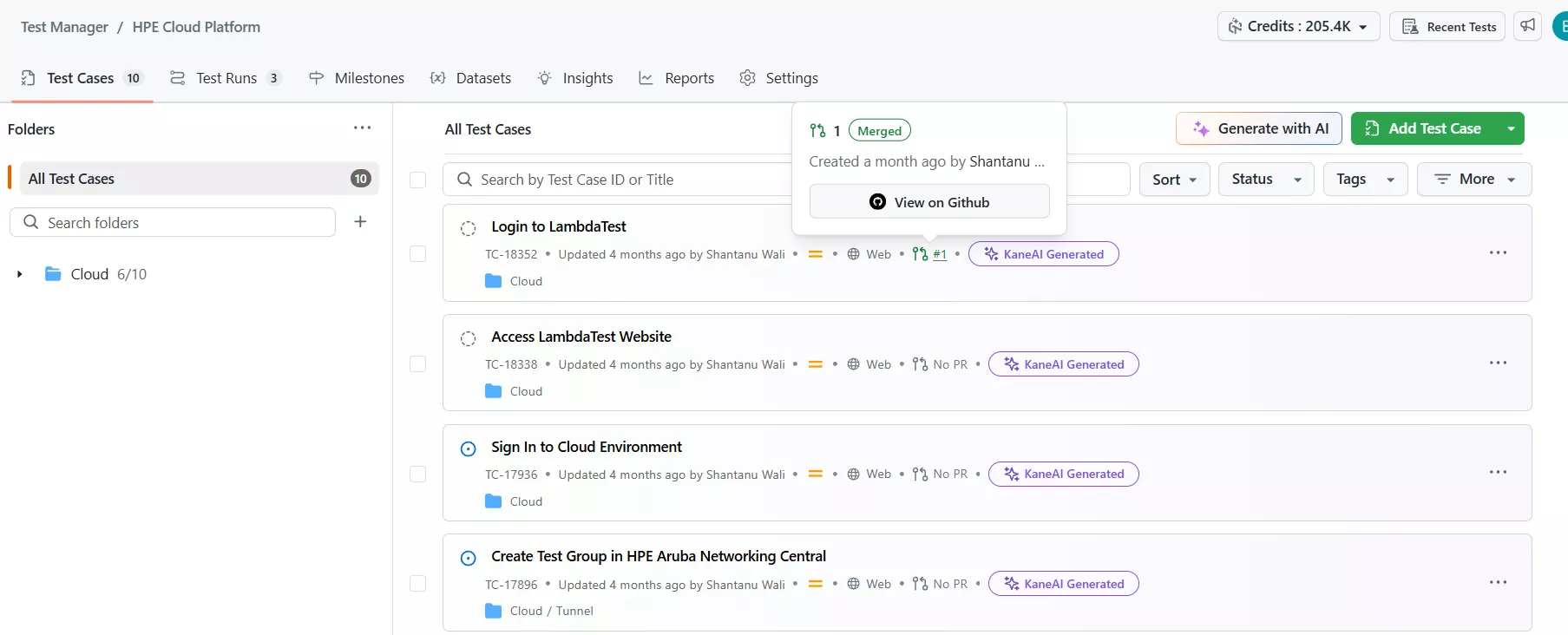
Each test case in AI test management shows its PR status inline. You can see at a glance what is Open, Merged, Closed, or has a Diff Available, meaning the test code has changed since the last PR was created and needs a new one. The Create PR button only appears when there is actually something new to push, so you are never raising duplicate PRs.
Closing Thought
AI-native PR testing does not replace your QA team, it makes them faster. Instead of writing boilerplate test scripts, they are reviewing results, triaging meaningful failures, and building institutional knowledge.
Note: This article was researched and drafted with AI assistance, then reviewed, fact-checked, and published by Bhavya Hada, Community Contributor at TestMu AI, whose listed expertise includes Automation Testing and Software Testing. Every link and product claim was verified against primary sources. Read our editorial process and AI use policy for details.
Author

Bhavya Hada
Blogs: 28


Bhavya Hada is a Community Contributor at TestMu AI with over three years of experience in software testing and quality assurance. She has authored 20+ articles on software testing, test automation, QA, and other tech topics. She holds certifications in Automation Testing, KaneAI, Selenium, Appium, Playwright, and Cypress. At TestMu AI, Bhavya leads marketing initiatives around AI-driven test automation and develops technical content across blogs, social media, newsletters, and community forums. On LinkedIn, she is followed by 4,000+ QA engineers, testers, and tech professionals.


PR Testing FAQs
Did you find this page helpful?
More Related Blogs
TestMu AI forEnterprise
Get access to solutions built on Enterprise
grade security, privacy, & compliance
- Advanced access controls
- Advanced data retention rules
- Advanced Local Testing
- Premium Support options
- Early access to beta features
- Private Slack Channel
- Unlimited Manual Accessibility DevTools Tests