
Agent Assurance for your AI Deployment
Test how your agents actually behave across workflows, tools, and actions. Catch failures and vulnerabilities before they ship.
npm install -g @testmuai/rook@latest
AI Risk Assessment: A Step-by-Step Method and Scoring Template
Run an AI risk assessment step by step: a 1 to 5 scoring template with agent amplifiers, a worked example, a control test map and a 12-point program checklist.
Published on:
Internal audit picks your customer support agent from the AI inventory and asks for its risk assessment. The one on file was written when the agent only answered questions; it has since been given a refund tool, and nobody re-scored it.
For high-risk uses in the EU, the stakes are also legal. From December 2, 2027, Article 26 of the EU AI Act gives deployers of Annex III high-risk systems duties such as assigning human oversight and monitoring the system in operation, and under Article 99(4), breaching them can draw fines of up to EUR 15,000,000 or 3% of total worldwide annual turnover, whichever is higher.
The method below adds three agent amplifiers to the usual likelihood and impact grid, because an agent that acts on its own, reads untrusted text or cannot undo its actions is riskier than the same model behind a chat box. Every control on a High risk ends in a test with dated evidence.
Overview
An AI risk assessment is a documented process for finding how an AI system could cause harm, scoring each harm by likelihood and impact, choosing controls and the tests that prove them, and recording who accepted the risk that remains. Run it before launch and again whenever the model, prompt, tools, data or permissions change.
AI Risk Assessment at a Glance
- AI risk register fields: An AI risk assessment records, for each system, the owner, purpose, model and version, data, users, and whether the system answers, recommends or acts, plus the laws and risk appetite that apply. Free template: Yes, the register layout in this guide is free to copy.
- AI risk scoring: An AI risk assessment scores each hazard from 1 to 5 for likelihood and for impact, then multiplies the two scores: 1 to 6 is Low, 8 to 12 is Medium and 15 to 25 is High.
- How AI agents raise the score: An AI agent gains 1 likelihood point when it acts without human approval, 1 more when it reads untrusted content with tool access, and 1 impact point when its actions cannot be undone, with each score capped at 5.
- Residual risk sign-off: After its controls are tested, each hazard in an AI risk assessment is scored again, and a named person with authority for that risk band accepts or rejects what is left. Named sign-off required: Yes.
- Reassessment triggers: An AI risk assessment is repeated when the model, prompt, tools, data sources, permissions or user group change, after any incident, and at the review interval your policy sets. Pre-launch only: No.
- Program-level audit: A program-level audit of AI risk assessments samples systems across the whole AI inventory and checks the risk assessments on file against a 12-point checklist, from inventory completeness to management review.
- Agent Assurance: TestMu AI's Agent Assurance supplies pre-release test evidence for AI agents that act, grading each criterion Pass, Fail or Unable to Verify against what the run changed. Auditor or certifier: No.
What Is an AI Risk Assessment?
An AI risk assessment is the documented process of identifying how a specific AI system, in a specific use, could harm the organization, individuals or society; scoring each harm by likelihood and impact; choosing controls and how each will be tested; and recording who accepted the remaining risk.
The scoring follows the definition in NIST AI 100-1, the AI Risk Management Framework, where risk is "the composite measure of an event's probability of occurring and the magnitude or degree of the consequences of the corresponding event." The same document says the framework "does not prescribe risk tolerance", so the bands and sign-off levels below are yours to set.
- Hazard - one specific way the system could cause harm, such as an agent issuing a refund the policy does not allow.
- Inherent risk - the hazard's score before any control, which decides how much control work it needs.
- Residual risk - the score with controls in place and tested, which is what a named person accepts or rejects.
- Risk register - the table that holds one row per hazard, from inventory to sign-off, and the record an auditor samples.
This guide covers assessing the AI systems your organization builds, buys or runs. Using AI as a tool inside a risk management program is a separate subject, and risk in ordinary software projects is covered in software risk analysis.
How Do You Do an AI Risk Assessment Step by Step?
Run these steps for each system in your inventory, in order. Each one leaves a record that an auditor can read later without asking you to explain it.
- Inventory the system - name, business owner and technical owner, purpose, model and version, data sources, users and channels, and whether it answers, recommends or acts.
- Set the context - who is affected, which laws and internal policies apply, and the risk appetite for this use. A use listed in Annex III of the EU AI Act, such as screening job applications, changes the rules from this step on.
- Identify hazards - write down specific ways this system could cause harm, using the hazard prompts below.
- Score each hazard - likelihood and impact from 1 to 5, adjusted by the agent amplifiers in the template.
- Choose controls and their tests - for each Medium or High hazard, pick a response (NIST AI 100-1 lists mitigating, transferring, avoiding or accepting under MANAGE 1.3), then name the test that will show each control works and the evidence it leaves.
- Re-score and get acceptance - score the residual risk with tested controls in place, and have a named person with authority for that band accept or reject it. MANAGE 1.4 asks for negative residual risks to be documented.
- Set review triggers - record the date of the next scheduled review and the changes that force an earlier one.
Hazard Prompts for AI Systems and Agents
Ask the first three questions for every system, and the last three for any agent that calls tools or takes actions:
- Which wrong output would hurt a customer, an employee or the company most?
- What happens if it makes things up, treats a group unfairly or exposes personal data?
- What happens if someone feeds it hostile input, or the vendor changes the model underneath it?
- What is the most damaging action it can take with its current permissions, and can that action be undone?
- Can text it reads, such as emails, web pages, documents or tickets, change what it does? That is the prompt injection route.
- Does it hand work to other agents that inherit its permissions, and can a person pause or stop it mid-task?
For the failure modes behind the agent questions, such as false completion reports and goal hijacking, and a test for each, see agentic AI risks.
AI Risk Assessment Template: How Do You Score AI Risks?
Score each hazard from 1 to 5 for likelihood and for impact, apply the agent amplifiers, then multiply. NIST's MAP 5.1 asks for the likelihood and magnitude of each identified impact to be identified and documented, which is what the two scales record.
| Score | Likelihood | Impact |
|---|---|---|
| 1 | Rare | Negligible |
| 2 | Unlikely | Minor |
| 3 | Possible | Moderate: customer harm that can be put right |
| 4 | Likely | Major: significant financial, legal or safety harm |
| 5 | Expected in normal use | Severe: irreversible harm or a regulatory breach |
The risk score is likelihood times impact. Band it as 1 to 6 Low, 8 to 12 Medium and 15 to 25 High; no product of two scores from 1 to 5 equals 7, 11, 13 or 14, so every score lands in a band.
Add a regulatory override: if a law classifies the use as high-risk, treat it as High for control purposes whatever its score. Annex III, point 4(a) of the EU AI Act, in the text on the Commission's AI Act Service Desk, covers AI systems "intended to be used for the recruitment or selection of natural persons", including those used "to analyse and filter job applications, and to evaluate candidates".
Agent Amplifiers
An agent that acts carries risk a chat model does not. Each amplifier adds 1 point, and no score goes above 5:
- Acts without human approval - likelihood +1, because nothing stands between a wrong decision and its effect.
- Reads untrusted content and has tool access - likelihood +1, because an instruction planted in an email or ticket can reach a tool.
- Actions cannot be undone - impact +1, because a mistake cannot be rolled back once it happens.
Risk Register Layout
Copy this layout, one row per hazard. The example values are illustrative, not data from a TestMu AI customer.
| Field | Example |
|---|---|
| System and hazard ID | SUP-AGENT-03 |
| Hazard | Agent issues a refund the policy does not allow |
| Affected party | Company (financial loss), customer (trust) |
| Likelihood, base and amplified | 3, raised to 5 |
| Impact, base and amplified | 3, unchanged |
| Inherent score and band | 15, High |
| Controls | Approval above $50; refund cap of $200; injection tests in every release suite; kill switch |
| How each control is tested | Scenarios with over-limit and injected requests; a read of refund totals after the run; a containment drill |
| Evidence | Dated test run with a verdict per criterion; drill record |
| Residual score | 2 x 3 = 6, Low |
| Accepted by and date | [Name, role], [date] |
| Next review and triggers | 6 months, or any model, prompt or tool change |
Worked Example: Three AI Systems Scored
The same template applied to three illustrative systems, from a reviewer's assistant to a hiring model:
| System and hazard | Base score | Amplifiers or override | Key controls | Residual |
|---|---|---|---|---|
| A. Code-review assistant that suggests comments with no write access; it misses a security flaw a reviewer then trusts | 3 x 2 = 6, Low | None | Human review stays mandatory; a monthly sampled check | 2 x 2 = 4, Low |
| B. Support agent that issues refunds up to $200; it refunds against policy | 3 x 3 = 9, Medium | Acts without approval and reads customer messages with tools: likelihood 5, so 5 x 3 = 15, High | Approval above $50; refund cap; injection and over-limit tests; kill switch | 2 x 3 = 6, Low |
| C. Applicant-ranking model used by recruiters; it ranks a protected group unfairly | 3 x 4 = 12, Medium | No amplifier (a recruiter decides); overridden to High as an Annex III employment use | Outcome comparison by group; human review of every rejection; records for the deployer duties of Article 26 | 2 x 4 = 8, Medium, accepted by the HR director with legal |
System B shows what the amplifiers change. Without them the refund agent scores 9, Medium; with them it scores 15, High, and the controls that bring it down, an approval threshold and injection tests, are the ones a plain grid gives no reason to require.
Checking the Refund Agent With the AI Agent Risk Scorer
For a first pass before the full register, TestMu AI's free AI Agent Risk Scorer rates an agent on 10 questions across five dimensions: autonomy and oversight, data access and memory, action scope and blast radius, exposure surface, and reversibility and safeguards.
System B was run through it on November 20, 2026, as the agent stands before any control: it acts alone with humans spot-checking samples, reads personal data, can move money, reads emails and tickets, replies to customers directly, takes days to clean up after a bad refund, and keeps basic logs nobody reviews.
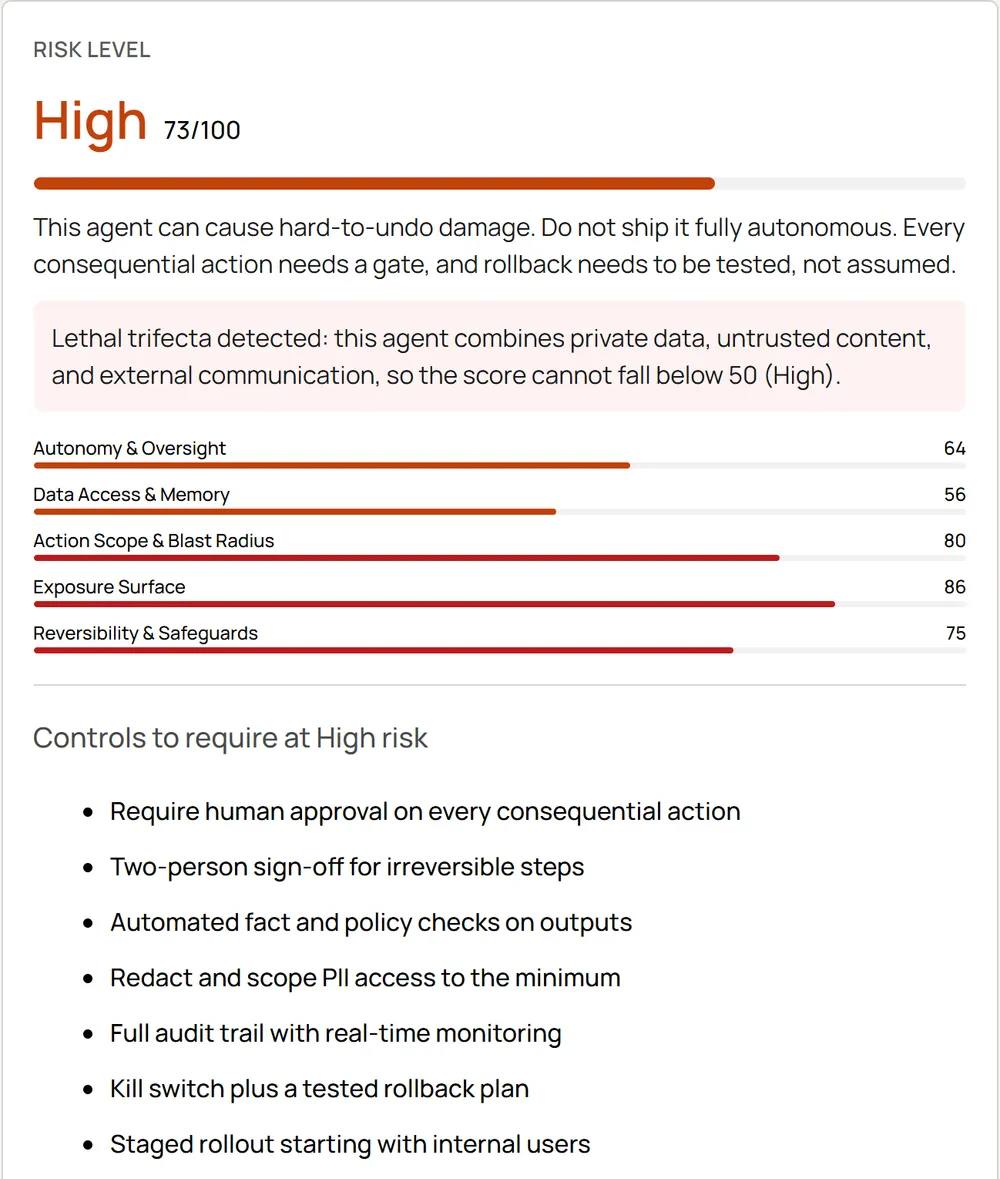
The AI Agent Risk Scorer returned 73/100, High, flagged that the agent combines private data, untrusted content and external communication, and named Exposure Surface (86/100) as the highest-risk dimension. The scorer's 0 to 100 scale is not the register's 1 to 25 score: use it to decide which agents get the full assessment first, then record their hazards and controls in the register.
How Is an AI Risk Assessment Different From an Impact Assessment and an Audit?
The three answer different questions, and ISO/IEC 42001:2023, the AI management system standard, gives each its own clauses. The clause titles below come from the standard's table of contents in its IEC Webstore preview.
| AI risk assessment | AI system impact assessment | AI audit | |
|---|---|---|---|
| Question | What could go wrong, how likely and how bad, and how will it be treated? | What effects could this system have on individuals, groups and society? | Are the assessments and controls real, and do they work? |
| Done by | System owner with risk, security and legal | System owner with input from affected groups | Internal audit, or an outside auditor or certification body |
| Output | Scored risk register, controls, residual risk sign-off | Impact record that feeds the risk assessment | Findings and an opinion |
| ISO/IEC 42001 clauses | 6.1.2 and 8.2 AI risk assessment; 6.1.3 and 8.3 AI risk treatment | 6.1.4 and 8.4 AI system impact assessment | 9.2 Internal audit |
The standard places risk assessment, risk treatment and impact assessment twice: under Planning (6.1.2 to 6.1.4) and again under Operation (8.2 to 8.4). Internal audit (9.2) and management review (9.3) sit under Performance evaluation, which is where the 12-point checklist later in this guide applies.
When Do You Need an AI Risk Assessment?
Run one before an AI system goes live, and again when any of these happen:
- The model, prompt, tools or a data source changes, including a model update the vendor ships.
- The system gets new permissions, such as the ability to take actions instead of only answering.
- It reaches a new user group, market or channel.
- An incident or a near miss involves it.
- A law or an internal policy that applies to it changes.
- The last assessment is older than the review interval your policy sets.
For providers of high-risk systems, Article 9(2) of the EU AI Act, in the text on the Commission's AI Act Service Desk, describes the risk management system as "a continuous iterative process planned and run throughout the entire lifecycle" that requires "regular systematic review and updating". The testing that Article 9 expects from a provider is the subject of EU AI Act conformity testing.
How Does an AI Risk Assessment Map to NIST, ISO/IEC 42001 and the EU AI Act?
One assessment can feed all three where they overlap. The mapping below is this article's reading of NIST AI 100-1, the ISO/IEC 42001 clause titles and the AI Act, not an official crosswalk, and the EU column applies only where the AI Act applies to you.
| Assessment step | NIST AI RMF 1.0 | ISO/IEC 42001:2023 | EU AI Act |
|---|---|---|---|
| Inventory and context | MAP | 4 Context of the organization; 6.1.2 | Article 6 and Annex III: is the use high-risk? |
| Identify and score risk | MAP 5.1; MEASURE | 6.1.2 and 8.2 | Article 9 risk management system, for providers of high-risk systems |
| Impact on people | MAP | 6.1.4 and 8.4 | Article 27 fundamental rights impact assessment, for certain deployers |
| Controls and tests | MEASURE; MANAGE 1.2 to 1.4 | 6.1.3 and 8.3; Annex A controls | Articles 9 and 15 (accuracy, robustness and cybersecurity) |
| Third-party AI | GOVERN 6.1 | Annex A controls | Article 26, obligations of deployers of high-risk systems |
| Oversight and review | MANAGE 2.4; GOVERN | 9.2 Internal audit; 9.3 Management review | Article 14 human oversight |
- NIST AI RMF 1.0 - released January 26, 2023, with four functions, Govern, Map, Measure and Manage; the Generative AI Profile, NIST AI 600-1, followed on July 26, 2024. NIST's AI RMF page says version 1.0 "is being revised as part of the White House AI Action Plan".
- ISO/IEC 42001:2023 - edition 1.0, published in December 2023 by ISO/IEC JTC 1/SC 42, per its IEC Webstore listing. It sets requirements for an organization's AI management system, not for a single model.
- EU AI Act - in force since August 1, 2024. After the Digital Omnibus on AI, Regulation (EU) 2026/1744, the AI Act Service Desk timeline shows the Annex III high-risk rules applying from December 2, 2027 and the Annex I rules, for AI in regulated products, from August 2, 2028.
The legal reading of these texts belongs to your counsel; this is engineering guidance, not legal advice. For the functions and subcategories in depth, see NIST AI RMF, and for the policies, roles and committees around the assessment, see AI governance framework.
How Do You Test Each AI Control and Record the Evidence?
For the full set of documents an auditor requests, see what evidence an AI audit asks for. This section goes control by control, because a residual score only holds if the control behind it was tested after the system's last change.
| Control | How to test it | Evidence to keep |
|---|---|---|
| Action limits, such as a refund cap and an approval threshold | Scenarios that ask for over-limit actions, then a read of the system of record to confirm nothing over the limit happened | Dated run with a verdict per criterion and the end state read back |
| Prompt injection resistance | Instructions planted in the emails, documents and tickets the agent reads | The attack list, results, and the transcript of every failure |
| Factual accuracy of answers drawn from documents | A claim-level sample checked against the source documents for groundedness, with two reviewers on part of it | Sample design, rates per claim type and reviewer agreement |
| Human oversight and kill switch | A containment drill: an authorized person pauses or stops the agent mid-task | Drill record with timings and who acted |
| Fairness | Outcomes compared across groups on a labelled set | Method, data description and results by group |
| Vendor model change control | The test suite re-run on every notified model or version change | The change notice and the matching re-test run |
The containment drill answers NIST's MANAGE 2.4, which asks for mechanisms to "supersede, disengage, or deactivate AI systems", and vendor change control answers GOVERN 6.1 on AI risks associated with third-party entities.
- Dated after the last change - evidence older than the latest model, prompt or tool change says nothing about the system now in production.
- Readable without the tool - an auditor should be able to open the record without a login to the system that produced it.
- Graded by something else - the model or team that grades a run should not be the one under test.
What Do Auditors Check Across Your AI Risk Assessments?
A program-level audit looks across all of your AI systems rather than at one. Internal audit or an outside auditor samples systems from your inventory and checks that the assessment process ran and that the controls work, so score yourself against this 12-point checklist and its pass conditions first.
| # | Check | Pass condition |
|---|---|---|
| 1 | Inventory completeness | The AI inventory reconciles with procurement records, single sign-on app lists and cloud AI service usage, and the sample finds no unlisted production AI system |
| 2 | Coverage | Every in-scope system has a risk assessment |
| 3 | Currency | Each assessment is dated after the system's last model, prompt, tool or data change, and within the review interval |
| 4 | Ownership | Each system has a named business owner and technical owner who confirm the role |
| 5 | Scoring consistency | Two sampled assessments of similar systems use the same scales and bands, and the regulatory override is applied where it should be |
| 6 | Control-to-test mapping | Every control on a High risk has a defined test and evidence type |
| 7 | Test evidence | Evidence exists, is dated after the last change, and shows pass, fail or unable to verify for each criterion |
| 8 | Residual risk acceptance | An authorized person accepted each residual risk, at the level set for its band |
| 9 | Human oversight | For agents that act, a containment drill was run and recorded |
| 10 | Third-party AI | AI supplied by vendors is in the inventory with its own assessment and re-test triggers |
| 11 | Incidents | AI incidents are logged, linked to the affected assessment, and reported within the time your policy and the applicable law set |
| 12 | Management review | Leadership reviewed AI risk at the planned interval (ISO/IEC 42001 clause 9.3) and the actions were tracked |
- Regulatory override (item 5) - a use a law classifies as high-risk is treated as High whatever its score, as set out in the scoring template above.
- Unable to verify (item 7) - the evidence needed to judge a criterion was missing, so it counts as neither a pass nor a fail.
- Containment drill (item 9) - a recorded exercise in which an authorized person pauses or stops the agent mid-task.
Currency (item 3) and test evidence (item 7) both depend on re-testing after every change, so run the control tests from your release pipeline rather than once a year. For legal reporting deadlines behind item 11, see AI incident reporting.
How Does Agent Assurance Produce Test Evidence for Agent Controls?
TestMu AI is not an auditor and certifies nothing. Its Agent Assurance tests AI agents that act, by calling tools, writing files or changing records, before release, and keeps evidence your risk owners and auditors can review.
Its terminal client, Rook CLI, derives scenarios from the agent's code or spec and from your PRD and policy documents. Functional and adversarial scenarios are generated by default, every scenario carries acceptance criteria, and the run calls the real agent through an invocation profile you review.
- Verdict per criterion - each acceptance criterion is graded Pass, Fail or Unable to Verify against evidence of what the run did: the tool calls it observed, checked against the tools the agent declares, the files that changed, and read-only checks through a tool you approve. Unable to Verify stays out of the pass rate.
- Adversarial scenarios - attacks such as prompt injection, jailbreak, data exfiltration, PII leakage, hijacking and policy violation, mapped to the OWASP Top 10 for LLM Applications (2025), the OWASP Top 10 for Agentic Applications (2026) and MITRE ATLAS. The mapping shows security test coverage, not compliance.
- Run-over-run change - the pass-rate change between your last two runs and the scenarios that newly fail or were fixed, which is what checklist item 3 needs after a model or prompt change.
- Plain-file evidence - each run's verdicts and quoted evidence stay as plain files inside your project, and published recipes run it in CI on GitHub Actions, Jenkins and Argo CD.
Anything the agent writes during a run really happens and nothing undoes it, so run it against staging with synthetic data, and check run files for personal data before you share them. Whether your organization meets ISO/IEC 42001, the NIST AI RMF or the EU AI Act is a call for your compliance team and auditors, and Agent Assurance has no mapping to any of those texts.
For agents that talk rather than act, TestMu AI's Agent Testing tests chat, voice, phone, video and image agents and grades what they say.
Agent Assurance is generally available on TestMu AI's self-serve plans, and the pricing page's FAQ describes a 14-day free trial with 4,000 credits and the Pro features, alongside the Agent Assurance plans. Install Rook CLI with npm, which needs Node.js 20 or newer:
npm install -g @testmuai/rook@latest
rook --version
To see what a run leaves on disk, read Agent Assurance results and evidence in the docs. Start the free trial from the banner below, and to discuss an Enterprise plan, Book a Demo.

Which AI System Should You Assess First?
Start with the agent that can move money or change records without approval. Rate it with the AI Agent Risk Scorer, add its hazards to the register, and list the tests its High-risk controls need before internal audit samples it.
Then check the whole program against the 12-point checklist, starting with currency (item 3), since an assessment written before the agent gained its tools describes a different system.

Note: AI assistance was used in researching and drafting this article. Vipul Verma (Group Senior Vice President of Engineering at TestMu AI, expertise in engineering leadership and enterprise architecture) verified every statistic, link, and product claim against primary sources: NIST, the IEC Webstore listing and preview of ISO/IEC 42001:2023, the European Commission's AI Act Service Desk and TestMu AI's product documentation, following our editorial process and AI use policy. The worked example and scores are illustrative, and nothing here is legal advice.
Author

Vipul Verma
Blogs: 15

Vipul Verma is Group Senior Vice President of Engineering at TestMu AI, where he heads the entire engineering organization that builds KaneAI, HyperExecute, and the broader testing cloud. He brings 15+ years architecting, securing, and scaling large enterprise applications across multiple sites. Before TestMu AI he was India Head at LogicHub, where he built the India R&D site from the first employee to a 30-plus engineering team, and Principal Software Engineer at Sumo Logic, where he was the first engineer in the India office and shipped search-performance and pricing-model initiatives. Earlier he worked on trading platforms at Portware and D. E. Shaw. Vipul holds a B.Tech in Computer Science from IIT Kharagpur.
Reviewer

Samyak Goyal
Reviewer
Samyak Goyal is a Senior Member of Technical Staff at TestMu AI engineering Kane CLI, the command-line tool that runs browser automation from the terminal, where a flow described in natural language executes in a real Chrome browser and returns pass or fail with shareable proof. He is a backend engineer with 4+ years of experience, previously an SDE at Innovaccer, where he built APIs, introduced Kafka, and cut deployment from weeks to hours. Samyak also builds multi-agent systems, skill-orchestration frameworks, and a personal copilot that indexes 200+ microservice repositories.


AI Risk Assessment FAQs
Did you find this page helpful?
More Related Blogs

TestMu AI forEnterprise
Get access to solutions built on Enterprise
grade security, privacy, & compliance
- Advanced access controls
- Advanced data retention rules
- Advanced Local Testing
- Premium Support options
- Early access to beta features
- Private Slack Channel
- Unlimited Manual Accessibility DevTools Tests