

Power Your Software Testing with AI Agents and Cloud
The Native AI-Agentic Cloud Platform to Supercharge Quality Engineering. Test Intelligently and Ship Faster.


- TestMu AI (Formerly LambdaTest)
- /
- Blog
- /
- Web Accessibility: WCAG Levels and the Four Delivery Phases
Web Accessibility: WCAG Levels and the Four Delivery Phases
Accessibility means more than passing a checklist. See what the WCAG conformance levels require and how to build it into design, development, and testing.
Last Updated on:
Web accessibility means building products that every user can operate, including people with permanent disabilities and people facing situational limits. The Web Content Accessibility Guidelines set three conformance levels, A, AA, and AAA, and WCAG 2.2 added nine success criteria, including a Level AA target size of 24 by 24 CSS pixels. This guide covers how companies should think about accessibility, the global standard, what WCAG conformance requires, where to start across the four delivery phases, how AI changes accessibility testing, and what teams can expect.
Key Takeaways
- Accessibility covers situational limits as well as permanent disability, such as a customer who can only use one hand on a mobile app while carrying bags in the other.
- The Web Content Accessibility Guidelines, published by the Web Accessibility Initiative at the World Wide Web Consortium, define four principles and three conformance levels: A, AA, and AAA.
- WCAG 2.2 became a W3C Recommendation on 12 December 2024, keeping every WCAG 2.1 criterion and adding nine more, including a Level AA pointer target size of at least 24 by 24 CSS pixels.
- WCAG conformance is claimed for a full web page rather than a single component, and every page in a process such as selecting and buying a product has to conform at the same level.
- Accessibility work belongs in all four delivery phases: analysis and planning, design, development, and testing.
- Automated accessibility checks catch only 40 to 50 percent of accessibility issues, so keyboard navigation, color contrast, and assistive device checks still need manual testing.
How should companies think about accessibility?
In many cases, people/teams look at accessibility as a technical aspect to tick off from a list. While that is partly true, it isn't the whole picture. Similarly, people assume that accessibility is about ensuring that specially-abled folks are able to seamlessly use your product. Again true, but is that all it is?
How about this use case? Imagine there's a customer of yours who is using your app while carrying two bags in one hand. Can they use your app with just the other hand? That's accessibility too! Imagine if you did solve it, you'd have earned a loyal customer who knows that your company is going the extra mile!
It really is about putting yourself in the shoes of every possible user/every possible scenario of/for your product.
Just to dig a bit deeper, accessibility can be thought of in three distinct sub-divisions.
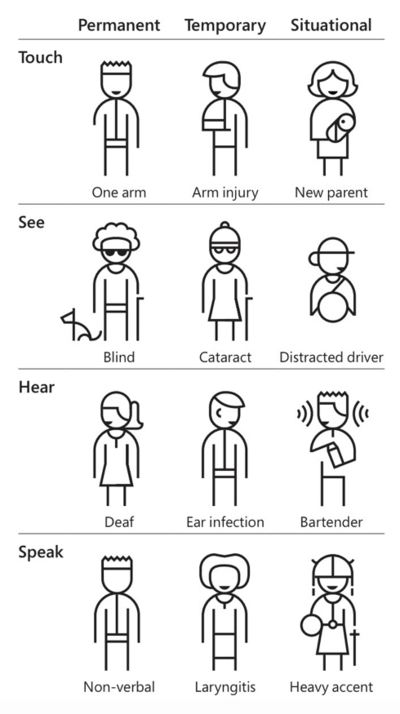
Source- Microsoft Inclusive Design Kit
If your app/digital asset isn't accessible, you are creating barriers & making their impairment a disability. Be inclusive and your brand will reap benefits!

Austin Siewert
Co-Founder, Steadfast Systems
Discovered @TestMu AI yesterday. Best browser testing tool I've found for my use case. Great pricing model for the limited testing I do 👏
2M+ Devs and QAs rely on TestMu AI
Deliver immersive digital experiences with Next-Generation Mobile Apps and Cross Browser Testing Cloud

Key Takeaway: Accessibility means designing for every situation a person can be in, including a customer operating an app one-handed, not only for permanent disability.
What's the global standard?
A question I often get asked is, how can my business achieve global standards? Is there a benchmark?
Yes!
The Web Accessibility Initiative at the World Wide Web Consortium outlined four main web accessibility principles in the Web Content Accessibility Guidelines: WCAG.
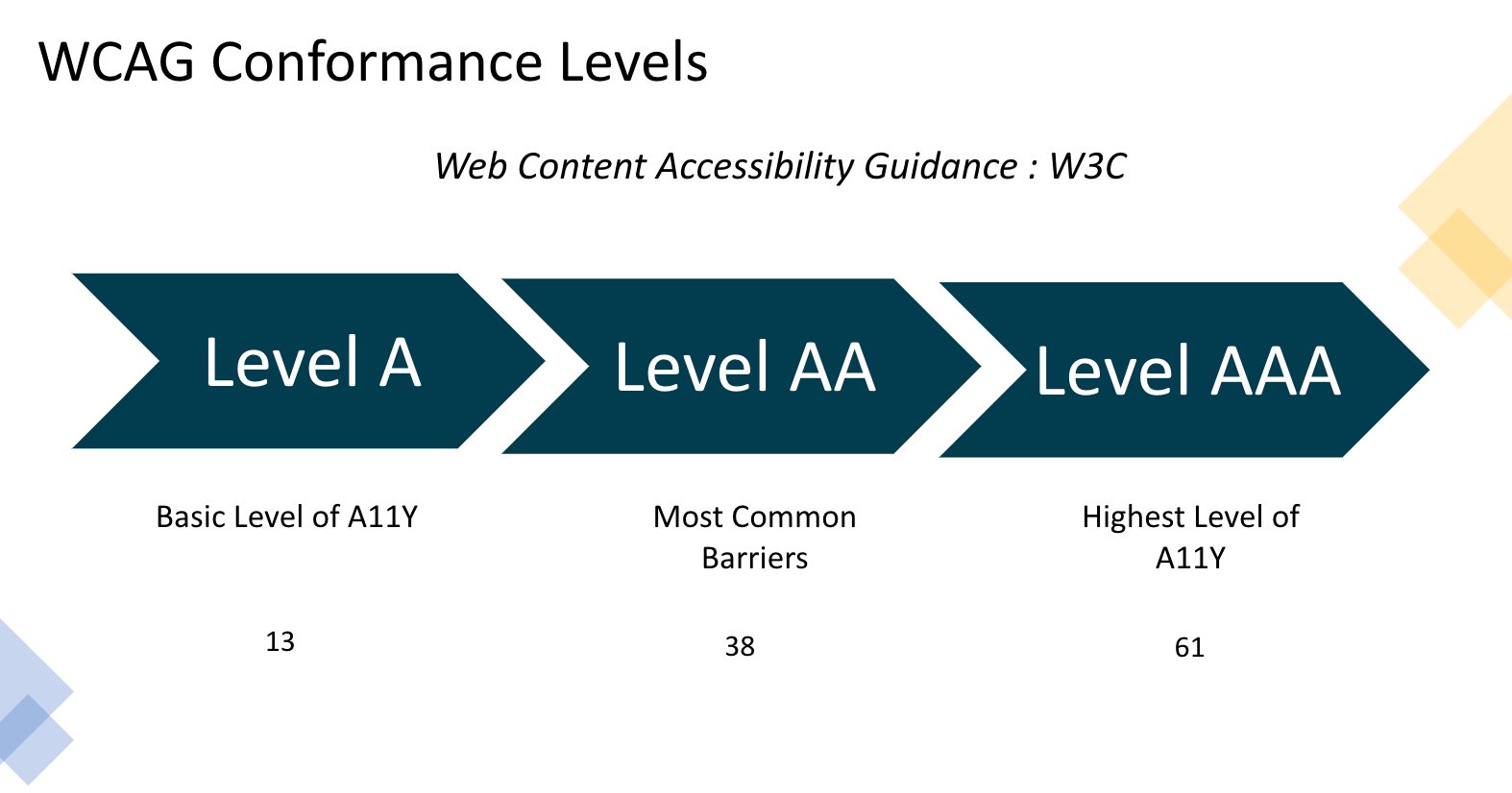 Given that there are three levels of accessibility: A, AA, and AAA. Each level comes with its set of 'targets'.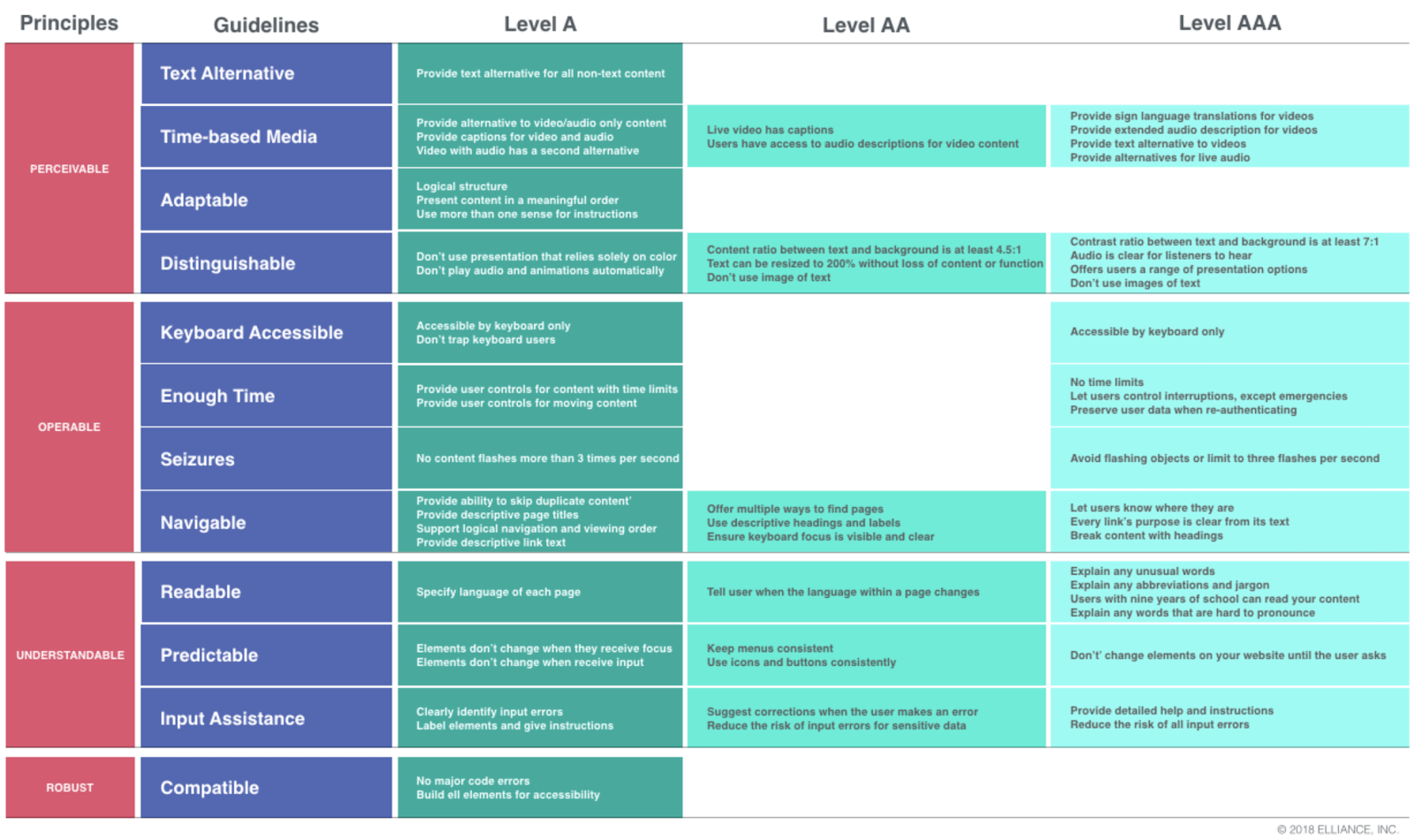
WCAG 2.2 is the current W3C Recommendation, published on 12 December 2024. It keeps every WCAG 2.1 criterion and adds nine more, including Target Size (Minimum), which asks for pointer targets of at least 24 by 24 CSS pixels at Level AA, plus Focus Not Obscured, Dragging Movements, Redundant Entry, and Accessible Authentication. Success criterion 4.1.1 Parsing was removed, so an audit written against WCAG 2.0 or 2.1 will miss the newer checks.
Key Takeaway: The Web Content Accessibility Guidelines are the global accessibility benchmark, with three conformance levels of A, AA, and AAA, and WCAG 2.2 has been the current W3C Recommendation since 12 December 2024.
What does WCAG conformance actually require?
WCAG conformance is claimed per page, not per component. The W3C conformance requirements state that conformance is for full web pages only and cannot be achieved if part of a web page is excluded, so repairing one broken widget does not move a page from Level A to Level AA. A full page also covers each variation the page presents at different screen sizes, which means every responsive breakpoint has to hold.
The next requirement is complete processes. When a page is one step in a sequence, such as selecting and buying a product, every page from the first step to checkout has to conform at the same level or better. An accessible product page and an inaccessible payment step fail together. A further requirement, non-interference, reaches technology you never relied on for the claim. Four success criteria apply to all content on the page even when it is not relied upon, because failing them can block any use of the page: 1.4.2 Audio Control, 2.1.2 No Keyboard Trap, 2.2.2 Pause, Stop, Hide, and 2.3.1 Three Flashes or Below Threshold.
Publishing a conformance claim is optional, but a claim you do publish has to carry all the information a claim requires, including the date, the WCAG version and level, the pages in scope, and the content technologies relied upon. Where part of a page comes from a source you do not control, such as user comments, a plugin or an embedded widget, the guidelines allow a partial conformance claim and say plainly that this is a statement of non-conformance. They also warn that third party content can change without the page author approving it, so a page that conformed last quarter may fail today. Decide the target level, the page scope and the process scope before the work starts, and treat third party content as something you monitor rather than audit once.
Key Takeaway: WCAG conformance applies to a full web page and to every page in a complete process, so an inaccessible payment step fails the whole purchase flow no matter how accessible the product page is.
Where can companies start with accessibility?
The first thing to do is to come up with a plan to bring in a continuous culture of unlearning and learning across functions in the firm. It is prudent for companies to conduct workshops on A11Y to understand, deep dive, and create accessible components.
The mantra that has to be instilled through these workshops is this: Accessibility (A11Y) is not "someone else's job"; Accessibility is everyone's responsibility.
For starters, accessibility can be divided into four phases, initially:
1- Accessibility in the Analysis and Planning Phase
Taking off from the WCAG conformance levels, you can first understand the guidelines and select the level you want to adhere to. The next thing to do is to advocate inclusive design practices. This includes coming up with a product roadmap with user personas that includes special abilities/situations. The end goal of this product roadmap must be to make any interaction with your digital asset more human-centered, natural, and contextual.
Also, early planning will ensure reduced legal risks and improve the customer experience of your brand.
In the European Union that legal risk is now concrete. The European Accessibility Act, Directive (EU) 2019/882, covers consumer products and services such as e-commerce sites, banking services, e-books, ticketing and check-in machines, computers, and smartphones. Its requirements apply from 28 June 2025, so decide during planning which of your products fall in scope.

2- Accessibility in the design phase
The prudent thing to do when it comes to design is to set the foundation right. Begin by defining your design ethos. Introduce your design kit (with inclusive color contrast) like Atlassian does, Global Experience Language (GEL) like BBC, and bake in A11Y into your ethos. And start as early as possible with UX prototypes. More importantly, do your research and avoid a design that is known to be inaccessible.
3- Accessibility in the development phase
This phase of accessibility can be defined in one line: design what everyone can use and not what is easy to develop. The workshops I mentioned above will be helpful here as engineers need to think inclusively. It is important that engineers research Web Accessibility Initiative- Accessible Rich Internet Applications (WAI-ARIA). It specifies how companies can increase the accessibility of web pages and UI components.
Finally, the team must ponder on getting the focus order right. Focus order helps design the interaction in such a way that people with mobility impairments who rely on keyboard access to operate a page can do so in a logical, usable focus manner.
4- Accessibility in the testing phase
Testing is the cornerstone of accessibility. You must test extensively. This testing must involve people with special abilities to get actual user feedback. Do add A11Y tests as part of your build, across all levels of the test pyramid. Based on my experience, automated accessibility testing is not a silver bullet, but it is still good enough for 40-50% of A11Y issues.
You must test for:
- Keyboard navigation
- Touch target size
- Landmarks
- Color contrast ratio
- Form labels,
and, also test with assistive devices.
Key Takeaway: Companies can start accessibility with cross-functional A11Y workshops and then carry it through four phases, from choosing a WCAG conformance level during planning to testing with assistive devices.
How does AI change accessibility testing in 2026?
AI changes the triage and the guidance around accessibility testing, not the rules themselves. Deterministic engines still do the detection. Deque publishes an automated accessibility coverage report built on more than 13,000 pages and close to 300,000 issues, and it puts axe-core at 57.38 percent of accessibility issues found automatically. That figure is counted by issue volume rather than by success criteria, which is why it reads higher than the older per-criterion number. Either way, a large share of the work is left over.
The practical addition in tools such as axe DevTools is the guided test. It is a structured workflow that walks an engineer who is not an accessibility specialist through the checks a scanner cannot settle on its own, such as whether alternative text actually describes the image or whether the heading structure matches the visible page. Generative models help most at this point. They draft the explanation, suggest a fix, and cut the time a developer spends working out what a violation report means.
The limitation is structural rather than a question of model quality. Focus order during a dynamic update, or whether a screen reader announcement makes sense in context, needs a person to judge the experience. Treat AI as a layer over the same four phases described above. Use the rule engine as the hard gate in your build, use guided workflows for the criteria that need judgement, and keep testing with people who use assistive devices every day.
Key Takeaway: AI speeds up triage, explanation, and remediation drafting, but detection still rests on rule engines such as axe-core, and the criteria that need human judgement stay manual.
So, what can companies expect by focusing on accessibility?
There is no right answer here. It really depends on how deep you can go into this rabbit hole. Trust me, it pays rich dividends.
Just to drive home the point, here's an anecdote. I was working with a large national bank in the ANZ region for one of my previous assignments. We worked ground-up to make their mobile app more accessible. The end result: 6X increase in app usage.
Accessibility does reward you and after all, it is the right thing to do!


Key Takeaway: Accessibility work pays back in usage: a large national bank in the ANZ region recorded a 6X increase in app usage after its mobile app was rebuilt to be more accessible.
Author

Manoj Kumar
Blogs: 1


Manoj Kumar Kumar is a software quality engineering and testing leader with 14+ years of experience across test automation, quality engineering, accessibility, and AI-driven testing. He specializes in Selenium, Appium, model-based automation, CI/CD integration, visual testing, accessibility testing (WCAG), and large-scale test frameworks, and is a Project Leadership Committee member for Selenium. Manoj is the Global Director – NextGen Solutions at Planit, where he leads AI-powered and agentic testing initiatives. An active open-source contributor, conference speaker, and workshop tutor, he has authored content on Selenium and contributed to tools such as ngWebDriver and Serenity, advancing modern software testing practices globally.


Web Accessibility FAQs
Did you find this page helpful?
More Related Blogs
TestMu AI forEnterprise
Get access to solutions built on Enterprise
grade security, privacy, & compliance
- Advanced access controls
- Advanced data retention rules
- Advanced Local Testing
- Premium Support options
- Early access to beta features
- Private Slack Channel
- Unlimited Manual Accessibility DevTools Tests