
Thunder: JMeter Recorder and Script Generator
A free Chrome extension that turns a recording, cURL command or API spec into a correlated JMeter plan, checks it at one user, then runs it at scale.
Trusted by 3M+ users globally at




"We have tripled our tests and are now executing tests in less than 2 hours with 78% Faster Test Execution"


"We figured out a more efficient way to monitor system health and resolve failures earlier in lower environments."





"TestMu AI has significantly boosted our testing speed, is easy to implement, and provides exceptional support."


"With 70% faster test execution, TestMu AI helped us achieve faster time-to-market and enhanced CX."



How Thunder Builds a Load Test
A release ships next week and the load test is due Friday. Follow one plan from the files your team has to a run on HyperExecute.
 START FROM ANY SOURCE
Start From the Files You Already Have
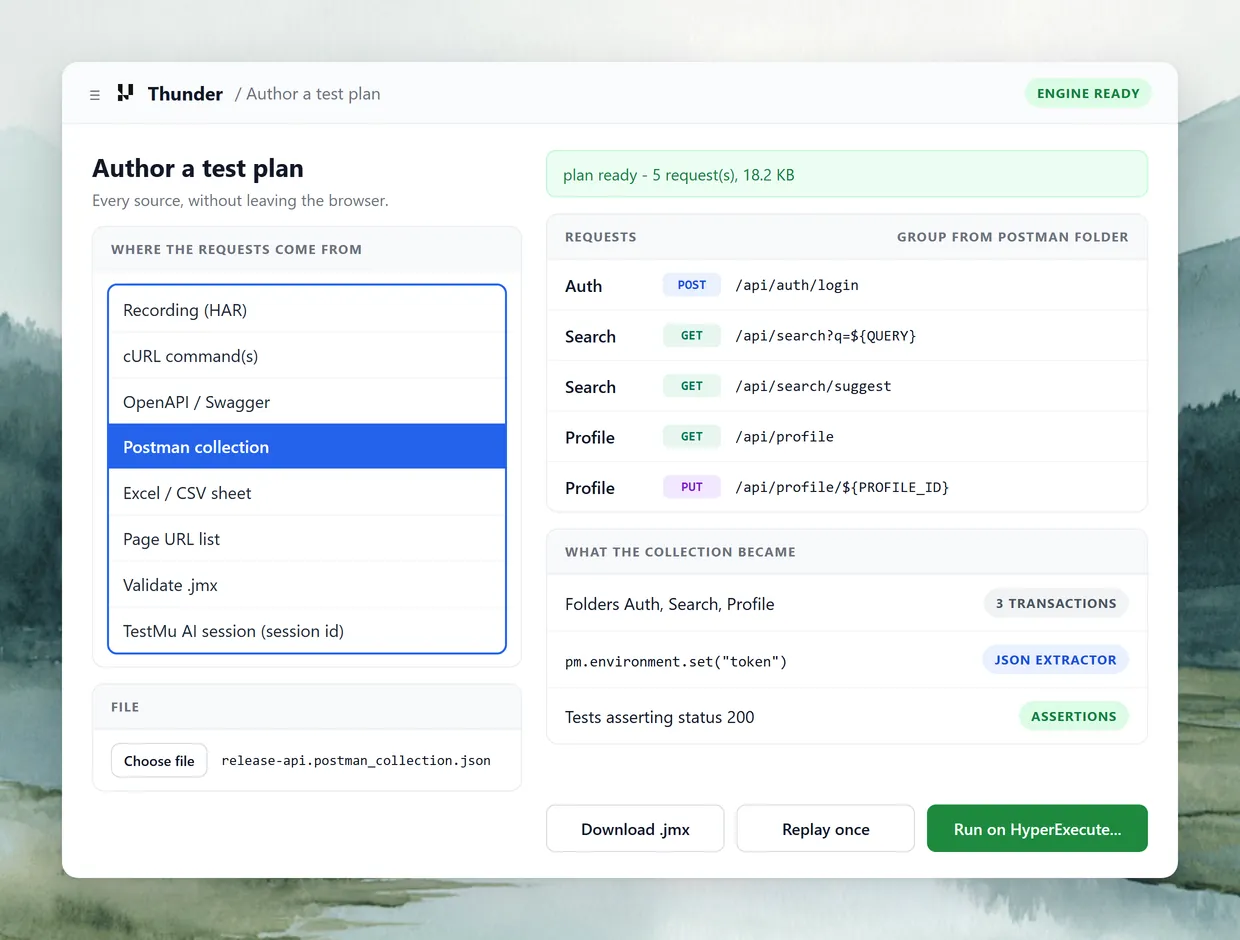
The API team keeps a Postman collection and QA has a Selenium suite. Thunder builds the load test from either, so nobody writes it twice.
Add to Chrome
Sources Thunder accepts
 RECORD IN YOUR CHROME
Record the Journey in Your Own Chrome
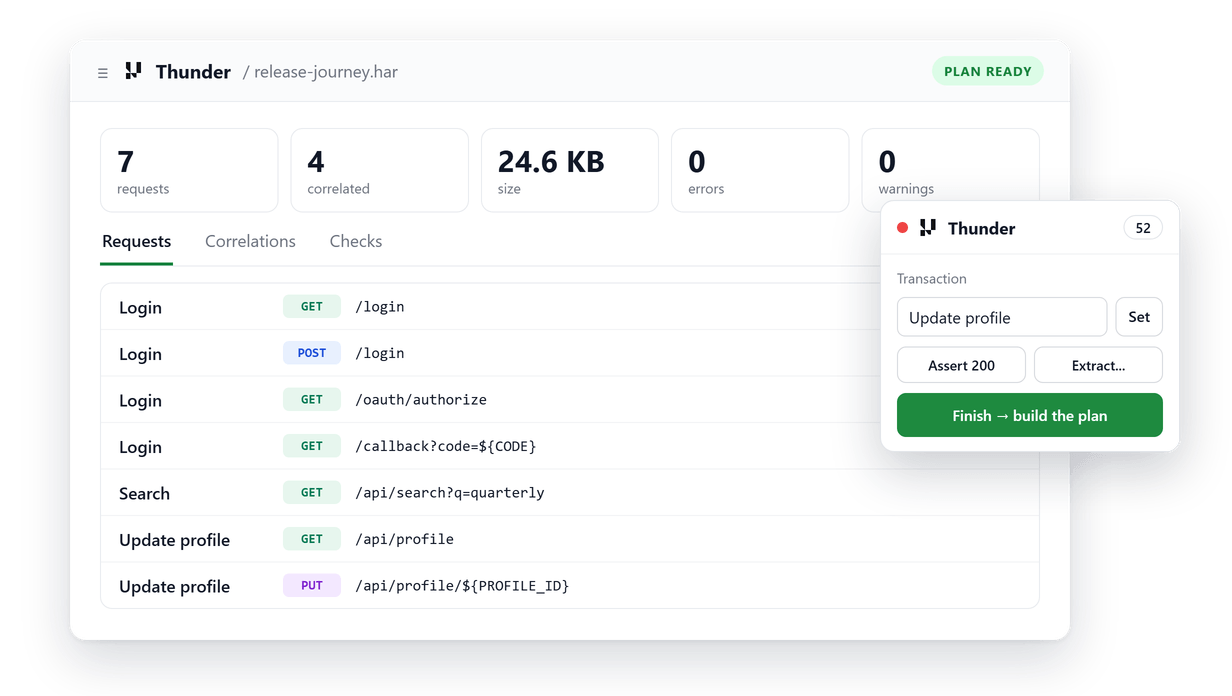
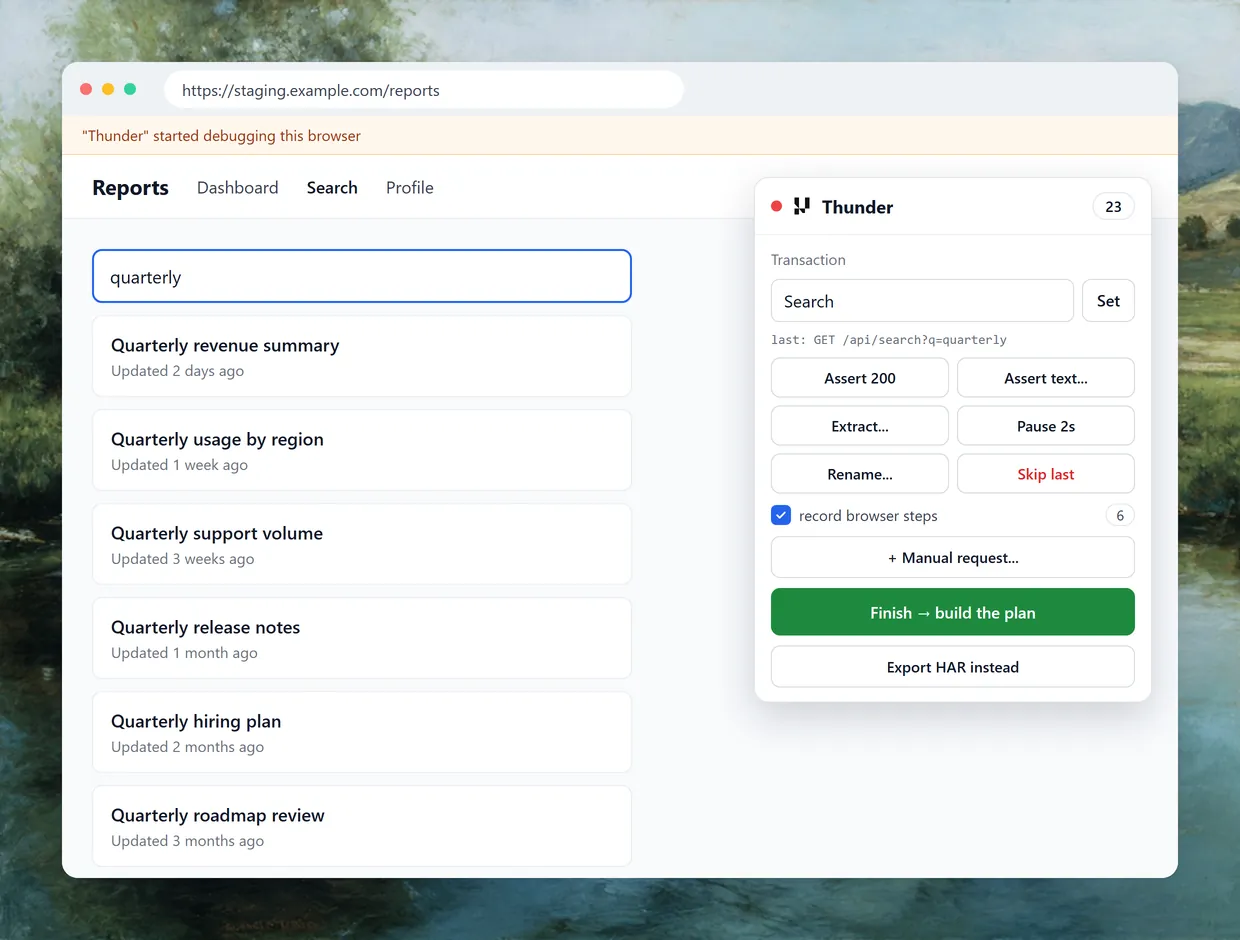
Staging sits behind SSO and the VPN. Record in your own browser profile, and name each step as you click through it.
Add to Chrome- Start from a URL to capture the first SSO redirect
- Assert, extract or rename the request you just made
- Skip a stray request, or add one the browser never sent

 AUTO-CORRELATION
See Every Token Thunder Wired In
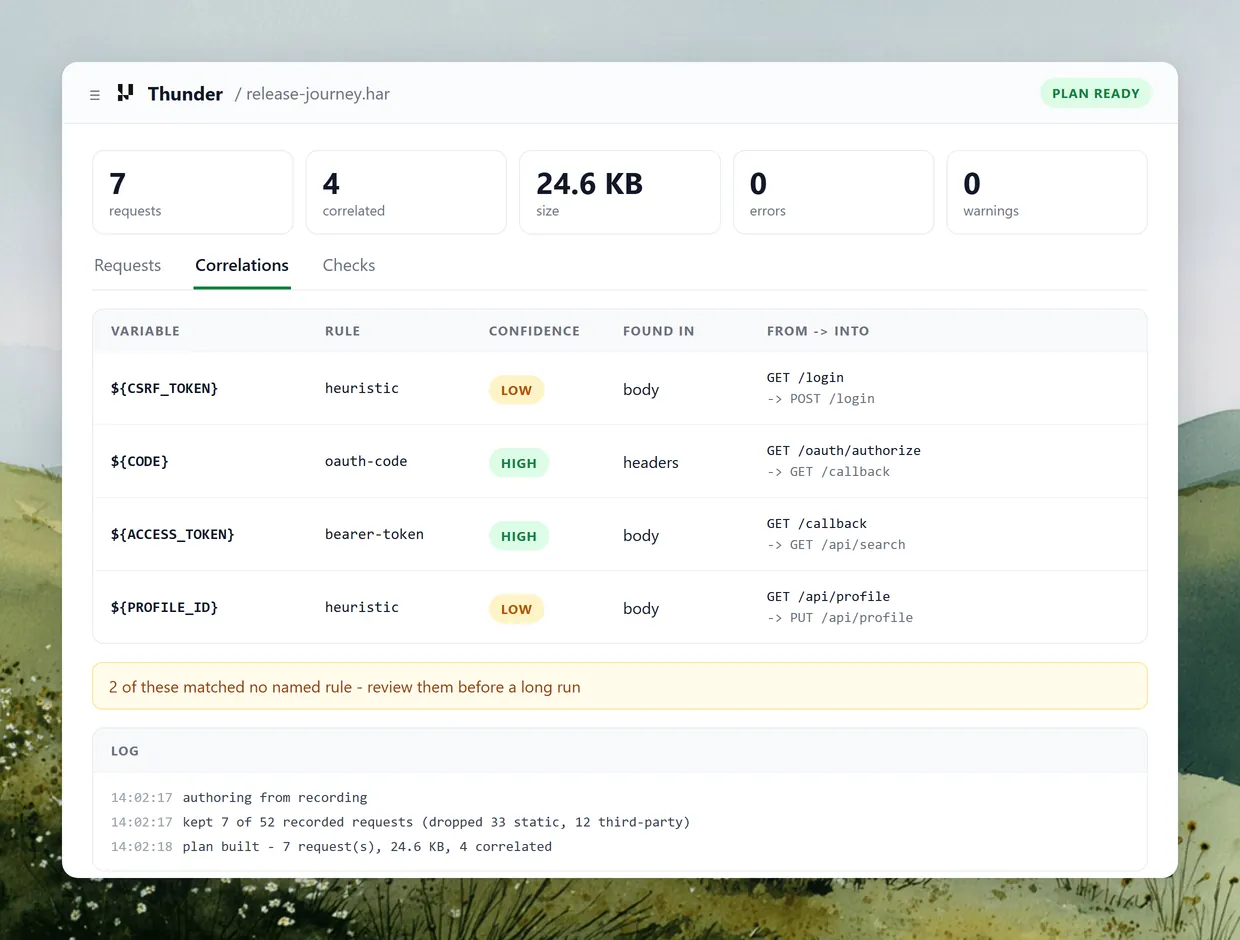
A recorded token is stale by the time the test runs. Thunder pulls each one from its response and shows the rule, confidence and hop.
Add to Chrome- Bearer tokens, CSRF fields, OAuth codes and ViewState
- Matches without a named rule are marked for review
- Static assets and tracker calls are dropped first
 ONE-USER REPLAY
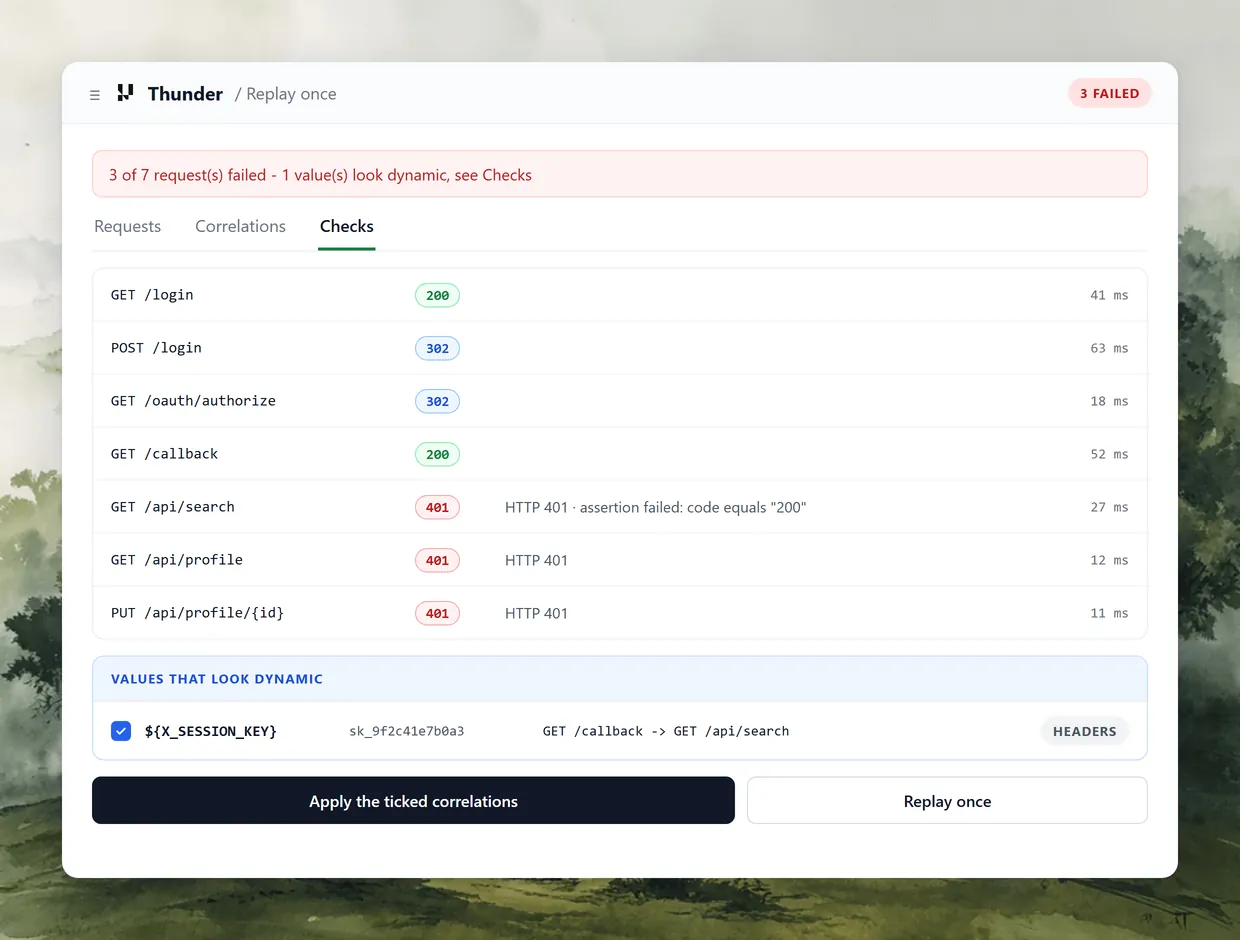
Prove the Plan Works at One User
A failed run at 500 users costs an afternoon and virtual user hours. Replay runs the plan once in your browser and proposes each fix.
Add to Chrome- Every request listed with its status code and timing
- Apply a suggested fix and the value changes plan-wide
- JSR223, JDBC and WebDriver steps count as skipped
 PRIVATE BY DEFAULT
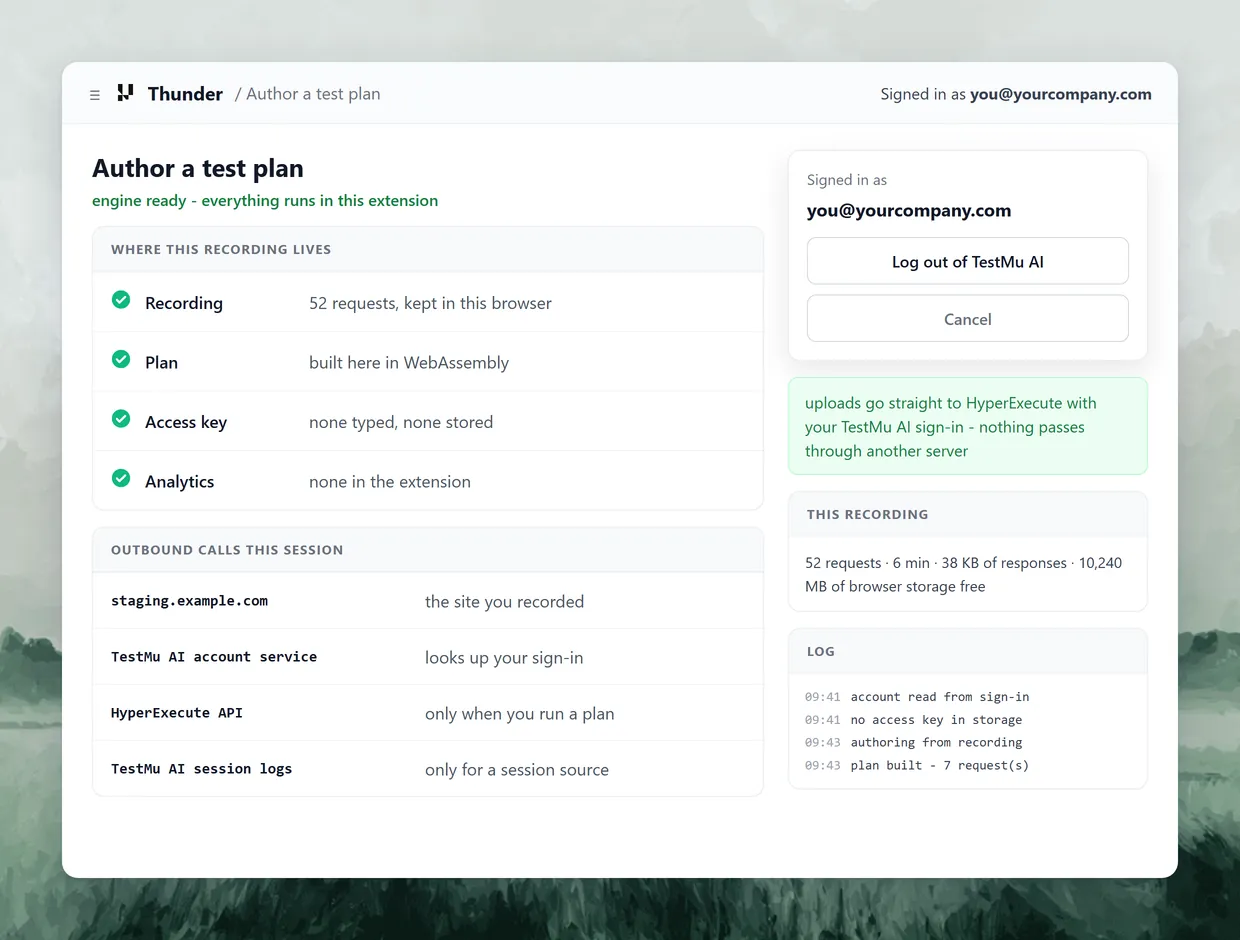
Keep the Recording in Your Browser
A logged-in recording holds real tokens and internal hostnames. Thunder builds the plan inside the extension, and no access key is stored.
Add to Chrome- Outbound calls go only to your target and TestMu AI
- No analytics or third-party endpoints in the extension
- Chrome shows a banner while the debugger is attached
 ONE-CLICK RUNS
Send the Plan to HyperExecute
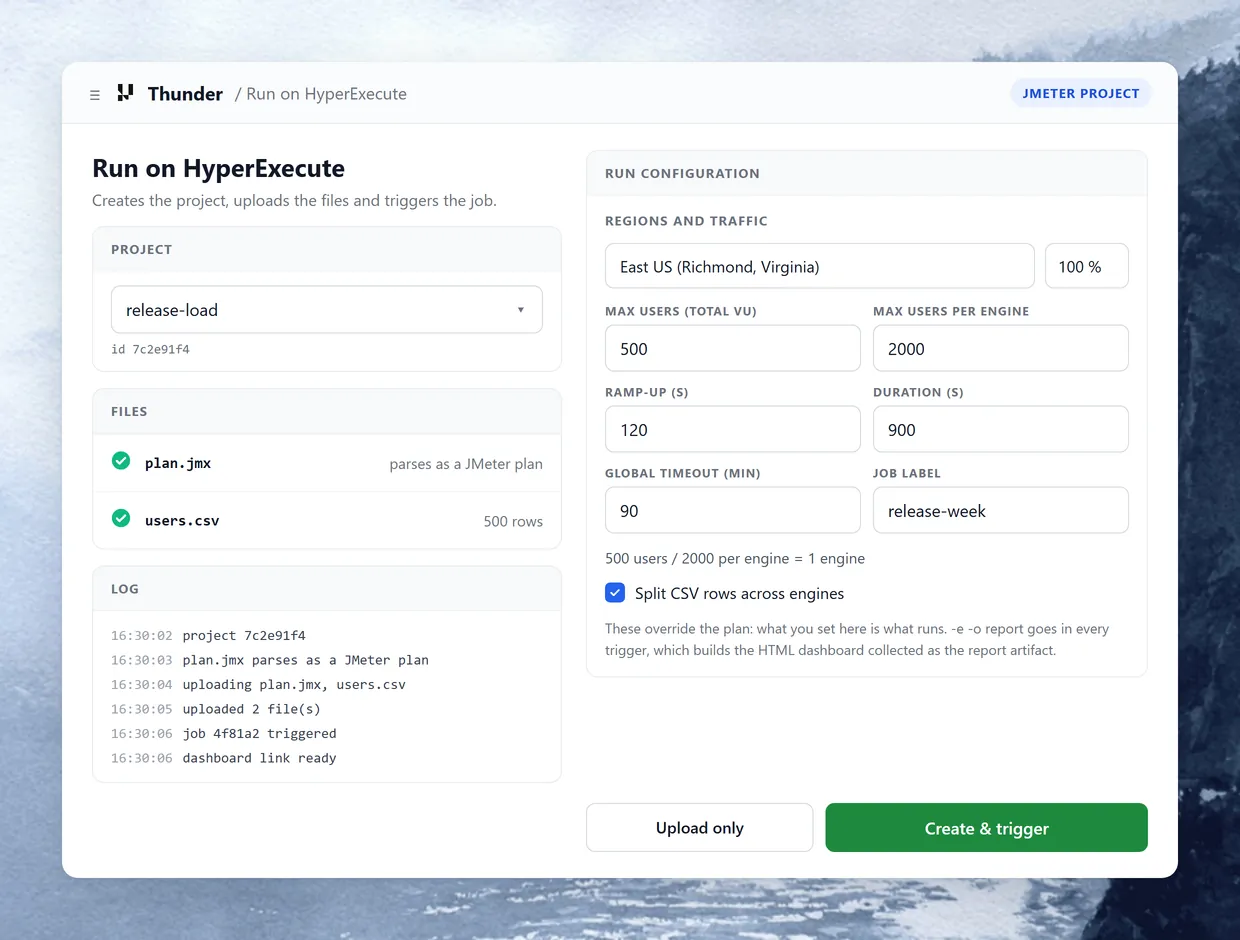
Friday comes and the plan is ready. Thunder creates the project, uploads the files and triggers the job as your TestMu AI account.
Add to Chrome- Users, ramp-up and duration on the form override the .jmx
- Each plan is parsed before upload, so bad XML stops here
- JMeter's HTML dashboard comes back as the job report
Built for Plans That Hold Up Under Load

One Login, Every Thread
Thunder logs in once in a setUp Thread Group and publishes the token as a property every thread can read.

Test Data From a CSV
Map CSV columns to variables so each virtual user reads its own row, split across engines at run time.

Record as a Phone or Tablet
Emulate an iPhone 14, Pixel 7, iPad Pro or Galaxy S22 while recording to capture the traffic mobile users send.

Hour-Long Recordings
Requests are written to disk as you browse, so a long session survives the extension restarting or Chrome closing.

Edit Any Request Afterwards
Rename, assert, extract, replace a value plan-wide, reorder or delete a request, with undo for the last ten edits.

Your Own Correlation Rules
Add a JSON or YAML rule pack for a framework of your own. Your rules run before the built-in ones.
Thunder vs a HAR Converter

Top Choice
Features
Thunder
Free HAR converter
Planted-value recording, re-run 1 October 2026
Dynamic values correlated
Requests passed on a live server
Passed after the app changed
Same recording, 17 September 2026
Session cookie left to the cookie manager

Repeated static value left alone
Pick the Output Your Test Needs
Start free with Google
The same plan renders as an API test, a browser test that replays real clicks, or a k6 script. You choose per plan, not per recording.
API test (.jmx)
Browser test (.jmx)
k6 script (.js)
What each user replays
Recorded HTTP requests
Recorded clicks and typing
Recorded HTTP requests
Users per engine
Thousands
4, one Chrome each
Split across machines
Built from
Any source
A recording with browser steps
Any source
Checks
Assert 200 and Assert text
Each recorded step
Checks plus thresholds
Report on HyperExecute
JMeter HTML dashboard
JMeter HTML dashboard
k6 dashboard as an artifact
Runner needs
JMeter, on HyperExecute
WebDriver plugin 4.13.0.2
k6 v2.2.0, pinned by the job
Left out
Clicks, shipped as Playwright
Assertions and extractors
Browser, JSR223 and JDBC steps
API test (.jmx)
What each user replays
Recorded HTTP requests
Users per engine
Thousands
Built from
Any source
Checks
Assert 200 and Assert text
Report on HyperExecute
JMeter HTML dashboard
Runner needs
JMeter, on HyperExecute
Left out
Clicks, shipped as Playwright
Browser test (.jmx)
What each user replays
Recorded clicks and typing
Users per engine
4, one Chrome each
Built from
A recording with browser steps
Checks
Each recorded step
Report on HyperExecute
JMeter HTML dashboard
Runner needs
WebDriver plugin 4.13.0.2
Left out
Assertions and extractors
k6 script (.js)
What each user replays
Recorded HTTP requests
Users per engine
Split across machines
Built from
Any source
Checks
Checks plus thresholds
Report on HyperExecute
k6 dashboard as an artifact
Runner needs
k6 v2.2.0, pinned by the job
Left out
Browser, JSR223 and JDBC steps
Install Thunder and Build a First Plan
Thunder needs no JMeter, Java or command line on your machine. JMeter is only needed to run a plan locally.
Add It to Chrome
Install Thunder from the Chrome Web Store. It runs on Chrome 116 or newer, Edge, Brave, Arc and Opera.
Pin It to the Toolbar
Pin the extension. Ctrl+Shift+9 opens it, and Ctrl+Shift+8 starts or stops a recording (Cmd on a Mac).
Sign In to TestMu AI
Log in once in the same browser with Google, GitHub, SSO or email. Creating an account is free.
Generate a First Plan
In DevTools, copy any request as cURL, paste it into Thunder and press Generate plan.
More Reasons to Love TestMu AI
TestMu AI is a leading agentic AI quality engineering platform, trusted globally, that assures your AI deployments work as intended, safely and securely, across enterprise and real-world conditions.
Users
3M+
Tests
1.5B+
Enterprises
18K+
Countries
132
TestMu AI positioned as a Leader in the 2026 Gartner® Magic Quadrant™
Read ReportTestMu AI recognized in The Forrester Wave™: Autonomous Testing Platforms, Q4 2025
Read ReportWall of Fame
TestMu AI is the #1 choice for SMBs and enterprises across the globe.

Enterprise-Grade Security
We safeguard your data and AI systems with global security, privacy, responsible AI, and ESG standards.

Integrations
Works where you work, 120+ integrations with the tools your team relies on.




As Seen On
Frequently Asked Questions
TestMu AI for Enterprise
Get access to solutions built on enterprise-grade
security, privacy, & compliance
- Advanced access controls
- Advanced data retention rules
- Advanced Local Testing
- Premium Support options
- Early access to beta features
- Private Slack Channel
- Unlimited Manual Accessibility DevTools Tests