

Power Your Software Testing with AI Agents and Cloud
The Native AI-Agentic Cloud Platform to Supercharge Quality Engineering. Test Intelligently and Ship Faster.


- TestMu AI (Formerly LambdaTest)
- /
- Learning Hub
- /
- What Is Microsoft Edge: All You Need to Know
What Is Microsoft Edge: All You Need to Know
Learn what is Microsoft Edge, explore its features and see why this modern browser is built for speed, security, and productivity.
Last Updated on:
Microsoft Edge is a fast, secure web browser developed by Microsoft and was launched in 2015 to replace Internet Explorer. At first, it used its own engine (EdgeHTML), but in 2020, it switched to the same engine that powers Google Chrome (Chromium). This change made it easier to support modern websites and use Chrome extensions.
Overview
Microsoft Edge is a fast, secure Chromium-based web browser for Windows, macOS, Linux, Android, and iOS that integrates with Microsoft services and features built-in AI tools like Copilot. It uses a multi-process architecture to enhance speed, security, and stability across all your devices.
Features of Microsoft Edge
- Collections: Users can organize web-related activities, notes, and links for shopping, travel, or research in one place.
- Sidebar: Users can access apps and utilities directly within their current browser tab without interrupting their active workflow.
- Vertical Tabs: This feature helps users stay organized by moving active browser tabs from the top of the screen to the side.
- Copilot: The built-in AI assistant helps users search for information, create images, and boost overall productivity while browsing.
- Coupons: The browser automatically finds deals and discounts to help users save money while shopping online on Microsoft Edge.
- Read Aloud: The browser reads web pages aloud in the user's preferred language to improve reading comprehension and support multitasking.
- Image Creator: The integrated AI generator uses OpenAI's DALL-E models to generate images directly within the Microsoft Edge browser.
- Sleeping Tabs: This feature improves overall browser performance and saves system resources by putting inactive Microsoft Edge tabs to sleep.
- Immersive Reader: The tool simplifies the visual interface of web pages and offers text-to-speech, line spacing, and grammatical features.
- TestMu AI: Developers can use this cloud platform to test websites on various legacy and latest versions of Microsoft Edge.
Working of Microsoft Edge
- Browser Process: This main process manages browser windows, tabs, and the frame while directing privileged access to utility processes.
- Renderer Processes: These isolated processes execute website code like HTML, CSS, and JavaScript to prevent malicious code from affecting other tabs.
- GPU Process: This process handles all communication with the GPU to calculate and display image-related tasks on the user's monitor.
- Utility Processes: These processes control specific tasks like audio playback, network services, and data decoding to safely audit resource access.
- Plug-In and Extension Processes: These processes execute active plug-ins and extensions separately from the rest of the Microsoft Edge browser architecture.
- Crashpad Handler Process: This process monitors browser health and captures crash reports to help the Microsoft Edge development team troubleshoot issues.

What Is Microsoft Edge?
Microsoft Edge is a web browser built on the Chromium engine and works on platforms such as Windows, macOS, Linux, Android and iOS. It is tightly coupled with Microsoft services and works with tools like Microsoft 365 and Office apps.
It puts a strong focus on security and privacy by offering features like Tracking Prevention and Microsoft Defender SmartScreen. Microsoft Edge also lets you sync your browsing data like passwords, favorites, and settings across all your devices.
For optimal security and to leverage the latest features, it is recommended to get Edge updates as well.
Features of Microsoft Edge
Microsoft Edge offers a smooth and efficient browsing experience by offering features like built-in multitasking tools, privacy protections, and more.
Key Features:
- Collections: This browser allows you to organize web-related activities, whether you're shopping, planning a trip, or collecting notes for research.
- Sidebar: This can help to multitask on the web easily with access to tools, apps, and more within the same tab without breaking your flow.
- Vertical Tabs: This helps to stay organized by moving browser tabs from the top to the side of the screen.
- Copilot: Copilot is an AI assistant in Edge that helps with tasks like searching for information, creating images, and boosting productivity.
- Coupons: This helps you save costs by automatically finding deals and discounts while you shop online.
- Read Aloud: This lets you listen to web pages in your preferred language, making it easier to multitask, learn, or improve reading comprehension.
- Image Creator: Part of Copilot in Edge, this built-in tool generates images from a text description directly inside the browser.
- Sleeping Tabs: When a tab is not in use, this feature helps put it to sleep. Not only does this save resources, but it also improves the performance of the browser.
- Immersive Reader: This hands the users the flexibility to focus on the content by simplifying the visual interface and offering functionalities such as text-to-speech, text-line spacing, and grammatical features.

Note: Test your websites on the latest Edge browsers online. Try TestMu AI Now!
How Does Microsoft Edge Use AI Agents in Copilot Mode?
Microsoft rolled out agentic browsing as part of Copilot Mode in Edge for Business in May 2026, letting Copilot complete multi-step tasks on IT-approved sites instead of only answering questions.
- Actions handle repetitive tasks: Copilot can fill in repeated form fields, compare prices across several retail pages, complete a booking, or unsubscribe from a newsletter, all inside the browser tab.
- Microsoft Purview governs every action: IT sets which sites Copilot may act on, and Purview audits or blocks an action when it detects sensitive data before Copilot finishes it.
- Edge for Business and a Copilot license are required: agentic browsing is not part of the free consumer version of Edge, and it ships only to organizations holding both an Edge for Business and a Microsoft 365 Copilot license.
- Rollout is still limited: Microsoft moved agentic browsing into preview in May 2026 and has targeted general availability for the second half of 2026, so most Edge installations do not have it yet.
- Different from Copilot Chat: the Copilot assistant already in Edge answers questions and summarizes a page; Actions is the newer layer that clicks, types, and submits forms on a user's behalf instead of only replying in text.
How Does Microsoft Edge Work?
Microsoft Edge has a multi-process architecture, which means various activities are executed in a separate process to enhance speed, security, and stability.
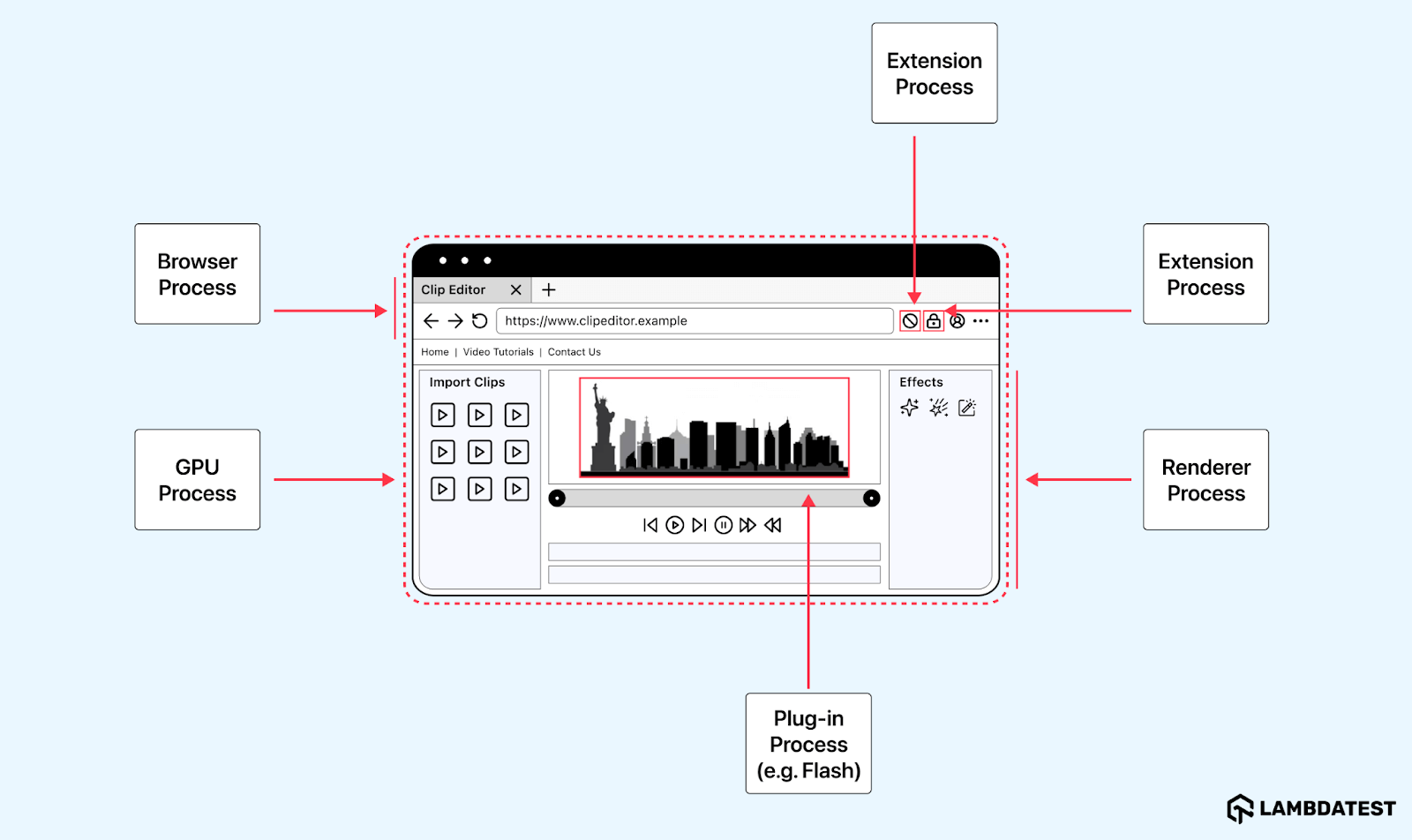
Here's how this architecture works:
- Browser Process: This is the main process that manages lists of windows and tabs, in addition to controlling the browser frame with the address bar and the back and forward buttons. It also directs privileged access to relevant utility processes like network and file system access.
- Renderer Processes: These processes handle and execute code submitted by the websites. They manage all the components that make up a website, such as HTML, CSS, JavaScript, and images, among others. Each renderer process is isolated for security purposes so that malicious code in one tab does not affect other tabs.
- GPU Process: This process manages all forms of communication with the GPU, handling all the work assigned to it. The GPU does the heavy lifting of calculating image-related tasks and displays the image on the monitor.
- Utility Processes: These processes control audio playback, network service, video capture, data decoding, and the collections manager. By separating these processes, Edge has control of these resources and can audit the access being granted.
- Plug-In Processes and Extension Processes: A plug-in process has active plug-ins, for example, Adobe Flash, while an extension process has active extensions. Each process executes code from “plug-in” or “extension” processes and operates with the rest of the browser, including the renderer processes.
- Crashpad Handler Process: This process monitors the health of different processes within Microsoft Edge. When Edge crashes, this process captures and sends crash reports to Microsoft's servers, thereby allowing their development team to troubleshoot and resolve pertinent issues.
How to Test on Microsoft Edge?
Now you know what is Microsoft Edge and how it works. According to StatCounter, Microsoft Edge holds a global browser market share of 5.21% in 2025, with a stronger desktop presence at 13.77%, making testing applications on Microsoft Edge crucial to ensure compatibility and performance for its growing user base.
Testing on Microsoft Edge ensures your website works as intended for users who use this browser. It helps catch layout issues, bugs, or functionality issues specific to Edge.
Since there are umpteen browser versions of Edge, testing on each one won’t be feasible. However, you can try out AI-native cloud testing platforms like TestMu AI to test on Microsoft Edge online across various latest and legacy Edge versions. Mac users can also test on Microsoft Edge for Mac without installing it locally.
To get started, refer to the documentation on real-time testing on desktop browsers.
Browser Comparison: Edge vs Chrome vs Firefox vs Safari
Here is a comparison between Edge and how it is different from other browsers such as Chrome, Firefox, and Safari:
| Parameter | Edge | Chrome | Firefox | Safari |
|---|---|---|---|---|
| Engine | Chromium (Blink) | Chromium (Blink) | Gecko | WebKit |
| Speed | Fast, optimized for Windows | Very fast, but heavy on resources | Moderate speed, stable | Fastest on Apple devices |
| Platform Support | All major platforms | All major platforms | All major platforms | Only on Apple devices |
| RAM Usage | More efficient than Chrome | High memory consumption | Low to moderate | Low (best on macOS/iOS) |
| Battery Life | Efficient on Windows laptops | Drains battery quickly | Decent battery performance | Best for Apple devices |
| Extensions | Supports Chrome extensions | Largest extension library | Large library, privacy-focused | Limited (App Store only) |
| Privacy | Good (basic blocking) | Weak (tracks user data) | Strong (strict blocking) | Good (Apple’s privacy protections) |
Conclusion
In this tutorial, we delved into what is Microsoft Edge, exploring its features and how it works. What sets Microsoft Edge apart is its speed, coupled with impressive security features, and integration with AI further provides a fast and effective browsing experience.
Microsoft Edge is perfect for those looking for an all-in-one browser with exceptional privacy, top-of-the-line performance, and productive AI features.
Citations
- Features of Microsoft Edge: https://www.microsoft.com/en-gb/edge/features/edge-at-work?form=MA13FJ
- Microsoft Edge’s multi-process architecture: https://blogs.windows.com/msedgedev/2020/09/30/microsoft-edge-multi-process-architecture/
- Copilot Mode agentic browsing in Edge for Business: https://blogs.windows.com/msedgedev/2026/05/20/new-in-edge-for-business-ai-for-work-safe-from-day-one/
Author

Zikra Mohammadi
Blogs: 18


Zikra brings 5+ years of hands-on expertise in AI, web development, and software testing to her role as a technical content strategist. Certified in AI, manual, and automation testing, she breaks down complex ideas into step-by-step guides, tutorials, and reference docs, helping teams unlock the full power of AI-driven, codeless automation on web and mobile.


Frequently asked questions
Did you find this page helpful?
More Related Learning Hubs
TestMu AI forEnterprise
Get access to solutions built on Enterprise
grade security, privacy, & compliance
- Advanced access controls
- Advanced data retention rules
- Advanced Local Testing
- Premium Support options
- Early access to beta features
- Private Slack Channel
- Unlimited Manual Accessibility DevTools Tests