

Next-Gen App & Browser Testing Cloud
Trusted by 2 Mn+ QAs & Devs to accelerate their release cycles


On This Page
- What are Software Testing Strategies?
- Why are Software Testing Strategies Important?
- Types of Software Testing Strategies with Examples
- How to Select the Right Testing Strategy
- What Are the Disadvantages of Different Software Testing Strategies?
- What Are the Key Elements of an Effective Test Automation Strategy?
- What is the difference between a Test Strategy and a Test Plan?
- Which Are the Best Tools to Automate Your Testing Strategy?
- What Are the Different Types of Software Testing?
- Conclusion

- Home
- /
- Learning Hub
- /
- Software Testing Strategies: Types, Tools & Selection Guide
Software Testing Strategies: Types, Tools & Selection Guide
Learn software testing strategies with types, tools and selection tips. Gain actionable insights to improve Software quality, code coverage and test efficiency.

Prince Dewani
February 22, 2026
Software testing strategies are a crucial part of the software development lifecycle (SDLC), ensuring software meets end-user expectations and works as intended. As applications grow more complex, having an effective strategy becomes essential. These strategies guide testing efforts so teams can manage risk, ensure quality, and optimize resources.
In this article, we’ll explore the major testing strategies, how to select the right one, the tools that help, and best practices to strengthen your testing process.
Overview
Testing strategies offers structured and strategic approaches to testing that ensures software quality, manage risks, and optimize resource allocation throughout the SDLC.
What are the different types of software testing strategies?
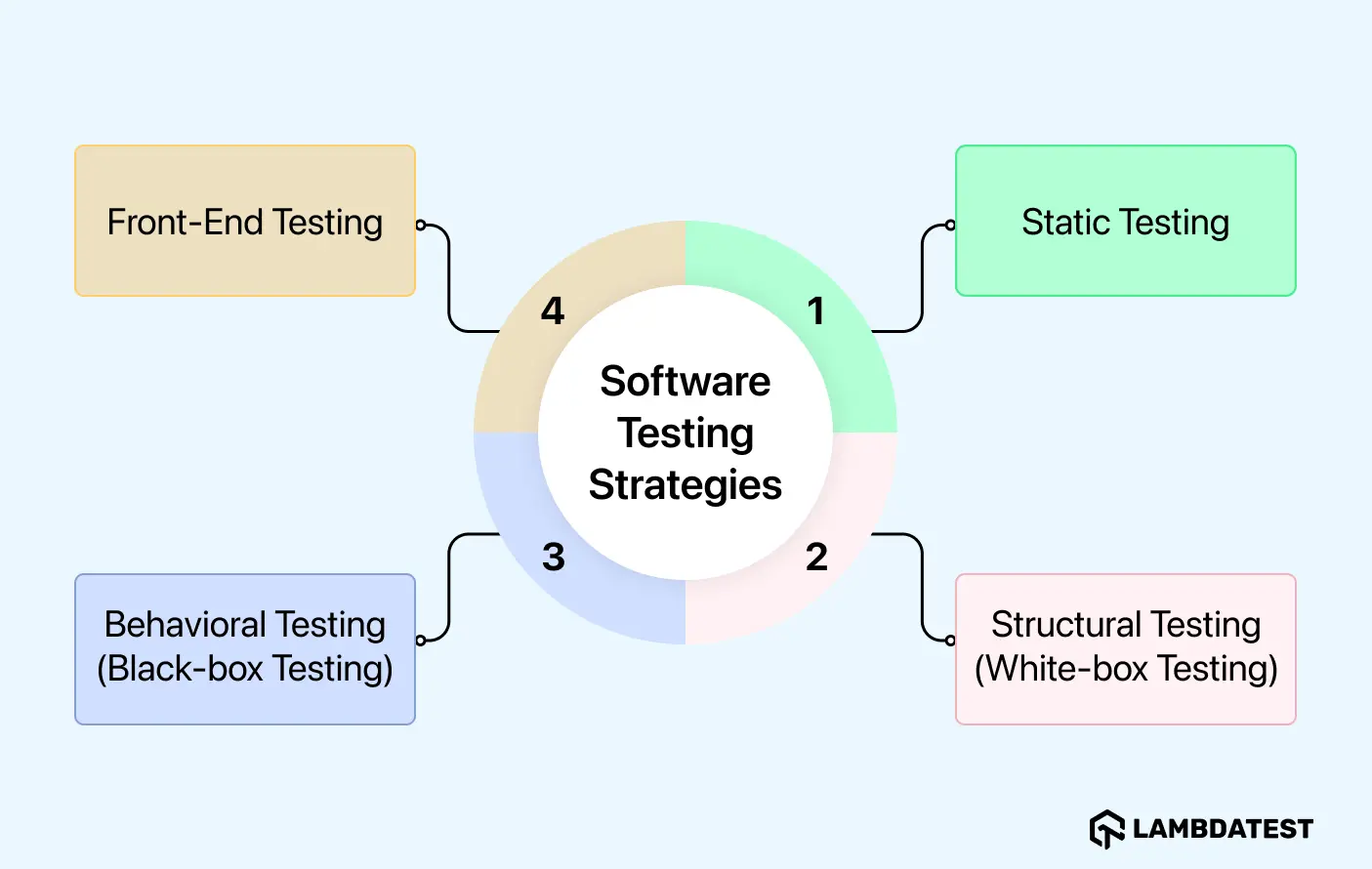
- Static Testing: Reviews requirements, code, and design without execution.
- White Box Testing: Inspects internal logic, paths, and conditions to assure code integrity.
- Black Box Testing: Validates functionality from an end-user perspective across environments.
- Front-End Testing: Checks UI, interactions, responsiveness, and accessibility across devices.
Which are the best tools to automate your testing strategy?
- LambdaTest: GenAI-native end-to-end testing platform.
- Selenium & Playwright: Web UI automation.
- Appium: Mobile app automation for iOS & Android (native, hybrid, web).
- Postman: Fast, collaborative API testing.
- JMeter: Performance & load testing.
- SoapUI: Enterprise SOAP/REST testing.
What are Software Testing Strategies?
Software testing strategies are the overall approaches and methodologies used to determine how testing is conducted during software development. They define the methods, processes, and tools applied during testing.
These strategies guide the testing process, helping teams plan, organize, and execute tests to identify defects and improve software quality.
Why are Software Testing Strategies Important?
Software testing strategies are extremely important for ensuring software quality. Without a clear strategy, testing can become chaotic, inefficient, and incomplete, leading to missed defects and poor utilization of both testing efforts and resources.
- Improves Test Coverage: A solid strategy ensures that all aspects of the software are tested, leaving no room for defects.
- Risk Mitigation: An effective testing strategy help to identify risks early in the process, allowing teams to mitigate potential issues before they escalate.
- Resource Optimization: Allows teams to focus efforts on the most important areas, avoiding redundant tests, saving time and resources.
- Consistency and Standardization: Testing strategies set up a uniform testing process across teams and projects, which ensures reliable and repeatable test results. This reduces variations and enhances efficiency in testing.
- Better Decision-Making: Software testing strategies offer valuable insights and data, helping teams make informed decisions on when to deploy, maintain, or enhance the software.
Types of Software Testing Strategies with Examples
When we talk about strategies, we can categorize them based on their approach in identifying software defects, the level of access to the code, and the focus area of testing. All strategies have a specific purpose that helps in improving the software quality at different stages of the development cycle.
The key software testing strategies are discussed below:
1. Static Testing
Static testing strategy involves reviewing and analyzing the software’s documentation, code, design or requirements without executing it. This is often done early stage of the software development life cycle (SDLC) to identify errors in code, design or requirements before the code is even run.
Purpose:
- Early Issue Detection: It allows teams to spot problems early, such as discrepancies in requirements or unclear design, which would be harder and more costly to address later.
- Cost and Time Efficiency: By identifying issues before they are coded into the system, static testing saves both time and resources by preventing errors from escalating.
- Collaborative Review Process: Not only the developers need to be involved. Domain experts, system architects, and testers should all participate in static testing as this offers diverse perspectives which validates the software meets all requirements accurately.
Example:
Let’s suppose you’re building an e-commerce app. During static testing, the team would review the project’s requirement documents and design to ensure that the checkout flow is clear and complete. If they find that it fails to apply discounts or tax calculation feature, they can fix it early, saving time compared to discovering this problem during integration testing.
This is typically done through desk-checking, where developers manually check the code after writing the code and before code execution or it can also be done through formal review meetings where stakeholders discuss the design and requirements.
2. Structural Testing (White-box Testing)
Structural testing, also known as white-box testing, involves testing the internal workings of an application. Testers have full access to the source code and focus on verifying the code’s logic, paths, and conditions.
Structural testing helps identify issues within the code that may not be easily spotted through external testing methods.
Purpose:
- Ensures Code Integrity: Verifies that all parts of the code, including paths and conditions, work as expected. This helps ensure the software operates correctly in all scenarios.
- Bug Detection: The main benefit of structural testing is its ability to detect issues that may not be visible from the outside.
For example, errors in logic, incorrect calculations, or flawed data handling are often only identifiable by directly analyzing the code. By evaluating these internal aspects, testers can catch bugs early before they cause bigger problems.
- Comprehensive Coverage: Helps achieve high code coverage, ensuring every part of the code is checked and tested.
Example:
A good example for this would be an online payment system. In structural testing, the focus is on the code that processes payments. Testers verify that it handles different scenarios, such as valid and invalid card numbers, multiple payment methods (credit, debit, digital wallets), and the calculation of transaction fees.
Every logic path in the code is tested to confirm that decision points in the code execute correctly under various conditions, like a payment failure or a successful transaction. By doing this, testers ensure that all edge cases are covered and no errors are left undetected in the code.
3. Behavioral Testing (Black-box Testing)
Behavioral testing, also known as black-box testing, focuses on testing the software’s functionality from an end-user's perspective, without any knowledge of the internal code. The goal is to validate that the software works as expected in real-world usage scenarios.
Purpose:
- Validates User Experience: It tests all the functionality of the software works as expected from end user perspective.
- Confirms System Behavior Under Various Conditions: Verifies that the software behaves correctly when interacting with different user inputs, devices, or environments.
Example:
Imagine you are testing a banking app that helps users to check account balances, transfer funds, and view transaction history. In behavioral testing, you would check if these features work correctly under various conditions.
You can do it by performing cross browser and cross-device testing to ensure that the app functions accurately and consistently across all browser-OS combinations and devices.
4. Front-End Testing
Front-end testing (UI Testing) checks whether the user interface (UI) of the application functions as expected, this includes validating design elements, layout, responsiveness, and accessibility across devices and platforms.
Purpose:
- Visual Testing: Ensures the UI matches the intended design and is visually consistent across devices.
- Checks User Interactions: Verifies that buttons, menus, and other interactive elements work as expected.
- Accessibility Testing: Ensures that the app is usable for differently abled people, meeting accessibility standards.
Example:
For a shopping app, UI testing ensures that all the UI elements, such as product images, filter buttons, and navigation menus, response and display correctly across all devices and environments.
It checks that the layout adapts properly when it switches between desktop and mobile views so as to ensure the design remains intuitive as well as accessible for all of users. Additionally, features like image carousels or sorting filters must also be tested to ensure smooth functionality and responsiveness.
How to Select the Right Testing Strategy
Choosing of the right software testing strategy ensures testing efforts align with the project’s goals, risks, and resources.
Let's discuss how you can select the best testing strategy for your project:
1. Understand Project Requirements
First assess the scope of the project. What does the software aim to achieve, and how important is it to meet certain functional, performance, and security requirements?
Think about whether the application is a new product or whether it is an improved version of an existing product. New applications may require a more extensive testing strategy, such as structural testing. However, updates to existing applications mostly require a regression testing strategy to avoid breaking what already works.
2. Evaluate Project Complexity and Risk
High-complexity projects or those involving multiple integrations and complex workflows will require a proper and more detailed testing approach, like behavioral or structural testing.
Risk assessment is essential. For example, if the application handles sensitive information or requires high uptime, such as a healthcare or finance related application, we shall give priority to testing methodologies that focus on security and performance.
3. Consider Team Expertise and Resources
Consider the expertise of the team available for testing. A team that has experience in automation will opt for a more automated testing strategy. Whereas a less experienced team may benefit from simpler manual testing strategies.
Also, think about available resources. Automation demands time, but in the long term, it helps you scale quickly and efficiently.
4. Understand Regulatory and Compliance Needs
Some sectors have to comply with certain regulations, e.g., Healthcare, Finance. Software designed for such industries should incorporate testing strategies that adhere to these regulations and compliance.
5. Test the Strategy in Smaller Increments
If you are not sure which strategy to use, start by testing smaller modules of your software application. This way, you can check if the selected approach aligns with your application goals before committing it across the entire system.
What Are the Disadvantages of Different Software Testing Strategies?
As we've covered the advantages of each testing strategy while discussing on them, let's now take a look at the different disadvantages each one may have:
- Static Testing: It is unable to catch bugs that appear only during runtime, especially with dynamic inputs or performance issues under load.
- Structural Testing: It requires indepth code knowledge, so less experienced testers might overlook internal logic problems.
- Behavioral Testing: It may not catch internal code problems or edge cases, because it focuses only on external behavior of application.
- Front-End Testing: It ensures UI functionality but it doesn't cover backend issues that could affect performance or the user experience.
What Are the Key Elements of an Effective Test Automation Strategy?
Test automation can reduce human errors and increase efficiency while speeding up the testing process. Having an effective test automation strategy will be necessary to avail all these benefits of automation. Here are the key components to consider.
1. Define Scope and Goals
Clearly define what you want to automate like unit tests, integration tests, UI tests, etc. Set measurable goals and specific objectives that the automation should achieve, for example reducing the time for regression testing or improving test coverage.
2. Select the Right Tools
Select tools that align with your project’s technology. For Automation, you can use tools like Selenium or Cypress for web automation, Appium is best for mobile testing, and TestMu AI which is ideal for cross browser testing.
These tools help ensure that tests are run across different environments for thorough validation.
3. Design Effective Test Cases
Writing effective automated test cases is important. First, make sure that the tests are easy to understand, they maintain and cover the most critical paths. They prioritize the tests that offer greatest value and can be implemented quickly in CI/CD pipeline.
4. Orchestrate with CI/CD Pipelines
Integrating automated tests into CI/CD pipelines is essential for fast and reliable software delivery. However, large test suites can slow execution, creating bottlenecks and delaying feedback. To address this, testing teams can use a test orchestration platform within their CI/CD pipelines.
TestMu AI HyperExecute is a end-to-end test orchestration platform that can deliver up to 70% faster test runs compared to traditional cloud grids. It uses the Model Context Protocol (MCP), to seamlessly integrate AI into your testing environment and reduce setup time from hours to minutes.
It automatically analyzes code, generates test commands, auto-creates configuration files, and provides real-time logs and execution insights to keep CI/CD pipelines fast and reliable.

5. Address Flakiness
A flaky test is a test that sometimes pass and sometimes fails under the same conditions, making it unreliable and reducing the value of test automation. To address this, you can use tools like TestMu AI, which offers Test Intelligence.
Test Intelligence by TestMu AI offers intelligent flaky test detection that analyzes WebDriver command logs and historical test data to flag tests that fail intermittently under similar conditions. It also provides insights through Root Cause Analysis, showing why a test is flaky, error trends over time, and anomalies across environments.

Note: With Test Intelligence, detect flaky tests early and accelerate your release cycle. Try TestMu AI Now!
6. Execute Parallel Testing
It’s important to perform parallel testing across multiple environments (browsers, devices, operating systems) to scale automation and improve test efficiency. It helps team to validate the functionality of software across diverse setups without overloading resources.
A big challenge here is maintaining an in-house infrastructure that includes buying, managing, and updating diverse browser-OS combinations across devices. Tools like TestMu AI simplify this.
TestMu AI is a cloud-based testing platform that supports parallel test execution across 3,000+ browser-OS combinations and 10,000+ real devices through its Cloud Grid. This allows teams to run large test suites faster, integrate seamlessly into CI/CD pipelines, and test at scale without maintaining inhouse.

7. Test Result Analysis
After running automated tests, reviewing test results thoroughly is crucial. Implement proper reporting and logging systems to capture detailed error information and metrics that can guide improvements.
What is the difference between a Test Strategy and a Test Plan?
It is important to distinguish between Test Strategy and Test Plan for effective software testing. Although these words are used interchangeably, they serve different purposes:
| Point of Difference | Test Strategy | Test Plan |
|---|---|---|
| Definition | High-level approach that defines the testing goals, objectives, and overall methodology. | Detailed document that outlines specific testing tasks, schedules, and resources required to execute the strategy. |
| Focus | “What” and “why” of testing. | “How,” “when,” and “who” will perform the testing. |
| Scope | Covers the overall project or product. | Covers individual releases, modules, or test cycles. |
| Details | Broad guidelines, testing tools, techniques, and standards. | Step-by-step actions, timelines, assigned responsibilities, and test cases. |
| Audience | Project managers, QA leads, stakeholders. | Testers, developers, and QA team members. |
| Flexibility | Relatively static; updated less frequently. | Dynamic; updated as per project changes. |
| Examples | Choosing automation frameworks, defining test environments, planning testing types. | Scheduling regression testing for release 1.2, assigning testers, and detailing test cases for a module. |
Which Are the Best Tools to Automate Your Testing Strategy?
A strong testing strategy defines what to test, but the right tools make it possible to execute efficiently. After extensive research and trying out many different tools personally, I have curated the best testing tools, so you don’t have to look anywhere else:
| Applicability | Tools | Why choose this |
|---|---|---|
| End-to-end Testing Platform | TestMu AI | Trusted by 2M+ users across 10K+ enterprises in 130+ countries, TestMu AI lets you run parallel cross-browser tests across 3,000+ browser-OS combinations and 10,000+ real devices. It brings in KaneAI, HyperExecute (70% faster test runs), Agent-to-Agent Testing, Test Intelligence, Visual UI testing, accessibility testing and more. |
| Web automation | Selenium & Playwright | Both are go-to choices for web UI test automation. Selenium is a classic, flexible, language-rich, and perfect for legacy apps. On the other hand, Playwright is faster and more stable with modern, JS-heavy applications. From my experience, Playwright reduces flaky tests, though Selenium still wins because of its broad compatibility. |
| Mobile app automation | Appium | It is a good open source mobile testing tool and can be used across iOS and Android for native, hybrid, and mobile web apps. It is great for validating mobile behavior on real devices but tests are slower than web apps. |
| Static code analysis | SonarQube & ESLint | Both SonarQube and ESLint help catch code quality issues and security risks early. They are reliable for identifying problems, though strict rules can sometimes make developers frustrated. |
| Unit testing | JUnit (Java), NUnit (.NET), PHPUnit (PHP), pytest (Python) | All are great for writing unit tests in their respective languages. In my experience, pytest feels the most flexible and modern, especially for handling complex scenarios quickly, while JUnit is still the most used and reliable for Java. |
| API testing | Postman and SoapUI | Postman is quick and more collaborative, great for regular API testing. SoapUI is heavier but powerful for complex SOAP/REST services. In practice, Postman speeds up team workflows, while SoapUI is great for large and complex enterprise level API testing. |
| Performance testing | JMeter | Reliable for simulating heavy loads and stress testing scenarios. Setting up detailed scenarios can take time, but results are trustworthy once tuned. |
| CI / CD pipelines | Jenkins and GitHub Actions | Both are used to run and orchestrate automated tests in pipelines. Jenkins is highly customizable with plugins, while GitHub Actions is lighter and integrates beautifully into modern DevOps workflows. I use GitHub Actions for quick CI pipelines and Jenkins for complex, enterprise integrations. |
What Are the Different Types of Software Testing?
Here are the different types of software testing approaches:
1. Unit Testing: Unit testing checks individual code components, like functions or modules, work correctly in isolation before integration.
2. Integration Testing: Ensures that different modules in the system interact and exchange data as expected.
3. System Testing: Evaluates the software as a whole in a real-world environment, covering both functional testing and non-functional testing.
4. User Acceptance Testing (UAT): UAT ensures that the software meets business requirements and is ready for deployment. This is usually validated by end-users or stakeholders.
5. Performance Testing: Performance testing measures how the application performs under load, checking speed, stability, and responsiveness under different environments.
6. Security Testing: Identifies vulnerabilities and potential threats, ensuring the application is safe from attacks like SQL injection or XSS.
7. Compatibility Testing: Validates that the software functions consistently across multiple browsers, devices, and operating systems.
8. Regression Testing: Ensures that new updates or bug fixes do not break existing functionality and that previously resolved issues remain fixed.
9. Usability Testing: Evaluates how intuitive and user-friendly the application is, focusing on the overall user experience.
Conclusion
This was a complete guide for software testing strategies. We have covered the core approaches, including static, white box, black box, and front end testing approaches. We also discussed key testing types and tools.
It shows how to pick the right strategy for your project based on objectives, risk, compliance, and team skills. We also provided a curated list of tools like Selenium, Playwright, Appium, and TestMu AI for automation, CI/CD, parallel runs, and fixing flaky tests.
These insights will surely help you plan better, test faster, and improve quality while saving time and cost. If you want one guide to plan and run testing from start to finish, this is it.


Frequently asked questions
Did you find this page helpful?
More Related Hubs
TestMu AI forEnterprise
Get access to solutions built on Enterprise
grade security, privacy, & compliance
- Advanced access controls
- Advanced data retention rules
- Advanced Local Testing
- Premium Support options
- Early access to beta features
- Private Slack Channel
- Unlimited Manual Accessibility DevTools Tests