

Power Your Software Testing with AI Agents and Cloud
The Native AI-Agentic Cloud Platform to Supercharge Quality Engineering. Test Intelligently and Ship Faster.


- TestMu AI (Formerly LambdaTest)
- /
- Blog
- /
- Effortlessly Handle Windows in Selenium with PHP
Effortlessly Handle Windows in Selenium with PHP
Learn to handle browser windows, tabs and pop-ups in Selenium with PHP using getWindowHandle, getWindowHandles and switchTo, with PHPUnit examples.
Last Updated on:
Handling windows in Selenium with PHP means reading the unique handle of each browser window, tab or pop-up and passing it to switchTo()->window(), so WebDriver acts on the right one.
In Selenium PHP tests, getWindowHandle() returns the handle of the focused window and getWindowHandles() returns every handle the session has open.
This guide covers window handles, the window-handling commands, handling multiple windows, tabs and pop-ups with PHPUnit, and opening new windows in Selenium 4.
Key Takeaways
- A window handle is a unique alphanumeric ID that Selenium WebDriver assigns to every browser window, tab and pop-up in a session.
- The getWindowHandle() method in Selenium PHP returns the handle of the window that currently has focus.
- The getWindowHandles() method in Selenium PHP returns the handles of every window and tab opened by the same driver instance.
- Selenium WebDriver keeps focus on the parent window after a new window opens, so a test must call switchTo()->window() with the new handle first.
- A Selenium PHP test closes pop-ups by looping over getWindowHandles(), skipping the parent handle, and calling close() on every other window.
- The php-webdriver method switchTo()->newWindow() opens a new tab or window through the W3C WebDriver New Window command and moves focus to the new window.
What is a Window Handle?
The Window Handle is a unique identifier whose primary responsibility is to hold all the windows’ address. When the Selenium WebDriver instance is instantiated, an alpha-numeric ID is assigned to the Window. The unique ID is called Window Handle, a pointer to the Window and helps identify the browser window.
Whether it is a new window/tab/pop-up, the Window Handle (or ID) is unique for each one of them. The Selenium WebDriver uses the Window Handle functions in Selenium PHP for switching between different windows (or tabs).
As far as the Window Handle’s retention is concerned, the unique ID is retained till the closure of the Selenium WebDriver session (i.e. either via WebDriver.Quit or WebDriver.Close APIs). The Window Handle functions are used for getting details of the handles of all the windows. The fundamentals of window handling in Selenium remain the same, irrespective of whether you are handling windows in Selenium with PHP or using Selenium with other programming languages (e.g. Python, Java, etc.).
Here are some of the common scenarios where you would encounter multiple windows (or tabs):
- Forms that require selection of date from a newly opened window.
- Button clicks that open a new tab (or Window).
- Pop-ups which are used to show some offers to the end-user. Job portals commonly use this strategy.
- Handling windows that show advertisements.
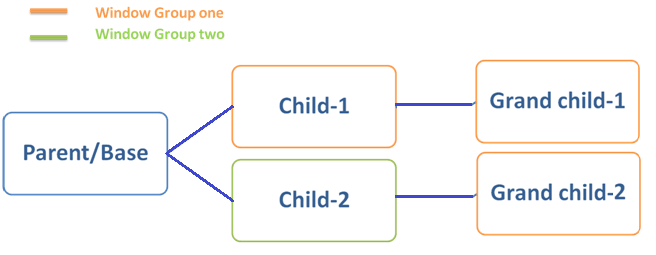
Shown above is a sample scenario where a click operation in the parent (or base) window opens up two ‘child windows’. Each of these has unique window handles, and the handle is retained till the windows are not destroyed (i.e. closed). With this, the total number of windows becomes three (parent + child-1 + child-2).
Click on a button/link in ‘Child-1’, and ‘Child-2’ opens ‘Grand Child-1’ and ‘Grand Child-2’ respectively. With this, the total number of windows are five, and each of them has unique Window handles that can be used to automate operations on them.
Commands for Handling Windows in Selenium with PHP
Selenium provides different methods for handling multiple windows. You can also refer to our guide to handle multiple windows with Selenium & Protractor. Here are some of the widely used commands in Selenium PHP testing for switching browser windows and handling pop-up windows:
If you are a PHP expert, you can acquire a benchmark industry certification specializing in core PHP programming skills and expand your opportunities to advance your career in PHP automation testing.

SwitchTo Window
The SwitchTo command is used for switching the focus to a new browser window or tab. For changing the focus to a new window, the Window Handle of the desired browser window is passed as an argument to the command.
/* $wHandle is the Window Handle (or ID) of the Window to which the switch has to be performed */
$this->webDriver->switchTo()->window($wHandle);

/* Switch can also be done by obtaining the number of windows using getWindowHandles or getWindowHandle  */
$this->webDriver->switchTo()->window($HandleCount[win-number]);
getWindowHandle
The getWindowHandle method in Selenium PHP returns the Window ID (which is a unique alpha-numeric identifier for the window) of the currently active (or focused) window.
$wHandle = $this->webDriver->getWindowHandle();
In the example shown above, $wHandle is the ID of the window obtained using the getWindowHandle method.
getWindowHandles
This is an important method for handling windows in Selenium with PHP. The getWindowHandles method returns a set of window (and tab) handles opened by the same driver instance, including the parent and child windows. For example, if a click operation on a button in the parent window opens up a new tab; the getWindowHandles method will return the handles of the parent window and child window (i.e. tab). The sizeof operator when applied on the set returned by getWindowHandles returns the size of the set i.e. 2 in this case.
On a similar line, if a web page opened in the parent window opens up 8 pop-up windows; the Handle Count obtained by applying sizeof operator on the set returned by getWindowHandles method is 9.
Each of the windows will have a unique Window Handle (or Identifier) for easy identification of the window.
/* For a web page that opens a new tab, getWindowHandles returns an array of comprising of 2 window handles (i.e. handle of parent and child window) */
$HandleCount = $this->webDriver->getWindowHandles();

/* Returns the size of the Window Handle array. In the current example, it will be 2 */
echo ("
 Total number of window handles are " . sizeof($HandleCount));

/* Print the Window Handle of the Parent Window */
echo ("
 Window 0: " . $HandleCount[0]);

/* Print the Window Handle of the Child Window */
echo ("
 Window 0: " . $HandleCount[1]);
How to Handle Multiple Browser Windows, Tabs, and Pop-ups in Selenium PHP?
We demonstrate the test scenarios for window handling in Selenium PHP using PHPUnit on TestMu AI’s cloud-based Selenium Grid. Cross browser testing using PHPUnit on a cloud-based Selenium Grid helps in testing across different combinations of browsers, platforms, and device emulators.
To get started, we create an account on TestMu AI and note the user-name & access-key available on the profile page. The tests are performed on the Chrome + Windows 10 combination set in the capabilities array. The browser capabilities are generated using the TestMu AI capabilities generator.
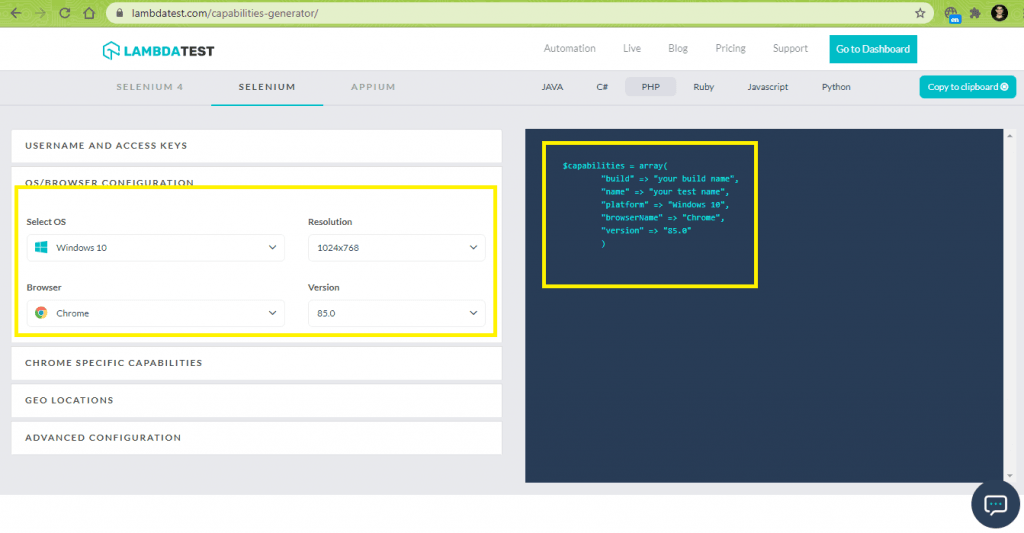
For installing the PHPUnit framework, we create a composer.json file for the project:
{
   "require":{
      "php":">=7.1",
      "phpunit/phpunit":"^9",
      "phpunit/phpunit-selenium": "*",
      "php-webdriver/webdriver":"1.8.0",
      "symfony/symfony":"4.4",
      "brianium/paratest": "dev-master"
   }
}
Run the command composer require, press ‘Enter’ button twice to proceed with the installation of the PHPUnit framework. On completion, the PHPUnit 9 framework is installed, as set by the ^9 constraint in composer.json.
The file composer.lock contains information of the dependencies and the vendor folder has all the dependencies.
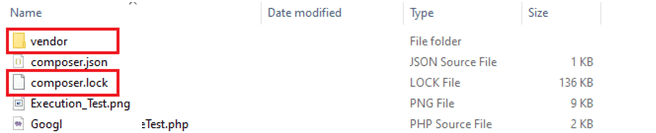
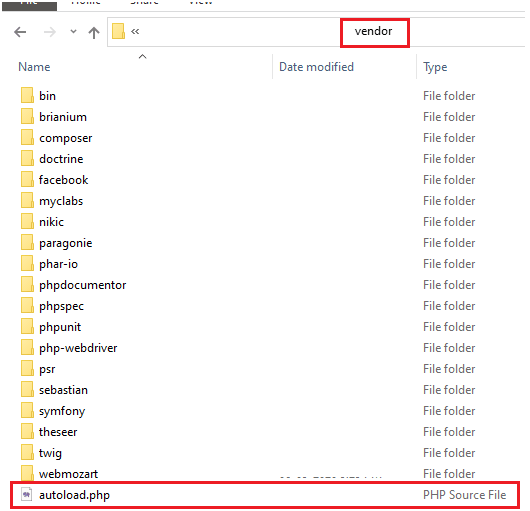
The file vendor\autoload.php will be used in the test code so that classes (and its methods) provided by those libraries can be used in the implementation. Now it’s time to demonstrate the various scenarios for handling Windows in Selenium With PHP.
You can also refer to the below video tutorial on how to handle Windows and Frames in selenium.
Multiple Browser Window Handling in Selenium PHP
For demonstrating multiple window handling in Selenium PHP, we use the following test scenario:
- Open https://www.testmuai.com in the Chrome browser.
- Get the Window Handle of the currently focused window.
- Open https://www.testmuai.com/blog/ in a new window using the HTML attribute __blank.
- Print the respective window handles.
- Switch to the window where the second URL is opened.
- Assert if the window title does not match with the expected title.
- Close the window under focus.
- Switch to the first window and assert if the window title does not match with the expected title.
- Close the browser window.

Implementation
<?php
require 'vendor/autoload.php';

use PHPUnitFrameworkTestCase;
use FacebookWebDriverRemoteDesiredCapabilities;
use FacebookWebDriverRemoteRemoteWebDriver;

$GLOBALS['LT_USERNAME'] = "user-name";
# accessKey:  AccessKey can be generated from automation dashboard or profile section
$GLOBALS['LT_APPKEY'] = "access-key";

class WindowSwitchTest extends TestCase
{
  protected $webDriver;

  public function build_browser_capabilities(){
    /* $capabilities = DesiredCapabilities::chrome(); */
    $capabilities = array(
      "build" => "[PHP] Window Switching with Chrome on Windows 10",
      "name" => "[PHP] Window Switching with Chrome on Windows 10",
      "platform" => "Windows 10",
      "browserName" => "Chrome",
      "version" => "85.0"
    );
    return $capabilities;
  }

  public function setUp(): void
  {
    $url = "https://". $GLOBALS['LT_USERNAME'] .":" . $GLOBALS['LT_APPKEY'] ."@hub.lambdatest.com/wd/hub";
    $capabilities = $this->build_browser_capabilities();
    /* Download the Selenium Server 3.141.59 from
    https://selenium-release.storage.googleapis.com/3.141/selenium-server-standalone-3.141.59.jar
    */
    /* $this->webDriver = RemoteWebDriver::create('http://localhost:4444/wd/hub', $capabilities); */
    $this->webDriver = RemoteWebDriver::create($url, $capabilities);
  }

  public function tearDown(): void
  {
    $this->webDriver->quit();
  }
  /*
  * @test
  */
  public function test_SwitchToNewWindow()
  {
    $test_url_1 = "https://www.testmuai.com/";
    $title_1 = "Most Powerful Cross Browser Testing Tool Online | LambdaTest";

    $test_url_2 = "https://www.testmuai.com/blog/";
    $title_2 = "LambdaTest | A Cross Browser Testing Blog";

    $this->webDriver->get($test_url_1);
    $this->webDriver->manage()->window()->maximize();

    $wHandle = $this->webDriver->getWindowHandle();
    /* echo ("
 Primary Window Handle is " . $wHandle ); */
    sleep(5);

    /* Open the second window */
    /* $link = "window.open('https://www.testmuai.com/blog/', '_blank', 'toolbar=yes,scrollbars=yes,resizable=yes,width=800,height=800')"; */
    $link = "window.open('". $test_url_2 ."', '_blank', 'toolbar=yes,scrollbars=yes,resizable=yes,width=1200,height=1200')";
    $this->webDriver->executeScript($link);
    /* $this->webDriver->manage()->window()->maximize(); */

    /* The focus is now on the second window */
    /* The Handle count will be two */
    $HandleCount = $this->webDriver->getWindowHandles();
    echo ("
 Total number of window handles are " . sizeof($HandleCount));
    echo ("
 Window 0: " . $HandleCount[0]);
    echo ("
 Window 1: " . $HandleCount[1]);

    sleep(10);

    /* Assert if the Window Count is not 2 */
    $this->assertEquals(2, sizeof($HandleCount));

    /* Check if the Window titles match */
    $this->webDriver->switchTo()->window($HandleCount[1]);
    $win_title_2 = $this->webDriver->getTitle();
    echo ("
 Title of the window 1 is " . $win_title_2);
    sleep(10);
    $this->assertEquals($win_title_2, $title_2);

    /* Close the newly opened Window and return to the old window */
    $this->webDriver->close();
    sleep(10);

    /* Return to the window with handle = 0 */
    $this->webDriver->switchTo()->window($wHandle);
    /* Check if the Window titles match */
    $win_title_1 = $this->webDriver->getTitle();
    echo ("
 Title of the window 0 is " . $win_title_1);
    $this->assertEquals($win_title_1, $title_1);
    sleep(10);
  }
}
?>
Code Walkthrough
- As the Selenium Grid on TestMu AI is used for testing, the user-name and access key are stored in global variables. The same can be obtained by visiting the profile page on TestMu AI.
$GLOBALS['LT_USERNAME'] = "user-name";
# accessKey:  AccessKey can be generated from automation dashboard or profile section
$GLOBALS['LT_APPKEY'] = "access-key";
$capabilities = array(
      "build" => "[PHP] Window Switching with Chrome on Windows 10",
      "name" => "[PHP] Window Switching with Chrome on Windows 10",
      "platform" => "Windows 10",
      "browserName" => "Chrome",
      "version" => "85.0"
    );
$url = "https://". $GLOBALS['LT_USERNAME'] .":" . $GLOBALS['LT_APPKEY'] ."@hub.lambdatest.com/wd/hub";
$capabilities = $this->build_browser_capabilities();
$this->webDriver = RemoteWebDriver::create($url, $capabilities);
public function test_SwitchToNewWindow()
{
     $test_url_1 = "https://www.testmuai.com/";
     $title_1 = "Most Powerful Cross Browser Testing Tool Online | LambdaTest";
     ...............................................
     ...............................................
     $this->webDriver->get($test_url_1);
     $wHandle = $this->webDriver->getWindowHandle();
     ...............................................
}
The executeScript method offered by JavaScriptExecutor in Selenium PHP is used for executing the newly formed JavaScript code in the context of the currently opened window.
$link = "window.open('". $test_url_2 ."', '_blank', 'toolbar=yes,scrollbars=yes,resizable=yes,width=1200,height=1200')";
$this->webDriver->executeScript($link);
$HandleCount = $this->webDriver->getWindowHandles();
echo ("
 Total number of window handles are " . sizeof($HandleCount));
$this->assertEquals(2, sizeof($HandleCount));
$this->webDriver->switchTo()->window($HandleCount[1]);
$win_title_2 = $this->webDriver->getTitle();
$this->assertEquals($win_title_2, $title_2);
$this->webDriver->close();
Raise an assert if the window title does not match with the expected one.
$test_url_1 = "https://www.testmuai.com/";
$title_1 = "Most Powerful Cross Browser Testing Tool Online | LambdaTest";
...........................................
$this->webDriver->get($test_url_1);
...........................................
...........................................
$wHandle = $this->webDriver->getWindowHandle();

/* Return to the window with handle = 0 */
$this->webDriver->switchTo()->window($wHandle);
/* Check if the Window titles match */
$win_title_1 = $this->webDriver->getTitle();
$this->assertEquals($win_title_1, $title_1);
public function tearDown(): void
{
    $this->webDriver->quit();
}
Execution
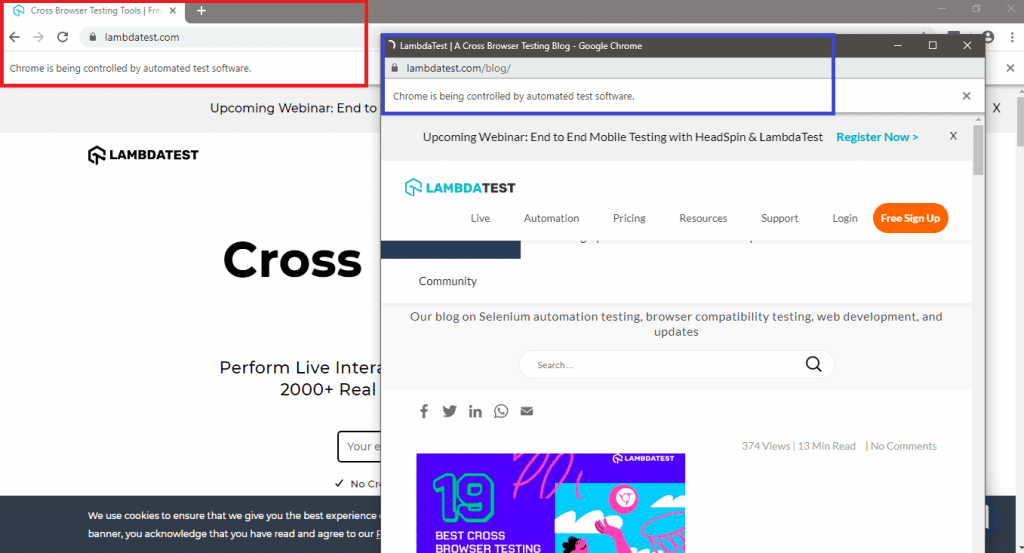
The two browser windows are open with URL 1 & URL 2. The WindowHandle of the second browser window is used with the SwitchTo() command for switching the context to the second window (that is opened using window.open JS method).
A similar approach is used for switching the context to the parent window on the child window’s closure.
Here is the execution snapshot where the PHPUnit framework was triggered for running the tests:
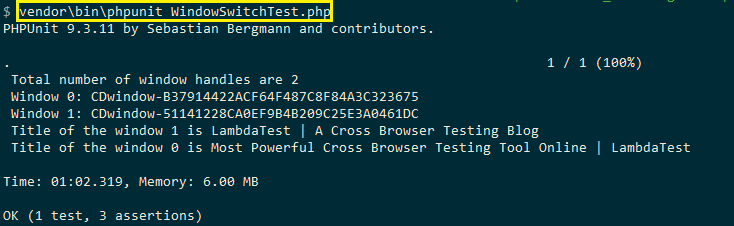
I hope this gives you a fairly good idea of handling windows in Selenium with PHP. Next up, we learn about handling multiple browser tabs in Selenium PHP.

Handling Multiple Browser Tabs in Selenium with PHP
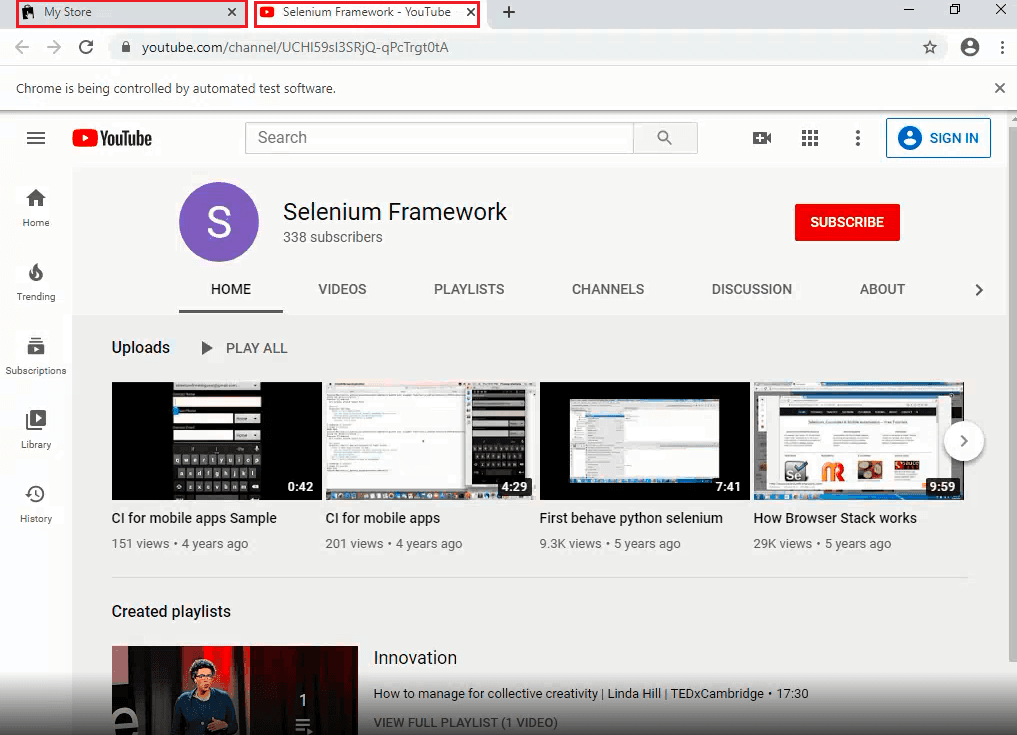
For demonstrating handling of multiple browser tabs in Selenium PHP, we use the following test scenario:
- Open http://automationpractice.com/index.php in the Chrome browser
- Locate the ‘Youtube link’ on the test page and click on the link
- Switch to the newly opened browser tab
- Assert if the window title does not match with the expected title
- Close the window under focus
- Switch to the first window and assert if the window title does not match with the expected title
- Close the browser window
Note: The automationpractice.com demo store used in this scenario is no longer online, and the domain now serves a web-hosting placeholder page. To run the test, set $test_url to a page whose link opens in a new tab, then update the XPath and the two expected titles.
Implementation
<?php
require 'vendor/autoload.php';

use PHPUnitFrameworkTestCase;
use FacebookWebDriverRemoteDesiredCapabilities;
use FacebookWebDriverRemoteRemoteWebDriver;
use FacebookWebDriverWebDriverBy;

$GLOBALS['LT_USERNAME'] = "user-name";
# accessKey:  AccessKey can be generated from automation dashboard or profile section
$GLOBALS['LT_APPKEY'] = "access-key";

class TabSwitchTest extends TestCase
{
  protected $webDriver;

  public function build_browser_capabilities(){
    /* $capabilities = DesiredCapabilities::chrome(); */
    $capabilities = array(
      "build" => "[PHP] Tab Switching with Chrome on Windows 10",
      "name" => "[PHP] Tab Switching with Chrome on Windows 10",
      "platform" => "Windows 10",
      "browserName" => "Chrome",
      "version" => "85.0"
    );
    return $capabilities;
  }

  public function setUp(): void
  {
    $url = "https://". $GLOBALS['LT_USERNAME'] .":" . $GLOBALS['LT_APPKEY'] ."@hub.lambdatest.com/wd/hub";
    $capabilities = $this->build_browser_capabilities();
    /* Download the Selenium Server 3.141.59 from
    https://selenium-release.storage.googleapis.com/3.141/selenium-server-standalone-3.141.59.jar
    */
    /* $this->webDriver = RemoteWebDriver::create('http://localhost:4444/wd/hub', $capabilities); */
    $this->webDriver = RemoteWebDriver::create($url, $capabilities);
  }

  public function tearDown(): void
  {
    $this->webDriver->quit();
  }
  /*
  * @test
  */
  public function test_SwitchToNewTab()
  {
      $test_url = "http://automationpractice.com/index.php";
      $title_1 = "My Store";
      $title_2 = "Selenium Framework - YouTube";

      $this->webDriver->get($test_url);
      $this->webDriver->manage()->window()->maximize();

      sleep(5);
      $HandleCount = $this->webDriver->getWindowHandles();
      echo ("
 Total number of window handles are " . sizeof($HandleCount));
      echo ("
 Window 0: " . $HandleCount[0]);

      $win_title = $this->webDriver->getTitle();
      echo ("
 Title of the window 0 is " . $win_title);
      $this->assertEquals($win_title, $title_1);

      /* Go to the end of the Page since we are looking to click the YouTube button */
      $link = "window.scrollTo(0, document.body.scrollHeight)";
      $this->webDriver->executeScript($link);

      /* $browser_button = $this->webDriver->findElement(WebDriverBy::XPath("//a[.='Click Here']")); */
      $browser_button = $this->webDriver->findElement(WebDriverBy::XPath("//a[contains(.,'Youtube')]"));

      if($browser_button) {
          $browser_button->click();

          /* The Window Count is now 2 */
          $HandleCount = $this->webDriver->getWindowHandles();
          echo ("
 Total number of window handles are " . sizeof($HandleCount));
          echo ("
 Window 0: " . $HandleCount[0]);
          echo ("
 Window 1: " . $HandleCount[1]);

          /* Check if the Window titles match */
          $this->webDriver->switchTo()->window($HandleCount[1]);
          $win_title_2 = $this->webDriver->getTitle();
          echo ("
 Title of the window 1 is " . $win_title_2);
          sleep(5);
          $this->assertEquals($win_title_2, $title_2);

          /* Close the newly opened Window and return to the old window */
          $this->webDriver->close();
          sleep(5);

          /* Return to the window with handle = 0 */
          $this->webDriver->switchTo()->window($HandleCount[0]);
      }
      /* Check if the Window titles match */
      $win_title_1 = $this->webDriver->getTitle();
      echo ("
 Title of the window 0 is " . $win_title_1);
      $this->assertEquals($win_title_1, $title_1);
      sleep(5);
      }
}
?>
Code Walkthrough
A significant part of the implementation in this part of the Selenium PHP tutorial remains the same as that used in handling windows in Selenium with PHP.
- On opening the test URL (i.e. http://automationpractice.com/index.php), the getWindowHandles method of WebDriver is used for getting the handles of the opened browser window(s).
public function test_SwitchToNewTab()
{
      $test_url = "http://automationpractice.com/index.php";
      $title_1 = "My Store";
      $title_2 = "Selenium Framework - YouTube";

      ......................................
      ......................................

      $this->webDriver->get($test_url);
      $this->webDriver->manage()->window()->maximize();
      ......................................
      ......................................
      $HandleCount = $this->webDriver->getWindowHandles();
$link = "window.scrollTo(0, document.body.scrollHeight)";
$this->webDriver->executeScript($link);
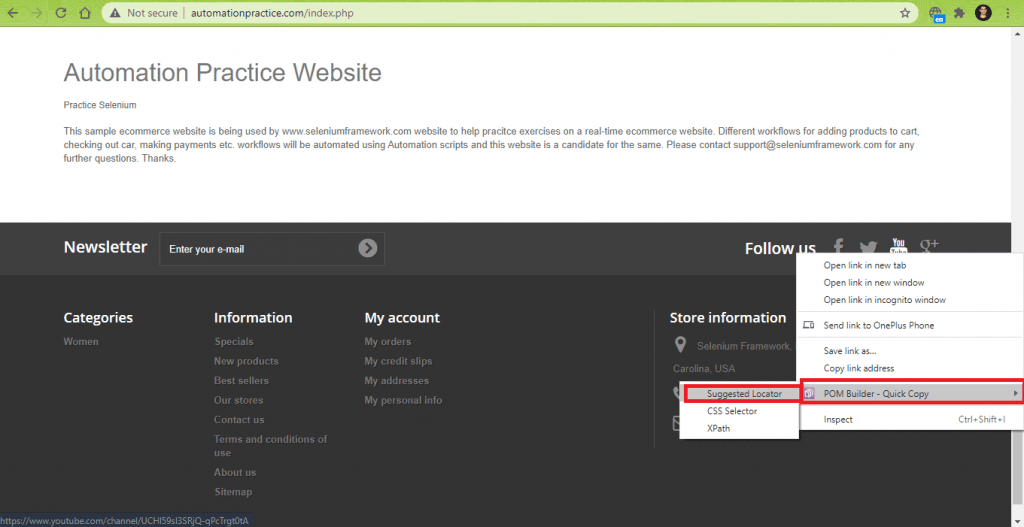
The findElement method of WebDriverBy class is used for getting details about the web element [with XPath – //a[contains(.,’Youtube’)].
$browser_button = $this->webDriver->findElement(WebDriverBy::XPath("//a[contains(.,'Youtube')]"));
$browser_button->click();
Hence, sizeof operator when applied to the array (or set) returned by getWindowHandles returns 2.
$HandleCount = $this->webDriver->getWindowHandles();
echo ("
 Total number of window handles are " . sizeof($HandleCount));
echo ("
 Window 0: " . $HandleCount[0]);
echo ("
 Window 1: " . $HandleCount[1]);
$this->webDriver->switchTo()->window($HandleCount[0]);
$win_title_1 = $this->webDriver->getTitle();
$this->assertEquals($win_title_1, $title_1);
Execution
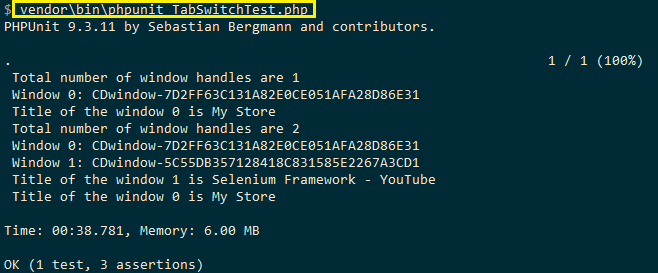
Here are the Window Handles of the two browser windows that were instantiated during testing:
Shown below is the Selenium test automation execution snapshot:
As seen in the execution snapshot, the Window Handles of the parent window and tab are unique. When the window and tab is open, the size of the window handles array is 2.
Now that we have seen the implementation and execution for handling windows in Selenium with PHP as well as multiple tabs, let us learn more about handling multiple browser pop-up windows.
Handling Multiple Browser Pop-up Windows in Selenium with PHP
For demonstrating handling of browser popups in Selenium PHP, we use the following test scenario:
- Open http://www.popuptest.com/popuptest1.html in the Chrome browser.
- Close all the pop-up windows in reverse chronological order.
- Check if the title of the parent window matches the expected title.
Note: The popuptest.com demo site used in this scenario no longer resolves in DNS. To run the test, point $test_url at a page you control that calls window.open() several times on load, then update the expected title and window count.
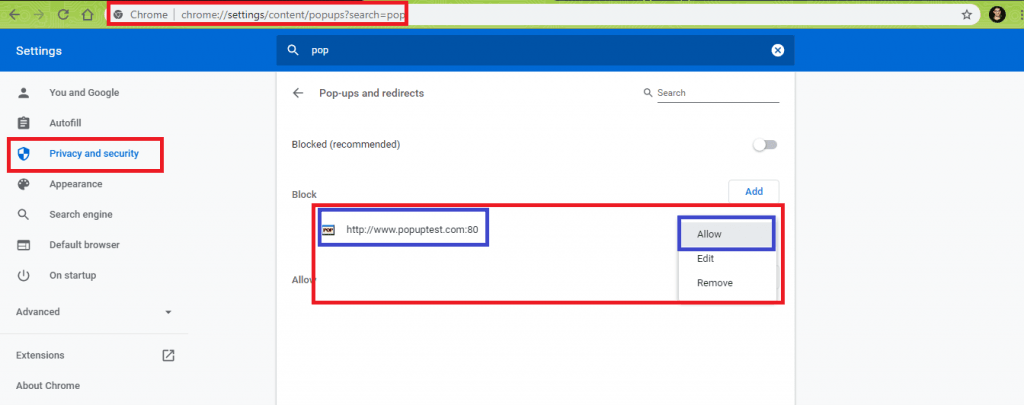
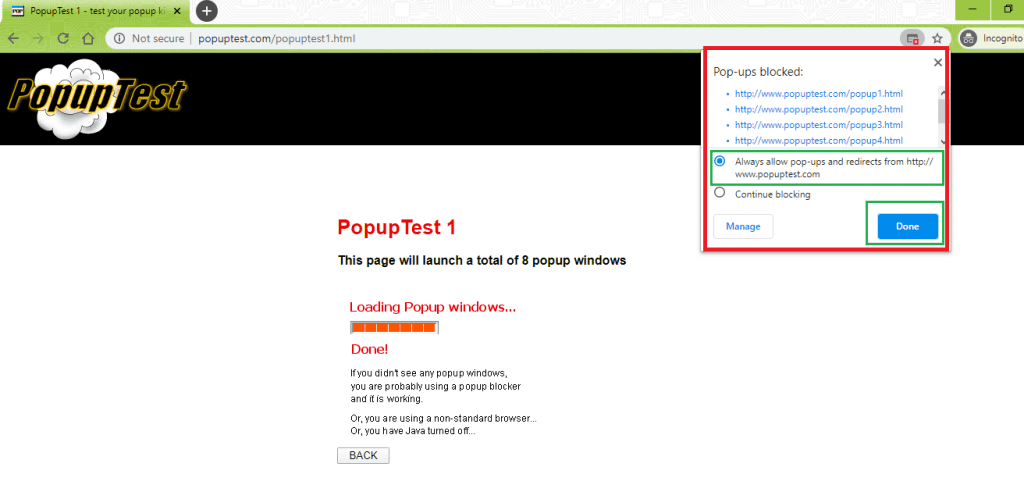
If the same test is performed on a local Selenium Grid, you have to ensure that pop-ups are enabled for Google Chrome. For enabling, pop-ups for Chrome on the local machine, go to chrome://settings/ 🡪 Privacy and security 🡪 Site Settings 🡪 Pop-ups and redirects. Disable Block option for http://www.popuptest.com:80
<?php
require 'vendor/autoload.php';

use PHPUnitFrameworkTestCase;
use FacebookWebDriverRemoteDesiredCapabilities;
use FacebookWebDriverRemoteRemoteWebDriver;
use FacebookWebDriverWebDriverBy;

$GLOBALS['LT_USERNAME'] = "user-name";
# accessKey:  AccessKey can be generated from automation dashboard or profile section
$GLOBALS['LT_APPKEY'] = "access-key";

class PopUpTest extends TestCase
{
  protected $webDriver;

  public function build_browser_capabilities(){
    /* $capabilities = DesiredCapabilities::chrome(); */
    $capabilities = array(
      "build" => "[PHP] Pop Up Testing with Chrome on Windows 10",
      "name" => "[PHP] Pop Up Testing with Chrome on Windows 10",
      "platform" => "Windows 10",
      "browserName" => "Chrome",
      "version" => "85.0"
    );
    return $capabilities;
  }

  public function setUp(): void
  {
    $url = "https://". $GLOBALS['LT_USERNAME'] .":" . $GLOBALS['LT_APPKEY'] ."@hub.lambdatest.com/wd/hub";
    $capabilities = $this->build_browser_capabilities();
    /* Download the Selenium Server 3.141.59 from
    https://selenium-release.storage.googleapis.com/3.141/selenium-server-standalone-3.141.59.jar
    */
    /* $this->webDriver = RemoteWebDriver::create('http://localhost:4444/wd/hub', $capabilities); */
    $this->webDriver = RemoteWebDriver::create($url, $capabilities);
  }

  public function tearDown(): void
  {
    $this->webDriver->quit();
  }
  /*
  * @test
  */
  public function test_SwitchToNewWindow()
  {
      $test_url = "http://www.popuptest.com/popuptest1.html";
      $title = "PopupTest 1 - test your popup killer software";

      $this->webDriver->get($test_url);
      sleep(5);

      /* This will open-up main window and six pop-up windows */
      /* Once the page is loaded, the total window count will be 7 */
      $HandleCount = $this->webDriver->getWindowHandles();
      /* This is the ID of the parent window */
      $mainHandle = $HandleCount[0];
      echo ("
 Total number of window handles are " . sizeof($HandleCount));
      echo ("
 Window 0: " . $HandleCount[0]);

      $win_title = $this->webDriver->getTitle();
      echo ("
 Title of the parent window is " . $win_title);

      foreach( $HandleCount as $handle)
      {
        if($handle != $mainHandle)
        {
          echo ("
 Window handle of the current window: " . $handle);
          $this->webDriver->switchTo()->window($handle);
          echo ("
 Title of the current window: " . $this->webDriver->getTitle());
          /* Close the pop-up window and return to the old window */
          $this->webDriver->close();
          sleep(2);
        }
      }
      $this->webDriver->switchTo()->window($mainHandle);
      $this->webDriver->manage()->window()->maximize();
      sleep(5);
      $curr_window_title = $this->webDriver->getTitle();
      echo ("

 Title of the only left window: " . $curr_window_title);
      $this->assertEquals($curr_window_title, $title);
      sleep(5);
  }
}
?>
Code WalkThrough
- On instantiation of the Chrome browser on TestMu AI Grid, the browser opens the test URL and 6 pop-up windows (i.e. Pop-up 1, Pop-up 2 ... Pop-up 6). Hence, the total window count is 7.
$test_url = "http://www.popuptest.com/popuptest1.html";
$title = "PopupTest 1 - test your popup killer software";
$this->webDriver->get($test_url);
The sizeof operation when performed on the set returned by getWindowHandles should return 7 (i.e. one parent window + six pop-up windows).
The first element (i.e. $HandleCount[0]) in the set is the Window Handle of the parent window and the same is saved in a temporary variable (i.e. $mainHandle)
/* This will open-up main window and six pop-up windows */
/* Once the page is loaded, the total window count will be 7 */
$HandleCount = $this->webDriver->getWindowHandles();
/* This is the ID of the parent window */
$mainHandle = $HandleCount[0];
echo ("
 Total number of window handles are " . sizeof($HandleCount));
If the current window handle is that of a pop-up window, the switchTo method is used to switch to the pop-up window. Selenium WebDriver’s close method is used for closing the pop-up window(s). The pop-up windows will be closed in the order – popup6.html 🡪 popup5.html 🡪 popup4.html 🡪 popup3.html 🡪 popup2.html 🡪 popup1.html. The loop is exited when all pop-up windows are closed and only one window is active (i.e. parent window).
foreach($HandleCount as $handle)
{
	if($handle != $mainHandle)
	{
          echo ("
 Window handle of the current window: " . $handle);
          $this->webDriver->switchTo()->window($handle);
	    $this->webDriver->close();
          sleep(2);
	}
}
$this->webDriver->switchTo()->window($mainHandle);
$this->webDriver->manage()->window()->maximize();
$curr_window_title = $this->webDriver->getTitle();
$this->assertEquals($curr_window_title, $title);
Execution
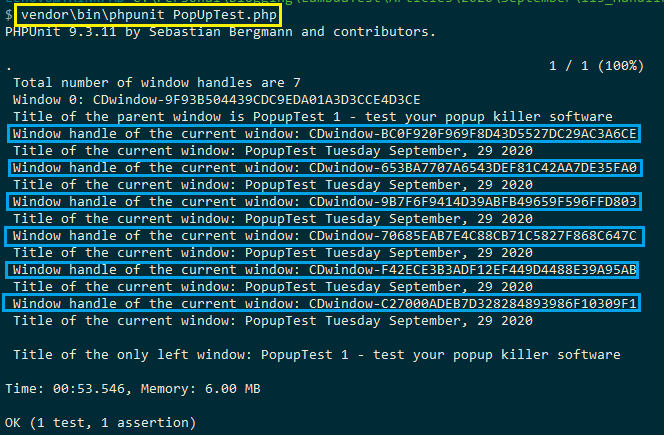
The window handles of the pop-up windows are marked below:
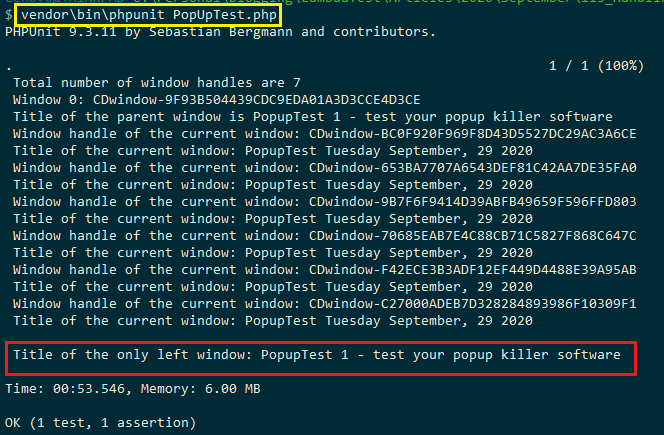
Only the parent window is left on the closure of all the pop windows, eventually closed after the test has been executed.
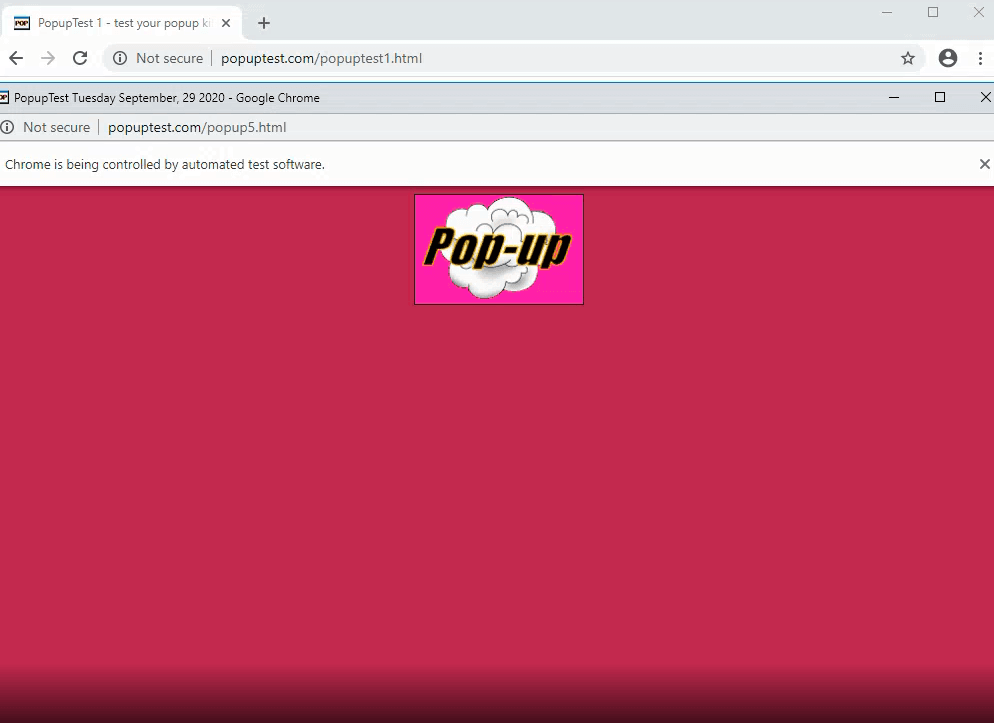
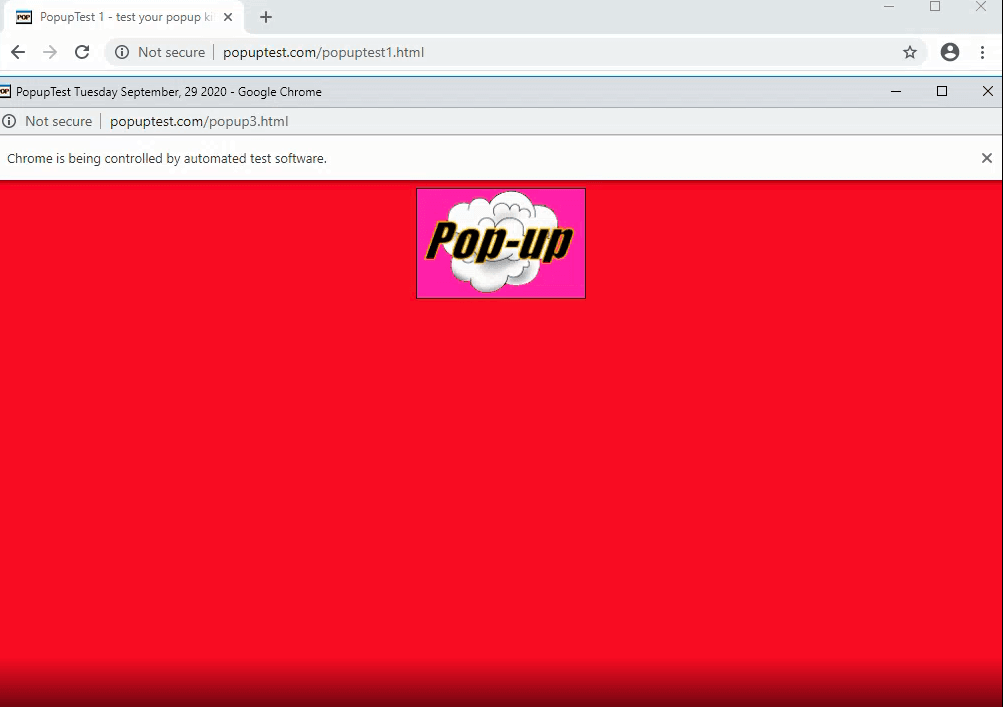
As seen in the execution snapshot obtained by visiting the automation tab on the TestMu AI platform, we notice that the pop-up windows are opened and later closed in reverse chronological order.
How Do You Open a New Tab or Window in Selenium 4 with PHP?
Call switchTo()->newWindow() in php-webdriver 1.10.0 or later. The method sends the W3C WebDriver New Window command, opens a tab or a window, and moves driver focus to the new handle.
The demos above pin php-webdriver 1.8.0 and open the second window with the JavaScript window.open() method. The php-webdriver changelog shows that version 1.9.0 added newWindow(), version 1.10.0 moved the method under switchTo(), and version 1.16.0 shipped on 29 December 2025.
use Facebook\WebDriver\WebDriverTargetLocator;

/* Save the parent handle before focus moves */
$parentHandle = $this->webDriver->getWindowHandle();
/* Open a new tab and switch focus to it */
$this->webDriver->switchTo()->newWindow(WebDriverTargetLocator::WINDOW_TYPE_TAB);
$this->webDriver->get("https://www.testmuai.com/blog/");
/* Close the tab and return to the parent window */
$this->webDriver->close();
$this->webDriver->switchTo()->window($parentHandle);
Five details matter when a test calls newWindow():
- Tab or window type: pass WebDriverTargetLocator::WINDOW_TYPE_TAB, the default, or WINDOW_TYPE_WINDOW to choose what opens.
- Automatic focus switch: newWindow() switches to the new handle itself, so the test needs no getWindowHandles() lookup to reach the new tab.
- Parent handle first: save getWindowHandle() before the call, because focus leaves the parent window and the test needs that handle to switch back.
- W3C mode only: php-webdriver throws a LogicException when the session runs in the legacy JsonWire (OSS) protocol mode.
- Driver fallback: a driver that cannot open the requested type opens whichever window type the driver supports instead.
Conclusion
Browser windows, including tabs and pop-up windows, are identified using Window Handles. These handles act as Window IDs and are unique for every browser window. In this Selenium WebDriver PHP tutorial, we had a look at handling windows in Selenium with PHP using methods like switchTo, getWindowHandle, and getWindowHandles. These methods are instrumental in window handling in Selenium test automation with PHP.
The difference between getWindowHandle() and getWindowHandles() is also a frequent topic in Selenium interview questions.
Happy Selenium Automation Testing ☺

Author

Himanshu Sheth
Blogs: 142


Himanshu Sheth is the Director of Marketing (Technical Content) at TestMu AI, with over 8 years of hands-on experience in Selenium, Cypress, and other test automation frameworks. He has authored more than 130 technical blogs for TestMu AI, covering software testing, automation strategy, and CI/CD. At TestMu AI, he leads the technical content efforts across blogs, YouTube, and social media, while closely collaborating with contributors to enhance content quality and product feedback loops. He has done his graduation with a B.E. in Computer Engineering from Mumbai University. Before TestMu AI, Himanshu led engineering teams in embedded software domains at companies like Samsung Research, Motorola, and NXP Semiconductors. He is a core member of DZone and has been a speaker at several unconferences focused on technical writing and software quality.


Handling Windows in Selenium PHP FAQs
Did you find this page helpful?
More Related Blogs
TestMu AI forEnterprise
Get access to solutions built on Enterprise
grade security, privacy, & compliance
- Advanced access controls
- Advanced data retention rules
- Advanced Local Testing
- Premium Support options
- Early access to beta features
- Private Slack Channel
- Unlimited Manual Accessibility DevTools Tests