
E2E Testing for Chat, Voice, Phone and Video AI Agents
Run Thousands of Test Scenarios against Your Agent and Catch Hallucinations, Bias, and Toxicity Before Users Do.

TruLens: How to Evaluate a RAG App With the RAG Triad
TruLens is an open-source library that traces and scores LLM apps. Install it, wire up the RAG triad, read the dashboard and see what it can't test.
Published on:
On This Page
TruLens is an open-source Python library that traces an LLM app and scores each response using feedback functions (most commonly the RAG triad of context relevance, groundedness and answer relevance). You install it via pip, you decorate your retrieval and generation functions, you record your test queries, and then you can compare app versions on a leaderboard and dashboard.
This guide walks through a working TruLens setup for a RAG app. It explains what each of the RAG triad scores picks up, how TruLens scores multi-turn conversations, and where it stops (so you know what still needs to go through an end-to-end check prior to release).
TL;DR
TruLens is an open-source, MIT-licensed Python library that traces an LLM app and scores each response with LLM judges. For a RAG app, its RAG triad scores context relevance, groundedness and answer relevance on every recorded query, and the TruLens dashboard puts app versions side by side on a leaderboard.
How Do You Evaluate a RAG App With TruLens?
- TruLens install: pip install trulens trulens-providers-openai adds the core library and an OpenAI judge. Other judges, such as Snowflake Cortex through trulens-providers-cortex, ship as separate packages, and trulens-eval now installs only a compatibility layer for the old trulens_eval API.
- @instrument span types: The RETRIEVAL, GENERATION and RECORD_ROOT span types tell TruLens which function retrieves, which one generates and which one is the entry point, so each call to query() becomes one traced record.
- RAG triad metrics: The TruLens RAG triad scores context relevance (each retrieved chunk against the query), groundedness (each sentence of the answer against the retrieved chunks) and answer relevance (whether the answer addresses the question).
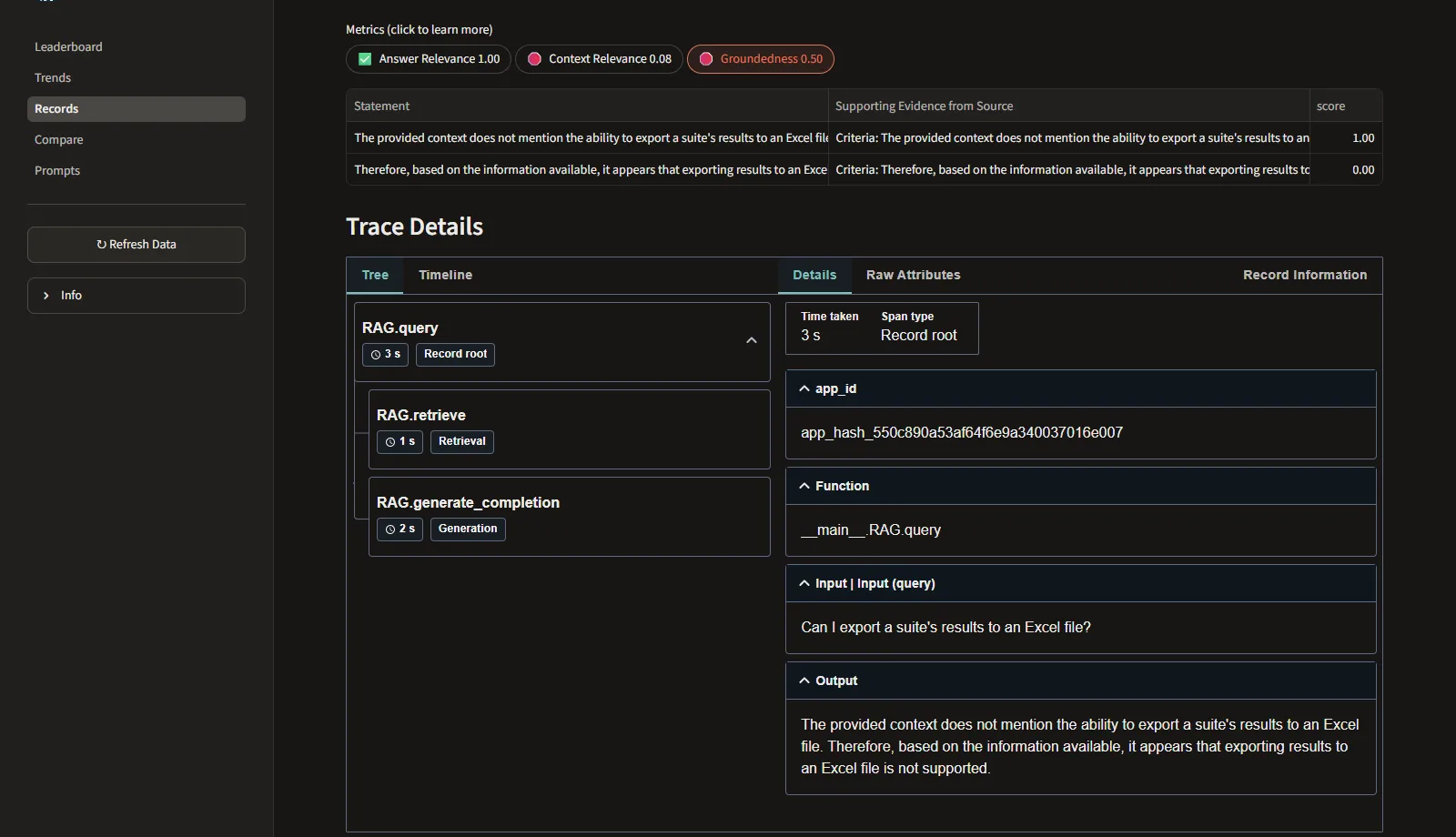
- TruLens dashboard: run_dashboard(session) opens a leaderboard of app versions and a record view that lists each scored statement with the judge's reasoning. Wait for retrieve_feedback_results() before reading scores, because the judges run in a background thread.
What Does a TruLens Run Cost, and What Does It Leave Untested?
- License and runtime: TruLens is free and open source under the MIT license. TruLens 2.16.0 runs on Python 3.10 to 3.14, and you pay only the LLM provider that acts as the judge.
- Judge calls: Every TruLens metric is a call to the judge model you pay for. With four retrieved chunks per query, a six-query run made 78 judge calls, about 13 per query, because TruLens groundedness makes two calls for each sentence of the answer.
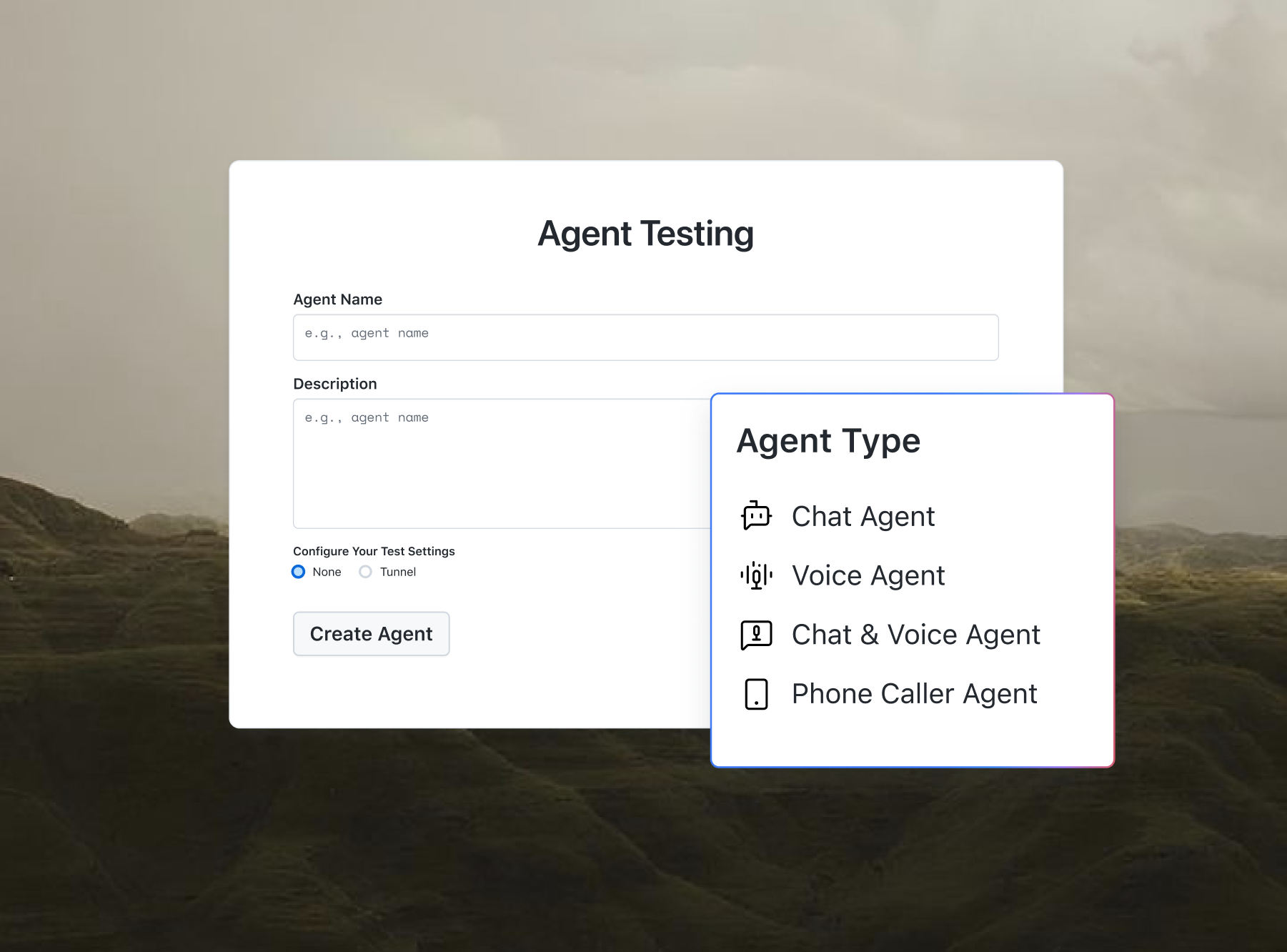
- Deployed agent: TruLens scores traces from your own Python code. TestMu AI Agent Testing generates scenarios from your requirements, runs them against your deployed chat agent's endpoint and scores each conversation on nine quality metrics.
What Is TruLens?
TruLens is an MIT-licensed library for tracing and evaluating LLM applications and AI agents. The GitHub repo describes it as 'Evaluation and Tracking for LLM Experiments and AI Agents'.
It's built on OpenTelemetry, so traces can be sent to any OTLP-compatible backend. It's designed for use with agents as well as RAG chains, and the documentation includes a quickstart for building and evaluating a web search agent.
Key facts, checked November 23, 2026:
| Fact | Value | Source |
|---|---|---|
| Latest version | 2.16.0, released October 19, 2026 | PyPI |
| Python support | 3.10 to 3.14 | TruLens getting-started docs |
| License | MIT | GitHub |
| GitHub stars | 3.7k | GitHub |
| LLM providers for judges | OpenAI / Azure OpenAI, LiteLLM, Google Gemini, AWS Bedrock, Snowflake Cortex, HuggingFace, LangChain models, OrcaRouter | README |
| Framework integrations | LangChain / LangGraph, LlamaIndex, or any Python app via @instrument | README |
TruLens is one tool inside a wider AI testing practice: it scores what your model and retriever produced, while other tools test the full app a user talks to.
For a quick visual walkthrough of this concept, watch the video below from TestMu AI.
Subscribe to the TestMu AI YouTube channel for more tutorials on testing and automation.
What Is the RAG Triad?
The RAG triad is a set of three TruLens checks which, taken together, demonstrate whether a RAG answer is supported and useful. Each one looks at a different kind of failure.
| Check | Question | Failure it catches | TruLens implementation |
|---|---|---|---|
| Context relevance | Is each retrieved chunk relevant to the query? | Retriever pulls the wrong documents | context_relevance_with_cot_reasons |
| Groundedness | Is every claim in the answer supported by the context? | Model adds facts the sources don't contain | groundedness_measure_with_cot_reasons_consider_answerability |
| Answer relevance | Does the answer address the user's question? | Grounded answer that ignores what was asked | relevance_with_cot_reasons |
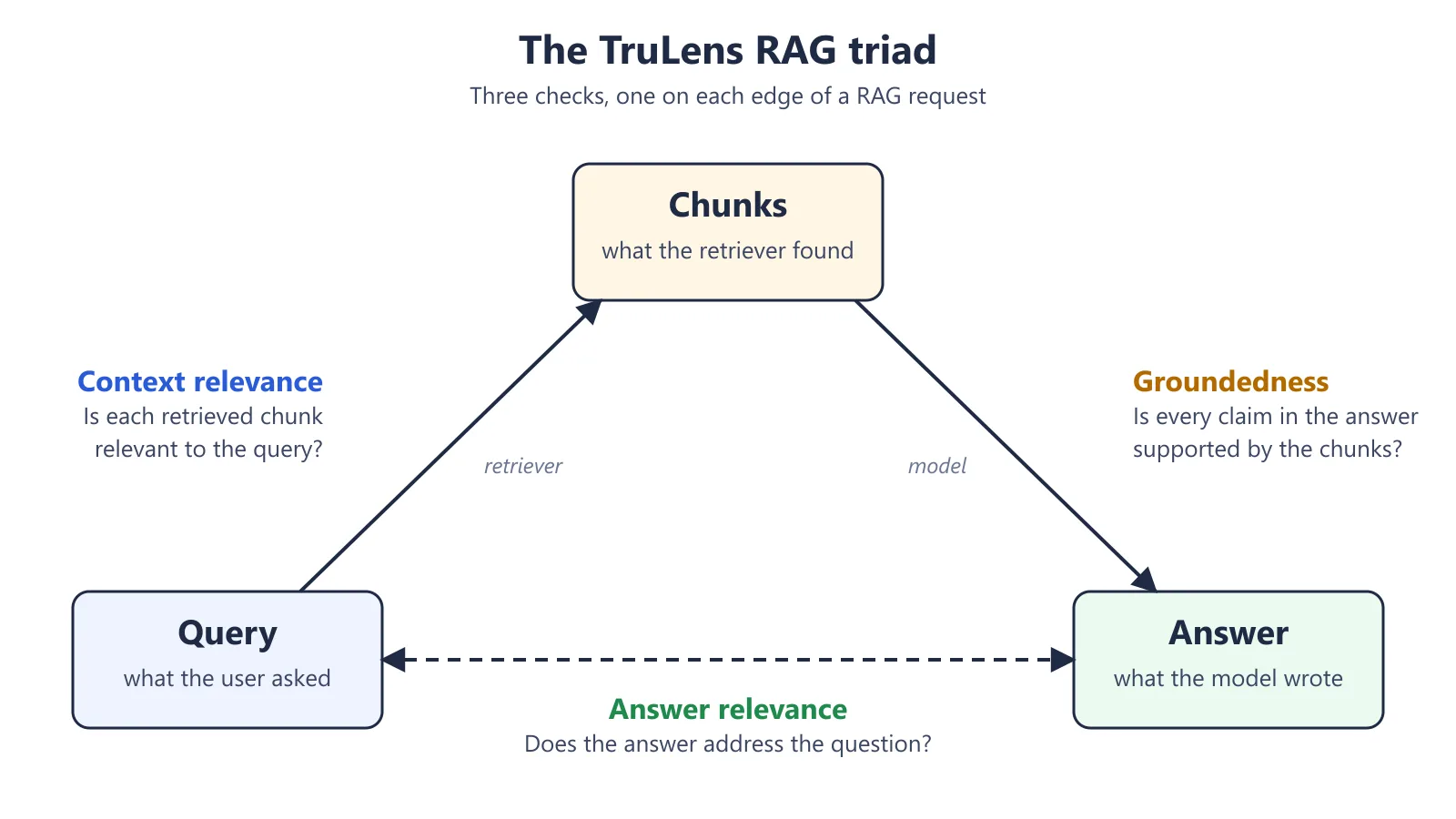
TruLens' RAG triad documentation defines groundedness as breaking the response down into individual claims and then searching for evidence to support each of those claims. They point out that irrelevant context "could be weaved into a hallucination".
For the details on how groundedness scores are calculated across the various vendors and what threshold you should gate on, see our explainer on groundedness in AI.
How Do You Install TruLens?
TruLens is available via PyPI as both a core package and as a provider package for the LLM that acts as the judge.
pip install trulens trulens-providers-openai        # core + OpenAI / Azure OpenAI judge
pip install trulens trulens-apps-langchain          # if your app uses LangChain / LangGraph
pip install trulens trulens-apps-llamaindex         # if your app uses LlamaIndex
Other judges follow the same pattern: trulens-providers-litellm, trulens-providers-bedrock, trulens-providers-google, trulens-providers-huggingface and trulens-providers-cortex. You'll need to set the judge's API key as an environment variable (for OpenAI: OPENAI_API_KEY) prior to running anything. Never hard-code it.

Test the whole chat agent, not just the model.
Note: TestMu AI Agent Testing takes your requirements and turns them into scenarios, which it then runs against your live chat agent endpoint and scores nine quality metrics per conversation. Try Agent Testing free.
How Do You Instrument a RAG App for TruLens?
TruLens needs to know which function is the one that retrieves, which one is the one that generates, and which one is the entry point. You annotate them with the @instrument decorator and span types. The example below follows the TruLens quickstart, except that the vector store and test queries are passed in as parameters.
import json
import sys

from openai import OpenAI
from trulens.core import TruSession
from trulens.core.otel.instrument import instrument
from trulens.otel.semconv.trace import SpanAttributes

oai_client = OpenAI()  # reads OPENAI_API_KEY from the environment


class RAG:
    def __init__(self, vector_store, model_name: str):
        self.vector_store = vector_store  # e.g. a Chroma collection
        self.model_name = model_name

    @instrument(
        span_type=SpanAttributes.SpanType.RETRIEVAL,
        attributes={
            SpanAttributes.RETRIEVAL.QUERY_TEXT: "query",
            SpanAttributes.RETRIEVAL.RETRIEVED_CONTEXTS: "return",
        },
    )
    def retrieve(self, query: str) -> list:
        results = self.vector_store.query(query_texts=query, n_results=4)
        return [doc for sublist in results["documents"] for doc in sublist]

    @instrument(span_type=SpanAttributes.SpanType.GENERATION)
    def generate_completion(self, query: str, context_list: list) -> str:
        if not context_list:
            return "I don't have enough relevant information to answer this question."
        context = "\n---\n".join(context_list)
        completion = oai_client.chat.completions.create(
            model=self.model_name,
            messages=[
                {"role": "system", "content": "You are a helpful assistant."},
                {"role": "user", "content": f"Context:\n{context}\n\nQuestion: {query}\n\nAnswer using the context above:"},
            ],
        ).choices[0].message.content
        return completion or "I don't have enough information to answer this question."

    @instrument(
        span_type=SpanAttributes.SpanType.RECORD_ROOT,
        attributes={
            SpanAttributes.RECORD_ROOT.INPUT: "query",
            SpanAttributes.RECORD_ROOT.OUTPUT: "return",
        },
    )
    def query(self, query: str) -> str:
        return self.generate_completion(query=query, context_list=self.retrieve(query=query))
The RECORD_ROOT span covers one full request, so each call to query() becomes one record in TruLens. The RETRIEVAL attributes tell the metrics where to find the query text and the retrieved chunks.
How Do You Define the RAG Triad Metrics in TruLens?
Each metric is a Metric with an implementation from a provider and selectors that point it at portions of the trace.
import numpy as np
from trulens.core import Metric, Selector
from trulens.providers.openai import OpenAI as OpenAIProvider


def rag_triad(judge_model: str) -> list:
    provider = OpenAIProvider(model_engine=judge_model)

    groundedness = Metric(
        implementation=provider.groundedness_measure_with_cot_reasons_consider_answerability,
        name="Groundedness",
        selectors={
            "source": Selector.select_context(collect_list=True),
            "statement": Selector.select_record_output(),
            "question": Selector.select_record_input(),
        },
    )

    answer_relevance = Metric(
        implementation=provider.relevance_with_cot_reasons,
        name="Answer Relevance",
        selectors={
            "prompt": Selector.select_record_input(),
            "response": Selector.select_record_output(),
        },
    )

    context_relevance = Metric(
        implementation=provider.context_relevance_with_cot_reasons,
        name="Context Relevance",
        selectors={
            "question": Selector.select_record_input(),
            "context": Selector.select_context(collect_list=False),
        },
        agg=np.mean,  # score each chunk, then average
    )

    return [groundedness, answer_relevance, context_relevance]
Context relevance uses collect_list=False so each chunk is scored individually and the scores are averaged. Groundedness uses collect_list=True so the answer is checked against all the retrieved chunks together.
How Do You Run TruLens and Read the Results?
You wrap the app in TruApp, record your test queries inside a with block, and then either look at the leaderboard or open the dashboard.
from trulens.apps.app import TruApp
from trulens.dashboard import run_dashboard


def evaluate(vector_store, queries: list, app_version: str, model_name: str, judge_model: str):
    session = TruSession()
    rag = RAG(vector_store=vector_store, model_name=model_name)
    tru_rag = TruApp(
        rag,
        app_name="support-rag",
        app_version=app_version,
        feedbacks=rag_triad(judge_model),
    )

    with tru_rag as recording:
        for q in queries:
            rag.query(q)

    recording.retrieve_feedback_results()
    print(session.get_leaderboard())
    return session


if __name__ == "__main__":
    # usage: python eval_rag.py docs.json queries.json v2 GENERATION_MODEL JUDGE_MODEL
    import os
    import chromadb
    from chromadb.utils.embedding_functions import OpenAIEmbeddingFunction

    docs_path, queries_path, version, gen_model, judge_model = sys.argv[1:6]
    with open(docs_path) as f:
        docs = json.load(f)       # {"doc_id": "document text", ...}
    with open(queries_path) as f:
        queries = json.load(f)    # ["first test question", ...]

    store = chromadb.Client().get_or_create_collection(
        name="support-docs",
        embedding_function=OpenAIEmbeddingFunction(
            api_key=os.environ["OPENAI_API_KEY"],
            model_name="text-embedding-3-small",
        ),
    )
    for doc_id, text in docs.items():
        store.add(doc_id, documents=text)

    evaluate(store, queries, version, gen_model, judge_model)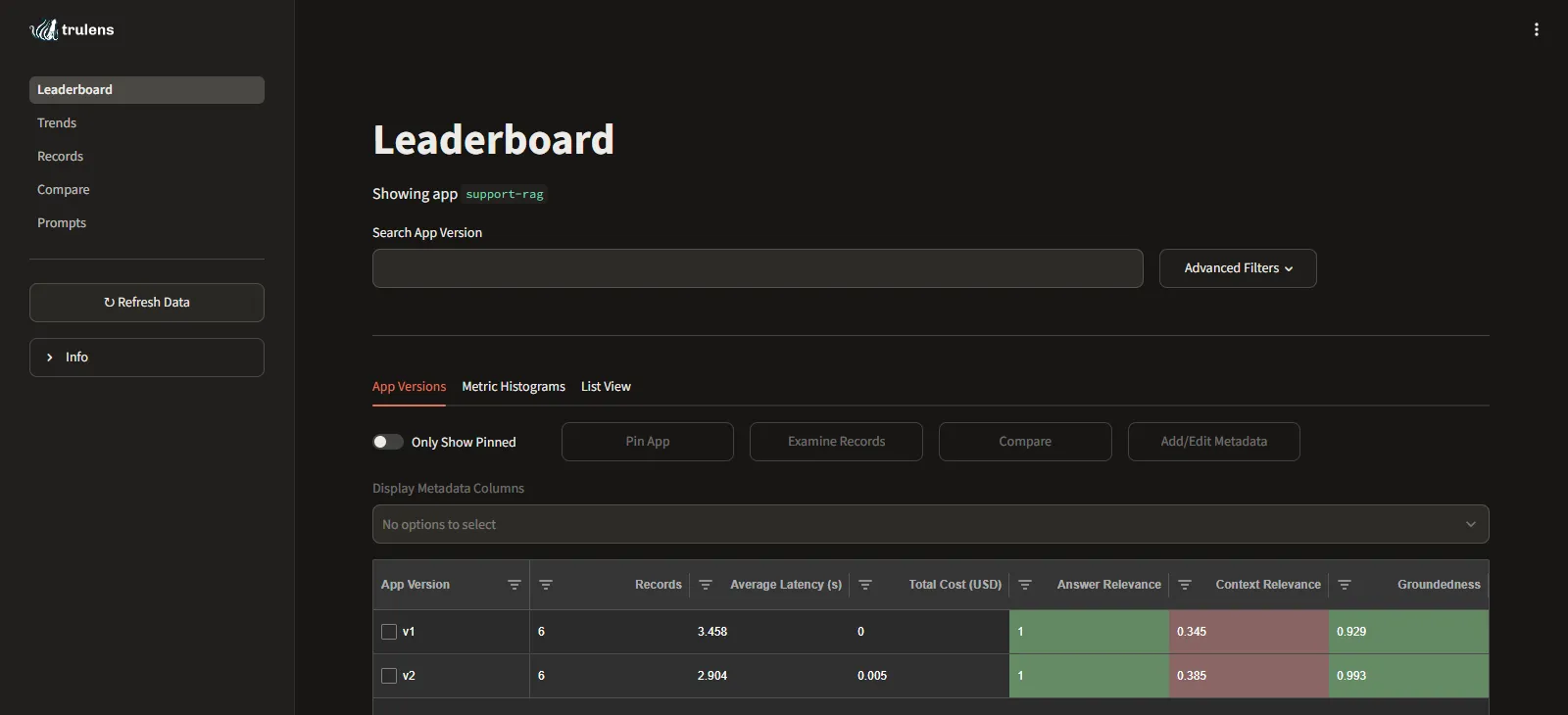
Three habits make the results useful:
- One app_version per change. Run the same query file against "v1" and "v2" (a new prompt, chunk size or model) and the leaderboard will have their average scores side by side.
- Read the reasons. The
_with_cot_reasonsimplementations used here are the versions that attach the judge's chain-of-thought reasons to each score. Open up the low scores in the dashboard (run_dashboard(session)) prior to making any changes. - Reset deliberately. The quickstart has a call to
session.reset_database()to start off clean. You'd skip that if you wanted history across runs.
How Do You Evaluate Multi-Turn Conversations With TruLens?
TruLens can score an entire conversation rather than just a single reply. The conversation evaluation quickstart defines a conversation-level metric and groups the turns under a single conversation ID.
The runnable below is based on that quickstart, with the model names and the user turns being passed in.
from openai import OpenAI
from trulens.apps.app import TruApp
from trulens.core import Metric
from trulens.core.otel.instrument import instrument
from trulens.core import TruSession
from trulens.providers.openai import OpenAI as OpenAIProvider


class SupportAssistant:
    def __init__(self, model: str):
        self.client = OpenAI()  # reads OPENAI_API_KEY from the environment
        self.model = model
        self.messages = [{"role": "system", "content": "You are a concise customer support assistant."}]

    def reset(self) -> None:
        self.messages = self.messages[:1]

    @instrument()
    def respond(self, question: str) -> str:
        self.messages.append({"role": "user", "content": question})
        completion = self.client.chat.completions.create(
            model=self.model, temperature=0, messages=self.messages
        )
        response = completion.choices[0].message.content or ""
        self.messages.append({"role": "assistant", "content": response})
        return response


def score_conversation(conversation_id: str, user_turns: list, model: str, judge_model: str):
    session = TruSession()
    provider = OpenAIProvider(model_engine=judge_model)
    metric = Metric(
        implementation=provider.conversation_helpfulness,
        name="Conversation Helpfulness",
    ).on_conversation()

    assistant = SupportAssistant(model=model)
    recorder = TruApp(
        assistant,
        app_name="support-assistant",
        app_version=model,
        main_method=assistant.respond,
        feedbacks=[metric],
    )

    with recorder(conversation_id=conversation_id) as recording:
        for turn in user_turns:
            assistant.respond(turn)

    recording.retrieve_feedback_results()
    return session
As per the docs, evaluation is queued once per conversation when the recording block exits (not per turn); retrieve_feedback_results() will then wait for those scores to be stored. Your assistant must retain the message history itself, as TruLens will be recording and scoring what it is given.
TruLens vs Ragas vs DeepEval vs Promptfoo: Which Should You Use?
The four open-source tools overlap, but each one is built around a different use case.
The TruLens, Ragas, and DeepEval entries are taken from Analytics Vidhya's comparison of RAGAS, TruLens and DeepEval (Soumil Jain, 12th July 2026).
The Promptfoo entry is from our own Promptfoo guide. Checked 23rd November 2026.
| Tool | Approach | Output | Best for |
|---|---|---|---|
| TruLens | Tracing plus feedback functions (RAG triad) | Leaderboard and dashboard by app version | Seeing why a specific query failed and tracking quality over versions |
| Ragas | RAG metric library, mostly without labeled ground truth | Score table | Quick scoring while comparing retrievers or prompts |
| DeepEval | Pytest-style test cases | Pass/fail results | Gating a CI pipeline on thresholds |
| promptfoo | YAML config of prompts and assertions | Matrix of pass/fail per prompt and model | Comparing prompts and models from the CLI |
Teams often combine them. For CLI prompt checks, see our promptfoo guide.
What Can't TruLens Test?
TruLens scores the traces your code generates. It doesn't act as a user, and its scores are derived from an LLM judge that you select and pay for.
- It requires the inputs that you provide. TruLens scores the queries that you record; it doesn't generate test conversations from your requirements documents.
- It sees your Python process, not your deployed agent. Any changes to the prompt in production, any changes to middleware, auth, or channel behavior will sit outside the trace unless you've instrumented them.
- Judge scores need to be calibrated. They're going to be different depending on the judge model and the prompt, so you need to hand-check a sample before you treat a number as a release gate.
- Voice and phone aren't covered in the docs. The TruLens docs only talk about text traces. There's nothing in there about making calls or about speech recognition scoring.
- Every metric is an LLM call. The triad above with
n_results=4makes 4 context relevance calls, 1 answer relevance call, and several groundedness calls per query (one to filter out trivial statements, then two for each sentence of the answer). A six-query run made 78 judge calls, about 13 per query, so 200 queries x 13 = 2,600 judge calls per run.
This is where TestMu AI Agent Testing sits alongside TruLens rather than in its place. In the Chat Agent setup, you create your agent, upload your requirements (PDF, DOCX, CSV, and so on, or link to Confluence, Jira, or S3), and then click Generate Scenarios with the various types of scenarios you want to generate (Happy Path, Negative, Edge Case, Integration, Red Team).
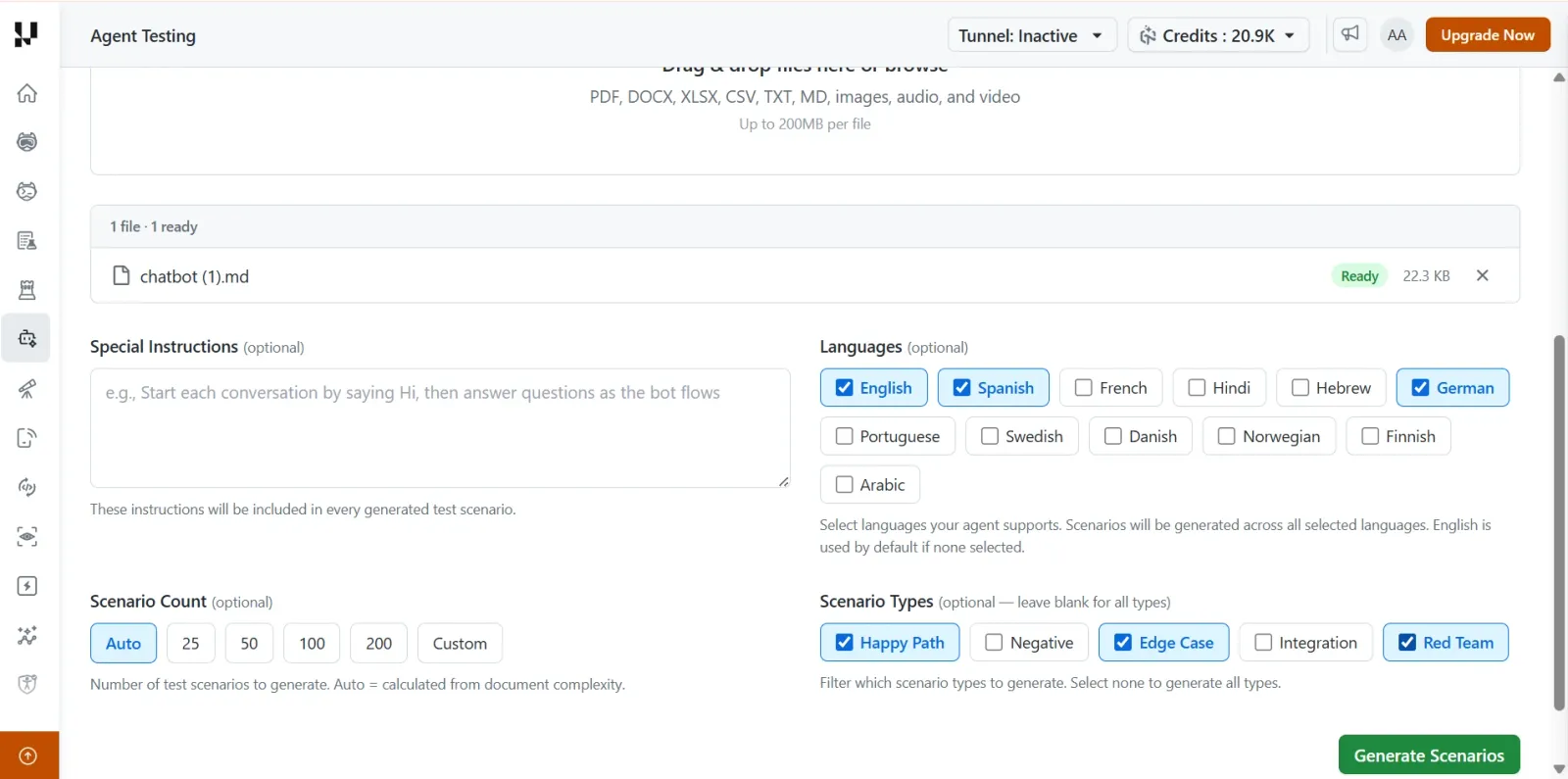
You then run a suite against your agent's actual endpoint via a cURL command, and each conversation is scored on nine metrics (Hallucination Detection, Context Awareness, Conversation Flow, etc.). You can re-run to compare the scores across runs after a fix.
From a terminal or CI job, the agent-testing CLI starts the same suite:
pip install agent-testing-cli
# LT_USERNAME and LT_ACCESS_KEY come from your CI secret store
agent-testing-cli --project "$TESTMU_PROJECT_ID" --json run \
  --workflow "$TESTMU_WORKFLOW_ID" \
  --suite "$TESTMU_SUITE_ID" \
  --yes
agent-testing-cli results --suite "$TESTMU_SUITE_ID"
Chat evaluations run asynchronously, so the docs recommend against --wait for chat runs. You have to read the results once the run has completed.
| Question | TruLens | TestMu AI Agent Testing |
|---|---|---|
| What is tested | Traces from your instrumented Python code | Your deployed chat, voice or phone agent through its endpoint |
| Test inputs | Queries you write | Scenarios generated from requirements, editable |
| Scores | Feedback functions you choose (RAG triad and more) | Nine chat metrics plus your validation criteria |
| Multi-turn | Conversation-level metrics on recorded turns | Simulated multi-turn conversations per scenario |
| Where it runs | Your environment | TestMu AI platform, CLI or API |

The SCORE Checklist for a TruLens Setup
Use this checklist to get scores you can act on.
- S - Span the right functions. Mark the retrieval, the generation, and the entry point. A missing
RETRIEVALspan leaves context relevance with nothing to score. - C - Calibrate the judge. Hand score 20 answers and compare with TruLens before you trust any thresholds.
- O - One app_version per change. Never compare runs that changed two things at once.
- R - Look at the reasons, not just the averages. Open the lowest-scoring records in the dashboard first.
- E - End-to-end before release. Run the deployed agent through real multi-turn scenarios rather than just recorded queries.
How Do You Fix Common TruLens Problems?
Fails to install on an older Python. TruLens supports Python 3.10 to 3.14. The Cortex provider and Snowflake connector both cut off at 3.13.
ModuleNotFoundError for a provider. The core package doesn't include judges. Install the matching trulens-providers-* package.
Context relevance is empty. The retrieval function is not decorated with the RETRIEVAL span type, or its return value is not a list of chunks.
The leaderboard shows just one version. Each run used the same app_version. You'll need to change that per experiment.
Scores swing between runs. The judge is an LLM. Pin the judge model, keep the query file fixed and take the average over the whole file rather than the average over individual records.
Watch: Techniques for Testing LLM Responses
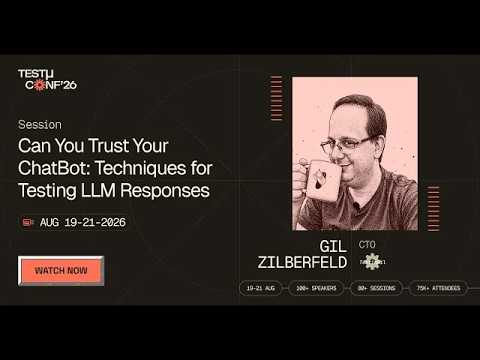
Gil Zilberfeld's TestMu Conf 2026 talk covers golden datasets, scorecards and AI judges for testing chatbot answers whose wording varies.
Conclusion
TruLens gives a RAG app three answers on each response: did retrieval find the right chunks? Is the answer supported by those chunks? Does it actually answer the question?
You install the core and a provider, decorate your three functions, define your triad, and then go and compare app versions on the leaderboard. You then need to go and test the deployed agent end to end, as TruLens will only score the inputs that you record from your own code.
Ship the agent with the evidence. Generate scenarios from your requirements and score every conversation on your live chat agent using TestMu AI Agent Testing.
Testing an AI agent? TestMu AI's Agent Testing validates chat, voice and IVR agents before your customers talk to them.
Author

Shantanu Wali
Blogs: 27

Shantanu Wali is Vice President of Product Management at TestMu AI, where he owns several product lines across the testing platform, including the Real Device Cloud and the Digital Experience Testing Cloud. He has also contributed significantly to the development and scaling of KaneAI, TestMu AI's flagship GenAI-native testing agent that uses natural language to make software testing faster and more reliable in this AI era. He brings 7+ years of experience across software development and product management, starting as a backend developer at Infosys building solutions for Fortune 500 clients. Shantanu holds an MBA from IIM Calcutta and a B.Tech in Mechanical Engineering.
Reviewer

Mayank Bhola
Reviewer
Mayank Bhola is Co-Founder and Head of Products at TestMu AI, where he leads the entire product portfolio across KaneAI, Kane CLI, HyperExecute, SmartUI, the Real Device Cloud, Accessibility, and other software testing product lines. As an early Lead Architect he designed and built the company's flagship Tunnel technology from scratch, created the React-based automation platform, and architected the data-intensive pipelines and FAAS services that scale it. He brings more than 10 years of experience in software development and product engineering, with earlier roles as Head of Technology at Juggernaut Books and Senior Software Engineer at PressPlay TV and Zomato. Mayank holds a B.Tech in Computer Engineering from JIIT Noida.


TruLens FAQs
Did you find this page helpful?
More Related Blogs

TestMu AI forEnterprise
Get access to solutions built on Enterprise
grade security, privacy, & compliance
- Advanced access controls
- Advanced data retention rules
- Advanced Local Testing
- Premium Support options
- Early access to beta features
- Private Slack Channel
- Unlimited Manual Accessibility DevTools Tests