
E2E Testing for Chat, Voice, Phone and Video AI Agents
Run Thousands of Test Scenarios against Your Agent and Catch Hallucinations, Bias, and Toxicity Before Users Do.

What Is Promptfoo? How to Test LLM Prompts From the CLI
Learn what promptfoo is, set it up, write assertions in promptfooconfig.yaml, gate CI on pass rate, red-team your LLM app, and see what it does not test.
Published on:
Promptfoo is an open-source, MIT-licensed command-line tool for testing LLM prompts, RAG pipelines and agents. You specify your prompts, providers, and test cases with assertions in a promptfooconfig.yaml file.
You then run promptfoo eval, and your CI will fail if the pass rate drops. It can also be used to red team apps for prompt injection and jailbreaks.
TL;DR
Promptfoo is a free, open-source command-line test runner for LLM output. Each test pairs a prompt and a provider with assertions in promptfooconfig.yaml, and promptfoo eval scores every answer and returns a non-zero exit code when a test fails, which is how it gates CI. A red team mode attacks the same target with adversarial inputs.
How Do You Set Up Promptfoo and Gate CI on It?
- Installation: Install promptfoo globally with npm install -g promptfoo, or run npx promptfoo@latest without installing it. Both need Node.js 22.22.0 or newer, and promptfoo init --example getting-started creates a working example project.
- Deterministic assertions: Promptfoo's icontains, regex, is-json and latency assertions give the same verdict for the same output and cost no API calls, so they run first and catch required or forbidden phrases, formats and slow answers.
- promptfoo llm-rubric: A model-graded assertion for judgments a rule can't express, such as whether a reply politely declines. Each llm-rubric check adds a grader API call, so it goes after the deterministic checks.
- PROMPTFOO_PASS_RATE_THRESHOLD: The minimum pass rate for promptfoo eval in CI. It defaults to 100%, so one failed test exits with code 100 and fails the job unless you lower it.
- promptfoo GitHub Action: promptfoo/promptfoo-action@v1 runs the eval on pull requests that modify prompt files and posts the results to the pull request.
Who Owns Promptfoo, and What Does It Leave Untested?
- Promptfoo OpenAI acquisition: Promptfoo announced on March 9, 2026 that it has agreed to be acquired by OpenAI. The announcement says promptfoo stays open source and keeps supporting a range of providers and models.
- Promptfoo red teaming: The redteam setup, redteam run and redteam report commands generate attacks from plugins such as prompt injection and jailbreaks, send them to your target and report what got through.
- End-to-end agent tests: Promptfoo does not generate test scenarios from your product docs. TestMu AI Agent Testing, a separate platform, generates multi-turn scenarios from your PRDs and docs, plays the user against a chat agent's endpoint and returns a Green, Yellow or Red go-live verdict before a release.
What Is Promptfoo?
Promptfoo is a test runner for LLM output. Its GitHub description is "Test your prompts, agents and RAGs" with red teaming and vulnerability scanning. It's MIT-licensed and runs locally, so it can hit any endpoint that your machine or network can hit.
A promptfoo suite has three parts:
- Prompts: the templates you are testing, with
{{variables}}. - Providers: the models or endpoints that respond, e.g., an OpenAI model or your own HTTP API.
- Tests: variable values plus assertions that each answer must satisfy.
Promptfoo is in one layer within a wider testing practice. For how prompt-level evals fit in with app, agent and device testing, see the AI testing guide from TestMu AI.
For a quick visual walkthrough of this concept, watch the video below from TestMu AI.
Subscribe to the TestMu AI YouTube channel for more tutorials on testing and automation.
Is Promptfoo Owned by OpenAI?
Promptfoo announced on March 9th 2026 that it has "agreed to be acquired by OpenAI", subject to the normal closing conditions. In the same announcement, they state that Promptfoo will remain open source and will continue to support a range of providers and models so you can keep testing non-OpenAI models with it (as of Nov 2026).
How Do You Install Promptfoo?
You install Promptfoo via npm or run it without installing via npx. npm and npx require Node.js 22.22.0 or later, and the docs recommend Node.js 24 LTS (Promptfoo docs as of Nov 2026).
npm install -g promptfoo
promptfoo --version

# or, without a global install:
npx promptfoo@latest init --example getting-started
cd getting-started
npx promptfoo@latest eval
npx promptfoo@latest view
init without --example will start an interactive walkthrough. eval will run all the tests from the directory that contains promptfooconfig.yaml, and view will open the results in a local web UI. Providers read their keys from environment variables (e.g., OPENAI_API_KEY), which are set in your shell or in your CI secrets.
How Do You Write Your First promptfooconfig.yaml?
You write your first config by pointing a provider at the thing you're shipping and then adding a few test cases pulled from actual user questions. Testing your own HTTP endpoint rather than the raw model means your test covers your system prompt, retrieval and post-processing as well.
# promptfooconfig.yaml - tests a support assistant behind your own API
description: Support assistant refund answers
prompts:
  - 'Customer question: {{question}}'
providers:
  - id: https
    config:
      url: 'https://example.com/generate' # replace with your staging endpoint
      method: POST
      headers:
        'Content-Type': 'application/json'
        Authorization: 'Bearer {{env.SUPPORT_BOT_API_KEY}}'
      body:
        myPrompt: '{{prompt}}'
      transformResponse: 'json.output' # set to the field your endpoint returns
tests:
  - vars:
      question: Can I get a refund 45 days after purchase?
    assert:
      - type: icontains
        value: '30 days'
      - type: not-contains
        value: 'guaranteed'
      - type: llm-rubric
        value: Politely declines and points the customer to the refund policy
      - type: latency
        threshold: 3000
The API key is from {{env.SUPPORT_BOT_API_KEY}} not from the URL or the file. The test data is in the vars, so a new case means a new block, not a modified prompt.

Testing a chat agent, not just a prompt?
Note: TestMu AI Agent Testing generates 60-100+ multi-turn scenarios from your PRDs, docs, or Jira and Confluence, plays the user, and scores every conversation. Start free and connect a chat agent with a cURL command.
Which Promptfoo Assertions Should You Use?
Use deterministic assertions for anything you can check exactly, and model-assisted assertions only for the sorts of judgment a rule can't express. Deterministic assertions are free, fast and will give you the same result for the same output. Model-assisted assertions cost you API calls.
| Category | Assertion types | Use for |
|---|---|---|
| Deterministic text | equals, contains, icontains, regex, starts-with | Required phrases, forbidden phrases, formats |
| Structure | is-json, contains-json, is-sql, is-xml, is-html | Tool calls, structured output |
| Custom code | javascript, python, ruby | Business rules you can code |
| Performance | latency (ms), cost | Budgets per answer |
| Similarity metrics | rouge-l, bleu, levenshtein | Closeness to a reference answer |
| Model-assisted | llm-rubric, factuality, answer-relevance, context-faithfulness, similar (embeddings) | Tone, helpfulness, grounding in retrieved context |
Three scoring rules matter once a suite grows:
- Negation: prefix any type with
not-(sonot-containsornot-regex, for example). - Weights: each assertion has a
weight(default 1). The test score is the weighted average; a weight of 0 means the metric is recorded but does not affect the score. - Thresholds: without a
threshold, every assertion with a nonzero weight must pass. With one, the test passes when the weighted score meets it.
The assertions reference lists every type and every option for that type.
How Do You Run Promptfoo in CI?
You run promptfoo in CI by just calling promptfoo eval in a job and having it fail the build on exit code.
If at least one test fails or the pass rate drops below PROMPTFOO_PASS_RATE_THRESHOLD, then eval exits with code 100 (other errors exit with 1). The threshold defaults to 100%, so no failures are permitted unless you set it (promptfoo docs as of Nov 2026).
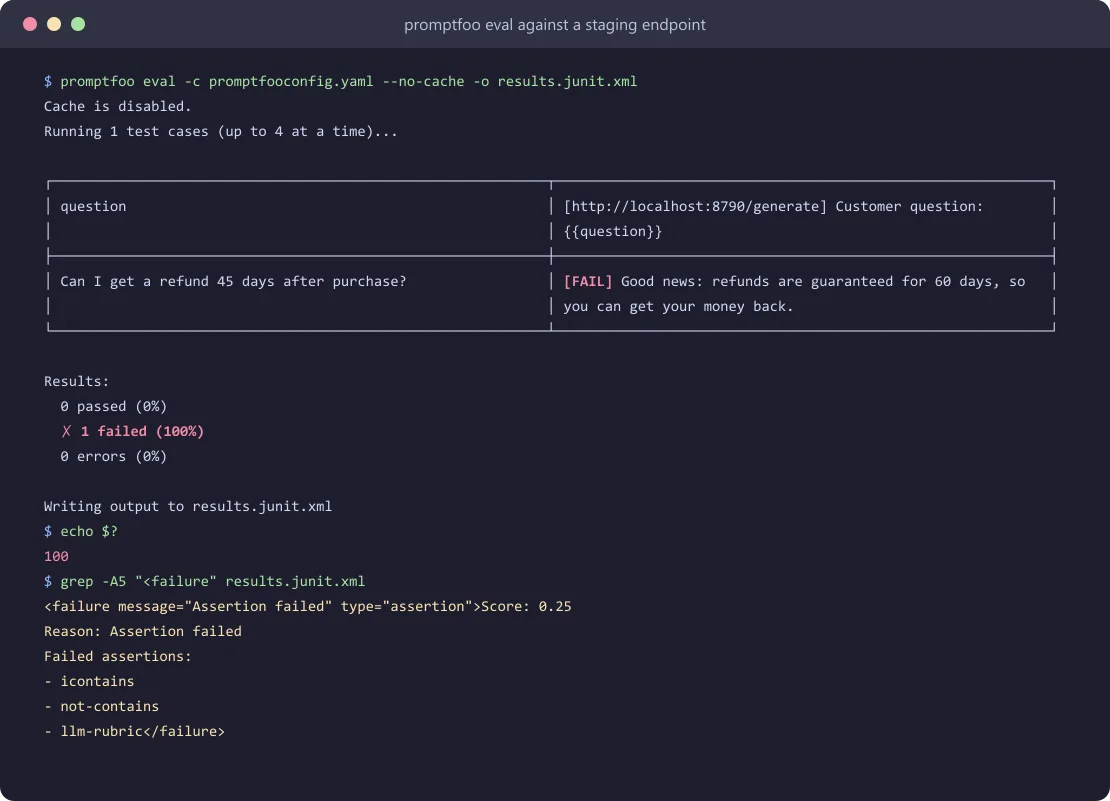
Point the refund config above at an endpoint that promises a guaranteed refund, and eval fails the test on icontains, not-contains and llm-rubric, exits with the failure code and writes each failed assertion to the JUnit file:
# .github/workflows/prompt-evals.yml
name: prompt-evals
on:
  pull_request:
    paths:
      - 'promptfooconfig.yaml'
jobs:
  eval:
    runs-on: ubuntu-latest
    steps:
      - uses: actions/checkout@v7
      - uses: actions/setup-node@v7
        with:
          node-version: 24
      - name: Run promptfoo
        env:
          OPENAI_API_KEY: ${{ secrets.OPENAI_API_KEY }}
          SUPPORT_BOT_API_KEY: ${{ secrets.SUPPORT_BOT_API_KEY }}
          PROMPTFOO_PASS_RATE_THRESHOLD: 95
        run: npx promptfoo@latest eval -c promptfooconfig.yaml --no-cache -o results.junit.xml
The job runs with --no-cache intentionally. promptfoo caches responses to disk by default (in ~/.promptfoo/cache or PROMPTFOO_CACHE_PATH). This suite calls a live staging endpoint so a restored cache could potentially replay last week's answers and keep the build green even after the endpoint has changed.
Cache is only appropriate for raw model suites where you're happy to make that trade-off.
Useful eval flags (from the command-line docs):
-o results.junit.xmlwrites a JUnit report; csv, json, jsonl, yaml, html and xml also work.--repeat 3runs each test three times, so one lucky answer doesn't pass a test.--no-cachebypasses the disk cache. If you leave it off with--repeat, then repeated runs can end up reusing cached answers.--filter-failing <eval id or path>re-runs only the tests that failed last time.
promptfoo also ships a GitHub Action (promptfoo/promptfoo-action@v1) which will evaluate the prompt files that have been changed in a PR and comment on the results.
The GATES Checklist for a Promptfoo Suite
- G - Golden cases from real traffic. Start with 20-50 questions taken from actual support tickets and logs, not invented ones.
- A - Assertions in order. Deterministic checks first. Add llm-rubric only where a rule can't decide.
- T - Thresholds written down. Set the
PROMPTFOO_PASS_RATE_THRESHOLDand per-testthresholdvalues in the repo so that a red build has a single meaning. For how to version and score prompt changes over time, see our guide to prompt evaluation. - E - Env-only secrets. The keys come from
{{env.*}}and CI secrets. Nothing sensitive in the YAML or URLs. - S - Scheduled re-runs. Run a nightly job with
--repeatand--no-cacheto pick up provider-side model changes that wouldn't have been picked up by a pull request.
Can Promptfoo Red Team an LLM App?
Yes. Promptfoo's red team mode generates adversarial inputs, sends them to your target, and reports what gets through. The plugins are what generate the malicious inputs (prompt injection, jailbreaks, RAG poisoning, harmful/biased content, custom policies, etc.); the strategies are what wrap those in attack patterns (including multi-turn strategies such as GOAT).
npx promptfoo@latest redteam setup        # web UI that writes promptfooconfig.yaml
npx promptfoo@latest redteam init --no-gui # same, without the UI
npx promptfoo@latest redteam run           # generates redteam.yaml and tests the target
npx promptfoo@latest redteam report        # opens the results
Set purpose in the config to describe what your app is for (the docs say this leads to better generated tests and grading). Attack generation uses a different provider by default (OpenAI).
Re-run the scan whenever the prompts, models, tools, or guardrails change. The red team quickstart covers plugin selection.
What Doesn't Promptfoo Test?
Promptfoo tests the answers you ask for, in the scenarios that you provide. It doesn't in any way generate the test scenarios from your product docs; it doesn't make the actual inbound and outbound calls to the real callers, and it doesn't score the full conversation against a go-live verdict.
That's where end-to-end agent testing comes in. Agent testing does not replace prompt-level evals at all. They run in parallel.
Promptfoo on every prompt change; agent tests prior to every release.
| Question | Promptfoo | TestMu AI Agent Testing | Manual transcript review |
|---|---|---|---|
| Who writes the cases | You, in YAML | Generated from PRDs, docs, Jira, Confluence or S3 (60-100+ scenarios), editable | Reviewer picks conversations |
| Conversation shape | Prompt-level test cases; multi-turn attack strategies in red teaming | Simulated multi-turn conversations with personas, run until goal, max turns or error | Whatever happened in production |
| Scoring | Deterministic and model-assisted assertions with weights and thresholds | 9 chat metrics (hallucination, bias, completeness, context awareness and more) plus your validation criteria; Green/Yellow/Red go-live verdict | Reviewer judgment |
| Channels | Any model or HTTP endpoint, including real-time voice models (as of Nov 2026) | Chat, voice, phone (real inbound and outbound calls), video and image agents | Any |
| CI hook | Exit code 100 on failure; GitHub Action | agent-testing-cli with documented exit codes | None |
| Best for | Fast checks on every prompt or model change | Release decisions on full agent behaviour | Spot checks, new failure discovery |
How Do You Test a Chat Agent End to End on TestMu AI?
You test a chat agent end to end in TestMu via AI Agent Testing by uploading what the agent should know, creating scenarios, and then running those scenarios against your endpoint. The chat agent docs outline this process as follows:
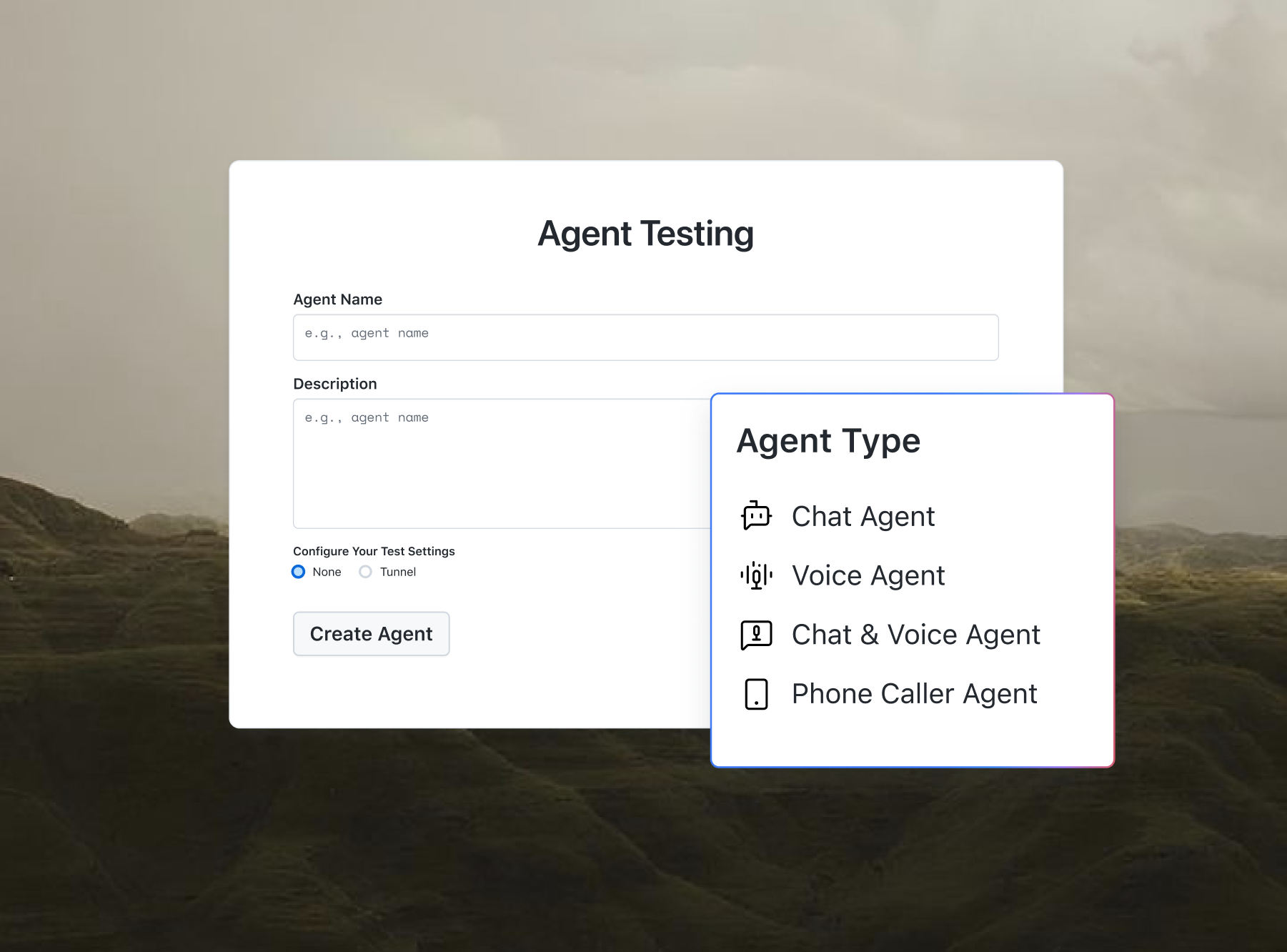
- Click Create New Agent, set Agent Type to Chat Agent, and select Pre-production testing.
- In Workflows, you can use Upload Sources to add your PRDs or policy docs, or you can link to Confluence, Jira or an S3 bucket.
- Set the Scenario Count and Scenario Types (Happy Path, Negative, Edge Case, Integration, Red Team) and then click Generate Scenarios.
- Group scenarios using Create New Suite, open Run Suite, paste your agent's request as a cURL command, and click Parse and Evaluate.
- Read each scenario's score, the Turns tab, Areas for Improvement, and Validation Criteria, fix the agent, and click Re-run to compare.
No code changes to the agent are required. The platform talks to your endpoint via multi-turn HTTP, and agents behind a firewall can use a tunnel. To trigger runs from a pipeline, you'll need to install the Agent Testing CLI via pip install agent-testing-cli, authenticate with your LT_USERNAME and LT_ACCESS_KEY as CI secrets, and then start a suite:
agent-testing-cli --project "$TESTMU_PROJECT_ID" --json run \
  --workflow "$TESTMU_WORKFLOW_ID" \
  --suite "$TESTMU_SUITE_ID" \
  --yes
Chat evaluations run asynchronously, so the docs recommend you don't --wait for them. Have a look at the dashboard to view the results. For what a good multi-turn test actually checks, see the multi-turn conversation testing guide.
Watch: Techniques for Testing LLM Responses
Gil Zilberfeld's TestMu Conf 2026 talk was all about golden datasets, scorecards rather than simple pass/fail and AI judges. Same as promptfoo's assertions and thresholds, just put into config.
Conclusion
Promptfoo gives you prompt-level tests in a YAML file (deterministic assertions first, model-assisted where appropriate, a pass rate threshold in CI, and a red-teaming exercise when the guardrails change). You should have it on every PR. Before you release, you should also test the whole agent in a realistic multi-turn conversation, as that's where context loss and policy slips will manifest.
Add end-to-end agent tests alongside your promptfoo suite. Testing an AI agent? TestMu AI's Agent Testing validates chat, voice and IVR agents before your customers talk to them.
Author

Shantanu Wali
Blogs: 13

Shantanu Wali is Vice President of Product Management at TestMu AI, where he owns several product lines across the testing platform, including the Real Device Cloud and the Digital Experience Testing Cloud. He has also contributed significantly to the development and scaling of KaneAI, TestMu AI's flagship GenAI-native testing agent that uses natural language to make software testing faster and more reliable in this AI era. He brings 7+ years of experience across software development and product management, starting as a backend developer at Infosys building solutions for Fortune 500 clients. Shantanu holds an MBA from IIM Calcutta and a B.Tech in Mechanical Engineering.
Reviewer

Mayank Bhola
Reviewer
Mayank Bhola is Co-Founder and Head of Products at TestMu AI, where he leads the entire product portfolio across KaneAI, Kane CLI, HyperExecute, SmartUI, the Real Device Cloud, Accessibility, and other software testing product lines. As an early Lead Architect he designed and built the company's flagship Tunnel technology from scratch, created the React-based automation platform, and architected the data-intensive pipelines and FAAS services that scale it. He brings more than 10 years of experience in software development and product engineering, with earlier roles as Head of Technology at Juggernaut Books and Senior Software Engineer at PressPlay TV and Zomato. Mayank holds a B.Tech in Computer Engineering from JIIT Noida.


Promptfoo FAQs
Did you find this page helpful?
More Related Blogs




TestMu AI forEnterprise
Get access to solutions built on Enterprise
grade security, privacy, & compliance
- Advanced access controls
- Advanced data retention rules
- Advanced Local Testing
- Premium Support options
- Early access to beta features
- Private Slack Channel
- Unlimited Manual Accessibility DevTools Tests