

Power Your Software Testing with AI Agents and Cloud
The Native AI-Agentic Cloud Platform to Supercharge Quality Engineering. Test Intelligently and Ship Faster.


- TestMu AI (Formerly LambdaTest)
- /
- Blog
- /
- How to Test Apps on iPhones: XCUITest to Real Devices
How to Test Apps on iPhones: Signing, TestFlight, and Real Devices
A practical guide to testing apps on iPhones: code signing, TestFlight builds, the simulator gap, XCUITest in CI, and when only a real iPhone will do.
Last Updated on:
Testing an app on an iPhone is harder than testing one on Android, and almost none of the extra difficulty is about writing tests. It is code signing, provisioning profiles, a simulator that shares your Mac's hardware, a distribution channel that gatekeeps every build, and a review process that can reject a release after it passes every test you wrote.
TL;DR
- Signing is the first thing that breaks: A provisioning profile ties a bundle identifier, a certificate, and a device list together. Get any one wrong and the build installs nowhere, which is why signing failures dominate first-time iOS CI setups rather than test failures.
- The simulator is not a small iPhone: It runs your app compiled for the Mac's own architecture and shares the Mac's CPU, memory, and GPU. It is excellent for layout and logic, and structurally unable to tell you anything true about battery, thermal behaviour, or camera hardware.
- XCUITest is the native path, Appium is the portable one: XCUITest runs inside Apple's own harness with the tightest integration and Swift or Objective-C only. Appium drives the same automation layer from any language and lets one suite cover both platforms.
- TestFlight validates distribution, not correctness: It confirms the build installs, launches, and survives real users on real hardware. It is a release gate, not a substitute for an automated suite, and its processing delay belongs in your release schedule.
- CI needs macOS, which shapes everything: Building and running iOS tests requires Xcode on Apple hardware, so runner cost and availability drive iOS pipeline design far more than test count does.
- App Store review rejects on policy, not bugs: Permission strings, privacy declarations, and account-deletion requirements sink releases that pass every functional test, so treat review criteria as their own checklist.
- Real iPhones are needed for a narrow but costly set: Camera, biometrics, payments, cellular behaviour, and performance all need physical hardware. A hosted fleet such as TestMu AI's real device cloud covers that set without buying and maintaining handsets.
In the world of smartphones, iPhones remain a popular choice, and as a result, iOS apps have become the preferred way for end-users to interact and communicate. With iOS apps being widely used, users expect a flawless and quality mobile experience.
Any encounter with glitches, slow loading times, or other issues will discourage users and lead to negative reviews, increase uninstall rates, thereby impacting the overall revenue generation through such apps.
As the number of apps on the App Store continues to grow, so does the competition you'll face. Considering the above figures, it becomes imperative to test apps on iPhones and ensure they are not only compatible with iOS but also deliver a seamless experience to your iOS user base.
In this iOS app testing tutorial, we look at how to test apps on iPhones and explore best practices and effective methods for ensuring your apps perform flawlessly on various iPhone devices.
What is iPhone App Testing?
iPhone app testing is process that ensures mobile applications designed for iOS platform perform optimally on devices like iPhones (or iPads). At its core, this testing is about putting the app through its paces in real-world scenarios, simulating the actions and environments users will encounter. It's not just about making sure the app doesn't crash; it's about how the app feels and behaves in the hands of the real users.
From the moment the app is installed to how quickly it responds to taps and swipes, every aspect is tested. This process is comprehensive, validating not only technical aspects like load time and functionality but also focusing on the user's experience. It addresses the following questions:
- Is the interface intuitive?
- Does this app look good on various screen sizes?
- Is it responsive to different iOS versions?
When you test apps on iPhones, there are four crucial aspects to consider:
- Hardware: This involves thoroughly testing the application across a spectrum of Apple devices, including the iPad, iPhone, and iPod.
- Software: In this aspect, we focus on identifying app crashes, security vulnerabilities, and addressing any memory leakage issues.
- Functionality: Here, we validate all product use cases, ensuring that there are no lingering bugs and that the mobile application performs flawlessly.
- User Interface (UI): The iOS application undergoes rigorous testing to ensure it offers a user-friendly experience with seamless navigation. We also verify that the iOS application runs smoothly in both landscape and portrait modes.
Why You Should Test Apps on iPhones?
According to Statcounter, iOS stands out as a widely used operating system, including tablets and smartphones, covering a substantial 29.55 % global market share and an impressive 57% share in the United States of America.
Understanding the significance of iPhone app testing in the real world is crucial. Firstly, it's about catching and fixing bugs before they reach the final product. Fixing bugs during the testing phase is significantly cheaper and less time-consuming than addressing them after the app is released.
In the worst-case scenarios, the cost of fixing a bug post-launch can be much more than during testing. This can have a substantial impact on the budget and return on investment, especially over a short period. Secondly, it's about keeping users engaged and satisfied. In today's competitive market, users have little tolerance for buggy apps.
As per a survey, 78% of users uninstall an app within 90 days. Many users tend to uninstall apps right after their first use or if they haven't used them for a week - these figures underscore the challenge of maintaining a stable user base.
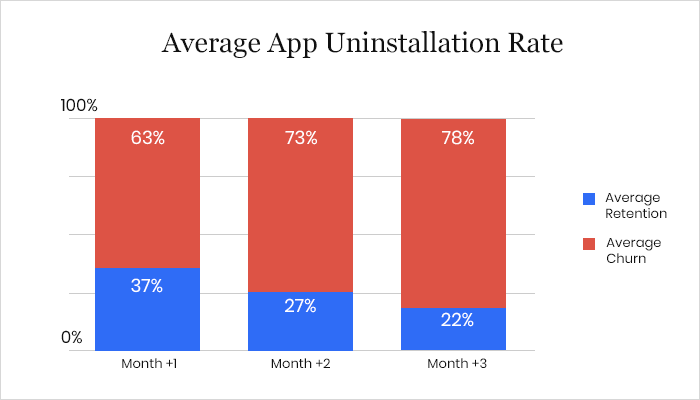
Without thorough iPhone app testing, the risk of errors increases, making the process even more critical. There are many other benefits to thorough app testing, such as preventing crashes and ensuring that the final product aligns with the initial vision. However, the main takeaway here is that releasing a flawed iOS app can have severe consequences, making rigorous testing an essential step in the development process.
- iOS users, especially in the United States and Western Europe, have high expectations for their apps. They want them to be perfect and easy to use. Because of this, if you're developing for iOS, test app on iPhone to make sure it performs as intended and is user-friendly.
- One thing to remember is that even though more people worldwide use Android OS, iOS is still important. So, quality is key. Also, there are many different iOS devices - iPhones, iPads, iPod Touch - and each one has its version of iOS. This means you have to test your app on a multitude of different devices and iOS versions to make sure it works for everyone.
- Automating your testing process is a smart move. It lets you test your app on different devices and versions of iOS efficiently. This makes sure that everyone using your app, no matter their device or iOS version, has a uniform experience.
- Security is a big deal for iOS. By testing thoroughly, you make sure your app is safe, protects user data, and keeps up with iOS's reputation for being secure.
- Lastly, the iOS user base might be smaller than Android, but it's often more willing to spend the cost. If your app is well-tested and is of high quality, it could lead to more downloads and more ad revenue.

Note: Test your mobile apps on 3000+ real iPhone environments. Try TestMu AI Today!
Approaches to Test Apps on iPhones
When you have to test apps on iPhones, there are two main ways to do it: manual testing and automated testing. Each of these methods has its own strengths, and when you use them together, it's like having the best of both worlds.
Manual Approach to Test Apps on iPhones
It is a hands-on process where real people (the testers), go through the app step by step without using any automation tools. This is important because it lets these testers act like everyday users, trying out the app in different ways - They check how the app behaves under all sorts of conditions and situations.
This helps find issues with how the app looks and feels and ensure the app works well even when things don't go as planned. The human intervention in manual testing helps catch those little usability issues that might slip past automated tests.
Automated Approach to Test Apps on iPhones
Now, on the other hand, to test apps on iPhones, there's automated testing. This is where automated testing tools do the heavy lifting. They run tests automatically and compare the actual results to what's expected.
This is a big time-saver, especially for tasks that need to be repeated over and over again or for checking that nothing broke when new changes are introduced in the app. Automated testing proves valuable when it comes to testing the app's performance, how it handles lots of users, and how it deals with stressful scenarios.
However, when you put manual and automated testing together, you get a comprehensive testing approach. Manual testing brings that human perspective, catching the little quirks and details of how real people use the app. Automated testing adds speed and efficiency to the mix, making sure you cover all the bases. This combination results in a robust and reliable iOS app that gives users a top-notch experience.
| Aspect | Manual iPhone App Testing | Automated iPhone App Testing |
|---|---|---|
| Testing Approach | Hands-on testing by human testers. | Automated testing using software tools. |
| Human Interaction | Testers mimic real-world user experiences. | No human interaction during testing. |
| Usability Testing | Effective for identifying UI/UX issues. | Focuses on functional and performance testing. |
| Adaptability to Unexpected Cases | Able to validate app behavior under unpredictable conditions. | Limited ability to handle unexpected scenarios without customization. |
| Time and Effort | Time-consuming and labor-intensive. | Time-efficient, especially for repetitive tasks. |
| Coverage | Broad coverage of usability and real-world scenarios. | Consistent and thorough coverage of predefined test cases. |
| Speed and Efficiency | Slower compared to automated testing. | Faster and can run tests quickly and repeatedly. |
| Regression Testing | Suitable for regression testing but can be time-consuming. | Excellent for regression testing, saving time and effort. |
| Load and Stress Testing | Not ideal for load and stress testing. | Well-suited for load and stress testing. |
| Integration with Development | Limited integration with the development process. | Supports integration into Agile and DevOps practices. |
Checklist for Testing Apps on iPhones
This covers the platform-level characteristics rather than your own feature list, so it applies to any iOS app regardless of what it does.
- Install, launch, update, and uninstall all complete cleanly, including an update installed over an older version rather than onto a clean device.
- Layout holds across the safe-area families: compact SE, notch and Dynamic Island models, and iPad, in both orientations.
- Interruptions are handled. An incoming call, a notification, a low-battery alert, and a backgrounding all return the app to a usable state.
- Permission prompts appear at the right moment, carry a usage string that matches actual behaviour, and the app degrades gracefully when a permission is denied.
- Network transitions work across Wi-Fi to cellular, weak signal, and fully offline, with no data loss on the way back.
- Accessibility passes with VoiceOver, Dynamic Type at the largest setting, and sufficient contrast.
- Performance is measured on hardware, not the simulator: startup time, scroll smoothness, memory under load, and battery cost over a sustained session.
- Localization renders correctly for the longest supported language and for right-to-left layouts if you ship them.
- App Store requirements are met, meaning privacy declarations match observed behaviour and an account-deletion path exists if the app supports accounts.
Popular Tools to Test Apps on iPhones
The iOS toolchain divides cleanly by job. One tool drives the UI, one distributes builds to humans, one profiles performance, and one supplies the hardware to run it all on.
| Tool | What it does | Reach for it when |
|---|---|---|
| XCUITest | Apple's native UI automation, written in Swift or Objective-C and run through Xcode. | The team is iOS-only and wants the tightest integration and fastest feedback. |
| Appium | Cross-platform automation driving the same underlying iOS automation layer from any language. | One suite has to cover iOS and Android, or the team does not write Swift. |
| TestFlight | Apple's beta distribution channel for signed builds. | Validating installation, launch, and real-user feedback before release. |
| Xcode Instruments | Profiling for memory, energy, and time. | Chasing a leak, a battery complaint, or a startup regression, on real hardware. |
| TestMu AI | Real device cloud plus manual and automated execution for Appium and XCUITest suites. | You need iPhone models and iOS versions you do not own. |
TestMu AI covers the last row by hosting the hardware, so an Appium or XCUITest suite runs against real iPhones without a device lab behind it. For a wider survey of what else is available, see the roundup of iOS testing tools.
Simulator vs Real Device: Where to Test
The iOS Simulator compiles your app for the Mac's own architecture and runs it on the Mac's CPU, memory, and GPU. That makes it fast and free, and it also means every measurement it produces describes your laptop rather than an iPhone. The split below follows from that one fact.
| iOS Simulator | Physical iPhone | Real device cloud | |
|---|---|---|---|
| Layout, navigation, logic | Reliable | Reliable | Reliable |
| Camera, biometrics, cellular | Simulated event only | Accurate | Accurate |
| Battery, thermal, real timings | Not represented | Accurate | Accurate |
| Device and iOS version breadth | Whatever Xcode ships | Whatever you have bought | Broad, on demand |
| Cost to add coverage | Free | Purchase and maintain each handset | Subscription, no hardware to own |
In practice the simulator carries the development loop and most of the regression suite, physical hardware validates the release, and a hosted fleet exists so the second group does not require a cupboard full of iPhones. For a fuller treatment of where each environment stops being trustworthy, see the comparison of emulator vs simulator vs real device.
How to Test Apps on iPhones in the Cloud?
When you need to test apps on iPhones in the cloud, you can choose from a variety of platforms out there. One of the popular choices is TestMu AI, an AI-powered test orchestration and execution platform to test apps on iPhones across real browsers, devices, and platforms. It's not just about checking how your app performs on real devices; TestMu AI also lets you test it on virtual platforms using emulators and simulators.
TestMu AI offers a variety of features to test apps on iPhones, providing comprehensive solutions for developers and testers. Here are some key features:
- Real iPhone and iPad testing on the cloud: TestMu AI allows you to access a variety of iPhone and iPad models directly from your browser. This includes both the latest and legacy iOS devices, enabling you to test your iOS app's responsiveness and compatibility on a real mobile device lab.
- iOS automation testing: TestMu AI supports automation testing for native, hybrid, and web apps on both real and virtual device clouds - this helps in speeding up the deployment process by automating tests.
- Test on iOS simulators: The platform offers iOS simulators on the cloud, allowing instant access from anywhere in the world. You can upload your app and start testing it immediately on these simulators, ensuring compatibility and performance.
- Support for latest devices and frameworks: On September 30, 2026, the TestMu AI real device list included iPhones from the iPhone 8 to the iPhone 18 Pro and iPhone 17 Pro Max, on iOS 14 through iOS 27. The platform allows app testing, browser testing, app test automation, and web automation on these devices. It also seamlessly integrates with popular open-source frameworks like Appium and XCUITest, facilitating easier and more efficient testing processes.
Real Time App Testing on iPhones with TestMu AI
Real Time App Testing in TestMu AI refers to the process of testing mobile applications in real-time (or manually) on real devices. Here are the following steps to perform Real Time App Testing on TestMu AI.
- Sign up on TestMu AI and login to your account.
- From the user Dashboard, navigate to Real Device > App Testing.
- Select the Apple icon, and then upload your iOS app. You can upload apps from your local system using public app URL, App Store, Test Flight or App Center. You can get started with the TestMu AI sample iOS test app.
- Now select the iPhone device on which you wish to run the test. Then, click Start.
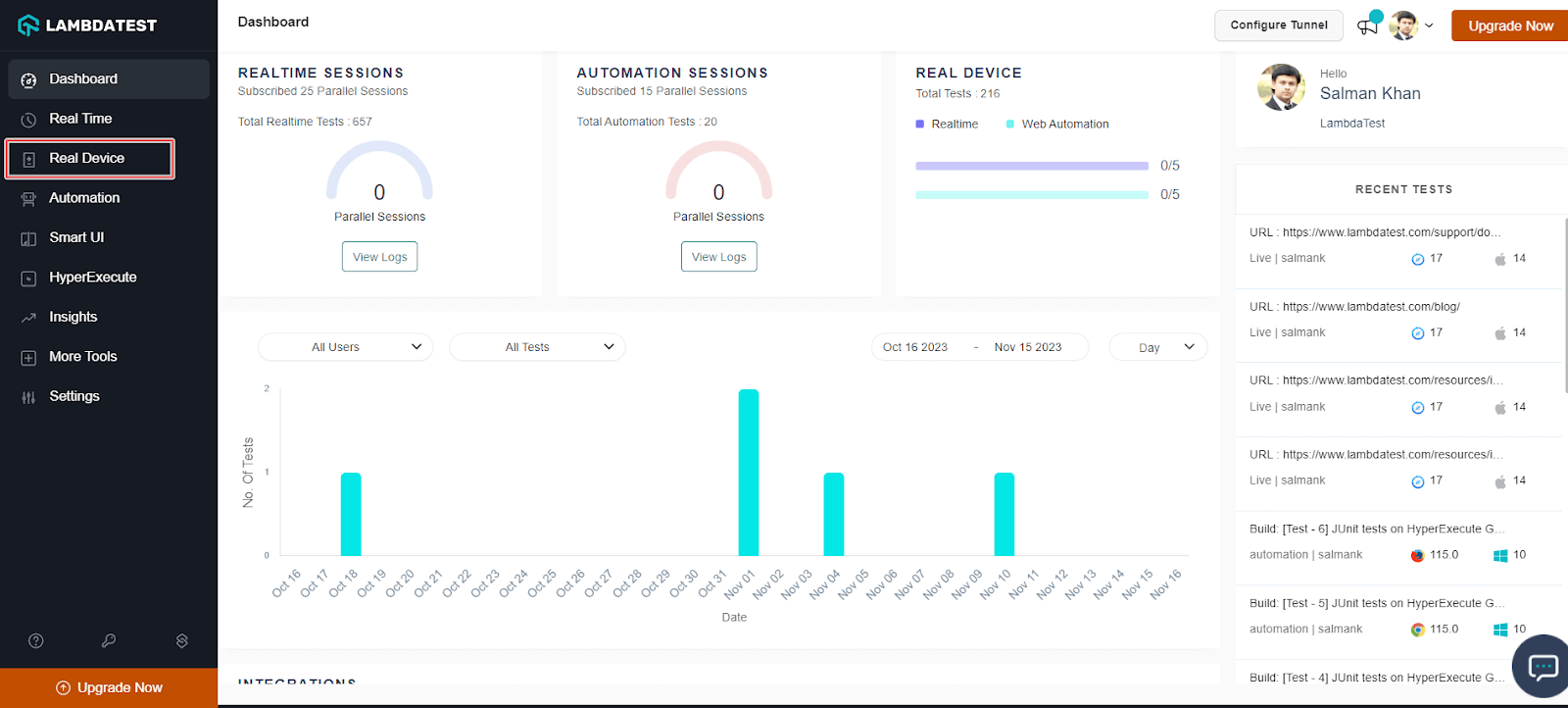
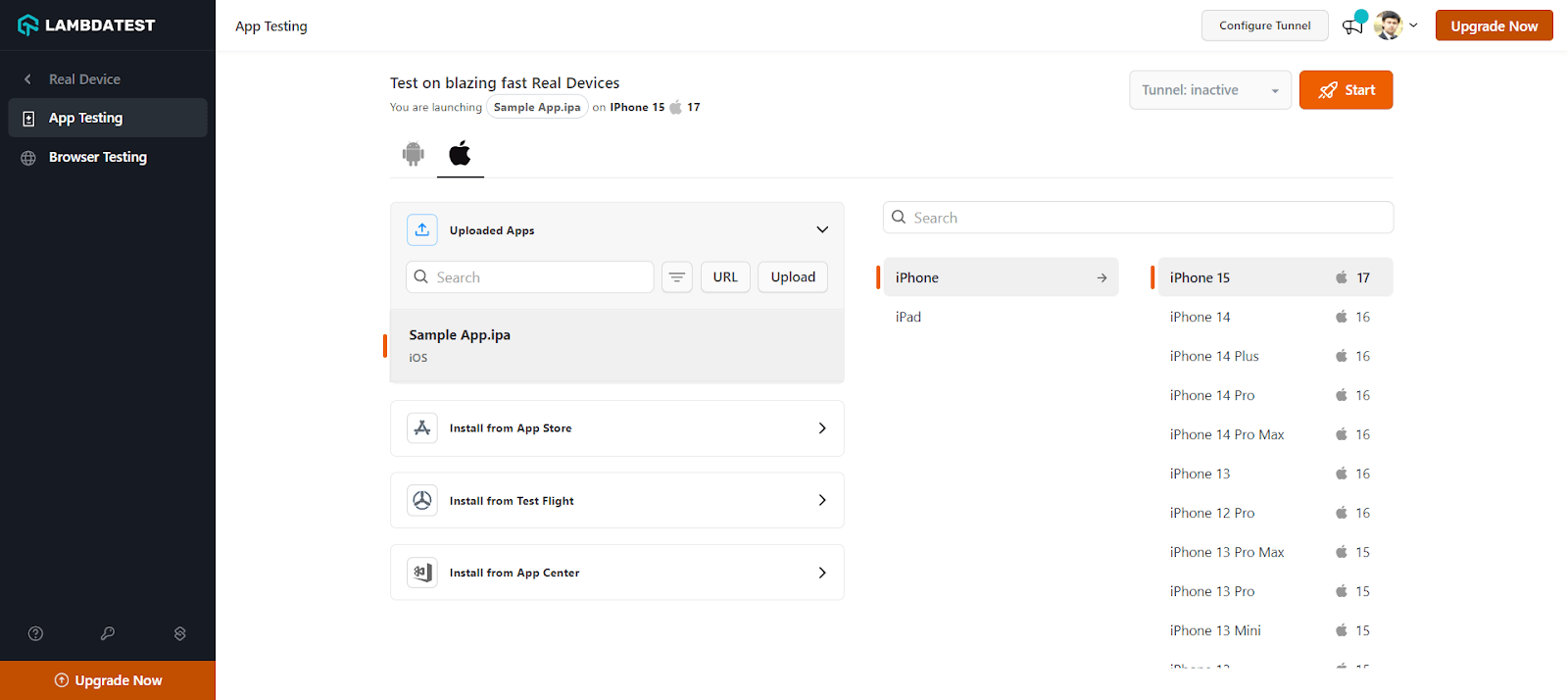
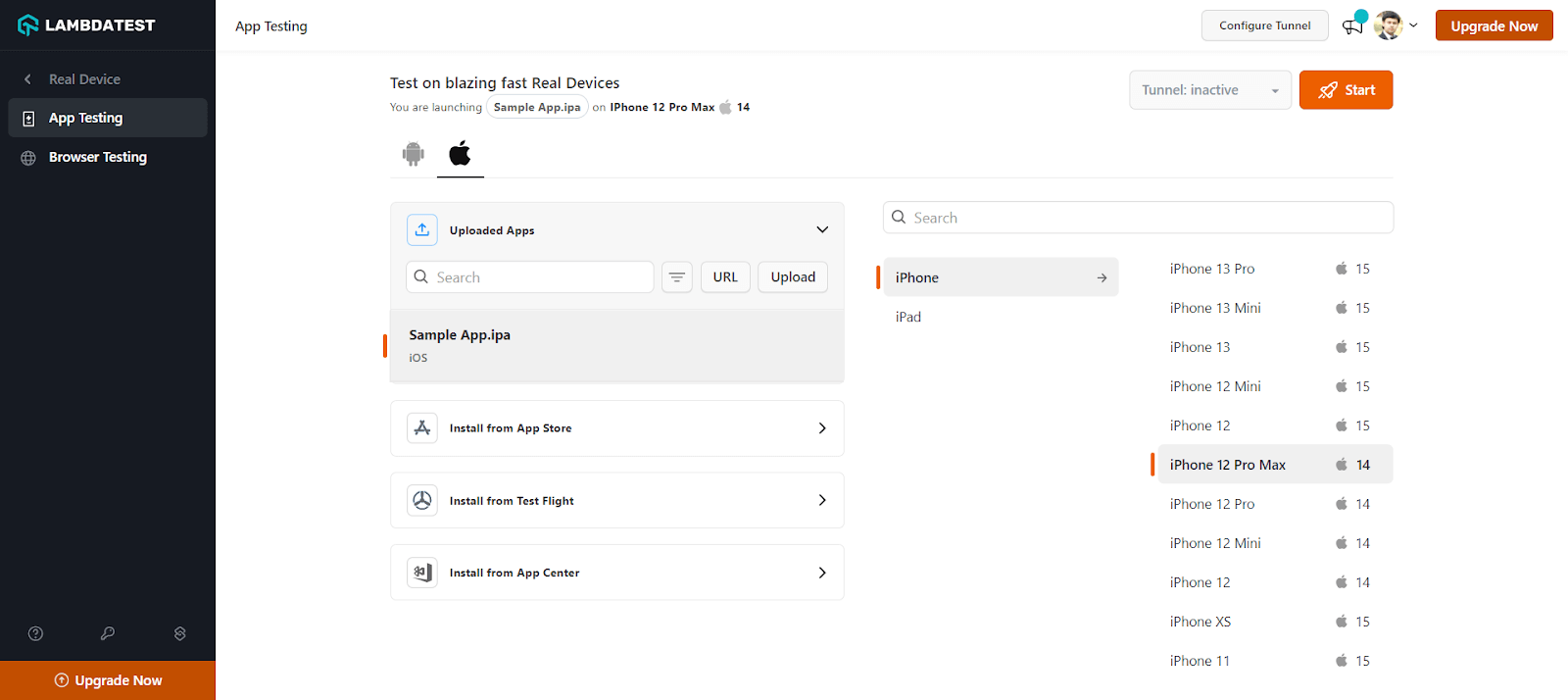
A real device cloud will be launched that allows you to test native apps on the selected real iPhone devices, enabling you to identify and fix any glitches that may arise during the testing process.
App Automation on iPhones with TestMu AI
To demonstrate how to automate apps on iPhones using TestMu AI, we will use the Appium framework along with Java. However, TestMu AI supports different programming languages and frameworks as well. Check the documentation to get started - Appium Support Languages and Frameworks.
Following are steps to automate iPhone apps with Appium on TestMu AI.
- Login to your TestMu AI account.
- Configure your TestMu AI Username and Access Key in environment variables. To get your TestMu AI credentials, head to your TestMu AI Profile dropdown from the top-right and select Account Settings > Password & Security.
- Install the Appium Java Client library.
- Make sure you have access to the Android app (.apk or .aab file) or iOS app (.ipa file). The IPA file guide explains how that iOS build is produced and signed.
- Upload your Android (.apk) or iOS (.ipa) application to TestMu AI servers using the REST API. Use the cURL command with your credentials and app file path from the system or the app URL.
Using app file from the system:
className="prettyprint" curl -u "YOUR_LAMBDATEST_USERNAME:YOUR_LAMBDATEST_ACCESS_KEY" -X POST "https://manual-api.lambdatest.com/app/upload/realDevice" -F "appFile=@"/Users/macuser/Downloads/proverbial_android.apk"" -F "name="proverbial_app""
Using app URL:
className="prettyprint" curl -u "YOUR_LAMBDATEST_USERNAME:YOUR_LAMBDATEST_ACCESS_KEY" -X POST "https://manual-api.lambdatest.com/app/upload/realDevice" -F "url=:https://prod-mobile-artefacts.lambdatest.com/assets/docs/proverbial_android.apk" -F "name=Proverbial_App"
Ensure that the app_url, username, and accesskey are updated in your script. Below is the sample automation script in Java.
import io.appium.java_client.AppiumDriver;
    import io.appium.java_client.MobileElement;
    import org.openqa.selenium.JavascriptExecutor;
    import org.openqa.selenium.remote.DesiredCapabilities;
    import java.net.URL;

    public class iOSApp {

      public static String userName = "username"; //Enter your LT Username here
      public static String accessKey = "accesskey"; //Enter your LT AccessKey here

      public String gridURL = "@mobile-hub.lambdatest.com/wd/hub";

      String DeviceValue;
      String versionValue;
      String PlatformValue;
      AppiumDriver driver;

      @org.testng.annotations.Parameters(value = {
        "device",
        "version",
        "platform"
      })
      public iOSApp(String device, String version, String platform) {
        try {
          DeviceValue = device;
          versionValue = version;
          PlatformValue = platform;
          DesiredCapabilities capabilities = new DesiredCapabilities();
          capabilities.setCapability("build", "ParallelSample iOS");
          capabilities.setCapability("name", platform + " " + device + " " + version);
          capabilities.setCapability("deviceName", device);
          capabilities.setCapability("platformVersion", version);
          capabilities.setCapability("platformName", platform);
          capabilities.setCapability("isRealMobile", true);
          //AppURL (Create from proverbial.ipa sample in project)
          capabilities.setCapability("app", "app url"); //Enter your app URL from previous step here
          capabilities.setCapability("deviceOrientation", "PORTRAIT");
          capabilities.setCapability("console", true);
          capabilities.setCapability("network", true);
          capabilities.setCapability("visual", true);
          capabilities.setCapability("devicelog", true);
          //capabilities.setCapability("geoLocation", "HK");

          String hub = "https://" + userName + ":" + accessKey + gridURL;
          driver = new AppiumDriver(new URL(hub), capabilities);

          MobileElement color = (MobileElement) driver.findElementByAccessibilityId("Colour");
          //Changes color
          color.click();
          //Back to black color
          color.click();

          MobileElement text = (MobileElement) driver.findElementByAccessibilityId("Text");
          //Changes the text to proverbial
          text.click();

          //toast is visible
          MobileElement toast = (MobileElement) driver.findElementByAccessibilityId("Toast");
          toast.click();

          //notification is visible
          MobileElement notification = (MobileElement) driver.findElementByAccessibilityId("Notification");
          notification.click();

          //Open the geolocation page
          MobileElement geo = (MobileElement) driver.findElementByAccessibilityId("GeoLocation");
          geo.click();
          Thread.sleep(5000);

          //Takes back
          driver.navigate().back();

          //Takes to speed test page
          MobileElement speedtest = (MobileElement) driver.findElementByAccessibilityId("Speed Test");
          speedtest.click();
          Thread.sleep(5000);
          MobileElement el10 = (MobileElement) driver.findElementByAccessibilityId("start speed test - connection type multi");
          el10.click();
          Thread.sleep(25000);

          driver.navigate().back();

          //Opens the browser
          MobileElement browser = (MobileElement) driver.findElementByAccessibilityId("Browser");
          browser.click();
          Thread.sleep(3000);

          MobileElement el4 = (MobileElement) driver.findElementByAccessibilityId("Search");
          el4.click();
          el4.sendKeys("Lambdatest");

          ((JavascriptExecutor) driver).executeScript("lambda-status=passed");
          driver.quit();

        } catch (Exception t) {
          System.out.println();
          ((JavascriptExecutor) driver).executeScript("lambda-status=failed");
          driver.quit();

        }

      }
    }
<?xml version="1.0" encoding="UTF-8"?>
<!DOCTYPE suite SYSTEM "http://testng.org/testng-1.0.dtd">
<suite thread-count="100" name="Mobile" parallel="tests">
    <test name="iOSApp 1">
        <parameter name="version" value="14"/>
        <parameter name="platform" value="iOS"/>
        <parameter name="device" value="iPhone 11"/>
        <classes>
            <class name="iOSApp"/>
        </classes>
    </test>
    <test name="iOSApp 2">
        <parameter name="version" value="14"/>
        <parameter name="platform" value="iOS"/>
        <parameter name="device" value="iPhone 12 Pro"/>
        <classes>
            <class name="iOSApp"/>
        </classes>
    </test>
</suite>
Catch up on the latest mobile app testing tutorial around Appium automation, automation testing, and more. Subscribe to the TestMu AI YouTube Channel for quick updates.
Which iPhones and iOS Versions Should You Test in 2026?
Pick devices by the iOS versions your users run, then cover at least one older version. According to StatCounter, these were the most used iOS versions worldwide in August 2026:
| iOS version | Share, August 2026 |
|---|---|
| iOS 26.6 | 34.29% |
| iOS 26.5 | 32.71% |
| iOS 18.7 | 10.36% |
| iOS 26.3 | 2.3% |
| iOS 26.2 | 2.04% |
| iOS 16.7 | 1.84% |
StatCounter notes that Safari's anti-fingerprinting changes caused some iOS 26 devices to be reported as iOS 18.x, so part of the 18.7 share may be newer phones. For most apps, that points to a current iPhone on iOS 26, a new iPhone on the latest iOS release, and one older device on iOS 18.
A real-device check - On September 30, 2026, I opened the TestMu AI ecommerce playground in Safari on three real iPhones on the TestMu AI cloud with Selenium:
| Device | iOS (device) | iOS in Safari user agent | Viewport | Page load | Sideways scrolling |
|---|---|---|---|---|---|
| iPhone 18 Pro | 27 | 18_7 | 402 x 714 at 3x | 3.9 s | No |
| iPhone 17 | 26 | 18_7 | 402 x 714 at 3x | 3.5 s | No |
| iPhone 16 | 18 | 18_0 | 393 x 659 at 3x | 5.1 s | No |
The layout held on all three phones, but Safari on iOS 26 and iOS 27 reported "OS 18_7" in its user agent string. Any test, feature flag, or analytics rule that reads the iOS version from the user agent will treat these phones as iOS 18, so check the device's real version in the test capabilities and use feature detection in the app instead.

Key Challenges of iPhone App Testing
Most of what makes iOS testing hard is imposed by Apple rather than by your codebase, which is why the same four problems recur across teams of every size.
- Signing and provisioning break builds before a single test runs. A profile binds a bundle identifier, a certificate, and a device list, and any mismatch produces a build that compiles but installs nowhere. Certificates also expire, so a pipeline that worked in March can fail in September with no code change.
- Version adoption moves fast. Apple users upgrade quickly, so a new iOS release reaches a large share of your install base within weeks. That compresses the window for validating against a build your team may not have hardware for yet, and iOS version fragmentation is narrower than Android but shifts faster.
- Screen geometry varies more than the device count suggests. Between the compact iPhone SE, the notch and Dynamic Island families, and iPad, layout has to survive several safe-area shapes rather than a simple range of sizes, which makes responsive design checks a per-family concern.
- Review is a gate you cannot automate against. Permission usage strings, privacy declarations, and account-deletion requirements are judged by policy, so a release that passes every functional test can still be rejected. The fix is a review checklist owned alongside the suite, not more tests.
Only the first and last are genuinely yours to solve. The middle two are hardware-access problems, which is where a hosted fleet of real iPhones removes the constraint rather than working around it.
Best Practices to Test Apps on iPhones
Now that you're aware of the challenges involved in iPhone app development, here are some best practices that your QA team can follow to ensure a thorough testing process and avoid overlooking critical factors.
- Understand your iPhone app: Before testing your iPhone app, it's crucial to gain a comprehensive understanding of its functionality. This will enable you to create right test cases and ensure comprehensive test coverage.
- Prioritize usability testing: User experience holds utmost importance in iPhone apps. The success of your app is often determined by how user-friendly and functional it is. Conduct thorough usability testing to ensure that your app meets user expectations and is easy to navigate.
- Test in real-world scenarios: To ensure your iPhone app performs well under real-world conditions, including low network connectivity, different time zones, GPS usage, interruptions from incoming messages, low battery situations, and more, consider using a real device cloud platforms to simulate real user interactions, payment processes, in-app purchases, geotargeting, and other scenarios.
- Keep an eye on iOS platform upgrades: Adapt to new OS upgrades to ensure your app remains compatible and functional.
- Test early and test often: Adopt a test-driven approach by testing your iPhone app early in the development process and at different project milestones. Automation can play a significant role in speeding up the testing process and ensuring a stable and reliable application.
- Divide and conquer: Divide the testing process into smaller, manageable units. Test individual functionalities or modules of your iPhone app separately. This approach facilitates thorough testing and helps you cover all areas of your app.
- Use a blend of real and virtual devices: Use a mix of real and virtual devices for testing to ensure thorough coverage and efficient testing across a wide range of devices and platform combinations.
Conclusion
In today's digital world, if you are in business and want your app to stand out, you can't skip to test apps on iPhones. It helps make your app better for users, can increase your ROIs, and gets your app noticed.
To capitalize on the power of iPhone app testing, you can leverage cloud-testing platforms like TestMu AI to thoroughly test apps on iPhones in various real and virtual environments. This way, you are not just meeting user expectations but exceeding them, giving your app a strong foothold in the competitive app marketplace.
Author

Wasiq Bhamla
Blogs: 4


Wasiq Bhamla is a Test Automation specialist having more than 15 years of experience in Manual and Automation testing. He has vast experience in automating Desktop, Web, API, Android, and iOS-based applications. He is also an active open-source contributor on GitHub, a freelancer, a mentor, and a blogger. You can also follow him on Twitter.
Reviewer

Salman Khan
Reviewer
Salman is a Test Automation Evangelist and Community Contributor at TestMu AI, with over 6 years of hands-on experience in software testing and automation. He has completed his Master of Technology in Computer Science and Engineering, demonstrating strong technical expertise in software development, testing, AI agents and LLMs. He is certified in KaneAI, Automation Testing, Selenium, Cypress, Playwright, and Appium, with deep experience in CI/CD pipelines, cross-browser testing, AI in testing, and mobile automation. Salman works closely with engineering teams to convert complex testing concepts into actionable, developer-first content. Salman has authored 120+ technical tutorials, guides, and documentation on test automation, web development, and related domains, making him a strong voice in the QA and testing community.


iPhone App Testing FAQs
Did you find this page helpful?
More Related Blogs
TestMu AI forEnterprise
Get access to solutions built on Enterprise
grade security, privacy, & compliance
- Advanced access controls
- Advanced data retention rules
- Advanced Local Testing
- Premium Support options
- Early access to beta features
- Private Slack Channel
- Unlimited Manual Accessibility DevTools Tests