
Test Your Website on Real Desktop and Mobile Browsers
Run live and automated cross browser tests on Chrome, Safari, Firefox, and Edge across 3,000+ browser-OS combinations. No setup, no device lab.

- TestMu AI (Formerly LambdaTest)
- /
- Blog
- /
- SyntaxError: Unexpected Reserved Word
SyntaxError: Unexpected Reserved Word
SyntaxError: Unexpected Reserved Word means a reserved keyword such as let, static, or yield was used as a variable name. Learn the causes and how to fix it.

Last Updated on:
On This Page
A SyntaxError: Unexpected reserved word happens when code uses a JavaScript reserved keyword, such as let, static, or public, as a variable or function name. Strict mode reserves additional words such as implements, interface, package, and yield that sloppy mode allows as normal identifiers. This guide covers the reserved word list, how strict mode changes it, and how AI linting tools catch the mistake before you run the code.
SyntaxError: "x" is a reserved identifier  (Firefox)
SyntaxError: Unexpected reserved word (Chrome)
Following will be the error messages you will receive if by accident you use such words. Seasoned JS developers too commit such blunders while scripting.
A reserved-word mistake is one of several common JavaScript errors; another frequent SyntaxError variant is JSON.parse: bad parsing, thrown when JSON.parse() receives invalid JSON text.
Key Takeaways
- JavaScript throws SyntaxError: Unexpected reserved word when a reserved keyword is used as a variable, function, or parameter name.
- Strict mode reserves additional keywords, including let, static, package, and yield, that plain JavaScript allows as identifiers.
- The keyword enum is reserved in both strict and non-strict JavaScript, so it can never be used as an identifier.
- Using await as a variable name is only an error inside an async function or a module; outside one, await behaves as a normal identifier.
- Renaming the conflicting identifier is the fix; JavaScript does not allow reassigning what a reserved word means.
- AI coding assistants can flag a reserved word used as an identifier before the code ever runs.
Strict mode
Strict mode has become a necessity because of its many benefits. It keeps in check and streamlines the code flow, error debugging too becomes very easy. I wouldn’t say that it has shortcomings but you need to be extra careful while implementing this.
In addition to the already existing reserved keywords, Strict mode reserves a few more keywords like implements, interface, let, package, private, protected, public, as, yield and static.
Several of these keywords are also core ES6 browser support syntax. The keyword await triggers the same error outside an async function, a case the async functions browser support guide covers.
<!DOCTYPE html>
<html>
<body>

<h2>With "use strict":</h2>
<h3>Using a reserved word as variable name, is not allowed.</h3>

<p>Activate debugging in your browser (F12) to see the error report.</p>

<script>
"use strict";
var public = 'Thanos';  // This will cause an error (public is reserved in strict mode).
</script>

</body>
</html>

Now we change the variable name to avengerEnemy, now it will work.
<!DOCTYPE html>
<html>
<body>

<h2>With "use strict":</h2>
<h3>No reserved word used</h3>

<p>Activate debugging in your browser (F12) to see the avengerEnemy.</p>

<script>
"use strict";
var avengerEnemy = 'Thanos';  //  avengerEnemy is not a reserved word in strict mode.
console.log(avengerEnemy);
</script>

</body>
</html>
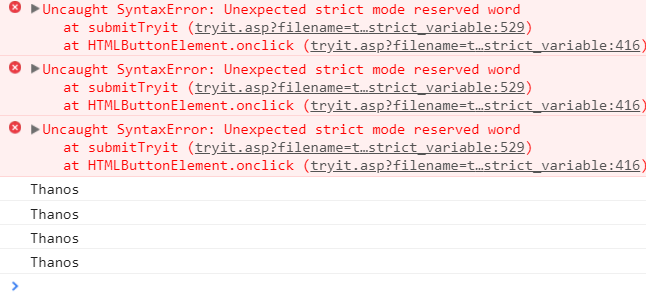
If you still get the same error, it may be due to the outdated browser version. Try updating the browser, as the old versions have old reserved words that need to be revised. Happy scripting!
How Do AI Coding Tools Catch Reserved Word Errors Before Runtime?
AI coding assistants such as GitHub Copilot and Claude Code flag a reserved word used as an identifier while you type, before the file ever reaches a JavaScript engine. Four checks do this work now.
- Real-time syntax checking: VS Code's built-in JavaScript language service underlines a reserved word used as a variable name as you type, without running the file.
- Chat-based fixes: Claude Code and GitHub Copilot Chat, part of the growing set of AI debugging tools, can read a pasted SyntaxError message and rename the conflicting identifier.
- Parser-level detection: Babel and the JavaScript engine's own parser reject a reserved word as an identifier before a single line executes, since this is a parse error rather than a runtime check.
- Migration-aware refactors: An AI assistant reviewing an older codebase before it adopts strict mode or ES modules can flag every identifier that collides with a newly reserved word, such as static or package, ahead of the upgrade.
None of these tools change which words JavaScript reserves. They speed up debugging by catching the same naming conflict before it reaches a build or test run.
Testing from the terminal? Kane CLI by TestMu AI lets SDETs and developers plan, write, run and debug tests from the command line.




Reserved Word Error FAQs
Did you find this page helpful?
More Related Blogs

TestMu AI forEnterprise
Get access to solutions built on Enterprise
grade security, privacy, & compliance
- Advanced access controls
- Advanced data retention rules
- Advanced Local Testing
- Premium Support options
- Early access to beta features
- Private Slack Channel
- Unlimited Manual Accessibility DevTools Tests