
Test Your Website on Real Desktop and Mobile Browsers
Run live and automated cross browser tests on Chrome, Safari, Firefox, and Edge across 3,000+ browser-OS combinations. No setup, no device lab.

- TestMu AI (Formerly LambdaTest)
- /
- Blog
- /
- SyntaxError: JSON.parse: bad parsing
SyntaxError: JSON.parse: bad parsing
JSON.parse() throws a SyntaxError when input breaks JSON syntax, such as a trailing comma or missing brace. Learn the causes and how to catch them early.
Last Updated on:
A JSON.parse SyntaxError happens when JSON.parse() receives text that breaks JSON's syntax, such as a trailing comma, a single quote, or a missing closing brace. Chrome, Firefox, and Node.js all throw a SyntaxError for invalid JSON text, though the exact wording differs by engine, and MDN documents more than two dozen distinct variants of it. This guide covers JSON.parse syntax errors, why the SyntaxError happens, how to catch it before it reaches production, and how AI coding tools catch it before the code runs.
Now you can easily covert JSON to YAML using JSON to YAML Converter.
Key Takeaways
- JSON.parse() throws a SyntaxError for any text that breaks JSON's syntax rules, including a trailing comma, a single quote, or a missing brace.
- MDN documents more than two dozen distinct SyntaxError messages that JSON.parse() can throw for different invalid inputs.
- JSON.parse() stops at the first syntax error it finds, so fixing one error can reveal a second error on the next attempt.
- Wrapping JSON.parse() in a try-catch block stops an invalid JSON string from crashing the rest of a JavaScript program.
- Validating JSON with a linter such as jsonlint.com before parsing catches syntax mistakes before the code runs.
- AI coding assistants can read a JSON.parse error message and point to the exact character causing it.
JSON.Parse Syntax Errors
In most web applications, nearly all data transferred from web server is transmitted in a string format. To convert that string into JSON, we use JSON.parse() function, and this the main function that throws errors. Nearly all JSON.parse errors are a subset of SyntaxError error type. Debugging console throws around 32 different errors messages when you mess up your JSON data. And some of them are very tricky to debug; and yes I am talking about you unexpected non-whitespace character after JSON data.
This string-to-object conversion happens constantly in REST API testing, since most APIs return their response body as a JSON string.

Why the SyntaxError Horror?
SyntaxError is an inherited object of the main error object The main reason behind the error is usually a mistake in the JSON file syntax. You mess up and put a “ instead of a ‘ and you invite to face the SyntaxError JSON.parse: unexpected character.
SyntaxError is one of several common JavaScript errors, alongside TypeError and ReferenceError, and each one points to a different kind of code mistake.
Just like every programming language, a JSON file has a fixed syntax. Small syntax errors throws errors. For example, in the following code, i forgot to remove a trailing comma
JSON.parse('[a,b, c, d, e, f,]');
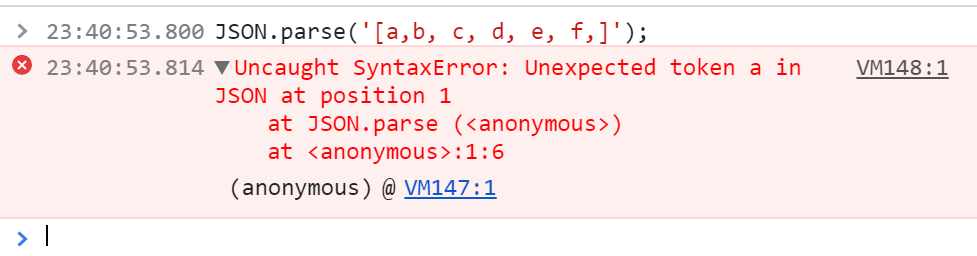
Similarly, in this example I forgot to add }
JSON.parse('{"LambdaTest": 1,');
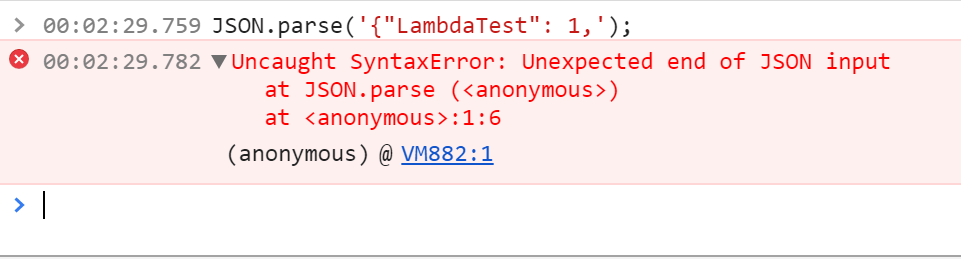
How to Catch The Error Before Hand?
The problem with debugging JSON errors are that you get to know about one error at a time. Debuggers throw the first error they find and then stop. It would be upto you to regression find the bugs. Usually it’s not as difficult as it sounds.
The first step is to make sure that your JSON file is perfect from the get go. Here you can take help from JSON linting tools like cleverly named jsonlint.com
If you don’t have any control over the receiving JSON file, then the next step is to add catch exceptions around your JSON.parse.
This try-catch pattern is a basic form of exception handling in JavaScript, and it keeps one bad JSON string from crashing the rest of the program.
function validatingJSON (json) {

  var checkedjson

  try {
    checkedjson = JSON.parse(json)
  } catch (e) {

  }

  return checkedjson }
Also, here are the main errors related to JSON.parse that I very painstakingly collected from a very single source [https://developer.mozilla.org/en-US/docs/Web/JavaScript/Reference/Errors/JSON_bad_parse] 😛
SyntaxError: JSON.parse: unterminated string literal
SyntaxError: JSON.parse: bad control character in string literal
SyntaxError: JSON.parse: bad character in string literal
SyntaxError: JSON.parse: bad Unicode escape
SyntaxError: JSON.parse: bad escape character
SyntaxError: JSON.parse: unterminated string
SyntaxError: JSON.parse: no number after minus sign
SyntaxError: JSON.parse: unexpected non-digit
SyntaxError: JSON.parse: missing digits after decimal point
SyntaxError: JSON.parse: unterminated fractional number
SyntaxError: JSON.parse: missing digits after exponent indicator
SyntaxError: JSON.parse: missing digits after exponent sign
SyntaxError: JSON.parse: exponent part is missing a number
SyntaxError: JSON.parse: unexpected end of data
SyntaxError: JSON.parse: unexpected keyword
SyntaxError: JSON.parse: unexpected character
SyntaxError: JSON.parse: end of data while reading object contents
SyntaxError: JSON.parse: expected property name or '}'
SyntaxError: JSON.parse: end of data when ',' or ']' was expected
SyntaxError: JSON.parse: expected ',' or ']' after array element
SyntaxError: JSON.parse: end of data when property name was expected
SyntaxError: JSON.parse: expected double-quoted property name
SyntaxError: JSON.parse: end of data after property name when ':' was expected
SyntaxError: JSON.parse: expected ':' after property name in object
SyntaxError: JSON.parse: end of data after property value in object
SyntaxError: JSON.parse: expected ',' or '}' after property value in object
SyntaxError: JSON.parse: expected ',' or '}' after property-value pair in object literal
SyntaxError: JSON.parse: property names must be double-quoted strings
SyntaxError: JSON.parse: expected property name or '}'
SyntaxError: JSON.parse: unexpected character
SyntaxError: JSON.parse: unexpected non-whitespace character after JSON data
If this doesn’t help, then you are in for one long debugging session. Leave a comment below with your issue. I can help.
How Do AI Coding Tools Catch JSON.parse Errors Before Runtime?
AI coding assistants such as GitHub Copilot and Claude Code read a JSON.parse error message together with the surrounding code and point to the exact character that broke the syntax. Four checks now do this work automatically.
- Inline JSON linting: VS Code's built-in JSON language service underlines a trailing comma or missing brace as you type, before
nodeever runs the file. - Error-position lookup: JSON.parse reports the exact character index where parsing failed, and an AI assistant given that message jumps straight to the character instead of a human bisecting the file by hand.
- Chat-based fixes: Claude Code and GitHub Copilot Chat, part of the growing set of AI debugging tools, can read a pasted SyntaxError message plus the offending string and suggest the corrected JSON inline.
- Pre-commit validation: ESLint's jsonc plugin flags malformed JSON files in a pre-commit hook, catching the error before it reaches a build pipeline.
- Schema-aware autocomplete: An editor with a JSON schema attached flags a missing required property or a wrong data type before JSON.parse ever runs against the file.
None of these tools change what the JSON.parse specification allows. They speed up debugging by finding the same syntax mistake faster than a manual read-through.
Testing from the terminal? Kane CLI by TestMu AI lets SDETs and developers plan, write, run and debug tests from the command line.
Author

Deeksha Agarwal
Blogs: 34


Deeksha is a Senior Product Manager at The Economic Times and a Community Evangelist with 8+ years of experience. She is followed by 6,000+ QA professionals, software testers, tech leaders, and enthusiasts across global communities. Deeksha has authored 40+ expert bios for TestMu AI, focusing on cross-browser testing, mobile app testing, regression testing, usability testing, and automation. Previously at TestMu AI, she drove product growth in native app testing and responsive browser features, combining product leadership with deep QA expertise.


JSON.parse SyntaxError FAQs
Did you find this page helpful?
More Related Blogs

TestMu AI forEnterprise
Get access to solutions built on Enterprise
grade security, privacy, & compliance
- Advanced access controls
- Advanced data retention rules
- Advanced Local Testing
- Premium Support options
- Early access to beta features
- Private Slack Channel
- Unlimited Manual Accessibility DevTools Tests