
Power Your Software Testing with AI Agents and Cloud
The Native AI-Agentic Cloud Platform to Supercharge Quality Engineering. Test Intelligently and Ship Faster.


- TestMu AI (Formerly LambdaTest)
- /
- Blog
- /
- Snowflake Automation Testing: How to Test Apps Built on Snowflake
Snowflake Automation Testing: How to Test Apps Built on Snowflake
Published on:
In dbt Labs' 2026 State of Analytics Engineering research, 71% of data professionals cite incorrect or hallucinated outputs reaching stakeholders as a top concern.
Snowflake automation testing catches those outputs where people see them. Data-level checks live in the Snowflake test case template, the platform view is on Snowflake testing, and this guide covers the commands.
TL;DR
Snowflake automation testing is an automated check that the numbers a dashboard, Streamlit app, API or Cortex Agent shows match what Snowflake holds. A script fetches the expected value through the Snowflake SQL API, a browser test asserts it on screen, and the exit code decides whether the release or pull request ships.
- Expected value: The Snowflake SQL API runs the trusted query over HTTPS and returns every value as a JSON string, so a test converts both sides to decimals before it compares them.
- Screen check: Kane CLI by TestMu AI takes the expected value as a variable, verifies it in a real Chrome browser, and exits 0 when the screen matches and 1 when it does not.
- Streamlit in Snowflake apps: Tests open the app-viewer URL as a role with USAGE on the app and compare against a query run with the app owner's role, because the app queries with the owner's privileges.
- Cortex Agents: Agent tests ask questions with known answers in several phrasings, compare each number with trusted SQL, and read the SQL the agent generated whenever an answer fails.
- dbt pull requests: A CI job runs dbt build and then the screen check against the CI schema, and a nonzero exit from either step blocks the merge.
- Snowflake connector required: No. Any test runner that can send an HTTPS request can query the Snowflake SQL API, which is how KaneAI and Kane CLI reach the warehouse.
- Stable while data loads: No, not by default. New rows can land between the query and the screen read, so pin the expected query to the page-load time with the Snowflake AT(TIMESTAMP => ...) clause.
Layers to Test Between the Warehouse and the Screen
Snowflake's own data migration validation compares a source system with Snowflake at three levels: schemas, then metrics such as row count, sum and average, then individual rows.
Pipeline checks like these compare data with data, and none of them opens the app. If you already run ETL testing, keep it, and add a check for each layer between the warehouse and the person reading the number:
| Layer | What goes wrong while the table stays correct | Check that catches it |
|---|---|---|
| BI dashboard | A filter, a date boundary or a rounding rule in the BI layer changes the total on the tile. | Read the tile and compare it with the SQL that defines the metric. |
| App or API cache | The API keeps serving the previous result after a dbt run updates the model. | Compare the API response with a fresh query after each deploy. |
| Streamlit in Snowflake app | App code sums the wrong column or drops a category before it draws the chart. | Drive the app UI and compare the figure with the source table. |
| Cortex Agent | Generated SQL joins the wrong tables and returns a fluent, wrong answer. | Ask questions with known answers and compare every number. |
| dbt model change | A refactor, often written by a coding agent, changes how a metric is calculated. | Gate the pull request on the screen check, not only on dbt tests. |
How to Query the Expected Value With the Snowflake SQL API
Every check in this guide starts from the value the warehouse says is right.
The Snowflake SQL API executes SQL statements sent over HTTPS: per Snowflake's guide to submitting requests, you POST the statement to /api/v2/statements on your account URL with a bearer token, and you can set the warehouse, role, database and schema in the request body.
Wrap the call in a small script so every test, CI step and teammate fetches expected values the same way:
#!/usr/bin/env bash
# query-expected.sh "<SQL>": print the first value of the result set
set -euo pipefail

BODY=$(jq -n --arg sql "$1" '{statement: $sql, timeout: 60, warehouse: "QA_WH",
  role: "QA_READONLY", database: "ANALYTICS", schema: "SALES"}')

curl -s -X POST "https://$SNOWFLAKE_ACCOUNT.snowflakecomputing.com/api/v2/statements" \
  -H "Authorization: Bearer $SNOWFLAKE_TOKEN" \
  -H "Content-Type: application/json" \
  -H "Accept: application/json" \
  -H "User-Agent: snowflake-app-checks/1.0" \
  -d "$BODY" | jq -r '.data[0][0]'
Per Snowflake's reference on handling responses, the SQL API returns result values as JSON strings, splits large results into partitions, and answers long-running statements with HTTP 202 instead of data.
Each of those behaviors changes how you write the assertion:
- Values arrive as strings - the data field is an array of arrays of strings, so a NUMBER column value of 1.0 comes back as the string "1.0". Convert both sides to decimals before you compare.
- Slow statements return 202 - a statement that runs longer than 45 seconds returns HTTP 202 with a statementStatusUrl to poll. Treat an empty result as "not ready", never as zero.
- Large results arrive in partitions - keep expected-value queries to one aggregated row so the first partition holds the whole answer.
- Bind variables - when the same query serves many test cases, pass region or date values through the bindings field instead of building SQL strings.
- A read-only role - give the test a role that can only SELECT the views it checks, and keep its token in your CI secret store.
How to Check a Dashboard Against the Warehouse
A dashboard check has three parts: the expected value from the query, the value on screen from a real browser, and a comparison rule that fails the run. Write the rule down before you automate anything, because "matches" means something different for a revenue tile in cents and a tile that shows 4.8M.
With Kane CLI in a Script or Pipeline
Kane CLI runs a plain-English objective in a real Chrome browser and returns an exit code your pipeline can act on: 0 for a pass, 1 for a failed assertion, 2 for an environment error and 3 for a timeout. Pass the warehouse value in as a variable and end the objective with an assertion on the screen, so the exit code is the verdict.
set -euo pipefail

RAW=$(./query-expected.sh "SELECT ROUND(SUM(amount), 2) FROM orders
  WHERE region = 'EMEA' AND fiscal_quarter = '2026-Q3'")

# Format the warehouse value exactly as the Revenue tile shows it, e.g. $4,812,330.25
EXPECTED=$(python3 -c 'import sys; from decimal import Decimal; print(f"${Decimal(sys.argv[1]):,.2f}")' "$RAW")

jq -n --arg u "$DASHBOARD_URL" --arg v "$EXPECTED" \
  '{dashboard_url: {value: $u}, expected_revenue: {value: $v}}' > vars.json

kane-cli run "Go to {{dashboard_url}}, set the Region filter to EMEA and the Quarter filter to Q3 2026, \
and verify the Revenue tile shows {{expected_revenue}}" \
--variables-file vars.json --agent --headless --timeout 300- Format before you assert - the assertion compares the tile with the text you pass in, so format the warehouse value with the tile's currency symbol, separators and decimal places.
- Rounded tiles - a tile that shows $4.8M gets an expected value rounded the same way in the formatting step, which makes the display precision your tolerance.
- Credentials stay out of the objective - Kane CLI objectives can call APIs themselves (see API calling in Kane CLI), but a separate query step keeps the Snowflake token out of the browser run and prints the expected value in the CI log.
With KaneAI in the Browser
Teams that author tests in a browser can build the same check in KaneAI. Per the KaneAI API testing docs, you paste a curl command into an API step, validate it, and add it to the test, and KaneAI turns API responses into JSON variables that later steps can use.
- Add an API step and paste the SQL API curl command for the metric, with the token kept in a KaneAI secret.
- Write the UI steps in plain English, such as "open the sales dashboard, set the Region filter to EMEA and the Quarter filter to Q3".
- Store the Revenue tile in a variable and assert that it matches the value in the API response.
- Where a display format needs custom handling, add a JavaScript execution step that reads and normalizes the tile on the page.
KaneAI can also draft the test from the Jira ticket or PRD that defines the metric. Filters, drill-downs and empty states need their own checks on the same dashboard; the guide to test a SaaS dashboard covers them.
A Worked Run on the TestMu AI Ecommerce Playground
The pattern works on any app with a data source behind it. The run below uses the TestMu AI ecommerce playground, where the cart API plays the part of the SQL API: adding two iPhones through the API returns the cart total, and the cart page in a real browser has to show the same figure.
# 1. Expected value from the cart API (the SQL API's job in a Snowflake app)
EXPECTED=$(curl -s -X POST \
  "https://ecommerce-playground.lambdatest.io/index.php?route=checkout/cart/add" \
  -H "X-Requested-With: XMLHttpRequest" \
  --data "product_id=40&quantity=2" \
  | python -c 'import sys, json, re; print(re.search(r"[$][0-9.,]+", json.load(sys.stdin)["total"]).group())')
echo "$EXPECTED"

# 2. The same total, read from the cart page in a real browser
kane-cli run "Go to https://ecommerce-playground.lambdatest.io/index.php?route=product/product&product_id=40, \
type 2 in the Qty field, click ADD TO CART, \
then open https://ecommerce-playground.lambdatest.io/index.php?route=checkout/cart, \
store the amount in the Total row of the cart totals table as 'screen_total', \
and verify the Total row of the cart totals table shows {{expected_total}}" \
  --variables "{\"expected_total\": {\"value\": \"$EXPECTED\"}}" \
  --agent --headless --timeout 400
echo "exit code: $?"
Trimmed to the lines that matter, the output is the expected total, the run_end event Kane CLI prints last, and the exit code:
$246.40
{"type":"run_end","status":"passed","one_liner":"added two items to the cart on LambdaTest Ecommerce Playground", ...}
exit code: 0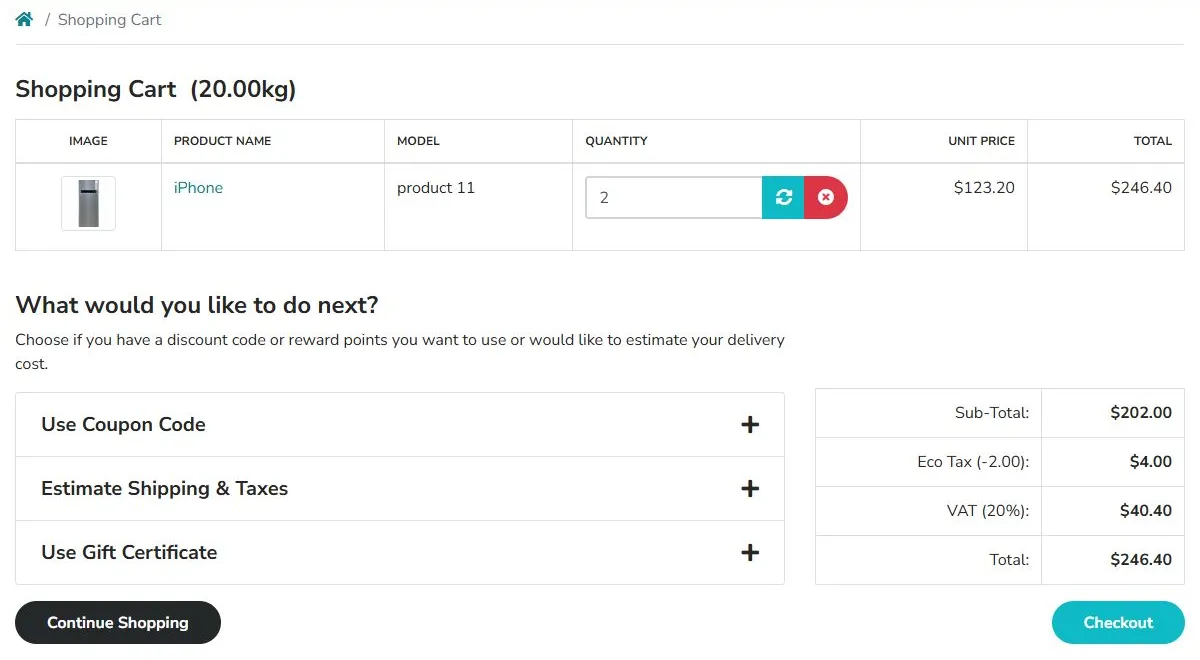
- Matching values - the API and the cart page both report $246.40, and the run passes in about a minute with exit code 0.
- One cent of drift - pass $246.41 as the expected total and the same objective fails at its final verification step with exit code 1, which is what stops a merge.
- Evidence for review - each run seals an evidence pack with per-step screenshots, the network log and console output, so a reviewer can see exactly which value the browser read.

Testing Streamlit in Snowflake Apps
A Streamlit in Snowflake app is a web app, so the dashboard pattern applies with a few Snowflake-specific details.
Per Snowflake's guide to sharing Streamlit apps, each app has an app-builder URL that shows Snowsight around it and an app-viewer URL that hides it, and any role with USAGE on the app can open the viewer URL.
- Test the app-viewer URL - it is the page shared users open, and it keeps Snowsight navigation out of the browser agent's way. DESCRIBE STREAMLIT returns the url_id it needs.
- Use a dedicated test role - grant USAGE on the app to a test role and user instead of reusing an admin login. Locally, a saved Kane CLI Chrome profile keeps the Snowflake session between runs.
- Owner's privileges - per Snowflake's Streamlit security notes, apps execute queries using the privileges of the app owner, not the viewer.
- Match the expected query to the owner - run the expected-value query with the app owner's role, so both sides read the same rows.
- Allow for a cold start - apps on the container runtime suspend after three days without viewers, so give the first load of a quiet app a longer timeout.
A forecast app that writes and reads rows gets one objective that covers both directions: upload the input, run the model, and compare the figure it draws with the table it wrote.
EXPECTED_Q4=$(./query-expected.sh "SELECT ROUND(SUM(forecast_amount), 0)
  FROM forecast WHERE fiscal_quarter = '2026-Q4'")

kane-cli run "Go to {{streamlit_viewer_url}}, upload forecast_q4.csv, click Run model, \
store the Q4 total shown under the chart as 'q4_total', \
and verify the Q4 total under the chart shows {{expected_q4}}" \
  --variables-file vars.json --agent --headless --timeout 600
Testing Cortex Agents Against Ground-Truth SQL
Agents that answer from warehouse data need the same check, because a fluent answer can still be wrong. In a post on Snowflake CoWork, Snowflake reported that in internal testing on complex enterprise queries, its agents reached 83% accuracy with Cortex Sense, a context layer set for private preview, and 47% without it.
The Cortex Agents REST API streams server-sent events by default, and its response.tool_result.analyst.delta event carries the SQL that Cortex Analyst generated.
Record both the answer and the generated SQL in every test, then build the check in this order:
- Pick questions with known answers - for every metric the agent covers, write the SQL your data team trusts, using the same query-expected.sh script as the dashboard checks.
- Ask each question many ways - vary the phrasing and the date wording ("last quarter", "Q3", "July to September"), and add follow-ups that change one filter. A few dozen phrasings per metric shows whether the agent is consistent.
- Compare the number, not the wording - extract the figure from the final response event and compare it with the expected value under the same tolerance rule as the dashboard.
- Read the generated SQL when an answer fails - it shows whether the agent picked the wrong table, join or date filter, which tells you whether to fix the semantic view or the instructions.
- Include questions it should decline - a metric outside the semantic view should get a clear refusal, not an estimate.
Agent Testing by TestMu AI runs these conversations at scale against any chat agent it can reach over REST, WebSocket or SSE endpoints, including Cortex-powered assistants. It generates multi-turn scenarios and scores each conversation on dimensions such as hallucination, completeness and context awareness, so an invented figure or an unsupported answer is flagged before customers see it.
Its Data Validation feature checks the facts an agent states against a read-only API lookup and gives each fact a Pass, Fail or Cannot verify verdict, with the agent's claim and the API value side by side. A lookup that runs your trusted SQL through the SQL API under a read-only role gives every Cortex answer a warehouse-backed check after each conversation.

Note: Run the dashboard check with Kane CLI and the Cortex Agent check with Agent Testing on TestMu AI. Create a free account
Snowflake Automation Testing for dbt Pull Requests
In Stack Overflow's 2025 Developer Survey, 46% of developers said they distrust the accuracy of AI tools, and 66% named "AI solutions that are almost right, but not quite" as their biggest frustration.
Coding agents such as Claude Code, Cursor and Codex now write dbt models and SQL as readily as app code, and an almost-right metric definition looks fine in review. The pull request needs a check that runs the app.
Per its exit codes page, dbt returns a zero exit code for success and a nonzero exit code for failure.
That stops a bad build, but data tests and unit tests prove the models without rendering the app. Add the screen check as the next step in the same job:
# .github/workflows/dbt-pr-gate.yml
name: dbt PR gate
on: pull_request

jobs:
  build-and-verify:
    runs-on: ubuntu-latest
    steps:
      - uses: actions/checkout@v4
      - uses: actions/setup-python@v5
        with:
          python-version: '3.12'
      - uses: actions/setup-node@v4
        with:
          node-version: '20'
      - uses: browser-actions/setup-chrome@v1

      - name: Build and test dbt models in the CI schema
        run: |
          pip install dbt-snowflake
          dbt build --target ci

      - name: Check the churn page against the warehouse
        env:
          SNOWFLAKE_ACCOUNT: ${{ secrets.SNOWFLAKE_ACCOUNT }}
          SNOWFLAKE_TOKEN: ${{ secrets.SNOWFLAKE_PAT }}
          LT_USERNAME: ${{ secrets.LT_USERNAME }}
          LT_ACCESS_KEY: ${{ secrets.LT_ACCESS_KEY }}
          APP_URL: ${{ vars.CI_APP_URL }}
        run: |
          npm install -g @testmuai/kane-cli
          EXPECTED=$(./scripts/query-expected.sh "SELECT ROUND(churn_rate_30d * 100, 1) || '%'
            FROM ci.churn_daily ORDER BY day DESC LIMIT 1")
          jq -n --arg u "$APP_URL" --arg v "$EXPECTED" \
            '{app_url: {value: $u}, expected_churn: {value: $v}}' > vars.json
          kane-cli run "Go to {{app_url}}/churn and verify the 30-day churn card shows {{expected_churn}}" \
            --variables-file vars.json --headless --timeout 300 \
            --username "$LT_USERNAME" --access-key "$LT_ACCESS_KEY"

      - name: Keep the run evidence
        if: always()
        uses: actions/upload-artifact@v4
        with:
          name: kane-evidence
path: ~/.testmuai/kaneai/sessions/- The exit code is the gate - a nonzero exit from dbt or Kane CLI fails the job, and branch protection keeps the pull request from merging.
- Point the app at the CI schema - the check only proves the change if the preview app reads the models this job just built.
- Coding agents can run the same check - npx @testmuai/kane-cli-skill installs the Kane CLI skill for Claude Code, Codex CLI and Gemini CLI, and other agents such as Cursor can read the hosted instructions at testmuai.com/kane-cli/agents.md. The agent then verifies its own dbt change before it opens the pull request.
For the wider pipeline design, including review rules for agent-authored pull requests, see CI/CD for agent-written code.
Automating Migration, Mobile and Release Checks
The same expected-value pattern covers the moments when Snowflake data reaches users through a new path: a migration, a phone, or a full release.
Post-Migration Cutover Checks
- Fix a test customer - pick an account whose invoice or order history exists in both the legacy system and Snowflake, so the expected values are known on both sides.
- Run the same objective twice - before cutover, take the expected values from the legacy source; after cutover, take them from Snowflake with query-expected.sh. "Log in as the test customer and verify the three most recent invoices show {{expected_invoices}}" stays identical.
- Split the job with the pipeline - row-level reconciliation stays with your migration validation; this check proves the portal renders the same history after the move.
Mobile Apps on Snowflake Data
A loyalty app that reads points balances from a MEMBERS table has to show the same number on every phone. KaneAI runs native app tests on the TestMu AI real device cloud of 10,000+ real Android and iOS devices, so one expected value from the warehouse can be asserted on an iPhone and a Galaxy alike.
Parameterized and Release-Wide Runs
- One test, many contexts - KaneAI parameters feed a different data set into the same test on each run, so a dashboard check can run once per warehouse, role or environment with its own expected value.
- Kane CLI variables files - keep one file per role or environment and pass it with --variables-file, so the objective never changes.
- The whole set every release - HyperExecute runs KaneAI tests in parallel next to the Selenium, Playwright and Cypress suites you already have, so every screen-to-warehouse check finishes before the release does.
Triaging a Failed Check
- Replay the run - the KaneAI test run view replays each step with screenshots and network logs, and the run can be attached to a Jira issue; Jira and Azure DevOps integrations can draft the bug.
- Trust the failure - self-healing re-finds an element when the layout shifts and surfaces the change for review, but the expected value never heals, so a total that disagrees with the warehouse still fails and gets logged as a defect.
Preventing False Failures in Snowflake Automation Tests
Most false failures in screen-to-warehouse checks come from comparing two values that were never meant to be identical:
- Data that changed mid-run - if loads land while the test runs, pin the expected query to the moment the page loaded: SELECT SUM(amount) FROM orders AT(TIMESTAMP => '2026-10-17 09:00:00'::TIMESTAMP_LTZ).
- Strings compared as text - "1.0" and "1" differ as text and match as numbers, so cast both values before comparing.
- Display rounding - a tile that shows 4.8M never equals 4812330.25, so the tolerance has to match the display rule.
- Different roles - row access policies and masking policies can return different numbers per role, so run the expected query with the role whose view the screen represents.
- Refresh schedules - a dashboard on an hourly extract lags the warehouse, so compare against the data as of its last refresh, not against the live table.
Snowflake's AT | BEFORE clause reads a table as of an exact timestamp, a time offset or a statement ID.
Your First Screen-to-Warehouse Check
Start Snowflake automation testing with the one number your executives or customers act on, such as the revenue tile or the invoice total, and write the SQL your data team trusts for it. Wire it to a Kane CLI run with the variable pattern above, then add that step to the pull request pipeline that ships your dbt models.
Install Kane CLI with npm install -g @testmuai/kane-cli and follow Kane CLI with AI coding agents to give your coding agent the same check.
Author

Abhishek Mishra
Blogs: 16

Abhishek Mishra is a Technical Product Manager at TestMu AI, where he owns Test Manager, the test management product. He has over 8 years of experience in product management and market analysis, spanning AI-native software testing, product strategy, and analytics. On TestMu AI, he authored guides on test management and test case management. Previously, he served as the Product Lead at IndiaClan and co-founded Gartley618 Technologies, a firm focused on quantitative trading and blockchain. He holds a B.Tech degree.
Reviewer

Mayank Bhola
Reviewer
Mayank Bhola is Co-Founder and Head of Products at TestMu AI, where he leads the entire product portfolio across KaneAI, Kane CLI, HyperExecute, SmartUI, the Real Device Cloud, Accessibility, and other software testing product lines. As an early Lead Architect he designed and built the company's flagship Tunnel technology from scratch, created the React-based automation platform, and architected the data-intensive pipelines and FAAS services that scale it. He brings more than 10 years of experience in software development and product engineering, with earlier roles as Head of Technology at Juggernaut Books and Senior Software Engineer at PressPlay TV and Zomato. Mayank holds a B.Tech in Computer Engineering from JIIT Noida.


Snowflake Automation Testing FAQs
Did you find this page helpful?
More Related Blogs

TestMu AI forEnterprise
Get access to solutions built on Enterprise
grade security, privacy, & compliance
- Advanced access controls
- Advanced data retention rules
- Advanced Local Testing
- Premium Support options
- Early access to beta features
- Private Slack Channel
- Unlimited Manual Accessibility DevTools Tests