

Power Your Software Testing with AI Agents and Cloud
The Native AI-Agentic Cloud Platform to Supercharge Quality Engineering. Test Intelligently and Ship Faster.


- TestMu AI (Formerly LambdaTest)
- /
- Blog
- /
- Selenium IDE Tutorial
Selenium IDE Tutorial: Features, Setup, and Limitations
What Selenium IDE does, how to record and run tests with SIDE Runner, how to export them to code, and an honest look at whether it is still maintained.
Last Updated on:
Selenium IDE is the fastest way to get a browser test running without writing a line of code, and it is also the tool most likely to be recommended to you by an article that has not checked on it in three years. Both of those things matter, so this guide covers what it does and what state it is actually in.
TL;DR
Selenium IDE is a record and playback browser extension for Chrome and Firefox that captures your interactions with a web page and replays them as an automated test. Tests are stored as a .side JSON project, run from the command line through SIDE Runner, and can be exported to Java, Python, C#, or JavaScript.
Key Things to Know
- Selenium IDE: A browser extension that records interactions as Selenese commands, each with a command, target, and value. It needs no programming knowledge and gives instant feedback on replay.
- SIDE Runner: The npm command-line runner that executes a .side project outside the browser. It is what makes cross browser and parallel execution possible, since the extension itself does neither.
- Code export: Any recorded test converts to JUnit, TestNG, pytest, NUnit, xUnit, or Mocha. The output is a linear scaffold, not a structured framework.
- Maintenance status: The newest tagged release is v4.0.1-beta.14 from July 2024, still a beta, with 454 open issues. Plan around that before building anything long-lived on it.
When Selenium IDE Is the Right Choice
It suits learning browser automation, prototyping a flow before coding it, and short-lived regression checks. It does not suit a long-term regression suite, where a coded framework or an actively developed codeless tool is the safer investment.
What Is Selenium IDE?
Selenium IDE is a browser extension that records what you do on a web page and replays it as an automated test. It arrived in 2006 as part of the Selenium suite and sits alongside WebDriver and Grid as the component aimed at people who do not want to write code.
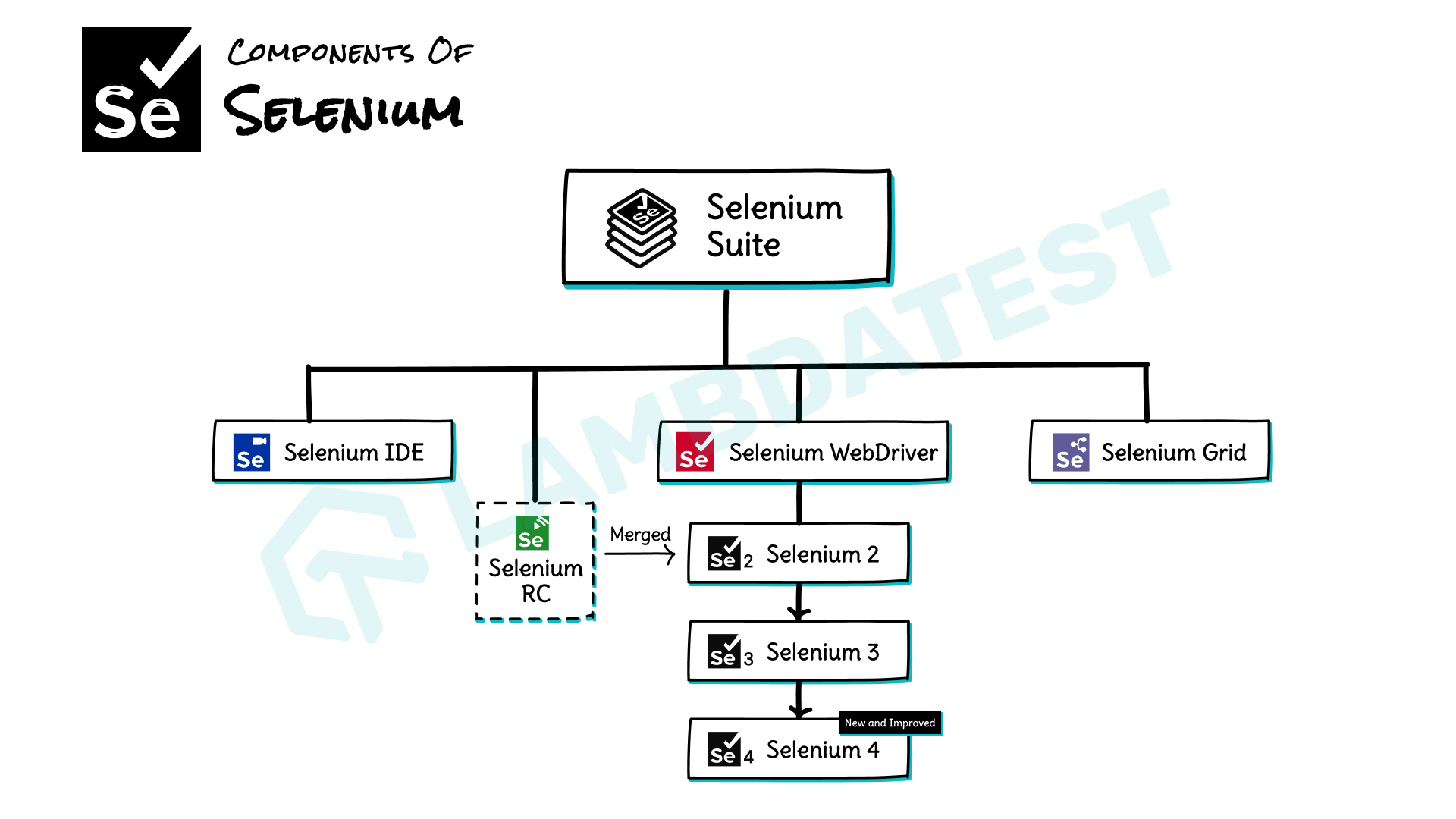
Its history is worth knowing, because it explains why advice about it varies so wildly. The original was a Firefox-only extension built on Firefox's legacy add-on architecture, and it stopped working when Mozilla retired that architecture in favour of WebExtensions in 2017. The tool was then rebuilt from scratch as a cross-browser extension for both Chrome and Firefox, and that rewritten version is what this guide covers. Articles written on either side of that gap describe effectively different tools.
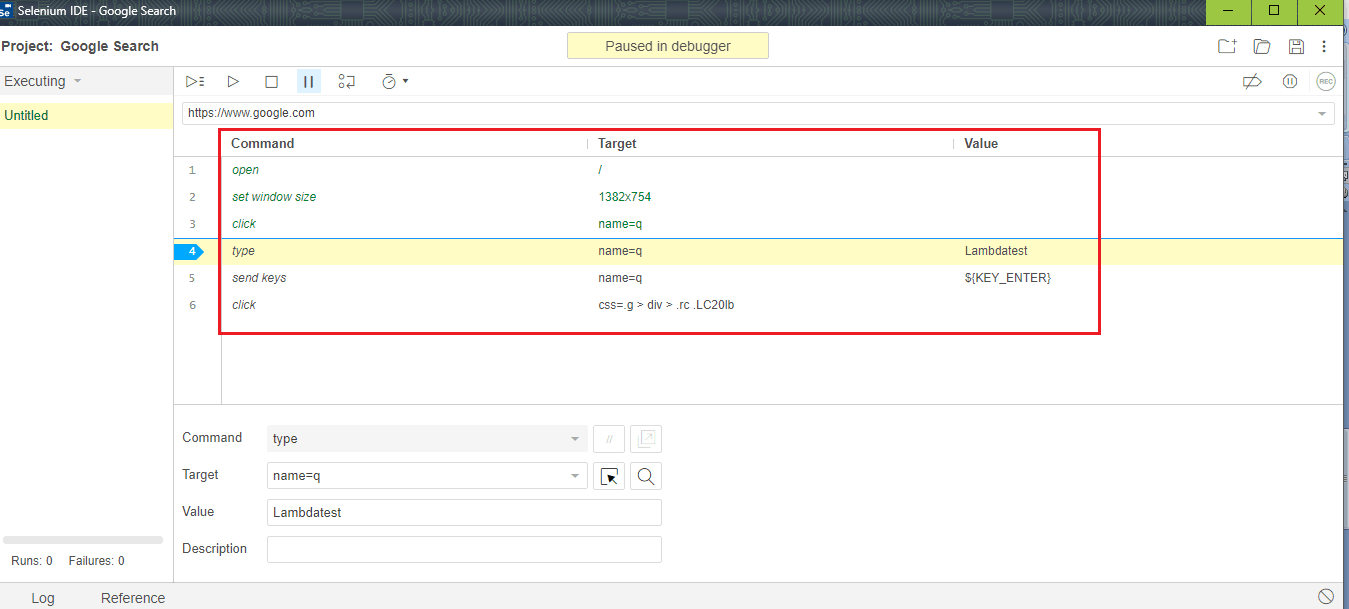
Each recorded step is a Selenese command with three parts: the command itself such as click or type, the target identifying the element, and an optional value. Tests are saved as a .side file, which is plain JSON, so projects can be diffed and reviewed in a code repository like any other file.
Is Selenium IDE Still Maintained?
This is the question most articles about Selenium IDE skip, so we checked the public record directly rather than repeating what the marketing pages say. The figures below were pulled from the GitHub API and the npm registry on 10 August 2026.
| Signal | Current state |
|---|---|
| Repository status | Not archived. Last code push 6 February 2026. |
| Newest tagged release | v4.0.1-beta.14, published 20 July 2024. Still labelled beta. |
| Open issues | 454 |
| SIDE Runner on npm | 4.0.13, published 22 November 2024 |
| SIDE Runner weekly downloads | 1,758 (week of 3 to 9 August 2026) |
Read together, those numbers describe a project that is alive but barely moving. The repository is not abandoned and the extensions still install and work, but the newest thing a user can actually download is a beta that shipped over two years ago, and 454 open issues against a tool this small is a long queue.
The adoption comparison is the part worth pausing on. In that same week, selenium-webdriver recorded 2,045,892 npm downloads against SIDE Runner's 1,758. That is roughly 1,160 code-first installs for every command-line install of the IDE's runner, on the same project, in the same week.
None of this makes Selenium IDE useless. It does mean you should treat it as a learning and prototyping tool rather than as infrastructure, and it means any article calling it "trending" is describing 2020, not now.
Key Features of Selenium IDE
What the current version gives you beyond simple record and replay:
- Control flow commands. if, else if, while, times, and do support conditional and repeated steps, so a recorded test can branch without being exported to code first.
- Multiple fallback locators. Every recorded step stores several candidate locators, an id, a CSS selector, and a few XPath variants, and falls back through them when the first fails. This is the single feature that makes recorded tests survive minor UI changes.
- Test case reuse. The run command calls one test from inside another, which is the closest the IDE gets to a shared helper function.
- Debugging in the extension. Set breakpoints in Selenium, step through commands, and pause on exceptions without leaving the browser.
- Plugin extensibility. Third-party plugins can add new commands and hook into the run lifecycle.
- JSON project files. Because a .side file is plain JSON, projects can be committed, diffed, and reviewed in version control rather than living in one person's browser.
Here is what a recorded project actually looks like on disk. This one opens a form on the Selenium Playground, types a message, submits it, and asserts the result:
{
  "id": "0cbf9be7-7cdf-4ab8-ae1e-ece61b57d861",
  "version": "2.0",
  "name": "Playground Smoke",
  "url": "https://www.testmuai.com",
  "tests": [{
    "id": "b3d88a58-3a4f-4189-8614-416817684027",
    "name": "Simple form submits",
    "commands": [{
      "command": "open",
      "target": "/selenium-playground/simple-form-demo/",
      "targets": [],
      "value": ""
    }, {
      "command": "type",
      "target": "id=user-message",
      "targets": [
        ["id=user-message", "id"],
        ["css=#user-message", "css:finder"],
        ["xpath=//input[@id='user-message']", "xpath:attributes"]
      ],
      "value": "Hello from Selenium IDE"
    }, {
      "command": "click",
      "target": "id=showInput",
      "targets": [["id=showInput", "id"]],
      "value": ""
    }, {
      "command": "assertText",
      "target": "id=message",
      "targets": [["id=message", "id"]],
      "value": "Hello from Selenium IDE"
    }]
  }],
  "suites": [{
    "id": "ac1e77d7-5be7-4359-baf9-b635ab97bb36",
    "name": "Default Suite",
    "persistSession": false,
    "parallel": false,
    "timeout": 300,
    "tests": ["b3d88a58-3a4f-4189-8614-416817684027"]
  }],
  "urls": ["https://www.testmuai.com/"],
  "plugins": []
}
Note the targets array on each command. That list of alternative locators is the fallback chain, and it is why a recorded test does not always break the moment a class name changes.

Getting Started With Selenium IDE
Recording a first test takes about two minutes:
- Install the extension from the Chrome Web Store or the Firefox Add-ons site.
- Create a new project and give it a base URL. Every recorded step is stored relative to that URL, which is what lets the same project run against staging and production.
- Record the flow. The IDE opens a new window and captures clicks, typing, and navigation as you go. Keep the flow short; a recording that spans twenty steps is far harder to repair than two recordings of ten.
- Add an assertion. This is the step people skip. Right-click an element and choose an assert or verify command, because a recording without an assertion only proves the page did not crash.
- Replay and save. Run it once to confirm it passes, then save the .side file into your repository rather than leaving it in browser storage.
One habit pays for itself immediately: use the Set Speed control to slow playback while you are building a test. Recorded tests replay faster than a human clicks, and a step that fails at full speed often passes when slowed, which tells you the problem is a missing wait rather than a broken locator.
Running Tests With SIDE Runner
The browser extension replays tests one at a time, in one browser, on your machine. SIDE Runner is the command-line tool that removes all three of those limits, and it is the only route to cross browser and parallel execution.
npm install -g selenium-side-runner

# Run a recorded project in Chrome
selenium-side-runner Playground-Smoke.side

# Run the same project across 4 parallel workers
selenium-side-runner -w 4 Playground-Smoke.side
The -w flag sets the number of parallel workers, splitting the suite across that many browser instances. Because SIDE Runner is a Node package invoked from a shell, it drops into a CI pipeline as an ordinary build step, so recorded tests can run on every pull request alongside coded ones.
SIDE Runner also accepts a remote WebDriver endpoint, which is how a recorded project runs somewhere other than your laptop. Pointing it at a cloud grid gives the recorded suite the same browser and OS coverage as a coded one, without the .side file changing at all. TestMu AI provides 3,000+ browser and OS combinations for exactly this, and the automation docs cover wiring up the remote endpoint and credentials.
Exporting Selenium IDE Tests to Code
Right-click any test or suite and choose Export, and the IDE writes out the equivalent script in Java with JUnit or TestNG, Python with pytest, C# with NUnit or xUnit, or JavaScript with Mocha. For most teams this is the feature that justifies using the IDE at all.
The realistic workflow is to record a flow to discover the locators and the sequence, export it, and then rewrite it properly. Exported code is linear and literal. It has no Page Object Model, no shared fixtures, no reporting, and no configuration layer, so it is a scaffold rather than a framework. Anyone continuing in Java will want the Selenium with Java tutorial for the structure the export leaves out.
Export is also a one-way door. Changes made to the exported code cannot be brought back into the .side project, so once you export and start editing, the recording stops being the source of truth. Decide which artifact you are maintaining before the team ends up maintaining both.
Where Selenium IDE Falls Short
The constraints are structural rather than bugs, which means no future release removes them:
- Recorded locators inherit whatever the DOM offered. The fallback chain helps, but a recording made against markup without stable ids produces positional XPath, and positional XPath breaks when anyone adds a div.
- Tests are linear and resist refactoring. There is no abstraction beyond calling one test from another, so shared logic gets duplicated across recordings and every change has to be made in several places.
- Data-driven testing is thin. External data is possible, but it is nothing like parameterizing a coded test, and it is the point where most teams give up and export.
- No reporting worth the name. Pass and fail appear in the console. Anything a stakeholder would look at has to come from elsewhere.
- Chrome and Firefox only. There is no Safari or Edge extension, so any browser matrix beyond those two needs the exported code or the runner against a grid.
- The release cadence. Building a regression suite on a two-year-old beta is a risk you take deliberately, not one to discover later.
The common failure is not any single limitation. It is that a recorded suite scales in maintenance cost faster than it scales in coverage, so the effort curve crosses over well before a coded framework's would.
Codeless Testing Without Recorded Selectors
The appeal of Selenium IDE was never recording as such. It was not having to write and maintain selectors. Recording solved that by capturing selectors automatically, which moved the maintenance problem rather than removing it, because the captured selectors still break.
Kane CLI takes the other route. It is a deterministic browser agent that drives a real Chrome instance through the Chrome DevTools Protocol and works from a natural language objective, so there is no selector to record and none to repair. You describe the outcome and the agent resolves the path to it.
npm install -g @testmuai/kane-cli

kane-cli run "open the simple form demo, enter 'Hello' in the message box, \
click Get Checked Value, assert the message appears" \
  --url https://www.testmuai.com/selenium-playground/
The comparison that matters for anyone weighing the two is what happens when the page changes. A recorded .side test fails when its locator chain runs out. An objective written in plain language keeps working, because "click Get Checked Value" does not depend on the button's id.
A pass is granted only on explicit evidence such as DOM state, URL changes, network responses, or console logs, and every run leaves a session directory with a step-by-step record and screenshots. It also exports to Playwright when you do want code, which fills the same role as the IDE's export step. Both are codeless entry points; only one of them is on a current release.

Note: Recording captures selectors that will break. Describing the outcome in plain language does not. Kane CLI runs that from your terminal against real Chrome. Read the Kane CLI docs
Should You Use Selenium IDE in 2026?
It depends entirely on how long the tests need to live.
| Situation | Verdict |
|---|---|
| Learning how browser automation works | Good fit. Seeing commands, targets, and values recorded live teaches the model faster than reading about WebDriver. |
| Prototyping a flow before coding it | Good fit. Record it, read off the locators, export, then write the real test. |
| A short-lived regression check | Workable. Acceptable when the test will be discarded within a release or two. |
| Non-technical team members contributing tests | Consider alternatives. The intent is right, but a two-year-old beta is a fragile base. A natural language agent covers the same need on current software. |
| A long-term regression suite | Poor fit. Maintenance cost grows faster than coverage, and there is no reporting layer. |
| Cross browser coverage beyond Chrome and Firefox | Poor fit. Export the tests or run the project against a cloud grid through SIDE Runner. |
Conclusion
Selenium IDE still does the job it was built for. Install the extension, record a flow, add an assertion, and you have a working browser test in minutes with no code involved. For learning and for prototyping, nothing else gets you there faster.
What has changed is the context around it. The newest release is a beta from July 2024, its command-line runner sees under 2,000 weekly downloads against WebDriver's two million, and 454 issues are open. That is a tool worth using deliberately for short-lived work, not one to build a regression suite on, and it is worth knowing before you commit rather than a year in.
Whichever route you take, the execution problem is the same. Recorded projects through SIDE Runner and exported code both need somewhere to run across real browsers, and TestMu AI provides 3,000+ browser and OS combinations with parallel execution so the suite finishes in minutes rather than hours.
Author

Himanshu Sheth
Blogs: 141


Himanshu Sheth is the Director of Marketing (Technical Content) at TestMu AI, with over 8 years of hands-on experience in Selenium, Cypress, and other test automation frameworks. He has authored more than 130 technical blogs for TestMu AI, covering software testing, automation strategy, and CI/CD. At TestMu AI, he leads the technical content efforts across blogs, YouTube, and social media, while closely collaborating with contributors to enhance content quality and product feedback loops. He has done his graduation with a B.E. in Computer Engineering from Mumbai University. Before TestMu AI, Himanshu led engineering teams in embedded software domains at companies like Samsung Research, Motorola, and NXP Semiconductors. He is a core member of DZone and has been a speaker at several unconferences focused on technical writing and software quality.
Reviewer

Srinivasan Sekar
Reviewer
Srinivasan Sekar is Director of Engineering at TestMu AI (formerly LambdaTest), where he leads engineering and open-source initiatives behind the Selenium and Appium automation grid and owns TestMu AI's MCP Server. A committer to Appium and a contributor to Selenium, WebdriverIO, Taiko, and AppiumTestDistribution, he brings over 15 years of experience in quality engineering and open-source technologies. He is the author of the Apress book 'The MCP Standard: A Developer's Guide to Building Universal AI Tools with the Model Context Protocol,' a Certified Kubernetes and Cloud Native Associate, and an international conference speaker. Before TestMu AI he spent over eight years at Thoughtworks as a Principal Consultant and Quality Architect. Srinivasan holds a B.Tech in Information Technology from Anna University.


Selenium IDE FAQs
Did you find this page helpful?
More Related Blogs
TestMu AI forEnterprise
Get access to solutions built on Enterprise
grade security, privacy, & compliance
- Advanced access controls
- Advanced data retention rules
- Advanced Local Testing
- Premium Support options
- Early access to beta features
- Private Slack Channel
- Unlimited Manual Accessibility DevTools Tests