
Author End-to-End Tests in Natural Language with KaneAI
Plan, Author, and Evolve E2E Tests for Web and Mobile Apps in Natural Language.

SAP Automation Tools: The 5 Types and Which One You Need
SAP automation tools fall into five types: process automation and RPA, job scheduling, mass data, test automation and native scripting. Pick the right one.
Published on:
SAP automation tools fall into five types: process automation and RPA (SAP Build Process Automation, UiPath, Power Automate), job scheduling (RunMyJobs by Redwood, Control-M), mass data automation (Precisely Automate), test automation (Tricentis Tosca, SAP Test Automation by Tricentis, KaneAI), and SAP-native scripting (SAP GUI Scripting, eCATT). Pick by what you are automating: work, jobs, data or verification.
Most "SAP automation tools" lists mix these types without saying so, which is how teams end up buying a job scheduler when they needed a bot. This guide separates them, names the main tools in each, and covers the part every list skips: how to stop automations from breaking after an SAP update. Tool facts are checked against vendor pages as of November 2026.
TL;DR
SAP automation tools come in five types, and each does a different job. Process automation and RPA tools run screen work and workflows, job schedulers run background jobs, mass data tools load records in bulk, test automation tools check results after SAP changes, and SAP-native scripting drives SAP GUI directly.
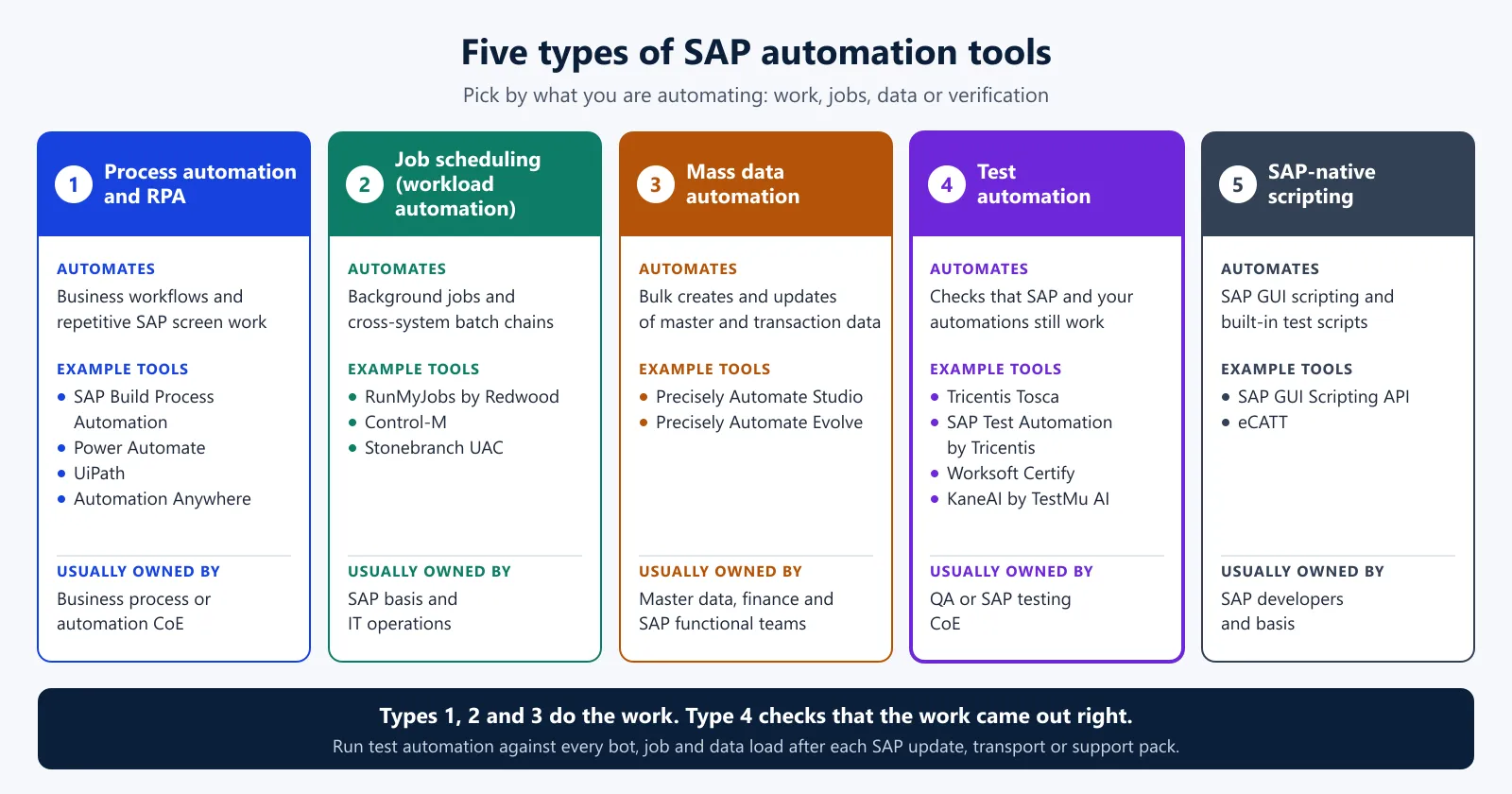
The Five Types at a Glance
- Process automation and RPA: Process automation and RPA tools run business workflows and repetitive SAP screen work such as invoice handling and order entry. SAP Build Process Automation is SAP's own option for workflows and bots. Low-code: yes.
- Job scheduling: Job scheduling tools schedule and monitor SAP background jobs and batch chains across SAP and other systems. RunMyJobs by Redwood is one. SAP Endorsed App: yes. Checks that job output is correct: no.
- Mass data automation: Mass data automation tools create or change large volumes of SAP records from Excel. Precisely Automate Studio works through BAPIs, IDocs and SAP transactions. ABAP required: no.
- Test automation: Test automation tools check that SAP processes, and the bots and jobs running on them, still produce the right result after a transport or upgrade. KaneAI by TestMu AI covers the SAP Fiori and S/4HANA web layer. Drives the SAP GUI desktop client: no.
- SAP-native scripting: SAP-native scripting uses the SAP GUI Scripting API and eCATT to drive SAP GUI directly. Server-side enablement required: yes, through the sapgui/user_scripting profile parameter in RZ11.
Keeping SAP Automations Working
After every SAP update, test the business outcome of each automation, not its run status. A finished bot run proves the bot ran; only a check of the posted SAP document proves it posted the right values.
What Are SAP Automation Tools?
SAP automation tools are software that performs SAP work without a person clicking through SAP screens. That work can be a business task (posting an invoice), a background job (a nightly MRP run), a data load (10,000 material master changes), or a check that SAP still behaves correctly (a regression test). Each of those needs a different kind of tool.
| Type | What it automates | Example tools | Usually owned by |
|---|---|---|---|
| 1. Process automation and RPA | Business workflows and repetitive screen work | SAP Build Process Automation, UiPath, Power Automate, Automation Anywhere | Business process or automation CoE |
| 2. Workload automation (job scheduling) | Background jobs, batch chains, cross-system schedules | RunMyJobs by Redwood, Control-M, ActiveBatch, Stonebranch | SAP basis / IT operations |
| 3. Mass data automation | Bulk creates and updates of master and transactional data | Precisely Automate, SAP's own migration tools | SAP functional teams, finance, master data |
| 4. Test automation | Verifying SAP processes still work after changes | Tricentis Tosca, SAP Test Automation by Tricentis, Worksoft Certify, KaneAI | QA / SAP testing CoE |
| 5. SAP-native scripting | Low-level automation of SAP GUI or test scripts | SAP GUI Scripting API, eCATT | SAP developers and basis |
What Are SAP Process Automation and RPA Tools?
SAP process automation tools run business workflows and repetitive screen tasks: approvals, invoice handling, order entry, data copying between SAP and other systems.
- SAP Build Process Automation is SAP's own tool. SAP describes it as combining AI-driven and rule-based workflows with low-code editors, RPA bots, document processing, and Joule-assisted authoring of processes, decisions and forms (SAP). SAP also sells an add-on with UiPath for enterprise RPA.
- Microsoft Power Automate provides SAP GUI actions for desktop flows, such as Launch SAP, Start SAP transaction, Click SAP UI element and Populate SAP text field in element. It needs SAP GUI 750 or later, and the actions do not work on screens that open in SAP's embedded Web Dynpro browser (Microsoft Learn).
- UiPath and Automation Anywhere are general RPA platforms with SAP integrations, used when the same bots also work in non-SAP systems.
Pick process automation when the task follows rules, involves a person today, and spans screens or systems. Watch out for: bots that drive SAP GUI screens depend on screen layouts and field IDs, so SAP updates and custom screen changes can break them.
What Are SAP Job Scheduling (Workload Automation) Tools?
Workload automation tools schedule and monitor background jobs and job chains, inside SAP and across SAP and other systems. They replace or extend scheduling done inside SAP with cross-system dependencies, event triggers, SLAs and alerting.
- RunMyJobs by Redwood became an SAP Endorsed App on SAP Store in May 2025 and has achieved SAP's Premium level certification, per Redwood. Its S/4HANA connector runs, intercepts and monitors background programs and applies variants, with out-of-the-box connectors for S/4HANA, RISE, BTP and Business Data Cloud (Redwood).
- Control-M (BMC), ActiveBatch, Stonebranch, AutoSys and Automic are cross-platform schedulers with SAP job support, common where SAP is one of many systems in a batch chain.
Pick job scheduling when the work is unattended and time- or event-driven: period-end closes, MRP runs, data extracts, interface batches. Watch out for: a job that "completed successfully" can still produce wrong data. Schedulers check that a job ran, not that its output is correct.
What Are SAP Mass Data Automation Tools?
Mass data tools let business users create or change large volumes of SAP data, often from Excel, without writing ABAP or loading data by hand.
- Precisely Automate includes Automate Studio for Excel-based mass updates through BAPIs, IDocs, transactions and custom T-codes, with "zero scripting or ABAP required"; Automate Evolve for master data processes with role-based forms, a graphical workflow builder, approvals and audit trails; and Automate Studio Manager for governance of scripts, permissions and licences (Precisely).
Pick mass data automation when the bottleneck is volume: material master updates, price changes, journal entry uploads, vendor onboarding. Watch out for: a single wrong column mapping replicates an error across thousands of records. In fintech and insurance, a bad journal upload is an audit finding, so keep approval steps and logs switched on.
What Are SAP Test Automation Tools?
SAP test automation tools check that SAP business processes still work after a change: a transport, a support pack, an S/4HANA upgrade, a new Fiori app or a new automation. They run end-to-end tests across SAP GUI, Fiori and connected systems and report pass or fail with evidence.
Short summary of the main options (the full 14-tool comparison is in our guide to SAP testing tools):
| Tool | Good fit | Note (as of Nov 2026) |
|---|---|---|
| Tricentis Tosca | SAP GUI plus Fiori plus non-SAP, codeless, model-based | Windows authoring and agents; quote-based pricing. See what Tosca is and how it works |
| SAP Test Automation by Tricentis | SAP-centric teams on SAP Cloud ALM | SAP describes it as integrated continuous testing for SAP and third-party systems (SAP) |
| Test Automation Tool for SAP S/4HANA Cloud Public Edition | Public-cloud customers testing standard processes | Embedded in the product, with preconfigured automates and SAP-run post-upgrade tests (SAP Learning) |
| Worksoft Certify | Large SAP estates with process-capture testing | Codeless, SAP-focused |
| KaneAI by TestMu AI | Fiori, S/4HANA web, BTP, SuccessFactors and Ariba flows in natural language, plus web and mobile around SAP | Does not drive the SAP GUI desktop client |
Pick test automation when SAP changes faster than people can manually re-check it. That includes changes made by your other automation tools.
What Are SAP-Native Automation Options?
SAP ships low-level automation interfaces that many of the tools above build on:
- SAP GUI Scripting API lets external programs drive SAP GUI for Windows. A basis admin must enable it on the server with the profile parameter
sapgui/user_scriptingin transaction RZ11, and on each client in SAP GUI options (UiPath docs on enabling SAP GUI scripting). Security teams often restrict it, so ask early. - eCATT (extended Computer Aided Test Tool) is SAP's built-in test scripting tool for ABAP-based systems. It is still used for data setup and legacy regression scripts, but most teams now pair or replace it with the tools above.
Which SAP Automation Tool Do You Need?
Answer three questions in order:
- Is a person doing this today, step by step on screens or across systems? Use process automation or RPA.
- Is it a background job or batch chain that runs on a schedule or event? Use workload automation.
- Is it the same change applied to thousands of records? Use mass data automation.
Then ask a fourth question for every automation you add: how will you know it still works after the next SAP update? That is the job of test automation, and it is the question most SAP automation programs skip until a bot or job fails in production.
Why Do SAP Automations Break After Updates, and What Should You Test?
Every automation encodes assumptions about SAP: screen layouts, field IDs, BAPI signatures, job variants, authorisations. SAP updates, transports and custom changes break those assumptions quietly. This matrix lists the typical failure for each type and the test that catches it before production:
| Automation type | What typically breaks after an SAP change | Test that catches it |
|---|---|---|
| RPA bot on SAP GUI | Field ID or screen sequence changes; a new popup appears | End-to-end test of the bot's business outcome (document posted, values correct), not just "bot finished" |
| RPA or workflow on Fiori | Fiori app version changes element structure; new mandatory field | UI test of the same Fiori flow, plus a check of the resulting document |
| Scheduled job chain | Variant fields change; a predecessor job's output format changes | Data checks on the job's output (counts, totals, key fields) after a test run in QA |
| Mass data upload | BAPI or field mapping changes; validation rules tightened | Upload a small known dataset in QA and verify records field by field |
| Integration (IDoc/OData) | Payload fields added or renamed | API-level contract tests against the OData or IDoc interface |
| Authorisation-dependent automation | Role changes remove access for the bot or job user | Run each automation's smoke path with its real technical user |
The pattern: test the business outcome, not the automation's own status. A green bot run or a "finished" job log tells you the automation ran. Only a check of the resulting SAP document or data tells you it did the right thing.
How Do You Test SAP Automations With KaneAI?
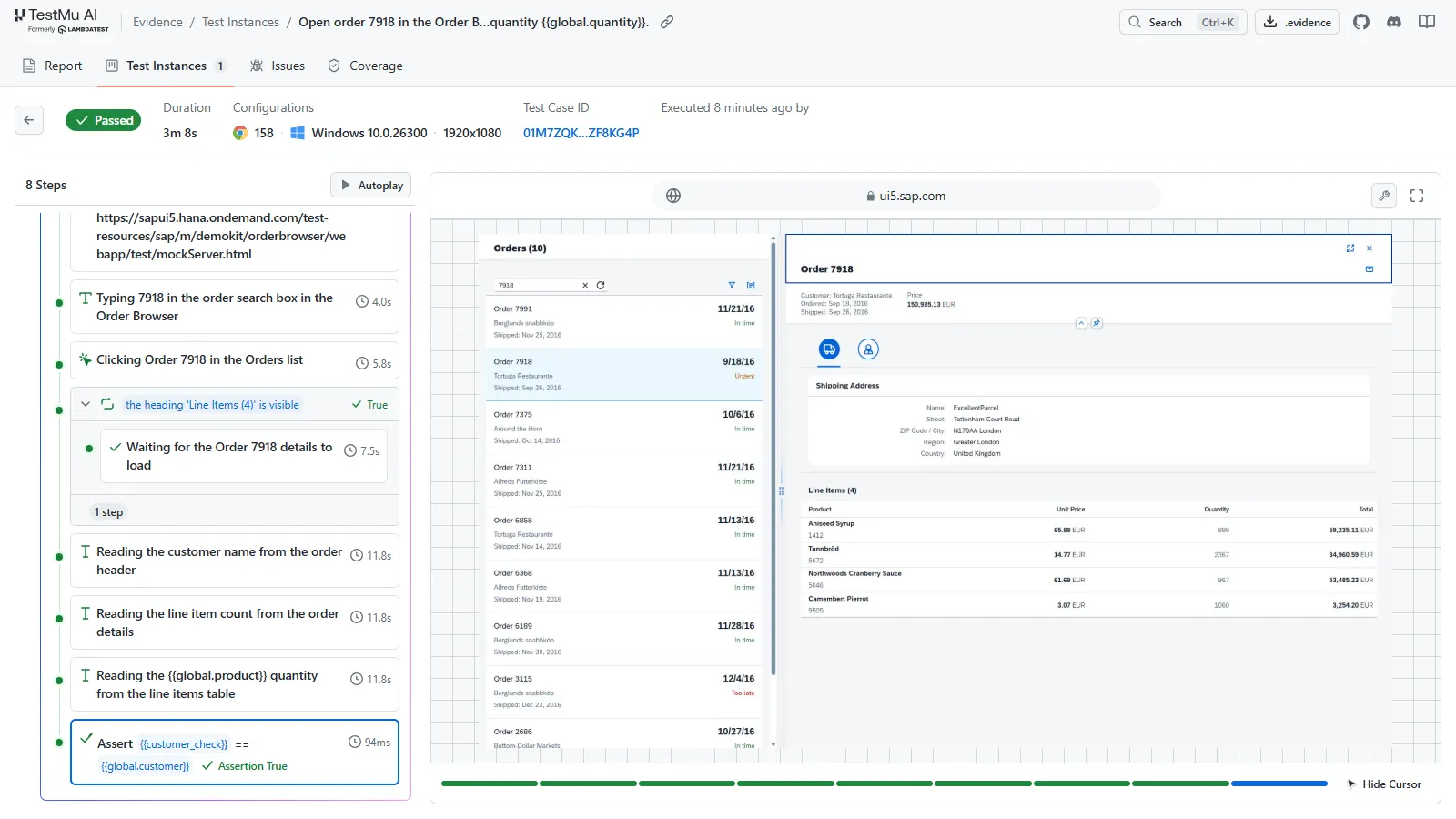
TestMu AI covers the Fiori, S/4HANA web, BTP and API side of that matrix. KaneAI lets you describe an SAP check in plain English; KaneAI authors and runs it, resolves Fiori elements from SAP metadata at runtime, and returns logs, screenshots and video. Kane CLI runs the same checks from a terminal or CI pipeline and exits with typed codes your pipeline can gate on.
An illustrative check after an RPA bot creates purchase orders overnight:
npm install -g @testmuai/kane-cli

kane-cli run "Log in to SAP Fiori staging as qa_buyer. Open Manage Purchase Orders. \
Filter by Created By = RPA_BOT and Created On = today. \
Verify there are 25 purchase orders, every one has status Sent, \
and PO 4500012345 has net value 1,250.00 EUR." --headless
Kane CLI exits with 0 on pass, 1 on fail, 2 on setup or auth errors and 3 on timeout, so a nightly pipeline can stop downstream steps when the bot's output is wrong. Each run produces a .evidence file with steps, screenshots, console and network logs and the verdict, which is the record auditors in regulated industries ask for.
Be clear about the boundary: KaneAI does not drive the SAP GUI desktop client. If your bots and jobs live in SAP GUI, verify their outcomes in Fiori or through OData where possible, and use Tosca, SAP-native tools or another SAP GUI-capable tool for GUI-only steps.

Note: Check what your SAP automations actually did. Book a demo of SAP testing with KaneAI and see a Fiori check written in plain English run against your landscape, cloud, on-premise or hybrid.
How Do Industries Use SAP Automation?
- Fintech and insurance: journal entry uploads and period-end job chains, with approval steps and audit logs. Pair every mass upload with a post-load reconciliation test.
- E-commerce and retail: order-to-cash bots and pricing updates. Test that orders created by bots flow through delivery and billing with the right prices.
- Healthcare and life sciences: validated SAP processes need documented evidence for each change. Keep test evidence attached to the change record.
- B2B SaaS companies on S/4HANA Cloud: rely on SAP's embedded Test Automation Tool for standard processes, and add your own tests for custom fields and extensions, which SAP's preconfigured tests do not cover.
Conclusion
Start by mapping every bot, job and data load that touches SAP to the SAP document or record that proves it worked, then add an outcome check for each one to your regression suite. The Kane CLI introduction covers installation, and the SAP testing tutorial covers SAP test types and release cycles.
Testing web or mobile apps without writing code? KaneAI by TestMu AI turns plain-English instructions into tests.
Author

Saurabh Prakash
Blogs: 30

Saurabh Prakash is an Engineering Manager at TestMu AI, where he leads engineering on agentic AI development and scalable system architecture for the quality engineering platform. He has also contributed to Test at Scale, the company's open-source test intelligence platform. He brings over 9 years of experience across Node.js, Java, Spring, MVC, data structures, algorithms, and scalable system design, with earlier roles as SDE 2 at Zomato, Senior Software Engineer at LogicHub, and Software Development Engineer at Directi. Saurabh holds a B.Tech in Computer Science and Engineering from Delhi Technological University.
Reviewer

Himanshu Sheth
Reviewer
Himanshu Sheth is the Director of Marketing (Technical Content) at TestMu AI, with over 8 years of hands-on experience in Selenium, Cypress, and other test automation frameworks. He has authored more than 130 technical blogs for TestMu AI, covering software testing, automation strategy, and CI/CD. At TestMu AI, he leads the technical content efforts across blogs, YouTube, and social media, while closely collaborating with contributors to enhance content quality and product feedback loops. He has done his graduation with a B.E. in Computer Engineering from Mumbai University. Before TestMu AI, Himanshu led engineering teams in embedded software domains at companies like Samsung Research, Motorola, and NXP Semiconductors. He is a core member of DZone and has been a speaker at several unconferences focused on technical writing and software quality.


SAP Automation Tools FAQs
Did you find this page helpful?
More Related Blogs




TestMu AI forEnterprise
Get access to solutions built on Enterprise
grade security, privacy, & compliance
- Advanced access controls
- Advanced data retention rules
- Advanced Local Testing
- Premium Support options
- Early access to beta features
- Private Slack Channel
- Unlimited Manual Accessibility DevTools Tests