

Next-Gen App & Browser Testing Cloud
Trusted by 2 Mn+ QAs & Devs to accelerate their release cycles


On This Page
- What are physical devices?
- What is physical device testing?
- Why should you test on physical devices?
- What are the limitations of physical devices?
- What are real devices on cloud?
- Why should you perform real device cloud testing?
- What are the limitations of real device cloud testing?
- Physical device testing vs Real device cloud testing
- Real Device Cloud Testing on TestMu AI

Physical Device vs Real Device Cloud Testing: A Detailed Guide
Physical device vs Real device cloud testing- Here is a detailed look at both of them.

Amrita Angappa
January 21, 2026
Physical device testing has been in the market for a long time. Even today, you can’t deny the importance it holds in the world of testers. In this age of automation testing and real device cloud testing, physical device testing still has the same reverence owing to its unwavering vitality in usability testing and hardware functionality testing, such as camera and GPS. Yet, if you want to reduce your overall project cost, you need to opt for a smarter solution that would enable features such as performing cross-browser testing at scale.
That’s when real device cloud testing comes to your aid. It comes with its own sets of advantages, such as cloud storage, access to communication tool integration, testing with the latest virtual browsers and OS versions, and much more.
In this article, we will look at both physical device testing and real device cloud testing, compare and contrast while analyzing which would fit your business model.
What are physical devices?
A physical device is a combination of software and hardware through which you can perform certain operations. It can range anywhere between a Smartphone or a PC. The best example would be the device you are currently using to read this blog (And we are glad about that!). It could be an iPhone or a Windows PC, but hasn’t it helped you reach the doorsteps of our website and catch up on our content?
Physical devices combined with Internet connectivity have made people’s lives easier than ever. You can use a physical device to play games, watch movies, text your friends, mail your colleagues, buy groceries, and what not? Similarly, you can use physical devices for mobile app testing or testing web applications. It’s no magic! You are testing the app you have built directly on your device to check how it performs under different conditions based on battery, GPS, memory storage, and so on.
Even though 44% of IT companies have gone on to automate half of their testing processes in 2020, Physical device testing still matters a lot.

What is physical device testing?
Physical device testing refers to testing your mobile or web app and website through manual and automation testing strategies using a hardware device. It can range anywhere from checking if a button is properly functioning to understanding if the app freezes on certain devices when a memory storage issue occurs.
This term is most commonly used as a method of testing mobile apps, but it can also be used for websites and desktop applications. Using physical devices for testing allows you to get an accurate picture of how your app or site will look and function on actual devices. The tests can be performed in a lab environment on physical devices that are representative of the targeted mobile platform. Depending on the type of test you are conducting and the environment in which you are testing, using physical devices may be more suitable in some situations than others.

Why should you test on physical devices?
When you run your test suite on physical devices, it comes loaded with a lot of goodness. Here are a few points:
- More hardware support: Physical devices support cameras, sensors, GPS, facial recognition, accelerometer, pyrometer, and several other features not yet supported by virtual devices.
- Experience real environment testing: Physical device testing makes sure that your tests are adaptable to real-world conditions. Get rid of flaky tests through automatable test scenarios where you receive those annoying false positives. You can easily replicate any bugs found on the device.
- Enhanced performance: Testing on physical devices are comparatively faster and more accurate than on virtual devices such as emulators and simulators. This would obviously result in faster build times.
- Sort out usability issues: Finding usability issues are quite easier on physical devices. Be it an unresponsive button or a poor system configuration, you can fix these usability issues easily with a physical device. You can easily perform usability testing with physical devices.
- Identify bugs faster than Thor: Prevention is better than cure. Get rid of complexities and incompatibilities by testing on physical devices before it’s out in the world for your customer’s judgments. This will help you write better test cases.
- Get an idea of configuration settings: Get a clear idea of the configuration settings in real-time on different devices. This can help you out when you work on different projects in the near future.
- Provide reports confidently: There is no need to hesitate when you have to report to your client that the app or website has passed the test when you test on actual handsets. This can accelerate the speed at which your product would reach the customer.
- Third-party support: Not every library is supported by virtual devices. But most of them come under the support system of physical devices.

Note: Automate your app testing process. Try TestMu AI Now!

What are the limitations of physical devices?
This is the red pill you need to swallow- Physical devices aren’t the right choice when you are testing minor functionalities. Would you prefer buying an iPhone just to check if your app opens on it without crashing? There are so many things you need to ponder over deeply when you depend upon physical device testing. Some of them are listed below:
- It costs a lot: Physical devices aren’t always the cup of tea for businesses with limited time and budget. It might be taxing when you want to buy everything on your own and test within a limited time frame. The maintenance and repair costs involved in the procurement of mobile app testing tools can also take a toll on your team.
- Location-based barriers: Not every physical device will be available across every geographical location. Depending on the rules and regulations of a certain country, a need might arise to compromise on a few factors. Geo-location testing is hard when you perform physical device testing.
- Shop-to-table time matters: Getting complete awareness of where a particular device is available might be arduous even during this internet age. Your team would have to travel to and fro to buy those items needed to test. Even if you are ordering online, it’s liable to defects and late arrival.
- Being choosy is a must: Even experts can feel the heat when they have to determine how many handset types they need and which would suit them the best. There are umpteen handsets and tablets available in the market currently. Picking the best one is a skill at which not everyone might excel.
- On-premise challenges: When you use physical devices, your team is bound to be at your workstation. It becomes an ordeal when you are supposed to let them work from home due to unavoidable circumstances.
- Lacking IDE support: It’s hard to connect real handsets to IDE compared to emulators. This could bring down the speed of the debugging process.
To get over these limitations, you can choose real device cloud testing.
Note: Want to make your life of testing easy and fuss-free while debugging? Try LT Debug Chrome extension!
What are real devices on cloud?
To put it in layman’s terms, the Real device cloud is a mobile testing-based environment that we host on the cloud. It consists of real Android and iOS devices accessible from the desktop browser. You can use it to test your apps and websites. All you need to do is sign up and log in to your account. Combined with the power of fuss-free UI and highly capable IDE, TestMu AI Android Cloud ensures higher accuracy, reliability, and flexibility compared to mobile app emulators and simulators.
Go through our Mobile app testing tutorial to learn more about it.
Why should you perform real device cloud testing?
Real device cloud testing is winning laurels, thanks to its features such as “access your data anytime, anywhere” and “subscribe once, test for a lifetime.”
- Stay updated: It’s vital that you set up a cloud mobile testing environment that is up-to-date with the latest arrivals in the market, be it devices, operating systems, or brands. Real device testing is the best option to make this happen since it’s loaded with the latest browsers, OS, and brands. Pick from endless options within seconds!
- Work from anywhere: Things get messy when you can’t expect your team members to be available onsite to test the physical devices. That’s when real devices on the cloud come into the picture. You can connect with your teammates and test at the comfort of your workcation spot or home sweet home, even if you are into the busiest project involving mobile app testing on cloud.
- Get the latest updates: When you miss a certain feature or tool in your physical device, you need to wait until you get hold of it. It’s not the case in Real device cloud testing, where you can access every feature you need then and there through plugins and extensions.
- Flawless communication: There is no need to send endless emails and wait for a timely reply in vain, only to receive customer feedback on the same bug. You can mark a bug without any delay and notify your team through project management tools like JIRA and Slack.
- Parallel testing: Real device on Cloud is suitable for large-scale testing where you can test as many as 100 devices simultaneously through parallel testing. This is one major advantage of real device cloud testing.
What are the limitations of real device cloud testing?
Opting for Real devices on the cloud might lead you to miss out on testing features such as facial recognition, camera, sensors, and bluetooth. However, since its pros dominate its cons, you can substitute those few features which are currently unavailable on Real Devices on Cloud with physical device testing.
Note: Test your websites and app on a real device cloud. Try TestMu AI Now!
Physical device testing vs Real device cloud testing- A detailed comparison
Before we determine the supremacy of physical devices and real device cloud, we need to look at how they vary. Let’s look at the basic facts that set apart physical devices and real device clouds.
| Functionality | Physical Device | Real Device on Cloud |
|---|---|---|
| UI layout testing | Yes | Yes |
| Loading speed | Yes | Yes |
| GPS | Yes | Yes |
| Camera, Sensors and Bluetooth | Yes | No |
| Gesture control | Yes | Yes |
| Different browsers, devices, and OS support | Yes | Yes |
| Memory, size, and CPU testing | Yes | Yes |
| App performance testing | Yes | Yes |
| Network connectivity and latency speed | Yes | Yes |
| Remote working flexibility | No | Yes |
| Cost | High | Low |
| Maintenance | High | Low |
| Testing speed | Low | High |
| Geolocation testing | Difficult to perform | Easy to perform |
| Storage | Low | High |
| Procurement cost | High | Low |
| Parallel Testing | Yes but difficult | Easy to perform |
Which one to choose for your business?- Physical device testing or real device cloud testing?
When you evaluate an app or a website through software testing, there are many factors that you need to consider. There shouldn’t be a thin line between expected results vs actual results. It’s done to ensure that the program works as we need it to work. It should be budget-friendly and time-saving in every way, rather than burning a hole in your pocket. It should also not make meeting deadlines difficult.
Before you choose a specific testing strategy, be it physical device or real device cloud testing, you need to remember these factors:
- Objective of the test: Look into the test objective. Do you want to test an entire app or is it just unit testing for now? Knowing this factor is essential when you want to choose if you want to perform your test on physical device cloud testing or real device cloud testing.
- Rise assessment: Assess the risk posed by the methodology you choose. Compare it with an alternative methodology. It might cost you more when choosing physical device testing, but would it be manageable when you pick up real device cloud testing? You need to brainstorm on it.
- Requirements: Look for your app or website requirements. Decide according to it. Does it require you to test the camera features? Do you need to rely upon GPS support? When do you want to test mobile browsers? Think about these factors before you choose real device cloud testing.
- Project timeline: Understand the bandwidth of the project. Discuss with your team to know whether it’s short-term or long-term. For smaller projects, you can opt for the physical device, but for a long-duration project where you need to keep track of every test log, it’s highly opinionated to choose real device cloud testing.
- App or website type: Determine the type of app or website you would want to test. It could be a VR-based app or an e-commerce website. You must determine the project scale and choose the web or mobile app testing strategy accordingly.
- Time and budget: They play a crucial role in determining the testing strategy you are going to adopt. Usually, our customers rely upon real device cloud testing to complete their testing within a smaller time frame. On the other hand, physical device testing can cost more bucks and clocks.
- Adherence to industry norms: Every industry has a certain set of regulations and guidelines we need to adhere to. Your real device on the cloud should support it.
- Documentation support: What if you get stuck when you are testing a certain feature? Will you be able to go back and look into the technical documentation for better clarity? Ensure that your physical or real device cloud testing provider offers them.
- SDLC and ATLC support: Keep an eye out for the software development lifecycle along with the automation testing lifecycle. Testing is a permanent process. Every app or website would demand testing at different stages and frequencies. Ensure that the methodology you choose suffices.
- Team capability: Hire the best testers out there, but the testing process shouldn’t bring down morale and lead to burnout and demotivation.
- Flexible features: Any app or website would need constant changes. Your testing methodology should support it.
Note: Perform tests on different tools and frameworks. Try TestMu AI Now!
Real Device Cloud Testing on TestMu AI
TestMu AI is the most advanced cross-browser testing platform where you can perform real device cloud testing with our online device farm of over 3000+ browser, OS and device versions.
Subscribe to the TestMu AI YouTube channel for getting the latest updates on the best way to test cross browser compatibility, best practices to test internet explorer compatibility, and responsiveness test.
TestMu AI lets you perform Android automation testing and iOS automation testing on Real Device Cloud, where you can skip the requirement of an internal device library and bring down operational costs. When you perform real device cloud testing, you can make use of network logs, device logs, app logs, videos, and screenshots to debug your app. All you need to do is upload the .abb, .apk or .ipa files to test your apps. You can also install production apps when you download them directly from the Play Store or App Store.
It’s extremely simple to work on! It’s a cloud platform crafted with love by the testers for the testers.
Step 1: Login to your TestMu AI account. If you don’t have a TestMu AI account, sign up for free.
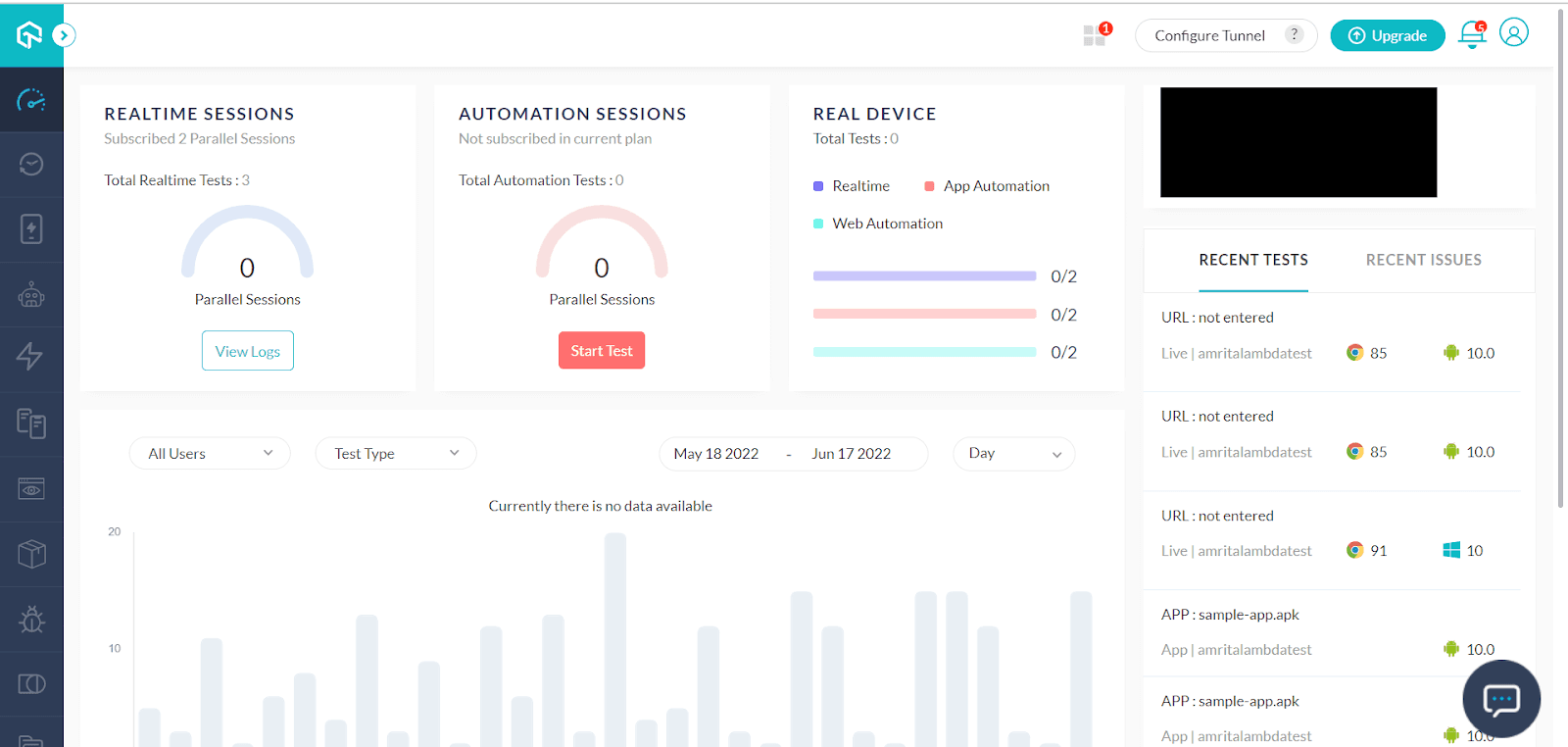
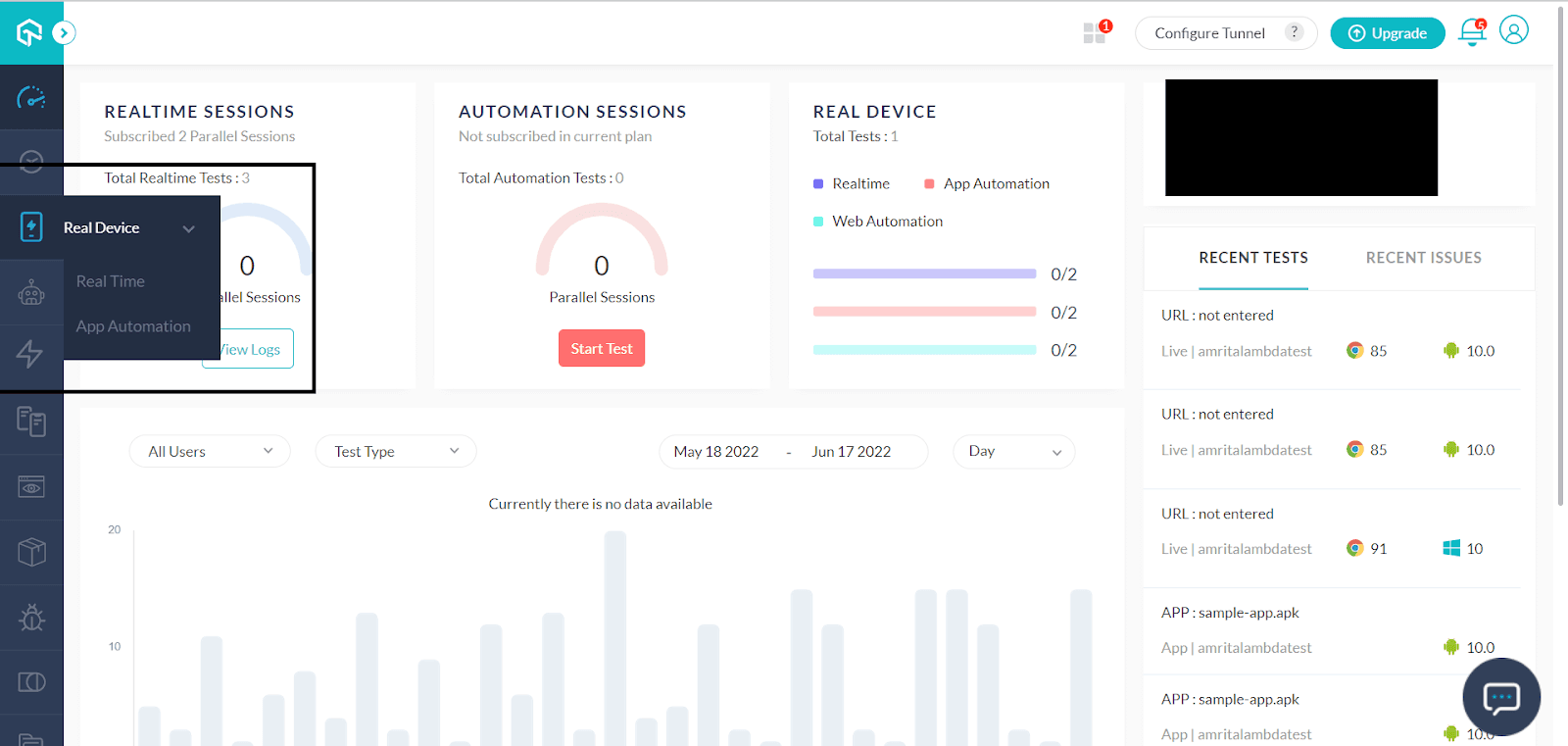
Step 2: Select Real Device from the left panel. You will get two options- Real Time and App Automation. You can conduct real time browser testing and app testing, as well as automated app testing.
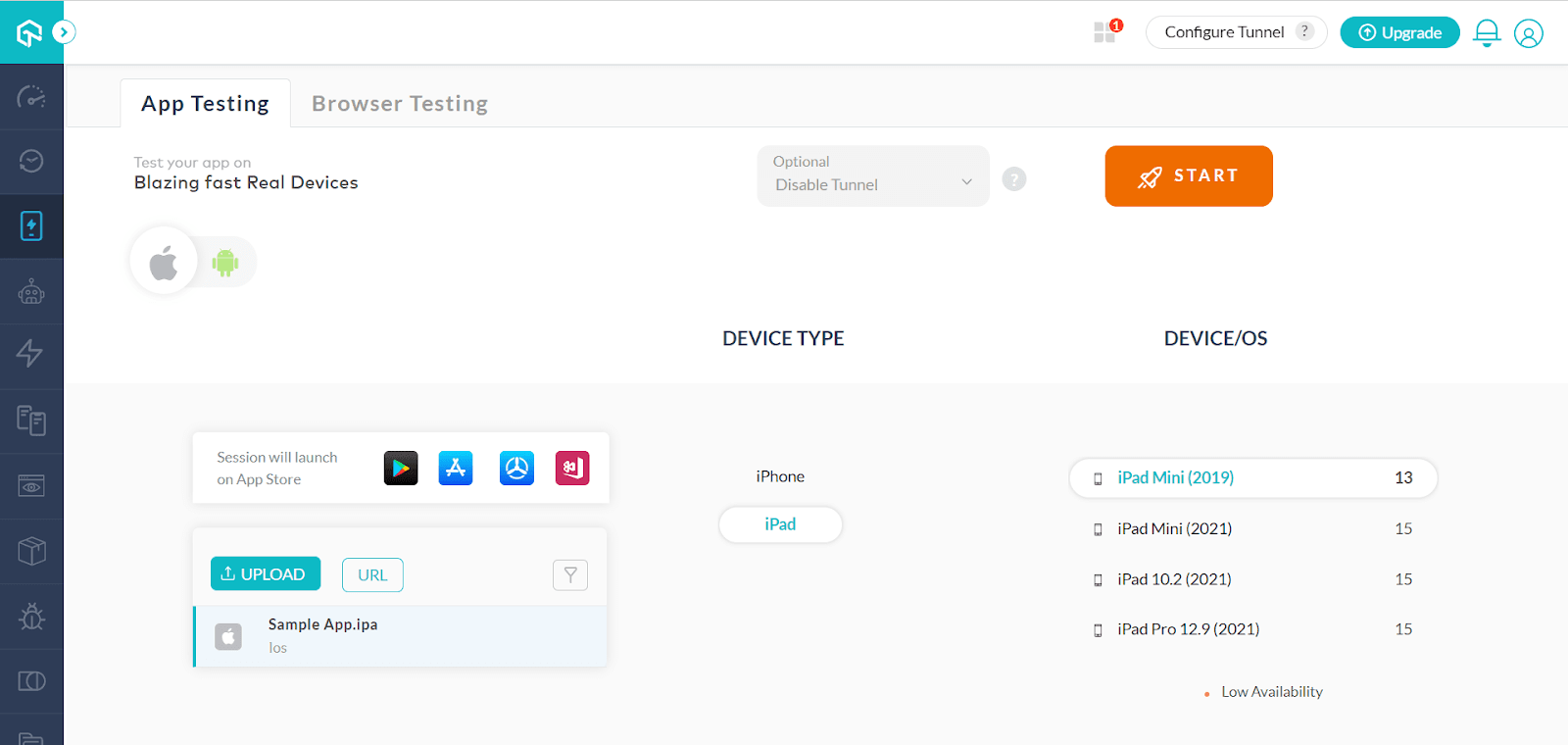
Step 3: You can find two options in Real Time – App Testing and Browser Testing.
Real Device App Testing
For App Testing, all you need to do is upload an app of your choice, configure the Device and OS type and start the test.
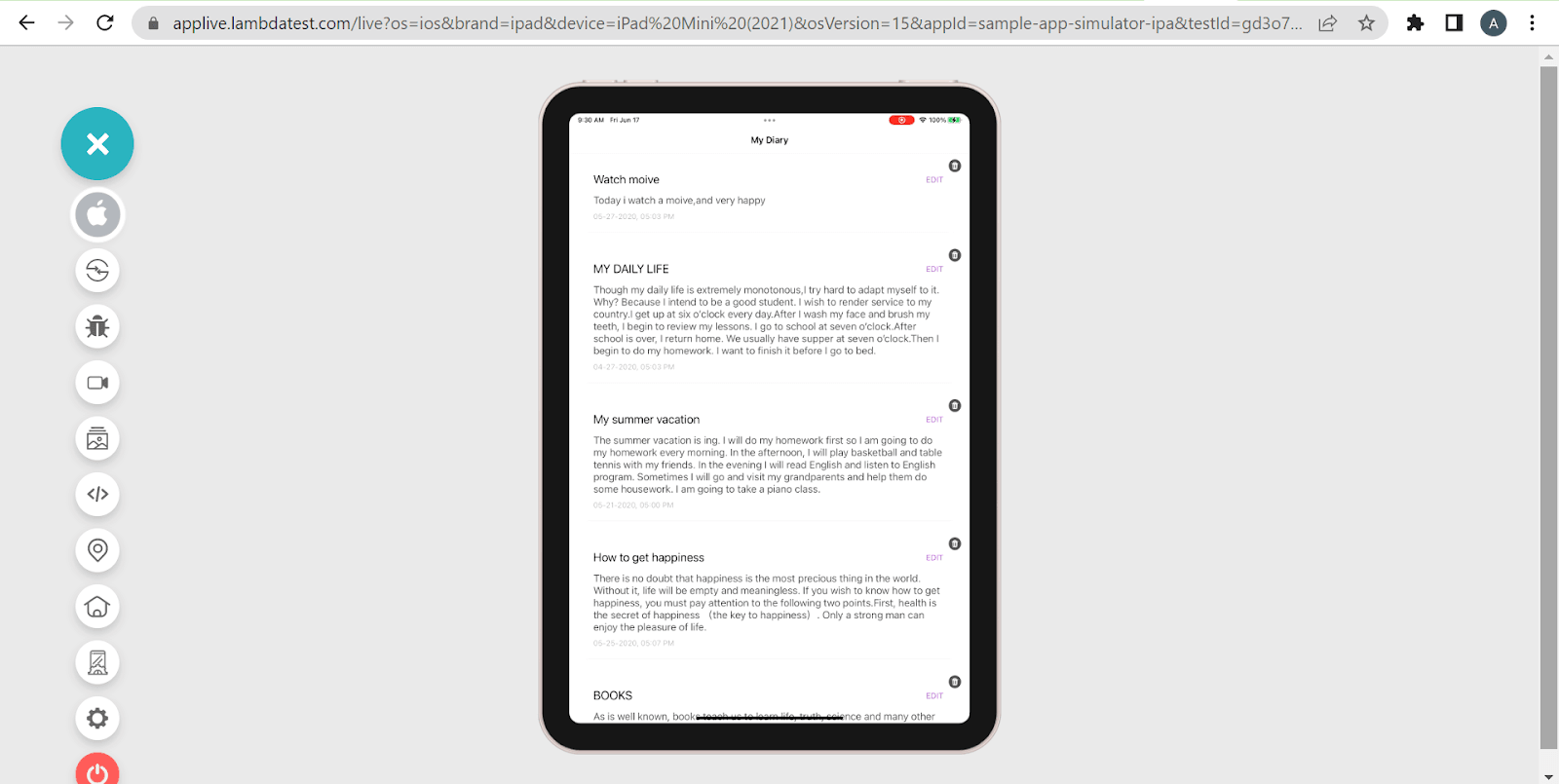
Step 4: Once your app gets installed, you can test it.
Real Device Browser Testing
Please follow Steps 1-4.
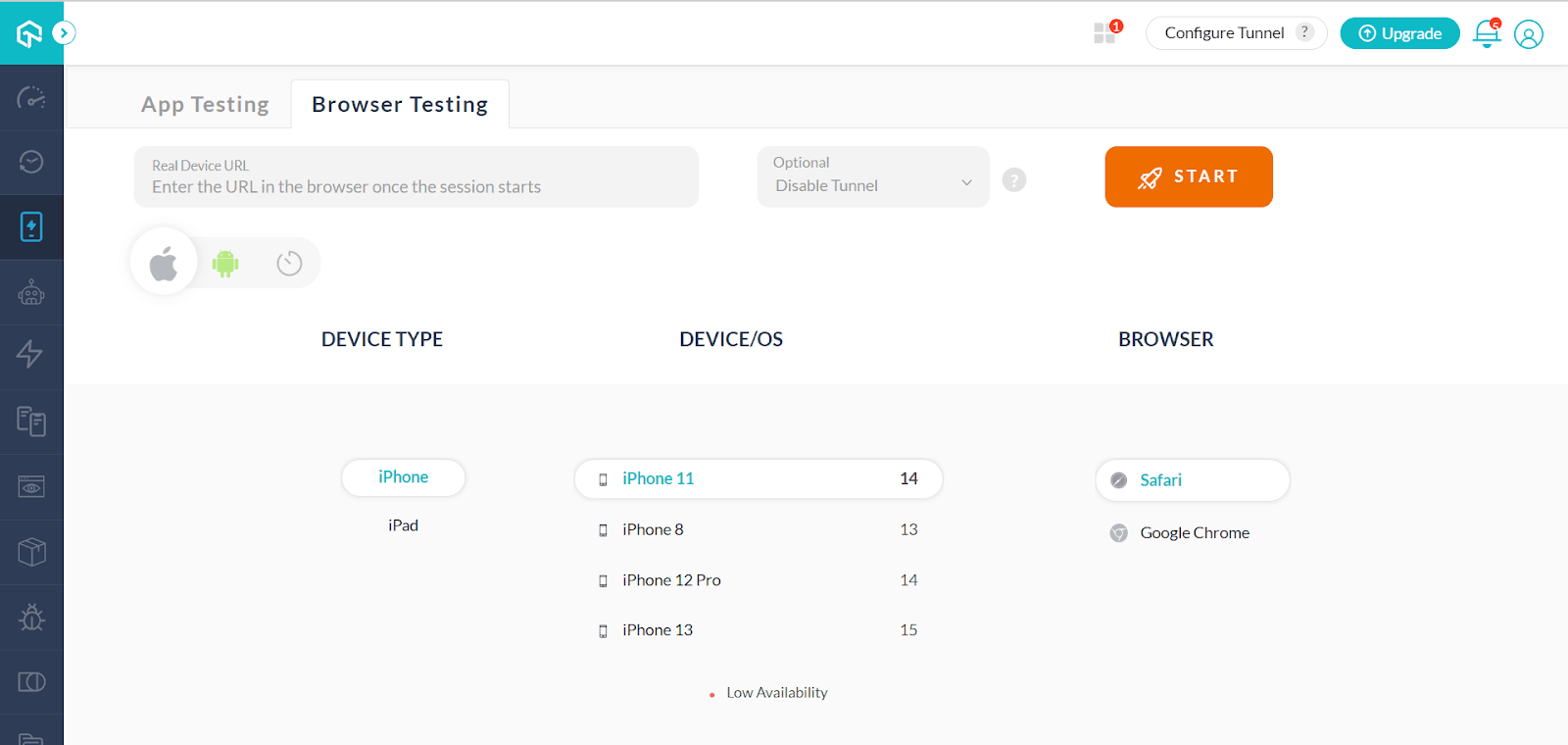
Step 5: Go to Browser Testing. You can provide the URL directly when you start the session. So, click START after providing the DEVICE TYPE, DEVICE/OS, and BROWSER.
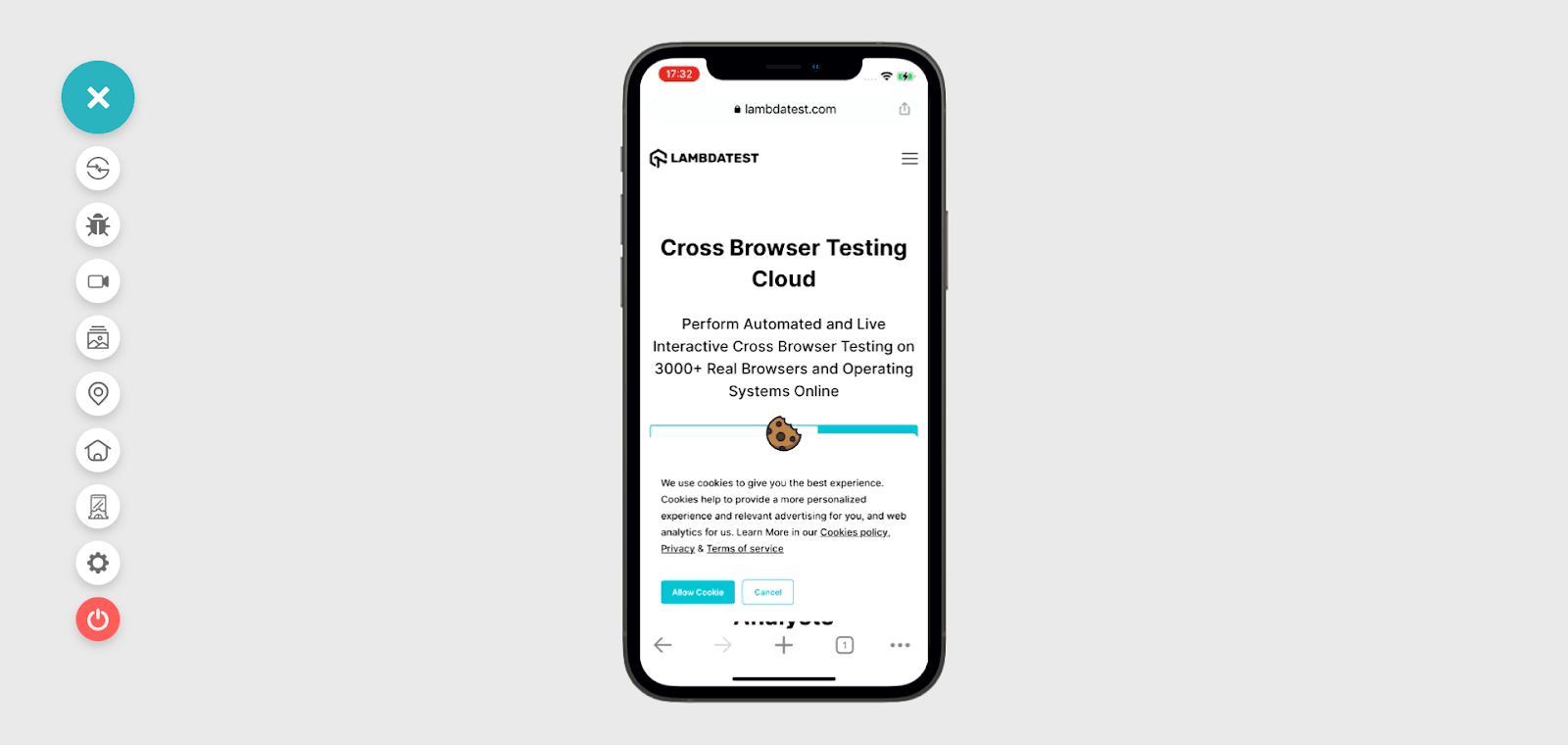
Step 6: Now, the website you want to test opens in the cloud-supported real device on the TestMu AI app. You can test it now.
Conclusion
Choosing a physical device or a real device cloud is an option you need to ponder over before you fix your mobile app testing strategy. You need to look at various factors before you pick the right choice. It’s always recommended to rely upon standard cloud testing service providers such as TestMu AI when you want to test your apps or websites on a large scale using real device cloud testing. This way, you can always stay a step ahead of the testing curve laid out by the market. For your automation tests you can configure your automation frameworks tests through real device capabilities generator.
Real Device Cloud Testing on TestMu AI
Conclusion


Frequently asked questions
Did you find this page helpful?
More Related Hubs
TestMu AI forEnterprise
Get access to solutions built on Enterprise
grade security, privacy, & compliance
- Advanced access controls
- Advanced data retention rules
- Advanced Local Testing
- Premium Support options
- Early access to beta features
- Private Slack Channel
- Unlimited Manual Accessibility DevTools Tests