

Power Your Software Testing with AI Agents and Cloud
The Native AI-Agentic Cloud Platform to Supercharge Quality Engineering. Test Intelligently and Ship Faster.


- TestMu AI (Formerly LambdaTest)
- /
- Blog
- /
- Building an AI Agent That Books, Fills Forms, and Navigates Dynamic Sites in n8n
Building an AI Agent That Books, Fills Forms, and Navigates Dynamic Sites in n8n
Build an n8n AI agent that takes real action on the web: booking, multi-step forms, and dynamic-site navigation, running on real cloud browsers.
Last Updated on:
By 2027, 74% of enterprise leaders expect their companies to be using AI agents at least moderately, with 23% of them expecting extensive use, according to Deloitte's State of AI in the Enterprise. Most of those agents start life in a workflow tool, wired to a chat model and a few API nodes. They summarize, classify, and call endpoints well.
What they usually cannot do is the thing a human assistant does all day: open a website, fill in a form, and click through to a result. The moment a task needs a real browser, to book a slot, complete a checkout, or read a price that only appears after the page renders, a chat-and-API agent stalls.
This guide builds an n8n AI agent that does not stall. It books, fills forms, and navigates dynamic sites on real cloud browsers, and every action you see here was run live on TestMu AI Browser Cloud (build 94996065) so the behavior is observed, not assumed.
Chat Agent vs Acting Agent: What Changes
An n8n AI agent is built around the AI Agent node, which pairs a chat model with memory and a set of tools the model is allowed to call. n8n has become a default home for these agents, with more than 194,000 GitHub stars on its open-source repository. If you are new to the pattern, our primer on what AI agents are and how they work covers the building blocks.
The difference between a demo agent and a useful one is what sits in that tools list:
- A chat agent has tools like a calculator, an HTTP request, a Google Sheet, or a Slack message. It can reason and move data between services, but it never touches a live web page a human would use.
- An acting agent adds a browser tool. Now the model can navigate to a URL, read what actually rendered, type into fields, click buttons, and confirm a result, the same loop a person runs.
That one addition is the gap between an agent that talks about booking a demo and an agent that books it, and it is where much of the 2026 state of AI browser agents is being decided. The rest of this guide is about building the second kind.
Why n8n's HTTP Node Can't Book or Fill Forms
The instinct is to reach for the HTTP Request node. It works for clean JSON APIs and fails for almost everything a human interacts with, for two reasons.
First, the page is not in the HTML. The HTTP node fetches the raw markup a server returns before any JavaScript runs. On modern sites the prices, listings, and form widgets are assembled in the browser after load. Per the HTTP Archive Web Almanac, the median page shipped 558 KB of JavaScript on mobile and 613 KB on desktop in 2024, and roughly 10% of pages run React. A plain fetch never executes any of it, so the agent reads an empty shell. The same wall blocks naive scraping of dynamic, JavaScript-heavy web pages.
Second, booking and forms are stateful. Completing a sign-up, a booking, or a checkout means clicking, waiting for the next step to render, carrying cookies and CSRF tokens between requests, and reacting to validation errors. An HTTP call is a single shot with no DOM, no clicks, and no memory of the step before. To do this work the agent needs to drive a real browser, not request a URL.

Note: Give your n8n agents a browser tool that runs real Chrome in the cloud, no headless servers to babysit. TestMu AI Browser Cloud renders JavaScript-heavy pages, fills forms, and clicks through multi-step flows on demand. Start free with TestMu AI
The Architecture: Agent Plus a Cloud Browser Tool
The fix is to hand the agent a browser as a tool. The TestMu AI verified n8n node for Browser Cloud plugs into the AI Agent node's Tools socket and exposes seven browser operations the model can call: navigate, snapshot, click, type, get_text, screenshot, and release. Each runs on real cloud Chrome over the W3C WebDriver protocol. The sibling guide covers install in detail; this guide is about putting those tools to work.
The agent does not need pre-written selectors. It works a tight loop on whatever page it lands on:
Goal: "Register a test account on the demo store and confirm it worked."

navigate  -> open the register page
snapshot  -> get a numbered list of interactive elements (refs)
type @3   -> first name
type @4   -> last name
type @6   -> email
click @12 -> Continue
snapshot  -> read the new page state
get_text  -> "Your Account Has Been Created!"
release   -> end the cloud session
Because each snapshot returns elements by reference number, the model acts on what it can see instead of guessing CSS selectors that break on the next redesign. That navigate, snapshot, act, re-snapshot loop is what lets a chat model like Gemini 2.5 Flash, GPT-4o, or Claude Sonnet operate a page it has never seen. To set up the underlying sessions, see the Browser Cloud documentation.
Developers who would rather drive the browser in code instead of the node can call the same cloud sessions with the @testmuai/browser-cloud SDK. This is the exact shape we used for the live runs below:
import { Browser } from "@testmuai/browser-cloud";

const client = new Browser();

// 1. Spin up a real cloud Chrome session, no infrastructure to manage
const session = await client.sessions.create({
  adapter: "playwright",
  lambdatestOptions: {
    browserName: "Chrome",
    browserVersion: "latest",
    "LT:Options": {
      platform: "Windows 11",
      username: process.env.LT_USERNAME,
      accessKey: process.env.LT_ACCESS_KEY,
      build: "n8n AI Agent Browser Tasks",
      name: "Fill a multi-step form",
    },
  },
});

const { browser, page } = await client.playwright.connect(session);

// 2. The same actions the agent's tools perform: navigate, type, click
await page.goto("https://ecommerce-playground.lambdatest.io/index.php?route=account/register");
await page.fill("#input-firstname", "Ada");
await page.fill("#input-lastname", "Lovelace");
await page.fill("#input-email", "ada.agent." + Date.now() + "@example.com");
await page.fill("#input-telephone", "4155550100");
await page.fill("#input-password", "CloudAgent123");
await page.fill("#input-confirm", "CloudAgent123");
// the agree checkbox is overlaid by a styled label, so force the toggle
await page.check("input[name='agree']", { force: true });
await page.click("input[value='Continue']");

// 3. Release the session when the task is done
await browser.close();
await client.sessions.release(session.id);
Pattern 1: Navigate a Dynamic Site and Read It
The first thing any acting agent has to do is see the page. We pointed the agent at a JavaScript-rendered storefront, had it type a query into the search box, submit, and read the results that loaded.
On the live run, the agent searched for "iPhone" and the cloud browser returned 8 rendered product results, complete with the price slider, manufacturer facet, and product grid, none of which exist in the raw HTML an HTTP node would have fetched.
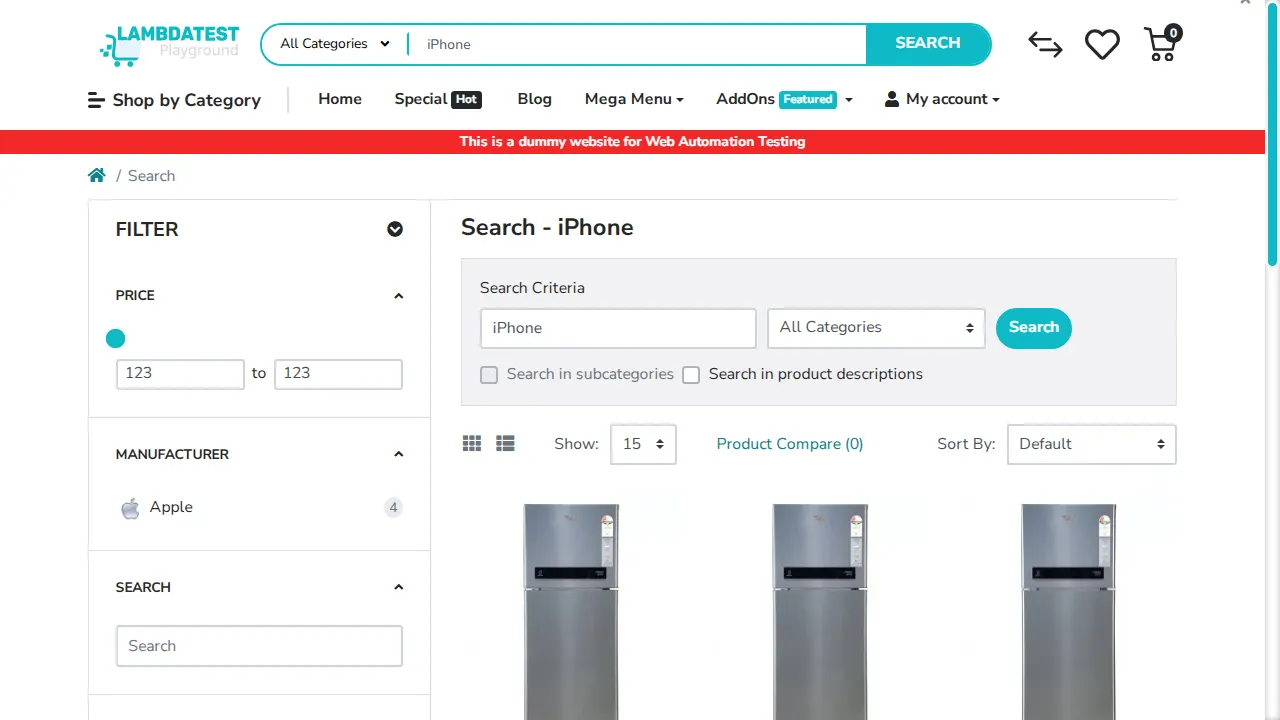
This is the foundation for everything else. Once the agent can render a page and read it back as a snapshot, the rest of the work is choosing which element to act on next.
Pattern 2: Fill and Submit a Multi-Step Form
Forms are where most automation breaks, and where the payoff is highest. The average online shopping cart abandonment rate is 70.22% across 50 studies aggregated by the Baymard Institute, and a long or complicated checkout is one of the most documented reasons people give up. Those long, multi-field flows are exactly what an agent can complete reliably if it can drive a real browser.
In the live run, the agent opened a registration page, filled six fields (first name, last name, email, telephone, password, and confirm password), ticked the privacy agreement, and submitted. The cloud browser landed on the success page reading "Your Account Has Been Created!":
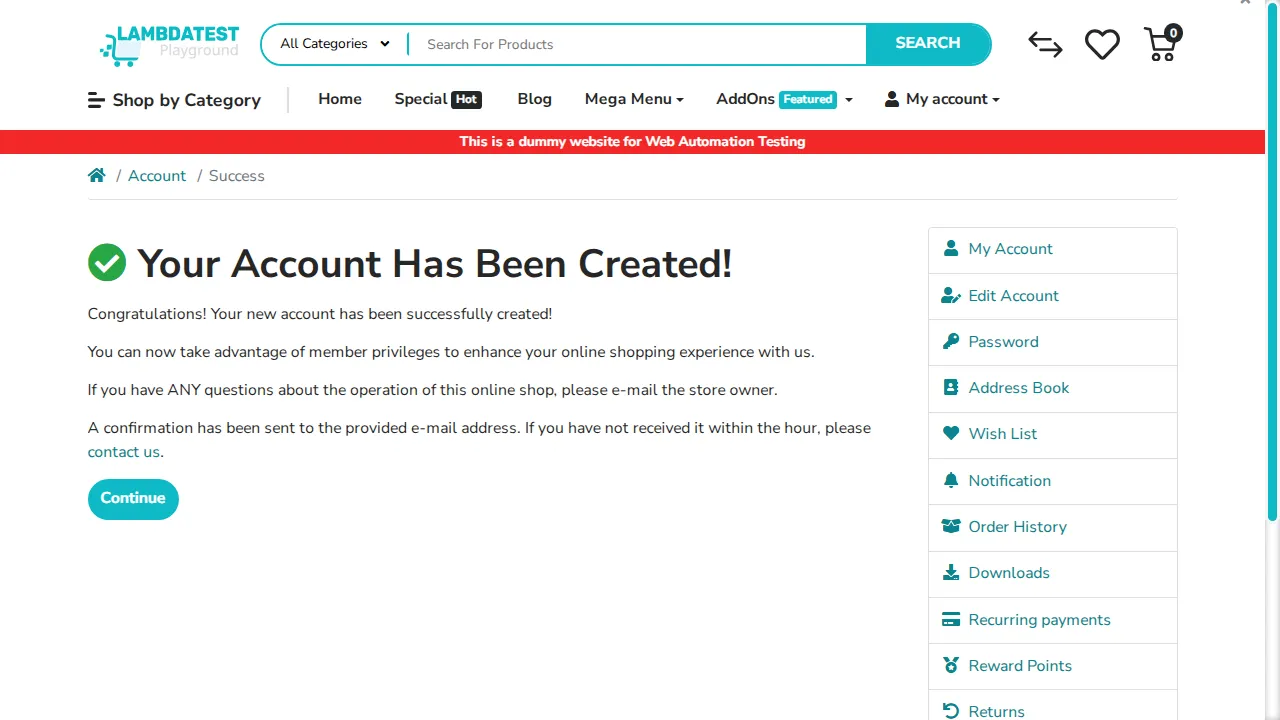
Notice what made it work: the agent read each field from a fresh snapshot, typed by reference, then re-snapshotted to confirm the success state. There were no hardcoded selectors and no assumption about layout, which is why the same agent can fill a job application, a support ticket, or a lead form without new code.
Pattern 3: Complete a Booking-Style Transaction
Booking a slot, reserving a seat, and adding an item to a cart are the same shape: open a detail page, choose options, confirm, and verify the state changed. In the live run the agent opened the HP LP3065 product page, clicked Add to Cart, then loaded the cart, which listed the item at $122.00. Verifying the result on the cart page, rather than trusting the click, is what separates a booking that went through from one that silently failed.
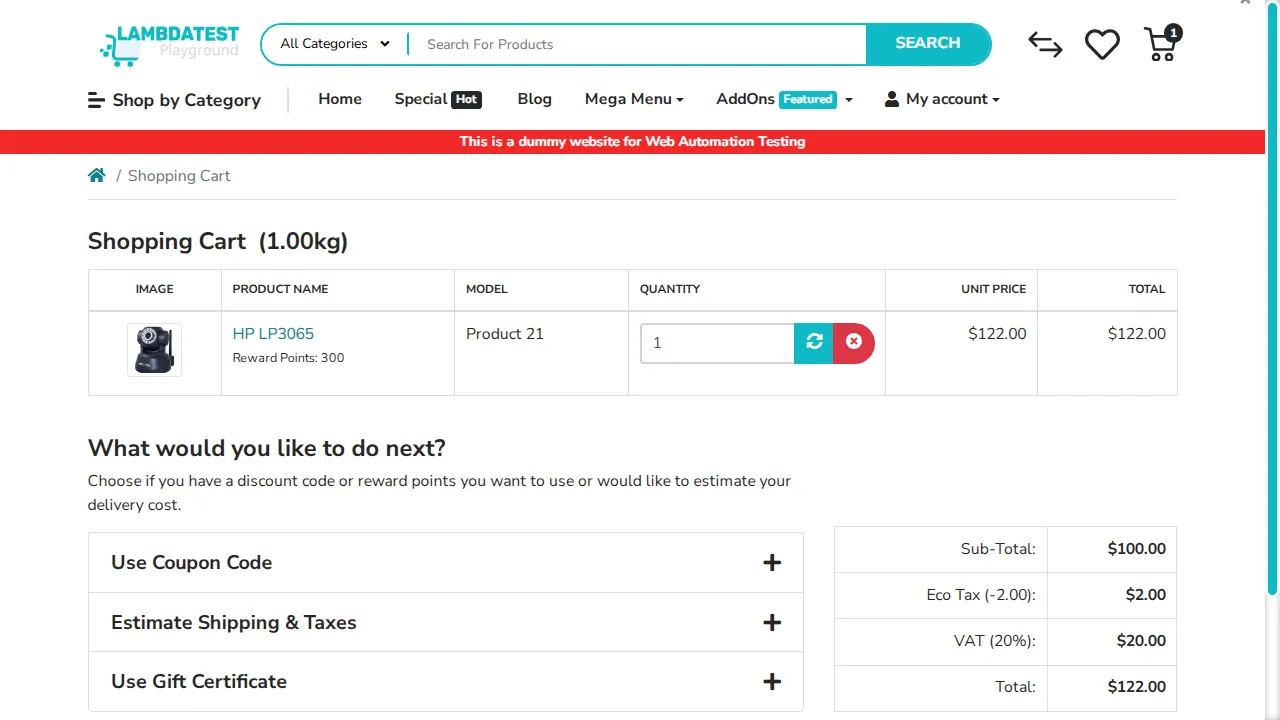
All three patterns ran on the TestMu AI dashboard under build 94996065, with video, console, and network logs for every step. That is the difference between an agent you hope worked and one you can prove worked:
- Select: navigate to the item, date, or slot and snapshot the options.
- Fill: type the booking details (name, quantity, time) by element reference.
- Confirm: click the final action and read back the confirmation text or reference number with get_text.
Running It Reliably at Scale
Driving one browser once is easy. Running an agent that books, fills, and navigates hundreds of times a day, against sites with bot defenses and login walls, is where a single local headless browser falls over. This is the workload TestMu AI Browser Cloud is built for, on the same infrastructure that runs 1.5 billion tests a year for more than 18,000 enterprises.
- Real Chrome on demand: sessions render JavaScript and hydrate fully, so the agent sees what a user sees, with parallel sessions when a workflow fans out.
- Session transparency: every run captures video, console logs, network logs, and step-by-step command replay, so a failed booking is something you watch back, not guess at.
- Persistent state: log in once and reuse that state, so the agent is not re-authenticating on every run of a logged-in flow.
- Built-in tunnel: reach a staging environment or an internal app behind your firewall without exposing it publicly.
- Best-effort stealth: fingerprint masking and CAPTCHA handling reduce blocks on protected sites, though no automation can promise it is undetectable.
For a deeper look at the layer underneath the node, our write-up on browser infrastructure for AI agents covers how the sessions scale, persist, and stay debuggable.
Infrastructure keeps the agent running; reliability engineering keeps it correct. For the failure modes to test for and the guardrails to gate a release on, see our guide to agentic workflows.

Local Headless vs Cloud Browsers: Which to Use
A local headless browser is fine for a quick experiment. Pick based on how the agent will actually run in production, not on the first demo.
| Concern | Local headless browser | Cloud browser (Browser Cloud) |
|---|---|---|
| Concurrency | One browser per machine; queues and crashes when workflows fan out. | Many real Chrome sessions in parallel on demand, no provisioning. |
| Bot defenses | Default fingerprints are easy to flag and block. | Best-effort stealth with fingerprint masking and CAPTCHA handling. |
| Debugging a failed run | A stack trace and a guess about what the agent saw. | Video, console, and network logs plus command replay per session. |
| Private and staging apps | Reachable only if the agent runs inside your network. | Built-in tunnel reaches localhost and internal apps securely. |
| Upkeep | You patch, scale, and clean up the browser servers. | Fully managed; sessions manage their own lifecycle. |
Rule of thumb: a local browser is fine for a one-off script on a public page, but an agent that runs on a schedule, hits protected or logged-in pages, or fans out across sites needs managed cloud browsers. The same shift applies when you use n8n to run automated tests, and the fundamentals are covered in our browser automation hub.
Getting Started
Start with one flow you run by hand today, a booking, a sign-up, or a form submission, and build the agent around it:
- Add the TestMu AI Agent verified node to n8n and connect it to your AI Agent node's Tools socket, or import the @testmuai/browser-cloud SDK if you prefer code.
- Add a TestMu AI credential with your username and access key, then give the agent a goal in plain language.
- Run it, open the session replay to watch what it actually did, and tighten the prompt or waits where it hesitated.
A chat agent tells your users what to do. An agent browser does it for them. Grab your credentials and spin up your first session from the launch your first session guide, wire it into an n8n workflow, and your agent can start booking, filling, and navigating on real cloud browsers today.
Author

Devansh Bhardwaj
Blogs: 80


Devansh Bhardwaj is a Community Evangelist at TestMu AI with 4+ years of experience in the tech industry. He has authored 30+ technical blogs on web development and automation testing and holds certifications in Automation Testing, KaneAI, Selenium, Appium, Playwright, and Cypress. Devansh has contributed to end-to-end testing of a major banking application, spanning UI, API, mobile, visual, and cross-browser testing, demonstrating hands-on expertise across modern testing workflows.


Frequently asked questions
Did you find this page helpful?
More Related Blogs
TestMu AI forEnterprise
Get access to solutions built on Enterprise
grade security, privacy, & compliance
- Advanced access controls
- Advanced data retention rules
- Advanced Local Testing
- Premium Support options
- Early access to beta features
- Private Slack Channel
- Unlimited Manual Accessibility DevTools Tests