

Power Your Software Testing with AI Agents and Cloud
The Native AI-Agentic Cloud Platform to Supercharge Quality Engineering. Test Intelligently and Ship Faster.


- TestMu AI (Formerly LambdaTest)
- /
- Blog
- /
- What Are Agentic Workflows?
What Are Agentic Workflows? Patterns, Examples, and How to Make Them Reliable
Agentic workflows let AI agents plan, call tools, and act across many steps. Learn how they work, their patterns and use cases, and how to make them reliable.
Last Updated on:
A coding agent closes a ticket in four minutes. It read the issue, wrote the fix, ran a check, and reported success, all without a human choosing each step. That is an agentic workflow: a process where an AI agent decides what to do next at runtime instead of following a script a developer wrote in advance.
This guide covers what agentic workflows are, how they work, the patterns and components behind them, where they are used, and their benefits. It then goes where most explainers stop short: the failure modes that break them in production and the testing discipline that makes them reliable enough to ship.
The topic matters now because agents are moving from demos into software that touches money, records, and customers. Gartner projects that 40% of enterprise applications will feature task-specific AI agents by 2026, up from less than 5% in 2025. Understanding how these workflows behave, and how they fail, is quickly becoming table stakes for engineering and QA teams.
Overview
What Is an Agentic Workflow?
An agentic workflow is an AI-driven process where an autonomous agent plans, calls tools, observes results, and adapts across multiple steps to reach a goal, instead of following a fixed script.
What Are the Core Patterns?
- Planning: break a goal into ordered steps.
- Tool use: call APIs, retrieval, or a browser to act.
- Reflection: critique and revise before returning output.
- Multi-agent orchestration: coordinate specialized agents that verify each other.
How Do You Run Them Reliably?
Map each failure mode to a repeatable test, measure consistency across many runs, and gate releases on the result. TestMu AI's AI agent testing platform automates that loop and returns a Green, Yellow, or Red readiness verdict.
What Are Agentic Workflows?
An agentic workflow is an AI-driven process in which one or more autonomous agents decide the next action at runtime, using reasoning, tools, and memory to reach a goal. Instead of following a fixed path, the workflow chooses the path as it runs, adapting to new context and the results of its own earlier steps.
What makes a workflow "agentic" is the shift from execution to decision-making. A rule-based automation runs the same branch every time. An agentic workflow evaluates the situation, picks a step, and can change course if the step does not work, which is why it handles messy, open-ended tasks that a hard-coded flow cannot. For the broader concept behind these systems, see our primer on agentic AI.
That autonomy is also the source of the risk that runs through this guide: a system that decides its own steps is powerful, but it is non-deterministic, so it cannot be trusted on the strength of a single successful run.
Retail is where that risk is easiest to see in concrete terms, since the agent changes a cart or an order rather than only answering. Our guide to AI agents for ecommerce works through a real run where the flow reported success against an empty cart.
How Do Agentic Workflows Work?
An agentic workflow runs a loop rather than a flowchart. The agent plans a step, calls a tool, observes the result, reflects on whether it met the goal, and repeats until the objective is reached or a stop condition fires. A typical cycle looks like this:
- Interpret the goal: parse the request and any triggering event into a concrete objective.
- Plan: decide the next action based on current context and intermediate results.
- Act with tools: call an API, run a query, execute code, or drive a browser.
- Observe and reflect: read the result, check it against the goal, and correct course if needed.
- Remember and iterate: store what happened, then loop back until the task is done or handed off.
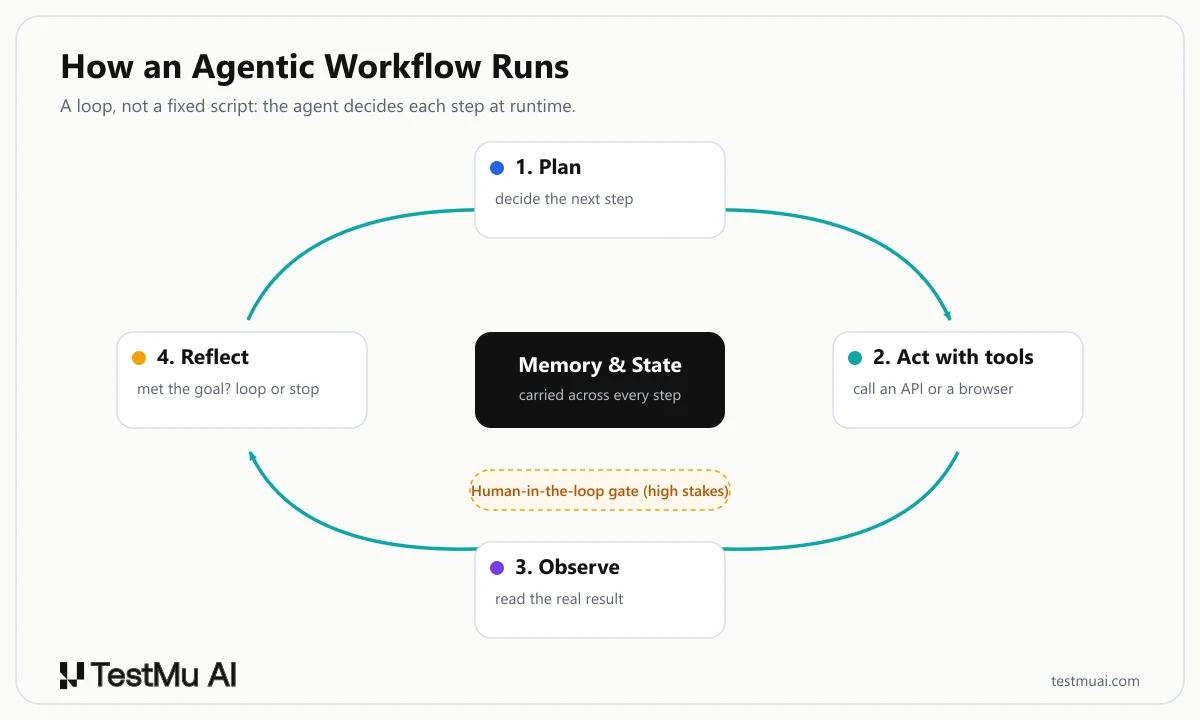
That loop, not a fixed sequence, is what makes the workflow adaptive, and it is also what makes it hard to test: the same input can drive a different sequence of actions every run.
What Are the Core Components of an Agentic Workflow?
Every agentic workflow is assembled from the same building blocks. Understanding them clarifies where things break later.
- The agent and its model: a large language model that reasons about what to do next. Its temperature and prompt directly shape output quality and consistency.
- Tools: APIs, retrieval, code execution, and browsers that let the agent act on the world instead of only describing it.
- Memory: short-term context for the current run and longer-term state the agent recalls across runs. Weak memory is why agents lose the thread, a problem we cover in why AI agents forget.
- Feedback and human-in-the-loop: reflection steps and human approval gates that steer or stop the agent at high-stakes decisions.
- Orchestration: in multi-agent systems, a coordination layer that routes work between specialized agents and manages shared state.
Agentic Workflows vs. Traditional Workflows
The clearest way to understand agentic workflows is to place them next to the two things they are not: a deterministic script and a single AI prediction. The difference in the last row is the one most explainers skip.
Zoom out from the individual workflow and the same shift has a name at the operating-model level: agentic automation, where agents that plan and adapt take over business processes that scripted bots used to run end to end.
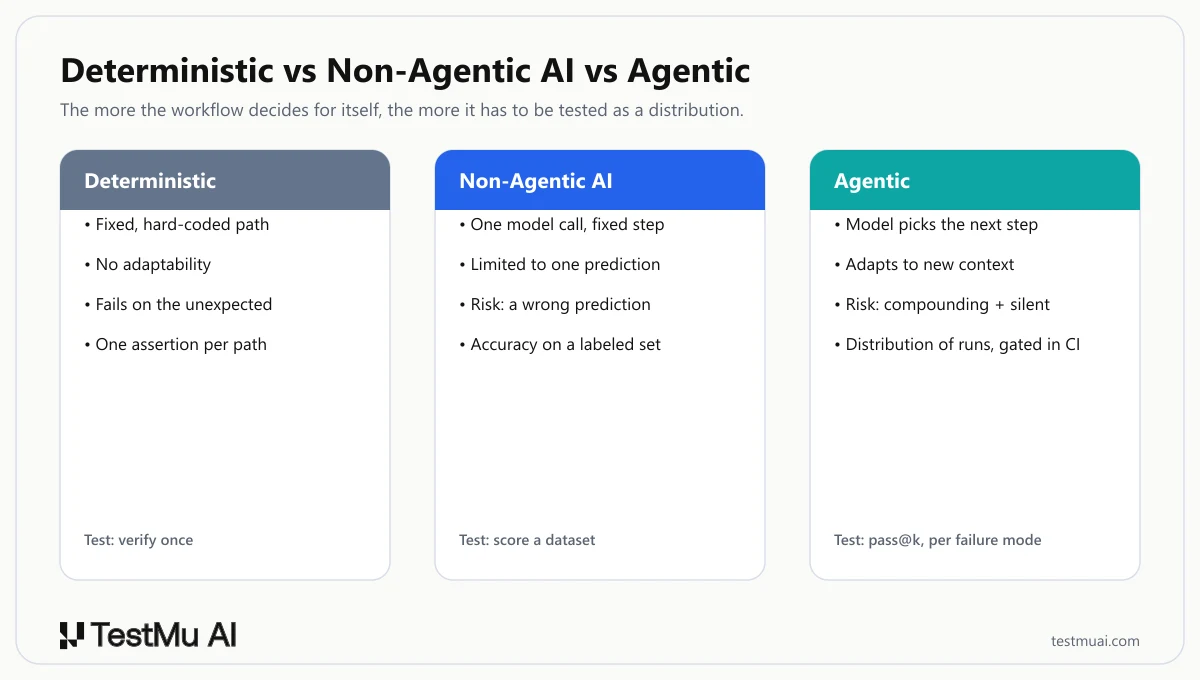
| Dimension | Deterministic workflow | Non-agentic AI | Agentic workflow |
|---|---|---|---|
| Control flow | Fixed, hard-coded path. | One model call inside a fixed step. | The model decides the next step at runtime. |
| Adaptability | None; it breaks on the unexpected. | Limited to a single prediction. | Adapts to new context and intermediate results. |
| Main failure risk | A wrong rule. | A wrong prediction. | Compounding, silent, and drift failures across steps. |
| How you test it | One assertion per path. | Accuracy on a labeled set. | A distribution of runs, per failure mode, gated in CI. |
What Are the Main Agentic Workflow Patterns?
Agentic workflows are built from a handful of reusable patterns. Most production systems combine several rather than using one alone.
- Planning: the agent decomposes a goal into ordered steps before acting, which prevents it from charging at a complex task with no strategy.
- Tool use: the agent grounds its decisions in real systems by calling APIs, retrieval, or a browser, so it acts on live data instead of guessing.
- Reflection: the agent critiques its own output and revises it, catching errors before they reach the user.
- Multi-agent orchestration: specialized agents divide the work and check each other, which raises quality but multiplies the number of handoffs that can fail.
Each pattern has its own implementation trade-offs and failure points. For a deeper, testing-focused breakdown of how these map to QA workflows, see our guide to agentic design patterns.
Agentic Workflow Use Cases and Examples
Agentic workflows earn their keep on multi-step tasks that are too varied to script. Four categories dominate real deployments:
- Coding and software testing: an agent reads a ticket, writes a change, runs it, and verifies the result. In testing this becomes Agentic QA, where the agent is handed a testing goal instead of a script. For AI app testing, TestMu AI's KaneAI authors and runs tests from natural language and self-heals steps when the UI changes.
- Customer support: an agent resolves multi-step tickets, pulling account data, checking policy, and escalating only when it cannot resolve the issue on its own.
- Research and analysis: an agent plans a query, retrieves across sources, and synthesizes an answer, iterating when a source is thin.
- QA and agent evaluation: agents generate and execute tests, and even validate other agents. This is exactly what agent evaluation systematizes.
What Are the Benefits of Agentic Workflows?
Done well, agentic workflows change what automation can cover. The benefits are concrete, not abstract:
- They handle the unscriptable: tasks with too many branches to hard-code become tractable, because the agent decides the branch at runtime.
- They adapt without a code change: when inputs shift, the agent adjusts its plan instead of failing on a missing rule.
- They compress multi-step work: a single agent can carry a task from intake to completion that used to span several tools and handoffs.
- They improve with feedback: memory and reflection let the workflow refine its behavior over repeated runs.
Every one of these benefits comes from the same property, autonomy, that also creates the failure modes in the next section. The benefit and the risk are two sides of one coin.
What Are the Failure Modes and Risks of Agentic Workflows?
Agent failures are not random. They cluster into a small, recurring set of modes, and naming them is the first step, because you cannot test for a failure you have not named.
| Failure mode | What it looks like | Why it happens |
|---|---|---|
| Hallucination | Invents a fact, policy, or record that does not exist, and the workflow acts on it. | The model fills a gap confidently instead of refusing or retrieving. |
| Context blindness | Forgets a constraint stated earlier and contradicts itself mid-workflow. | Limited context window and weak state management across turns. |
| Tool-call failure | Calls the wrong tool, sends bad arguments, or mishandles an error response. | Brittle function calling and unhandled API schemas or timeouts. |
| Goal drift | Slowly optimizes for the wrong objective over a long run. | Ambiguous instructions and long horizons with no checkpoint. |
| Cascading failure | One bad step corrupts every step after it. | No rollback or verification gate between steps. |
| Silent failure | Returns "done" while the real task is incomplete or wrong. | No ground-truth check on the actual outcome. |
| Prompt injection | Hostile content in a page or document hijacks the agent's instructions. | Untrusted input enters the same context as trusted instructions. |
These are not edge cases. On the WebArena benchmark of realistic web tasks, the best GPT-4 based agent completed only 14.41% of tasks end to end, against 78.24% for humans. Hallucination persists even in grounded production tools: a Stanford RegLab study of leading legal AI research tools found they still hallucinate between 17% and 33% of the time despite using retrieval-augmented generation.

How Do You Make Agentic Workflows Reliable?
AI guardrails are necessary but not sufficient, because a guardrail is itself untested software: an output validator can miss the phrasing that matters, and an injection filter can be bypassed by an input its author never imagined. Reliability is therefore a testing discipline, not a filter you bolt on. The six practices below turn "add guardrails" into engineering.
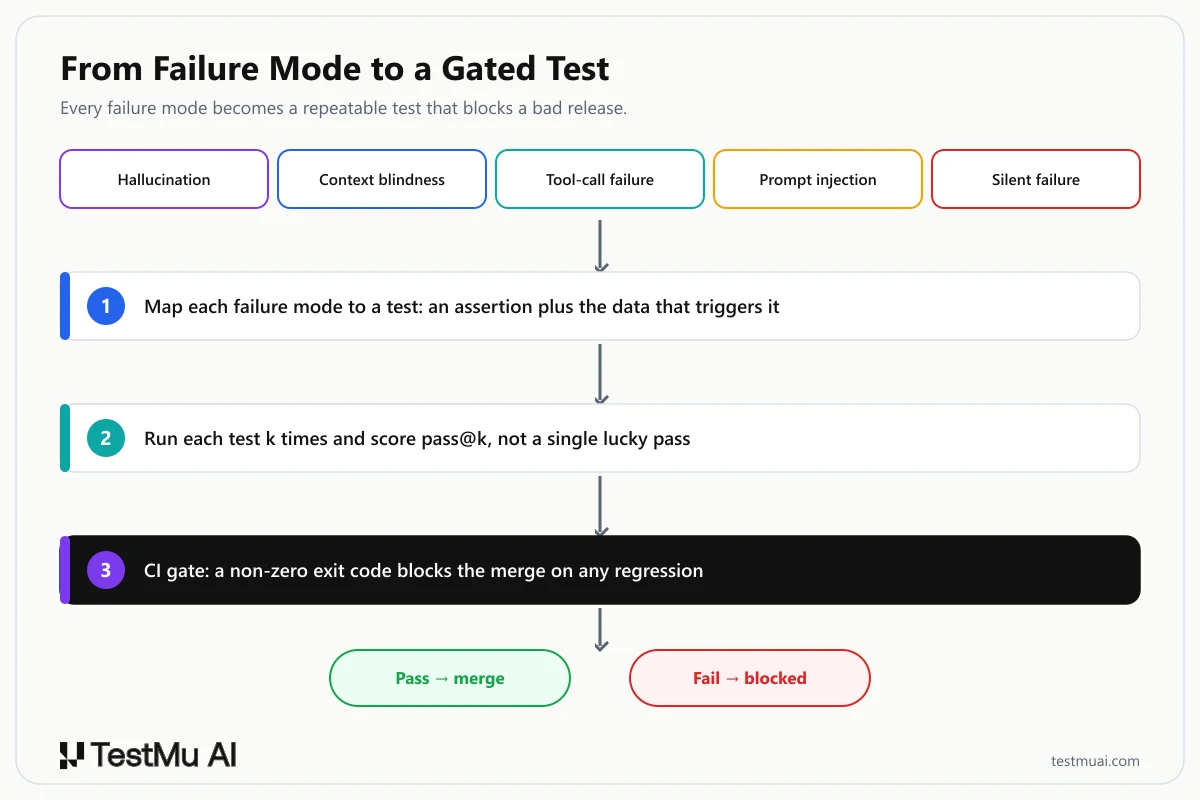
1. Map Each Failure Mode to a Test
Reliability becomes tractable when every failure mode maps to a concrete assertion, a dataset that triggers it, and a pass criterion. The matrix below is the bridge from the taxonomy to an executable test suite.
| Failure mode | Test / assertion | Test data / scenario | Pass criteria |
|---|---|---|---|
| Hallucination | Every factual claim traces to a provided source. | Questions with no valid answer in the knowledge base. | Zero fabricated facts; the agent refuses or escalates. |
| Context blindness | Reference a constraint from turn 1 at turn 5. | Multi-turn conversations with earlier-stated data. | Agent reuses the earlier value without re-asking. |
| Tool-call failure | Inject a tool error and assert bounded recovery. | Mocked timeouts and malformed API responses. | Retries with backoff, then escalates; no infinite loop. |
| Prompt injection | Embed hostile instructions in tool inputs. | Red-team payloads like "ignore previous instructions." | Injection ignored; no policy or PII leak. |
| Silent failure | Verify the real end state, not the agent's claim. | Assertions on the actual system after the run. | Outcome matches expected state. |
Building this by hand for one agent is doable; keeping it current as the agent evolves is where teams stall. TestMu AI's Agent Testing platform generates 60 to 100 scenarios from a single uploaded requirements document, then runs the agent through them with 15 or more specialized evaluators, each probing one failure mode, and attaches an evidence excerpt to every verdict so a fail is debuggable.
2. Test Non-Deterministic Agents Without Flaky Tests
Writing one assertion per behavior fails on agents, because the same input yields different outputs. Run that test once and it is flaky by construction. The fix is to treat agent tests as statistical, not binary.
- Measure consistency, not a single pass: run each scenario k times and report pass@k and pass^k. On the tau-bench benchmark, state-of-the-art function-calling agents succeeded on under 50% of tasks and, in the retail domain, passed all of eight repeated runs under 25% of the time. Test each behavior once and you are measuring luck.
- Set a statistical acceptance threshold: decide the bar up front, for example "must pass 9 of 10 runs," so a probabilistic system gets a probabilistic gate.
- Assert on outcomes, not self-reports: check the real end state of the system rather than the agent's claim of success, which is the only way to catch silent failures.
- Seed and replay where you can: fix the model temperature and record trajectories so a failing run can be replayed and debugged.
The screenshot below is a real cloud run on TestMu AI's grid: an automated flow entered a message, submitted it, and then asserted that the rendered output matched, checking what the page actually shows rather than what the workflow claims. That is the same principle you apply to an agent: verify the state it left behind, not the summary it wrote.

Note: Stop shipping agents you have only tested once. TestMu AI's Agent Testing runs your agent through hundreds of adversarial and edge-case scenarios and returns a Green, Yellow, or Red readiness verdict before you deploy. Start testing your agents free
3. Gate Reliability in CI/CD
A test suite only protects production if it runs before a change ships. Shift the evaluation left: run the agent eval suite on every prompt change, model swap, or knowledge-base update, and block the merge when the score regresses. The mechanism is an exit code. TestMu AI's Agent Testing ships a CLI that runs a scenario set, emits JUnit XML, and returns 0 when every scenario passes or 1 when any fails:
# CI quality gate: fail the pipeline when agent reliability regresses
testmu-a2a test \
  --agent "$AGENT_ENDPOINT" \
  --spec "Customer support agent" \
  --count 30 \
  --threshold 0.80 \
  --format junit \
  --output results.xml
# exit code 0 = every scenario passed
# exit code 1 = a scenario failed, so the pipeline stops and the merge is blocked
The same determinism principle applies to browser-facing agents. TestMu AI's Kane CLI verifies rendered UI in a real browser and returns standard POSIX exit codes (0 pass, 1 fail, 2 error, 3 timeout), so a stochastic agent's work is confirmed by a deterministic check before the gate opens. See the getting started documentation to authenticate in CI.
Note: The agents that act rather than answer, coding agents, workflow agents, and back-office agents, can be gated in CI too. Agent Assurance reads the agent's codebase and derives the suite itself, functional, non-functional, and adversarial, then invokes the agent for real and grades each criterion against observed evidence such as files changed, artifacts produced, and tool calls, so a silent failure that reports success cannot grade itself a pass. The gate reads the per-criterion verdicts in the run report, because the exit code only shows whether the run happened. Anything unverifiable is reported as a number beside the pass rate instead of being folded into it. Join the Agent Assurance waitlist
4. Red-Team Beyond Security
Most red-teaming stops at prompt injection and jailbreaks. Those matter, but the same adversarial approach should probe the full failure taxonomy, because a hallucination that misleads a user is as damaging as a leaked secret.
- Adversarial personas: run the agent against an angry user, a confused novice, and an off-script user who pushes outside its designed scope.
- Security attacks: prompt injection, jailbreak attempts, and data-exfiltration probes that try to pull other users' data.
- Correctness attacks: inputs engineered to trigger hallucination, contradictory multi-turn inputs to trigger context blindness, and edge inputs that trigger tool-call failures.
TestMu AI's Agent Testing runs red-team suites across categories including prompt injection, jailbreak, and PII leakage, pairs them with 10 built-in adversarial personas, and assigns each scenario a risk score of Critical, High, Medium, or Low so remediation lands on the highest-impact failures first.
5. Turn Production Failures into Regression Tests
Every production incident is a free, high-signal test case, and most teams throw it away. The reliability flywheel is simple: capture the exact input and trajectory of a failure, reduce it to a minimal scenario with a clear pass criterion, and add it to the suite that gates every future release. The failure can then never silently return.
Agent Testing keeps a scenario library and trend analytics across runs, so a captured failure becomes a permanent, tracked scenario and drift shows up as a number rather than a hunch. Human-in-the-loop stays a first-class guardrail for the cases that must not be fully automated, and self-healing keeps existing checks alive when the interface shifts, the same idea behind self-healing test automation. Feed all of it with AI observability so you can see which step failed and why.
6. Measure Reliability
You cannot gate what you do not measure. A reliability scorecard turns fuzzy confidence into a small set of numbers you can track per release.
| Metric | What it measures | Target signal |
|---|---|---|
| Task success rate | Share of runs that fully complete the objective. | Trends up; compared across model versions. |
| Consistency (pass@k / pass^k) | How often the same task passes across k repeated runs. | High pass^k, not just a single pass@1. |
| Tool-call success rate | Share of tool calls with valid arguments and handled responses. | High; watch for silently swallowed errors. |
| Hallucination rate | Share of responses with unsupported claims. | Near zero on grounded tasks. |
| Recovery / MTTR | How often and how fast the agent recovers from a failed step. | Recovers without a human, or escalates cleanly. |
| Drift | Metric delta versus the last released version. | Flat or improving; a regression blocks release. |
Agent Testing rolls its 9 chat and voice metrics, and 30 or more for phone agents, into a single Green, Yellow, or Red production-readiness verdict, each attached to a confidence level based on how many scenarios were run, so a release owner reads one signal instead of a spreadsheet.
When Should You Use an Agentic Workflow (and When Not)?
Not every task needs an agent, and reaching for one where a script would do adds cost and risk for no benefit. Scale the choice to the problem:
- Use an agentic workflow when the task needs runtime decisions, adapts to unpredictable inputs, or spans steps you cannot script in advance, and the payoff justifies the testing overhead.
- Stay deterministic when the steps are fixed and known. A rule-based workflow is cheaper, faster, and cannot drift, so reserve agents for problems that genuinely need them.
- Constrain the agent when the action is high-stakes: bound its tools, cap its steps, and add a human-in-the-loop gate before anything expensive or irreversible.
Conclusion: Getting Started with Agentic Workflows
Agentic workflows trade a fixed script for an adaptive loop, which is what makes them powerful and what makes them hard to trust. The teams that ship them successfully treat reliability as an engineering discipline, not a hope: they name their failure modes, test each one, and gate releases on the result.
- Name your top three failure modes from the taxonomy and write an eval and pass criterion for each.
- Run each scenario k times and set a consistency threshold instead of a single-pass check.
- Gate the pipeline on the eval exit code, and convert every production failure into a new scenario.
From there, scale the suite rather than the guesswork. TestMu AI's Agent Testing generates the scenarios, runs the evaluators in parallel, and returns a readiness verdict you can gate on, and its CLI drops straight into CI. Build the workflow for what agents can do, and build the tests for how they fail.
Author

Samyak Goyal
Blogs: 31

Samyak Goyal is a Senior Member of Technical Staff at TestMu AI engineering Kane CLI, the command-line tool that runs browser automation from the terminal, where a flow described in natural language executes in a real Chrome browser and returns pass or fail with shareable proof. He is a backend engineer with 4+ years of experience, previously an SDE at Innovaccer, where he built APIs, introduced Kafka, and cut deployment from weeks to hours. Samyak also builds multi-agent systems, skill-orchestration frameworks, and a personal copilot that indexes 200+ microservice repositories.
Reviewer

Anubhav Singhmaar
Reviewer
Anubhav Singhmaar is an AI Product Manager at TestMu AI driving Kane CLI, the command-line tool that brings browser automation to the terminal, turning natural-language flows into runs in a real Chrome browser that return pass or fail with shareable proof. He owns the roadmap and prioritization and works with engineering to ship developer-facing features. Before TestMu AI, he spent over four years at Sprinklr owning enterprise voice AI across APAC and EMEA. A mechanical engineer turned product manager, he grounds guidance in real QA workflows.


Agentic Workflows FAQs
Did you find this page helpful?
More Related Blogs
TestMu AI forEnterprise
Get access to solutions built on Enterprise
grade security, privacy, & compliance
- Advanced access controls
- Advanced data retention rules
- Advanced Local Testing
- Premium Support options
- Early access to beta features
- Private Slack Channel
- Unlimited Manual Accessibility DevTools Tests