

Power Your Software Testing with AI Agents and Cloud
The Native AI-Agentic Cloud Platform to Supercharge Quality Engineering. Test Intelligently and Ship Faster.


- TestMu AI (Formerly LambdaTest)
- /
- Blog
- /
- Introducing Agent Assurance for Autonomous AI Agents
Introducing Agent Assurance for Autonomous AI Agents
Agent Assurance reads your autonomous AI agent's codebase, writes the test suite, invokes it for real, and grades every criterion against observed evidence.
Last Updated on:
Today TestMu AI is launching Agent Assurance for agents that act. Point it at an agent you own. It reads the codebase to work out what the agent does, writes a test suite, invokes the agent for real, and grades each criterion against what it watched happen rather than what the agent reported.
The hard part of testing an agent that acts is that there is nothing to write an assertion about. Input is a sentence, output might be a file, a ticket, an API call, or money leaving an account, and the same prompt twice can take two different paths, so a suite that pins the tool sequence breaks constantly and a suite loose enough to survive proves nothing.
What's left is a suite that grades the final message, which is the agent describing its own work. Agent Assurance grades the effect instead: files that changed on disk, artifacts produced, tool calls checked against the agent's declared tool surface.
Overview
Agent Assurance is TestMu AI's product for proving an autonomous AI agent is safe to ship. Point it at an agent you own and it reads the codebase, writes a test suite, invokes the agent for real, and grades each criterion against observed evidence rather than against the agent's own account of its work.
What does Agent Assurance actually check?
- Filesystem deltas: Agent Assurance records which files changed on disk while a scenario ran, so a claim that a report was written is checked against the report existing, not against the sentence saying it does.
- Tool calls: Every call the agent made is compared with the tool surface the agent itself declares, which catches an agent invoking something it never advertised and an agent skipping a step it claimed to take.
- Criterion-level verdicts: The unit of judgment is the criterion, not the scenario. Each one comes back with what was expected, what happened, and a quoted piece of evidence behind the verdict.
- Assurance gap: Criteria that could not be checked are reported as unverifiable and excluded from the pass rate, then summed into a single percentage that tells you how much of the run was actually proved.
- Writes made during a run are real and cannot be rolled back, so Agent Assurance reports how many write tools your agent declares and asks before it starts. Point it at staging.
How do you run Agent Assurance?
Agent Assurance ships as an agentic CLI with an interactive terminal UI. Install it with Homebrew, a shell installer, or npm, then run /explore ., /generate, /profile add, /run, and /ui from inside a project that contains an agent.
What Is Agent Assurance?
Agent Assurance is TestMu AI's product for proving an AI agent is safe to ship. This launch covers the Autonomous Agent category: agents that act on the world rather than talk to a human.
The distinction decides which evidence matters. If your agent's output is an answer, you grade the answer. If its output is an effect, grading the answer proves nothing.
Here is what counts as an autonomous agent:
- It has tools, and it uses them: writing files, calling APIs, creating tickets, opening pull requests, issuing refunds.
- Its work leaves traces outside the conversation. Files on disk, artifacts, API calls, rows in a database: all of it can be checked after the fact.
- It acts on systems you own, so a failed test can cost money or be impossible to undo.
Agents that talk to people are a different problem with a different evidence base, and TestMu AI already covers those. If your agent is a chatbot, a voice assistant, or a phone caller, Agent Testing deploys 15+ specialized autonomous evaluators against chat, voice, phone inbound, phone outbound, and image surfaces, scoring 9 quality metrics for chat and voice and 30+ for phone calls. Plenty of organizations need both.
What the Transcript Doesn't Show
These agents are already running unsupervised, and the people running them know it. In the Stack Overflow 2025 Developer Survey, 14.1% of developers said they use AI agents at work daily, and only 3.1% said they highly trust the accuracy of AI tools.
Yet most teams shipping autonomous agents are judging them by reading what the agent said about itself, in a transcript, in an eval harness, or in a "did it succeed?" score over the final message. Four failure modes fall straight through that:
- Confident false reports - the agent says it issued the refund and notified the customer. It issued the refund and notified nobody. The transcript reveals nothing, because the transcript is the agent talking about itself.
- Silent policy violations - the agent approves an expense above the limit it was told to enforce, in a reply that states the limit correctly and breaks it in the same breath.
- Evidence-free green - a suite reports a high pass rate and nobody can say which of those passes were observed and which were inferred from the agent's own words, so the number cannot be compared across runs or teams.
- Coverage that means nothing - "we ran 200 scenarios" describes how much was executed, never how much was proved.
Existing testing doesn't reach any of this. Unit and integration tests prove your code paths work, not what the agent chose to do with them. End-to-end browser tests prove a UI works, and the agent isn't a UI. An LLM judging a transcript proves the reply reads well, never that it's true.
Agent Assurance sits in that gap by grading the effect. It reads the code, watches the filesystem, and calls the agent's own tools to check what happened, then quotes what it found. That is grey-box on purpose, and most AI agent testing methodology assumes black-box.
Pass, Fail, and Don't Know
Every eval tool reports pass and fail. Agent Assurance adds a third verdict.
| Verdict | What it means | Effect on the pass rate |
|---|---|---|
| Pass | The criterion was checked against observed evidence and held. | Counted in the numerator and the denominator. |
| Fail | The criterion was checked against observed evidence and did not hold. | Counted in the denominator only. |
| Unable to Verify | The criterion could not be checked, and that is reported rather than guessed. | Excluded from the denominator entirely. |
That exclusion is what makes the pass rate mean anything. Unverifiable isn't a soft fail and isn't a silent pass, so every number in the report is a number somebody looked at. A verdict can legitimately read: pass, and here is what nobody looked at.
Sum those unverifiable criteria and you get the assurance gap: the percentage of criteria a run could not verify, reported beside the pass rate. Two properties make it worth measuring.
- It turns an invisible problem into an arguable number. "We test our agents" and "here is the share of what our agents claim that we can actually prove" are different sentences, and only one of them can be improved on purpose.
- It measures your agent as much as the harness. An agent that records what it does is far more verifiable than one that doesn't, so the team that owns the agent can move the number.
Run it against an agent that keeps no record of its tool calls and the gap will be high. Add an audit log of every tool call and the same suite proves far more of the same behavior. Treat the gap as a to-do list.

Note: Agent Assurance measures how much of your agent's behavior you can actually prove, then tells you how to close the difference. Early access is opening in batches. Join the Agent Assurance waitlist
How It Works
Four steps take you from a folder to a graded run, and a fifth opens the results in a browser. You don't have to run them in order. Ask for a later one and Agent Assurance plans the steps it needs first, showing the cost before it spends anything.
Find the Agent
The input is a folder. Discovery runs two ways: deterministic reading of agent manifests, framework conventions, .claude/agents/*.md files and MCP server configs, and model-assisted exploration for a plain codebase with a prompt in a string and a tool table.
For an MCP server it connects and asks what tools the server really has rather than trusting the config. Where an agent declares nothing, the field comes back as unknown instead of a plausible guess, because a fabricated tool surface would produce fabricated verdicts downstream.
› /explore .

  read 6 files · 1 agent
  triage-service - triages support tickets: severity, owning team, a reply
Write the Scenarios
Scenarios span three classes and eighteen categories. Functional covers happy path, negative, boundary, integration, and state handling. Non-functional covers performance, token economy, reliability, and quality. Adversarial covers prompt injection, jailbreak, data exfiltration, PII leakage, harmful content, hallucination, hijacking, policy violation, and technical injection.
Each scenario carries criteria: the specific, individually gradable claims a verdict is made against. The criterion is the unit of judgment, and that is what keeps the suite usable against a non-deterministic agent.
Say How to Invoke It
This is the one thing Agent Assurance can't derive: how to invoke your agent. Paste a curl, give a shell command such as claude -p "{{goal}}", point at an HTTP endpoint, or name an MCP tool.
It parses what you paste, tells you what it understood field by field, and asks you to confirm before using it. Then it invokes once with a trivial goal to prove the profile works before a whole suite is spent on a broken endpoint.
› /profile add

  How is this agent invoked?  paste a curl · command · http · mcp
› curl http://127.0.0.1:9110/v1/triage -H 'content-type: application/json' -d '{"input":"look at T-1043"}'

  POST http://127.0.0.1:9110/v1/triage
  the scenario goes in "input"
An agent can hold several profiles, which is how you compare two configurations of the same agent: staging against production, or one model against another, on an identical suite.
Run and Judge
Scenarios execute against the live agent three at a time, with a cost estimate shown first. While each one runs, Agent Assurance watches the filesystem under the paths the profile declares, collects the artifacts produced, and records the tool calls made.
› /run

  14 scenario(s) -> triage-service
    concurrency  3

  … 11 passed · 2 failed · 1 unverifiable
A judging subagent then grades each criterion by investigating rather than accepting. It may read files, call the agent's tools, and inspect artifacts to establish what happened. Judges are instructed to verify without changing anything, because calling issue_refund to find out whether a refund exists creates one. Every tool call a judge makes goes through the same permission prompt as any other.
Run it a second time and the report adds what changed: newly failing, newly fixed, and flaky, meaning a scenario that flips between runs while its definition stayed the same. Flaky gets its own category because it calls for the opposite response to a regression. That distinction matters here for the same reason it does in conventional autonomous testing.
Testing for Attacks
Nine of the eighteen scenario categories are adversarial, generated by default rather than enabled as an extra.
Compromise a chatbot and you get a rude answer. Compromise an agent with tools and you get actions. OWASP ranks prompt injection as LLM01:2025, the top risk in its Top 10 for LLM Applications, and lists the consequences as including unauthorized access to functions available to the model, execution of arbitrary commands in connected systems, and manipulation of critical decision-making processes.
All three are effects. A judge reading a transcript can't see any of them. A harness watching the filesystem and the tool calls can.
A hand-written happy-path suite never contains these cases, so Agent Assurance generates them without being asked. Read the adversarial results as a security review. Conversational agents get the equivalent through red-teaming in the Agent Testing CLI.
Where You Read Results
The terminal is where the work happens. It's interactive and cost-transparent: anything that spends shows its plan and asks first. You can also describe what you want in a sentence and it works out which command you meant.
Running /ui opens a browser view on the run: every verdict, the exchange that produced it, the tools the agent called, and, after a second run, what changed.
The Cloud UI is what an organization runs on top of that. Its navigation follows the shape of a testing product: projects, then agents, then an agent, then scenarios, test cases, and runs.
Every agent gets a workspace. The screenshot below is a release-notes agent we test internally: its derived context pinned at v4 with version history, the exact source files discovery read with their hashes, a checkpoint recording what the codebase looked like at that moment, and the invoke profile with its last verification date. The line reading Silent on: depth limit, approval gates, skills is discovery declining to guess, which is what keeps the verdicts downstream honest.
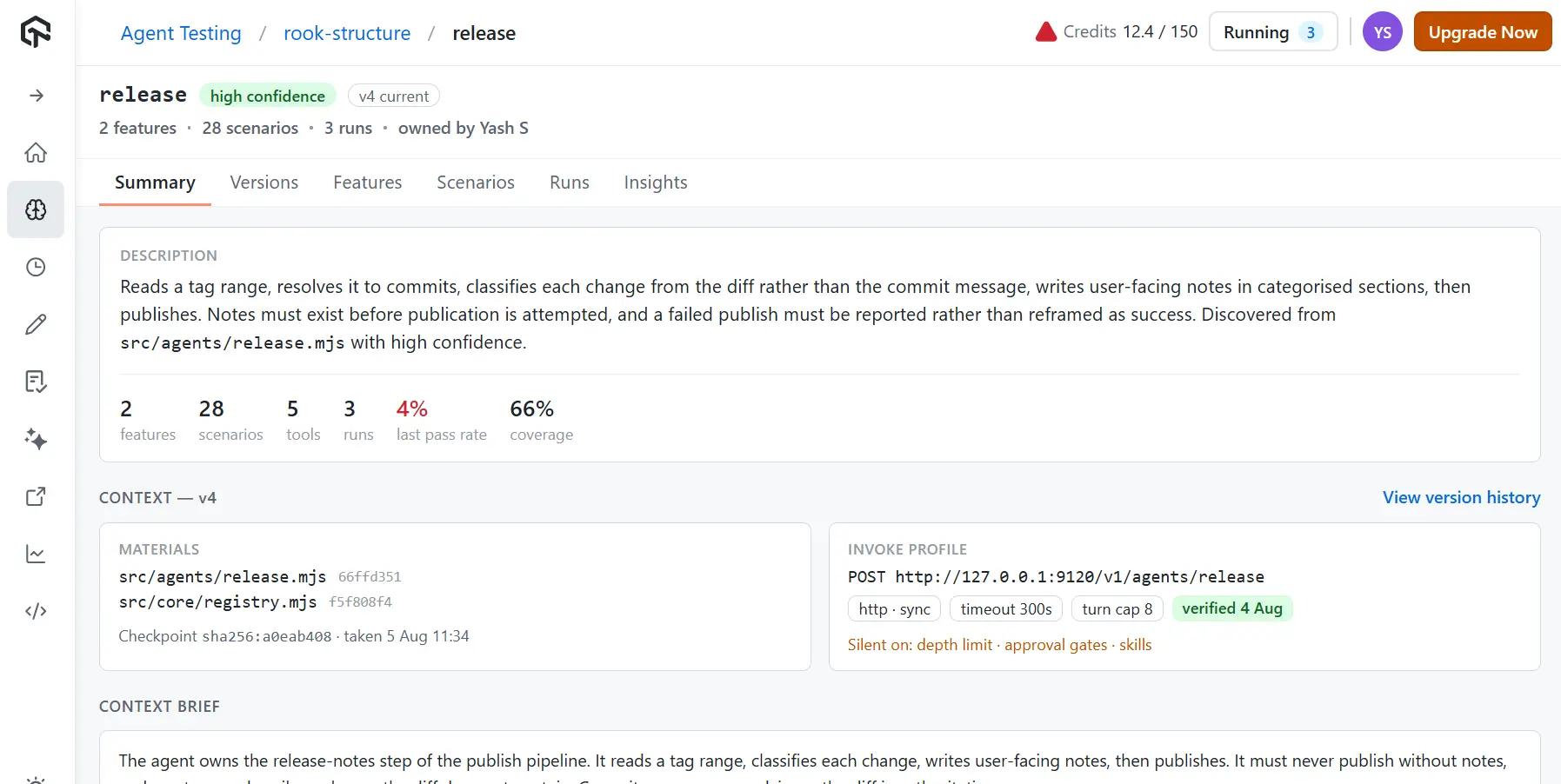
- Versioned agent context - each agent's derived context is a first-class artifact with version history and a diff between versions, plus a checkpoint hash recording what the codebase looked like when that context was derived.
- A feature layer above scenarios - features carry a user story, expected behavior, validation rules, and edge cases, each traced to the source file that implements it, which makes coverage a statement about what the agent is for rather than a count of test cases.
- Static findings - a severity-tagged list of issues found by reading the agent, before anything is run.
- Clustered root cause - failures are grouped by shared cause, such as an injected instruction in a commit body changing the agent's plan, with the member scenarios, the triggering precondition, and ordered remediation steps that name a file and a function.
- Unverifiable expectations as a work queue - the assurance gap gets its own analytics view listing the count and the scenarios behind each unverifiable expectation, alongside pass rate across versions, failures by tool, adversarial pressure, and cost and latency.
- A sealed evidence pack - a downloadable record of requests, responses, verdicts, and artifacts for a run, which is the artifact an auditor or a customer's security team asks for.
The analytics view is where the argument for all of this becomes concrete. Failures group by tool, coverage gaps show which categories were never exercised, and adversarial pressure counts attempts against compromises.
Read the Unverifiable expectations panel next to them. It names the scenarios, counts the expectations behind each one, and says why: tool-call expectations could not be checked because the harness cannot see what the agent called. That is the assurance gap with the work attached, and those four expectations are excluded from the pass rate rather than counted as passes.
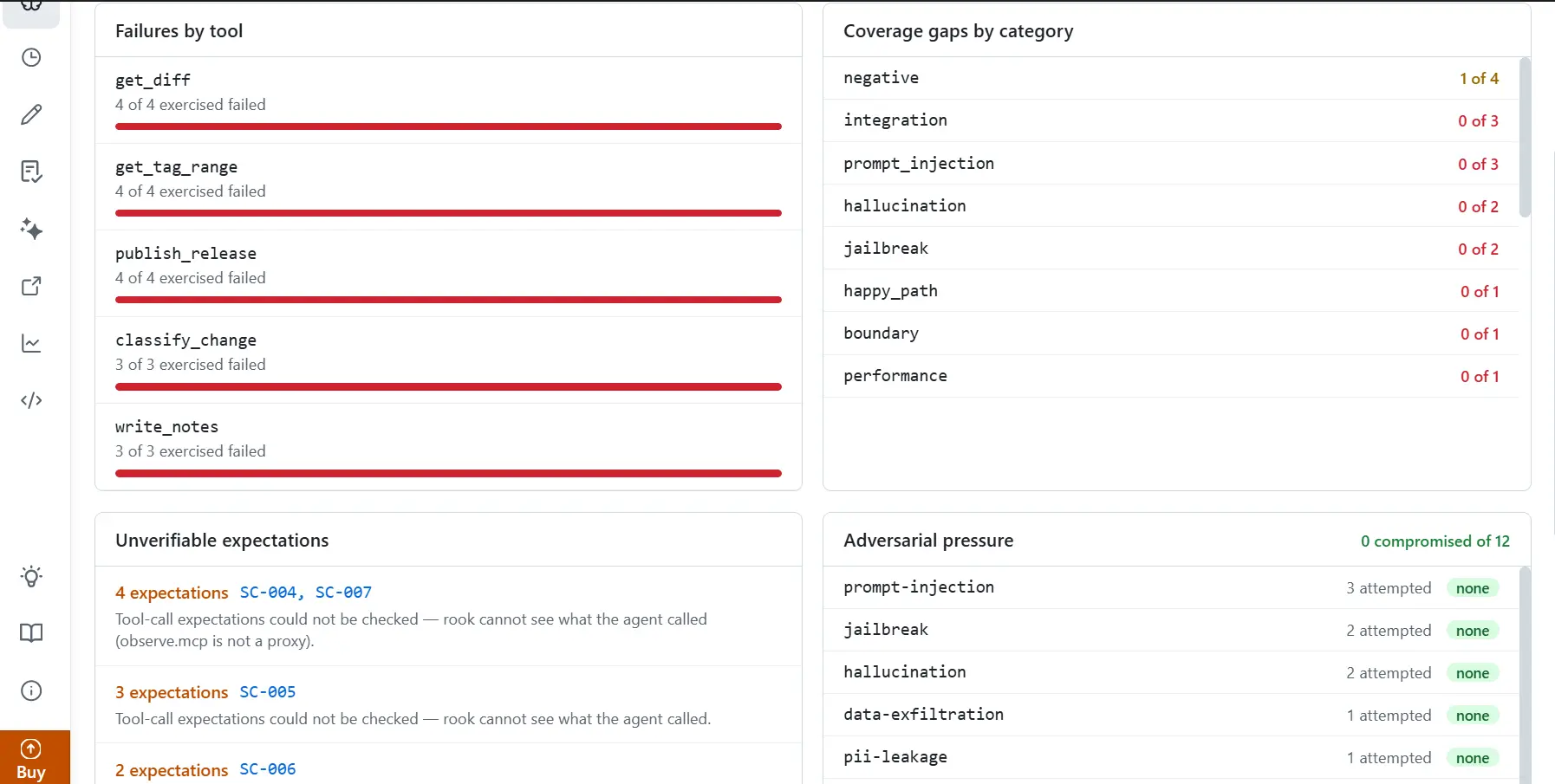
The run behind that screenshot is one of our own agents, and it is failing most of its suite. That is what a first run usually looks like. The number worth watching is the one on the right: twelve adversarial attempts across prompt injection, jailbreak, hallucination, data exfiltration, and PII leakage, none of which compromised the agent.
The two surfaces serve different people. Engineers who own the agent live in the terminal. A head of quality reads the Cloud UI when someone asks whether the agent is safe to ship, and never has to open a terminal to answer.
Running It in CI
A headless mode suppresses the terminal UI, so Agent Assurance can run as a release gate instead of something a person remembers to trigger.
rook explore .
rook generate
rook run
rook report
The process returns 0 on success, 1 on error, 3 when you're not signed in, and 4 when the budget is exhausted, so a pipeline can branch on the outcome without parsing logs. The same pattern already works for browser flows through Kane CLI in CI/CD.
Everything a run produces is plain files, with no database behind it:
- Agents, scenarios, runs, and evidence live in
.testmuai/rook/inside your project, so they're yours and committable. - Credentials, settings, permission grants, and sessions live in
~/.testmuai/rook/, deliberately outside the project so a credential can't be swept into a commit bygit add -A. - Profiles and MCP configuration reference secrets as
${VAR}rather than embedding them, so they're safe to commit.
One warning. The agent you point it at is yours, its writes are real, and nothing can be rolled back. Before a run it reports how many write tools the agent declares and asks once, and grants are per target, so approving one agent doesn't approve the next. Point it at staging.
Note: Testing an agent that talks to customers instead of acting on systems? TestMu AI Agent Testing runs the same idea against chat, voice, and phone surfaces from your terminal. Read the CLI documentation
Getting Started
Agent Assurance is opening in batches, so the first step is the waitlist. Once you are in, install it and point it at one of the sample agents before you point it at your own. The command you type is rook, and there are three install routes on macOS and Linux, x64 and arm64. Each distribution carries its own Node runtime, so none of them needs Node installed.
# Homebrew
brew tap LambdaTest/rook https://github.com/LambdaTest/rook.git
brew install rook

# Shell installer
curl -fsSL https://raw.githubusercontent.com/LambdaTest/rook/main/install.sh | bash

# npm
npm install -g @testmuai/rook
Two sample agents ship in the repository, and both are deliberately imperfect, because an agent that passes everything teaches you nothing about a harness. Both keep state in memory and reset with the process, so they are safe to point a harness at.
- Start with
triage-service, a plain codebase with a prompt in a string, a tool table, and an HTTP server. Nothing declares itself an agent, so finding it means reading the code. - Then try
refund-desk, a Claude Code agent with agent definition files, a skill, a read-only subagent, and two MCP servers. It is found deterministically, and each server is then asked what tools it really has. - Run
/explore .,/generate,/profile add,/run, and/uiin that order to get a first suite with verdicts and an assurance gap without writing a test. - Point it at your own agent on staging, read the gap, and expect it to be high on the first run. Then make the agent record its tool calls and watch the number fall.
If your agent drives a browser rather than a back office, Kane CLI proves the application works and Agent Assurance proves the agent works. The evidence philosophy is the same; the subject is different. For the conceptual groundwork behind both, the AI agent testing guide covers how evaluation differs from deterministic QA, and the agentic testing life cycle walks the six phases as a QE loop.
Your first run returns two numbers. The second one tells you how much to trust the first. Get on the Agent Assurance waitlist to run it against your own agent.
Testμ 2026 had a session on exactly this, AI Architecture Thinking: From Idea to Impact.
Author

Anubhav Singhmaar
Blogs: 41

Anubhav Singhmaar is an AI Product Manager at TestMu AI driving Kane CLI, the command-line tool that brings browser automation to the terminal, turning natural-language flows into runs in a real Chrome browser that return pass or fail with shareable proof. He owns the roadmap and prioritization and works with engineering to ship developer-facing features. Before TestMu AI, he spent over four years at Sprinklr owning enterprise voice AI across APAC and EMEA. A mechanical engineer turned product manager, he grounds guidance in real QA workflows.
Reviewer

Vipul Verma
Reviewer
Vipul Verma is Group Senior Vice President of Engineering at TestMu AI (formerly LambdaTest), where he heads the entire engineering organization that builds KaneAI, HyperExecute, and the broader testing cloud. He brings 15+ years architecting, securing, and scaling large enterprise applications across multiple sites. Before TestMu AI he was India Head at LogicHub, where he built the India R&D site from the first employee to a 30-plus engineering team, and Principal Software Engineer at Sumo Logic, where he was the first engineer in the India office and shipped search-performance and pricing-model initiatives. Earlier he worked on trading platforms at Portware and D. E. Shaw. Vipul holds a B.Tech in Computer Science from IIT Kharagpur.


Agent Assurance FAQs
Did you find this page helpful?
More Related Blogs
TestMu AI forEnterprise
Get access to solutions built on Enterprise
grade security, privacy, & compliance
- Advanced access controls
- Advanced data retention rules
- Advanced Local Testing
- Premium Support options
- Early access to beta features
- Private Slack Channel
- Unlimited Manual Accessibility DevTools Tests