

Power Your Software Testing with AI Agents and Cloud
The Native AI-Agentic Cloud Platform to Supercharge Quality Engineering. Test Intelligently and Ship Faster.


- TestMu AI (Formerly LambdaTest)
- /
- Blog
- /
- How to Test iOS Apps on Multiple Devices
How to Test iOS Apps on Multiple Devices
In this blog, discover iOS app testing and how to test iOS apps on multiple devices.
Last Updated on:
On This Page
- What is iOS App Testing?
- Why Test iOS Apps on Multiple Devices?
- What Aspects Are Tested on Multiple iOS Devices?
- Techniques to Test iOS Apps on Multiple Devices
- Choosing the Right iOS Devices for Testing
- Popular Devices to Test iOS Apps
- Approaches to Test iOS Apps
- Different iOS App Testing Tools
- Where to Test iOS Apps?
- How to Test iOS Apps on Multiple Devices on the Cloud?
- Best Practices for iOS App Testing
With nearly 2 million apps competing in the Apple App Store, a single bug or slow load can turn users away and cut into revenue, so testing must cover every iPhone and iPad model despite iOS's comparatively low device fragmentation. Functional testing then checks button taps, data input, and output across every device and iOS version.
Key Takeaways
- Testing iOS apps on multiple devices checks functional and non-functional behavior across iPhone and iPad models and iOS versions, because different models and versions can cause compatibility issues even with low iOS fragmentation.
- Statista reports that iOS had a 20.7% market share in the first quarter of 2024, and Apple states that the Apple App Store offers nearly 2 million apps competing for users.
- An iOS device test matrix should prioritize the models most used by the app's audience, cover small, medium, and large screens, include latest and legacy iOS versions, and add newly launched devices.
- Counterpoint Research's Global Monthly Handset Model Sales Tracker named the iPhone 14 the best-selling smartphone of 2023 and the iPhone 15 Pro Max the best seller in Q4 2023.
- iOS simulators built into Xcode suit early debugging but may miss memory leaks, latency, and network delays, while physical iPhones and iPads give realistic results but are costly to buy and manage at scale.
- Popular iOS app testing tools include Appium for native, hybrid, and web apps, Apple's XCUITest for UI tests, Google's EarlGrey for iOS UI automation, and Apple's free TestFlight for distributing beta builds.
- TestMu AI runs manual and automated iOS app tests on real iPhones and iPads, including Appium and XCUITest suites, with in-session tools such as network throttling and geolocation testing.
- iOS app testing best practices include testing core functionalities first, combining automation for repetitive tasks with manual testing for usability, and checking layouts across screen sizes and both orientations.
What is iOS App Testing?
iOS app testing is the process of testing the functional and non-functional aspects of the iOS application. These aspects can be functionality, usability, performance, and others. Therefore, running iOS app tests helps developers and testers identify and fix possible issues before launching the iOS app to the general public. This results in a seamless user experience and reduces the likelihood of negative reviews and uninstall rates.
Testing apps on iPhones and iPads allows the QA team to determine how each app performs for specific user actions under different test configurations. Moreover, they test iOS apps across various browsers, devices, and platforms to ensure that the functional and non-functional aspects work as intended.
Why Test iOS Apps on Multiple Devices?
Understanding the importance of testing iOS apps on multiple devices is crucial. This primarily identifies and resolves errors before the final product is released. Second, it is important to ensure that users remain engaged and satisfied. As the current market is highly competitive so users tend to have less tolerance for buggy apps.
According to Statista, in the first quarter of 2024, iOS had a market share of 20.7%. This shows an increase from the same quarter in 2023. The distribution pattern of Apple over the past few years has been consistent, with a substantial market share during the fourth quarter.
If we look at iOS device fragmentation, though it is lower, it still needs to be taken into account. Since different iOS device models and versions can cause compatibility issues, testing iOS apps on multiple iOS devices is important.
In addition, nearly 2 million apps are available in the Apple App Store, so it is imperative that developers and testers test their iOS apps on multiple devices.
Shown below are the different types of categories of iOS apps:
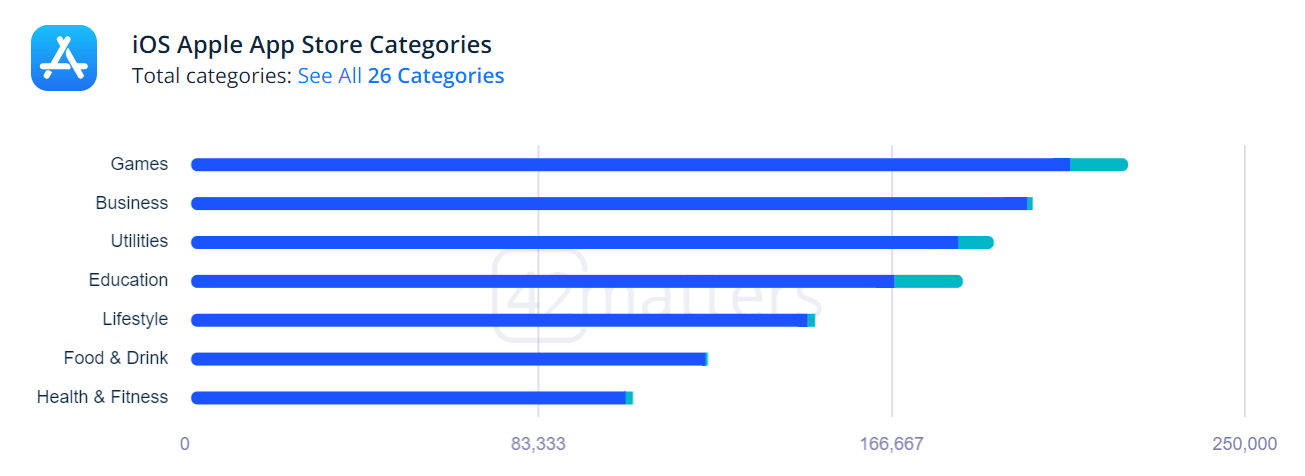
From the above categorization of iOS apps, we can see that Apple is paying more attention to its app marketplace, which has become one of the most important areas of revenue generation. Since iOS development has surged over the years, the Apple App Store has seen an increase in iOS apps.
Here are a few benefits of testing iOS apps on multiple devices:
- Testing iOS apps on different devices lets you ensure your app appears and behaves as expected on all screen sizes. Regardless of the device used by each user, this consistency creates a positive experience.
- Testing compatibility helps identify and fix issues that prevent users from downloading your app on specific devices.
- Testing native features like cameras, GPS, and biometric authentication across devices helps uncover bugs related to these features, ensuring proper functionality on all devices.
- Testing accessibility helps ensure your app is accessible to users with impairments. This may involve testing with accessibility features.
- Testing performance on multiple devices exposes issues specific to particular hardware. This allows you to optimize app performance for various configurations and ensure smooth operation on all devices.
- Catching and fixing bugs early during the testing phase on multiple devices saves time and resources compared to fixing them after launch. This translates to reduced development costs overall.

What Aspects Are Tested on Multiple iOS Devices?
iOS app testing involves analyzing several aspects on multiple iOS devices to ensure compatibility, functionality, and a consistent user experience. Some key aspects include:
- Functionality: Test functionalities of all app features on various devices to determine whether any device-specific bugs, errors, or inconsistencies exist.
- Compatibility: Ensure the app works properly and maintains compatibility with legacy and new versions of the iOS app by testing it across multiple versions.
- Usability: Ensure the user interface elements and layouts appear as expected across the devices.
- Geolocation: Test how your iOS app functions when accessed through various countries.
- Localization: Ensure the app supports multiple languages, cultural preferences, and regional settings across different devices.
- Network Connectivity: Assess how the app performs under Wi-Fi, 5G, 4G, 3G, and offline modes.
- Performance: Analyze the performance metrics, such as load times and responsiveness, on several devices.
- Battery Consumption: Identify how the app impacts battery life and resource usage on different devices.
In the next section of this blog on how to test iOS apps on multiple devices, let’s discuss different techniques for testing iOS apps.
Techniques to Test iOS Apps on Multiple Devices
Testing your iOS apps can be done using different testing techniques. Together, these techniques can contribute to developing and deploying quality iOS apps.
There are two broad techniques for testing iOS apps on multiple devices:
- Functional Testing
- Non-Functional Testing
Functional Testing
Functional testing evaluates whether the features and functionalities of the app meet their specified requirements. This includes testing functionalities on the iOS app, such as button taps, data input, and output.
Following are the types of testing that fall under functional testing:
- Unit Testing: It focuses on testing individual components of an app to ensure that each unit of code performs as expected.
- Integration Testing: It tests how various components of an application interact with one another. It ensures that different components or modules interact as expected when integrated into the app.
- System Testing: It tests an entire and integrated system to determine compliance with specified requirements and identify any defects or discrepancies.
- Acceptance Testing: It determines whether an app meets business and user requirements.
- Regression Testing: It retests the app when new functionality is introduced to ensure the existing functionality works as expected.
Non-Functional Testing
Non-functional testing evaluates different aspects like usability, responsiveness, security, etc. These tests occur after functional testing and focus on elevating the quality of the app.
Following are the types of testing that fall under non-functional testing:
- Compatibility Testing: It checks the compatibility of the app across different browsers, devices, and versions of operating systems.
- Usability Testing: It tests the overall user experience of the app. This includes navigation, scrolling, and other aspects, keeping user’s perspective in mind.
- Performance Testing: It checks the responsiveness, speed, and resource usage of the app to ensure the app runs smoothly.
- Security Testing: It tests for vulnerabilities in the codebase such as data breached or unauthorized access.
Choosing the Right iOS Devices for Testing
To test iOS apps, it’s crucial to test on the right devices. For this, you need to consider factors like market share, screen size, resolution, and others.
The following are the things to remember when selecting iOS devices:
- Popularity: Use analytics to see which devices people use most with your app. Focus on testing those first to make sure everyone has a smooth experience.
- Screen Size: Devices aren’t one size fits all anymore. Test your app on small and medium and large screens to ensure everything functions as intended. Layout faults that depend on screen height, such as those addressed by handling the iOS keyboard with IQKeyboardManager, often surface only on the smallest device in your matrix.
- Operating System Versions: Make sure your app works well on the latest and legacy iOS versions.
- New Releases: Keep an eye on upcoming device launches and try to include them in your testing. That way, your app will be ready for the latest devices.
The above are the necessary steps to ensure your iOS app delivers a seamless experience for users on all sorts of iPhones and iPads.
Popular Devices to Test iOS Apps
As per the Global Monthly Handset Model Sales Tracker by Counterpoint Research, the iPhone 14 was the best selling smartphone in 2023, accounting for half of all sales. The iPhone 15 series dominated the top three global bestseller lists in Q4 2023, with the iPhone 15 Pro Max becoming the best selling smartphone.
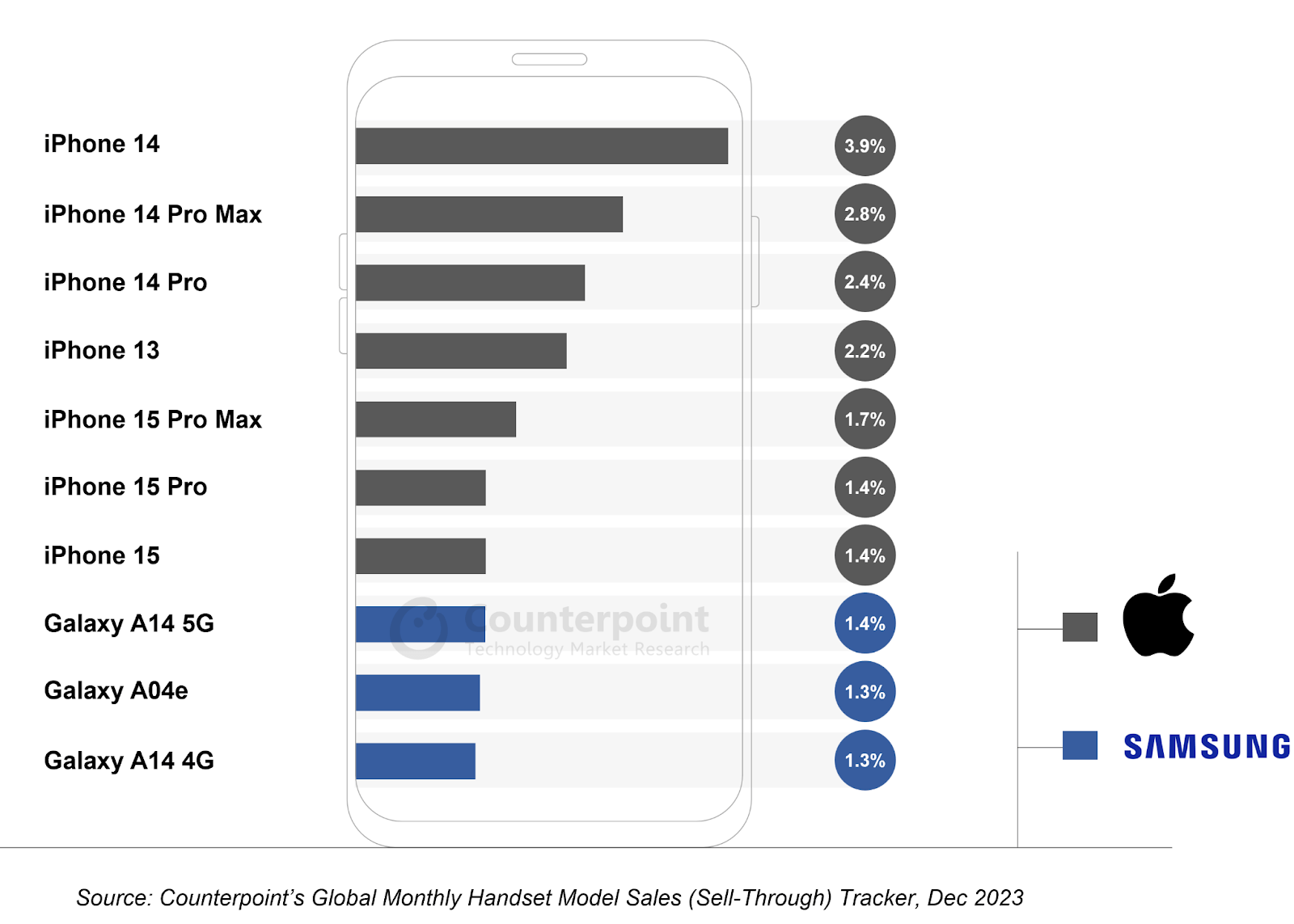
Based on the above iOS sales figure, here is the list of popular iOS devices you can include in your testing pool:
| iPhone Models | Market Share |
|---|---|
| iPhone 14 | 3.9% |
| iPhone 14 Pro Max | 2.8% |
| iPhone 14 Pro | 2.4% |
| iPhone 13 | 2.2% |
| iPhone 15 Pro Max | 1.7% |
| iPhone 15 Pro | 1.4% |
| iPhone 15 | 1.4% |
Other than that, it’s also important to test on the latest iPhones and iPads to make your app ready for the newly launched iOS devices.

Note: Test Your Apps on the Latest iPad Air and Pro (11 & 13). Try TestMu AI Today!
Approaches to Test iOS Apps
There are two primary approaches to testing iOS apps on multiple devices: manual testing and automated testing. Each approach offers its own advantages and limitations. However, when used in conjunction, it provides comprehensive testing.
- Manual Testing: It is a hands-on approach where human testers test the app without relying on testing tools. This method is crucial as it enables testers to simulate real-world user interactions and explore the application under various scenarios and conditions.
- Automated Testing: It leverages automation testing tools to run test cases and suites. These tools execute pre-defined tests automatically and compare the obtained results with expected results. This approach offers significant time savings, particularly for repetitive tasks.
In the next section on how to test iOS apps on multiple devices, let’s explore some tools used to test iOS apps on various devices.
Different iOS App Testing Tools
For comprehensive testing, it is recommended to use manual and automated in tandem. In this section of the blog on how to test iOS apps on multiple devices, let’s explore some of the popular iOS testing tools that you can use to automate your iOS app testing.
- TestMu AI: It is an AI-powered test orchestration and execution platform that allows developers and testers to perform iOS app testing on multiple devices. With TestMu AI, you can run tests on both real and virtual device clouds. Also, it supports manual and automated iOS app testing and integrates with iOS testing tools like Appium and XCUITest.
- Appium: It is an open-source tool that automates the testing of native, hybrid, and web apps on real devices and iOS simulators. In order to communicate with iOS applications using WebDriver, Appium uses the JSON Wire protocol.
- XCUITest: It is an automation tool for iOS by Apple that allows testers to validate the functionality of specific code units. You can use XCTest to write test cases to test the behavior of app elements such as buttons, text fields, and menus.
- EarlGrey: Developed by Google, EarlGrey is an open-source iOS automation testing tool that automates UI tests on iOS devices. Google uses EarlGrey internally to test native iOS apps such as YouTube, Google Calendar, Google Photos, and Google Translate.
- TestFlight: Apple provides TestFlight as a free iOS testing tool. TestFlight allows developers to distribute beta versions of iOS apps to testers for feedback. It will allow for improvements to be made to the iOS application before it is released on the Apple App Store.
In the next section of this blog, let’s look at how to test iOS apps on multiple devices.
Where to Test iOS Apps?
You can test iOS apps on multiple devices using various iOS simulators, physical devices, and real device cloud. These methods will help ensure that an app functions correctly and meets user requirements.
- iOS Simulators: These are software applications that mimic the behavior and functionality of physical devices, such as smartphones and tablets, on a desktop computer.
- Physical Devices: While iOS simulators are helpful for testing phases, testing on real iOS devices is crucial before deploying the final app. This involves running tests on real iPhones and iPads to gain a realistic understanding of how the app performs in real-world scenarios.
- Real Device Cloud: The real device cloud provides an online device farm where a wide range of real iOS devices are available for testing. This allows developers and testers to access various iOS devices remotely, eliminating the need to own or maintain a large collection of physical devices.
They replicate the behavior of real devices without needing physical hardware. iOS simulators come integrated within IDEs like Xcode and the iOS SDK environment. These simulators offer a convenient and cost-effective way to test iOS apps on multiple devices.
This approach accurately represents user environments, interaction methods, device-specific functionalities, and hardware usage. It allows for precise testing of factors like performance, battery consumption, sensors, and gestures, which iOS simulators may not fully replicate.
For further information on physical and real device testing, check out this blog on Real Device Cloud.
Testing iOS apps on virtual devices can be effective for debugging, particularly in the early stages of development. In addition to streamlining the iterative development process, virtual devices offer efficiency and speed. However, it may not detect memory leaks, high memory usage, latency, or network delays, and it does not support custom operating systems.
On the other hand, physical devices provide a real user experience that simulators might miss. However, real device testing can be costly and comes with scalability and reliability issues due to the need to purchase and manage the devices.
To overcome the challenges associated with virtual and physical devices at scale, it’s recommended to choose a cloud-based testing platform that offers a real device cloud that lets you perform mobile app testing at scale. One such real device cloud platform is TestMu AI.
It is an AI-powered test orchestration and execution platform that allows developers and QA teams to test iOS apps on multiple devices at scale. It offers a remote test lab of 3000+ real environments for iOS manual and iOS automation testing.
How to Test iOS Apps on Multiple Devices on the Cloud?
Cloud-based testing platforms like TestMu AI let you perform real-time (manual) and automated app testing on real iOS devices. Plus, you can also test on a virtual device cloud of iOS simulators.
In this section of this blog, let’s look at how to test iOS apps on multiple devices using TestMu AI. For demonstration, we will test on a real device cloud.
Real Time iOS App Testing
With TestMu AI real time testing, you can manually test your iOS apps on different devices.
For demonstration, let’s use the real device cloud to test iOS apps.
- Create an account on the TestMu AI platform.
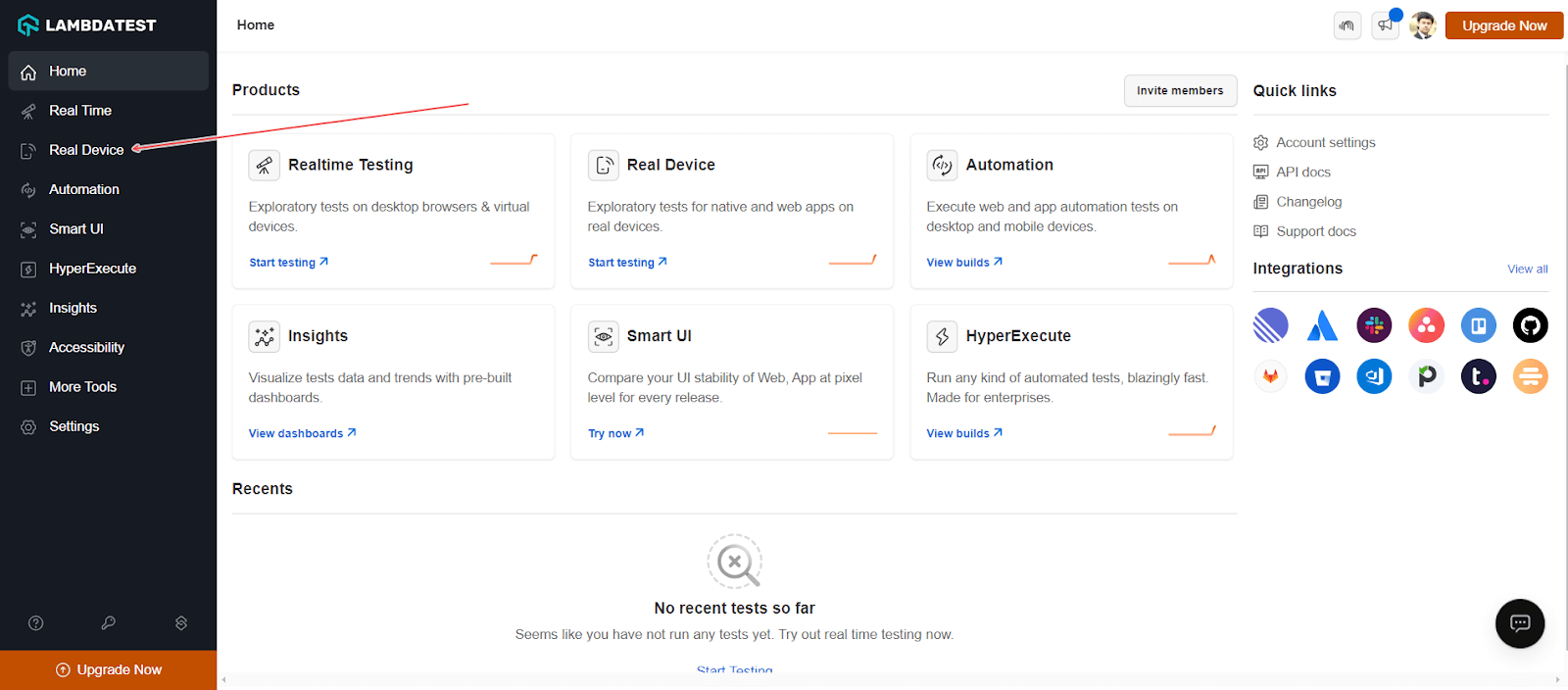
- From the TestMu AI Dashboard, go to Real Device and then click App Testing.
- Select the Apple operating system, upload your app, or use a sample Proverbial app provided by TestMu AI. Choose iPhone or iPad, and select the device model. Then click Start.
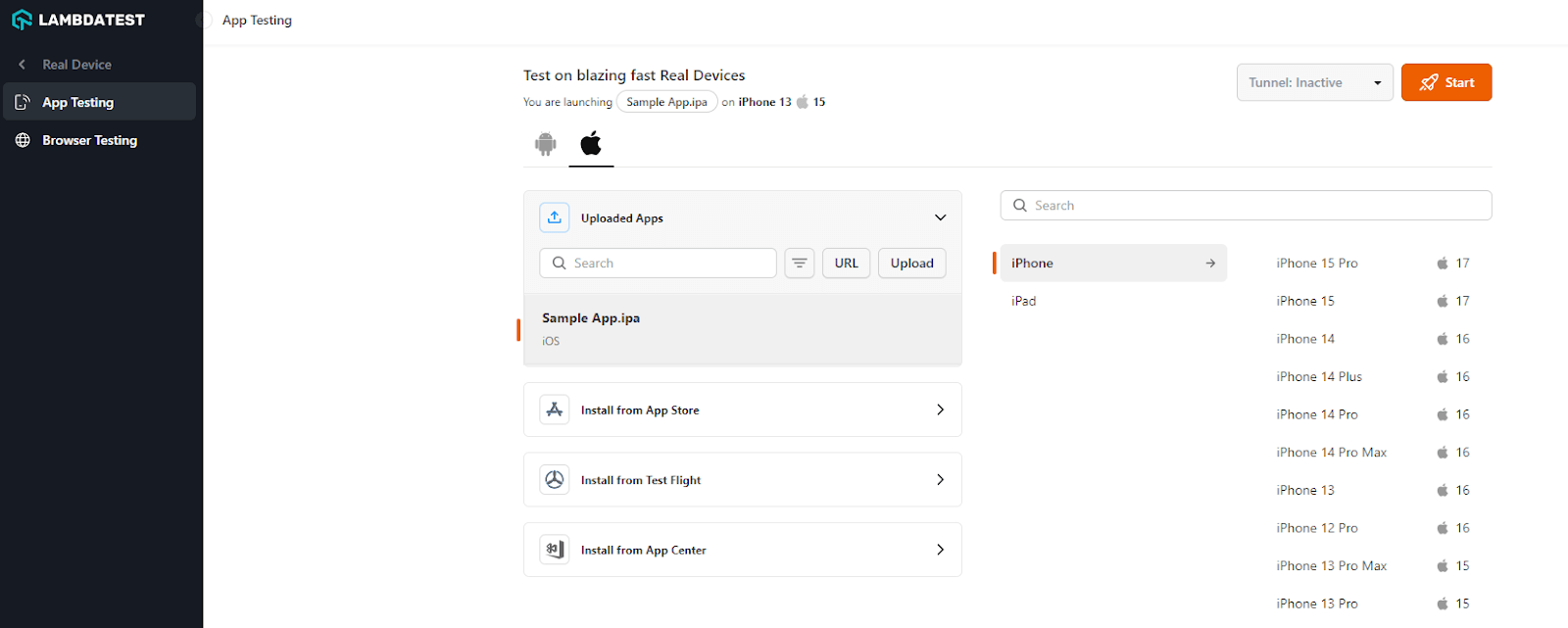
This will launch a test session on the cloud running a real iOS device. You can also leverage features from the in-session toolbar, such as mark as a bug, network throttling, geolocation testing, and more.
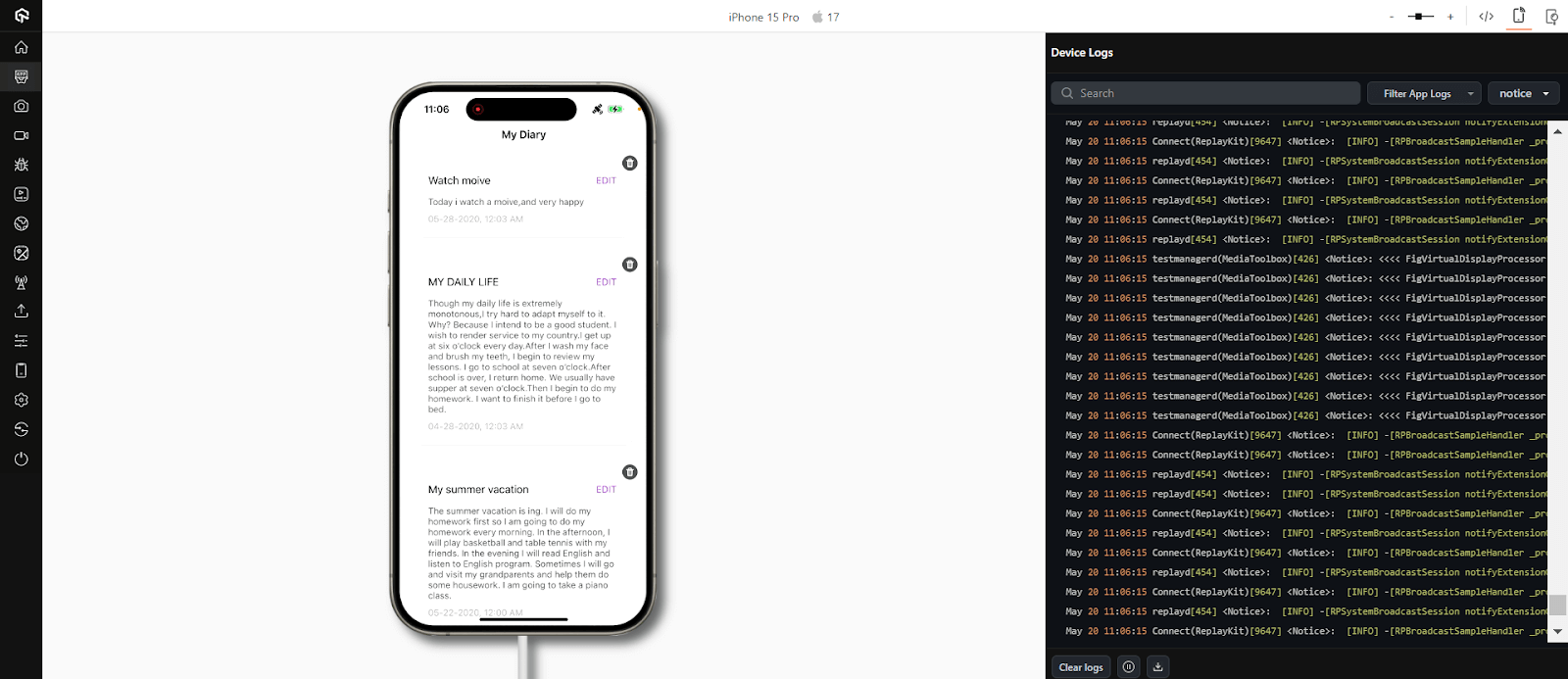
With real-time testing on TestMu AI, you can test iOS apps manually. Now, let’s see how to test iOS apps on multiple devices using TestMu AI with app test automation.
Automated iOS App Testing
With TestMu AI App Automation, you can automate iOS apps using mobile app testing frameworks like Appium and XCUITest.
For demonstration, let’s use the XCUITest framework to test iOS apps on multiple devices.
- Login to your TestMu AI account.
- Set your TestMu AI Username and Access Key in the environment variables. To get your TestMu AI credentials, head to your TestMu AI Profile and then navigate to Account Settings > Password & Security.
- Make sure you have access to the iOS app (.ipa file). If you still need to produce one, see how to create and export an IPA file.
- Upload your iOS app using the REST API. You can also use TestMu AI XUI.
curl -u "LT_USERNAME:LT_ACCESS_KEY" -X POST "https://manual-api.lambdatest.com/app/uploadFramework" -F "appFile=@"/Users/macuser/Downloads/proverbial.ipa"" -F "type="xcuit-ios""
The response to the above cURL command will be a JSON object containing the app URL and the test suite URL.
curl --location --request POST 'https://mobile-api.lambdatest.com/framework/v1/xcui/build' --header 'Authorization: Basic <Enter_Basic_Auth>' --header 'Content-Type: application/json' --data-raw '{
    "app" : "lt://APP_ID",
    "testSuite": "lt://TestSuite_ID",
    "device" :  ["iPhone 11-14","iPhone 12 Pro-15","iPhone X-13"],
    "queueTimeout": 10800,
    "IdleTimeout": 150,
    "deviceLog": true,
    "build" : "Proverbial-XCUITest"
}'
As you can notice, we will run the test on three devices (iPhone 11-14, iPhone 12 Pro-15, iPhone X-13) in parallel.
Catch up on the latest mobile app testing tutorial around Appium, automation testing, and more. Subscribe to the TestMu AI YouTube Channel for quick updates.
Now, you have learned how to perform iOS apps on multiple devices on the cloud. However, to carry out iOS app testing hassle-free, it’s important to follow certain best practices.
Best Practices for iOS App Testing
To ensure the success of iOS app development, it is crucial to follow best practices for testing. Here are some key best practices for iOS app testing:
- Target the Right Devices: Consider the iOS device fragmentation and focus on popular models used by your target audience.
- The Mix of New and Old: Include various devices, from the latest models to older ones.
- Simulators for Speed, Real Devices for Accuracy: Use simulators for initial testing and real devices for critical functionalities.
- Prioritize Core Functionalities First: Test essential features before expanding to less critical ones.
- Combine Automation and Manual Testing: Use frameworks for repetitive tasks and manual testing for usability and exploration.
- Leverage Cloud-Based Testing Services: Consider platforms offering real devices for remote multi-device testing.
- Optimize for Different Screen Sizes and Resolutions: Ensure proper layout and functionality across various device displays.
- Test in Different Orientations: Test if the app functions seamlessly in both orientations.
Conclusion
In this blog on how to test iOS apps on multiple devices, we looked at iOS app testing and techniques to test iOS apps on multiple devices.
In view of the estimated number of iOS devices ranging between one and two billion, iOS applications are a must have for organizations that rely heavily on mobile applications to conduct their business.
It should be noted that a poor user experience can undermine customer loyalty and engagement, thereby impacting revenue growth and tarnish brand reputation. To ensure a flawless user experience, it’s crucial to make iOS app testing a priority before releasing your app. For UI-level coverage, you can run XCUI automation tests early in development.
Author

Shivam Singh
Blogs: 4

Shivam Singh is a Lead Member of Technical Staff at TestMu AI (formerly LambdaTest), architecting the Real Device Cloud that runs automated app and web tests on real Android and iOS devices. He designed the architecture for real-device app and web automation and wrote the microservices from scratch in Golang, including the XCUITest and Espresso execution layers for iOS and Android. His platform reached peak parallel concurrency of 150+ for app automation while handling roughly 500,000 tests a month, and he leads the team that keeps the automation grid running. He brings over eight years of engineering experience and holds a B.Tech in Computer Science.
Reviewer

Shubham Soni
Reviewer
Shubham Soni is a Senior Member of Technical Staff at TestMu AI (formerly LambdaTest), building the Real Device Cloud and real-time testing infrastructure. He optimized the WebRTC services that power live testing to sub-100ms latency with adaptive bitrate streaming, led a frontend migration from Angular to React that cut page load time from 5-6 seconds to 1-1.5 seconds, and contributes to the official Device SDK. He led a team of four to build an accessibility testing product covering manual and automated testing and mentored a team of six on a real-time testing product. He brings over eight years of experience and earlier scaled a cloud code platform to 200K+ monthly users. Shubham holds a B.Tech in Computer Science.


Frequently asked questions
Did you find this page helpful?
More Related Blogs
TestMu AI forEnterprise
Get access to solutions built on Enterprise
grade security, privacy, & compliance
- Advanced access controls
- Advanced data retention rules
- Advanced Local Testing
- Premium Support options
- Early access to beta features
- Private Slack Channel
- Unlimited Manual Accessibility DevTools Tests