

Power Your Software Testing with AI Agents and Cloud
The Native AI-Agentic Cloud Platform to Supercharge Quality Engineering. Test Intelligently and Ship Faster.


- TestMu AI (Formerly LambdaTest)
- /
- Blog
- /
- NDJSON: How Agents Read a Kane CLI Run
When an AI coding agent or a CI runner calls Kane CLI, it does not want a pretty terminal. It wants a result it can parse without scraping logs. That is what agent mode is for.
Add --agent --headless and the interface disappears. Output becomes NDJSON: one JSON object per line, typed, in the order events happen.
Why Agent Mode Speaks NDJSON Instead of Prose
A human reads a step tree. A program reads lines. NDJSON gives every event its own self-contained JSON object, so a consumer can read the stream as it arrives and act on each event without waiting for the whole run.
This is the contract that lets agents and pipelines consume Kane CLI results programmatically. No regex over prose, no guessing from log formatting.
The Events Kane CLI Emits During a Run
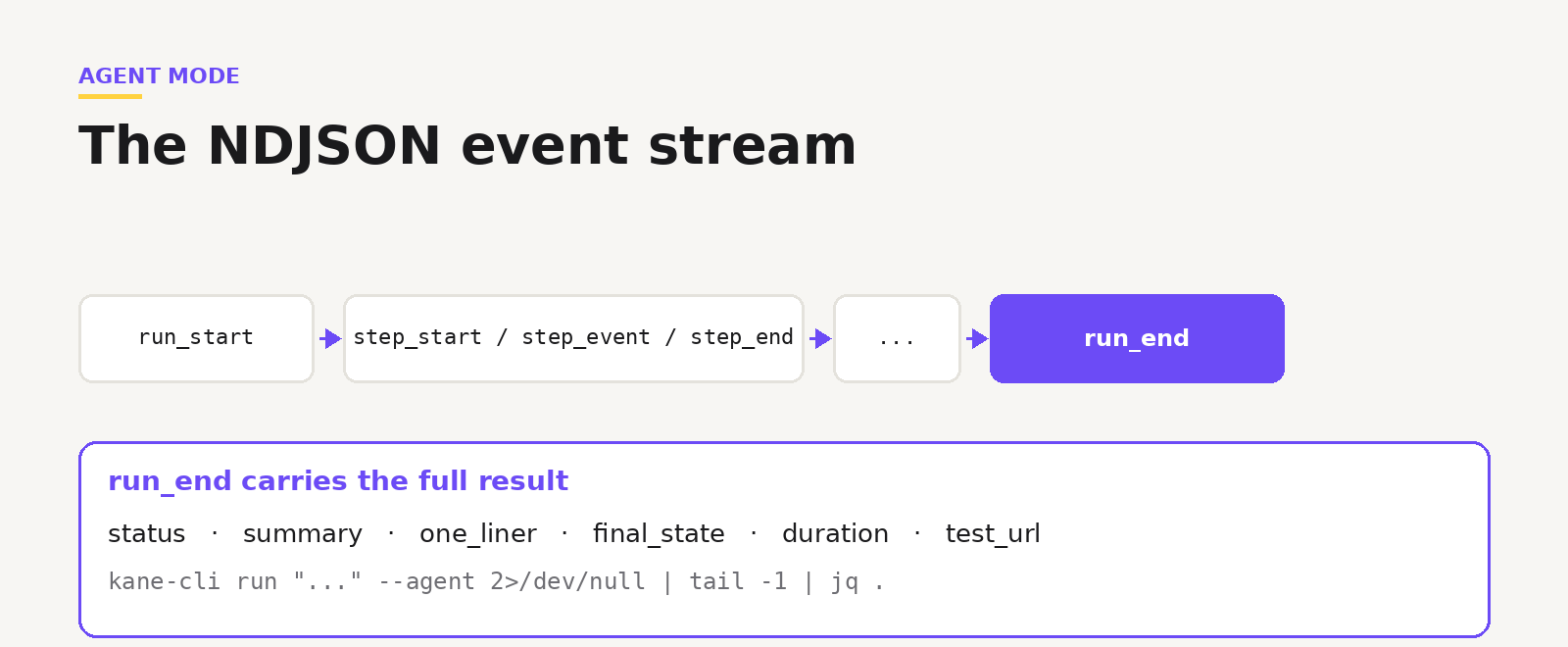
A run opens with run_start and then emits step events. step_start begins a step, step_event reports activity inside it, and step_end closes it with a status and duration. The event field on a step event names what happened: a screenshot, reasoning, an action, vision, an assertion, or an evaluation. That is the forensic trace of every move the agent made.
Around those, flow events mark bigger moments: branching into parallel sub-flows, spawning child agents, asking for human input, or an error. Then the stream ends.
The run_end Line Is the One That Matters
The last line is always run_end, and it carries the whole result.
{
  "type": "run_end",
  "status": "passed",
  "summary": "Logged in and verified dashboard loads",
  "one_liner": "Login flow verified",
  "duration": 45.2,
  "final_state": { "username": "user@example.com" },
  "test_url": "https://test-manager.lambdatest.com/.../test-cases/<id>"
}
status is the binary verdict, summary and one_liner describe what happened, final_state holds anything you extracted with a store X as 'name' objective, and test_url links the full run. Read just that line:
kane-cli run "..." --agent 2>/dev/null | tail -1 | jq .
Note: Want to wire this into your agent? Start free. Try Kane CLI
Reading Results and Exit Codes in a Pipeline
Beyond the JSON, Kane CLI sets a standard exit code: 0 passed, 1 failed an assertion, 2 errored, 3 timed out. A pipeline can branch on the code alone, or pull status from run_end for detail.
One note for automation: ask_user auto-disables when stdin is not a terminal, so write objectives that do not need interactive input in CI and agent contexts.
Note: Want the full event schema and parsing patterns? Read the Kane CLI docs. Read the docs
Built So the Thing Calling Kane CLI Can Act on the Result
NDJSON is what turns a browser run into something an agent can reason about. It reads the stream, waits for run_end, checks the status, and decides what to do next: continue, fix the code, or hand it back to a human.
Note: Want to see the event types in code? Open the repo. Open the repo
Agent mode is Kane CLI talking to machines. One object per line, a clear verdict at the end, and a link to the proof.
Author

Bhawana
Blogs: 77


Bhawana is a Community Evangelist at TestMu AI with over 3 years of experience creating technically accurate, strategy-driven content in software testing. She has authored 50+ blogs on test automation, cross-browser testing, mobile testing, and real device testing. She also serves as Product Marketing Manager for Kane CLI, the command-line tool that runs browser automation from the terminal using natural-language flows in a real Chrome browser. Bhawana is certified in KaneAI, Selenium, Appium, Playwright, and Cypress, reflecting her hands-on knowledge of modern automation practices. On LinkedIn, she is followed by 6000+ QA engineers, testers, AI automation testers, and tech leaders.


Did you find this page helpful?
More Related Blogs
TestMu AI forEnterprise
Get access to solutions built on Enterprise
grade security, privacy, & compliance
- Advanced access controls
- Advanced data retention rules
- Advanced Local Testing
- Premium Support options
- Early access to beta features
- Private Slack Channel
- Unlimited Manual Accessibility DevTools Tests