

Power Your Software Testing with AI Agents and Cloud
The Native AI-Agentic Cloud Platform to Supercharge Quality Engineering. Test Intelligently and Ship Faster.


- TestMu AI (Formerly LambdaTest)
- /
- Blog
- /
- Computer Use Agents: How They Work and How to Test Them
Computer Use Agents: How They Work and How to Test Them
Computer use agents drive software through screenshots and clicks. See how the agent loop works, what OSWorld scores hide, and how to test one before you ship.
Published on:
On This Page
Computer use agents are AI systems that operate software the way a person does, reading screenshots of a live screen and emitting mouse and keyboard actions at pixel coordinates. On OSWorld 2.0, a benchmark of long-horizon desktop workflows, the best configuration of Claude Opus 4.8 finishes only 20.6% of tasks end to end.[1]
This guide covers how the agent loop works, how screen-driven control differs from RPA and Playwright, which platforms ship it today, what benchmark scores hide, and how to test one before you ship it.
Key Takeaways
- Screenshot-driven loop: The agent never sees your code, only an image of the screen, so it works on any application but carries no guarantee that a click landed where it meant.
- Pass^1 versus Pass^n: Every published leaderboard row is a single-run number, and every measured model scores lower when the same task runs three times.
- Verification failures dominate: Verification and feedback errors cause 39.3% of genuine agent failures, while grounding and execution mistakes cause only 13.9%.
- 15.3% wrong verdicts: Roughly one in seven benchmark failures is an evaluator mistake or a broken task, so triage the run before you file a bug against the agent.
- 11.2% residual injection rate: Anthropic's own red-teaming still leaves one in nine targeted attacks succeeding after mitigations, which rules out unattended access to money or production data.
- Explore then export: Let the agent discover flows and generate a script, and keep the deterministic script as the thing your pipeline actually runs.
What Is a Computer Use Agent?
A computer use agent is an AI system that drives software through screenshots and synthetic input. The agent reads a picture of the screen, picks a mouse or keyboard action, executes it, captures a fresh screenshot, and repeats until the task finishes or a step cap stops the run.
The defining property is the absence of an interface contract. There is no API to call, no selector to match, and no SDK to install against the target application. Anthropic states the position plainly: the application, not the model, captures the screenshot and performs every mouse and keyboard action.[2]
That property is the whole trade. A screen-driven agent reaches legacy software with no integration surface and adapts when a button moves. It also inherits every weakness of vision: a misread pixel, a downscaled image, or a dense toolbar can put a click in the wrong place with no error raised.
The CUA Acronym and the GUI Agent Label
CUA stands for computer-using agent, and GUI agent is the research term for the same family of systems. The two labels describe one idea from different sides. Academic papers say GUI agent, vendors say computer use, and Microsoft Copilot Studio lists Computer-Using Agent (CUA) as a selectable model in its tool configuration.[3]
One ambiguity is worth carrying carefully. OpenAI uses CUA as a product-specific model name, so a sentence about CUA can mean the whole category or one vendor's model. Establish which meaning applies before you compare two numbers that both use the acronym.
How Do Computer Use Agents Work, Step by Step?
The loop is perception, reasoning, and action. A vision-language model reads the screenshot, returns a structured action such as a click at specific coordinates, your code executes that action on a real display, and a new screenshot restarts the cycle. The shape is identical across Anthropic, OpenAI, and Google.
- Your harness captures a screenshot of a display it controls, such as a virtual X11 display, a browser context, or a virtual machine, and sends it with the task text.
- The vision-language model reads the image plus the conversation history and returns a structured tool call naming an action and its target coordinates.
- Your harness translates that abstract action into a real event, such as a Playwright mouse click at the given x and y position.
- Your harness captures the new screen state and returns it as a tool result, and the model either requests another action or stops.
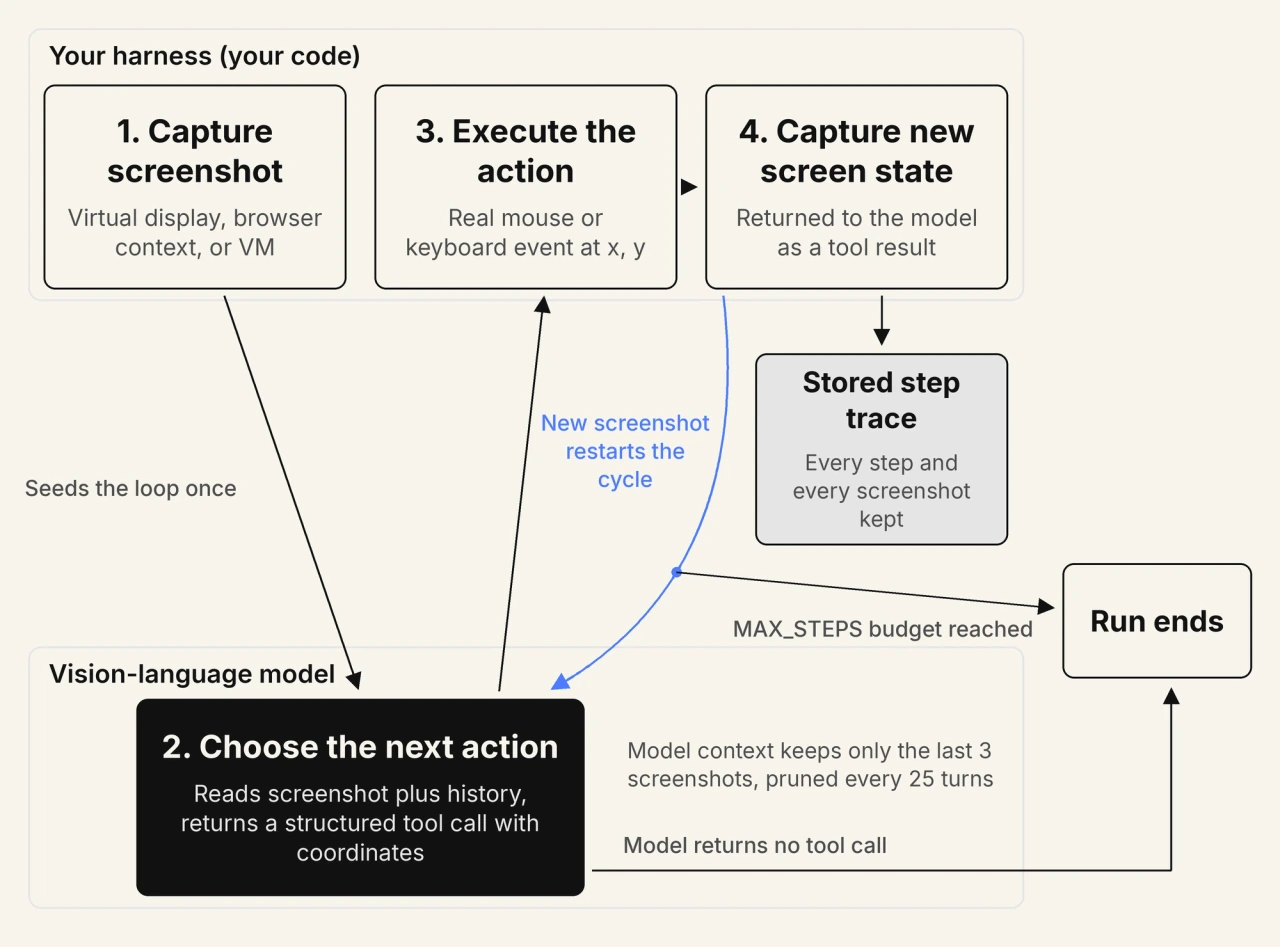
OpenAI documents the same cycle as five steps that terminate when the model stops returning a computer call, with nine action types covering click, double click, scroll, type, wait, keypress, drag, move, and screenshot.[4] Stripped to its essentials, a harness is a short loop:
let screenshot = await capture(display);
let history = [{ role: "user", content: [task, screenshot] }];

for (let step = 0; step < MAX_STEPS; step++) {
  const reply = await model.act(history);
  const call = reply.toolCall;
  if (!call) break;                     // model believes the task is done

  await execute(display, call.action, call.coordinate);
  screenshot = await capture(display);  // observe the real result

  history.push(reply, { toolResult: screenshot });
  trace.append({ step, call, screenshot });  // keep every step, not the last three
}
The last line matters more than it looks. Anthropic recommends keeping only the last three screenshots and pruning every 25 turns to control cost, so the model sees a short window while your stored trace should retain all of it. The pruned screenshots are usually where a divergence started.
Screen Resolution and Click Accuracy
Resolution changes accuracy because vision models cap input image size and downscale anything larger before the model sees it. Claude Opus 5 and Claude Sonnet 5 accept up to 2576 pixels on the long edge, and earlier models cap at 1568 pixels. The model then returns coordinates for the image it saw, not for your display.
Relying on the server-side downscale therefore leaves you without the scale factor. The fix is to resize on the client, declare the resized dimensions, and scale returned coordinates back yourself. Azure AI Foundry recommends a fixed 1440x900 or 1600x900 viewport for optimal click accuracy.[5]
Vendors also disagree on the coordinate space itself. Anthropic returns absolute pixels in the declared display space, while Google normalizes coordinates to a 0 to 999 grid that your client must denormalize.[6] Porting a harness without changing that conversion silently misplaces every click.
How Is Screen-Driven Automation Different From RPA and Playwright?
RPA and Playwright replay a fixed sequence against recorded selectors, so both break when the interface moves. A screen-driven agent re-derives every step from the current screenshot, which survives interface churn but makes the output probabilistic instead of repeatable. That single difference drives cost, speed, and every testing decision below.
The distinction is control logic, not the executor. Playwright is itself the execution layer inside several vendor reference harnesses. What changes is who decides the next step: an author who wrote it once, or a model deciding live on every run.
| Dimension | Screen-driven agent | RPA bot | Playwright or Selenium script |
|---|---|---|---|
| Control logic | A model chooses each action from the current screenshot | A recorded rule set replays in a fixed order | An author writes the sequence once and it runs unchanged |
| Target surface | Any application the display can render, including native desktop software | Applications the recorder was trained against | Web pages reachable through a browser driver |
| Determinism | Two runs of one task can take different paths and step counts | Identical every run until the interface changes | Identical every run until a selector breaks |
| Failure mode | Silent wrong action, repeated no-op, or an unverified assumption of success | Hard stop when a recorded element is not found | Explicit assertion failure with a stack trace |
| Cost per run | Model tokens for every screenshot, growing with each step | Licence and runner time, flat per execution | Compute only, measured in seconds |
| Adapts to a moved button | Usually yes, because the screen is re-read each step | No, the recording must be redone | Only if the selector still matches |
Read across the rows and the trade is clear: screen-driven agents buy reach and resilience with money, latency, and repeatability. The comparison in rpa vs ai covers where rule-based automation ends.
Should You Use a Desktop Agent or a Browser Agent?
Browser agents drive the DOM inside a single browser, and desktop agents drive the whole machine including native applications and the file system. Browser agents cost fewer tokens and avoid coordinate errors entirely. Desktop agents reach software that a browser cannot open.
A DOM-driven agent serializes page structure into text and asks the model to pick an element by role and name, so the framework resolves the click and grounding error disappears. That approach is blind to canvas, WebGL, PDF, and video, and to everything outside the page. Our roundup of browser agents covers that category.
In the Reddit thread "Is there a decent computer use model?" on r/LocalLLaMA, one commenter separated pixel-level control from accessibility-tree control, noting that open models remain weak at grounding and click accuracy on dense interfaces. The same commenter added that pixels are only needed for what the DOM cannot express, such as canvas or WebGL. Four other commenters converged on that same accessibility-tree route through playwright-MCP.
MCP Tools Alongside Pixel Control
Model Context Protocol gives an agent typed tools and data, and computer use gives it a mouse. The two compose rather than compete. Call a structured tool wherever one exists, because it is faster, cheaper, and testable, then fall back to pixels only for the surfaces that expose nothing.
Production systems increasingly hybridize on exactly that rule. Microsoft's Windows agent framework mixes GUI clicks with direct calls through Windows UI Automation rather than treating pixels as the only channel. The article on mcp and ai agents covers the protocol side of that split.

Note: Validate AI agents across chat, voice, and phone surfaces with TestMu AI. Try free!
Which Computer Use Models and Platforms Can You Use Today?
Anthropic ships a beta computer use tool, OpenAI ships a built-in computer tool in the Responses API, Google ships Gemini Computer Use in preview, and Microsoft ships computer use inside Copilot Studio. Every one of those surfaces carries a beta or preview label as of August 2026.
| Platform | What it gives you | Status as of August 2026 |
|---|---|---|
| Anthropic computer use tool | Screenshot capture plus mouse and keyboard control of a desktop, executed client side, with absolute pixel coordinates and a zoom action for small targets | Beta, behind the computer-use-2025-11-24 header, supported on Claude Opus 5, Claude Sonnet 5, and several 4.x models |
| OpenAI Responses API computer tool | Screenshot-driven interface control returning a batched array of actions per turn, across nine action types | Built in to the Responses API. The standalone computer-use-preview model was shut down on 23 July 2026 |
| Gemini Computer Use | Browser, mobile, and desktop environments with per-action safety decisions, confirmation requirements, and optional prompt injection detection | Preview, with Gemini 3.6 Flash recommended and the 2.5 computer use model marked legacy |
| Microsoft Copilot Studio | Low-code agents driving Windows desktop and web apps, with Azure Key Vault credential storage, site allowlists, and email-based human review | Model tiers marked generally available or experimental. Billing is 5 Copilot Credits per step, or 15 on a premium model |
Read those status labels as engineering constraints rather than marketing stages. A beta or preview surface carries no stability commitment, and OpenAI states that preview models can be retired with as little as two weeks of notice.[7]
Open Source Options You Can Self-Host
Open source covers both the model layer and the sandbox layer, and the choice depends on which one you are missing.
- UI-TARS: A native end-to-end model from ByteDance that folds perception, grounding, and action into one network, published with a desktop runtime under Apache-2.0.
- browser-use: A DOM-first library that lets any model drive a real browser through Playwright by exposing page structure rather than pixels.
- Skyvern: A vision-based browser automation project that deliberately avoids XPath and DOM selectors and ships a Playwright-compatible SDK.
- trycua/cua: An MIT-licensed sandbox providing macOS, Linux, Windows, and Android virtual machines with ephemeral environments and a max-parallel flag for concurrent runs.[8]
- Agent S: A modular agent framework from Simular that separates planning from grounding, so each layer can be swapped or evaluated on its own.
Twelve Months of Vendor and Model Churn
Five named products or models were retired or superseded in roughly twelve months. OpenAI shut down computer-use-preview on 23 July 2026, folded Operator into agent mode and then withdrew that too, and retired ChatGPT Atlas. Google marked its 2.5 computer use model legacy. Project Mariner was absorbed into other products.
That churn is a procurement fact. Anything built directly against a preview surface should assume a twelve-month shelf life and keep the harness, the task set, and the trace format independent of any single vendor's action vocabulary.
How Accurate Are Screen-Driven Agents Right Now?
Accuracy depends entirely on which benchmark is quoted. On OSWorld the human baseline is 72.36% and the first models managed 12.24%.[9] On OSWorld 2.0, which uses long-horizon workflows, the best system finishes 20.6% of tasks end to end. Both figures describe the same generation of models.
| Benchmark | What it measures | Reference figure |
|---|---|---|
| OSWorld | 369 open-ended tasks in a real Ubuntu or Windows virtual machine, verified by execution | Human baseline 72.36%, best model at release 12.24% |
| OSWorld 2.0 | 108 long-horizon workflows averaging 318 tool calls per task, scored both binary and by checkpoint | Claude Opus 4.8 at 20.6% binary and 54.8% partial, at a 500-step budget |
| ScreenSpot-Pro | Pure element localization on high-resolution professional software across 23 applications | Best model 18.9% at release[10] |
| OSWorld-Human | Efficiency rather than accuracy, measured as extra steps and wall-clock latency | Best agents take 2.7x to 4.3x more steps than necessary[11] |
The spread across those rows is the real finding. A number near 80% and a number near 20% can both be true of the same model, because they answer different questions on different task lengths. Microsoft reports the same split by surface, at roughly 80% success on web tasks against roughly 35% on desktop applications.[12]
What Do OSWorld Leaderboard Scores Really Tell You?
An OSWorld leaderboard score is a single-run estimate. It tells you whether one attempt can succeed, and it says nothing about whether the same task succeeds twice. Repeated-execution numbers come in consistently lower, and the gap widens as the number of runs grows.
This is the gap between capability and reliability, and it is measured. Research on repeated execution states directly that reliability cannot be inferred from the ability to solve a task once and must instead be evaluated across repeated executions.[13] Running 361 OSWorld tasks three times each produced a drop for every model tested.
| Model | Pass^1 (one run succeeds) | Pass^3 (all three runs succeed) |
|---|---|---|
| Claude Sonnet 4.6 | 0.702 | 0.612 |
| GPT-5 | 0.576 | 0.454 |
| Kimi 2.5 | 0.508 | 0.357 |
| UI-TARS-1.5 | 0.253 | 0.152 |
| OpenCUA | 0.226 | 0.125 |
Stretch the run count and the two metrics tell opposite stories. The same research reports Pass@10 near 78% while the agent succeeded on all ten executions for only about 36% of tasks. The distinction is the one tau-bench introduced: pass@k asks whether any attempt works, and pass^k asks whether every attempt works.[14]
One derived observation is worth stating, and it is our reading of the published table rather than a quoted finding. If runs were independent, Pass^3 would equal Pass^1 cubed: Claude Sonnet 4.6 would land at 0.346 rather than 0.612, and GPT-5 at 0.191 rather than 0.454.
Observed reliability sits roughly two to two and a half times above that prediction, so outcomes cluster rather than scatter. Most tasks are near-deterministic passes or failures, and a smaller set is genuinely unstable. That justifies sorting your task set into consistently solved, inconsistently solved, and never solved, then treating only the middle bucket as flaky.
One reading habit protects you from a common misquote. OSWorld 2.0 scores tasks two ways, and Claude Opus 4.8 scores 54.8% on partial checkpoints against 20.6% on binary completion.[1] Any figure in the 50% to 70% range on that benchmark is almost certainly checkpoint scoring, so ask which metric a chart shows.
Long-Horizon Tasks and Compounding Step Errors
Long tasks break agents because per-step errors compound multiplicatively. OSWorld 2.0 averages 318 tool calls per task against roughly 30 in OSWorld 1.0, and the same per-step accuracy produces a completely different outcome across those two lengths.
| Per-step accuracy | 30 steps | 100 steps | 318 steps |
|---|---|---|---|
| 98% | 54.5% | 13.3% | 0.17% |
| 99% | 74.0% | 36.6% | 4.1% |
| 99.5% | 86.0% | 60.6% | 20.2% |
| 99.9% | 97.0% | 90.5% | 72.8% |
The arithmetic above is ours, computed as per-step accuracy raised to the step count, using the published step counts. It shows why 99% per-step grounding is a failing agent on a 318-step workflow. A practitioner on Hacker News stated the same effect from production experience, reporting that 95% accuracy per step over ten chained steps lands at a 60% success rate.[15]

How Much Does a Screen-Driven Agent Cost to Run, and Why Is It Slow?
Cost scales with screenshots, not with seats. Every step resends an image worth roughly 1,000 to 1,800 input tokens plus the growing history,[2] and Microsoft Copilot Studio bills 5 Copilot Credits per step, or 15 on a premium model.[3]
Per-step billing changes how you budget. Microsoft's worked example puts a four-step timesheet form fill at 20 credits on a standard model and 60 on a premium one, so an inefficient agent is directly more expensive. Anthropic adds a fixed 466 to 499 tokens of system prompt overhead before any pixels are sent.
Latency shares that root cause. Researchers behind OSWorld-Human describe current systems as practically unusable, citing end-to-end latency measured in tens of minutes for tasks humans finish in a few minutes. They also measured each successive step taking up to 3x longer than the early ones as the screenshot history grows.[11]
Anthropic reaches the same conclusion and steers users toward work where speed is not critical, naming background information gathering and automated software testing as the fitting cases.
How Do Attackers Hijack a Screen-Driven Agent With Prompt Injection?
Indirect prompt injection hides instructions inside page text or inside the pixels of a screenshot, and the agent follows them. Anthropic measured a 23.6% attack success rate without safety mitigations and 11.2% with them, across 123 test cases and 29 attack scenarios.[16]
The mechanism is structural rather than a bug. The agent receives operator instructions and page content through the same channel and cannot reliably tell them apart, so it follows both. Anthropic documents this directly, noting that instructions on webpages or inside images can override the operator's own.
Screenshots are an attack surface in their own right, not only the text on a page. VPI-Bench measured visual prompt injection across 306 test cases on five platforms and found agents deceived at rates up to 51% for screen-driven agents and up to 100% for browser agents on certain platforms.[17] Vendors now run classifiers over the screenshot image itself.
Read the residual number as the design constraint. An 11.2% success rate after mitigations means roughly one in nine targeted attacks still lands.[16] That rules out unattended agent access to payments, production data, or anything else where a single wrong action cannot be reversed.
Red Teaming a Screen-Driven Agent
Red teaming a screen-driven agent means planting injected instructions in the surfaces the agent reads, then confirming refusal or escalation. Seed hostile text into page copy, form labels, and screenshot pixels, and stage hostile UI states such as a fake consent dialog or a relabeled confirm button. A run that follows a planted instruction fails, even when the task completes.
How Do You Sandbox and Supervise a Screen-Driven Agent Safely?
Run the agent in a dedicated virtual machine or container with least privilege, allowlist the sites and applications it may touch, keep credentials in a vault rather than in the prompt, and require human approval before any irreversible action. Every major vendor documents these four controls.
- Dedicated machine: Microsoft recommends isolated machines used only for computer use, which removes cross-contamination from unrelated software and makes configuration auditable.
- Allowlist with a known gap: Access control restricts which sites and desktop apps the agent may act on, and Microsoft notes the model can still open a blocked site but cannot interact with it afterwards.
- Vaulted credentials: Copilot Studio stores passwords in Azure Key Vault or internal encrypted storage and injects them at the login prompt, so secrets never sit in the instruction text.
- Confirmation on risky actions: Anthropic runs injection classifiers over prompts and steers the model to ask for user confirmation when a screenshot looks like an injection attempt.
- Named human reviewer: Copilot Studio emails a specified reviewer when potentially harmful instructions are detected, and the run stops if nobody responds within the time limit.
Neither vendor presents its pause as a safety guarantee, and the honest reading is that these controls reduce blast radius rather than prevent hijacking. OpenAI states the requirement plainly: run computer use in an isolated browser or virtual machine, keep a human in the loop for high-impact actions, and treat page content as untrusted input.
Can a Screen-Driven Agent Run Your UI Tests?
A screen-driven agent can explore an interface, find bugs, and emit a Playwright script, but the deterministic script is what belongs in continuous integration. The agent is the explorer. The generated test is the artifact that runs on every commit.
One published evaluation shows both the promise and the limits. An engineering team at ML6 built three pipelines that generate user flows, hunt bugs, and write Playwright tests, and reported catching 27 of 28 functional bugs and 6 of 8 visual and polish bugs on a real application with implanted defects.[18]
Carry the caveats with the number, because they are the point. That result is one team, one unnamed application, implanted bugs, and no disclosed run count, which makes it a single unreplicated evaluation rather than a measured rate. The same team notes that subtle visual regressions still slip through.
There is also a failure class that vision alone cannot catch. Practitioners on Hacker News described a React controlled select that renders the correct value after a click while the framework's internal state never updates. The screen looks right and the submitted payload is null.[19] A vendor co-founder in the same thread conceded that a screenshot taken after an action does not solve it.
The rule that follows is to assert on the downstream outcome rather than the visual state. Check the request payload, the persisted record, or the confirmation identifier, and keep verification separate from execution so one perception error cannot both cause and hide a defect.
Turning an exploratory run into a maintainable suite is where most teams stall, because the flows an agent discovers still have to become tests someone owns. KaneAI generates test cases from natural-language intent, PRDs, or Jira tickets and exports them to Selenium, Playwright, Cypress, or Appium, so the deterministic script stays in your own repository.
- Multi-framework export: Generated tests export to Selenium, Playwright, Cypress, or Appium, so a team keeps its existing code ecosystem instead of adopting a new runtime.
- Intent-based authoring: Natural language, PRDs, Jira tickets, and recordings convert into executable cases, which covers the handoff from an exploratory finding to a committed test.
The getting started with KaneAI guide covers authoring and export in detail, and KaneAI lists the supported testing layers.
How Do You Test a Screen-Driven Agent Before You Ship It?
Run every task at least three times, report the all-runs-pass rate alongside the single-run rate, store a replayable step trace for each run, and gate on a three-valued verdict rather than a binary assertion. The five steps below turn that into a repeatable method.
Step 1: Fix the Harness and the Task Set
Pin every variable that is not the agent. That means the model version, the step budget, the screen resolution, the environment image, and the coordinate convention, because each one moves published scores independently. Anthropic's guidance on regression evaluations is to draw 20 to 50 simple tasks from real failures rather than inventing scenarios.
Step 2: Run Every Task at Least Three Times
Three runs is the practical floor, and it is the number the reliability research used across 361 OSWorld tasks. Report both metrics side by side: the share of tasks that passed at least once, and the share that passed on every run. The second number is the one a merge gate should read.
Repetition is not the only lever, and it is not always the best one. The same research found that a single execution with clarified instructions can match or exceed retrying, which means an ambiguous task specification often looks like an unreliable agent. Fix the wording before you buy more runs.
Step 3: Store a Replayable Step Trace
A failure artifact must let someone reconstruct the run without repeating it. No major vendor persists one for you: Anthropic ships a logging helper because the API stores nothing, and Google assigns the job to your client explicitly. Copilot Studio renders a live panel and documents no export.
- Instruction text per run: Store the exact wording used, because task phrasing is a variable under test and not a constant.
- Every screenshot: Keep all of them even though the model only sees the last few, because the pruned frames are where divergence began.
- Action plus coordinates: Record the chosen action and its target for each step, so a misclick is distinguishable from a wrong plan.
- Resulting screen state: Capture what changed after each action, which is what turns a log into a replayable trajectory.
- Run metadata: Record model version, environment image, run index, step timestamps, and cost, so two runs are comparable at all.
One negative finding saves time here. OpenTelemetry's generative AI attributes were deprecated and moved to a separate repository, and no attribute exists for a screenshot or any image payload, so a standards-based trace format is not available for this yet.
Step 4: Triage the Failure Before Filing It
Ask whether it is a failure at all before asking what kind. An audit of 150 scored trajectories found 15.3% of FAIL verdicts were wrong, split into 10.7% evaluator false negatives and 4.7% broken tasks.[20] Roughly one in seven bugs filed against the agent belongs to the harness.
Once a failure is genuine, the class matters because it decides who fixes it. Verification and feedback failures account for 39.3%, planning failures 35.2%, and execution or grounding errors only 13.9%.[20] The single largest pattern is feedback-blind repetition at 29.5%, where the agent repeats an action that already failed because it never checked the result.
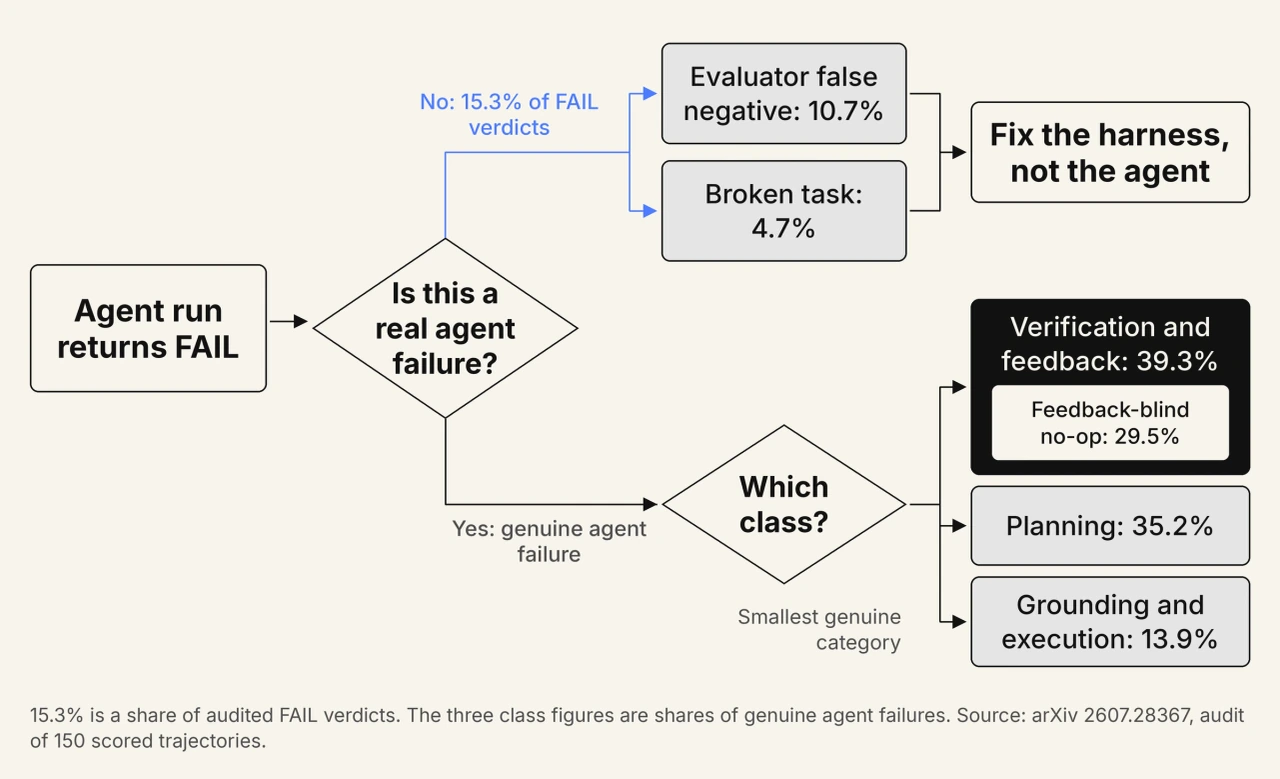
That distribution overturns the intuitive assumption. Most teams instrument for misclicks, but grounding is the smallest genuine category, and the dominant defect is an agent that does not look at what it just did. The canonical example is an agent clicking a results button 27 times while the screen never changed.
Two rules follow. Add a no-progress detector that aborts when consecutive screenshots are unchanged, and record the triage class on each run so the split is visible over time. The same audit reported only moderate annotator agreement on which tier a failure belongs to, so treat the class as a working label rather than a fact.
Step 5: Gate a Non-Deterministic Agent in CI
Nobody has published a production merge gate for a screen-driven agent, so the honest answer is that this is an assembled pattern rather than an established practice. The pieces that do exist are ephemeral sandboxes, repeated runs, and quarantine discipline imported from ordinary flaky-test handling.
The synthesis below is ours, not a documented standard. A binary assertion cannot express what a repeated agent run produces, so use three outcomes instead of two.
- Pass: All N runs satisfied every checkpoint, which is the only state that should let a change through unattended.
- Fail: Zero runs succeeded and triage confirmed a genuine agent failure rather than an evaluator or environment fault.
- Inconclusive: Some runs succeeded, or a no-progress abort fired, or triage found a harness fault. Record it, quarantine the task, and do not block the merge.
Comparing two releases needs a paired test rather than two averages, because a change can raise the mean while making more individual tasks unreliable. Compare per-task outcomes on the same task set, and treat a drop in the all-runs-pass count as a regression even when the headline average improved.
Maintaining that harness, the scenario set, and the scoring is a standing engineering cost, and the same problem recurs across chat, voice, and phone agents. Agent Testing runs the loop as a hosted evaluation platform, so the team shipping the agent does not also maintain the scoring infrastructure.
- Generated scenario sets: Upload documentation or an agent prompt and the platform auto-generates 60 to 100 or more test scenarios per workflow, which removes the manual task-authoring bottleneck.
- Scored quality dimensions: Each scenario is scored across 9 quality dimensions for chat and voice, producing per-scenario pass or fail plus failing transcripts with annotated evidence.
- Pipeline verdicts: The testmu-a2a-cli outputs JUnit XML and exits non-zero on failure, so the result wires into GitHub Actions, GitLab CI, Jenkins, or CircleCI without a custom plugin.
You can read the testing your first ai agent guide for the connection steps and the scoring model.
Test Non-Deterministic Agents Against Repeatable Scenario Sets

Which Workflows Fit Today, and Do Computer Use Agents Replace QA Engineers?
Strong fits today are repetitive workflows on systems with no API, background data gathering, and exploratory interface testing. Weak fits are high-volume, latency-sensitive, or irreversible transactions. Execution shifts toward agents, while oracle design, test strategy, and the release decision stay with human engineers.
The fit test is reversibility and tolerance for latency. Invoice processing, legacy data entry, and portfolio data extraction all tolerate a twenty-minute run that gets checked afterwards. A payment submission does not, because the residual injection rate and the silent-failure modes both land on an action nobody can undo.
The role question has a narrower answer than the headlines suggest. An agent that clicks through a happy path replaces the shallowest layer of manual checking. It does not produce the test strategy, the oracle, or the judgment about whether a release is safe, and someone still has to review what it produced.
In the Reddit thread "E2E QA with Codex 5.5 (allegedly)" on r/QualityAssurance, SDETs debated a fintech team's claim that a screen-driven agent handles its end-to-end QA. The top comment reported that Claude could not write meaningful E2E tests beyond a basic level in a 1.4 million line codebase, and another relayed the presenter's own phrase that the agent essentially clicks around. Most commenters rejected the claim.
The vendor claim at the centre of that discussion was never independently verified. That scepticism is the correct default for any single reported success rate in this category, including the ones in this article. For the scoring side, see testing non deterministic ai outputs and ai agent testing.
Conclusion
Start by running one real task three times and recording what changed between the runs. That single exercise tells you more about whether a computer use agent fits your workflow than any leaderboard row, because it measures the thing a pipeline actually needs: the same correct outcome, repeatedly.
The engineering position as of August 2026 is consistent across vendors. Capability is real and improving, every major surface is still labelled beta or preview, single-run scores overstate reliability, and verification failures rather than misclicks cause most genuine errors. Treat the agent as a system under test, keep a replayable trace, and let a deterministic script hold the merge gate.
The practical next step is to build the artifact before you build the agent, because a run you cannot reconstruct is a run you cannot debug. The same repeat-and-score method applies to conversational systems, and TestMu AI's AI agents cover the evaluation stages across those surfaces.
Sources and References Used
- [1] OSWorld 2.0: Benchmarking Computer Use Agents on Long-Horizon Real-World Tasks - arXiv (June 2026)
- [2] Computer Use Tool Documentation - Anthropic (August 2026)
- [3] Automate Web and Desktop Apps with Computer Use - Microsoft Copilot Studio (August 2026)
- [4] Computer Use Tool Guide - OpenAI Platform Documentation (2026)
- [5] Computer Use in Azure AI Foundry Models - Microsoft (June 2026)
- [6] Computer Use with the Gemini API - Google (July 2026)
- [7] Deprecations and Model Retirements - OpenAI Platform Documentation (July 2026)
- [8] trycua/cua: Docker for Computer-Use Agents - GitHub (2026)
- [9] OSWorld: Benchmarking Multimodal Agents for Open-Ended Tasks in Real Computer Environments - XLANG Lab (2024)
- [10] ScreenSpot-Pro: GUI Grounding for Professional High-Resolution Computer Use - arXiv (April 2025)
- [11] OSWorld-Human: Benchmarking the Efficiency of Computer-Use Agents - arXiv (June 2025)
- [12] FAQ for the Computer Use Tool - Microsoft Copilot Studio (May 2026)
- [13] On the Reliability of Computer Use Agents - Gonzalez-Pumariega, Agashe, Yang, Li and Wang, arXiv (April 2026)
- [14] tau-bench: A Benchmark for Tool-Agent-User Interaction in Real-World Domains - arXiv (June 2024)
- [15] A Verification Layer for Browser Agents: Amazon Case Study - Hacker News Discussion (2026)
- [16] Piloting Claude in Chrome - Anthropic (August 2025)
- [17] VPI-Bench: Visual Prompt Injection Attacks for Computer-Use Agents - arXiv (June 2025)
- [18] Computer Use Agents in Practice: Automating UI Testing - Violetta Nguyen, ML6 (July 2026)
- [19] Launch HN: Coasty, An API for Computer-Use Agents - Hacker News Discussion (2026)
- [20] How Benchmarks Mis-Score Computer-Use Agents - arXiv (July 2026)
Author

Prince Dewani
Blogs: 30

Prince Dewani is a Community Contributor at TestMu AI specializing in AI agents, software testing, QA, and SEO. He is certified in Selenium, Cypress, Playwright, Appium, Automation Testing, and KaneAI, and presented academic research on AI agents at PBCON-01. At TestMu AI, he has also carried out extensive cross-browser research on the support of modern web technologies such as WebGPU, WebAssembly, WebXR, WebGL2 and other web technologies, validating their compatibility and feature parity across major browsers and rendering engines through rigorous hands-on testing. Prince has hands-on experience building AI agent workflows using Anthropic Claude, Google Antigravity, n8n, LangChain, and other agentic frameworks, and works regularly with MCP and A2A protocols. He shares his work with 5,500+ QA engineers, developers, DevOps experts, tech leaders, and AI agent practitioners on LinkedIn.
Reviewer

Chaitanya Sharma
Reviewer
Chaitanya Sharma is an AI Product Manager at TestMu AI (formerly LambdaTest), where he builds agentic AI capabilities focused on computer vision and multi-modality, moving testing beyond static script execution toward autonomous, agent-driven workflows. Before TestMu AI he shipped 135+ features at Sprinklr for a no-code community and website builder used by Fortune 500 enterprises including Dell, Samsung, and Polestar. At Policybazaar he led the zero-to-one launch of a digital lending and insurance marketplace embedded in Bahrain's dominant payments app, building a risk-intelligence engine that compressed loan-approval times by 80%. He explored machine learning and NLP through research at the University of Cambridge, and holds a B.Tech from Delhi Technological University.


Computer Use Agents FAQs
Did you find this page helpful?
More Related Blogs
TestMu AI forEnterprise
Get access to solutions built on Enterprise
grade security, privacy, & compliance
- Advanced access controls
- Advanced data retention rules
- Advanced Local Testing
- Premium Support options
- Early access to beta features
- Private Slack Channel
- Unlimited Manual Accessibility DevTools Tests