

Power Your Software Testing with AI Agents and Cloud
The Native AI-Agentic Cloud Platform to Supercharge Quality Engineering. Test Intelligently and Ship Faster.


- TestMu AI (Formerly LambdaTest)
- /
- Blog
- /
- What Is AODA Compliance: An Essential Accessibility Guide
What Is AODA Compliance: An Essential Accessibility Guide
Learn AODA compliance essentials, website requirements, and tools to ensure accessible, inclusive digital experiences for all users.
Last Updated on:
AODA compliance is essential for organizations to follow in order to ensure their websites, applications, and customer interactions are accessible and inclusive. It establishes clear accessibility standards that businesses, non-profits, and public sector organizations must meet. Achieving AODA compliance not only fulfills legal obligations but also enhances user experience, builds trust, and reflects a strong commitment to accessibility.
TL;DR
What Is AODA Compliance?
AODA compliance ensures organizations in Ontario make all services, websites, and digital platforms accessible to people with disabilities. It is a legal framework designed to remove barriers and promote inclusivity across public and private sectors.
Five AODA Standards
- AODA is Ontario legislation requiring accessible digital and physical services.
- AODA website requirements are built on WCAG, so WCAG work counts twice.
- Businesses with 20 or more employees report every three years, next due December 31, 2026.
- Designated public sector organizations report every two years instead.
Requirements of AODA Compliance
- POUR Principles: Content must be Perceivable, Operable, Understandable, and Robust.
- Text Alternatives: Provide alt text for images and non-text content.
- Keyboard Navigation: Ensure all functionality works without a mouse.
- Color Contrast: Maintain a minimum 4.5:1 contrast ratio for readability.
- Responsive Design: Make websites adaptable to all screen sizes and devices.
- Accessible Documents & PDFs: Ensure downloadable files are readable and accessible.
- Multimedia Accessibility: Add captions and alternatives for all media.
- Forms & Interactive Elements: Make forms, menus, and modals accessible with labels and clear instructions.
- Testing & Validation: Regularly audit websites using tools and manual checks for accessibility.
Deadlines and Consequences
Organizations must meet compliance deadlines and submit accessibility reports. Non-compliance can result in substantial fines, legal action, and reputational harm, making accessibility both a legal and ethical responsibility.
What Is AODA Compliance?
AODA is an acronym that stands for Accessibility for Ontarians with Disabilities Act. AODA ensures that everyone, including those with disabilities in Ontario, Canada, can easily access websites, applications, services, and public spaces.
This compliance helps to structure and enforce standards that ensure digital experiences are accessible to people with disabilities. The act received royal assent on June 13, 2005, and set a goal of an accessible Ontario by 2025, with obligations phased in over time. Since January 1, 2021, large organizations (50 or more employees) and public sector organizations have been required to make their public websites and web content accessible.
Under the AODA, the legal minimum for websites is WCAG 2.0 Level AA. Adopting the newer WCAG 2.2 is not yet a legal requirement but is recommended as best practice, since it addresses accessibility needs beyond the original WCAG 2.0 criteria. AODA compliance spans several areas, but this guide focuses on the digital experience aspect.
Complying with AODA in the digital space means that websites and applications must be accessible to people with disabilities by adding the necessary features that aid their use.
A user-centered approach matters as much as the checklist. Interfaces that let people adjust text size, contrast, and motion serve a far wider range of needs than a bare pass on the minimum requirements.
Role of AODA Standards in Digital Accessibility
The segment of the AODA standards that dwells on digital accessibility is the Information and Communication standard. This standard adheres to the Web Content Accessibility Guidelines (WCAG) to create an inclusive and user-friendly digital experience.
However, since the Information and Communication standard is based on the WCAG, it automatically follows these four core principles, usually referred to as POUR:
- Perceivable: Ensures digital content can be accessed by everyone, including people with sensory disabilities such as vision or hearing impairments.
- Operability: Ensures navigation and functionality are easy for everyone, including those using assistive technologies for keyboard access or focus management.
- Understandability: Emphasizes keeping digital content and the user interface readable and clear.
- Robustness: Ensures digital content works across different browsers, devices, and assistive technologies, such as screen readers.
The primary role of the AODA standards regarding digital accessibility is to ensure that your digital content conforms to the WCAG 2.0 Level AA standards.

Note: Scan your site against WCAG and AODA criteria with TestMu AI Accessibility Testing. Try TestMu AI Now!
Five Standards Under the AODA Compliance
Businesses and organizations that provide digital services must adhere to the five main AODA standards to ensure accessibility for all users, including people with disabilities:
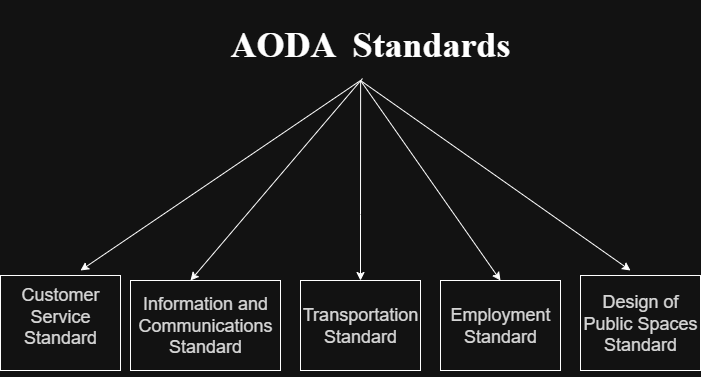
- Customer Service Standard: Ensure that the way services are delivered online is accessible to everyone. This includes supporting assistive technologies, providing accessible guidance or help features, and designing interactions that make digital services easy to use.
- Information and Communications Standard: Make all digital content, websites, documents, and videos accessible. Content should be perceivable, operable, understandable, and robust, following web accessibility rules like WCAG 2.0, so every user can read, hear, and interact effectively.
- Transportation Standard: For digital platforms that facilitate movement or access, such as ride-booking apps, public transport portals, or navigation tools, ensure these services are accessible to all users.
- Employment Standard: Ensure that digital workplaces and HR platforms support employees with disabilities. This includes fair hiring practices, accessible virtual interviews, and providing digital tools or accommodation plans to enable all employees to work effectively.
- Design of Public Spaces Standard: Ensure that public-facing digital and physical spaces support universal access. This includes creating intuitive navigation, removing barriers that may affect people with mobility or other disabilities, and maintaining consistent accessibility across all environments.
AODA Website Requirements
The AODA website requirements are based on WCAG 2.0 Level AA standards. Your website should follow the “POUR” principles, which means content must be Perceivable (can be seen or heard), Operable (easy to navigate and use), Understandable (clear and easy to comprehend), and Robust (works across devices, browsers, and assistive technologies).
Here are some AODA website requirements:
- Essential Accessibility Features for Websites: Your website must include several mandatory elements. Make sure you provide text alternatives (alt text for images), full keyboard navigation (so users can operate the site without a mouse), and maintain proper color contrast accessibility standards that is (minimum 4.5:1 for normal text) to ensure all users can read content easily.
- Mobile and Responsive Design: Ensure your website is fully responsive, adapting smoothly to different screen sizes and devices.
- Accessible Documents & PDFs: Make all downloadable documents accessible and readable directly on your website in user-friendly formats.
- Multimedia Accessibility: Provide captions and transcripts for all video and audio content, and include alternatives for any time-based media.
- Forms and Interactive Elements: Design all forms to be accessible, with proper input placeholders, labels, and clear error messages. Ensure interactive elements like drop-down menus and modals are easy to use for all users.
- Testing and Validation Tools: Regularly audit your website during development. Use accessibility testing tools and manually test from the perspective of users who rely on assistive technologies to ensure compliance.
After covering these key requirements, here are some ways to achieve and maintain easier accessibility on your website, ensuring a seamless and inclusive experience for all users.
AODA Compliance Checklist for Digital Accessibility
The AODA Compliance checklist helps you ensure your digital content meets accessibility standards and is usable by everyone, including people with disabilities.
By following this checklist, you can identify gaps, implement improvements, and maintain compliance across your websites, applications, and online platforms.
- Manual and Automated Testing: Conduct both manual and automated accessibility testing using tools like WAVE, Axe, and screen readers to ensure compliance.
- User Involvement in Testing: Involve users with disabilities in usability testing to gather real-world feedback on your digital content.
- Keyboard Operability: Ensure all content is fully operable via keyboard, so users can navigate without a mouse.
- Alt Text for Images and Non-Text Elements: Provide descriptive alt text for all images, icons, and other non-text elements.
- Color Contrast Accessibility: Maintain sufficient color contrast between text and background (minimum 4.5:1) for readability.
- Captions and Transcripts: Include captions for all videos and transcripts for audio content to make multimedia accessible.
- Accessible Documents & PDFs: Make PDFs and downloadable documents accessible and properly tagged for screen readers.
- Accessible Forms: Design forms with clear labels, helpful error messages, and guidance for corrections.
- Interactive Elements Accessibility: Ensure buttons, menus, and other interactive elements work with keyboard and assistive technologies.
- Regular Audits and Updates: Regularly audit and update digital content to maintain AODA compliance.
- Handling User-Reported Issues: Set up a clear process to address and resolve accessibility issues reported by users.
To ensure your organization consistently meets AODA compliance, it’s important to regularly review and test your digital services for accessibility. Using the web accessibility checklist can help identify areas that need improvement and ensure compliance, making your websites, applications, and platforms fully accessible to all users.
AODA Deadline and Consequences
AODA establishes deadlines to ensure organizations provide accessible services and digital experiences for everyone. Failure to comply can result in penalties, legal consequences, and reputational impact, highlighting the importance of maintaining accessibility standards.
AODA Deadline:
- January 1, 2021: Large organizations (50 or more employees) and designated public sector organizations must ensure their public websites and web content meet WCAG 2.0 Level AA (with limited exceptions for live captions and pre-recorded audio description), per the Ontario government.
- January 1, 2025: The AODA's target date for an accessible Ontario. Note that the web accessibility requirement is WCAG 2.0 Level AA, in force since 2021, and has not been raised to WCAG 2.1 or 2.2 in law.
- Every three years: Businesses and non-profits with 20 or more employees must file an Accessibility Compliance Report, and the next deadline is December 31, 2026. Designated public sector organizations file every two years instead, and their most recent deadline was December 31, 2025.
Consequences of Non-Compliance:
- Fines: The AODA provides for monetary penalties for ongoing non-compliance, enforced by the Government of Ontario.
- Legal Action: Complaints may be filed through the Human Rights Tribunal of Ontario, which can lead to legal proceedings.
- Reputation Damage: Non-compliance may result in your business name being publicly listed, potentially causing loss of clients and customers.
- Corrective Measures: Before fines are applied, organizations may receive warnings or orders to address accessibility gaps.
AODA Compliance Tools
To meet AODA website accessibility requirements, organizations rely on a mix of accessibility testing tools and manual evaluations. These help identify issues early and ensure digital content is usable by people with disabilities.
Some widely used tools include:
TestMu AI Accessibility DevTools
A cloud-based accessibility testing platform, powered by the Axe-core rules engine, that lets organizations run both manual and automated accessibility checks across multiple browsers and devices. It maps findings to WCAG success criteria so teams can identify and fix the issues that underpin AODA compliance.
This Accessibility DevTools Chrome extension provides full, partial, multi-page, and workflow scans, along with detailed accessibility reports displayed on an intuitive dashboard.
Key features:
- Full Page Scan: Check entire web pages for accessibility issues.
- Partial Page Scan: Focus on specific sections or components of a page.
- Multi-Page Scan: Evaluate multiple URLs for consistency.
- Workflow Scan: Capture dynamic interactions and page transitions.
- Real-Time Issue Detection: Highlight accessibility violations directly in the browser.
- WCAG-Guided Fixes: Offers remediation guidance mapped to WCAG success criteria, the technical basis of AODA compliance.
- Accessibility Automation: Can be integrated with Selenium, Cypress, or Playwright for automated testing.
- Reporting: Track accessibility progress and generate compliance-ready reports.
You can begin with manual accessibility testing. Check out this TestMu AI Accessibility DevTools documentation.
The full Accessibility Testing Suite extends this with CI/CD automation for Selenium, Cypress, and Playwright, scheduled monitoring, and real-device mobile app scanning, so accessibility checks run continuously rather than as a one-off audit.
WAVE
A free browser extension that visually marks accessibility errors, alerts, and features directly on a webpage. It’s great for quick checks on color contrast, missing alt text, headings, and ARIA attributes.
Key features:
- Errors and Alerts: Highlights accessibility errors and warnings on webpages.
- Alt Text and Headings: Identifies missing alt text, heading structure, and ARIA attributes.
- Visual Overlays: Displays issues directly on the page for easier detection.
Axe DevTools
An open-source accessibility engine available as a browser extension and library. It identifies WCAG compliance issues and can be integrated into accessibility automation workflows with frameworks like Selenium, Cypress, and Playwright.
Key features:
- WCAG Violations: Detects compliance violations against WCAG standards.
- Automation Integration: Works with Selenium, Cypress, and Playwright for accessibility automation.
- Rule-based Detection: Identifies issues using an extensive set of accessibility rules.
- DevTools Extension: Runs directly inside Chrome or Firefox Developer Tools.
Lighthouse
A tool built into Chrome DevTools that audits websites for performance, SEO, best practices, and accessibility. It provides accessibility scores and highlights problem areas with suggestions for improvement.
Key features:
- Accessibility Audits: Runs automated scans for accessibility issues.
- Scoring System: Provides accessibility scores for web pages.
- Multi-Audit Support: Covers performance, SEO, best practices, and accessibility.
- Reports: Generates structured reports for developers.
NVDA / JAWS
Screen readers that convert on-screen text into speech or braille output. NVDA is free and open-source, while JAWS is a commercial solution widely used in enterprise environments. Both are essential for testing how visually impaired users experience a site.
Key features:
- Speech Output: Reads out text and UI elements on screen.
- Braille Support: Provides braille display compatibility.
- Keyboard Navigation: Allows interaction through keyboard-only input.
- Real-world Simulation: Helps test accessibility from a visually impaired user’s perspective.
Best Practices for AODA Compliance
Best practices for AODA compliance help organizations go beyond basic requirements. They guide businesses in fostering accessibility, inclusion, and equal access across all services and interactions.
Some of the best practices you can implement to ensure you are AODA compliant are:
- Embed Accessibility in Design: Make accessibility a foundational part of your design, development, and content creation processes, rather than an afterthought.
- Employee Awareness and Training: Regularly train staff across departments, not just developers, on accessibility principles and inclusive practices.
- Inclusive Content Strategy: Ensure all digital content, including text, images, multimedia, and documents, is created with accessibility in mind from the start.
- User-Centered Feedback: Actively involve people with disabilities in usability testing and feedback loops to uncover real-world accessibility issues.
- Accessible Procurement: Evaluate vendors, third-party tools, and software for accessibility before adoption, ensuring they align with your AODA compliance goals.
- Continuous Monitoring: Periodically review and test digital platforms and services to maintain accessibility over time, adapting to updates or new standards.
- Leadership Commitment: Promote a culture of accessibility at the organizational level, with leadership supporting and prioritizing inclusive practices.
- Cross-Department Collaboration: Encourage collaboration between design, development, HR, and customer support teams to ensure accessibility is consistent across all touchpoints.

Conclusion
The primary goal of the AODA, now overseen by Ontario's Ministry for Seniors and Accessibility, is to make the province accessible to all.
The AODA Information and Communication Standard ensures digital accessibility, highlighting the need for websites, applications, and online services to be usable by everyone. Complying with AODA is essential, as failure to do so can result in fines, legal action, and reputational damage.
Regular testing and maintenance help organizations stay compliant and provide inclusive digital experiences.
Citations
- Independent Fourth Review of the AODA (Government of Ontario): Fourth Review of the AODA final report
- AODA Annual Report 2023 (Government of Ontario): AODA Annual Report 2023
- SoK: Detection and Repair of Accessibility Issues: https://arxiv.org/abs/2411.19727
- AODA Toolkit: https://uwaterloo.ca/lib-aoda-toolkit/home
Author

Victory Durosinmi
Blogs: 1


Victory Oluwatosin Durosinmi is a Frontend Developer and Technical Writer with over 3 years of hands-on experience in building user-centric web applications and creating technical content that simplifies complex engineering concepts. He specializes in React, Next.js, TypeScript, Tailwind CSS, and Mantine, and actively contributes to frontend architecture, performance optimization, and documentation. At Sterling Bank, he builds scalable production-grade applications. He has authored multiple frontend engineering articles for OpenReplay, delivering simplified content for global developer audiences. Victory is also the founder of Babyducts, an e-commerce platform he architected from scratch. He contributes to unit and integration testing using Jest and React Testing Library, and is expanding his expertise in automation testing with Cypress and Playwright.
Reviewer

Rahul Mishra
Reviewer
Rahul Mishra is a Lead Member of Technical Staff at TestMu AI (formerly LambdaTest), leading frontend engineering and accessibility testing across the quality engineering platform. He mentors frontend engineers, runs code reviews and sprint planning, optimizes React.js rendering performance, and makes product features accessible to users with disabilities through WCAG and ADA-compliant accessibility audits. He brings 10+ years of experience across React.js, VueJS, TypeScript, Swift, Objective-C, and AWS, with earlier work as a Technical Lead at VectoScalar Technologies. Rahul holds a B.E. in Information Technology.


AODA Compliance FAQs
Did you find this page helpful?
More Related Blogs
TestMu AI forEnterprise
Get access to solutions built on Enterprise
grade security, privacy, & compliance
- Advanced access controls
- Advanced data retention rules
- Advanced Local Testing
- Premium Support options
- Early access to beta features
- Private Slack Channel
- Unlimited Manual Accessibility DevTools Tests