

Power Your Software Testing with AI Agents and Cloud
The Native AI-Agentic Cloud Platform to Supercharge Quality Engineering. Test Intelligently and Ship Faster.


- TestMu AI (Formerly LambdaTest)
- /
- Learning Hub
- /
- What is AI Testing
What is AI Testing: A Complete Guide
A complete guide to AI testing: what it is, how it works, and the tools and techniques teams use to test faster with fewer defects.
Last Updated on:
What Is AI Testing
AI testing refers to the process of running tests using artificial intelligence technologies. Such technologies include machine learning, deep learning, predictive analytics, and more. AI testing can be implemented on a subset of software testing processes also and does not always require complete control over the cycle.
A simple example of AI testing is natural language processing-based test scripting, where the tester can write the test scripts in a plain language (such as English), and the AI system can understand, translate, and perform actions on the given instructions.
In practice, AI testing covers everything from generating and authoring tests, to running them, to maintaining them as the application changes. It can be applied to a single stage of the testing process or across the entire cycle.
Types of AI Testing
- AI-powered test generation: AI creates test cases and scripts from requirements or app behavior, often from plain-language instructions.
- Self-healing test automation: AI updates broken locators automatically when the UI changes, cutting test maintenance.
- Visual AI testing: AI compares screens to catch visual and layout regressions that assertion-based checks miss.
- Predictive, risk-based testing: AI analyzes code changes and past failures to prioritize the tests most likely to find defects.
- Flaky-test detection and root-cause analysis: AI flags unstable tests and traces failures to their underlying cause.
- Agentic testing: Autonomous AI agents plan, author, run, and adapt tests end to end with minimal human input.
For a closer look at how AI handles the full automation cycle, see our guide to AI test automation.
Why Perform AI Testing
AI testing can enhance your testing efficiency, reduce manual effort, improve test coverage, and accelerate release cycles while ensuring higher-quality software applications.
Below are the benefits of how AI enhances different aspects of your testing process:
- Test planning: Analyzes historical test data to optimize test coverage and prioritize test cases based on risk and complexity.
- Test data generation: Automates the creation and management of test data, reducing manual input and ensuring more accurate testing.
- Test case creation: Helps quickly generate test cases by learning from user interactions and previous test executions.
- Test authoring: Simplifies test authoring by offering suggestions and automatically writing tests based on application behavior.
- No-code test automation: Enables testers to automate tests without coding by using visual interfaces and intuitive workflows.
- Auto-healing: Detects changes in the application and automatically updates test scripts, minimizing the need for manual adjustments.
- Flaky test detection: Identifies and flags flaky tests by analyzing patterns in test execution, improving test reliability.
- Root-cause analysis (RCA): Helps identify issues by analyzing test results and tracing failures to their underlying causes.
To further simplify your testing process, you can leverage the AI-native Test Intelligence platform offered by TestMu AI. It provides advanced features such as auto-healing, flaky test detection, RCA, and even more AI-infused features. This can help you boost software reliability and focus on delivering quality software faster.

Note: Harness the power of AI testing with the cloud. Try TestMu AI Now!
How to Perform AI Testing
Someone who wishes to start testing their software project with the inclusion of AI can follow these steps.
- Define clear objectives: AI testing does not have to be fully autonomous. It can be included as part of a phase where it carries the heavier load and leaves minimum manual work for the testers. To achieve this, the team should be clear about the objectives they wish to achieve by introducing AI in their infrastructure.
- Leverage AI technologies: The objectives defined in the previous step will carve the path to select AI tools to include them in the cycle and perform AI testing.
- Train algorithms: Once the team has the technology, they need to train it on their organization’s data so that the algorithm understands the requirements and produces output only relative to this training data. It is an extremely important step and, if possible, should be done by an AI expert.
- Measure the efficiency and accuracy: The trained AI model associated with the algorithm is not foolproof evidence that the model will work as expected. It is because the team has no proof of its accuracy and efficiency except in theory. Therefore, before feeding, the algorithm must be tested through AI testing techniques.
- Model interpretability testing: It verifies the model’s output and decisions, especially when compared to the current software project in which it will be integrated. It helps make sure the outputs are correct and builds trust among the stakeholders about the adoption of the algorithm.
- Bias and fairness testing: It ensures that the algorithm is not biased toward any parameter of the input and the algorithm provides fair and impartial output.
- Data Quality and Validation Testing: It ensures that the data quality provided by the AI algorithm is high. Most of the time it means that the data generated is accurate and covers all the scenarios and corner cases for an enhanced test coverage.
- Adversarial Testing: It ensures the negative inputs do not break the algorithm and make their way out as errors or incorrect inputs. This includes providing wrong and malicious inputs that are either not expected or do not fit with the input criteria of that particular algorithm.
- Black-Box Testing: It tests the output by providing some input to the algorithm but not considering the internal structure or how it works.
- White-Box Testing: It tests the underlying code, the working of the algorithm, and all the other complexities. The inputs provided to the algorithm in this testing are based on all these understandings to cover the hidden and complex cases.
- Integrate With the Test Infrastructure: The tested AI model can then be integrated into the test infrastructure at specific places to conduct smoother AI testing.
For instance, some teams lack resources, and therefore, their main objective is to get the scripting work done through AI. Such clear objectives help the team decide which tool is best and which technology they wish to adopt (such as predictive analytics and NLP).
For instance, in the previous example, the team had to adopt AI due to a lack of resources, and their objective was to get help in writing test cases. In such a scenario, an ideal technology to adopt is natural language processing, through which the test cases can be written in English and be interpreted by NLP models.
For this, below are some AI testing techniques you can use to test an AI algorithm:
AI-Driven Strategies for Software Testing
AI testing strategies involve leveraging artificial intelligence techniques to improve the efficiency, accuracy, and effectiveness of software testing. We have already covered some of the strategies (as benefits) above, like test data generation, test case generation, self-healing automation, and more.
However, here are some more testing strategies you can leverage using AI:
- Exploratory Testing: AI assists exploratory testing by suggesting test scenarios based on user behavior, analyzing interactions, and recommending new areas to explore automatically.
- Visual testing: Using AI-native tools to perform visual comparisons and detect UI changes based on image recognition can help in visual testing. For example, cloud-based testing platforms like TestMu AI offer an AI-native SmartUI cloud to run a visual testing tool across various environments.
- Continuous Testing: AI optimizes continuous testing by prioritizing tests, predicting failures, and adapting test cases based on real-time data, improving automation pipelines in CI/CD environments.
- Performance Testing: AI can simulate real-world user behavior and analyze performance under various conditions, predicting performance bottlenecks and suggesting improvements.
- Security Testing: AI can be used to autonomously identify vulnerabilities, predict threats, and analyze security risks, improving the speed and scope of security testing.
To see these strategies applied in practice, watch our video walkthrough of AI use cases in software testing.
What Is AI-Driven Software Testing?
AI-driven software testing is an approach where artificial intelligence plans, authors, runs, and maintains tests with little manual scripting. Instead of hand-writing and fixing test code, teams describe what to test, and the AI generates the steps, executes them across browsers and real devices, and adapts them when the application changes.
The move from traditional automation to AI-driven testing matters because most QA effort goes into maintenance, not coverage. AI-driven software testing cuts that overhead by self-healing locators, triaging flaky failures, and generating test data on demand, so teams ship faster with fewer escaped defects. Tools like TestMu KaneAI bring AI-driven testing to web, mobile, and API in one workflow.
Tools Used for AI Testing
AI testing spans across wide domains and the team selects the tool that fits the requirement criteria. For instance, if test scripting is moved towards codeless test automation, an NLP-based tool is required for the project.
Such decisions can only be made with the knowledge of AI testing tools and help the team in selecting the perfect tool.
TestMu KaneAI
TestMu KaneAI is a generative AI testing agent that helps you create, debug, and improve tests using plain natural language. Built for fast-moving quality teams, KaneAI makes it easy to build complex tests quickly, saving both time and effort in starting automation.
Key features of KaneAI:
- Intelligent test generation: Effortless test creation and evolution through Natural Language (NLP) based instructions.
- Intelligent test planner: Automatically generate and automate test steps using high-level objectives.
- Multi-language code export: Convert your automated tests in all major languages and frameworks.
- Sophisticated Testing Capabilities: Express sophisticated conditionals and assertions in natural language.
- API Testing Support: Effortlessly test backends and achieve comprehensive coverage by complementing existing UI tests.
- Increased Device Coverage: Execute your generated tests across 3000+ browsers, OS, and device combinations.
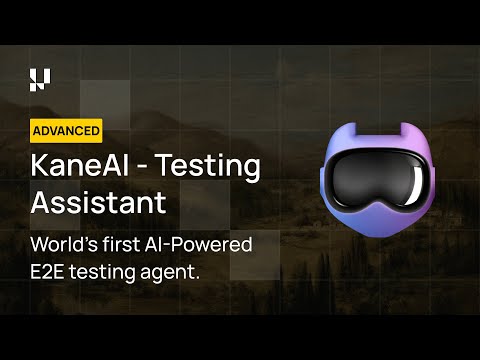
Features:
- Intelligent test generation: Simplifies test creation and updates with natural language-driven instructions.
- Intelligent test planner: Creates and automates test steps based on high-level objectives.
- Multi-language code export: Generates automated tests in all major programming languages and frameworks.
- Smart Show-Me Mode: Translates your actions into natural language instructions to build robust tests effortlessly.

TestCraft
TestCraft is an assisting test automation browser extension powered by artificial intelligence. The integrated AI makes the extension versatile as it makes the tool serve in different ways in different situations depending on the requirements.
Features:
- Automatic Test Case Generation: Provides automatic test case generation where the tester can generate test cases for the framework they use.
- Generate Ideas: Generates ideas and scenarios for the testing phase that help increase the test coverage.
- Generate Accessibility Test Cases:Generates accessibility test cases and can provide suggestions for accessibility issues on the existing test cases.
Tricentis Tosca
Tricentis Tosca is an AI-powered end-to-end test automation tool that works especially in the direction of enterprise testing that includes Salesforce, Oracle, and SAP.
Features:
- Model-based test automation: Divides the application’s view into various smaller units called models. Everything that a tester does is then connected to these models.
- Vision AI: Identifies the UI elements and picks them up for inclusion in test cases using computer vision. This is helpful with dynamic elements where locators change.
- Automatic Test Case Conversion: Record the actions and convert them into test cases.
Functionize
Functionize is an AI-powered test automation platform that leverages machine learning and NLP to create and maintain functional tests. It allows testers to write test cases in plain English, which are then converted into automated tests using its AI engine.
Features:
- NLP Test Creation: Allows testers to define test steps in plain English, which are automatically translated into executable test scripts.
- Self-Healing Tests: Uses ML models to adapt tests when the UI changes, reducing the need for manual test maintenance.
- Visual testing: Performs pixel-level screenshot comparisons to detect unintended visual regressions across releases.
Simplify AI Testing With KaneAI
A lot of the AI testing complexities force us to look for methods through which setup and tuning costs of AI can be minimized. In this situation, it is best to adopt a tool that provides tester-focused features with AI capabilities that can automate most of your tasks with artificial learning.
This is where test agents like KaneAI by TestMu help. It sets itself apart from traditional low-code/no-code solutions by addressing scalability challenges. KaneAI manages complex workflows and supports all major programming languages and frameworks, delivering seamless performance even for the most advanced AI testing needs.
Here are the steps to perform AI testing using KaneAI. In this demonstration, let’s check whether the video available on the Real Devices Cloud page is working fine or not.
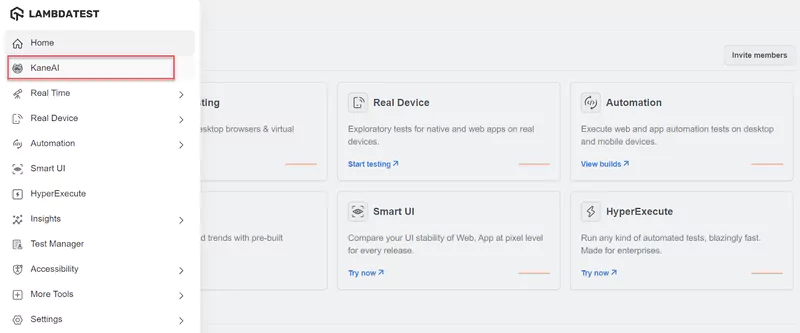
- From the TestMu AI dashboard, click the KaneAI option.
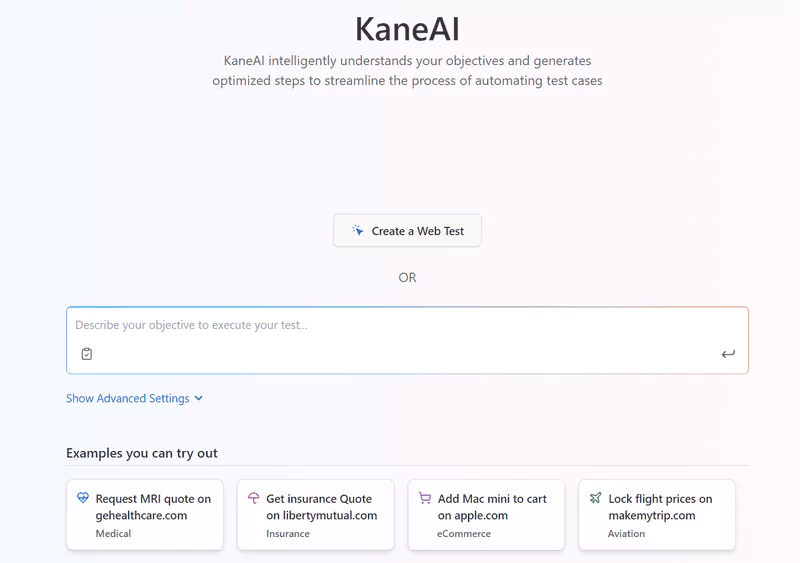
- Click on the Create a Web Test button. It will open up the browser with a side panel available to write test cases.
- In the Write a step text area, let’s write “go to https://www.testmuai.com” and press Enter to visit the website.
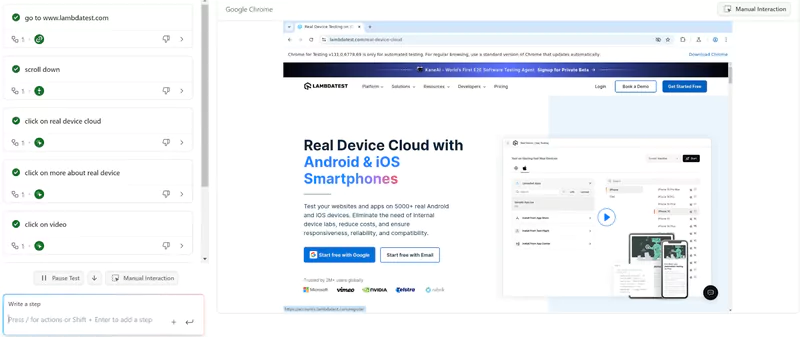
- As soon as we press Enter, the test step is recorded, and the website is opened on the browser. We can repeat the same process now with new test steps. These steps can be as follows:
- Scroll down
- Click on real device cloud
- Click on more about real device
- Click on video
- Click X
- Click on the Finish Test button at the top right to finish this testing session.
Shown below is the snap of the test session, where you can either write the test steps or interact with the browser agent manually. In the latter case, the actions will be recorded and repeated any number of times.
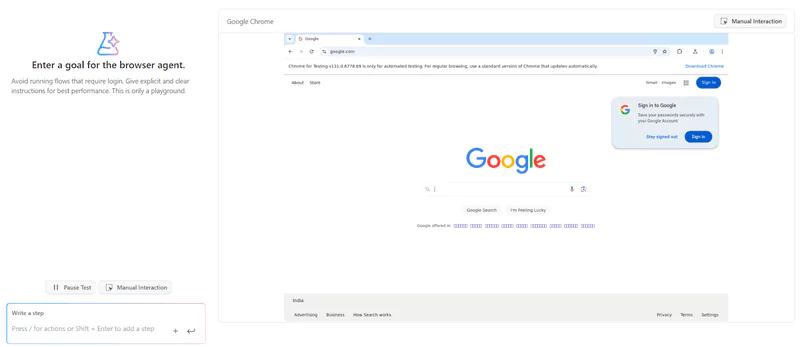
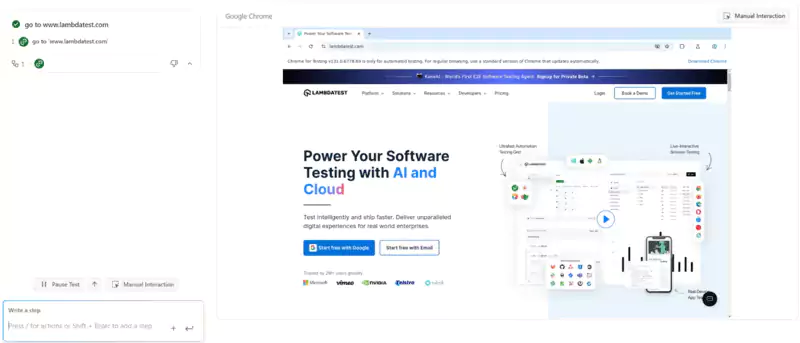
Writing these steps one by one will execute them on KaneAI. These steps are recorded and can be reused later.
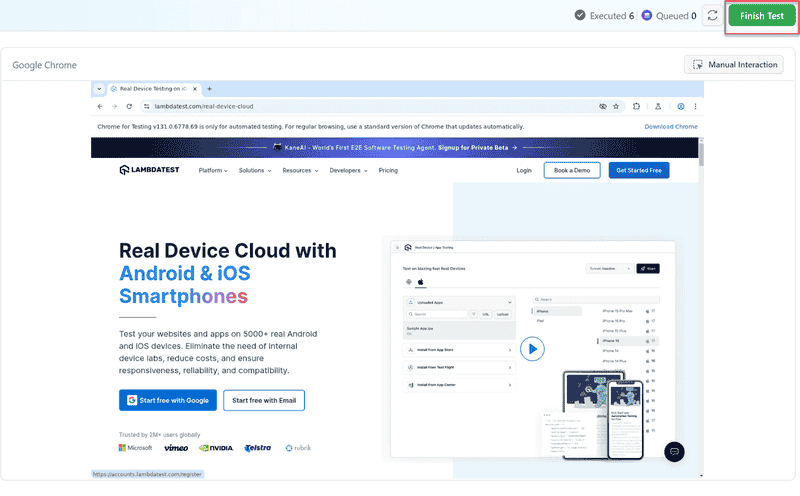
The next screen will ask to save the test case. You can notice how fields such as Test Name and Description are already populated by AI, therefore cutting down the time a tester has to spend on these things. Here, the tests can be saved in a folder and reused later when required.
Challenges in AI Testing
AI testing is easier to use and implement, which is the whole point of integrating AI into the system. However, while the end system is convenient, the processes followed until integration can present various challenges to the teams.
- Verification of AI Algorithms: AI algorithms work mostly with predefined libraries and functions included in the package. The algorithm may be easy to incorporate, but the accuracy of it cannot be determined easily. However, various AI testing techniques are available to accomplish this, but a team may never be able to compare the actual output with algorithms.
- Unpredictability of Algorithms: AI algorithms are sometimes unpredictable as they provide different outputs for the same input. This can lead to doubts over the outputs of the subsequent methods used after the AI algorithms.
- Good Training Dataset: An AI tool may have been trained using a poor dataset where biases might exist. Such a dataset may present a biased output, making the software application biased towards a certain parameter.
- Integration Hurdles: AI testing comes with a major integration challenge with third-party tools because it’s new, complex, and works almost completely autonomously. While there can be some help in CI/CD integrations, testers may have to wait some time for other third-party integrations and streamline the flow.
Best Practices to Follow in AI Testing
The above-defined steps and methods can accomplish AI testing completely. However, to conduct AI testing most optimally, the team should follow certain practices.
- Test the Algorithm First: While adopting a tool or algorithm to integrate into the application, plenty of resources might confirm its behavior and the most suitable environment in which it works. Still, it is always a good practice to test the algorithm according to your project using the data that is generated and used by the application. A tested algorithm is the safest bet when it comes to AI testing.
- Collaboration With Other Tools: Not every AI tool can conduct complete end-to-end testing without any manual efforts. Sometimes, they handle only a part of the application, such as UI and more.
- Avoid Security Loopholes: AI testing requires changes in a lot of processes and involves third-party software or an algorithm taken from known or unknown sources. In such a case, security loopholes can occur, making the setup vulnerable to security threats.
- Sustain High-Quality Datasets: A lot of testing processes require data and AI algorithms are the ones that generate it during the execution or before it in the preparation phase. It is important that a quality check is performed on this dataset to ensure the test execution is done in a high-quality phase.
Therefore, it is a good practice to know the limitations of the AI tool the team is using and collaborate with other tools to create a unified structure. Depending on the AI tool completely can have serious concerns in the future.
An unsecured network is probably the last thing any business would want, as it raises a lot of legal issues. Therefore, before integrating, make sure the setup is secure by either inviting security engineers or cyber security experts who have expertise in this field.
It can be done by verifying the algorithm accuracy that generates data or on the go through an attached algorithm. It can also be done manually, but that can break the autonomous testing flow if that is the end goal.

Conclusion
When we, as testers, are most worried about how things are becoming more and more complex for testing, some technology appears to ease our pain. AI automation is the new addition to this collection, and when it is used in testing, it is termed AI testing.
Generative AI in testing is quickly changing the testing space and brings tons of benefits. However, it is still in its budding stage, and while there are many AI tools available to facilitate the testing process, there are extremely high hopes regarding the future where AI can take over most of the work and perform highly accurate actions with little help from the outside.
It will not only help cut costs but involve testers in other activities where solutions to highly complex and challenging problems can be derived, which are currently pending and waiting to be explored.
Author

Salman Khan
Blogs: 146


Salman is a Test Automation Evangelist and Community Contributor at TestMu AI, with over 6 years of hands-on experience in software testing and automation. He has completed his Master of Technology in Computer Science and Engineering, demonstrating strong technical expertise in software development, testing, AI agents and LLMs. He is certified in KaneAI, Automation Testing, Selenium, Cypress, Playwright, and Appium, with deep experience in CI/CD pipelines, cross-browser testing, AI in testing, and mobile automation. Salman works closely with engineering teams to convert complex testing concepts into actionable, developer-first content. Salman has authored 120+ technical tutorials, guides, and documentation on test automation, web development, and related domains, making him a strong voice in the QA and testing community.


Frequently asked questions
Did you find this page helpful?
More Related Blogs
TestMu AI forEnterprise
Get access to solutions built on Enterprise
grade security, privacy, & compliance
- Advanced access controls
- Advanced data retention rules
- Advanced Local Testing
- Premium Support options
- Early access to beta features
- Private Slack Channel
- Unlimited Manual Accessibility DevTools Tests