
Browser Infrastructure for AI Agents with Browser Cloud
Give Your AI Agents Real Cloud Browsers with Session Persistence, a Localhost Tunnel, and Session Replay.

A coding agent is asked to fix a failing test. A README in the repo tells it to clear the build cache first, so it runs the command it was given, and the command reaches past the project folder because nothing on the machine stops it. Whether that ends in a lost afternoon or nothing at all depends on where the agent's commands run.
That place is an AI sandbox. This guide covers what an AI sandbox is, which isolation layer fits which kind of agent, and how to prove the boundary holds with a probe you can run yourself. I ran every script in it: the node:vm escape and the escape probes on Node.js 24.14.0, and the browser isolation check on TestMu AI Browser Cloud.
Overview
An AI sandbox is an isolated environment where an AI agent, or the code a model writes, runs with restricted access to the host's files, network, processes and credentials. If the agent runs a destructive command or follows an injected instruction, the damage stays inside a disposable boundary.
Which Isolation Layers Can an AI Sandbox Use?
- Process sandbox: Operating system features restrict what one command can read, write and reach, with no VM to start. Coding agents such as Codex use this layer to keep shell commands inside the project folder.
- Container: Namespaces give the agent its own filesystem and process view, but every container shares the host kernel, so a kernel or runtime bug can turn into an escape.
- gVisor: An application kernel in user space intercepts the agent's system calls instead of passing them to the host kernel, trading some per-call overhead for a smaller attack surface.
- MicroVM: A small virtual machine with its own guest kernel, such as a Firecracker microVM, gives each agent task hardware-level isolation and starts fast enough to create one per task.
- Isolated browser session: Agents that browse get one browser per task, with its own cookies and storage. TestMu AI Browser Cloud gives each session an isolated, real Chrome instance in the cloud.
How Do You Test That an AI Sandbox Holds?
Run an escape probe from inside the sandbox: try to read and write outside the workspace, spawn a process, read secrets from the environment, reach a host that is not on the allowlist and reach the cloud metadata address 169.254.169.254. Any probe that succeeds where your policy says it should fail is a hole to close.
What Is an AI Sandbox?
An AI sandbox is a restricted execution environment for code that an AI model writes or an AI agent runs. It decides what that code can reach on the machine: which files it reads and writes, which hosts it connects to, which processes it starts and which secrets it sees. Everything outside that list fails.
The NIST glossary quotes CNSSI 4009-2022, which defines a sandbox as a restricted, controlled execution environment that prevents potentially malicious software from accessing any system resources except those for which the software is authorized.
What agents change is who writes the code. An agent builds commands at runtime from the prompt, the repo and tool output, so nobody reviews each one before it runs, and the sandbox has to treat every command as possibly hostile.
Search results mix in other meanings of the term:
- Model playground - a web console where you try prompts and models without building an app, such as Google AI Studio or the OpenAI Playground. The TestMu AI short below covers this meaning.
- Campus AI sandbox - universities offer AI tools to their campus communities under this name; UC Berkeley's Campus AI Sandbox, for example, runs as a limited campus-wide pilot.
- Regulatory sandbox - Article 57 of the EU AI Act requires each Member State to establish at least one AI regulatory sandbox, where AI systems are developed and tested under supervision before release.

This guide covers the isolation meaning: a boundary around agents and the code they run. For sandboxes in general testing work, such as API sandboxes and ephemeral cloud environments, see the sandbox environment guide.
Risks an AI Sandbox Contains
The OWASP Top 10 for Agentic Applications lists Unexpected Code Execution as ASI05: attackers use an agent's code generation or tool access to escalate its actions into remote code execution. Its mitigations include running code in sandboxed containers with strict limits, including network access, and restricting filesystem access to a dedicated working directory.
An agent gets there through ordinary routes:
- Injected instructions - text in a README, an issue or a web page tells the agent to run a command, and the agent treats it as part of the task.
- Wrong commands - the model writes a cleanup step with the wrong path, or a recursive delete one directory too high.
- Install scripts - the agent installs a package, and the package's install script runs with the agent's permissions.
- Inherited credentials - the shell the agent runs in holds cloud keys, SSH keys and tokens in files and environment variables.
The wider agent risks, from goal hijack to rogue agents, are covered in the AI agent security guide. A sandbox handles the subset that ends with code running on a machine you care about.
Which Isolation Layer Should an AI Sandbox Use?
Each layer moves the boundary further from your host kernel, and each step costs startup time or compatibility. Match the layer to how much you trust the code the agent will run.
| Layer | What it isolates | What it still shares | Fits |
|---|---|---|---|
| Process sandbox (Seatbelt, bubblewrap) | Files, network and process creation for each command the agent runs | The host kernel and your user account | Your own coding agent on a developer machine |
| Container (Docker, Kubernetes pods) | Filesystem view, process tree and network namespace | The host kernel | Code you mostly trust, such as CI jobs |
| gVisor | System calls, which a user-space kernel handles instead of the host | The host kernel that gVisor itself runs on | Untrusted code in container platforms |
| MicroVM (Firecracker, Kata Containers) | A full guest kernel and memory space per workload | The hypervisor, KVM on the host | Code from many users or models on shared hosts |
| Isolated browser session | Cookies, storage and logins for each browsing task | Any credentials the agent types into a page | Agents that browse the web |
Firecracker, the microVM monitor that AWS built to run services such as AWS Lambda, boots a microVM in under 125 ms with under 5 MiB of overhead per VM, and can create up to 150 microVMs per second per host.
At that startup cost, creating a fresh VM for every agent task is practical, and nothing from one task survives into the next.
gVisor's documentation describes it as an application kernel written in Go that intercepts application system calls instead of passing them to the host kernel, to minimize the risk of a container escape. The same page states the price: reduced application compatibility and higher per-system-call overhead.
On Kubernetes, the kubernetes-sigs agent-sandbox project, under SIG Apps, adds a Sandbox resource for isolated, stateful agent runtimes and hands the isolation itself to runtimes such as gVisor or Kata Containers.
Coding agents ship the process layer built in. OpenAI's Codex documentation says it uses Seatbelt on macOS and bwrap plus seccomp on Linux, with network access off by default, and the Codex CLI guide walks through its sandbox modes. Claude Code uses Seatbelt on macOS and bubblewrap on Linux and WSL2, and its documentation says it runs commands unsandboxed on native Windows.
A quick way to choose:
- Your own agent on your own laptop - the agent's built-in process sandbox, with network access off until a task needs it.
- Code from many users or models - a microVM or gVisor per session, never one shared container.
- An agent that browses - a separate browser session per task, covered below.
Let Claude Code write Playwright tests that actually pass.

Why Is node:vm Not an AI Sandbox?
A common first attempt in a Node.js agent is to run generated code with node:vm in an empty context. The Node.js vm documentation opens with the reason that fails: "The node:vm module is not a security mechanism. Do not use it to run untrusted code."
I ran this script on Node.js 24.14.0, in a workspace folder with a canary file one level up. The context object is empty, so the code inside it has no require and no process:
// vm-escape.js: "sandboxed" code reaches the host process
const vm = require('node:vm');

const context = vm.createContext({}); // empty: no require, no process
const untrusted =
  "const p = this.constructor.constructor('return process')();" +
  "p.getBuiltinModule('node:fs').readdirSync('..').join(', ')";

console.log('typeof process inside the context:',
  vm.runInContext('typeof process', context));
console.log('files listed from the host:',
  vm.runInContext(untrusted, context));
It printed:
$ node vm-escape.js
typeof process inside the context: undefined
files listed from the host: outside-canary.txt, workspace
The context hides process, but its objects still lead back to the host's Function constructor. this.constructor.constructor builds a function in the host realm, that function returns the real process, and getBuiltinModule('node:fs') lists the folder above the workspace. The same two lines could read SSH keys or environment variables.
In-process tricks like this one share memory and objects with the host, so one missed reference is an escape. Run generated code in a separate process at the least, and behind one of the layers in the table when the code comes from a model you do not control.
Browser Isolation Between Agent Tasks
A browsing agent needs a boundary between the page and the machine, and another between tasks. Chromium's sandbox handles the page side: its design assumes sandboxed code is malicious and relies on the operating system's security to confine what page code can do. The Playwright sandbox analysis covers why an agent's browser should keep that sandbox switched on.
Between tasks, the risk is leftover state. A browser that one task logged into still holds that task's cookies, local storage and sessions when the next task starts, so a task for another user, or one that reads a prompt-injected page, inherits access it was never given.
TestMu AI Browser Cloud builds the between-task boundary into its session model: each session is an isolated, real Chrome instance in the cloud, created with sessions.create() and torn down when you release it. Persistence is opt-in, and the Browser Cloud session configuration docs list a profileId option that loads and saves a persistent browser profile when you want state to carry over.
I tested that boundary with three sessions. Task A sets a localStorage marker and a cookie on the Selenium Playground, task B opens the same page in a new session, and a third run does both tasks in one reused browser. The SDK (npm install @testmuai/browser-cloud) reads TestMu AI credentials from the LT_USERNAME and LT_ACCESS_KEY environment variables, so the script holds no keys:
// isolation.js, part 1 of 3: one fresh cloud browser per agent task
const { Browser } = require('@testmuai/browser-cloud');
const client = new Browser();
const SITE = 'https://www.testmuai.com/selenium-playground/';

async function inOwnSession(name, task) {
  const session = await client.sessions.create({
    adapter: 'playwright',
    lambdatestOptions: { build: 'AI sandbox: per-task sessions', name },
  });
  const { browser, page } = await client.playwright.connect(session);
  try {
    return await task(page);
  } finally {
    await browser.close();
    await client.sessions.release(session.id);
  }
}
// isolation.js, part 2 of 3: task A leaves state behind in its browser
async function readState(page) {
await page.goto(SITE);
const cookies = await page.context().cookies();
return {
marker: await page.evaluate(() => localStorage.getItem('agentTask')),
cookie: cookies.some((c) => c.name === 'agent_task'),
};
}
async function taskA(page) {
await page.goto(SITE);
await page.evaluate(() => {
localStorage.setItem('agentTask', 'A');
document.cookie = 'agent_task=A; path=/; max-age=3600';
});
return readState(page);
}// isolation.js, part 3 of 3: task B in its own session vs a reused one
(async () => {
const a = await inOwnSession('agent-task-A', taskA);
const b = await inOwnSession('agent-task-B', readState);
const reused = await inOwnSession('task-A-then-B-one-browser',
async (page) => { await taskA(page); return readState(page); });
console.log('task A, own session: ', JSON.stringify(a));
console.log('task B, own session: ', JSON.stringify(b));
console.log('task B, reused browser:', JSON.stringify(reused));
})();With @testmuai/browser-cloud 1.0.1, the script printed:
$ node isolation.js
task A, own session:    {"marker":"A","cookie":true}
task B, own session:    {"marker":null,"cookie":false}
task B, reused browser: {"marker":"A","cookie":true}
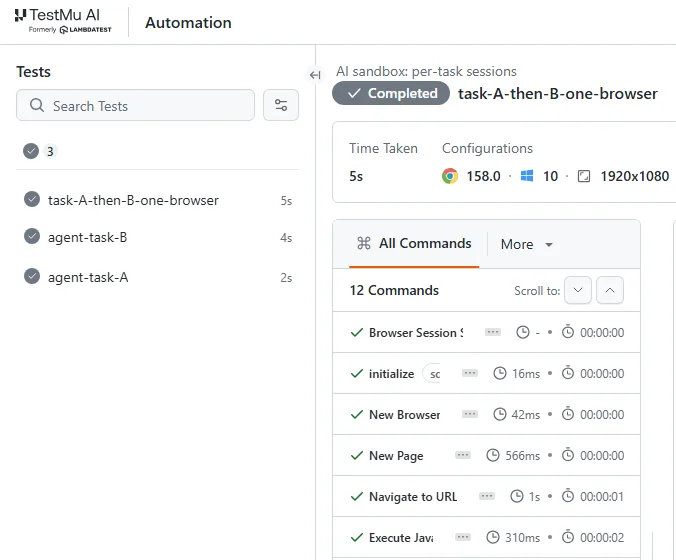
Task B found nothing in its own session, while the same task in a reused browser inherited the marker and the cookie. All three sessions ran on Chrome 158 on Windows 10 in build 112930731, finished in 2 to 5 seconds each, and recorded a video and a command log:
The browser sandbox for AI agents page covers the rest of that setup, including tunnels to private apps and per-run recordings, and the guide to browser infrastructure for AI agents covers scaling it to many parallel agents.

Note: Give each agent task its own real Chrome session on TestMu AI Browser Cloud, with a video and a command log for every run. Start free with TestMu AI
How Do You Test That an AI Sandbox Holds?
Run an escape probe from inside the sandbox whenever the sandbox config, the base image or the agent's tool list changes, and treat any probe that succeeds against policy as a failing test.
This probe uses only Node.js built-ins. It attempts actions an agent should not be able to take by default and prints OPEN or CLOSED for each:
// probe.js, part 1 of 2: run it inside the sandbox, from the workspace
const fs = require('node:fs');
const { execFileSync } = require('node:child_process');

async function probe(name, fn) {
  try {
    await fn();
    console.log('OPEN    ' + name);
  } catch (e) {
    const code = e.cause ? e.cause.code : e.code;
    const why = typeof code === 'string' ? code : e.name;
    console.log('CLOSED  ' + name + ' (' + why + ')');
  }
}
// probe.js, part 2 of 2: what an agent should not be able to do
(async () => {
await probe('read a file outside the workspace',
() => fs.readFileSync('../outside-canary.txt'));
await probe('write a file outside the workspace',
() => fs.writeFileSync('../escaped.txt', 'x'));
await probe('spawn a child process',
() => execFileSync(process.execPath, ['-v']));
await probe('read FAKE_API_TOKEN from the env', () => {
if (!process.env.FAKE_API_TOKEN) throw new Error('unset');
});
await probe('reach an unlisted host',
() => fetch('https://www.testmuai.com/', { method: 'HEAD' }));
await probe('reach cloud metadata (169.254.169.254)',
() => fetch('http://169.254.169.254/latest/meta-data/',
{ signal: AbortSignal.timeout(2000) }));
})();I ran it from the workspace folder on Node.js 24.14.0, with a fake token in the environment. First with plain node, which is what an agent's shell gives you without a sandbox:
$ FAKE_API_TOKEN=demo-not-a-real-key node probe.js
OPEN    read a file outside the workspace
OPEN    write a file outside the workspace
OPEN    spawn a child process
OPEN    read FAKE_API_TOKEN from the env
OPEN    reach an unlisted host
CLOSED  reach cloud metadata (169.254.169.254) (TimeoutError)
Then under the Node.js permission model, with reads and writes allowed only inside the workspace:
$ FAKE_API_TOKEN=demo-not-a-real-key node --permission \
    --allow-fs-read=<workspace-path> --allow-fs-write=<workspace-path> \
    probe.js
CLOSED  read a file outside the workspace (ERR_ACCESS_DENIED)
CLOSED  write a file outside the workspace (ERR_ACCESS_DENIED)
CLOSED  spawn a child process (ERR_ACCESS_DENIED)
OPEN    read FAKE_API_TOKEN from the env
OPEN    reach an unlisted host
CLOSED reach cloud metadata (169.254.169.254) (TimeoutError)- Files and processes closed - the read, the write and the child process all failed with
ERR_ACCESS_DENIED. - Secrets stayed readable - the token was visible in both runs, so keep secrets out of the sandbox's environment instead of counting on the sandbox to hide them.
- Network stayed open - the permission model in Node.js 24 does not restrict network access, so the unlisted host answered in both runs.
- Metadata timed out - my laptop has no metadata service, so the probe timed out; on a cloud VM this is the line to watch.
The Node.js 24 permissions documentation lists what the model restricts: native modules, child processes, worker threads, the inspector protocol, file system access, WASI and OpenSSL STORE loaders. Network access is not on that list, and the same page calls the permission model a "seat belt" that does not provide security guarantees in the presence of malicious code.
The AWS instance metadata documentation gives http://169.254.169.254/latest/meta-data/ as the metadata address, a link-local address valid only from the instance, and covers using the same service to retrieve AWS security credentials.
Treat the permission-model run as a demonstration of the probe rather than a sandbox to rely on. On a cloud VM, a sandbox that can reach the metadata address can ask the instance for its credentials, so that probe matters far more there than on a laptop.
Extend the probe to cover the rest of what an agent could reach:
- Reads outside the workspace, starting with real credential paths such as
~/.sshand~/.aws/credentials. - Writes outside the workspace, including the agent's own config and hook files.
- Process creation, including opening an interactive shell.
- Environment variables and mounted secret files.
- Connections to hosts that are not on the allowlist, by IP address as well as by name.
- DNS lookups to a domain you control, since a lookup can carry data out when HTTP is blocked.
- The metadata address and any internal service ranges.
- CPU, memory and disk exhaustion, to confirm the sandbox ends the run before the host slows down.
These probes test the isolation boundary. The agent's own permission rules, such as allowlists, deny rules and subagent scope, are a separate layer, and the guide to AI agent permission testing shows how to test them.
What Does an AI Sandbox Not Protect Against?
A sandbox limits where code can reach. It does not judge what the agent does with the access you give it:
- Prompt injection - the sandbox contains the command an injected instruction produces, but the agent still reads the instruction and can act on it inside the boundary.
- Allowed egress - every host on the allowlist is a possible exit for data.
- Credentials you hand over - a token injected for a task works anywhere that token works, so scope it to the task and expire it with the session.
- Real writes - when the agent calls an API, writes to a database or opens a pull request, the change lands outside the sandbox.
Anthropic's Claude Code sandboxing docs state the egress gap plainly: the built-in proxy enforces the allowlist based on the requested hostname and, by default, does not terminate or inspect TLS traffic.
OWASP's LLM06:2025 Excessive Agency entry traces damaging agent actions to excessive functionality, excessive permissions and excessive autonomy. Trimming the agent's tools and permissions addresses those causes; isolation only bounds the damage.
The real-writes gap is a testing problem: you have to check what the run actually changed. TestMu AI Agent Assurance tests how agents behave across workflows, tools and actions, checking each criterion against what the run changed instead of what the agent reported, and reporting separately what it could not verify. Its runs make real writes too, so point it at a staging or test account.
Conclusion
Start with one probe run. Copy probe.js into the folder your agent works in, run it the way the agent runs commands, and compare each OPEN line against your policy. Then pick the layer from the table that closes what stayed open, and re-run the probe whenever the config changes.
For agents that browse, give each task its own session. The Browser Cloud guide to launching your first session gets the SDK connected, and the isolation script above runs against it unchanged.
Author

Samyak Goyal
Blogs: 50

Samyak Goyal is a Senior Member of Technical Staff at TestMu AI engineering Kane CLI, the command-line tool that runs browser automation from the terminal, where a flow described in natural language executes in a real Chrome browser and returns pass or fail with shareable proof. He is a backend engineer with 4+ years of experience, previously an SDE at Innovaccer, where he built APIs, introduced Kafka, and cut deployment from weeks to hours. Samyak also builds multi-agent systems, skill-orchestration frameworks, and a personal copilot that indexes 200+ microservice repositories.
Reviewer

Siddhant Sinha
Reviewer
Siddhant Sinha is a Lead Member of Technical Staff at TestMu AI architecting Kane CLI, the command-line tool for browser automation from the terminal, where natural-language flows run in a real Chrome browser and return pass or fail with shareable proof. He has spent over three years at TestMu AI building scalable platforms that run tests at scale on real Android and iOS devices. His expertise covers platform architecture, large-scale distributed systems, and CLI design, shaped by earlier cloud-native engineering at Semut.io, including building Elasticsearch as a service.


AI Sandbox FAQs
Did you find this page helpful?
More Related Blogs

TestMu AI forEnterprise
Get access to solutions built on Enterprise
grade security, privacy, & compliance
- Advanced access controls
- Advanced data retention rules
- Advanced Local Testing
- Premium Support options
- Early access to beta features
- Private Slack Channel
- Unlimited Manual Accessibility DevTools Tests