
Power Your Software Testing with AI Agents and Cloud
The Native AI-Agentic Cloud Platform to Supercharge Quality Engineering. Test Intelligently and Ship Faster.


- TestMu AI (Formerly LambdaTest)
- /
- Blog
- /
- 15 Best Website Creation Tools in 2026 (With Test Data)
15 Best Website Creation Tools in 2026 (With Test Data)
Compare 15 website creation tools, from Wix and Squarespace to Webflow and Shopify, with free plans, AI builders and template test data from each official demo.
Last Updated on:
Picking a website creation tool takes an afternoon: choose a template, swap in your words and photos, and publish. What most comparisons skip is how that template behaves on a real phone, because a builder's mobile preview only resizes the page inside the browser you are editing in.
So for this update I loaded the official template demo of 11 of the 15 builders below on the TestMu AI cloud grid on 14 October 2026. Each demo got three cold loads in Chrome 155, a 390px phone pass in Chrome and in WebKit 27.2, the engine behind Safari, and an axe-core accessibility scan. Each tool's entry carries its result, and the full table is under Template Test Results.
W3Techs' October 2026 survey of content management systems counts Shopify on 5.4% of all websites, Wix on 4.2% and Squarespace on 2.4%, while 31.6% of sites use none of the systems it monitors.
The 15 builders run from all-round hosted builders to specialists, and the order does not rank test scores. Every plan detail was checked on the vendor's own site or help center in October 2026, and no prices are quoted because they change often and vary by region.
Overview
The best website creation tools for most small-business and portfolio sites are Wix and Squarespace: both host the site, include an AI site builder and designer templates, and need no code. Choose a specialist only when the job calls for one, and test the published site on a real phone before launch.
Which Website Creation Tool Fits Which Job?
- Best for an online store: Shopify - a commerce platform for selling online and in person, now built on its Horizon themes. It has no free plan, only a free trial, and its demo was the heaviest first load in the test.
- Best for custom design: Webflow - visual control close to hand-written CSS, plus a CMS and code export on paid Workspace plans. The free Starter plan publishes up to 2 pages on a webflow.io domain.
- Best for design-led marketing sites: Framer - its AI design agent builds and edits pages on the canvas, and its demo had the second-fastest largest paint. Sites stay on Framer, which offers no HTML export.
- Best for WordPress on your own hosting: Elementor - a free drag-and-drop editor plugin for WordPress, so the site and its content stay on hosting you choose and control.
- Best for agencies: Duda - a white-label editor with role-based client permissions, and one of two template demos with no axe-core accessibility failures.
- Best for a free one-page site: Carrd - up to three free sites per account, and its demo was the lightest page in the test at 0.16 MB over four requests.
- Best for team and class sites: Google Sites - part of Google Workspace, built for team, project and event sites that embed Docs, Sheets and Slides.
How Do You Check a Builder Site Before Launch?
Open the published URL, not the editor preview, in Safari on an iPhone and Chrome on Android, then run an accessibility scan: 9 of the 11 template demos tested here failed at least one WCAG A/AA rule. TestMu AI Real-Time Testing opens a live site on 3,000+ browser and OS combinations.
What Are Website Creation Tools?
Website creation tools, also called website builders, are apps that turn a template and drag-and-drop edits into a published website, with hosting and a domain connection handled for you. Most now include an AI generator that drafts a site from a prompt, and a few let you export the code and host it elsewhere.
The builder type decides how much you can change later and whether you can leave:
- Hosted all-in-one builders - Wix, Squarespace, WordPress.com, Hostinger, GoDaddy and Weebly run the editor, hosting and often the domain under one account. You trade control for convenience, and some offer no way to export the site.
- Commerce platforms - Shopify is built around products, checkout and payments, and the website is the storefront.
- Visual development platforms - Webflow and Framer offer canvas-based design with detailed layout control, plus a CMS for blogs and collections.
- WordPress page builders - Elementor adds drag-and-drop design to WordPress, so you choose and control the hosting.
- Specialist tools - Duda for agencies, HubSpot Content Hub for CRM-linked marketing sites, Canva Websites and Carrd for single pages, and Google Sites for team sites.
Web design tools such as Figma lay out pages without hosting them. Webflow, Framer and Canva Websites blur that line, because you design on a canvas and publish from the same tool. To build a site in code instead, the web development tools roundup covers editors and frameworks.
How I Tested the Template Demos
Every builder here publishes template demos on its own platform, so a demo shows what the builder ships before anyone edits it. I took one official demo per builder from the vendor's own gallery, usually the first or featured template, and ran it on the TestMu AI cloud grid with Playwright 1.64.1 on 14 October 2026:
- First load on desktop - three cold loads in Chrome 155 on Windows 11 at 1366x768 with the cache disabled, reporting the median bytes transferred, the number of requests and Largest Contentful Paint (LCP), the moment the biggest element on screen appears.
- Phone pass - Chrome at 390x844 with an Android phone profile, scrolled to the bottom so lazy-loaded images arrive, then checked for horizontal overflow, the sideways scroll that breaks a phone layout.
- Safari's engine - the same page in WebKit 27.2 on macOS at iPhone size, counting uncaught script errors and overflow.
- Accessibility - axe-core 4.12.1 with the WCAG 2.0, 2.1 and 2.2 Level A and AA rules, counting the failed rules by impact.
The runs are in TestMu AI build 108505841: 12 Chrome sessions, including one probe that recorded which element set each slow LCP, and 11 WebKit sessions. GoDaddy's Airo starts from a prompt instead of a template gallery, and Weebly, Canva Websites and Google Sites publish no standalone template demos, so those four would need an account to test and are left out of the measurements.
A demo is the template as the vendor ships it, and your own content or a heavier template on the same builder would score differently. Read the numbers as a snapshot of each builder's defaults on one day.
axe-core also finds only the failures a machine can detect. The W3C's guide to selecting web accessibility evaluation tools states: "Tools cannot check all accessibility aspects automatically. Human judgement is required."
This version replaces the 37-tool list from February 2025. Unstacked is gone because its domain no longer resolves, HostGator's builder page now redirects to a sign-in screen, and Webydo now sells itself as a business operating system. Single-purpose tools such as Format and Pixpa for portfolios, ClickFunnels for sales funnels, Bubble for web apps and Constant Contact for digital marketing also dropped out, along with general builders such as Jimdo, SITE123, Strikingly, Webnode and Zoho Sites that overlap the 15 below.
Website Creation Tools Compared
The plan facts that decide most shortlists are below; the measured results are in Template Test Results.
| Builder | Best for | Free plan | AI builder | Selling online | Leaving later |
|---|---|---|---|---|---|
| Wix | All-round small-business sites | Yes, with Wix ads and a wixsite.com address | Wix Harmony | Yes; taking payments needs a premium plan | No export; the site stays on Wix |
| Squarespace | Design-led small-business sites | No; 14-day free trial | Blueprint AI | Yes, on every plan | Some content as .xml; styles and store pages stay |
| WordPress.com | Blogs and hosted WordPress | Yes, with ads and a wordpress.com subdomain | WordPress Agent | Commerce plan | Posts, pages and comments; no theme or plugins |
| Hostinger AI Builder | An AI-built site with hosting | Free trial; trial sites cannot be published | Agentic mode | Yes | Content to WordPress, or code as a React and Vite project |
| GoDaddy Airo | Prompt-built sites and web apps | Yes, with 50 AI credits a month | Airo AI Builder | Yes | Code download on paid plans |
| Weebly | Simple sites and stores | Yes, with Square ads | None listed | Yes | Zip backup without blog or store pages |
| Shopify | Online stores | No; free trial | Sidekick | The core product | Products as CSV; themes download without content |
| Webflow | Custom design and CMS sites | Starter: 2 pages on webflow.io | AI site builder | Ecommerce site plans | HTML, CSS and JS on paid Workspace plans |
| Framer | Design-led marketing and portfolio sites | Yes, with a Made in Framer banner | Framer agent | Through Shopify or Stripe plugins | No HTML export |
| Duda | Agencies building client sites | No; 14-day free trial | Duda Vibe | Priced separately | Site export on the Agency plan and higher |
| Elementor | WordPress on your own hosting | Free editor plugin | Elementor AI and Angie | WooCommerce stores | Content stays in your WordPress install |
| HubSpot Content Hub | CRM-linked marketing sites | Free CMS tools, up to 30 website pages | AI website generator | Payments through Stripe; no storefront | HTML export of pages, posts and templates |
| Canva Websites | Designed one-page sites | Yes, up to five sites with a Canva footer | Canva Code | None listed | Canva Code copies out; no file export |
| Google Sites | Team, class and project sites | Part of Google Workspace | None listed | None listed | Export through Google's data download |
| Carrd | One-page sites | Yes, up to three sites | None listed | Payment forms and embeds | Code download on Pro Plus |
15 Best Website Creation Tools in 2026
Each entry ends with its template test result, or the reason the builder could not be tested.
1. Wix
Wix is the all-round option: one account covers hosting, a drag-and-drop editor, selling tools for products, services and memberships, and an AI builder. Use it when you want a full small-business site without touching code.
- Free plan - 500MB of storage, 1GB of bandwidth and a wixsite.com address, with Wix ads on every page. Accepting payments needs a premium plan.
- AI builder - Wix Harmony, launched in January 2026, generates a site from a description, and you keep editing by hand or with Aria, its built-in AI agent.
- Templates - Wix lists 2,000+ free designer-made templates in its gallery.
- Template test - the T-Shirt Store demo was the second-heaviest first load at 2.79 MB over 259 requests, with a median LCP of 1.56 s. It was one of two demos with no axe-core failures, and on a phone its newsletter pop-up covered the lower part of the screen.
Choose the template carefully: Wix's help center says you cannot switch to a different template for a site you already created. A Wix site also cannot be exported, because it needs Wix's servers to run.
2. Squarespace
Squarespace is the designer-template builder, with selling, invoices, courses and memberships available on every plan. Use it when the look of the site matters more than custom functionality.
- No free plan - a 14-day free trial with no credit card, and the trial site stays private unless you share it with a password.
- AI builder - Blueprint AI asks a few questions and builds the site, and Design Intelligence generates designs, images and copy.
- Plan names - the Basic, Core, Plus and Advanced plans replaced the Personal, Business, Commerce Basic and Commerce Advanced plans, so older guides use outdated names.
- Custom code - code blocks take HTML, Markdown and CSS on every plan, while site-wide code injection needs Core or higher.
- Template test - the Altaloma demo loaded 2.18 MB over 88 requests, with a median LCP of 3.00 s. Its headline carries Squarespace's fade-in classes and painted at 3.2 s in the LCP probe, well after the first paint at 1.5 s. axe-core flagged form fields without labels (critical), links without names and one color-contrast failure.
Leaving is partial: Squarespace exports only some content to an .xml file, and store pages, portfolio pages, style settings and custom CSS stay behind.
3. WordPress.com
WordPress.com is hosted WordPress: the servers and updates are handled for you, and you get the WordPress editor and themes, plus plugins on paid plans. Use it for a blog or content site that may grow into a larger WordPress install.
- Free plan - no expiry date, a wordpress.com subdomain, 1 GB of storage and unlimited pages and posts. Visitors see WordPress.com ads, and the plan has no custom domain or plugin installation.
- AI builder - the WordPress Agent builds a site from a description, and since September 2026 it generates a fully custom theme on the Premium and Business plans.
- Plugins and embeds - plugins install on every paid plan. Custom HTML blocks for third-party widgets need a paid plan with hosting features, while the Embed block works on every plan.
- Themes - the WordPress.com theme directory lists 1,000+ free designs.
- Template test - the Formwork theme demo was one of the lightest at 0.36 MB over 30 requests and had the fastest median LCP in the test, 0.35 s. axe-core flagged one list with invalid child elements and one tap target that is too small, and nothing critical.
The WordPress.com export file includes posts, pages and comments but not your theme design, customizations or plugins.
Agencies build client sites on WordPress as well, and web development firms such as Aalpha Information Systems offer WordPress development as a service. Because paid plans run plugins, the TestMu AI WordPress plugin can capture full-page screenshots of posts and pages on up to 25 browser and OS configurations at a time, from inside the WordPress admin.
4. Hostinger AI Builder
Hostinger AI Builder merges Hostinger's website builder and its Horizons app builder into one product with two modes: Manual for drag-and-drop editing, and Agentic for building a site or web app by chatting with AI. Use it when you want hosting, a domain and an AI first draft from one vendor.
- Free trial - both modes can be tried free with no card, and agentic mode starts with 5 free AI credits. During the trial, websites cannot be published and trial stores cannot connect payment methods.
- Selling online - physical and digital products, print-on-demand and services, with products, orders, inventory and shipping in one dashboard.
- Leaving later - manual-mode sites export pages, text and images to WordPress, but not styles, layout, the store, forms or SEO settings. Agentic projects export as a Node.js project built with React and Vite.
- Template test - the Alex demo was light at 1.21 MB over 26 requests, but its median LCP was the slowest in the test at 5.56 s, and it ranged from 3.59 to 6.76 s across the three loads. axe-core flagged an image with no alt text (critical) and a link with no accessible name.
Hostinger's technical specifications state that the builder is not file-based, so FTP, SFTP, SSH and a file manager are not available, and an exported agentic project cannot be imported back to continue prompting. Hostinger plans are also discounted through coupon sites, and GrabOn lists current Hostinger coupons.
5. GoDaddy Airo AI Builder
GoDaddy's website builder now runs on Airo AI Builder: you describe the idea, and GoDaddy says Airo generates the website, web app, pages, databases and logic. It suits a small business that wants a fast first draft and already buys its domain from GoDaddy.
- Free plan - a free start with 50 AI credits a month and no credit card. Paid plans add a free domain and let you edit text and images without spending credits.
- Code access - you can view and edit the generated code, and paid plans include a code download.
- Selling online - an online-store starting prompt, with orders, reviews and social managed from one dashboard.
- Template test - not tested, because Airo starts from a prompt and GoDaddy publishes no template gallery to measure.
6. Weebly
Weebly is a free drag-and-drop website builder, now part of the Square product suite, with ecommerce tools for orders, shipping and payments built in. It still suits a simple personal site or a small shop.
- Free plan - SSL, third-party embed code and a shopping cart, with Square ads on the site. Connecting a custom domain starts on the Personal plan, and removing Square ads on Professional.
- Custom code - the Embed Code element adds external content and scripts to a page.
- Template test - not tested, because Weebly's themes page has no public previews.
Weebly's backup export saves the site as a zip file that cannot be imported back into Weebly and leaves out blog and store pages, so it works only as an offline backup.
7. Shopify
Shopify is a commerce platform first and a website builder second: themes, products, checkout and payments live in one admin, for selling online and in person. Use it when the store is the site.
- No free plan - a free trial without a credit card. Shopify says the trial length can vary by store location, and a trial store starts in private mode or with checkout inactive.
- Themes - Horizon, launched with 10 new themes in Shopify's Summer '25 Edition, is its new theme foundation built on theme blocks. Stores on the Starter plan can only add the Spotlight theme.
- AI - Sidekick is Shopify's AI commerce assistant. AI-generated themes can no longer be created from the desktop Shopify admin.
- Leaving later - products export to CSV, but a theme download does not include products, pages, blog posts or images.
- Template test - the Horizon demo was the heaviest first load at 3.04 MB over 384 requests, yet its median LCP was 0.84 s. Scrolling it at phone size pulled 7.6 MB, and axe-core flagged a critical ARIA structure error and 8 scrollable regions a keyboard cannot reach.
Edit theme code with care: Shopify's help center says that if your theme code changes are incompatible with a theme update, all of them are removed in the updated copy. To check a store's product, cart and checkout journeys before launch, see how to test Shopify stores without code.
Email marketing for a Shopify store runs through apps, and Omnisend's roundup of email marketing apps for Shopify compares the options.

Austin Siewert
Co-Founder, Steadfast Systems
Discovered @TestMu AI yesterday. Best browser testing tool I've found for my use case. Great pricing model for the limited testing I do 👏
3M+ Devs and QAs rely on TestMu AI
Deliver immersive digital experiences with Next-Generation Mobile Apps and Cross Browser Testing Cloud

8. Webflow
Webflow, which now calls itself an agentic web platform, gives designers fine-grained control over layout and styling, with a CMS, hosting and an AI site builder on top. Use it when the design is custom and a designer or developer will maintain the site.
- Free Starter plan - up to two Starter sites on a webflow.io domain, each limited to 2 static pages, 1 GB of bandwidth and 50 form submissions, with the Made in Webflow badge.
- AI - the AI site builder generates a full site with a design system from a prompt, and Webflow connects to AI tools such as Claude and Cursor for agentic workflows.
- Templates - Webflow's marketplace lists 7,000+ free and premium templates.
- Custom code - the Code Embed element takes HTML, CSS and JavaScript up to 50,000 characters, but no server-side languages such as PHP.
- Template test - the Portfolio Starter demo was the second-lightest at 0.17 MB over 16 requests, with a median LCP of 0.51 s. axe-core found nothing critical but flagged links without names, low color contrast and a missing page language.
According to Webflow's code export guide, export needs a paid Workspace plan, not a Site plan, and the exported code leaves out CMS content, user accounts and ecommerce data. Site search and forms also stop working on an exported site.
TestMu AI's Webflow testing page covers end-to-end tests of Webflow layouts and user journeys with KaneAI, and its FAQ gives the same advice as this guide, to test the published site rather than the Designer canvas.
9. Framer
Framer now calls itself a design agent: you describe a page, its AI agent builds editable sections, copy and visuals on the canvas, and you refine by chat or by hand. Use it for marketing sites and portfolios where design polish matters.
- Free plan - publishes to a free Framer domain with a Made in Framer banner, 1 GB of bandwidth and 500 AI credits to try.
- Custom code - third-party scripts, custom CSS and JavaScript, plus an embed component for widgets and iframes.
- Selling online - no built-in store; Framer's marketplace lists Shopify and Stripe plugins for a catalog and checkout.
- Template test - the Coska demo loaded 2.66 MB on desktop, yet its median LCP was 0.42 s, the second-fastest in the test. A full scroll at phone size pulled 8.7 MB, the most of any demo, and axe-core flagged links without names, list items outside a list and a link marked only by color.
Framer does not offer HTML export for self-hosting, because its sites rely on Framer's managed services, so plan on the site staying with Framer.
10. Duda
Duda calls itself the AI web presence platform for pros, and it is built for agencies that build and run sites for clients: the whole platform can carry your brand, clients get role-based permissions, and its plans list a collaborative client workspace.
- Free trial - 14 days free with no credit card.
- Build modes - the classic website builder or Duda Vibe, its AI mode.
- Code and export - Developer Mode edits a site's HTML and CSS on Team plans and higher, and the Agency plan and higher can export a published site of up to 1 GB to another host.
- Template test - the Happy Tails demo loaded 1.40 MB over 45 requests with a median LCP of 1.54 s, and it was one of two demos with no axe-core failures.
Duda's custom code documentation notes that server-side languages such as PHP are not supported, and ecommerce is priced separately from the site plans.
11. Elementor
Elementor is a drag-and-drop website builder plugin for WordPress, so the site runs on WordPress hosting you choose or on Elementor's own managed hosting. Use it when you want visual editing without giving up WordPress and its plugins.
Elementor's hosting page says its builder powers over 13% of the world's websites.
- Free version - the free editor plugin has the core drag-and-drop tools and widgets. The paid version adds the popup builder, WooCommerce integrations, custom CSS and form submissions.
- AI - Elementor AI and Angie, its agentic AI, generate full pages, design systems and forms as editable Elementor content.
- Leaving later - the site and its content live in a WordPress install you control, and website templates export from WP Admin.
- Template test - the Personal Chef kit loaded 0.93 MB over 58 requests, but nothing painted until 3.3 s, and its largest element, a background image on a motion-effects layer, painted at 4.6 s in the LCP probe. Its median LCP was 4.83 s, and axe-core flagged only links without names.
Per Elementor's pricing page, the Elementor One bundle does not include hosting, so budget for WordPress hosting separately unless you buy Elementor's. The WordPress testing tutorial covers checking plugins, themes and updates on a self-hosted site.
12. HubSpot Content Hub
HubSpot Content Hub, renamed from CMS Hub in 2024, is HubSpot's content and CMS product for websites, landing pages and blogs. Use it when the site exists to generate leads for a team that already works in HubSpot.
- AI - the AI website generator drafts a site from your answers about the business, industry and goals.
- Code and export - code view edits HTML, CSS and JavaScript, and pages, blog posts and templates export as HTML files.
- Payments - payments run through an integrated Stripe account; there is no storefront.
- Template test - HubSpot's own Growth theme demo loaded 0.87 MB over 39 requests with a median LCP of 0.80 s. axe-core flagged a critical missing ARIA attribute, interactive controls nested inside each other and a tap target that is too small.
HubSpot's free tools catalog caps the free CMS at 30 website pages and 30 landing pages with HubSpot branding, plus one blog of up to 100 posts. HubSpot's drag-and-drop website builder page adds that a custom domain can be connected for free.
13. Canva Websites
Canva Websites publishes a Canva design as a website, which suits a portfolio, an event page or a link-in-bio page from someone who already designs in Canva.
- Free plan - Canva Free users can keep up to five live websites on the free domain, with a Designed with Canva footer that cannot be removed. Custom domains need Canva Pro, Teams, Business or Education.
- Size limits - up to 45 pages per website, and Canva Free sites are capped at 10 sections per page.
- AI - Canva Code builds interactive designs such as landing pages and portfolios from a description and publishes them as websites. Its code can be copied out but not exported as a file.
- Template test - not tested, because Canva templates open in the editor rather than as published demo sites.
Pick the template type before you design: Canva's help center says sites built from mobile website or Link in Bio templates publish only to a canva.link address, with no custom domain option.
14. Google Sites
Google Sites is the Google Workspace tool for team, project and event sites, and its search covers the Docs, Sheets, Slides and PDFs embedded in a page. Use it for an intranet page, a class site or a project hub rather than a public storefront.
- Access - people outside your company can view a published site without a Google Workspace account, while Google Accounts managed by parents cannot create sites.
- Custom code - an embed accepts HTML, with JavaScript inside script tags and CSS inside style tags, though some websites refuse to be embedded.
- Export - draft and published sites download through Google's data export.
- Template test - not tested, because template previews need a Google sign-in.
A custom domain comes through a Google Workspace plan, and Google limits URL mappings to 20 a week.
15. Carrd
Carrd builds simple, fully responsive one-page sites, which makes it the quickest route to a personal profile, a product landing page or a link-in-bio page. It moved from carrd.co to carrd.com, and the old domain redirects.
- Free plan - up to three sites per account with all core features and Carrd branding, which Pro Lite removes.
- Pro tiers - custom domains, forms and embeds start at Pro Standard, and downloading a site's HTML, CSS and JS starts at Pro Plus.
- Payments - no store; payment-enabled forms and embeds from Stripe, PayPal or Gumroad handle sales.
- Template test - the John Smith demo was the lightest page in the test at 0.16 MB over four requests, but its median LCP was 1.92 s, because the page hides its content until an intro animation plays. Its viewport tag also blocks pinch zoom, which axe-core reports, along with links that have no accessible name.
A downloaded Carrd site cannot be uploaded back to Carrd, so keep the original if you plan to edit it there. For landing pages in any builder, Superside's tips for designing effective landing pages cover layout and copy.
Template Test Results
Every demo passed the phone layout check, but 9 of 11 failed at least one automated accessibility rule, and page weight told you little about speed. The table lists the medians of three desktop loads, plus the single phone and WebKit passes, sorted by first-load weight.
| Builder (demo) | First load | Requests | LCP | Phone, full scroll | Sideways scroll at 390px | axe-core failed rules |
|---|---|---|---|---|---|---|
| Shopify (Horizon) | 3.04 MB | 384 | 0.84 s | 7.6 MB | None | 3 (1 critical) |
| Wix (T-Shirt Store) | 2.79 MB | 259 | 1.56 s | 5.5 MB | None | 0 |
| Framer (Coska) | 2.66 MB | 41 | 0.42 s | 8.7 MB | None | 3 |
| Squarespace (Altaloma) | 2.18 MB | 88 | 3.00 s | 2.4 MB | None | 3 (1 critical) |
| Duda (Happy Tails) | 1.40 MB | 45 | 1.54 s | 2.2 MB | None | 0 |
| Hostinger AI Builder (Alex) | 1.21 MB | 26 | 5.56 s | 3.1 MB | None | 2 (1 critical) |
| Elementor (Personal Chef) | 0.93 MB | 58 | 4.83 s | 0.9 MB | None | 1 |
| HubSpot Content Hub (Growth) | 0.87 MB | 39 | 0.80 s | 0.9 MB | None | 3 (1 critical) |
| WordPress.com (Formwork) | 0.36 MB | 30 | 0.35 s | 0.6 MB | None | 2 |
| Webflow (Portfolio Starter) | 0.17 MB | 16 | 0.51 s | 0.2 MB | None | 3 |
| Carrd (John Smith) | 0.16 MB | 4 | 1.92 s | 0.2 MB | None | 2 |
- Weight did not predict speed - Framer's 2.66 MB demo reached its largest paint in 0.42 s, while Carrd's 0.16 MB page took 1.92 s. Load-in animations explain part of the gap: Carrd hides its content until an intro plays, and Squarespace's headline fades in.
- Phones download far more than the first view - scrolling at phone size pulled 8.7 MB on Framer and 7.6 MB on Shopify, as lazy-loaded images arrived for a high-density phone screen.
- Layouts held at 390px - no demo scrolled sideways in Chrome or WebKit, and none threw an uncaught script error in WebKit. Check again after you add content, because a wide table, an embed or an oversized image can still push a page past the screen edge.
- Accessibility failures were common - links with no accessible name appeared on 6 of the 11 demos. Four demos had a critical failure: an image with no alt text, form fields with no labels, and two ARIA structure errors.
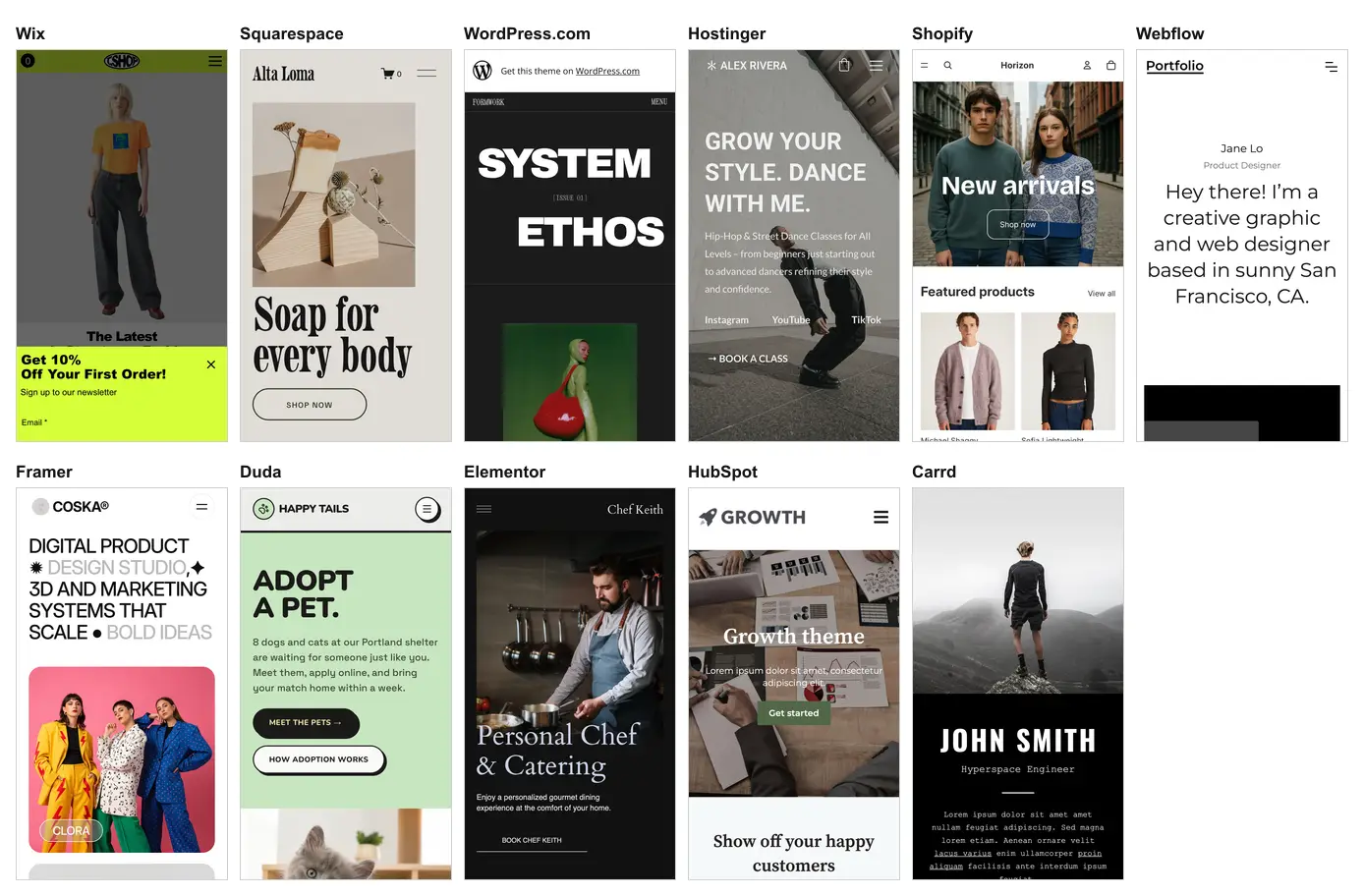
The screenshots above are the WebKit passes at iPhone 14 size. To run the same kind of layout check on your own pages across more screen sizes, see the responsive testing guide.
How to Choose a Website Creation Tool
Start from the job the site has to do, then check the exit before you build, because moving a site between builders usually means rebuilding it. Match your main need to a builder below, and read the caveat before you commit.
| If the site has to | Start with | Check first |
|---|---|---|
| Sell products online | Shopify | No free plan, and an incompatible theme update removes your code edits |
| Look designer-made with little effort | Squarespace or Wix | Wix cannot switch templates later; Squarespace has no free plan |
| Follow a custom design closely | Webflow or Framer | Framer has no HTML export; Webflow exports code only on paid Workspace plans |
| Run on hosting you control | WordPress with Elementor | You maintain hosting, updates and plugins yourself |
| Serve many client sites | Duda | Site export starts on the Agency plan |
| Put one page online fast | Carrd or Canva Websites | Carrd needs Pro Standard for a custom domain; Canva Free shows its footer |
| Feed leads into a CRM | HubSpot Content Hub | The free CMS stops at 30 website pages with HubSpot branding |
| Share a team or class hub | Google Sites | Custom domains come through a Google Workspace plan |
| Start from an AI draft | Hostinger AI Builder or GoDaddy Airo | Hostinger trial sites cannot be published; Airo's free plan runs on 50 AI credits a month |
- Check the exit - read the vendor's export page before you build. Wix and Framer keep the site on their platform, and Squarespace, WordPress.com and Weebly export only part of it.
- Read the free plan limits - ads, badges, subdomains and page caps decide whether a free plan can carry a real business site or only a test run.
For layouts that hold up on phones, the mobile website design examples roundup collects real sites worth studying before you pick a template.
How to Test a Site Built With a Website Builder
Test the published URL on the browsers your visitors use, then rerun the same checks after every template, app or content change. A builder's mobile view only resizes the page inside the browser you are editing in, so it cannot show how Safari on an iPhone or Chrome on an Android phone renders it.
- Publish first - test the live URL with its real domain, scripts and embeds instead of the editor preview.
- Safari on an iPhone and Chrome on Android - open menus, sticky headers, sliders and pop-ups by hand in both. The Wix demo's newsletter pop-up, for one, covered the lower part of the phone screen.
- Sideways scroll at 390px - compare the page width with the viewport width, as the script below does.
- Forms, bookings and checkout - submit every form and finish one test order on a phone, since template demos never exercise these flows.
- Accessibility - run an axe-core scan, fix critical and serious failures first, then tab through the page with a keyboard.
- After every change - rerun the checks when you switch themes, install an app or add a section.
For the hands-on checks, TestMu AI Real-Time Testing opens your published site in a live cloud browser on 3,000+ browser and OS combinations, with DevTools inside the session. Mark as Bug sends an annotated screenshot to your tracker with the browser, OS and resolution attached, and the tunnel option loads a staging or localhost URL before launch.
Real-Time Testing runs mobile browsers on Android emulators and iOS simulators. The mobile browser testing guide walks through starting a session, and the cross-browser compatibility guide explains why one page renders differently across engines.
To see several screen sizes at once while you edit, LT Browser is a free desktop browser from TestMu AI with 50+ device viewports, Chrome DevTools, network throttling and a Google Lighthouse report, and it needs no login. This walkthrough shows LT Browser 2.0 running up to six device viewports side by side:
For accessibility, TestMu AI Accessibility Testing runs on the same axe-core engine as this test, and its Accessibility DevTools Chrome extension scans a live page from your own browser.
If you or a developer prefer a script, this Playwright check opens a page on the TestMu AI grid in Chrome with a Pixel 7 profile and in WebKit with an iPhone 14 profile, then prints the horizontal overflow and uncaught script errors. I ran it with Node 24 and playwright-core 1.64.1, which needs Node 20 or later, after npm install playwright-core and with LT_USERNAME and LT_ACCESS_KEY set:
// check-site.mjs, part 1 of 2: browsers and grid connection
// Run: node check-site.mjs https://your-site.example/
import { chromium, webkit, devices } from 'playwright-core';

const runs = [
  [chromium, 'Chrome', 'Windows 11', devices['Pixel 7']],
  [webkit, 'pw-webkit', 'MacOS Sequoia', devices['iPhone 14']],
];
const wss = (browserName, platform) => 'wss://cdp.lambdatest.com/' +
  'playwright?capabilities=' + encodeURIComponent(JSON.stringify({
    browserName, browserVersion: 'latest',
    'LT:Options': { platform, build: 'Builder site check',
      user: process.env.LT_USERNAME,
      accessKey: process.env.LT_ACCESS_KEY },
  }));
// check-site.mjs, part 2 of 2: load the page and report
for (const [type, name, platform, device] of runs) {
const browser = await type.connect(wss(name, platform));
const page = await (await browser.newContext(device)).newPage();
const errors = [];
page.on('pageerror', (err) => errors.push(err.message));
await page.goto(process.argv[2], { waitUntil: 'load' });
const overflow = await page.evaluate(() =>
document.documentElement.scrollWidth - window.innerWidth);
console.log(name + ' ' + browser.version() + ': ' + overflow +
'px horizontal overflow, ' + errors.length + ' uncaught errors');
await browser.close();
}Run against the Wix demo, it printed this; any number above zero on either line is worth opening the page by hand:
$ node check-site.mjs https://www.wix.com/demone2/tshirt-store
Chrome 155.0.8059.40: 0px horizontal overflow, 0 uncaught errors
pw-webkit 27.2: 0px horizontal overflow, 0 uncaught errors
Note: Check your published site in Safari, Chrome, Edge and Firefox before your visitors do. Start free with TestMu AI and open it on 3,000+ browser and OS combinations.
Conclusion
Shortlist two builders from the comparison table, build the same home page in each on a free plan or trial, and publish both. Then open both URLs on real iPhones and Android phones in the TestMu AI Real Device Cloud, with 10,000+ real devices, and keep the builder whose page passes the checks above; the desktop browser testing guide covers the same check on desktop browsers.
Author

Shubham Suri
Blogs: 10

Shubham Suri is a Lead Member of Technical Staff at TestMu AI, building the frontend and web interfaces of the quality engineering platform. He works across React.js, HTML5, CSS3, Bootstrap, jQuery, JavaScript, and Angular to create and maintain webpages and web applications. He brings around a decade of experience in web and frontend development, with earlier roles as a Software Engineer at Hard Shell Technologies and an IT Analyst at Cyrus Group. Shubham holds a B.Tech in Computer Science from Uttar Pradesh Technical University.
Reviewer

Rahul Mishra
Reviewer
Rahul Mishra is a Lead Member of Technical Staff at TestMu AI, leading frontend engineering and accessibility testing across the quality engineering platform. He mentors frontend engineers, runs code reviews and sprint planning, optimizes React.js rendering performance, and makes product features accessible to users with disabilities through WCAG and ADA-compliant accessibility audits. He brings 10+ years of experience across React.js, VueJS, TypeScript, Swift, Objective-C, and AWS, with earlier work as a Technical Lead at VectoScalar Technologies. Rahul holds a B.E. in Information Technology.


Website Creation Tools FAQs
Did you find this page helpful?
More Related Blogs

TestMu AI forEnterprise
Get access to solutions built on Enterprise
grade security, privacy, & compliance
- Advanced access controls
- Advanced data retention rules
- Advanced Local Testing
- Premium Support options
- Early access to beta features
- Private Slack Channel
- Unlimited Manual Accessibility DevTools Tests