
AI code testing with Kane CLI for web and mobile apps
Unit tests and code review read the diff. Kane CLI runs the web or mobile app your coding agent changed the way a user would, checks the flow you describe in natural language, and returns pass or fail before merge. Free to install.
or read the documentation
Kane CLI catches the AI-code bugs that code review passes
AI code testing checks that a change written by Claude Code, Cursor, Codex or Copilot works in the running app as well as in the source. The agent's own checks, unit tests, type checks, linters and the compiler, all read code. None of them renders the page.
So a change can compile, pass review and still ship a button wired to the wrong API, a redirect that 404s or a modal that never closes. In the 2025 Stack Overflow Developer Survey, 66% of developers named AI solutions that are almost right, but not quite, as their biggest frustration with AI tools.
Kane CLI runs the app instead of reading it. Describe the flow in natural language, point it at a preview or staging build, and it uses the web or mobile app step by step, then returns pass or fail with screenshots and logs for each step.
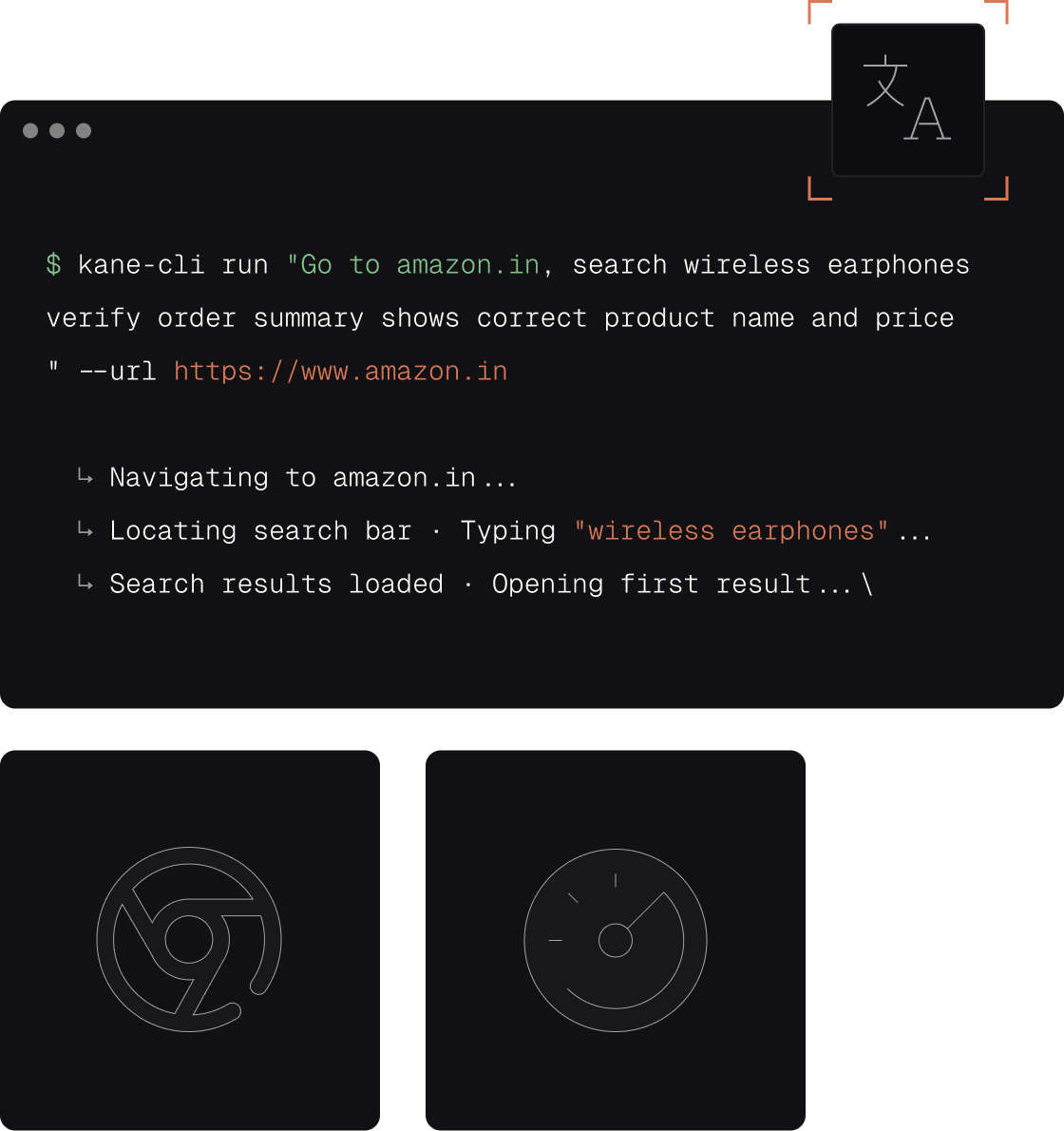
Kane CLI returns step screenshots, exit codes and coverage
Every run returns pass or fail with the evidence behind it, in a form a reviewer, a pipeline and the coding agent can all read.

Natural-language test objectives
Describe the outcome: sign in, add an item to the cart, confirm the total updates. No selectors, no XPath and no framework code to review next to the agent's diff.

Evidence for every step
Each run saves screenshots, a HAR network log and console output for every step in one evidence pack, so a reviewer opens what happened instead of trusting a green tick.

Product bug or test issue
With bug detection turned on, a failed step is investigated to work out whether the app or the test broke, and the verdict is recorded. A confirmed product bug carries result code 740.

Exit codes a pipeline can act on
0 is a pass, 1 a failed assertion, 2 an auth, browser or environment error, 3 a timeout. A staging server that will not respond never reads as a broken feature.

Autoheal with a confidence score
Each step targets the element a user sees, so a reworded label or a new CSS class does not break the test. Low-confidence matches are rejected, never healed past a real bug.

Coverage per acceptance criterion
kane-cli cover lists which acceptance criteria a run proved and which are gaps. Strict mode demotes a pass earned against a spec that has since changed.
Move Kane CLI tests from your terminal to TestMu AI cloud
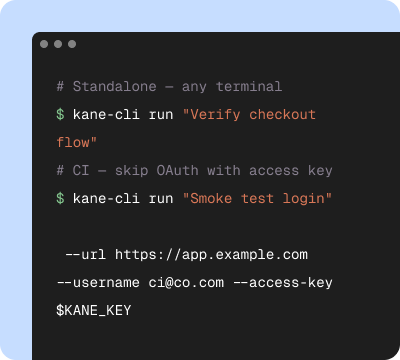
Start in your terminal
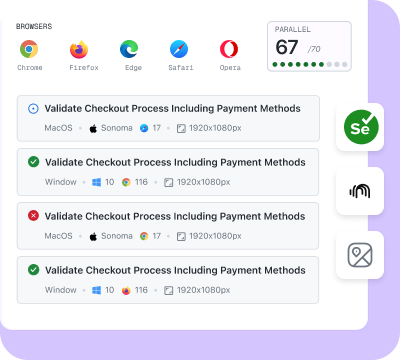
Validate on the cloud
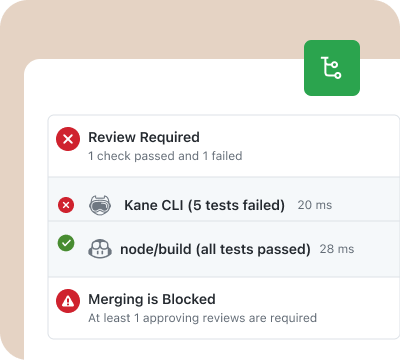
Release with confidence
Claude Code and Codex fix the bugs Kane CLI finds
The agent writes the change, runs Kane CLI against the app, and reads the result before it tells you the work is done.
Agent mode returns NDJSON
The agent runs Kane CLI headless in agent mode and reads one JSON event per line. The closing run_end event carries the status, a summary and the run directory.
Skills for Claude Code, Codex CLI and Gemini CLI
Install the skill once. The agent then checks that Kane CLI is installed and signed in, builds the command, parses the result and reads the failure logs and screenshots.
Continue, fix or hand back
After reading run_end, the coding agent moves on, fixes the bug its change introduced, or brings the failure to you with the screenshots attached.
Gate pull requests with Kane CLI in three steps
Store credentials as CI secrets
Add LT_USERNAME and LT_ACCESS_KEY to your CI secrets. Pipelines sign in with that username and access key, since the OAuth login opens a browser window a runner cannot use.
Describe the flows a change can break
Write login, search, checkout and the other journeys your app depends on as natural-language objectives, and commit them as _test.md files next to the code.
Run them on every pull request
Run Kane CLI headless with a timeout on each pull request in GitHub Actions, GitLab CI, Jenkins or Bitbucket Pipelines, and fail the check on any non-zero exit code.
Kane CLI docs, blog and source code

Documentation
Everything you need to install, configure, and run Kane CLI in under 2 minutes.
Frequently asked questions
AI code testing is checking that code written by an AI coding agent, such as Claude Code, Cursor, Codex or GitHub Copilot, works when the app runs. Code-level checks confirm the change compiles and its unit tests pass. AI code testing also runs the changed web or mobile app and verifies the user flows the change touches. Kane CLI does this from the terminal: you describe the flow in natural language and it returns pass or fail with evidence. For apps made in an app builder rather than a code editor, see vibe coding testing.
No. Code review checks the intent, scope and security of a diff, but the reviewer never sees the rendered page. Google's 2024 DORA report estimated a 7.2% reduction in delivery stability as AI adoption increased, and pointed teams back to basics such as small batch sizes and thorough testing. In the 2025 Stack Overflow Developer Survey, 66% of developers named AI solutions that are almost right, but not quite, as their biggest frustration. Keep the review, and add a run of the changed flow in a real browser whose result posts on the pull request.
Unit tests check functions in isolation, and a coding agent often writes them in the same change as the code they test, which is also where agent-induced flakiness starts: see deterministic tests for agent-written code. Kane CLI checks the assembled app the way a user meets it: it taps, clicks, types and waits on what the screen shows. Keep both. Unit tests catch logic errors in seconds, and a Kane CLI run catches the button wired to the wrong API or the redirect that 404s. To have AI write the unit tests themselves, see AI code assistants for testing.
Yes. Install the Kane CLI skill into Claude Code, Codex CLI or Gemini CLI, or point Cursor at the AGENTS.md file. After a change, the agent runs kane-cli run --agent --headless, reads the run_end event, and either continues, fixes the bug or hands the failure back to you with screenshots. See how a coding agent verifies a change with Kane CLI, and the setup pages for Claude Code app testing and Cursor app testing.
Any runner that has Node.js. Recipes exist for GitHub Actions, GitLab CI, Jenkins and Bitbucket Pipelines. Pass --headless and --timeout, sign in with --username and --access-key from CI secrets, and gate the job on the exit code. If the runner image has no browser installed, connect to a remote one with --ws-endpoint. Runs upload to Test Manager by default, and the run_end event carries the test_url link when the upload succeeds. Step-by-step: gate a CI pipeline with Kane CLI.
No. Kane CLI does not read the repository. It uses the running web or mobile app the way a user would, on a local, preview or staging build, and judges the result from what the screen shows, network responses and logs. A change that looks correct in the source but breaks on screen still fails.
They test different things. Kane CLI tests the app: it runs the code your coding agent wrote and checks the user flow in the web or mobile app. Agent Assurance tests the agent: it invokes an agent you own, such as your own coding agent, and checks what its runs changed, including files, commands and tool calls. Use Kane CLI to verify a change, and Agent Assurance to evaluate the agent that makes the changes.
The CLI is free to install. Every run, local runs included, uses KaneAI credits from your TestMu AI account, and kane-cli balance shows what is left. Start with 10,000 free credits, valid for 30 days, with no credit card. Paid KaneAI plans start at $19 a month, or $17 a month billed annually; see TestMu AI pricing.

Point your coding agent at the Kane CLI AGENTS.md file
The file teaches your agent to install Kane CLI, sign in, and test the flows its change touches in the running app, then report pass or fail with the evidence.
 Point your agent to: testmuai.com/kane-cli-agent/AGENTS.md