

Next-Gen App & Browser Testing Cloud
Trusted by 2 Mn+ QAs & Devs to accelerate their release cycles


On This Page
- What Is Test Management?
- Why Test Management Matters
- Test Management in the SDLC?
- Core Components of Test Management
- Test Management Process
- Test Management in Agile and CI/CD?
- Testing Types Covered by Test Management
- Who Is Responsible for Test Management
- Test Management vs. Project Management
- Test Management Tools
- End-to-End Test Management with TestMu AI
- Test Management Metrics & KPIs
- How High-Performing Teams Manage Testing
- Test Management Maturity Model
What Is Test Management? A Complete Guide to Process, Tools, and Metrics
Learn what test management is, how it works, the key metrics to track, and how teams apply it in Agile and CI/CD workflows.

Abhishek Mishra
April 6, 2026
OVERVIEW
Test management is the practice of planning, organizing, executing, and controlling all testing activities across the software development lifecycle. It ensures test coverage is tracked, resources are allocated efficiently, and software meets quality requirements before release.
Most teams do not have a testing problem. They have a visibility problem. Test cases exist, automation runs, bugs get logged. But when a release decision needs to be made, no one can clearly answer what was covered, what was found, and whether the risk of shipping is acceptable.
That gap is what test management fills: a centralized system for teams to plan coverage, track execution, and report release readiness with confidence.
Overview
What is Test Management?
Test management is the process of planning, organizing, executing, monitoring, and controlling all testing activities to ensure software quality before release.
What are the objectives of test management?
- Ensure complete test coverage across requirements
- Allocate resources efficiently and manage timelines
- Provide visibility into quality and release readiness
What are the types of testing covered in test management?
- Unit Testing: Validate individual components during development
- Functional Testing: Ensure features meet business requirements
- Regression Testing: Prevent new changes from breaking existing functionality
What are the key components of test management?
- Test Planning: Define scope, strategy, risks, and timelines
- Test Design: Create test cases, suites, and coverage strategy
- Traceability: Link requirements, tests, and defects
Who is responsible for test management?
- QA/Test Manager: Leads strategy and reporting
- Engineering: Ensures testability and automation health
- Product: Owns risk acceptance and release decisions
How can TestMu AI streamline test management?
- Unified platform: Manage test cases, execution, and reporting in one place
- AI test creation: Auto-generate test cases from requirements
What is the test management maturity model?
- Level 1: Ad-hoc (no structured process)
- Level 2: Managed (basic planning and tracking)
- Level 3: Defined (standardized processes and tools)
What Is Test Management?
Test management covers everything from writing a test plan on day one to generating a sign-off report on release day. It spans manual and automated testing, functional and non-functional testing, and every team member involved, from QA engineers and test leads to developers and product owners.
Without a structured test management process, testing becomes reactive. Bugs surface late, defects get missed, and release timelines slip.
As per The “Rule of 100”, A bug found in production costs 100x more to fix than the same bug caught during design; during testing, it is about 6x more than in design.
Test management enforces the shift-left approach that keeps defect costs low.
Why Test Management Matters for Modern Delivery
Teams ship more often, with more automation, and more dependencies (APIs, devices, browsers, data). Without test management, quality work becomes opaque: stakeholders see activity, but not confidence.
- Scope: What are we testing for this release, and what is explicitly out of scope?
- Coverage: Which requirements and risks have test evidence behind them?
- Signal: Are failures informative, or dominated by noise (flaky tests, unstable environments)?
- Decision: Given the evidence, is the release risk acceptable, and what are the known gaps?
What Is Test Management in the SDLC?
In the software development life cycle (SDLC), test management ensures testing is timed correctly and anchored to change. Practically, it shows up as:
- Defining when testing starts (shift-left: during refinement and design, not only after dev “hands off”).
- Aligning test environments and data with what production-like actually means for your risk profile.
- Ensuring a regression strategy exists before velocity collapses under endless manual retesting.
- Making defect handling predictable: triage rules, ownership, and escalation paths.
Core Components of Test Management (What It Is Made Of)
Test management spans several distinct areas, from how quality is defined upfront to how feedback loops are closed after release:
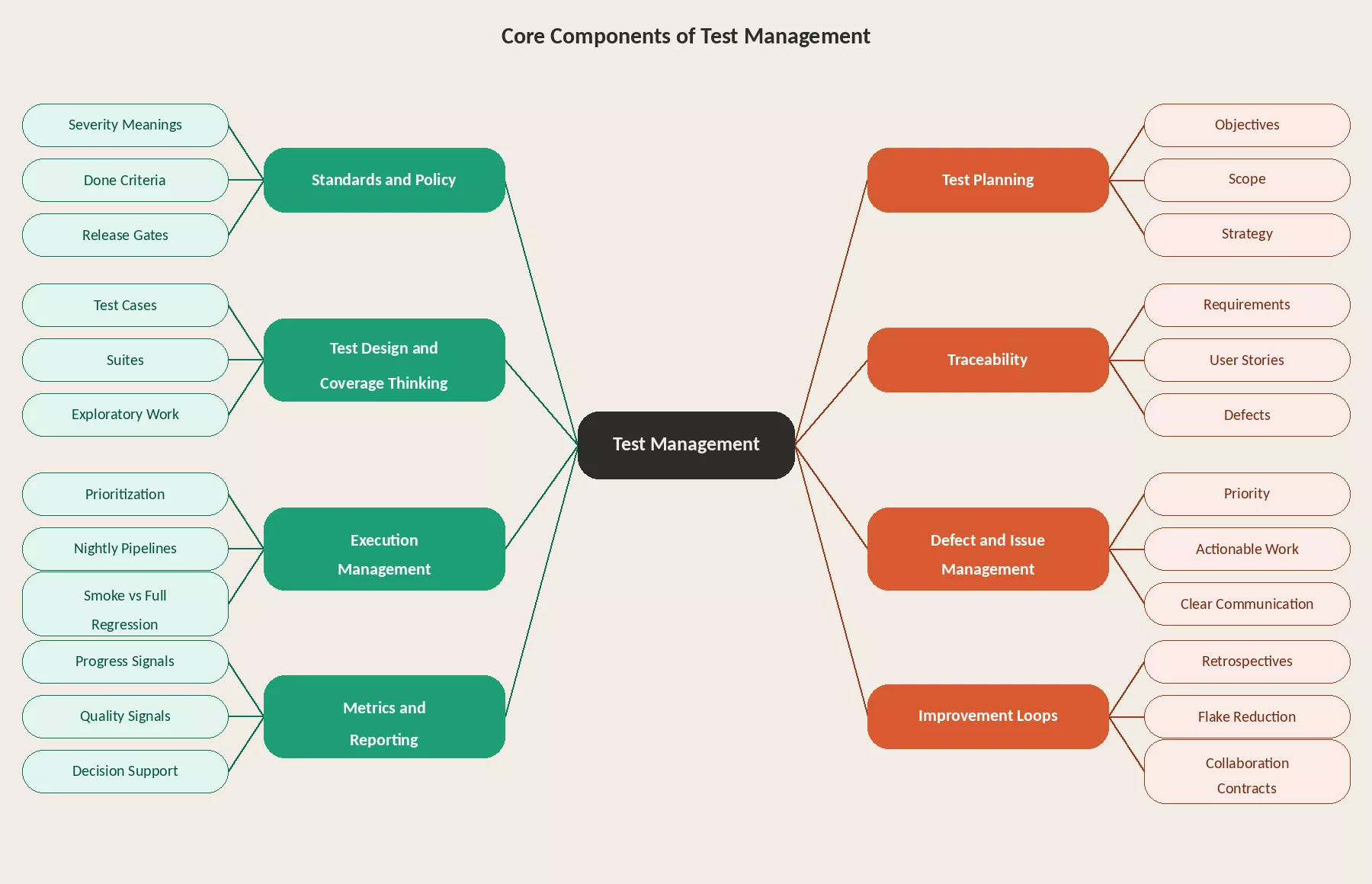
- Standards and policy: How quality is defined for your product line: severity meanings, done criteria, release gates (even if lightweight), and what “must never break.”
- Test planning: Objectives, scope, strategy (levels of testing), environment needs, dependencies, and schedule assumptions.
- Test design and coverage thinking: Test cases, suites, charters for exploratory work, and the balance between manual judgment and automated guardrails.
- Traceability: Linking requirements or user stories to tests and defects so you can prove coverage and audit decisions, especially important for regulated, financial, healthcare, or enterprise workflows.
- Execution management: Running the right tests at the right time, prioritization, nightly pipelines, smoke vs full regression, and handling blockers.
- Defect and issue management: Making sure problems become actionable work with clear priority, not endless comment threads.
- Metrics and reporting: Progress and quality signals that support decisions, not dashboards that only count cases executed.
- Improvement loops: Retrospectives on testing, flake reduction, suite cleanup, faster feedback, and better collaboration contracts with engineering.
The Test Management Process
The test management process is split into two phases: Planning and Execution. Each contains structured activities that build on each other.
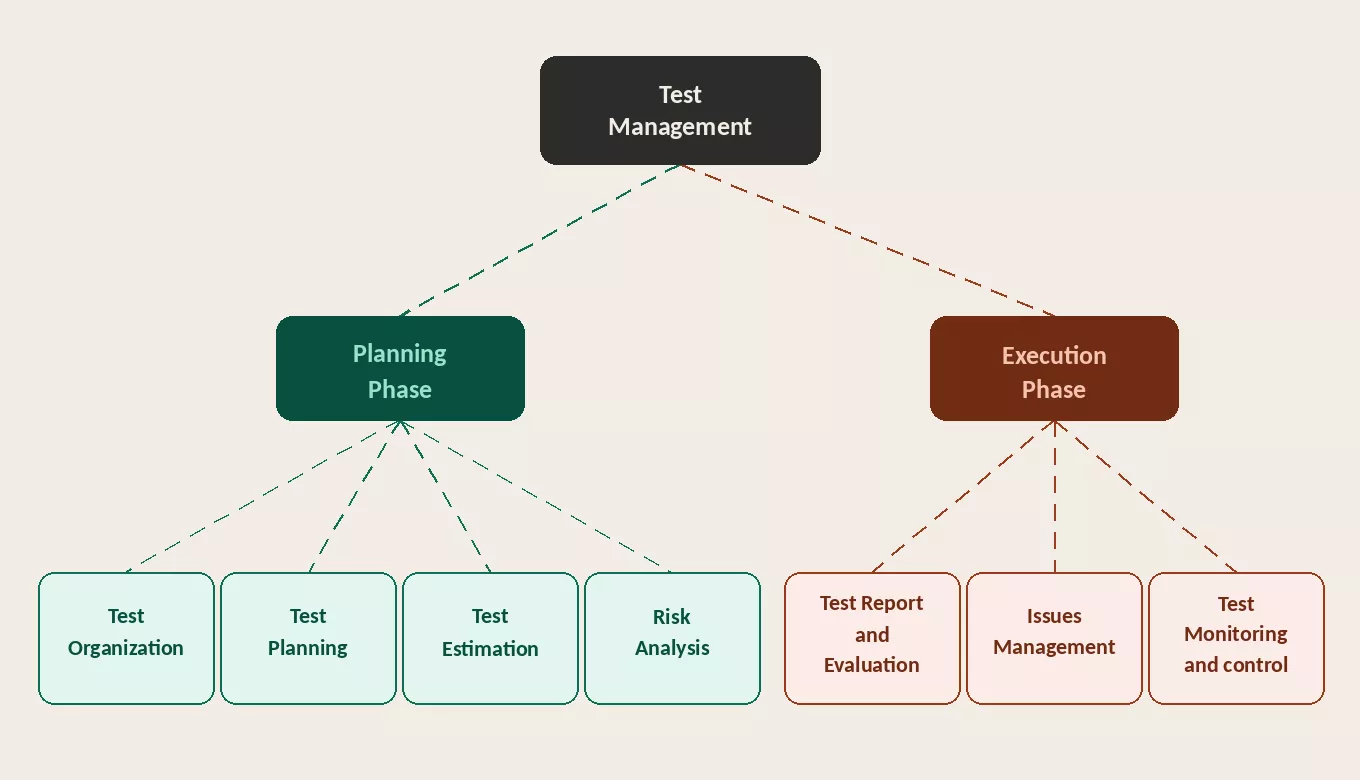
Planning Phase
- Test Organization: Define roles, ownership, communication rhythms, and escalation paths across the team.
- Test Planning: Set objectives, scope, strategy, environment needs, and schedule assumptions.
- Test Estimation: Estimate effort across people, tools, environments, data, and automation capacity.
- Risk Analysis: Identify what must not fail, assess impact, and prioritize coverage accordingly.
Execution Phase
- Test Monitoring and Control: Track progress against the plan, flag deviations early, and adjust scope or resources with explicit tradeoffs.
- Issues Management: Ensure defects become actionable work with clear ownership and priority, not just logged items.
- Test Report and Evaluation: Report release readiness with evidence, known issues, and residual risk. Close the loop by archiving artifacts, capturing lessons, and updating standards.
What Is Test Management in Agile and CI/CD?
Agile test management is still test management, just compressed into iterations and tied to continuous delivery realities:
- Testing is continuous, not a phase at the end.
- Scope changes often; management focuses on risk-based choices and transparent tradeoffs.
- Automation is part of the product system: flaky tests are treated as engineering debt, not “QA noise.”
- Done means testable increments, not “tickets closed.”
Testing Types Covered by Test Management
A comprehensive test management strategy incorporates multiple testing types, each targeting different quality aspects:
| Testing Type | Purpose | When | Manual / Automated |
|---|---|---|---|
| Unit Testing | Verify individual functions in isolation | During development | Automated |
| Integration Testing | Validate module and service interactions | After unit testing | Automated |
| Functional Testing | Confirm features match requirements | Each sprint/build | Both |
| Regression Testing | Ensure changes don't break existing features | After every change | Automated (recommended) |
| Performance Testing | Measure speed, scalability, stability | Pre-release | Automated |
| API Testing | Validate endpoints, data contracts, errors | Continuous | Automated |
| UI/UX Testing | Verify interface across browsers/devices | Each sprint | Both |
| Security Testing | Identify vulnerabilities (OWASP Top 10) | Pre-release | Both |
| Exploratory Testing | Discover edge cases through unscripted testing | Each sprint | Manual |
| UAT | Business users validate against their needs | Before production | Manual |
| Accessibility Testing | WCAG compliance for disabled users | Each release | Both |
Who Is Responsible for Test Management
Accountability commonly sits with a Test Manager / QA Lead, but ownership is shared:
- Test Manager / QA defines strategy, tracks coverage, manages defect triage, and owns release sign-off. The responsibility of a test manager also includes team coordination, risk assessment, and ensuring testing aligns with business goals.
- QA Engineers own test design, coverage execution, exploratory judgment, and defect triage.
- Developers / Engineering own testability, unit and integration test health, and pipeline stability.
- Product Manager owns risk acceptance, deciding what ships with known limitations and what does not.
Test Management vs. Project Management
Test management and project management are related but distinct disciplines. Confusing the two leads to either under-tested software or misallocated resources. Here is how they differ:
| Dimension | Test Management | Project Management |
|---|---|---|
| Scope | Testing activities only (planning, execution, defect tracking, reporting) | Entire project (requirements, design, dev, testing, deployment) |
| Primary Goal | Ensure software quality and reduce defects | Deliver on time, within budget, meeting requirements |
| Deliverables | Test plan, test cases, defect reports, test summary | Project plan, WBS, risk register, status reports |
| Owner | Test Manager / QA Lead | Project Manager / Delivery Manager |
| Key Metrics | Defect density, test coverage, pass/fail rates, defect leakage | Budget variance, schedule variance, scope completion |
What Are Test Management Tools and How To Choose
A test management tool helps teams store and run structured testing work: cases, runs, results, integrations with Jira (or similar), reporting, and often traceability features.
- Workflow fit: Whether the tool works as a Jira-native plugin or a standalone QA hub matters depending on how your team already operates.
- Integration depth: Look for native connections to your CI/CD pipeline, automation frameworks, and issue tracker, not just surface-level imports.
- Auditability: Enterprise and regulated teams need audit history, permission controls, and structured reporting built in.
- Scale: The tool should support multi-team usage without becoming an administration overhead as test volume grows.
For teams that also need scalable execution across browsers, devices, and automation stacks, platforms such as TestMu AI can complement test management by improving where and how tests run, keeping claims factual and balanced.
How to Set Up End-to-End Test Management with TestMu AI
As test suites grow, managing cases, execution, and reporting across separate tools slows teams down and creates release bottlenecks. The problem is not the volume of tests. It is the fragmentation.
TestMu AI's Unified Test Management tool brings manual and automated testing into one platform, from AI-native test creation to execution across real browser and OS environments. Here is what that includes:
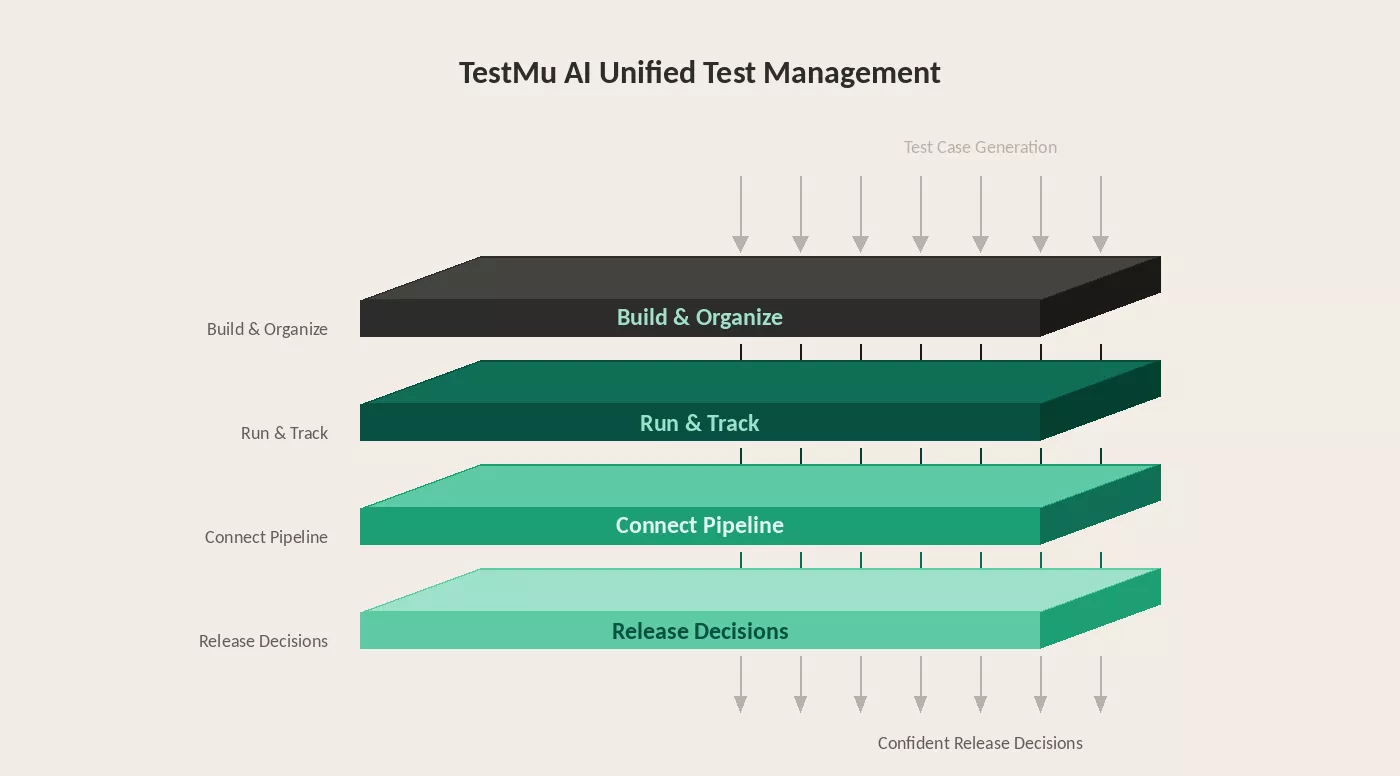
Building and organizing test cases
- AI test case generator: Describe a user flow, paste a requirement, or upload a Jira ticket. TestMu AI generates structured test cases with clear steps and scenarios ready for execution.
- Smart context memory layer: Scans your existing repository before every session, fills coverage gaps, and removes duplicates automatically.
- Unified test case repository: Version control, tagging, and reusable test modules in one place. Update a shared flow once and every case referencing it updates automatically.
- One-click import: Migrate from TestRail, Zephyr, or Xray with automatic field mapping and no data loss.
Running and tracking execution
- Real-time execution tracking: Manual runs, automated results, and exploratory sessions appear on one dashboard. Coverage gaps and release readiness are visible to every stakeholder without a separate reporting layer.
- Customizable workflows: Customize test steps and actions the way your team works, built for teams managing large test suites at scale.
Connecting to your delivery pipeline
- Bug and defect tracker: Two-way sync with your existing issue tracker, including Jira, GitHub Issues, and Azure Boards. Defects logged during a run flow in with full context attached.
- CI/CD pipeline coverage: Integrates with GitHub Actions and GitLab CI. Link pull requests to test cases and let quality gates block failing deployments automatically.
- 120+ integrations: Connect to Jira, GitHub, Jenkins, Slack, and CI/CD tools to bring testing into your existing workflow.
Making release decisions with confidence
- Requirement traceability: Map every requirement to its test cases and linked defects. Coverage gaps surface before release, not after.
Watch how to set up end-to-end test management with TestMu AI in a single unified workflow.
Subscribe to the TestMu AI YouTube channel for the latest tutorials on modern software testing.
Test Management Metrics & KPIs
Measure test management effectiveness with these quantitative metrics:
| Metric | Formula | What It Tells You | Target |
|---|---|---|---|
| Test Execution Rate | (Executed / Planned) × 100 | Plan completion | >95% |
| Pass Rate | (Passed / Executed) × 100 | Build quality | >90% |
| Defect Density | Defects / KLOC | Code quality | Decreasing |
| Defect Leakage | (Prod Defects / Total Defects) × 100 | Testing effectiveness | <5% |
| Test Coverage | (Reqs with Tests / Total Reqs) × 100 | Coverage completeness | 100% |
| Defect Resolution Time | Avg creation-to-closure | Fix-verify speed | Decreasing |
| Automation Coverage | (Automated / Total Tests) × 100 | Automation adoption | >70% regression |
| Cost Per Defect | Testing Cost / Defects Found | Testing efficiency | Decreasing |
Track these across release cycles, not just within one release. Trend analysis reveals whether your process is improving or degrading.
What High-Performing Teams Do Differently in Test Management
Most teams have a test plan, a defect tracker, and coverage reports. What separates teams that consistently ship quality software is how they handle the decisions that fall outside the playbook.
Risk is treated as a living variable, not a one-time assessment. A module that was low risk in sprint 3 can carry significant risk by sprint 8 after multiple rounds of rework. High-performing test leads update the risk register mid-cycle and reallocate effort accordingly.
Coverage gaps are visible before release, not after. The requirement traceability matrix (RTM) makes this possible. When a requirement changes mid-sprint, the RTM immediately surfaces which test cases are now stale. Teams without a live RTM discover coverage gaps in production.
Estimation improves over time because data closes the loop. If the team consistently executes fewer test cases per day than planned, the next estimate reflects that. High-performing teams track the gap between planned and actual velocity every cycle and adjust. Most teams estimate from scratch every time and make the same mistakes repeatedly.
Test Management Maturity Model
Not every team starts at the same level. Use this maturity model to assess where you are and what to invest in next:
| Level | Name | Characteristics | What to Invest In |
|---|---|---|---|
| 1 | Ad-hoc | No formal test process. Testing is reactive, unplanned. Defects found by users in production. No documentation. | Create a basic test plan. Start logging defects in a tracker (even a spreadsheet). Assign someone to own testing. |
| 2 | Managed | Basic test plans exist. Defects are tracked. Some test cases documented. Testing is planned but inconsistent. | Adopt a test management tool (TestMu AI, TestRail, etc.). Define entry/exit criteria. Standardize test case format. |
| 3 | Defined | Standardized process across teams. Test management tool in use. Requirements traceability. Consistent reporting. | Begin automation (start with regression). Implement CI/CD test integration. Track key metrics (pass rate, defect density). |
| 4 | Measured | Metrics-driven decisions. Defect leakage tracked. Test coverage mapped to requirements. Automation covers regression. | Optimize test suite for speed (parallel execution with HyperExecute). Risk-based test selection. Cross-browser/device testing. |
| 5 | Optimizing | AI-powered test generation and maintenance. Continuous testing in CI/CD. Predictive quality analytics. Self-healing tests. | Leverage AI (KaneAI) for test creation and maintenance. Implement predictive defect detection. Continuous process improvement. |
Most teams fall between Level 2 and Level 3. The jump from Level 3 to Level 4, where testing becomes truly metrics-driven, is where the biggest ROI improvements happen. Level 5 is where AI transforms testing from a cost center into a competitive advantage.
Conclusion
Test management is the operational backbone of software quality. The fundamentals are straightforward: plan, organize, execute, monitor, and report. The discipline is in doing each consistently, adapting when reality diverges from the plan, and closing the feedback loop so every cycle performs better than the last.


Summarize with AI


Frequently asked questions
Did you find this page helpful?
TestMu AI forEnterprise
Get access to solutions built on Enterprise
grade security, privacy, & compliance
- Advanced access controls
- Advanced data retention rules
- Advanced Local Testing
- Premium Support options
- Early access to beta features
- Private Slack Channel
- Unlimited Manual Accessibility DevTools Tests