

Power Your Software Testing with AI Agents and Cloud
The Native AI-Agentic Cloud Platform to Supercharge Quality Engineering. Test Intelligently and Ship Faster.


- TestMu AI (Formerly LambdaTest)
- /
- Learning Hub
- /
- Ansible Tower: A Complete Guide for Modern IT Automation
Ansible Tower: A Complete Guide for Modern IT Automation
Discover how Ansible Tower streamlines IT automation with this complete guide, covering features, setup, benefits, and best practices for modern teams.
Last Updated on:
On This Page
- What Is Ansible Tower?
- Evolution from AWX
- Core Features of Ansible Tower
- Architecture of Ansible Tower
- How to Implement Ansible Tower in Your Organization?
- GUI and Licensing
- Real-World Use Cases of Ansible Tower
- Best Practices for Using Ansible Tower
- Troubleshooting Issues in Ansible Tower
- Future of Ansible Tower and Automation
- Ansible Tower vs Ansible Automation Platform vs AWX
Ansible Tower (now Automation Controller within Red Hat’s Ansible Automation Platform) is an enterprise-grade management layer built on the open-source Ansible engine.
It provides a web-based UI and REST API to simplify, secure, and scale infrastructure automation for collaborative teams and regulated environments.
Overview
To centralize, secure, and scale IT automation, organizations should use Ansible Tower, an enterprise-grade control plane that provides a web-based user interface and REST API. This platform is best for managing dynamic inventories, scheduling jobs, and enforcing role-based access control across complex environments.
- Web UI and REST API: The Web UI and REST API in Ansible Tower allow teams to launch, monitor, and script all automation jobs and UI actions.
- Role-Based Access Control: Role-Based Access Control enables administrators to define granular permissions for running, editing, or approving Ansible Tower automation tasks.
- Central and Dynamic Inventory: Central and Dynamic Inventory automatically syncs host lists with cloud providers, CMDBs, or Git repositories to target live infrastructure during automation.
- Job Scheduling and Workflows: Job Scheduling and Workflows automate recurring playbooks and chain multiple tasks into conditional pipelines without relying on cron.
- Notifications and Alerts: Notifications and Alerts send real-time job status updates and triggers to teams via Slack, email, SMS, or webhooks.
- Audit Logging and Dashboard: Audit Logging and Dashboard track all user actions, job histories, stdout, and metadata to meet strict governance requirements.
- Dedicated hosting server: A clean RHEL or CentOS server with recommended specifications should be provisioned to host Ansible Tower without other major services.
- TestMu AI installer bundle: TestMu AI's official installer bundle provides the necessary configuration files and setup scripts to install Ansible Tower and its dependencies.
- My First Job template: The default "My First Job" template runs a basic ping to confirm that the Ansible Tower setup can successfully reach its hosts.
- Source control integration: A Git repository or local upload connects Ansible Tower directly to your version-controlled playbook sources to keep playbooks consistent across environments.
- Access governance: User permissions and run-only rights promote secure collaboration by restricting system-level access to trusted accounts within the platform.
What Is Ansible Tower?
Ansible Tower, now officially known as Automation Controller within Red Hat Ansible Automation Platform, is the enterprise-grade control plane for Ansible automation. It provides a browser-based UI and REST API to define, operate, scale, and delegate automation across teams and environments.
Tower preserves the power of Ansible Core but adds centralized inventory, role-based access control, job templates, workflow pipelines, and full audit logging for governance.
As a configuration management control plane, it lets developers version playbooks, operators run approved jobs, and auditors review execution histories.
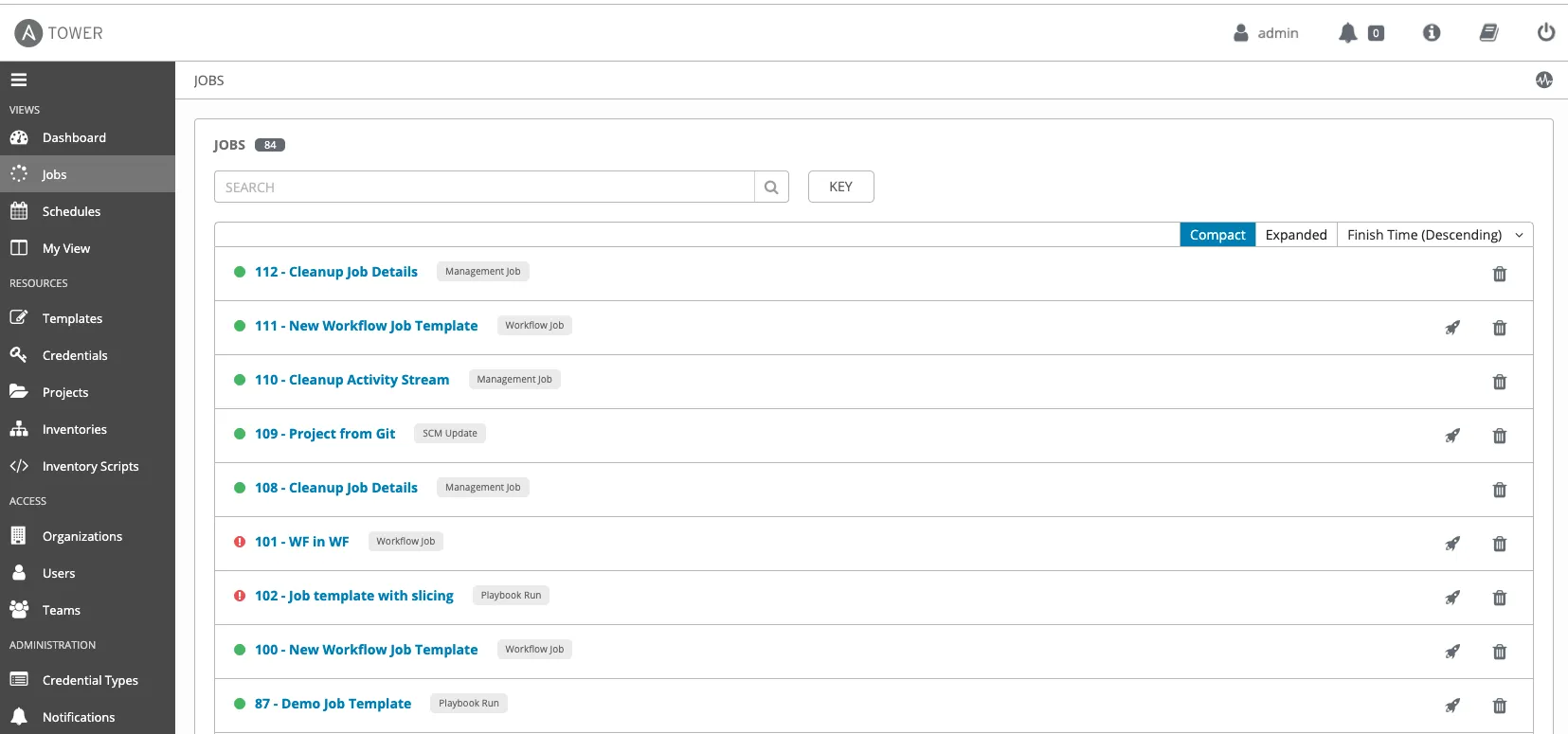
Ansible Playbook vs Ansible Tower
A common point of confusion: a playbook and Ansible Tower are not competing things, they work together.
- Ansible Playbook: A YAML file that defines the automation itself, the ordered tasks Ansible runs against your hosts. It is the "what to do."
- Ansible Tower: The control plane that stores, schedules, secures, and audits the execution of those playbooks through a GUI and API. It is the "how it runs at scale."
In short, you still write playbooks the same way; Tower is where you run them with RBAC, logging, and scheduling around them.
Evolution from AWX
Before Ansible Tower became the go-to enterprise automation hub, there was AWX, the open-source upstream project.
Here’s the short story:
- AWX is the freely available, community-driven version of Tower.
- Ansible Tower is the commercially supported version from Red Hat, built on AWX but with enterprise features like robust authentication, Role-Based Access Control (RBAC), clustering, and vendor support.
1. Pre-2017: Ansible CLI was the primary tool for automation. The Tower existed, but the open-source community version was less prominent.
2. 2017: Red Hat formalized AWX as the upstream project feeding into Ansible Tower.
3. 2018-2020: Quick adoption in enterprises; Tower became a key part of Red Hat Ansible Automation Platform.
4. 2021 Onwards: Tower features increasingly integrated into the broader Ansible Automation Platform suite.
The takeaway? AWX is like the “beta lab” where new features appear first. Tower is the “hardened release” enterprise-ready, stable, and backed by Red Hat support.

Note: Provision consistent test environments and run your suites across 3,000+ browser and OS combinations on the TestMu AI cloud grid. Try TestMu AI Today!
Core Features of Ansible Tower
Ansible Tower isn’t just AWX with enterprise branding; it layers in governance, usability, and scalability for real‑world automation.
Features:- Web UI and REST API: Launch and monitor jobs with a click or automate them via fully featured APIs for CI/CD or ServiceNow workflows. All UI actions are scriptable too.
- Role‑Based Access Control: Define who can execute, edit, or approve automation down to the project or inventory level, and enforce separation of roles.
- Central and Dynamic Inventory: Pull host lists automatically from AWS, Azure, VMware, CMDBs, or Git, ensuring your automation always targets live infrastructure.
- Job Scheduling and Workflows: Automate recurring playbooks or build multi-step pipelines with branching, conditionals, and approval steps without writing cron jobs.
- Notifications and Alerts: Stay informed with built-in triggers for job start, success, failure, or approvals. Supports Slack, email, SMS, webhook-enabled chatops tools.
- Audit Logging and Dashboard: Track every action with real‑time stdout, host-level logs, job history, and user metadata, ideal for compliance and troubleshooting.
- Workflow Visualizer: Chain multiple job templates into a single visual pipeline with success and failure branches, so complex multi-step automation is built and understood as a diagram rather than a script.
Architecture of Ansible Tower
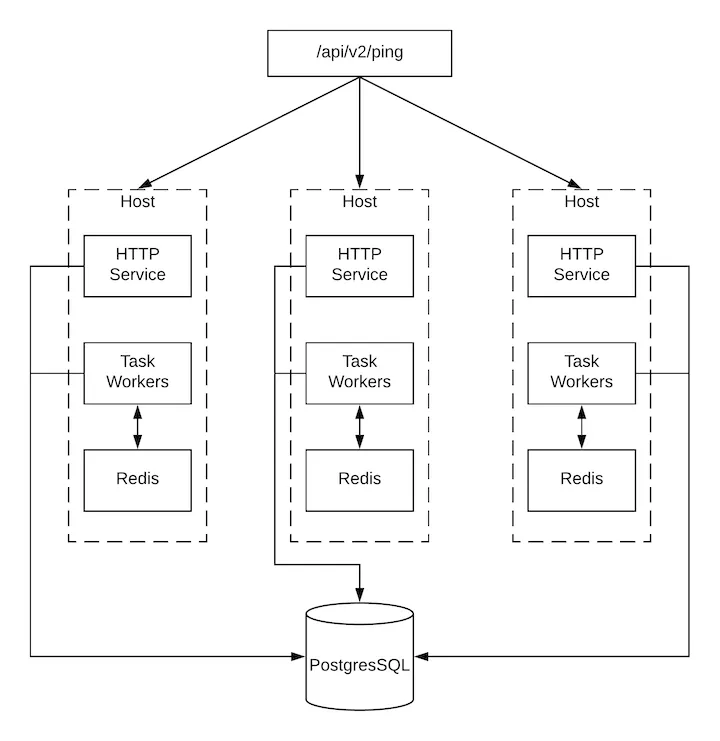
Here is the architecture of Ansible Tower and a breakdown of the components and flow:
- API Endpoint: The /api/v2/ping at the top of the diagram represents the entry point for API requests. It's a common endpoint used to check if the service is alive.
- Hosts (3 Instances): Each Host represents an instance or container running a part of the Tower/AWX application. There are 3 hosts shown, indicating a clustered or high-availability setup.
Each host contains:
- HTTP Service: It handles incoming HTTP API requests from users or external systems and routes requests to the appropriate internal components.
- Task Workers: These are background workers that handle asynchronous tasks like playbook execution, project syncing, and inventory updates. They receive tasks from a message queue.
- Redis: It acts as a message broker and cache. Redis queues tasks from the HTTP Service and delivers them to the Task Workers.
- PostgreSQL: All hosts connect to a central PostgreSQL database. This database stores:
- Inventory
- Job results
- Users and permissions
- Playbook outputs
- Schedules, credentials, and more
How to Implement Ansible Tower in Your Organization?
Ansible Tower gives you a central control plane for managing automation across your teams and infrastructure.
To adopt it successfully, you can follow the steps below:
Step 1: Prepare Your Tower Server
- Provision a fresh 64-bit RHEL 8 / CentOS 7.7 or later server.
- Allocate 2 vCPUs, at least 4 GB RAM, and 20 GB disk (with at least 10 GB dedicated to /var/, ideally 750+ IOPS).
- Avoid running other major services on this box. It should host only the Tower.
- Download the Ansible Tower or AAP installer bundle from Red Hat’s Customer Portal.
- Extract it locally, open the inventory file, and set your hostname, admin password, and DB location (local or remote).
- Run ./setup.sh. This installs Tower, PostgreSQL, and required dependencies in one go.
Step 3: Log In and Run Your First Job
- Navigate to https://<your_tower_hostname>/, use the admin credentials you configured.
- On the Dashboard, run the “My First Job” template (typically a ping to your demo inventory) to confirm Tower can reach its hosts.
Step 4: Add Your Hosts and Playbook Source
- In the UI, go to Inventories → “Add” → Inventory, and create a simple inventory (or use the Demo Inventory).
- Add or sync a host (or group), and provide SSH credentials in Credentials → Add.
- Under Projects, link Tower to your Git repo or uploaded playbook.
Step 5: Create a Job Template and Set Permissions
- Navigate to Templates → Add → Job Template, and configure your first job using your Git-based or local playbook.
- Run the job, check execution logs and status in the UI.
- Optional but recommended: Create a second user and assign them “Run-only” rights for non-production job templates.
Ansible Tower GUI and Licensing
When you log into Ansible Tower (Automation Controller), the interface is organized around a left-hand navigation menu. Knowing what each area does is the fastest way to get productive:
- Dashboard: The landing view, showing job status, recent activity, and host and inventory counts at a glance.
- Projects: Where you link a source control repo (or local path) that holds your playbooks, so Tower always runs the versioned copy.
- Inventories: The hosts and groups your automation targets, either static lists or inventories synced dynamically from cloud providers and CMDBs.
- Credentials: Encrypted SSH keys, cloud, and vault secrets that jobs use at runtime and that are never exposed in plain text.
- Templates: Job Templates bind a project, inventory, and credential into one runnable job; Workflow Templates chain several templates into a pipeline.
- Jobs: The record of every execution, with live stdout, pass or fail status, and a full audit history for compliance.
Getting an Ansible Tower License
Ansible Tower requires a subscription for production, while the upstream AWX project is free. To evaluate it, get a free trial or the no-cost Red Hat Developer subscription from the Red Hat Customer Portal.
After installation, open Settings then Subscription in the GUI and upload the manifest or enter your Red Hat credentials to activate the platform.
Real-World Use Cases of Ansible Tower
Here are some industry use cases for Ansible Tower (Automation Controller):
- NASA (WESTPRIME Infrastructure): NASA’s WESTPRIME team implemented a 10-line Ansible Tower playbook to automate web server patching and remediation, reducing update windows from over an hour to under 5 minutes.
It completed patch cycles from several days to approximately 45 minutes while integrating with their CMDB for AWS asset visibility and maintaining FedRAMP compliance through RBAC and audit logging.
- Verizon Media: Verizon Media’s 11-person infrastructure team transitioned from manual SSH scripts to centralized automation using Tower, achieving a sustained 65% increase in operational efficiency.
It also remediated over 2,000 security issues across production in just two days, all enabled by Tower’s job templates, RBAC control, and orchestrated execution.
- AIA Group (Asia-Pacific Insurance Provider): Deployed Tower to automate provisioning across 5,100 nodes, cutting provisioning time from 90+ days to about 1 hour via Git and ServiceNow integration.
- Blue Cross and Blue Shield of North Carolina: BCBS‑NC replaced custom ServiceNow API scripts with Tower-run automation workflows, enabling a self‑healing process and eliminating the need for Python/JavaScript-heavy development by extracting IT service and credential workflows into Tower.
Best Practices for Using Ansible Tower
Following best practices ensures Ansible Tower is used efficiently, securely, and at scale.
Here are some best practices for teams using Ansible Tower for streamlining automation workflows and reducing operational risks.
- Version control your automation: Keep all playbooks, inventories, and roles in Git or similar SCM, and link them to Tower as Projects. This ensures changes are reviewed, traceable, and consistent across environments.
- Use dynamic inventories: Pull host data from AWS, Azure, CMDBs, or custom scripts instead of static files. Manage group and host variables in Tower’s inventory system for consistency and runtime accuracy.
- Apply least-privilege RBAC: Assign access via Teams and job templates instead of broad admin rights. Restrict system-level roles to a few trusted accounts to reduce risk and enforce governance.
- Secure credentials: Store all SSH keys, API tokens, and passwords in Tower’s encrypted credential store. Never hard-code secrets in playbooks to prevent accidental exposure.
- Integrate with CI/CD and logging: Trigger jobs from your CI/CD pipeline via API or CLI, and centralize logs in Splunk, ELK, or Activity Streams for full audit trails and deployment governance.
Troubleshooting Issues in Ansible Tower
Running into issues with Ansible Tower? Here are the most common issues and how to troubleshoot them.
- Can’t find the root cause: Start with the logs. Check /var/log/tower for backend errors, /var/log/supervisor/ for UI/API failures, and Nginx logs for connectivity or streaming problems.
- Inventory not syncing: Make sure your target machines are reachable over SSH. If you're using dynamic inventories, resync them after any changes to credentials, scripts, or source configuration.
- Are jobs getting stuck or not completing: This could point to stuck Celery workers or RabbitMQ queues. Try restarting those services during low-traffic periods to clear the backlog.
- Playbook keeps failing to run: Use ansible-runner with -vvv verbosity to surface issues like YAML syntax errors, missing modules, or undefined variables before re-running your jobs.
- Need to contact support, but missing diagnostics: Use must-gather (for OpenShift environments) or sosreport (for VMs) to collect system logs and configuration details before submitting a Red Hat support ticket.
Future of Ansible Tower and Automation
Here are some key areas that can shape the future of Ansible Tower and automation:
- AI/ML-Driven Automation Enhancements: The integration of AI will enable Ansible Tower to anticipate potential failures in automation workflows, suggesting proactive fixes or optimizations before failures occur.
For example, machine learning models can analyze past run data and spot recurring issues in playbooks or tasks. With AI capabilities, Ansible Tower could detect anomalies in systems and automatically trigger remediation workflows, reducing downtime and increasing efficiency.
- Intelligent Automation Orchestration: As enterprises move to hybrid cloud architectures, Ansible Tower will need to evolve to orchestrate automation tasks across on-premises systems and multiple cloud providers like AWS, Azure, and Google Cloud.
Future versions of Ansible Tower could focus on deeper integration with more cloud platforms, container orchestration systems (like Kubernetes), and network infrastructure, creating a true unified automation hub.
- Increased Focus on Security and Compliance: Automation will need to go beyond deployment, embracing security as code. This means that Ansible Tower will integrate security policies directly into automation tasks to ensure compliance, vulnerability scanning, and remediation during deployments.
Future versions will focus on providing detailed, real-time auditing features to support compliance regulations like GDPR, SOC2, and HIPAA. The governance tools will evolve to provide real-time tracking and control over sensitive infrastructure changes.
- Automation for DevSecOps: Ansible Tower could become an essential part of a DevSecOps pipeline, where it automates security tasks throughout the CI/CD pipeline. This includes vulnerability management, encryption key handling, security testing, and compliance checks.
With automation deeply embedded into security practices, it could automatically apply security patches, conduct audits, and check for deviations from security policies within the infrastructure.
- AI-Powered Monitoring and Feedback Loops: Leveraging AI, Ansible Tower could enhance its monitoring capabilities by providing deeper insights into automation outcomes, enabling more intelligent alerts and notifications for better visibility into operations.
With feedback loops powered by AI, Ansible Tower could adapt automation tasks dynamically to accommodate new challenges or changes in infrastructure, ensuring that tasks are continuously optimized.
Ansible Tower vs Ansible Automation Platform vs AWX
Here’s a quick breakdown to help you understand their differences, use cases, and how they fit into Red Hat’s automation ecosystem.
| Feature | Ansible Tower | AWX | Ansible Automation Platform |
|---|---|---|---|
| Type | Commercial product (now deprecated) | Open-source project | Full enterprise platform |
| Maintained by | Red Hat (deprecated) | Red Hat (community-led) | Red Hat (official product) |
| Status | Deprecated and replaced by AAP | Active (upstream project) | Actively maintained and supported |
| Access | Paid subscription (was) | Free & open source | Paid subscription |
| UI & API | Web UI and REST API | Web UI and REST API | Web UI, REST API, CLI, and automation hub |
| Key Features | Same as AWX, but with enterprise support | Role-based access, job templates, logging, and inventory management | Includes AWX core + automation hub, services catalog, content signing, analytics, and more |
| Scalability & HA | Scalable with support | Basic (community-led effort) | Enterprise-grade scalability and HA |
| Integration | Supported integrations | Manual, community-supported | Native integrations with Red Hat ecosystem (OpenShift, Insights, Satellite, etc.) |
| Use Case | Mid-sized enterprise automation (legacy) | Testing, non-production, community environments | Full-stack enterprise automation with governance and lifecycle management |

Conclusion
Ansible Tower, built on AWX, offers a scalable and secure way to manage automation across your organization. With features like role-based access, visual workflows, and real-time job monitoring, it streamlines IT operations and integrates smoothly into DevOps pipelines.
From setup to deployment, Tower's architecture supports efficient orchestration and centralized control. Real-world use cases, from cloud provisioning to compliance, highlight its versatility, while best practices and built-in support simplify troubleshooting.
As Red Hat shifts focus toward the broader Ansible Automation Platform, understanding the differences between AWX, Tower, and the platform helps in choosing the right fit. Whether starting small or scaling enterprise-wide, Ansible Tower remains a powerful automation engine for modern IT teams.
Citations
- Ansible Tower Documentation: https://docs.ansible.com/ansible-tower/
- Red Hat Ansible Automation Controller: https://www.redhat.com/en/technologies/management/ansible/automation-controller
Author

Salman Khan
Blogs: 138


Salman is a Test Automation Evangelist and Community Contributor at TestMu AI, with over 6 years of hands-on experience in software testing and automation. He has completed his Master of Technology in Computer Science and Engineering, demonstrating strong technical expertise in software development, testing, AI agents and LLMs. He is certified in KaneAI, Automation Testing, Selenium, Cypress, Playwright, and Appium, with deep experience in CI/CD pipelines, cross-browser testing, AI in testing, and mobile automation. Salman works closely with engineering teams to convert complex testing concepts into actionable, developer-first content. Salman has authored 120+ technical tutorials, guides, and documentation on test automation, web development, and related domains, making him a strong voice in the QA and testing community.


Ansible Tower FAQs
Did you find this page helpful?
More Related Learning Hubs
TestMu AI forEnterprise
Get access to solutions built on Enterprise
grade security, privacy, & compliance
- Advanced access controls
- Advanced data retention rules
- Advanced Local Testing
- Premium Support options
- Early access to beta features
- Private Slack Channel
- Unlimited Manual Accessibility DevTools Tests