
Test what your AI agent
does before it ships
Agent Assurance tests how your agent actually behaves across workflows, tools, and actions to catch failures and vulnerabilities.

Time to Value Calculator
A free Time to Value Calculator that turns your agent type, complexity, and team size into a week-by-week deployment timeline, effort hours, and ROI projections at 1, 3, and 6 months. Runs entirely in your browser, no signup required. This utility is part of the free developer toolkit from TestMu AI (formerly LambdaTest).
Categories

Ship AI Agents With Confidence
See how it performs before real users do.



5 people
What Is the Time to Value Calculator for AI Agents?
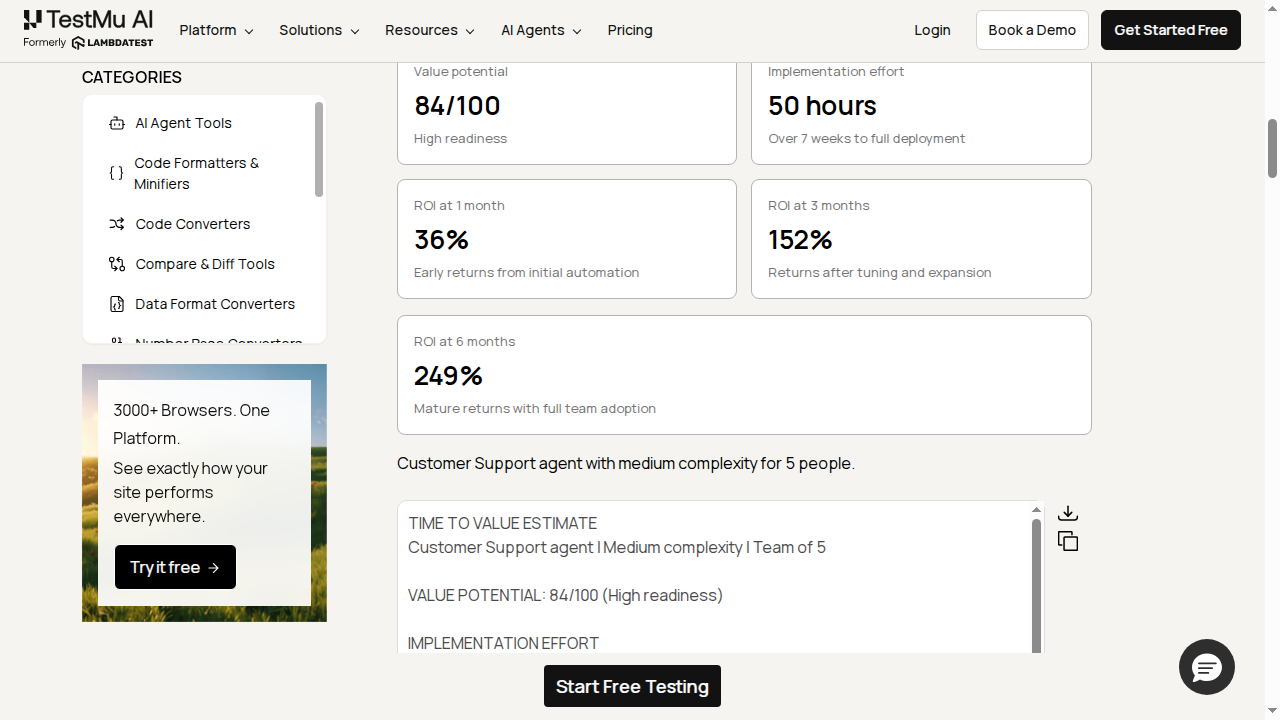
The Time to Value Calculator is a free online tool that turns three choices (your agent type, deployment complexity, and team size) into a concrete AI agent deployment timeline. You get a value-potential score, total implementation effort in hours, a week-based timeline to full deployment, and ROI projections at 1, 3, and 6 months.
It covers four agent types (Customer Support, Sales, Marketing, and Operations) across three complexity levels, and scales every number to your team size, so a solo operator and a 20-person team get meaningfully different estimates.
Everything runs locally in your browser. There is no external API call, no signup, and no daily limit, so your selections never leave your device.
How Does the Time to Value Calculator Work?
When you click Calculate Time to Value, the tool runs entirely on your device:
- Scales effort hours by team size: more people to configure for and onboard means more setup hours, with an added coordination penalty once a team gets large.
- Sets the base timeline by complexity: Simple targets about 4 weeks, Medium about 7 weeks, and Complex about 10 weeks, then nudges the calendar based on team size.
- Scores value potential out of 100: blending agent type, complexity, and how close your team size is to the 2-6 person sweet spot.
- Projects ROI at 1, 3, and 6 months: each figure uses the standard return on investment formula, (gain minus cost) divided by cost, where gain is hours saved per week times a blended hourly cost and cost is the monthly tool cost plus setup cost spread over 6 months.
- Builds a 6-step guided action plan: from an initial workflow audit through full production deployment with ROI tracking.
Because everything comes from a fixed formula rather than a live model, results are instant and repeat exactly if you pick the same inputs again.

How Do You Use the Time to Value Calculator?
Follow these steps to get a full deployment estimate in seconds:
- Choose your agent type: Pick Customer Support, Sales, Marketing, or Operations.
- Choose the complexity: Simple for a single channel and workflow, Medium for multi-channel with integrations, Complex for custom logic across multiple systems.
- Set your team size: Drag the slider to the number of people who will use or manage the agent.
- Click "Calculate Time to Value": The tool instantly returns a value-potential score, effort hours, a week timeline, ROI at 1/3/6 months, and a guided action plan.
- Adjust and recalculate: Change any input to see how complexity or team size shifts the timeline and ROI curve.
- Copy or download: Use the Copy button to copy the results to your clipboard, or Download to save them as a Markdown file.
For more free planning tools, try the AI Agent Prompt Generator or the AI Use Case Generator.
Who Should Use the Time to Value Calculator?
- Founders scoping their first agent: Get a realistic effort and timeline estimate before committing budget or headcount.
- Ops leaders building a business case: Use the ROI curve to explain why Month 1 looks weaker than Month 6.
- Agencies scoping client work: Generate a defensible timeline and effort estimate to include in a proposal.
- Teams comparing complexity tradeoffs: Re-run the calculator with Simple vs. Complex to see the effort and ROI difference before deciding scope.
- Anyone sizing team involvement: Slide team size up or down to see when coordination overhead starts working against you.
Pair it with the AI Agent ROI Calculator for payback period and NPV, the AI Agent Onboarding Planner to turn the timeline into a 14-day plan, or the AI Agent Readiness Quiz to gauge readiness before you start.
Once you have a timeline, plan the rollout in TestMu AI Test Manager and validate the agent with KaneAI, the AI-native testing agent, before it reaches production.
Frequently Asked Questions
How accurate are the timeline estimates?
They are directional estimates from a fixed formula based on agent type, complexity, and team size, not a guarantee. Actual timelines shift with tool choice, data quality, and how much time your team can dedicate each week.
What is included in implementation effort hours?
It represents the human time spent on the deployment: tool evaluation, setup, configuration, testing, monitoring, fixing issues, training, and documentation. It does not include the time the agent works autonomously afterward.
Why is Month 1 ROI often lower than Month 3 or 6?
Month 1 carries the full weight of setup cost and a lower accuracy ramp while the team is still learning the new workflow. ROI improves in later months as the agent handles more cases correctly and setup cost is spread out.
Can I speed up the timeline?
Yes, with tradeoffs. Using pre-built templates instead of custom configuration can save time, and having clean, documented processes before starting removes a lot of early back-and-forth. Skipping testing to move faster tends to create reliability problems later.
Does a bigger team always mean faster results?
Not linearly. Teams of about 2 to 6 people tend to be the sweet spot because coordination overhead stays low. Much larger teams often add coordination time that offsets the extra hands available.
Is the Time to Value Calculator free to use?
Yes, it is 100% free with no signup required, and there is no daily limit because the tool runs entirely in your browser with no external API calls.
Does the tool store or send my data anywhere?
No. Nothing you select is sent to a server. The entire estimate is computed locally in your browser using the tool's built-in formula.
What is time to value for an AI agent?
Time to value for an AI agent is the time from starting a deployment to the point where the agent delivers measurable returns. This calculator estimates it in weeks from your agent type, deployment complexity, and team size, alongside effort hours and ROI at 1, 3, and 6 months.
How long does it take to deploy an AI agent?
It usually ranges from about 4 weeks for a simple single-channel agent to roughly 10 weeks for a complex multi-system deployment. The calculator sets a base timeline from complexity, then adjusts it up or down for team size, since very small and very large teams both shift the schedule.
Can I use this for an enterprise AI agent deployment?
Yes. Set team size up to 50 and choose Complex to model a larger enterprise rollout. The tool adds a coordination penalty as the team grows, so the effort hours and timeline reflect the overhead of aligning more people on one deployment.

Did you find this page helpful?
More Tools
TestMu AI forEnterprise
Get access to solutions built on Enterprise
grade security, privacy, & compliance
- Advanced access controls
- Advanced data retention rules
- Advanced Local Testing
- Premium Support options
- Early access to beta features
- Private Slack Channel
- Unlimited Manual Accessibility DevTools Tests