
The best Cursor alternative to test Cursor builds
Cursor agents build the feature and check their own work. Kane CLI, TestMu AI's end-to-end testing agent, verifies the flow in a real browser, catches regressions, and ranked #1 in the PRISM Q4 2026 benchmark.

Trusted by 3M+ users globally at




"We have tripled our tests and are now executing tests in less than 2 hours with 78% Faster Test Execution"


"We figured out a more efficient way to monitor system health and resolve failures earlier in lower environments."





"TestMu AI has significantly boosted our testing speed, is easy to implement, and provides exceptional support."


"With 70% faster test execution, TestMu AI helped us achieve faster time-to-market and enhanced CX."



Cursor vs TestMu AI testing comparison

Top Choice
Features

Cursor
What it is
Primary job
Who checks the change
AI testing agent benchmark
Built for
Where tests run
Browsers covered
Real mobile devices
Who writes the test
Tests outlive the session
Regression on every build
Evidence captured
Evidence outside the agent
Test management and traceability
Flaky-test detection and root cause
Self-healing
Visual regression
Accessibility checks
API, database, and network checks
AI code review
Coding-agent integration
Working together
Pull-request workflow
CI/CD integrations
Code export
Human in the loop
Parallel execution
Compliance
Offers free tier
Starting price
Pricing unit
Where it wins
Methodology
How we compared Cursor and TestMu AI
Each row is scored against the public material Cursor publishes itself: the documentation at cursor.com/docs for the agent browser, cloud agents, and Bugbot, the changelog entry that gave cloud agents computer use, the features page, and the pricing page, all checked on 6 October 2026, alongside the TestMu AI product documentation and live pricing page. Cursor is a code editor with agents, so rows an editor does not cover by design are marked Not offered or Not documented rather than treated as failings, and where the documentation is silent the row says so. Where Cursor is stronger, in the editor, on cloud agents, and on pull-request review, the comparison says so. We built this page after sales conversations in which prospects asked why a team that works in Cursor still needs a testing platform.
Last updated
October 2026
What was tested
32 head-to-head rows across where tests run, authoring, persistence, evidence, integration, and pricing. Pricing verified on 2026-10-06
Sources
cursor.com/docs, cursor.com/changelog, cursor.com/pricing, and the TestMu AI product documentation and pricing page
How TestMu AI tests what Cursor ships
Keep Cursor for the code. Add Kane CLI as the end-to-end check in its loop, then saved tests, real devices, and results your QA lead can open.
 KANE CLI
Verify Cursor builds with Kane CLI
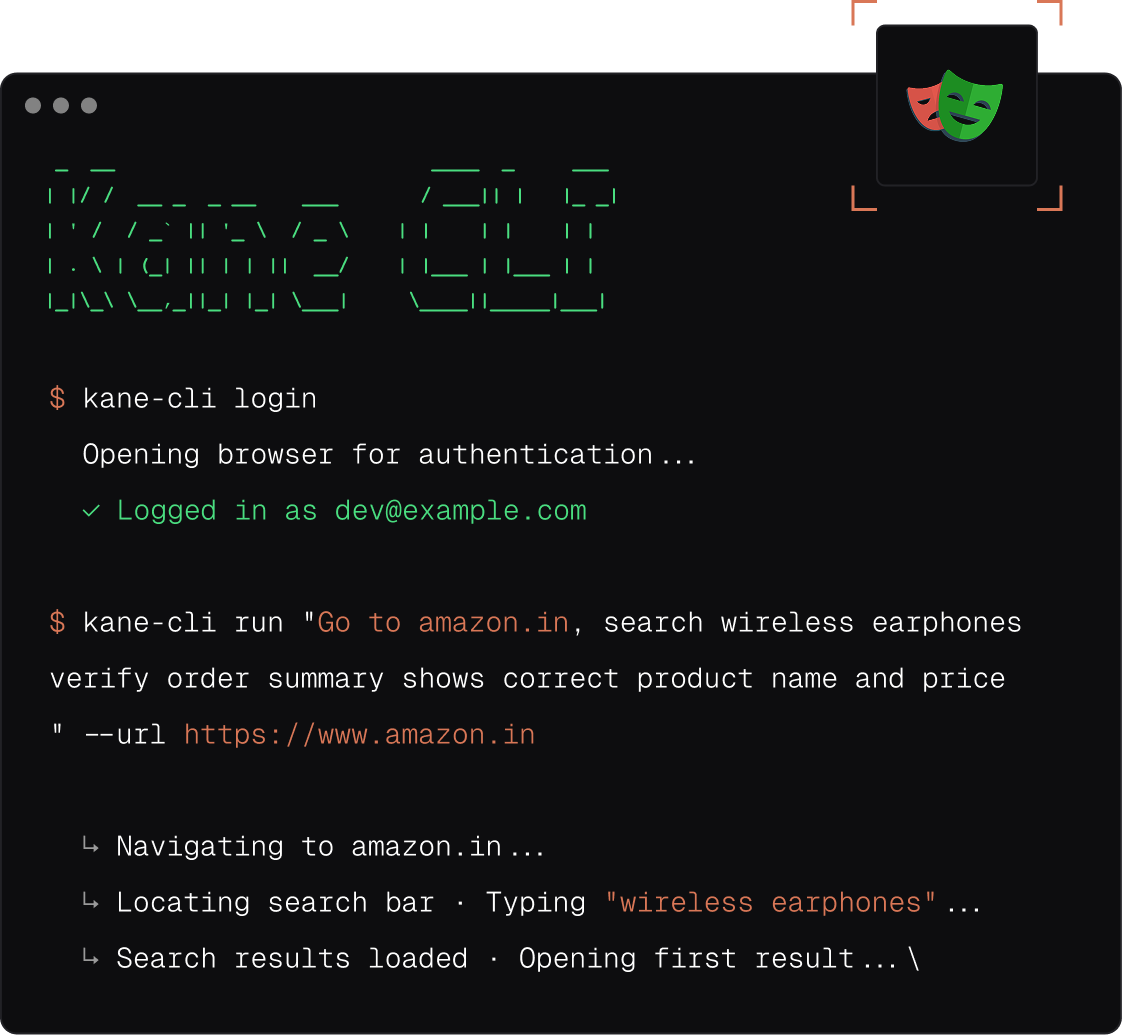
Kane CLI is an end-to-end testing agent by TestMu AI: a plain-English flow runs in real Chrome and returns pass or fail. Cursor runs it via AGENTS.md.
Install Kane CLI
- Install from testmuai.com/kane-cli/agents.md in one step
- Codex CLI skill, read by Cursor through AGENTS.md
- #1 on the PRISM Q4 2026 AI testing agent leaderboard

 KANEAI
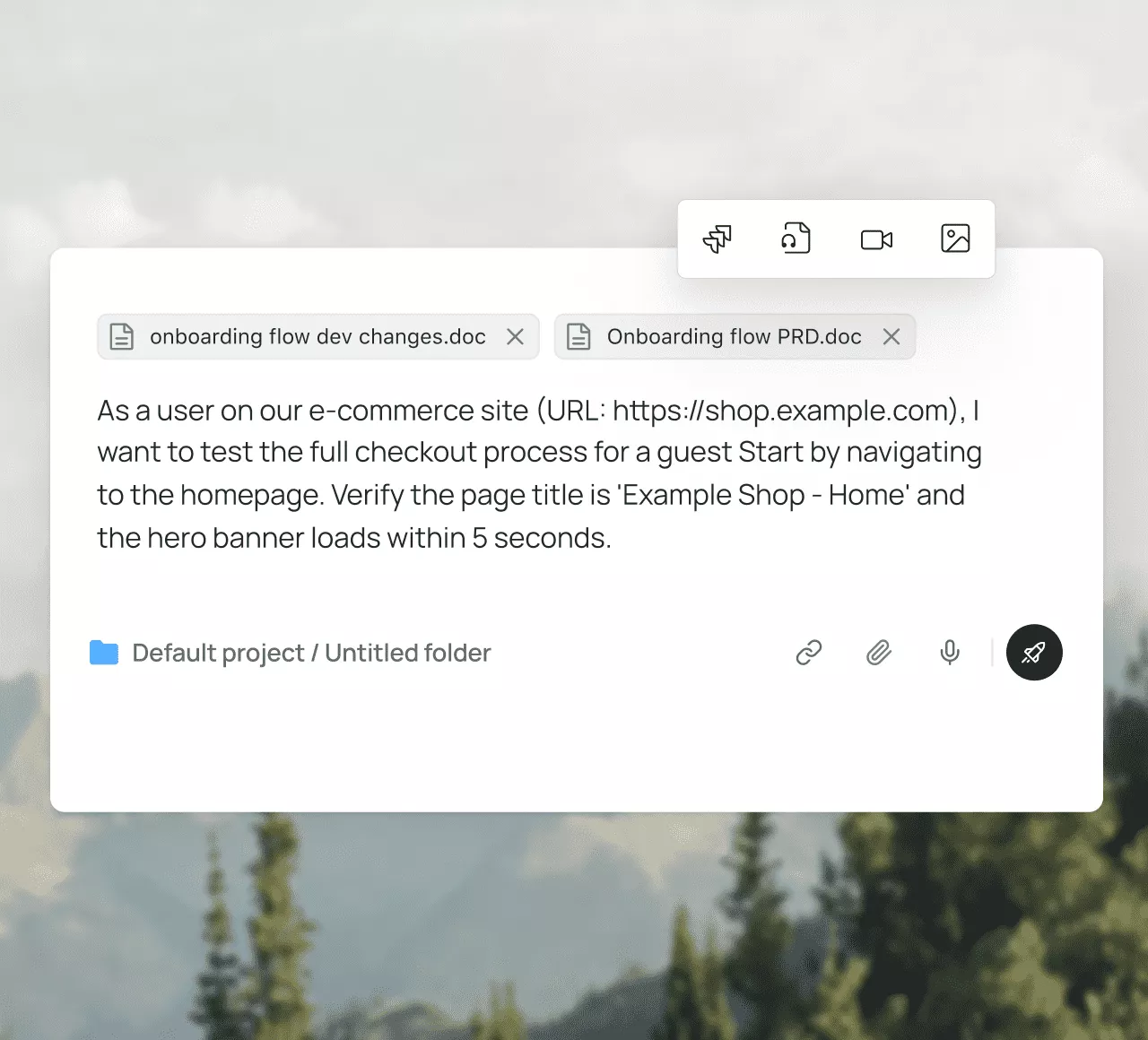
Turn Cursor's checks into saved tests
A Cursor agent's check ends with its pull request. KaneAI turns the same prompt, PRD, or ticket into a saved, scheduled test that exports as code.
Try KaneAI free- Author from a PRD, Jira ticket, or GitHub pull request
- Self-healing steps replay the same way on every run
- Export to Selenium, Playwright, Cypress, or Appium
 REAL DEVICE CLOUD
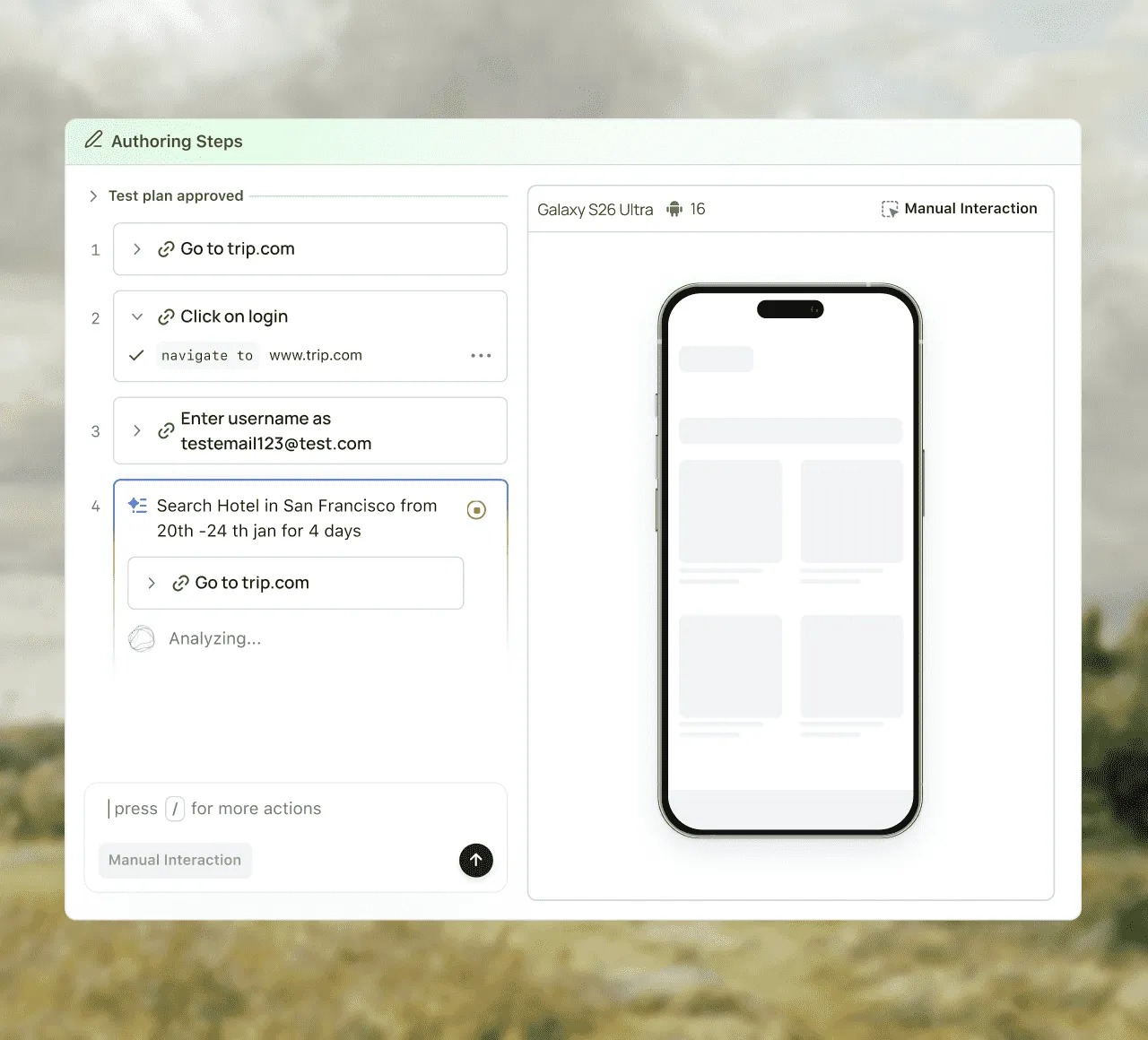
Cursor builds on 10,000+ real devices
Cursor's agent tests in one browser or VM. TestMu AI runs those flows on 3,000+ browser and OS combinations and 10,000+ real iOS and Android devices.
Start Free Testing- Safari, Firefox, Edge, and Chrome on Windows and macOS
- 10,000+ real devices with network and geolocation control
- Up to 70% faster suites on HyperExecute
 TEST MANAGER AND TEST INSIGHTS
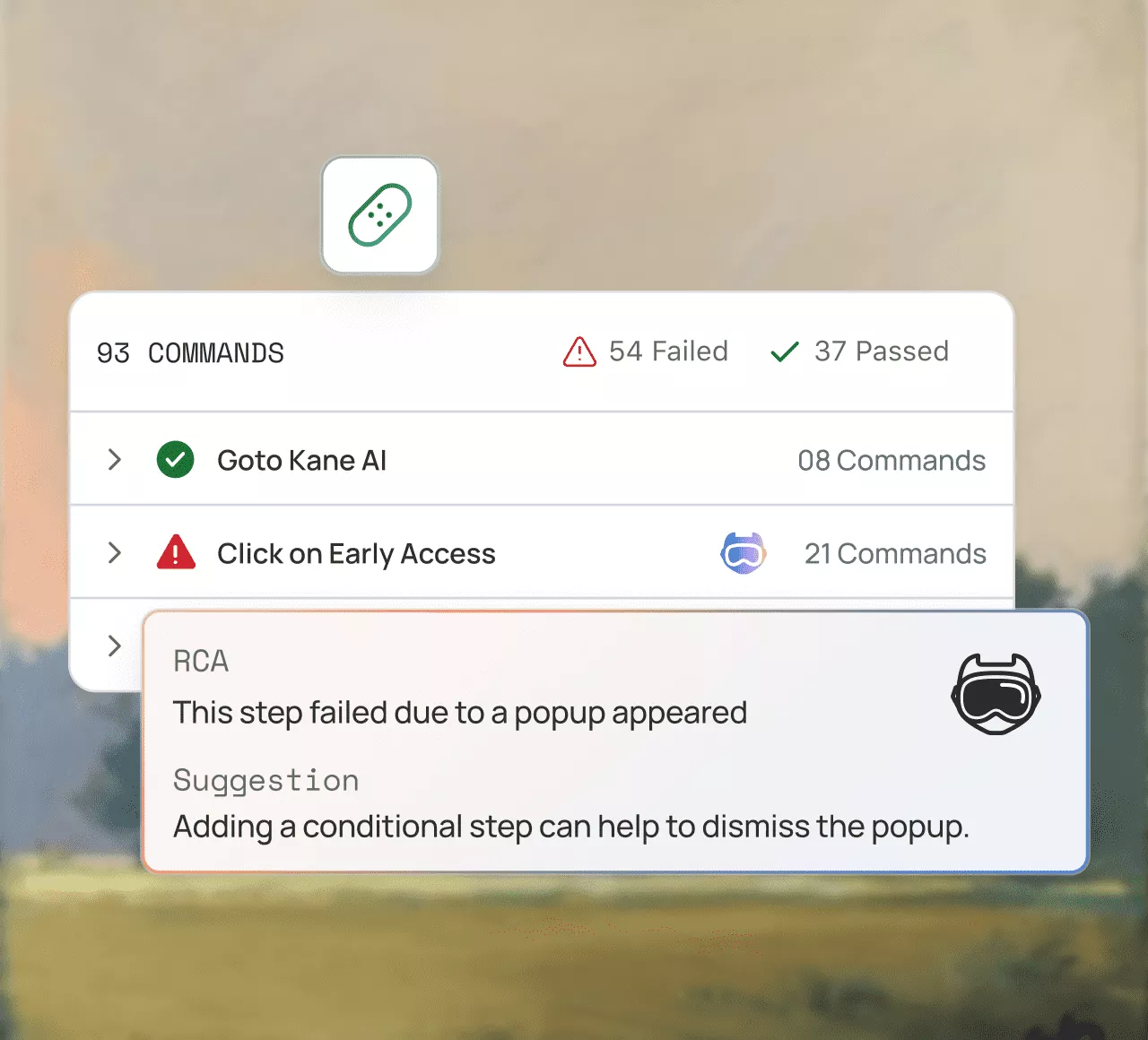
Track Cursor test results across runs
A Cursor recording sits on the pull request. TestMu AI keeps every run in Test Manager, flags flaky tests in Test Insights, and diffs UI in SmartUI.
Try for free- Two-way Jira and Azure DevOps sync in Test Manager
- Flaky-test detection and AI root-cause analysis
- Visual baselines and diffs for web and mobile in SmartUI
Cursor vs TestMu AI pricing comparison
Start free with Google
Cursor's published pricing, verified on 6 October 2026. Cursor bills per seat plus metered agent usage; TestMu AI bills per agent and per execution minute.
TestMu AI
Cursor
Free tier
Kane CLI free to start; HyperExecute, Test Manager, SmartUI, and Live testing free forever
Hobby, free, with limited agent requests and no credit card
Starting price
KaneAI Starter $17 per agent per month, billed annually
Pro $20 a month
Higher individual tier
KaneAI Pro $89 and Max $179 per agent per month; Max adds mobile
Pro+ and Ultra, with higher agent limits
Team pricing
Plan-dependent seats; execution minutes pooled on HyperExecute
Teams $40 per user a month, with SAML or OIDC SSO
Enterprise
Custom: dedicated and on-premise clouds, SSO, SLA
Custom: pooled usage, SCIM, audit logs, access controls
Pricing unit
Per agent per month plus execution minutes
Per seat with included model usage; cloud agents at API pricing; Bugbot per review
Real devices and browser matrix included
Yes, on web and mobile automation plans
Not offered at any tier
TestMu AI
Free tier
Kane CLI free to start; HyperExecute, Test Manager, SmartUI, and Live testing free forever
Starting price
KaneAI Starter $17 per agent per month, billed annually
Higher individual tier
KaneAI Pro $89 and Max $179 per agent per month; Max adds mobile
Team pricing
Plan-dependent seats; execution minutes pooled on HyperExecute
Enterprise
Custom: dedicated and on-premise clouds, SSO, SLA
Pricing unit
Per agent per month plus execution minutes
Real devices and browser matrix included
Yes, on web and mobile automation plans
Cursor
Free tier
Hobby, free, with limited agent requests and no credit card
Starting price
Pro $20 a month
Higher individual tier
Pro+ and Ultra, with higher agent limits
Team pricing
Teams $40 per user a month, with SAML or OIDC SSO
Enterprise
Custom: pooled usage, SCIM, audit logs, access controls
Pricing unit
Per seat with included model usage; cloud agents at API pricing; Bugbot per review
Real devices and browser matrix included
Not offered at any tier
 Planning
 1-Click Migration from Other PlatformsLink Jira Issues with Test Manager
 Authoring


 Execute
 AnalysisAI-powered error classificationSmart auto-healingSmart flakiness detection


HyperExecute features for agent-written tests

Auto Healing
Broken locators are re-anchored automatically, so a Cursor refactor does not fail every test that used the old selector.

Auto Muting
Tests that fail without a usable signal are muted automatically, so alerts fire only for failures someone must act on.

Flaky Test Management
Flaky journeys are tracked across runs, so you see how often a test has failed before you spend time on it.

Fail Fast
Execution stops at the first critical failure, so feedback arrives in minutes instead of after the full suite.

Artifact Management
Screenshots, video, and logs are kept for every run, so debugging does not depend on reopening an agent session.

Smart Wait
Waits are driven by what has rendered on screen, so slow pages do not need fixed sleeps or retries.






















Success Stories of TestMu AI (Formerly LambdaTest)

50%
reduction in test execution time
“HyperExecute is a highly reliable test execution platform and has excellent customer support.”
Sagar Uday Kumar
Sr. Engineering Manager
More Reasons to Love TestMu AI (formerly LambdaTest)
See how TestMu AI improves your testing with seamless integration, quicker results, and unmatched accuracy.
Users
3M+
Tests
1.5B+
Enterprises
18K+
Countries
132
TestMu AI Named a Challenger in the 2025 Gartner® Magic Quadrant™
Read ReportTestMu AI recognized in The Forrester Wave™: Autonomous Testing Platforms, Q4 2025
Read ReportWall of Fame
TestMu AI is the #1 choice for SMBs and enterprises across the globe.

Enterprise-Grade Security
We safeguard your data and AI systems with global security, privacy, responsible AI, and ESG standards.

Integrations
Works where you work, 120+ integrations with the tools your team relies on.




As Seen On
Some Love from our Customers
As Best Egg expanded its product offerings and entered new markets, we knew our old testing infrastructure couldn’t keep up.
With support from Tenny Agustin, our Engineering Operations Lead, we modernized our approach with
TestMu AI

Best Egg
best-egg

Excited to Share My Learning Journey with Kane AI & Lambda Tool!
I'm pleased to announce that I've recently gained hands-on experience exploring Kane AI through the Lambda Tool and it’s been a fantastic journey of upskilling!
KaneAI

Suryateja Goud
suryateja-goud

See how is #Futureready to enable blazing-fast test orchestration seamlessly integrated with organizations' existing CI/CD platforms, using #Microsoft Azure.
TestMu AI

Microsoft India
MicrosoftIndia
Frequently asked questions
TestMu AI for Enterprise
Get access to solutions built on enterprise-grade
security, privacy, & compliance
- Advanced access controls
- Advanced data retention rules
- Advanced Local Testing
- Premium Support options
- Early access to beta features
- Private Slack Channel
- Unlimited Manual Accessibility DevTools Tests