

Next-Gen App & Browser Testing Cloud
Trusted by 2 Mn+ QAs & Devs to accelerate their release cycles


On This Page
- Why use Xamarin?
- How does Xamarin work?
- Features of Xamarin
- Advantages of Xamarin
- Disadvantages of Xamarin
- Prerequisites before using Xamarin
- Support Controls of Xamarin
- Xamarin vs. React Native
- Why is it important to test Xamarin applications?
- Who performs Xamarin testing?
- Different methodologies to perform Xamarin testing
- How TestMu AI helps you with Xamarin testing?
- How to perform Xamarin testing using TestMu AI?

A Detailed Guide To Xamarin Testing
This guide covers Xamarin basics and explains how to test Xamarin-based websites and applications.

Irshad Ahamed
January 12, 2026

Xamarin is an open-source framework that offers cross-platform application development using the C# programming language. It helps to simplify your overall development and management of cross-platform software applications.
With the help of Xamarin, you can develop apps using JS libraries supported on three different mobile platforms like Android, iOS, and Windows. The apps developed using Xamarin exhibit native behavior regarding overall look and feel. A single C# codebase can access all the features related to the native SDK.
Xamarin runs in a controlled environment that provides functionalities like memory allocation and garbage collection. The developers can write all of their business logic in a single language that helps to achieve the desired performance in the long run. The code can also be easily reused, which optimizes performance.
In this guide, explore Xamarin, its features and benefits, and how to perform Xamarin testing of websites and applications.
Why use Xamarin?
Now that we have understood the basics of Xamarin let us elaborate on some of the factors that highlight why Xamarin is needed for your development requirements.
- Xamarin applications are developed using C#, an improved version compared to Java and Objective-C.
- You can include Objective-C, Java, and C++ libraries directly into Xamarin, allowing you to easily reuse all the third-party codebases.
- It helps to reduce the time and cost of developing your mobile apps.
- Xamarin provides a vast collection of class libraries.
- It helps to tackle compile-time checking smartly. This means you will have fewer errors during runtime, improving the overall quality of applications.
Besides, Xamarin is helpful for developers that have the following objectives.
- Share code, and manage business logic requirements across platforms.
- Write cross-platform applications that use C# as a programming language with support for Visual Studio.
How does Xamarin work?
Xamarin provides support for two commercial products.
- Xamarin.Android
- Xamarin. iOS
Both are built on Mono, an open-source version of the .NET framework based on the .NET ECMA standard. Mono has been around for many years as the .NET framework itself. Xamarin converts the Android and iOS Software Development Kit (SDK) to C# so that it can be easily understood by the developer community.
The same codebase can be used for both platforms without remembering the syntax related to different languages every time. The user interface remains the same.
Here are two different methods to create the UI:
- Use the original native method.
- Use Xamarin.Forms where you can make the UI for different platforms simultaneously and have 100% code sharing.
Once the UI requirements are completed, the real challenge lies in connecting the UI to the codebase. Here, you can use two different code-sharing approaches – Shared Project or Portable Class Libraries (PCL)

Features of Xamarin
Xamarin provides the following features that include:
- Modern integrated development environment (IDE): Xamarin uses Microsoft Visual Studio, a modern IDE providing many capabilities such as integrated source control, solution management system, project template library, and many more.
- Support for major mobile platforms: Xamarin is leading the way in providing cross-platform support for major platforms. There is a unified API where common resources can be accessed across different platforms. Shared code is the new way to reduce the time to market for mobile developers working on complex coding requirements.
- Base class library (BCL): Xamarin applications rely on .NET BCL, an extensive collection of classes that provide a comprehensive set of features such as powerful XML, database serialization, string, networking support, and more.
- Modern-day language support: It supports C#, which helps accomplish modern-day requirements compared to Objective-C and Java. There are modern-day constructs such as LINQ, parallel programming, and more that help to simplify the coding requirements.
- Bindings for underlying SDKs: Xamarin contains bindings for the underlying platform SDKs with support for both Android and iOS. These bindings are strongly typed, so you can efficiently perform compile-time type checking, providing top-notch quality and performance for your applications that are built and developed.
- Scalability: You can use this framework to provide much-needed scalability resulting in faster project delivery. Xamarin is far better when it comes to competitive app development.
- Documentation: The documentation is available online for understanding different features and functionalities related to Xamarin. The documentation is structured according to the various platforms that Xamarin supports.

Austin Siewert
CEO, Vercel
Discovered @TestMu AI yesterday. Best browser testing tool I've found for my use case. Great pricing model for the limited testing I do 👏
2M+ Devs and QAs rely on TestMu AI
Deliver immersive digital experiences with Next-Generation Mobile Apps and Cross Browser Testing Cloud

Advantages of Xamarin
Here are some of the advantages that make Xamarin a great option for your development requirements:
- It supports the concept of code reusability, where more than 90% of the code can be recycled for application development on different supported platforms. Due to code sharing, there is a shorter product development lifecycle so that you can deliver your code requirements quickly.
- Provides support for native applications. The native design is a great solution for any application.
- Xamarin provides support for shared app logic, a powerful feature from a development perspective. Developers can transfer 75% of the code across different operating systems, saving considerable time and effort.
- Easily bind with the same APIs and UI controls used to build the iOS, Android, Windows and macOS apps in their platform-supported languages.
- Provides a component store built in the Xamarin Studio and Xamarin Visual Studio extensions.
- Xamarin and C# provide a perfect combination for cross-platform development.
Disadvantages of Xamarin
Let us understand some of the disadvantages of using Xamarin, which you should be aware of:
- Xamarin does not support all the available third-party libraries for Android and iOS, and developers need to spend additional time and effort on the required new elements.
- The applications that are loaded with a lot of graphics or utilize a lot of user interactions take a long time to develop using Xamarin.
- The mobile apps developed in Xamarin can consume larger sizes than native ones. You can mitigate the apps that have a large extent where you need to optimize the code requirements.
- Xamarin can be expensive for enterprise users since the free platform is only limited to individual developers.
- It still needs a lot of work in terms of community expansion and growth. There is a small community of Xamarin developers, which will take time to grow and evolve. The talent pool can only get better if there are more and more professionals that learn and implement this platform for real-world projects.
- Third-party tools cannot provide instant support when there is the latest release for Android and iOS. You need to contact the support team for issues that need technical assistance on an immediate basis.
We discussed the pros and cons of using Xamarin as a reliable framework for cross-platform development, but you need to know what works best for you and your development requirements.
If you are a newbie developer looking to explore the various features offered by Xamarin, it is always a good practice to download the software and its related dependencies to get started with your development requirements.
Prerequisites before using Xamarin
These are some of the prerequisites that can help you learn Xamarin in a quick time.
- Good understanding of C#.
- Performance related to XAML for UI designing.
- Knowledge related to MVVM architecture.
- Understanding the fundamentals associated with mobile development.
The proficiency of Xamarin is attributed to the mix of factors – C# language, mobile development, and architecture patterns such as MVC and MVVM. It can be challenging to learn all the fundamentals at once, but it is important to build a learning plan to help you understand the basic concepts quickly.
Support Controls of Xamarin
The Xamarin UI controls allow you to build platform-specific applications for iOS, Android, and Windows platforms. Here are some of the critical controls that help to create the user interface of Xamarin.Forms application.
- Pages: The pages are derived from Xamarin. Forms page class. These visual elements occupy almost all of the screen.
Following are the different page types that Xamarin supports.
- ContentPage
- FlyoutPage
- NavigationPage
- TabbedPage
- CarouselPage
- TemplatedPage
- Layouts: It helps to compose the user interface controls into visual structures. Depending on the project requirements, you can have a design either with single content or multiple children.
- Views: These are useful when working with cross-platform mobile user interfaces.
- Cells: The cells can be added to ListViews and TableViews controls.
You can also use the third-party controls as they can provide additional support for Xamarin.Forms developers.
Xamarin vs. React Native
Let us try and compare the popular frameworks and see which the best option is considering different factors.
- When it comes to performance, Xamarin is a preferred choice when it comes to native-like performance when compared with React Native.
- React Native has a vast community and a better group of a developer ecosystem.
- Xamarin provides more useful pre-built components than React Native.
- Xamarin offers a better compiler that is well-suited for diverse platform requirements.
- React Native is more economical.
When you try and compare two options, it all comes down to different factors that create an impact in the long run. React Native has been given tough competition to the Xamarin framework in the past few years. That is why more and more companies are shifting their focus to React Native due to the larger community and developer support.
Xamarin is still a reliable framework with all the required capabilities, but it is still needed to make an impact, in the long run, to meet diverse market needs. It is important to choose based on the project requirements and budget constraints.
Why is it important to test Xamarin applications?
It is important to perform comprehensive testing of Xamarin apps and websites to deliver the correct business value to the end users and customers. Since it is an open-source, cross-platform system, you can validate the apps and websites on different browsers, devices, and OS for better quality and performance in the long run.
Following are the benefits of testing Xamarin websites and apps.
- It helps to ensure that the different security aspects impacting the Xamarin websites are validated thoroughly.
- The key elements of overall look and feel, design flow, and user navigation are validated for different Xamarin websites and apps.
- Different non-functional aspects, such as server response time, page load, etc., that impact the Xamarin websites are validated using different user scenarios.
- The features and enhancements delivered as part of Xamarin development must be tested before they are pushed to end users.
Who performs Xamarin testing?
The success of Xamarin websites and apps relies on multiple teams that work in close collaboration to deliver desired outcomes. The testing is performed by both developments as well as testing teams.
The development team can test the following aspects:
- Responsiveness
- Complex workflows
- System configurations
- Product requirements as per the defined development standards
The testing team needs to test the following scenarios:
- Overall system functionality and flow
- Validation of test cases and test plan.
- Product requirements as per the defined testing standards
- Performance
The security team can also perform testing along with the development and testing teams.
The following testing types apply to Xamarin websites:
Different methodologies to perform Xamarin testing
In this section of the Xamarin testing tutorial, let’s explore different ways of testing Xamarin-based websites and applications.
- Using Xamarin Test Cloud with different frameworks: It is one of the best solutions for performing UI acceptance testing. It allows the developers to perform automation testing on a mobile application using the cloud.
You can write automated UI tests using any of the following frameworks.
- Xamarin.UITest: The tests are written in C# using the NUnit testing library. It can be integrated with Xamarin.IOS and Xamarin.Android projects. The tests interact with the user interface as a user would be involved in entering text, tapping buttons, and using gestures such as swipes. Each test follows the Arrange-Act-Assert pattern.
- Calabash: It allows you to write tests in Ruby using Cucumber. It enables the user to write and implement tests validating the functionality of iOS and Android apps. You can perform testing using a powerful open-source mobile app and behavior driven development framework.
The automated tests run on the application UI and validate the application behavior irrespective of the framework used to write the tests. Once the tests are created locally, the mobile apps and tests are uploaded to the Test Cloud.
On the test cloud, the app is installed, and tests are executed on different supported physical devices. Frameworks used in Xamarin Test Cloud services cannot interact independently with mobile applications. You need an automation library to run the tests on the device. This automation library is provided using the Xamarin Test Cloud agent. It gives the required APIs to interact with Android and iOS apps on mobile devices.
- Xamarin Forms: You can perform unit testing using Xamarin forms. Xamarin provides the Xamarin.Forms.Device class that allows you to determine the platform and device where the required testing needs to be performed. The course offers practical methods and properties you can use throughout the application.
Nowadays, many organizations face a tough challenge in building their applications and mobile apps for multiple platforms, especially Android and iOS. Developers and QA teams face the major challenge of building an in-house test infrastructure to cover all browsers, devices, and OS, which is a cumbersome and expensive approach. You will still need to manage OS updates continuously, which is impractical.
This is where a cloud-based testing platform like TestMu AI comes into play. In the next section, we’ll discuss more about TestMu AI and how it helps you with Xamarin testing.

Note: Test your Xamarin applications on a real device cloud. Try TestMu AI Now!
How TestMu AI helps you with Xamarin testing?
TestMu AI is a continuous quality cloud platform that helps organizations seamlessly manage both manual and automation Xamarin testing requirements for websites and apps using the cloud infrastructure. You can test your Xamarin-based web and mobile apps at scale across 3000+ real browsers, devices, and OS combinations without worrying about the infrastructure requirements.
Doing so ensures that your product requirements are shipped within stipulated timelines, allowing you to get timely customer feedback. As TestMu AI supports running tests on cloud-based infrastructure, you do not have to spend additional time or money configuring your test environment.
Here are a few features you can leverage with TestMu AI’s Xamarin testing cloud.
- Run automated tests using popular frameworks like Selenium, Cypress, Playwright, and more.
- With parallel testing, speed up your test execution by multiple folds, get early feedback on code commits, and reduce costs associated with finding issues early.
- Automate visual regression testing across different desktop and mobile browsers to identify visual mismatches.
- Test At Scale to expedite your release pipeline, reduce testing time, achieve faster feedback to code changes, and manage flaky tests.
Subscribe to TestMu AI YouTube Channel, and check out the latest tutorials around Selenium automation testing, Cypress testing, real-time testing, and more.
Vivo Cloud is the most powerful, feature-rich, and flexible platform for Android testing. Vivo Cloud enables you to test on real devices, which helps you achieve higher quality and faster time-to-market. It’s fully integrated with Xamarin Test Cloud, so you can connect your existing virtual network using your favorite development tools or simply run tests on Vivo devices.
How to perform Xamarin testing using TestMu AI?
With the TestMu AI platform, devs and testers can perform real-time and automated testing of Xamarin websites and apps on its high-performing CMS testing cloud.
In this Xamarin testing guide, we’ll look at how to perform real-time and automated testing of your Xamarin applications.
Real Time Xamarin testing
Follow the below steps to perform real-time Xamarin testing of your website on the TestMu AI cloud.
- Sign up for free and login to your TestMu AI account.
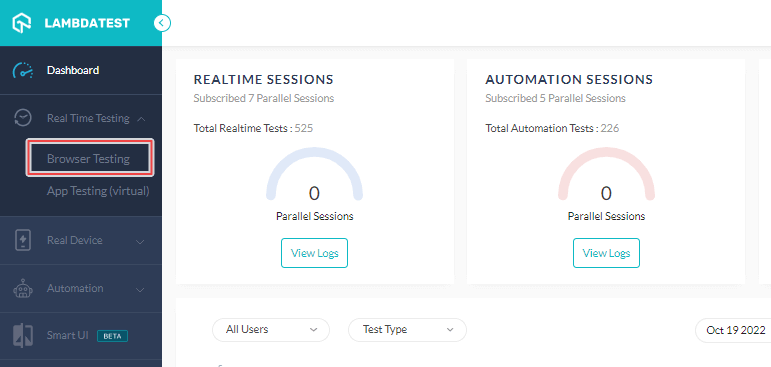
- From the left-sidebar menu, go to Real Time Testing → Browser Testing.
- Enter the test URL, select the testing type – Desktop/ Mobile, and choose the RESOLUTION, OS, and browser VERSION. Then hit START.
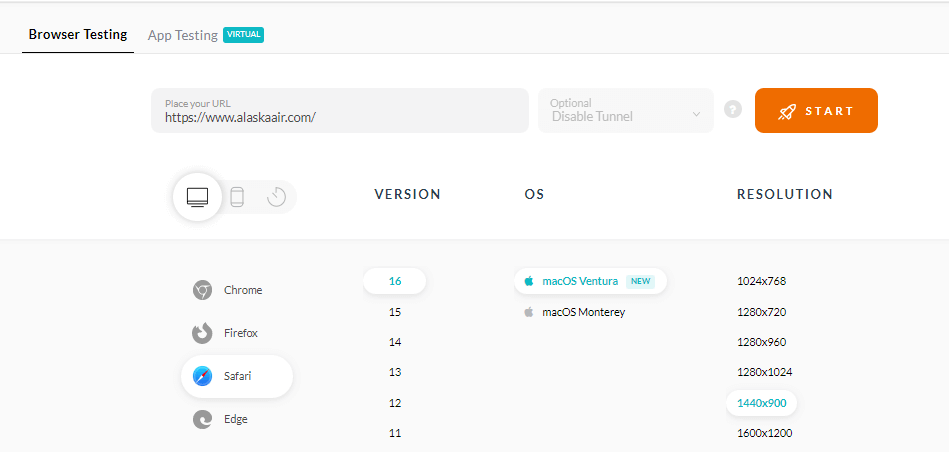
It will redirect you to a remote environment where you can test Xamarin websites on real browsers and operating systems.
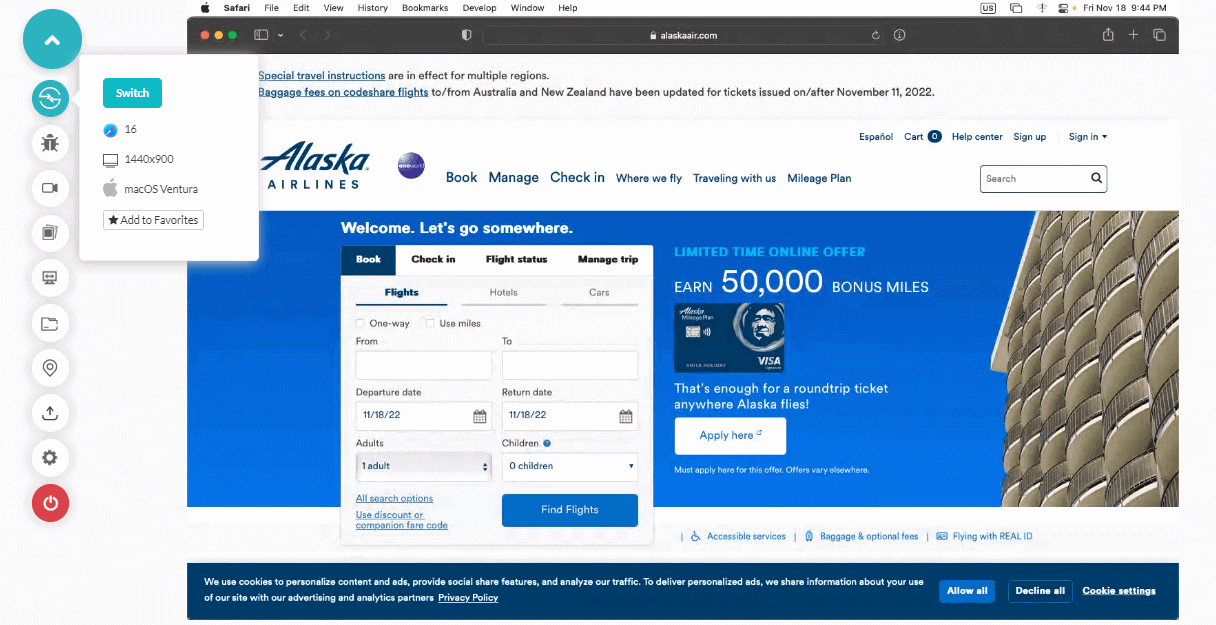
Now let’s see how to perform automated Xamarin testing.
With TestMu AI automation testing cloud, you can run automation tests at scale on your Xamarin website with test automation frameworks like Selenium, Cypress, Playwright, and more.
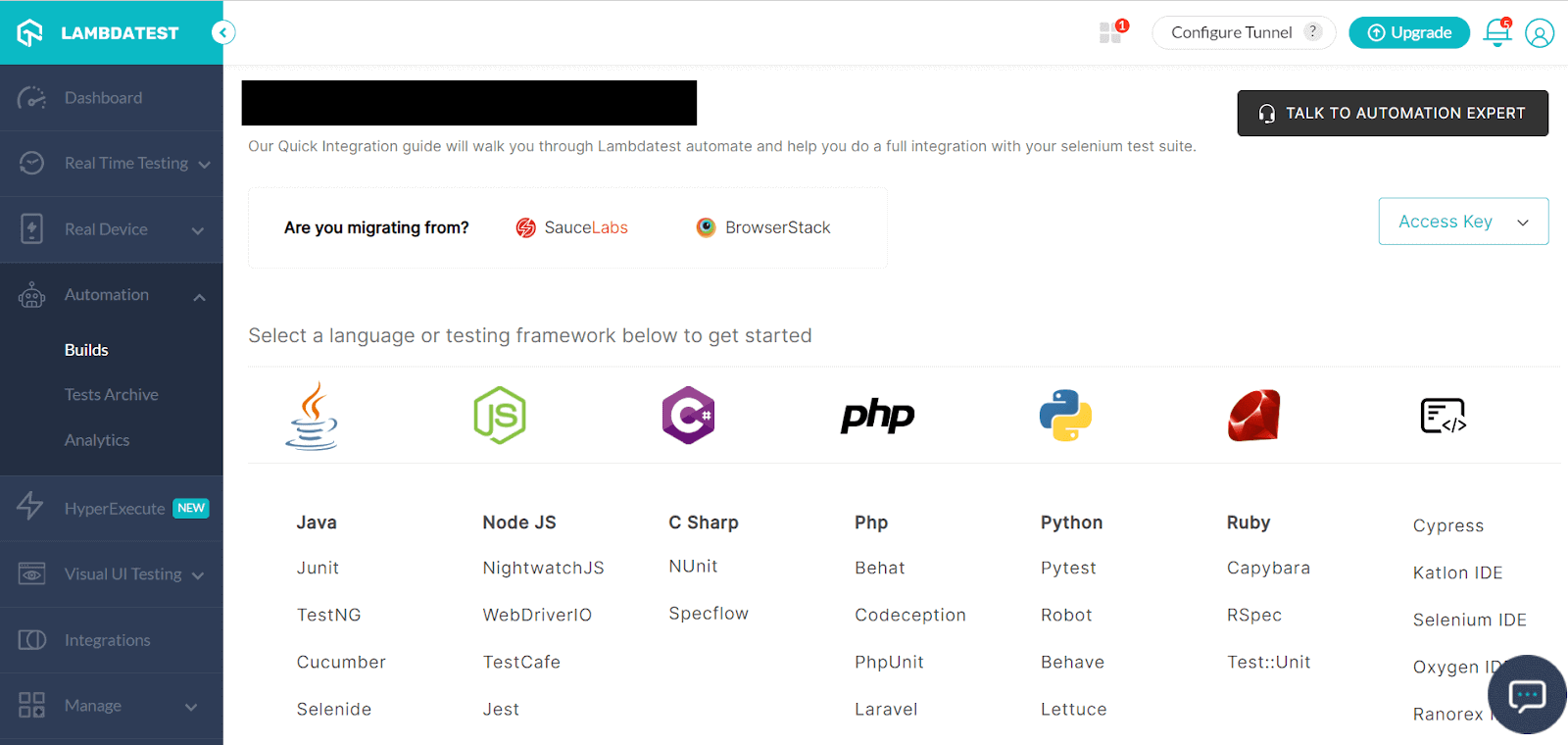
Here are the steps to perform Xamarin test automation on the TestMu AI platform.
- Login to your TestMu AI account.
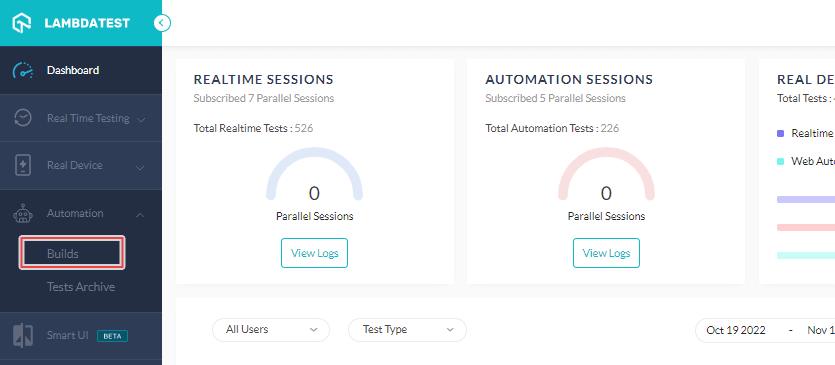
- Navigate to the Automation tab and then Builds.
- Select your favorite programming language and testing framework, and you can start testing. For your configuration of automation frameworks tests you can use real device capabilities generator.
Conclusion
In this Xamarin testing guide, we shed light on the different features and capabilities that the Xamarin platform offers. Testing is an integral part of validating the performance of any website before end customers use it. If you are a growing organization that is looking to reinvent its testing strategies, then you must explore the TestMu AI platform and give it a try.
Happy Xamarin testing!


Frequently asked questions
Did you find this page helpful?
More Related Hubs
TestMu AI forEnterprise
Get access to solutions built on Enterprise
grade security, privacy, & compliance
- Advanced access controls
- Advanced data retention rules
- Advanced Local Testing
- Premium Support options
- Early access to beta features
- Private Slack Channel
- Unlimited Manual Accessibility DevTools Tests