
Power Your Software Testing with AI Agents and Cloud
The Native AI-Agentic Cloud Platform to Supercharge Quality Engineering. Test Intelligently and Ship Faster.


- TestMu AI (Formerly LambdaTest)
- /
- Blog
- /
- How to Test Web Apps Without Code
How to Test Web Apps Without Code (2026 Guide)
Test your web app end to end, dynamic UI, forms, sessions, and multi-page flows, in plain English across every browser. No Selenium, no Playwright, no code.
Published on:
A web app's real cost of failure shows up in small breakages: a filter that returns an empty table while the data sits right there, or a save button that spins forever and quietly loses an hour of edits. KaneAI tests these flows from plain-English steps, with no Selenium or Playwright code required.
Why web apps are hard to test
A single page can look calm and still hide a dozen ways to fail. Real coverage of a web app has to deal with all of it:
- Dynamic, asynchronous rendering, where content arrives over AJAX behind spinners and lazy-loaded lists, so a test that clicks a beat too early sees an element that is not there yet
- Single-page app routing, where the view changes and the URL updates without a full page reload, and state carries over from one screen to the next
- Deep, stateful flows, like multi-step wizards, saved drafts, filters, and pagination that only make sense if the earlier steps ran correctly
- A sprawling surface of pages, modals, side panels, and permission-gated views that each need their own path exercised
- Browser and viewport fragmentation, where Chrome, Safari, Firefox, and Edge plus tablet and mobile widths render the same component in subtly different ways
- Session, auth, and data dependencies, where logged-in state, feature flags, and seeded records quietly change what the page is even supposed to show
And that is one build. Real coverage means running the same journeys as a new user and a returning user, on desktop and on mobile web, across every browser your customers actually open.
The old way: brittle web app scripts
Here is what verifying one small scenario, searching a dashboard and checking that results come back, looks like in a typical Selenium setup:
wait = WebDriverWait(driver, 10)
driver.get("https://yourapp.com/dashboard")
search = wait.until(EC.presence_of_element_located((By.CSS_SELECTOR, "input[name='q']")))
search.send_keys("invoices")
driver.find_element(By.CSS_SELECTOR, "button.search-submit").click()
wait.until(EC.presence_of_element_located((By.CSS_SELECTOR, ".results-list .result")))
results = driver.find_elements(By.CSS_SELECTOR, ".results-list .result")
assert len(results) > 0, "Expected at least one result row"
first = results[0].find_element(By.CSS_SELECTOR, ".result-title").text
assert "invoice" in first.lower(), f"Unexpected top result: {first}"
Ten lines, and it is fragile. The moment a developer renames the search input, restyles the results list, or moves the row title into a new component, the test breaks. Maintenance like this is the dominant cost of a large automation suite: engineers spend a large share of every sprint re-pointing selectors and nursing waits instead of writing new coverage. And this approach still needs someone on the team who writes Python or JavaScript in the first place, which dynamic content and single-page routing only make harder. It is the core tradeoff behind code-based vs. codeless test automation.
If you are a manual QA engineer, a PM, or a founder without a dedicated automation engineer, the code wall means most of your web app gets tested by hand, slowly, inconsistently, and never at 2 a.m. before a release.
The no-code way: write the test the way you would explain it
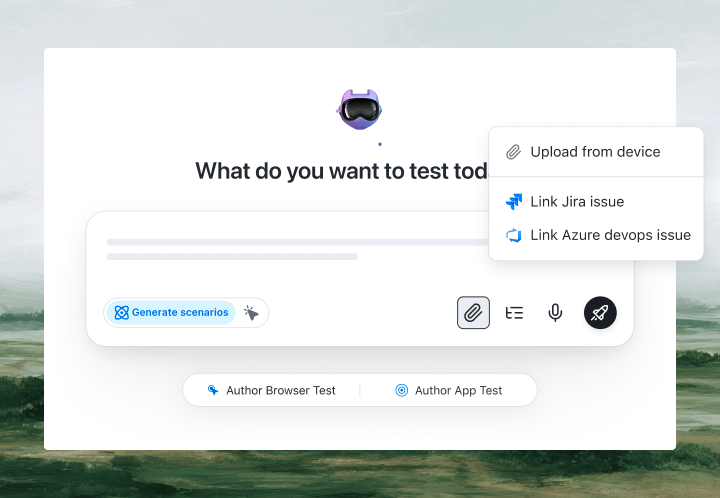
With KaneAI, you write the same test in plain English:
- Go to yourapp.com and open the dashboard
- Type invoices into the search box
- Click the search button
- Wait for the results list to load
- Verify at least one result appears
- Verify the top result mentions an invoice
That is the entire test. KaneAI reads each step, waits for the dashboard to finish loading the way a patient human would, and finds the search box on your live site by understanding the page rather than matching a brittle CSS selector. When a developer renames the results container or redesigns the layout, the test re-anchors itself instead of failing. You write it once in plain English, let KaneAI self-heal as the UI shifts, export the same test to Selenium, Playwright, Cypress, or Appium if you ever want the code, and run it across the TestMu AI grid of 3,000+ browser and OS combinations.

The web app scenarios that actually break
Once the happy path works, real coverage is just more English. Here are the web app scenarios worth adding, each takes about two minutes to write:
Search and filter a data table
- Apply a status filter and a date range to a records table
- Verify only matching rows remain and the result count updates
- Clear the filters and verify the full list returns
Multi-step form wizard
- Fill in step one and click Next
- Leave a required field blank on step two and verify the inline error appears
- Complete every step and verify the summary shows exactly what you entered
Modal and dialog flows
- Open the create dialog from the toolbar
- Verify the modal closes cleanly on the cancel button and the page underneath is untouched
- Submit the dialog and verify the new item shows up in the list
Session timeout and re-auth
- Stay idle until the session expires
- Verify the app prompts you to sign in again instead of showing stale data
- Sign back in and verify you land where you left off
Run every one of these across Chrome, Safari, Firefox, and real mobile devices from the same plain-English steps, with no per-browser rewrites.
Putting it on autopilot
Web app tests are most valuable when they run without you:
- Schedule the suite nightly, so a Friday deploy cannot leave a broken filter or a dead save button waiting to greet everyone on Monday
- Trigger on deploy via CI, where Kane CLI runs the same tests from your pipeline and pauses for an OTP or CAPTCHA instead of failing
- Alert on failure in Slack, with a full replay of exactly what the AI saw when the step failed, including screenshots, video, and the reason in plain English
When a test fails, you do not get a stack-trace exception at line 52. You get a plain-English reason for the exact step that failed. Anyone on the team can read it, and anyone can fix the test, because the test is just English.
Try it on your own web app in 10 minutes
- Sign up for KaneAI free, with no credit card
- Paste your web app URL
- Write your first test in plain English, or let KaneAI suggest one from your pages
- Run it and watch your web app get tested end to end
Your web app is too big to test by hand and too dynamic for brittle scripts. Test it in the language you already speak. When you are ready to cover the rest of your stack, read how to test Shopify stores and mobile apps without code.

Note: Test your web app without writing a line of code. Start with KaneAI free.
Author

Suryapratap Singh Chauhan
Blogs: 5

Suryapratap Singh Chauhan is Director of Engineering at TestMu AI, where he leads engineering with a focus on systems design and microservices across the testing platform. He brings over a decade of software engineering experience across backend and distributed systems, with earlier roles as a Software Engineer at Vidooly Media Tech and engineering roles at Freekaamaal and Webkul. Suryapratap holds a Master of Computer Applications in Information Technology from G.L. Bajaj Institute of Technology and Management.
Reviewer

Saniya Gazala
Reviewer
Saniya Gazala is a Product Marketing Manager and Community Evangelist at TestMu AI with 2+ years of experience in software QA, manual testing, and automation adoption. She holds a B.Tech in Computer Science Engineering. At TestMu AI, she leads content strategy, community growth, and test automation initiatives, having managed a 5-member team and contributed to certification programs using Selenium, Cypress, Playwright, Appium, and KaneAI. Saniya has authored 15+ articles on QA and holds certifications in Automation Testing, Six Sigma Yellow Belt, Microsoft Power BI, and multiple automation tools. She also crafted hands-on problem statements for Appium and Espresso. Her work blends detailed execution with a strategic focus on impact, learning, and long-term community value.


Web App Testing FAQs
Did you find this page helpful?
More Related Blogs

TestMu AI forEnterprise
Get access to solutions built on Enterprise
grade security, privacy, & compliance
- Advanced access controls
- Advanced data retention rules
- Advanced Local Testing
- Premium Support options
- Early access to beta features
- Private Slack Channel
- Unlimited Manual Accessibility DevTools Tests