
Power Your Software Testing with AI Agents and Cloud
The Native AI-Agentic Cloud Platform to Supercharge Quality Engineering. Test Intelligently and Ship Faster.


- TestMu AI (Formerly LambdaTest)
- /
- Blog
- /
- How to Test Single Sign-On Without Code
How to Test Single Sign-On Without Code (2026 Guide)
Test your whole SSO flow, SAML and OAuth redirects, IdP hops, session continuity, and logout, in plain English. No Selenium, no Playwright, no code.
Published on:
Single sign-on is tested without code by writing plain-English steps, such as clicking Sign in with SSO and signing in at the identity provider, that KaneAI runs across both domains while confirming the session stays active. It generates a TOTP code when a second factor appears and verifies logout ends the session at the provider and the app.
Why single sign-on is hard to test
A single button hides a lot of moving parts, and real coverage has to follow all of them across systems you only half control:
- The flow leaves your domain for an identity provider and has to come back, so the test spans two or more origins and a chain of redirects your app does not own
- SAML and OAuth behave differently, with signed assertions, token exchanges, and callback URLs that each fail in their own way
- Session and cookie continuity has to survive the cross-domain hop, so a login can look successful on the provider and still land on an unauthenticated app
- Just-in-time provisioning creates the account on first login, so a brand-new user and a returning user take different paths through the same button
- Second factors, consent screens, and keep-me-signed-in prompts appear on the provider side, outside your codebase, and change without warning
- Single logout has to end the session in your app and at the provider together, and it is the flow most teams never automate until it silently breaks
And that is one provider. Real coverage means testing each identity provider you support, first-time users vs. returning users, and every browser and device your people actually sign in from.
The old way: brittle SSO scripts
Here is what verifying a sign-in-through-the-provider-and-check-the-session scenario looks like in a typical Selenium setup:
const driver = await new Builder().forBrowser("chrome").build();
await driver.get("https://yourapp.com/login");
await driver.findElement(By.css(".sso-login-button")).click();
await driver.wait(until.urlContains("idp.example.com"), 10000);
await driver.findElement(By.id("username")).sendKeys("test.user@example.com");
await driver.findElement(By.id("password")).sendKeys("SuperSecret123");
await driver.findElement(By.css("button[type='submit']")).click();
await driver.wait(until.urlContains("yourapp.com/dashboard"), 15000);
const cookie = await driver.manage().getCookie("app_session");
assert.ok(cookie && cookie.value, "Expected an app session cookie after SSO");
const name = await driver.findElement(By.css(".user-menu")).getText();
assert.ok(name.length > 0, "Expected the signed-in user menu to render");
About a dozen lines, and every one is a liability. The moment your provider moves the username field, changes a callback URL, or renames the session cookie, the script breaks. Maintenance like this is the dominant cost of a large automation suite: engineers spend a large share of every sprint re-pointing selectors and chasing redirect changes instead of writing new coverage. It also needs someone on the team who writes JavaScript or Python, and a cross-domain SSO flow makes that person's job harder, not easier. It is the core tradeoff behind code-based vs. codeless test automation.
If you are a manual QA engineer, an IT admin, or a founder without a dedicated automation engineer, the code wall means SSO usually gets tested by hand once, right after setup, and never again until an outage forces it.
The no-code way: write the test the way you would explain it
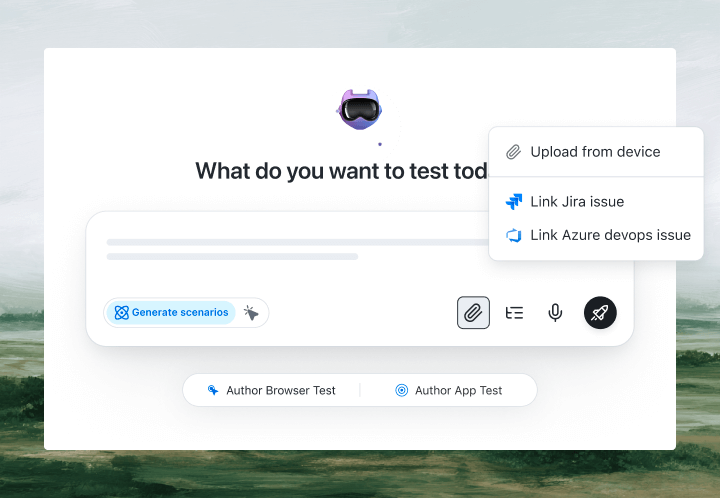
With KaneAI, you write the same test in plain English:
- Go to yourapp.com and open the login page
- Click Sign in with SSO
- On the identity provider screen, enter the email test.user@example.com
- Enter the account password and continue
- Verify the app returns to the dashboard
- Verify the signed-in session is active and shows the user's name
That is the entire test. KaneAI reads each step and executes the flow across both domains: it clicks the SSO button, follows the OAuth or SAML redirect to your identity provider, signs in there, and confirms the app comes back with its session and cookies intact. It finds fields on the provider screen and on your app the same way, by understanding each page rather than matching brittle selectors, so a redesign on either side does not break the run. When a second factor appears, KaneAI generates the TOTP code from your secret key, and its smart element detection and self-healing re-anchor steps across the IdP and app domains when the UI shifts, which significantly reduces maintenance.

The SSO scenarios that actually break
Once the happy path works, real coverage is just more English. Here are the SSO scenarios worth adding, each takes about two minutes to write:
SAML assertion and return hop
- Click Sign in with SSO and complete the identity-provider login
- Verify the app accepts the returned assertion and lands on the dashboard
- Verify the app session cookie is set and the user is fully signed in
First-time user provisioning
- Sign in through SSO with an account that has never logged in before
- Verify a new account is created and the onboarding or default workspace loads
- Verify a returning sign-in with the same account skips provisioning
Second factor on the provider side
- Sign in through SSO with valid credentials
- Enter the current TOTP code when the provider asks for a second factor
- Verify the app returns to the dashboard with the session active
Single logout
- Sign in through SSO, then trigger logout from your app
- Verify the session ends in the app and at the provider
- Verify visiting a protected page redirects back to the login screen
Run all of them across Chrome, Safari, Firefox, Edge, and real mobile devices from the same plain-English steps, with no per-browser rewrites.
Putting it on autopilot
SSO tests are most valuable when they run without you:
- Schedule the suite nightly, so a provider or config change cannot silently lock out your whole team overnight
- Trigger on deploy via CI, where Kane CLI runs the same tests from your pipeline and pauses for an OTP or consent prompt instead of failing
- Alert on failure in Slack, with a full replay of exactly what the AI saw when the step failed, so you get screenshots, video, and the reason in plain English
When a test fails, you do not get a stack-trace exception at line 47. You get a plain-English reason for the exact step that failed. Anyone on the team can read it, and anyone can fix the test, because the test is just English.
Try it on your own SSO in 10 minutes
- Sign up for KaneAI free, with no credit card
- Paste your app URL
- Write your first SSO test in plain English, or let KaneAI suggest one from your site
- Run it and watch your single sign-on get tested end to end across the provider and your app
Your SSO flow is too important to test by hand and too dynamic for brittle scripts. Test it in the language you already speak. Once sign-in through your provider is covered, read how to test two-factor authentication (2FA) and how to test file uploads to cover the steps your users reach next.

Note: Test your single sign-on flow without writing a line of code. Start with KaneAI free.
Author

Kavita Joshi
Blogs: 14


Kavita Joshi is a Senior Marketing Specialist at TestMu AI, with over 6 years of experience in B2B SaaS marketing and content strategy. She specializes in creating in-depth, accessible content around test automation, covering tools and frameworks like Selenium, Cypress, Playwright, Nightwatch, WebdriverIO, and programming languages with Java and JavaScript. She has completed her masters in Journalism and Mass Communication. Kavita’s work also explores key topics like CSS, web automation, and cross-browser testing. Her deep domain knowledge and storytelling skills have earned her a place on TestMu AI’s Wall of Fame, recognizing her contributions to both marketing and the QA community.
Reviewer

Himanshu Sheth
Reviewer
Himanshu Sheth is the Director of Marketing (Technical Content) at TestMu AI, with over 8 years of hands-on experience in Selenium, Cypress, and other test automation frameworks. He has authored more than 130 technical blogs for TestMu AI, covering software testing, automation strategy, and CI/CD. At TestMu AI, he leads the technical content efforts across blogs, YouTube, and social media, while closely collaborating with contributors to enhance content quality and product feedback loops. He has done his graduation with a B.E. in Computer Engineering from Mumbai University. Before TestMu AI, Himanshu led engineering teams in embedded software domains at companies like Samsung Research, Motorola, and NXP Semiconductors. He is a core member of DZone and has been a speaker at several unconferences focused on technical writing and software quality.


SSO Testing FAQs
Did you find this page helpful?
More Related Blogs

TestMu AI forEnterprise
Get access to solutions built on Enterprise
grade security, privacy, & compliance
- Advanced access controls
- Advanced data retention rules
- Advanced Local Testing
- Premium Support options
- Early access to beta features
- Private Slack Channel
- Unlimited Manual Accessibility DevTools Tests