
Power Your Software Testing with AI Agents and Cloud
The Native AI-Agentic Cloud Platform to Supercharge Quality Engineering. Test Intelligently and Ship Faster.


- TestMu AI (Formerly LambdaTest)
- /
- Blog
- /
- How to Test React Apps Without Code
How to Test React Apps Without Code (2026 Guide)
Test your React app end to end, dynamic renders, changing class names, conditional UI, and async data, in plain English. No Selenium, no Playwright, no code.
Published on:
React apps can be tested without code by writing plain-English steps like submitting a form and verifying the inline validation error appears, which KaneAI executes by reading the live page instead of matching class names that CSS Modules, styled-components, or Tailwind regenerate on every build. The approach also waits for lazy-loaded components to render before checking them.
Why React apps are hard to test
A React UI looks like plain HTML in the browser, but under the hood it moves in ways that break traditional test scripts:
- Class names and DOM structure are generated by build tools like CSS Modules, styled-components, and Tailwind, so a selector pinned to a hashed class name breaks on the next build
- State lives in memory, not in the markup, so a component can look correct and still hold the wrong value until an interaction forces a re-render
- Rendering is asynchronous, so between data fetches, Suspense boundaries, and lazy-loaded components the element you want may not exist the moment a script looks for it
- Conditional rendering makes whole sections of the UI appear and disappear based on props and state, multiplying the paths real coverage has to touch
- The virtual DOM re-mounts and re-keys elements on update, so an element reference that was valid a second ago goes stale after a re-render
- Client-side routing swaps the view without a full page load, so tests that wait for a navigation event or a page reload never fire
And that is one component. Real coverage means the happy path plus every empty state, error state, loading state, and validation branch, across every browser your customers actually use.
The old way: brittle selectors that fight the render cycle
Here is what verifying a simple render-and-check-the-state scenario looks like in a typical Selenium setup:
const { Builder, By, until } = require("selenium-webdriver");

const driver = await new Builder().forBrowser("chrome").build();
await driver.get("https://yourapp.com/dashboard");

// wait for the React component to mount and render
const cart = await driver.wait(
  until.elementLocated(By.css("[data-testid='cart-count']")),
  10000
);
await driver.wait(until.elementTextMatches(cart, /\d+/), 10000);

// assert the rendered state matches what we expect
const count = await cart.getText();
if (count !== "3") {
  throw new Error("Expected cart count 3, got: " + count);
}
A dozen or so lines, and nearly every one is a liability. The data-testid only works if a developer remembered to add it, and the hard-coded wait races the render cycle instead of tracking it. On a large React app, keeping scripts like this alive is the dominant cost of the whole suite: engineers spend a large share of every sprint re-pointing selectors after a re-render or a refactor instead of writing new coverage. It also assumes someone on the team writes JavaScript in the first place, which async rendering and regenerated markup only make harder. That is the core tradeoff behind code-based vs. codeless test automation.
If you are a manual QA engineer, a PM, or a founder without a dedicated automation engineer, the code wall means the React app gets tested by hand, clicking the same flows before every release and hoping nothing regressed under a refactor.
The no-code way: write the test the way you would explain it
With KaneAI, you write the same test in plain English:
- Go to yourapp.com and open the dashboard
- Wait for the cart to finish loading
- Verify the cart count shows 3 items
- Add one item to the cart
- Verify the cart count updates to 4
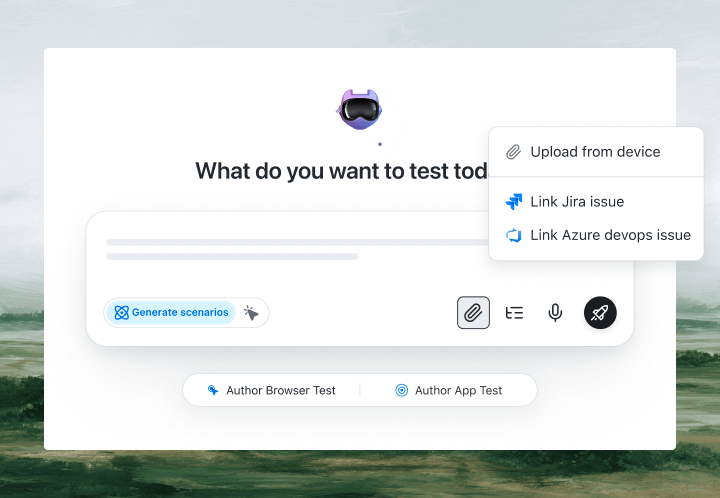
That is the entire test. KaneAI reads each step and finds the right elements on your live React app by understanding what they mean on the page, not by matching a class name or a data-testid that your next build will rewrite. Because it detects elements semantically, self-healing re-anchors the step when React regenerates class names or the DOM shifts under a re-render. And because it waits by looking at what has actually rendered, it holds until an async fetch resolves or a lazy-loaded component appears, rather than racing a fixed timer. When your team refactors a component, the test adapts instead of breaking.

The React apps scenarios that actually break
Once the happy path works, real coverage is just more English. Here are the React scenarios worth adding, each takes about two minutes to write:
Async data that renders late
- Open a page that fetches its data on mount
- Wait for the loading spinner to disappear
- Verify the fetched records render in the list
Conditional rendering and empty states
- Load the page for an account with no saved items
- Verify the empty-state message appears instead of the list
- Add one item and verify the list replaces the empty state
Form state and inline validation
- Submit the form with a required field left blank
- Verify the inline validation error renders next to the field
- Fill the field, resubmit, and verify the success state renders
Client-side navigation
- Click a link that routes without a full page reload
- Verify the new view renders and the URL updates
- Go back and verify the previous view restores its state
Run all of them across Chrome, Safari, Firefox, and real mobile devices from the same plain-English steps, with no per-browser rewrites.
Putting it on autopilot
React tests are most valuable when they run without you:
- Schedule the suite nightly, so a merged refactor cannot silently break a render before your users find it
- Trigger on deploy via CI, where Kane CLI runs the same tests from your pipeline, headless with exit codes, and pauses for an OTP or CAPTCHA instead of failing
- Alert on failure in Slack, with a full replay of exactly what the AI saw when the step failed, including screenshots, video, and the reason in plain English
When a test fails, you do not get a NoSuchElementException at line 22. You get a plain-English reason for the exact step that failed. Anyone on the team can read it, and anyone can fix the test, because the test is just English.
Try it on your own React app in 10 minutes
- Sign up for KaneAI free, with no credit card
- Paste your React app URL
- Write your first test in plain English, or let KaneAI suggest one from your live UI
- Run it and watch your React app get tested end to end
Your React app is too dynamic to test by hand and too fluid for selector-bound scripts. Test it in the language you already speak. From here, cover the flows your users hit next: how to test a multi-step form without code, and, if your stack spans frameworks, how to test Angular apps without code.

Note: Test your React app without writing a line of code. Start with KaneAI free.
Author

Kavita Joshi
Blogs: 14


Kavita Joshi is a Senior Marketing Specialist at TestMu AI, with over 6 years of experience in B2B SaaS marketing and content strategy. She specializes in creating in-depth, accessible content around test automation, covering tools and frameworks like Selenium, Cypress, Playwright, Nightwatch, WebdriverIO, and programming languages with Java and JavaScript. She has completed her masters in Journalism and Mass Communication. Kavita’s work also explores key topics like CSS, web automation, and cross-browser testing. Her deep domain knowledge and storytelling skills have earned her a place on TestMu AI’s Wall of Fame, recognizing her contributions to both marketing and the QA community.
Reviewer

Shahzeb Hoda
Reviewer
Shahzeb Hoda is the Associate Director of Marketing and a Community Contributor at TestMu AI, leading strategic initiatives in developer marketing, content, and community growth. With 10+ years of experience in quality engineering, software testing, automation testing, and e-learning, he has authored and reviewed 70+ technical articles on software testing and automation. Shahzeb holds an M.Tech in Computer Science from BIT, Mesra, and is certified in Selenium, Cypress, Playwright, Appium, and KaneAI. He brings deep expertise in CI/CD pipeline automation, cross-browser testing, AI-driven testing practices, and framework documentation. On LinkedIn, he is followed by 3,700+ engineers, developers, DevOps professionals, tech leaders, and enthusiasts.


React Testing FAQs
Did you find this page helpful?
More Related Blogs

TestMu AI forEnterprise
Get access to solutions built on Enterprise
grade security, privacy, & compliance
- Advanced access controls
- Advanced data retention rules
- Advanced Local Testing
- Premium Support options
- Early access to beta features
- Private Slack Channel
- Unlimited Manual Accessibility DevTools Tests