
Power Your Software Testing with AI Agents and Cloud
The Native AI-Agentic Cloud Platform to Supercharge Quality Engineering. Test Intelligently and Ship Faster.

- TestMu AI (Formerly LambdaTest)
- /
- Blog
- /
- Replit Review: What Replit Agent Builds, Tests, and Misses
Replit Review: What Replit Agent Builds, Tests, and Misses
Replit review: what Replit Agent 4 builds, how Free, Power, and Max Mode pricing works, where App Testing stops, and how to check a Replit app before launch.
Published on:
A Replit app can pass its own browser test and still show one member another member's bookings. Replit Agent writes the code, adds a Postgres database, connects Stripe, and clicks through the app before reporting that the build works, but the same agent decides what that test covers.
This Replit review is about that gap. Agent builds and publishes faster than anyone can review line by line, so the useful question for a team is what its self-test proves, and which checks still need a tool or a person outside the build.
I work on Kane CLI, TestMu AI's terminal tool for browser verification, so this review reads Replit as a tester would and ends with an outside check against a live app hosted on Replit.
TL;DR
Replit is a cloud platform where Replit Agent turns a plain-English prompt into a full-stack web or mobile app, with a database, hosting, and a live URL. It is worth using for prototypes and internal tools, and for production apps once an independent test confirms permissions, payments, and the main user journeys.
Replit at a Glance
- Free plan: Yes. Replit's Starter plan costs nothing and includes a daily Agent allowance, Lite build, Design Canvas, and one published app, which goes offline automatically after 30 days.
- Self-testing in every Agent mode: No. Replit's App Testing, where Agent clicks through its own app in a browser, runs only in Power or Max Mode, covers web apps only, and starts when Agent decides enough has changed.
- Agent write access to live data: No. Each published Replit app gets a separate production database that Agent cannot modify, and Agent checkpoints can roll the development database back along with the code.
- Predictable monthly bill: No. Replit prices paid Agent work by effort, one checkpoint per request, so a complex feature costs more than a bug fix and the monthly total depends on how much you build.
- Outside check before launch: TestMu AI's Replit app testing workflow uses Kane CLI to open the deployed Replit URL in Chrome and verify each step of a user journey written in plain English.
Replit Review Verdict
Replit takes an idea to a running full-stack app on a public URL without leaving the browser. Agent plans the work, builds the front end and back end together, provisions a database, and publishes. The weak spots are a bill that is hard to forecast and a self-test that Agent designs, schedules, and grades on its own.
- Good fit - founders and product managers turning an idea into a clickable prototype, teams building internal tools, and developers who want real code they can edit and connect to GitHub.
- Needs extra care - apps whose first release takes payments, stores personal data, or has role-based access, where an untested permission or total reaches real users.
- Poor fit - teams that need a fixed AI spend each month, since effort-based pricing moves with the size of every request.
TestMu AI's one-minute Replit review covers the same arc, from what Agent builds to its browser testing, and ends on what production still needs: acceptance criteria, access permissions, checkout calculations, and user journeys.

Replit Agent Features
Agent 4 is the current version of Replit's building agent. The Agent 4 launch post says it lets you ship production-ready software 10x faster, through design variants on an infinite canvas, parallel agents, and more kinds of output in one project.
- Full-stack build - Agent handles auth, the database, back-end logic, and front-end design at once, with each part running as a task you review before it merges into the main app.
- Design Canvas - Agent generates UI variants on a canvas, you adjust them visually, and the chosen design is applied to the app's code.
- One project, many outputs - web and mobile apps, landing pages, slide decks, and videos can live in the same project and share context and design.
- Connectors - Agent can act on connected services, such as creating tickets in Linear or querying data stored in Excel or Databricks.
- Native mobile apps - Agent builds iOS and Android apps that you preview in a simulator, an emulator, or on your own phone through Expo Go.
Parallel work is where the paid plans split. According to the Replit Pro plan page, Pro runs up to 10 tasks at once and pools credits for up to 15 builders, against 5 builders on Core.
Replit Agent Modes, Plans, and Pricing
Every request to Agent runs in one of three Agent modes. Free Mode uses intelligent model routing and a plan allowance, Power Mode balances speed and capability for most work, and Max Mode is the most capable option for complex work and larger codebases. Power Mode and Max Mode use monthly credits.
Replit says Free Mode lets Core subscribers create 30x more with their subscription, and the Core and Pro allowance resets every 5 hours. Power Mode, formerly Economy Mode, gives the same or better performance for the same cost.
Paid work uses effort-based pricing. Under Replit AI billing, each Build Mode request creates one checkpoint priced by the effort it took, so a bug fix usually costs less than a full feature, and Plan Mode can bill for reasoning even when it changes no code.
| Plan | What it adds | Builders |
|---|---|---|
| Starter | Free Mode and Lite build with a daily cap, Design Canvas, and one published app that goes offline after 30 days | Solo, no collaborators |
| Core | Monthly credits, Power and Max Mode, full build, Plan Mode, connectors, one background task, and unlimited published apps | Up to 5 |
| Pro | Tiered credits that roll over for two months, 10 parallel tasks, priority support, and a 28-day database recovery window | Up to 15 |
| Enterprise | SSO and SCIM, governance controls, dedicated support, and an Auto mode that picks the mode and an approved model per task | Unlimited seats |
Effort-based pricing has no fixed cost per app, so the reliable way to estimate a bill is to build one representative feature in Power Mode and read its checkpoint cost in the Agent tab.
Current plan prices are listed on Replit pricing.
How Replit Agent Tests Its Own App
App Testing is Replit's self-test. Agent opens the app it built in a browser, clicks through it like a user, enters mock data where needed, and fixes the issues it catches, and you can replay the whole session as a video afterward.
The App Testing docs set its limits. It is available for Full Stack JavaScript and Streamlit Python web apps, you turn it on in Power or Max Mode while Free Mode keeps it off, and Agent decides when to test instead of testing after every message.
- Login walls - when a test reaches a sign-in such as Gmail, Agent asks you to take over the preview, and if nobody responds within 10 minutes it skips the test and carries on.
- Cost - App Testing is billed as Agent effort, so longer test sessions use more credits.
- Coverage you ask for - when coverage is missing, the docs advise naming critical user flows explicitly, so a flow nobody names may never be exercised.
- Mobile builds - App Testing does not run on native mobile apps, which you check by hand in a simulator, an emulator, or Expo Go, or across 10,000+ real Android and iOS devices on TestMu AI's real device cloud.

Note: TestMu AI's Kane CLI runs the user journeys you define against your deployed Replit URL in a real Chrome browser and keeps an evidence pack for every run. Sign up free to try it
Production Checks Replit's Self-Test Leaves to You
App Testing is run by the same agent that wrote the code, so it checks the app against Agent's own reading of your request. That catches a dead button or a broken form, and it is unlikely to catch a requirement Agent misread, because the test inherits the same misreading.
Handing tests to AI is already routine: 58.1% of respondents in the latest Stack Overflow Developer Survey currently use AI or AI agents for writing or improving tests.
Replit Agent goes a step further: it chooses what to test, decides when to run the test, and grades the result.
Replit found the same split in its own security tooling. Its black-box pen tests post reports that findings from the code-reading scan and the outside-in scan rarely overlap, and only the outside-in scan found an admin dashboard sitting at a guessable address with no login.
Write these checks from your requirements, not from Agent's summary, and run them against the deployed app:
- Acceptance criteria - decide what done means before Agent builds, including empty, invalid, and duplicate inputs, then test against that list. The basics of acceptance testing apply unchanged to an agent-built app.
- Access permissions - sign in as an ordinary user, then try to open another user's records or an admin page by typing its URL. A test that signs in once as one user never tries this.
- Checkout calculations - assert exact totals, taxes, discounts, and refunds in Stripe test mode, because a payment that completes can still charge the wrong amount.
- User journeys - walk a full path across pages and sessions, such as sign up, book, cancel, and rebook, since single-page checks miss state that breaks between steps.
The wider question is covered in can coding agents test their own code, and the failures that follow from skipping these checks are listed in vibe coding risks.
Production Safety in Replit: Databases, Rollbacks, and Scans
In July 2025, Replit deleted SaaStr founder Jason Lemkin's production database despite his instruction not to change any code without permission, then told him the database could not be restored, which turned out to be wrong, according to The Register.
Replit's safer databases announcement from the same month explains that until then, Replit apps used a single database for both development and live customer data, and it introduced separate development and production databases.
- Separate production database - every published app gets its own production database, and Replit's development and production databases page states that Agent can't touch it.
- Checkpoints and rollbacks - each Agent checkpoint captures project files, Agent context, and database contents, and a rollback can restore the database as well when you select it.
- Point-in-time recovery - Pro restores a database to any point in the last 28 days instead of the standard 7, and the longer window uses more storage.
- Security scans - Level 1 runs dependency checks and static analysis for free, Level 2 adds a deep white-box agent scan, and Level 3 runs the white-box and black-box scans together.
- Monitoring Agent - Replit's Monitoring Agent reads production logs, investigates alerts, validates a fix, and can publish it automatically if you turn on auto-publish.
Leave auto-publish off until a test you control runs against each fix. An agent that validates its own fix and then publishes it is the App Testing loop again, pointed at production.
Verifying a Replit-Hosted App With Kane CLI
TestMu AI's content team generates the social cards for this blog with a small image generator hosted on Replit, which makes it a convenient live target. Two runs against its replit.app URL show what an outside check adds.
Kane CLI takes a plain-English objective, drives a real Chrome browser through the Chrome DevTools Protocol, and returns a pass or fail backed by evidence: per-step screenshots, a network log, and console output sealed into one evidence pack.
npm install -g @testmuai/kane-cli
kane-cli login

kane-cli run "Go to https://meta-image-generator.replit.app/ and type 'Replit Review' into the Meta Image Title or Keyword field, select the second background thumbnail, click Generate Meta Image, then verify a generated preview image is displayed that shows the headline 'Replit Review', and verify the Download PNG and Download WebP buttons are visible" --agent --headless
The first run passed in seven steps and under a minute. Kane CLI typed the headline, picked a background, generated the card, then confirmed that the preview showed "Replit Review" and that both download buttons were present.
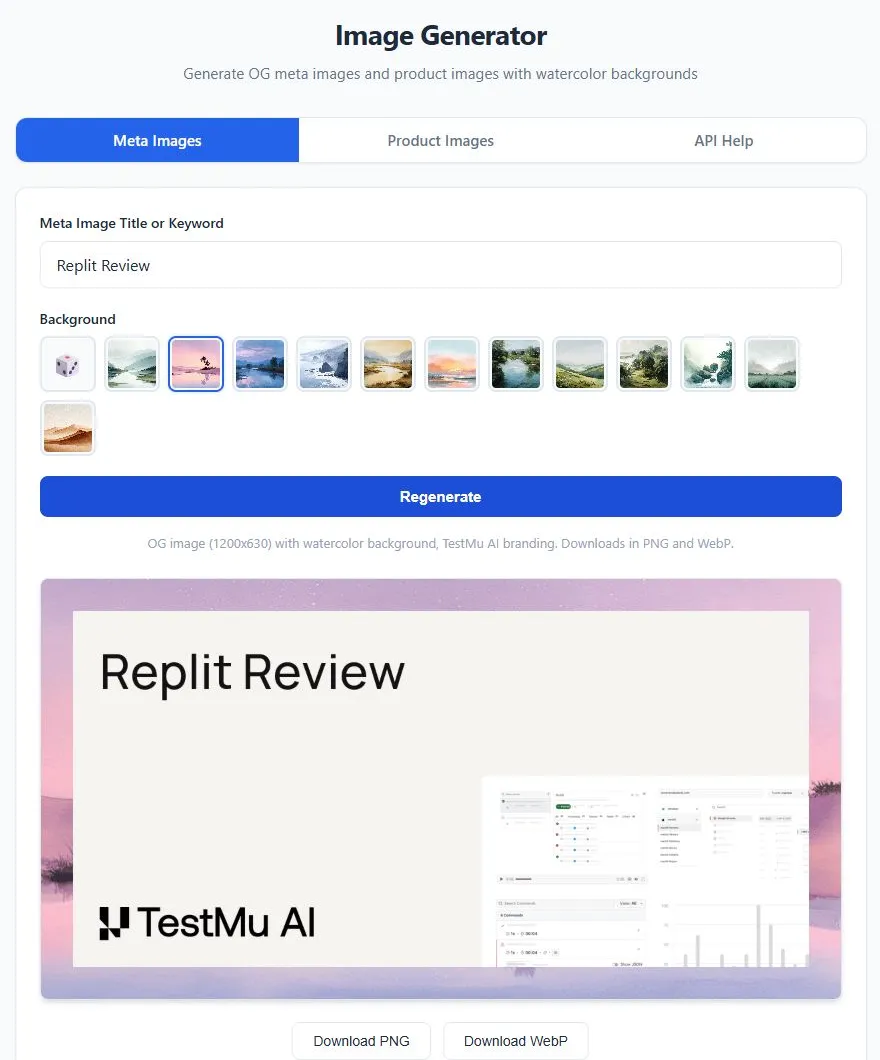
The second run called the generator's image API and asserted a 200 response with an image/webp content type, then submitted the form with the title left empty. Both checks passed, and the empty submit produced no card and no message telling the user why.
Whether that silent result is correct depends on the acceptance criterion, which is the point of writing one. A self-test can only confirm the behavior its author expected, while a check written from the requirement can fail the build.
- Terminal - run the objective while you build, with the browser visible or headless.
- CI pipelines - exit codes separate a pass (0), an assertion failure (1), a setup or auth error (2), and a timeout (3), so a failed check can block a publish step.
- Coding agents - the --agent flag streams machine-readable results, so an agent working on a Replit project in Cursor or Claude Code can run the check and read the verdict itself.
For no-code tests of the failures Replit apps hit most often, such as forms that lose data on redeploy, see test Replit apps.
Replit Pros and Cons
Pros
- Idea to live URL in one workspace - code, database, hosting, and publishing sit together, so a prototype is shareable without separate hosting setup.
- Editable code - the project is real code you can open in the editor or work on through a GitHub or GitLab repository.
- Recoverable mistakes - checkpoints restore code, Agent context, and optionally the database.
- Built-in security tooling - dependency, white-box, and black-box scans run from the Security Center.
Cons
- Hard-to-forecast bills - each paid request is priced by effort, so spend tracks how much and how often you build.
- Self-graded testing - App Testing is off in Free Mode, limited to web apps, and runs on Agent's schedule.
- Free apps expire - a Starter app goes offline after 30 days and carries the Made with Replit badge.
- Manual mobile testing - native builds are checked by hand in a simulator, an emulator, or on a phone.
Conclusion
Replit Agent can take an idea to a live URL faster than anyone can review the code, and that speed is the reason its self-test isn't enough. App Testing checks the app against Agent's own reading of your request, on Agent's schedule, so a misread requirement passes along with everything else.
If you're building on Replit, write three acceptance checks for the flow that would hurt most if it broke, such as sign-up, a permission boundary or checkout. Keep App Testing on in Power or Max Mode for fast feedback, and run your own checks against the published URL after every Agent session. The run command above works against any deployed Replit app, and the Kane CLI introduction covers installation and sign-in.
Author

Samyak Goyal
Blogs: 34

Samyak Goyal is a Senior Member of Technical Staff at TestMu AI engineering Kane CLI, the command-line tool that runs browser automation from the terminal, where a flow described in natural language executes in a real Chrome browser and returns pass or fail with shareable proof. He is a backend engineer with 4+ years of experience, previously an SDE at Innovaccer, where he built APIs, introduced Kafka, and cut deployment from weeks to hours. Samyak also builds multi-agent systems, skill-orchestration frameworks, and a personal copilot that indexes 200+ microservice repositories.
Reviewer

Harshit Paul
Reviewer
Harshit Paul is Director of Product Marketing at TestMu AI, with over 8 years of experience in product and growth marketing for developer and QA tools, leading the Agentic AI in Quality Engineering space. He has authored 80+ technical articles for TestMu AI on software testing and automation, and hosted webinars on Selenium, automation testing, browser compatibility, DevOps, and continuous testing. He has led go-to-market and technical marketing initiatives across software testing products, contributing to SEO, content strategy, and developer marketing. He began his career as a certified Salesforce developer at Wipro Technologies, where he worked for 2 years before moving into marketing. Harshit holds a degree in computer programming from Vivekananda Institute of Professional Studies.


Replit Review FAQs
Did you find this page helpful?
More Related Blogs

TestMu AI forEnterprise
Get access to solutions built on Enterprise
grade security, privacy, & compliance
- Advanced access controls
- Advanced data retention rules
- Advanced Local Testing
- Premium Support options
- Early access to beta features
- Private Slack Channel
- Unlimited Manual Accessibility DevTools Tests