

Power Your Software Testing with AI Agents and Cloud
The Native AI-Agentic Cloud Platform to Supercharge Quality Engineering. Test Intelligently and Ship Faster.


- TestMu AI (Formerly LambdaTest)
- /
- Blog
- /
- What Is Machine Learning Automation (AutoML)
What Is Machine Learning Automation (AutoML)
Explore machine learning automation (AutoML): how it works, NAS and HPO techniques, its limitations, role in software testing, and popular AutoML tools.
Last Updated on:
Machine learning automation, or AutoML, is a technique used to automate the process of design, training, optimization, and deployment of machine learning models.
AutoML techniques help stakeholders create ML models and deploy them efficiently, even for those without deep expertise. Various tools streamline the machine learning pipeline to implement automation.
Key Takeaways
Machine learning automation (AutoML) automates the end-to-end machine learning pipeline - from data preprocessing to model deployment - enabling teams to build models rapidly without deep algorithmic expertise. Platforms like Google Cloud AutoML excel at image and translation tasks, while Amazon SageMaker Autopilot provides transparent model building and ranking.
- Best for image and translation workflows: Google Cloud AutoML - This tool offers tailored machine learning models, such as AutoML Image and AutoML Translation, utilizing Google's own scalable processes to automate model development.
- Best for transparent model ranking: Amazon SageMaker Autopilot - This platform builds classification, regression, and prediction models with full transparency, automatically processing incomplete datasets, filling missing values, and ranking models by accuracy.
- Best for cloud-based model training: Azure Machine Learning - This popular AutoML tool automates the machine learning pipeline, enabling teams to design, train, optimize, and deploy models efficiently without deep algorithmic expertise.
- Best for automated pipeline optimization: IBM AutoAI - This popular tool automates the machine learning pipeline from data preprocessing to model selection and hyperparameter tuning, allowing teams to build models faster.
- Best for multi-format data modeling: H2O AutoML - This popular tool automates model selection and training across image, video, tabular, and text data, matching the modeling approach to the specific problem.
- Best for natural language test generation: TestMu AI - This agentic machine learning tool authors software tests directly from natural language, driving automated test case generation, visual testing, and defect prediction.
- AutoML platforms have limitations, including black-box models with limited interpretability, high computational costs, overfitting risks, and a strict dependence on data quality, which requires keeping a human in the loop.
What Is Machine Learning in Automation?
Automated machine learning, or machine learning automation, involves automating the process of developing a machine learning model. A machine learning model is the final result of a long chain of sequential processes, where the output from one process goes to another.
For instance, a machine learning model first preprocesses the data, prepares the data for training, trains on the data, tests on the testing data, uses an algorithm based on the goal of the product (such as a classifier), and then repeats all these steps on different models to check highest compatibility.
All these steps have to be performed each time a model needs to be developed, and they consume a lot of time. AutoML or machine learning automation automates all these processes and provides a final model ready to be incorporated into the software backend, bringing model development within reach of non-specialists and into the workflow of teams applying AI and ML in software testing.
Why Is Automated Machine Learning Important?
Automated machine learning provides a lot of benefits to the team working on it:
- Since AutoML automates all the manual work to develop the models, non-experts in machine learning can also use AutoML to achieve the same outputs.
- Big tech giants use AutoML tools with a dedicated team that works only on machine learning. They constantly tune their machine learning automation process and include high-quality algorithms with greater accuracy.
- When it comes to time savings, AutoML saves a lot of time, as almost all the work is done by AutoML tools.
It enables easy access to machine learning development for all individuals, a form of AI automation often described as the “democratization” of machine learning.
Using AutoML tools improves the output and performance of the resulting models. This is applicable to both functional and non-functional requirements.
Moreover, since human resources are not involved in the machine learning model development process, the time saved can be utilized in other processes, such as model integration, enhancing the team’s productivity. Hence, the software can be built in less time, which means the cost involved will also be less.
How Does AutoML Work?
AutoML works in various steps, the end of which generates a model for implementation in the software application.
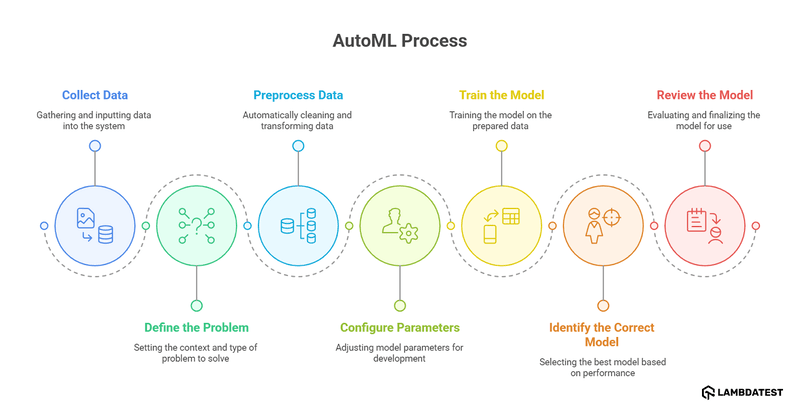
- Collect Data: The first step in AutoML is data collection. This step is manual and testers are expected to either search for a dataset or create their own (not recommended as it takes a lot of time).
- Define the Problem: In this step, a problem is defined within the AutoML tool, enabling it to understand the context, relate it to the data, and generate the most suitable model. Examples of this are classification and forecasting.
- Preprocess Data: The next step is the preprocessing of data which is done by the AutoML tool automatically. In this step, the data is cleaned and transformed according to the requirements of machine learning automation. While this process is done by AutoML tools, it is highly recommended to manually preprocess the data as well for higher quality.
- Configure Parameters: The AutoML tool provides various parameters to tweak during the model development process. Developers can provide the values and alter the default values based on their requirements.
- Train the Model: In the next step, the AutoML tool trains a model on the submitted data, determining its performance and accuracy based on various parameters.
- Identify the Correct Model: The data is then trained using various models. This step determines the best model according to the data and the problem defined.
- Review the Model: The model leaderboard is then generated and presented to the user with results that include parameters like accuracy. The team can review the model, test it using different data, and if satisfied, start using it in their software application.
It is an extremely crucial step as all the AutoML steps are performed after it considers data for their execution. If the data quality is inappropriate, the model will also show anomalies. The collected data is then fed to the AutoML system as input.
Except for the data collection and defining the problem, everything is taken care of by the AutoML tool.
Advanced AutoML Techniques
Beyond the steps above, modern AutoML platforms lean on a few advanced techniques to produce better models without manual tuning:
- Neural Architecture Search (NAS): automates the design of neural networks, searching through candidate layer types, connections, and depths to find an architecture that fits the data instead of hand-designing one.
- Hyperparameter Optimization (HPO): automatically tunes settings such as learning rate, tree depth, and regularization. Methods like Bayesian optimization explore the search space efficiently rather than relying on brute-force grid search.
- Ensemble modeling: instead of shipping a single best algorithm, advanced pipelines combine several top-performing models through voting or stacking, which usually outperforms any individual model.
These techniques are also where AutoML differs most from a hand-built workflow:
| Stage | Traditional ML Workflow | AutoML Workflow |
|---|---|---|
| Data preprocessing | Hand-coded cleaning and feature engineering by a data scientist. | Automated cleaning and feature transformation with minimal scripting. |
| Model selection | Engineer picks and codes candidate algorithms manually. | Multiple algorithms trained and compared automatically. |
| Hyperparameter tuning | Manual, often grid search. | Automated with methods like Bayesian optimization (HPO). |
| Expertise required | Deep ML and coding expertise. | Accessible to non-experts and domain specialists. |
| Time to a usable model | Days to weeks. | Minutes to hours. |
Once a model is selected, AutoML tools commonly export it to a portable format such as ONNX (Open Neural Network Exchange) so it can run across different runtimes and hardware in production. For a deeper technical reference on these methods, see automl.org.
AutoML for Different Data Types
Machine learning models are created for different purposes and each of those purposes is satisfied by only a certain type of input data.
For instance, if you want to create a model that can detect fraudulent transactions in a banking system, you have to train that model using financial transaction data where each transaction is labeled as “Fraud” or “Legitimate.”
Users leveraging AutoML tools can work with various data types, including:
Image Data
Computer vision is a discipline of machine learning in which the model can recognize and classify an object according to pre-defined labels based on the training data.
When machine learning automation is brought into the picture, it takes over the identification tasks of certain features that will guide the model in classifying that particular object without manual intervention.
The quality of data, however, plays a key role in the training of the model. The images used should be diverse, including the object requiring classification.
Video Data
Image-based categorization can be extended to video data, incorporating additional factors for analysis. AutoML tools working on video data can generate models that can identify objects in a video, analyze their actions, and understand voice commands.
However, it is worth noting that AutoML tools with video support are not currently commonly available due to their higher complexities and low accuracy.
Tabular Data
Tabular data provides information in the tabular form, where the identifier is the class to which each data point belongs. The main goal behind training with the tabular data using AutoML is categorizing the new data into pre-defined classes.
For instance, the team can provide the data based on identifiers that result in declaring an email as spam or not spam. These identifiers can be words used, emails used, etc. When the same process is done on numerical values, it is called regression. In this data, the final classes are not categories but numerical values.
Another branch of tabular data is time-series forecasting. In this process, the goal is to forecast a certain value in the future based on current trends and past values.
Time-series forecasting is kept as a separate discipline because of its dynamicity and involvement of a high number of variables, such as seasonality and changing trends with time.
Due to such variables, a large number of quality models often fail to work on time-series, and AutoML is often the recommended path to follow.
Textual Data
Textual data is used to train machine learning models primarily for natural language processing, which also underpins NLP testing. In this discipline, AutoML tools aim to understand the text and make sense of it.
It is done by training the model with appropriate text with pre-defined categorization of information. AutoML tools are expected to include high-quality Bidirectional Encoder Representations from Transformers (BERT)-based models that are finely tuned and work with very high efficiency when it comes to natural language processing.
The type of data to use depends on the problem the team is trying to solve. The team should take its time collecting data, as the quality and type of this data, will determine the quality and type of subsequent phases, resulting in a better model.
What ML Tasks Should You Automate?
Machine learning automation can be used in different domains to accomplish a variety of tasks. Some of the tasks where the users can opt for AutoML are as follows:
- Text-based content is all over the Internet and serves as a great medium to communicate with the reader. However, when automated tools like chatbots interact with such content, they may not understand the intent and emotion of the text. This results in straightforward, machine-like responses that can be frustrating for the end-user.
- Analyzing images is one of the most common use cases of machine learning. When there is a task where images are to be analyzed, and certain objects are to be identified in them, it is best to automate these tasks with finely tuned models available.
- Prediction and forecasting help in getting future value based on past data, current trends, and other variables. Such predictions and forecasting are extremely valuable in strategizing before the time and getting a glimpse of the future to evaluate it.
- Classification is one of the most focused areas of machine learning due to its wide usage across different domains. No matter what field the team is working on, they can easily spot an area where classification can fit perfectly.
Automating intent detection with ML models can improve user interactions. For example, in a custom support tool or system, these models can automatically recognize the intent of the messages (positive, negative, or urgent) and prioritize tickets accordingly for faster resolution.
A team should always consider AutoML models when such requirements arise. Since these are common scenarios, AutoML tools can identify such problems and update their algorithms according to new research.
Due to this, there have been many researches and refinements on algorithms working for the classification of different data. This is a bonus as the team doesn’t need to update their algorithms or be updated about recent advancements in the model development.
They can choose the right AutoML tool, and there is a very high chance that it will have the latest classification arrangement already set to be tested against the data. Therefore, if you are in a situation where the answer lies in classifying the data into different classes, it is always better to turn to AutoML tools.
Machine Learning Automation Tools
To take advantage of machine learning automation, you need to adopt the right tool built for building models. Beyond dedicated AutoML platforms, many teams also use broader AI automation tools across their workflows.
The most commonly used tools for AutoML are as follows:
- Google Cloud AutoML: It offers tailored machine learning models for different needs such as AutoML Image for image-based tasks, AutoML Translation for language translation, and more. It follows the same process Google uses, making it a reliable and scalable choice for projects of any size.
- Amazon SageMaker Autopilot: SageMaker Autopilot builds ML models with full transparency, handling tasks like classification, regression, and prediction. It can process incomplete datasets, fill in missing values, and rank models based on key metrics like accuracy.
- Azure Machine Learning: Azure’s AutoML supports classification, regression, vision, and NLP while integrating with Spark Cluster for scalable cloud-based processing. It also lets users deploy pre-trained models from OpenAI, Hugging Face, Meta, and Cohere.
- IBM AutoAI: It extends AutoML by adding features like model testing, scoring, code generation, and risk management. It streamlines AI lifecycle management, embeds ModelOps into workflows and cuts costs by automating the entire process.
- H2O AutoML: It supports hyperparameter tuning, iterative modeling, and feature engineering. It works with R, Python, and a no-code GUI and integrates seamlessly with Hadoop, Spark, and Kubernetes for scalable model development.
Limitations and Challenges of AutoML
AutoML removes a lot of manual work, but it does not replace judgment. Keep these limitations in mind before handing a model fully to automation:
- Black-box models: AutoML often optimizes for accuracy without explaining why a model behaves as it does. Limited interpretability makes it harder to debug, audit, or meet regulatory requirements, which is where explainable AI techniques become important.
- High computational cost: searching across many models, architectures (NAS), and hyperparameter combinations is resource-intensive and can run up significant compute cost and time.
- Overfitting risk: with human oversight removed, a pipeline can over-optimize to the training and validation data and then generalize poorly to new inputs.
- Data quality dependence: AutoML automates modeling, not data collection. Biased or low-quality input still produces a biased or low-quality model.
The practical takeaway is to use AutoML to accelerate model building while keeping a human in the loop to validate results, check for bias, and confirm the model generalizes before it reaches production.
Conclusion
Artificial intelligence has become a mandatory technology in our software today. It not only brings a lot of benefits, such as cutting down time and costs for each task but also helps in being competitive and ahead of competitors.
However, the road to this integration is not an easy one. It requires multiple time-consuming steps ranging from data collection, pre-processing, running data on multiple models, feature generation, and many more. Moreover, all this can only be done by an expert in AI who themselves costs a lot of money to the company.
AutoML is the answer to all these problems, bringing machine learning model development into the automation world where each of the above processes can be completed without any manual intervention or monitoring. These software are designed to compare multiple models and provide the best possible solution to the users.
Citations
- Automated machine learning: https://en.wikipedia.org/wiki/Automated_machine_learning
Author

Harish Rajora
Blogs: 100


Harish Rajora is a software developer at TestMu AI with over 6 years of hands-on experience in Python and cross-platform application development across Windows, macOS, and Linux. He has authored 800+ technical articles and worked on large-scale projects, including GenAI applications and core engineering features used by millions. Harish has led DevOps initiatives building CI/CD pipelines with Jenkins, AWS, GitLab, and GitHub, and holds an M.Tech in Software Engineering from IIIT Allahabad.
Reviewer

Anmol Gupta
Reviewer
Anmol Gupta is Vice President of Product Management at TestMu AI (formerly LambdaTest), driving HyperExecute, the test orchestration cloud that runs and accelerates automated test execution. He led the development of the Unified Test Execution Cloud Platform and now leads a 30-member cross-functional product organization across product lines contributing $7M+ in revenue. He brings over nine years of experience and previously co-founded the SaaS company Timble as CTO, where he grew the team from 5 to 40 and launched an AI KYC platform that processed 600K+ applications in five months while cutting verification time from 12 minutes to under 30 seconds. Anmol holds an MTech and BTech from IIT Delhi.


Machine Learning Automation FAQs
Did you find this page helpful?
More Related Blogs
TestMu AI forEnterprise
Get access to solutions built on Enterprise
grade security, privacy, & compliance
- Advanced access controls
- Advanced data retention rules
- Advanced Local Testing
- Premium Support options
- Early access to beta features
- Private Slack Channel
- Unlimited Manual Accessibility DevTools Tests