

Power Your Software Testing with AI Agents and Cloud
The Native AI-Agentic Cloud Platform to Supercharge Quality Engineering. Test Intelligently and Ship Faster.


- TestMu AI (Formerly LambdaTest)
- /
- Blog
- /
- A Deep Dive into LocalStack Integration with TestMu AI
Testing Unleashed: A Deep Dive into LocalStack Integration with TestMu AI
Explore the transformative integration of LocalStack and TestMu AI, enhancing testing speeds and efficiency. Dive into a seamless collaboration that promises unparalleled testing experiences and accelerated development cycles.
Last Updated on:
LocalStack integration with TestMu AI runs a Docker container of the AWS emulator directly on HyperExecute runners, giving every parallel test its own private AWS on port 4566. Because each runner starts its own container, parallel tests never collide over the same DynamoDB table or SQS queue.
Want to use this integration? Check the documentation – TestMu AI Integration with LocalStack.
What is LocalStack?
LocalStack is a software that mirrors AWS functionalities on your personal computer. This means you can operate AWS applications from your computer without needing an external cloud connection. It’s compatible with your laptop and CI systems, ensuring smooth operations.
Mechanically, it runs as a Docker container that implements the AWS APIs. Your application still speaks the AWS protocol and still uses the AWS SDK; the only thing that changes is where those calls are sent. Services such as Lambda, SQS, SNS, DynamoDB, and S3 are emulated inside that container, so a test can create a queue, publish to it, and assert on the result without an AWS account, an internet connection, or a cleanup bill.
The detail that matters most for the rest of this guide is the edge port, 4566. LocalStack multiplexes every emulated service onto that single port rather than assigning one port per service. Whether you are calling DynamoDB, SQS, or SNS, the endpoint is the same: http://localhost:4566. That is why pointing an application at LocalStack is usually a one-line change per client rather than a per-service configuration exercise.

Note: Take your testing to the next level with LocalStack integration. Try TestMu AI Today!
TestMu AI Integration with LocalStack
Teaming up with TestMu AI, LocalStack presents an improved testing environment. Utilizing LocalStack’s ability to emulate cloud services and TestMu AI’s AI-Native infrastructure, developers and testers are empowered to expedite their processes and swiftly bring products to the forefront. This integration guarantees more efficient testing and prompt product releases.
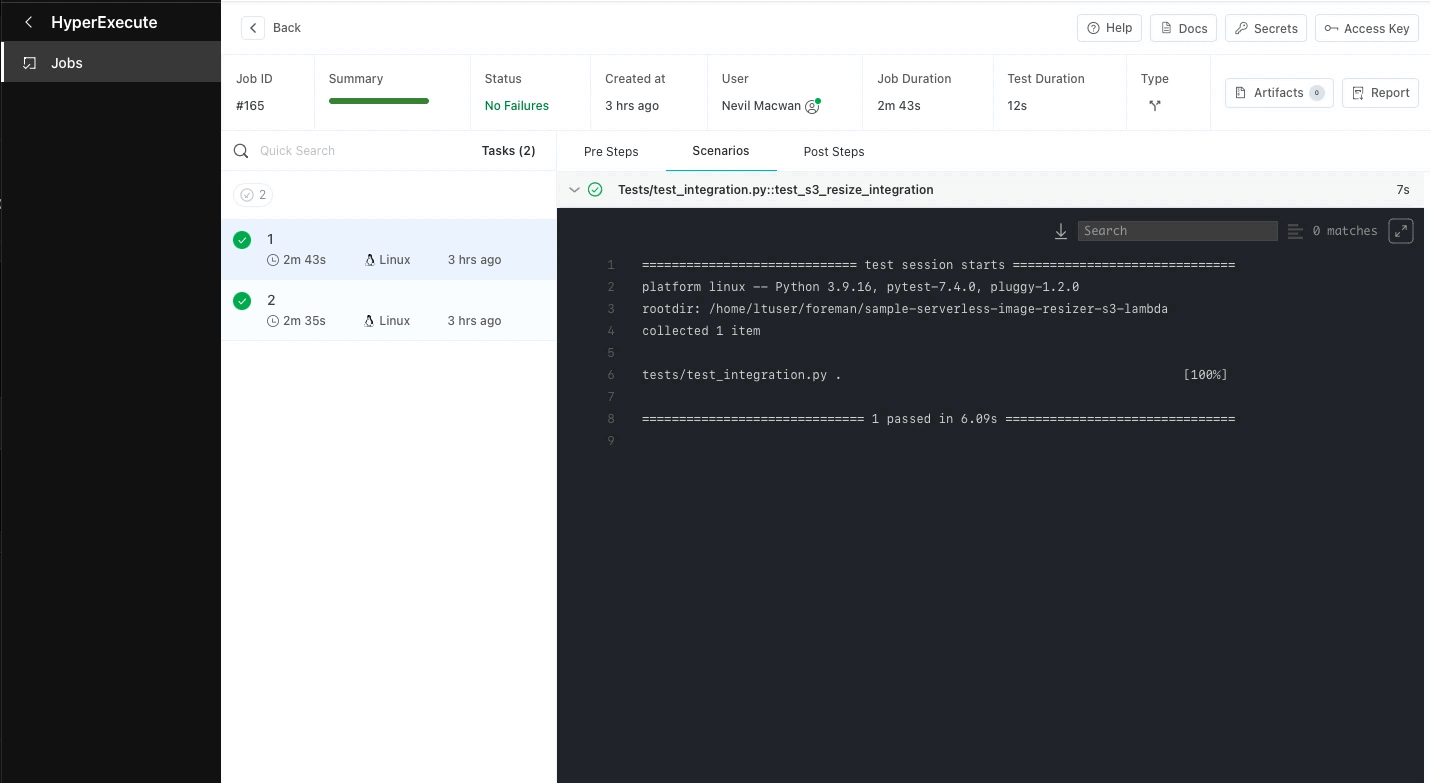
Here’s how the TestMu AI and LocalStack integration benefit users:
Enhanced Testing Efficiency and Performance
The LocalStack-TestMu AI partnership brings a multitude of benefits to the testing arena. By leveraging LocalStack’s local cloud emulation, teams can execute tests at an impressive speed without requiring constant Internet connectivity. The infusion of TestMu AI’s advanced AI solutions further amplifies the experience, providing an unmatched edge when it comes to executing tests.
The result? Enhanced productivity and efficiency throughout the development and testing lifecycle. The testing process becomes seamless, smooth, and swift, translating to accelerated time-to-market for businesses hungry to get their products into the hands of users.
Seamless Integration
One of the standout features of this partnership is the effortless integration of tools. Developers can run their AWS Cloud or Serverless applications on their local machines, thanks to LocalStack’s emulation capabilities. When combined with TestMu AI’s smart AI solutions, the result is a powerhouse testing suite that doesn’t just meet industry standards – it sets new ones.
Where the two halves meet
The architecture is worth stating plainly, because it is simpler than it sounds. LocalStack does not run somewhere else and get called remotely. It runs on the TestMu AI runner itself, as a Docker container started before your tests execute. Your test process and the emulated AWS services share a machine, which is why they talk over localhost and why there is no network hop to a shared staging account.
That co-location is what makes the combination worth the setup. Each runner gets its own private AWS. Tests running in parallel cannot collide over the same DynamoDB table or drain each other's SQS queue, because there is no shared account for them to collide in. The isolation problem that usually forces teams to serialize their cloud tests, or to build elaborate per-test namespacing, simply does not arise.
The rest of this post is the concrete setup: what you need, the orchestration file that starts LocalStack on the runner, the client configuration that routes your AWS calls to it, and how to seed state across parallel runners without re-creating it every time. To learn about the wider testing context this fits into, refer to this guide on software testing.
Prerequisites
Four things before you start:
- A TestMu AI account, along with your username and access key.
- A LocalStack account and an Auth Token, which you generate from the Auth Token section of the LocalStack web app.
- Docker, which the LocalStack CLI requires. LocalStack is a container, and the CLI is a wrapper that manages it.
- The LocalStack CLI and the HyperExecute CLI, both installed on whatever machine kicks off the run.
One thing to get right before anything else: use an Auth Token, not a legacy API key. LocalStack has moved from API keys to Auth Tokens, and it began phasing out legacy API keys in early 2025, so a key generated under the old scheme will not activate LocalStack today. If you follow an older tutorial to the API Keys tab, you will produce a credential that no longer works and a container that silently starts without Pro features.
The current environment variable is LOCALSTACK_AUTH_TOKEN. You can set it once through the CLI:
localstack auth set-token <YOUR_AUTH_TOKEN>
localstack start
Or export it, which is the form you will use in CI:
export LOCALSTACK_AUTH_TOKEN=<YOUR_AUTH_TOKEN>
localstack start -d
The older LOCALSTACK_API_KEY variable is still accepted for backward compatibility, and LocalStack will read an Auth Token out of it. The variable name is not the problem; the credential is. Put an Auth Token in either variable and you are fine, put a legacy API key in either and you are not.
Step-by-Step: Running LocalStack on TestMu AI Runners
Test execution on TestMu AI is driven by a YAML orchestration file, conventionally named he.yaml. The file describes the runtime, how work is split across runners, and what happens before your tests run. LocalStack belongs in that last part: it is started in the pre steps, which execute on the runner before test discovery and execution begin.
Here is a complete working configuration for a Python suite:
version: "0.1"
runson: linux
autosplit: true
parallelism: 2
concurrency: 2
scenarioCommandStatusOnly: true

runtime:
  language: python
  version: 3.9.16

pre:
  - pip install -r requirements-dev.txt
  - LOCALSTACK_AUTH_TOKEN=${{ .secrets.LOCALSTACK_AUTH_TOKEN }} localstack start -d
  - localstack wait -t 60
  - bin/deploy.sh

testDiscovery:
  type: raw
  mode: remote
  command: pytest --co -q tests | sed '$d'

testRunnerCommand: pytest $test
Four lines in that pre block are doing the real work, and they are worth taking one at a time.
- The Auth Token comes from secrets, never from the file. The ${{ .secrets.LOCALSTACK_AUTH_TOKEN }} syntax pulls the value from your configured secrets at run time. Your token is a licence credential, so it does not belong in a YAML file in your repository.
- localstack start -d runs the container detached. Without -d the step would block and the run would never reach your tests. This is the step that gives the runner its own private AWS on port 4566.
- localstack wait -t 60 is the line people delete and then regret. Starting a container detached returns immediately; the services inside it are not ready yet. Skip this and your first test races the container and fails with a connection error that looks like a broken test rather than a timing problem. The wait command blocks until LocalStack reports ready, with a 60-second ceiling. It is the difference between a suite that works and a suite that is mysteriously flaky on cold runners.
- bin/deploy.sh is where your infrastructure gets created. LocalStack starts empty. Something has to create the tables, queues, buckets, and functions your tests expect, whether that is a shell script of AWS CLI calls, a CDK deploy, or Terraform. This is your hook for it.
Because autosplit and parallelism are set, this file does not spin up one LocalStack. Each runner executes the pre block independently, so each gets its own container, its own port 4566, and its own empty AWS to deploy into. That is the isolation property described earlier, and it is a consequence of where the pre steps run rather than anything you configure explicitly.
If you trigger runs from GitHub Actions, the invocation is a single command, with both credentials pulled from repository secrets:
./hyperexecute --user ${{ secrets.LT_USERNAME }} --key ${{ secrets.LT_ACCESS_KEY }} --config he.yamlAdd LOCALSTACK_AUTH_TOKEN to the same secrets store so the pre step can resolve it. For the canonical version of this setup, refer to the LocalStack integration documentation.
Configuring AWS SDK Endpoints for Local Emulation
A running LocalStack achieves nothing on its own. Your code still points at real AWS until you tell it otherwise, and the whole integration comes down to one change: override the endpoint so the SDK sends its calls to http://localhost:4566 instead of Amazon.
Credentials are the part that confuses people first. LocalStack does not authenticate you, but the AWS SDKs refuse to sign a request without credentials present, so you pass dummy values. test and test are the convention. They are not a placeholder for something you are supposed to fill in later.
Node.js, AWS SDK v3
In v3, credentials are nested inside a credentials object. This is the single most common mistake when copying an older snippet, because v2 took them as flat top-level properties and v3 silently ignores them there:
const { DynamoDBClient, ListTablesCommand } = require('@aws-sdk/client-dynamodb');
const { SQSClient } = require('@aws-sdk/client-sqs');
const { SNSClient } = require('@aws-sdk/client-sns');

// Point every client at LocalStack's edge port
const localstackConfig = {
    endpoint: 'http://localhost:4566',
    region: 'us-east-1',
    credentials: {
        accessKeyId: 'test',      // LocalStack ignores these,
        secretAccessKey: 'test',  // but the SDK requires them
    },
};

const dynamodb = new DynamoDBClient(localstackConfig);
const sqs = new SQSClient(localstackConfig);
const sns = new SNSClient(localstackConfig);

// Same API, same commands. Only the destination changed.
const { TableNames } = await dynamodb.send(new ListTablesCommand({}));
If you are still on SDK v2, the shape is flatter:
const AWS = require('aws-sdk');

const lambda = new AWS.Lambda({
    endpoint: 'http://localhost:4566',
    accessKeyId: 'test',
    secretAccessKey: 'test',
    region: 'us-east-1',
});
Python, boto3
import boto3

def localstack_client(service):
    return boto3.client(
        service,
        endpoint_url="http://localhost:4566",
        region_name="us-east-1",
        aws_access_key_id="test",
        aws_secret_access_key="test",
    )

sqs = localstack_client("sqs")
dynamodb = localstack_client("dynamodb")

queue = sqs.create_queue(QueueName="orders")
sqs.send_message(QueueUrl=queue["QueueUrl"], MessageBody="test-order-1")
The S3 exception
S3 is the one service that does not follow the pattern, and it will waste an afternoon if you do not know. Because S3 addresses buckets by subdomain, it needs its own endpoint host and path-style addressing turned on:
const { S3Client } = require('@aws-sdk/client-s3');

const s3 = new S3Client({
    endpoint: 'http://s3.localhost.localstack.cloud:4566',
    forcePathStyle: true,   // s3ForcePathStyle in SDK v2
    region: 'us-east-1',
    credentials: { accessKeyId: 'test', secretAccessKey: 'test' },
});
The practical advice is to put this configuration behind one factory function, as in the Python example above, and switch it on an environment variable. Your tests then run against LocalStack on a TestMu AI runner and against real AWS in staging without a single call site changing.
Cloud Pods for Parallel Test Execution
The configuration above has a cost that grows with your suite. Every runner starts an empty LocalStack and runs bin/deploy.sh to build its infrastructure from nothing. With two runners that is fine. With twenty runners and a seed step that creates tables and loads fixture data, you are paying that setup cost twenty times, in parallel, on every run.
A Cloud Pod is a persistent, versioned snapshot of a LocalStack instance's state. You build the state once, save it, and then restore it wherever you need it. Instead of every runner deploying infrastructure, every runner loads a snapshot of infrastructure that was already deployed.
Create one from a LocalStack instance that already has your tables, queues, and seed data in place:
export LOCALSTACK_AUTH_TOKEN=<YOUR_AUTH_TOKEN>

# Snapshot the current state and push it
localstack pod save test-baseline

# Inspect what you have
localstack pod list
localstack pod versions test-baseline
Then swap the deploy step in your pre block for a load:
pre:
  - pip install -r requirements-dev.txt
  - LOCALSTACK_AUTH_TOKEN=${{ .secrets.LOCALSTACK_AUTH_TOKEN }} localstack start -d
  - localstack wait -t 60
  - localstack pod load test-baseline
Two things follow from this, and the second is the one that matters more.
- Runners start faster. Restoring a snapshot is cheaper than re-running a deploy script that makes dozens of sequential AWS API calls, and the saving multiplies by your parallelism.
- Every runner starts from provably identical state. A deploy script is code, and code drifts. Run it twenty times and you are trusting that it is deterministic, that no step depends on wall-clock time, and that no AWS call returned something slightly different. A pod is a snapshot: the state is the same because it is literally the same state. This is what turns "these tests pass on my machine" into a question with an answer.
Pods are versioned, so localstack pod load test-baseline:1 pins a specific version rather than taking the latest. That is worth using in CI. A pod that silently moves under your test suite is a new source of the exact non-determinism you adopted pods to remove.
Two caveats before you plan around this. Cloud Pods require a licensed LocalStack account, and they need LOCALSTACK_AUTH_TOKEN set for the full feature range, which is the same token from the prerequisites. And a pod captures state at a moment in time, so when your schema changes, the pod needs rebuilding. Treat regenerating it as a step in your migration process rather than something to remember later.
All-in-All!
The whole integration reduces to three moving parts. LocalStack starts as a Docker container in the pre steps of your orchestration file, giving each runner a private AWS on port 4566. Your AWS clients get one configuration change so their calls go to that port instead of Amazon. Cloud Pods, if your suite is large enough to care, replace a repeated deploy script with a snapshot restore so every runner begins from identical state.
If you take one thing from this guide, make it the two lines that are easiest to skip and most expensive to debug: localstack wait, without which your tests race a container that has not finished starting, and an Auth Token rather than a legacy API key, without which LocalStack starts but never activates.
What you get for that setup is the thing that is genuinely hard to buy elsewhere: cloud tests that run in parallel without colliding, because there is no shared cloud account for them to collide in.
Try our new LocalStack integration and share your thoughts on the TestMu AI Community. You can also contact us via our chat portal or at support@testmuai.com.
Happy Testing! 😀
Author

Devansh Bhardwaj
Blogs: 80


Devansh Bhardwaj is a Community Evangelist at TestMu AI with 4+ years of experience in the tech industry. He has authored 30+ technical blogs on web development and automation testing and holds certifications in Automation Testing, KaneAI, Selenium, Appium, Playwright, and Cypress. Devansh has contributed to end-to-end testing of a major banking application, spanning UI, API, mobile, visual, and cross-browser testing, demonstrating hands-on expertise across modern testing workflows.


Did you find this page helpful?
More Related Blogs
TestMu AI forEnterprise
Get access to solutions built on Enterprise
grade security, privacy, & compliance
- Advanced access controls
- Advanced data retention rules
- Advanced Local Testing
- Premium Support options
- Early access to beta features
- Private Slack Channel
- Unlimited Manual Accessibility DevTools Tests