

Next-Gen App & Browser Testing Cloud
Trusted by 2 Mn+ QAs & Devs to accelerate their release cycles


Cypress vs Selenium – Which Is Better ?
Cypress vs Selenium: Which one is better? See a thorough comparison to evaluate which is the right testing tool for your business. Read more.

Himanshu Sheth
December 19, 2025
The main difference between Selenium & Cypress is that Cypress supports Javascript only and Selenium supports all popular languages like Java, Python, Ruby, C#, Php etc in addition to that Cypress provides us more developer-focused framework and avoids complex environment setup. Selenium is one of the most prominent automation frameworks for functional testing and web app testing. Automation testers who use Selenium can run tests across different browser and platform combinations by leveraging an online Selenium Grid, you can learn more about what Is Selenium? Though Selenium is the go-to framework for test automation, Cypress – a relatively late entrant in the test automation game has been catching up at a breakneck pace.
Do check out the detailed Cypress tutorial on the TestMu AI YouTube channel in case you are looking to explore the immense number of features offered by Cypress Testing Framework:
Similarly, do check out the detailed Selenium tutorial on the TestMu AI YouTube channel
You can also Subscribe to the TestMu AI YouTube Channel and stay updated with the latest tutorials around automated browser testing, Selenium testing, CI/CD, and more.
Like Selenium, Cypress is also an open-source test automation framework for testing web applications. And that’s where the big Cypress vs Selenium fight begins! Here are some of the most commonly asked questions that might come up when doing a Cypress vs Selenium comparison:
- Is Cypress an alternative to Selenium?
- How does Cypress fare when compared with Selenium?
- Like Selenium, does Cypress also support a range of popular programming languages?
- What is the essential architectural difference between Selenium and Cypress?
- Does Cypress also support cross browser testing?
So many questions! In this blog, we do a detailed Cypress vs. Selenium comparison to determine the core differences between Selenium and Cypress. By the end of this blog, you should be in a better position to evaluate Cypress vs Selenium for your next test automation project. If you are preparing for an interview you can learn more through Selenium interview questions.
To get started with Cypress vs. Selenium, we look at what features do these frameworks offer when it comes to web automation testing:
Starting your journey with Cypress Testing? Check out how you can test your Cypress test scripts on TestMu AI’s online cloud.
Cypress vs Selenium – A Top-Down View
Cypress is a specialized open-source testing framework that excels in JavaScript, while Selenium offers support for multiple languages like Java, Python, JavaScript, and C#. However, when it comes to running tests simultaneously on different browsers, Selenium’s Selenium Grid outperforms Cypress, making it the preferred choice for comprehensive cross-browser testing. Choose Cypress for JavaScript-focused projects and Selenium for versatility in language options and cross-browser testing needs.
Read more – What Is Selenium?

Selenium is a popular open-source test automation framework primarily used for web app testing and cross-browser testing. Selenium WebDriver is one of the pivotal components of the Selenium suite, and it lets you drive the browser natively (either on local machines or remote machines).
- Forks – 6K
- Stars – 19K
- Watch – 1.3K
Selenium supports a range of programming languages like Python, Ruby, C#, JavaScript, Java, PHP, and more. It supports several test automation frameworks, including popular BDD frameworks – Behave, JUnit, SpecFlow, MSTest, TestNG, PyTest, PyUnit, Mocha JS, Jest, WebDriverIO, Protractor, and more.
To get started with Selenium test automation, developers have to download corresponding browser drivers (e.g., ChromeDriver for Chrome, geckodriver for Firefox, etc.) and the appropriate Selenium language drivers on their machines.
Cypress is a relatively new player in the arena of automation testing and web app testing. Like the Selenium framework, Cypress is also open-source, and the project is hosted on GitHub. Off late, Cypress has gained significant traction, as it is evident from the number of forks and stars for the project.
- Forks – 1.5K
- Stars – 24.3K
- Watch – 426
At the time of writing this blog, the latest version of Cypress was 5.5.0. The growing interest from the developers’ community is one of the primary reasons we’re doing this Cypress vs Selenium comparison. Cypress enables you to unit tests, write end-to-end tests, as well as integration tests.
Unlike Selenium WebDriver that supports many languages, Cypress only supports JavaScript. Cypress is preferred by front-end developers and automation testers who are well-versed with JavaScript. In terms of support for test automation frameworks, Cypress only supports the Mocha JS framework. Hence, the tests written for web automation testing are written in JavaScript on top of the Mocha JS framework.
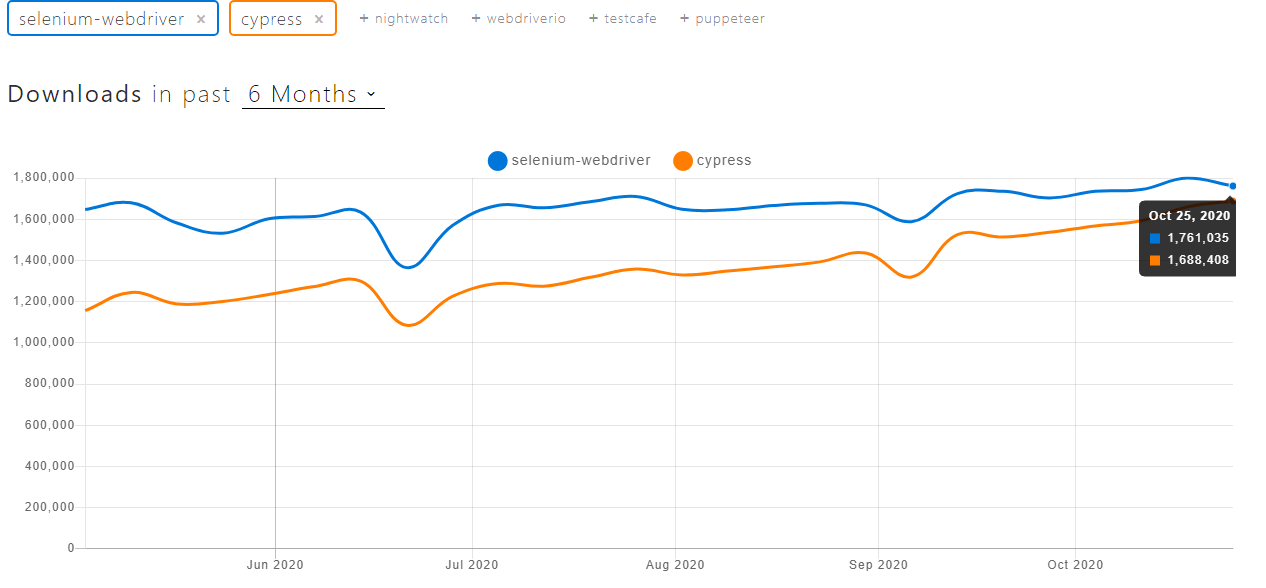
The six-month download trend comparison of Selenium WebDriver and Cypress clearly indicates that Cypress vs Selenium battle will intensify in months to come. Cypress is catching up well with Selenium WebDriver, and this trend drives curiosity about the usefulness of these test automation frameworks.
Starting your journey with Cypress End-to-End Testing? Check out how you can test your Cypress test scripts on TestMu AI’s online cloud.
Introduction To Selenium
The Selenium project was started way back in 2004, and it has come a long way since then! The Selenium IDE introduced in 2006 was a naive record and playback tool available only on Firefox. Along with Firefox, the latest Selenium IDE is also available for Chrome. It comes with cross browser support and can be used for parallel testing. It is web-ready and also lets automation testers debug scripts by setting breakpoints.
The latest stable version of Selenium is Selenium 3.141.59. However, Selenium WebDriver in Selenium 4 (which is still in the Alpha Stage) is a W3C recommendation, i.e., the JSON Wire protocol would no longer be used for communicating with the web browser. The automation tests would work more seamlessly across popular browsers like Chrome, Firefox, and more.
Selenium WebDriver Architecture
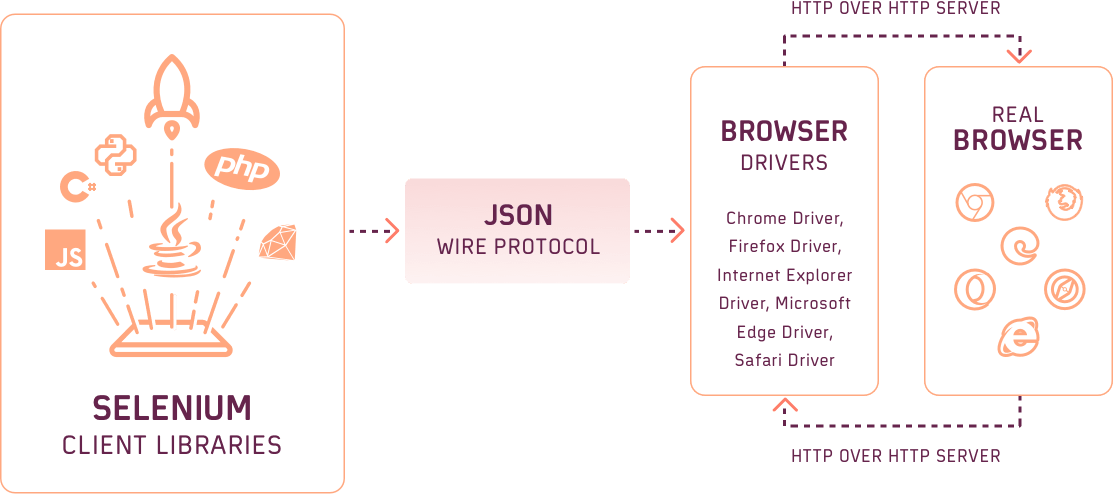
Developers can expect a more stable and uniform behavior with Selenium 4 since the Selenium WebDriver and corresponding browsers use a common protocol (i.e., W3C protocol) for communication. You can refer to our detailed coverage of Selenium WebDriver architecture to know more about the Selenium framework’s essential components.
Major Advantages Of Selenium
These are some of the major positives of Selenium that can help Selenium win this Cypress vs Selenium battle:
- Selenium WebDriver is popularly used for unit testing, E2E (End-to-End) testing, and security testing.
- Selenium supports popular programming languages (e.g., Java, C#, Python, Ruby, etc.) and widely used test automation frameworks (e.g., Mocha JS, JUnit, PyUnit, TestNG, etc.)
- It is compatible with the latest browsers (e.g., Chrome, Firefox, Edge, etc.) and outdated browsers like Internet Explorer.
- Since Selenium WebDriver has been around for many years, it has a growing and robust Selenium ecosystem.
- Test implementation for a local Selenium Grid can be ported to work with a cloud based Selenium Grid with minimal effort.
- The combination of Selenium and cloud-testing tools like TestMu AI can be used for parallel testing in Selenium, which eventually reduces testing time, drives cost-effectiveness, achieves better test coverage, and more.
- Selenium supports popular programming languages (e.g., Java, C#, Python, Ruby, etc.) and widely used test automation frameworks (e.g., Mocha JS, JUnit, PyUnit, TestNG, etc.)
Though Selenium offers many advantages, it does have its share of shortcomings.

Austin Siewert
CEO, Vercel
Discovered @TestMu AI yesterday. Best browser testing tool I've found for my use case. Great pricing model for the limited testing I do 👏
2M+ Devs and QAs rely on TestMu AI
Deliver immersive digital experiences with Next-Generation Mobile Apps and Cross Browser Testing Cloud

Shortcomings Of Selenium
Listed below are some of the most frequently reported shortcomings of Selenium-
- There is a steep learning curve for developers who are new to Selenium. The upside is that developers and automation testers can get started quickly by learning from Selenium’s active users.
- Setting up Selenium can be time-consuming since it involves installing the browser drivers, Selenium Grid Server, and/or Selenium IDE.
- Though Selenium is widely used for UI testing, it has limitations when it comes to testing images.
- Selenium scripts are executed outside the browser (i.e., interface between the test script and browser under test is through the corresponding ‘browser driver’). Hence, execution times can be more in comparison to the Cypress framework.
Introduction To Cypress
Cypress is a next-generation front-end testing tool built for the modern web. Cypress was built for addressing the major pain points faced by developers and QA engineers when coming up with test applications. Cypress lets you test anything that runs in a browser.
With Cypress, developers can perform Cypress UI testing, write end-to-end tests, integration tests, and unit tests. Cypress is built on JavaScript – the popular front-end language and only supports the Mocha JS framework. Chai – the popular BDD/TDD assertion library for NodeJS, is used for writing readable assertions with excellent error messages.
Apart from support for programming languages, the other significant difference between Selenium and Cypress is architectural. Cypress is architecturally and fundamentally different from Selenium. We would touch upon these aspects at a later point in this Cypress vs Selenium comparison.
While Selenium operates by running outside of the browser, Cypress is executed in the same loop as the application. In Cypress, there is a Node server process that communicates, synchronizes, and performs tasks on behalf of each other. As stated on the Cypress architecture page, Cypress also has access to the Network layer due to which it can read and alter web traffic on the fly.
Cypress has a unique DOM manipulation technique, the basis of which Cypress tests have access to everything – web elements in the DOM, application instance, timer, service worker, and more.
Cypress has access to front & back parts that enable it to modify everything coming in & out of the browser. The complete control over the automation process enables Cypress to change code that might interfere with the ability to automate the web browser. Since Cypress is installed locally on the machine, it can also access operating systems to control automation tasks.
Major Advantages Of Cypress
To understand whether Cypress is the right tool for you or not, let us take a look at the main advantages offered by Cypress. It will help you get a clear picture of the difference between Selenium and Cypress.
- Selenium requires the installation of browser drivers so that the script can interact with the web elements on the page. However, installing Cypress does not have any additional dependencies, extra downloads since the test cases run directly inside the browser.
- Selenium is purely a test automation tool, whereas both developers and QA engineers use Cypress. It is built on JavaScript that is widely used for front-end development.
- There is no additional overhead of IDE in Cypress. Once you start Cypress, it prompts you to choose any IDE that can be used for making changes in the test script.
- Cypress processes respond to the application’s events and processes command in real-time. With real-time reloads in Cypress, tests are reloaded automatically as and when changes are made in the app.
- Compared to Selenium, the Cypress framework is more capable of delivering consistent results. This is because Cypress has tighter control over the entire automation process (from top to bottom), due to which it has a better understanding of things happening in and out of the browser.
- In Selenium (up to v 3.8), the communication between the script and browser driver happens through the JSON Wire protocol. In Cypress, there is no necessity for JSON Wire (or some other protocol). Since Cypress operates within the application, test code can access all the objects (not limited to DOM elements) that the application code can.
- There is no necessity for adding implicit and explicit wait statements in Cypress since Cypress automatically waits for the element to exist in the DOM. It also waits for commands and assertions before the execution moves to the next statement. As far as stale elements are concerned, Cypress never yields stale elements that are no longer a part of the DOM.
- There is no network lag and flakiness in tests executed with Cypress as tests are executed inside the browser and have complete visibility of everything happening in the application synchronously. It even knows when an element is animating and waits for it to stop animating. This makes Cypress tests more flake resistant compared to tests executed with other test automation tools.
- Cypress takes a snapshot at every test step. This enables the developer to check the state and activity at any particular step in the test script.
- Cypress lets you modify the DOM elements directly, for example –showing the hidden elements to be shown.
- Cypress is built on top of the Electron App, enabling the developers (or QA engineers) to control the application better. For example, Stubbing DOM APIs, which are possible in Cypress, is not possible with a Selenium framework.
- Stubs [i.e., cy.stub()] in Cypress are used to modify functions and delegate its control over to the developer. Spies [i.e. cy.spy()] in Cypress let you Spy on a function. The clock APIs [e.g., cy.clock()] in Cypress are useful for controlling the application’s data & time. This helps in scenarios where you want to override the application’s behavior or avoid slow tests.
- Developers can block or prevent analytics code like Google Analytics before the application undergoes testing, as Analytics might not be required for an activity like UI testing.
- Creating states for a certain situation can slow down the entire test process. To overcome this problem, Cypress lets developers create states artificially like it was done in a unit test.
- The rich and intuitive UI of Cypress Dashboard shows you every minute detail of test execution, i.e., assertions, network requests, page loads, stubs, spies, and more.
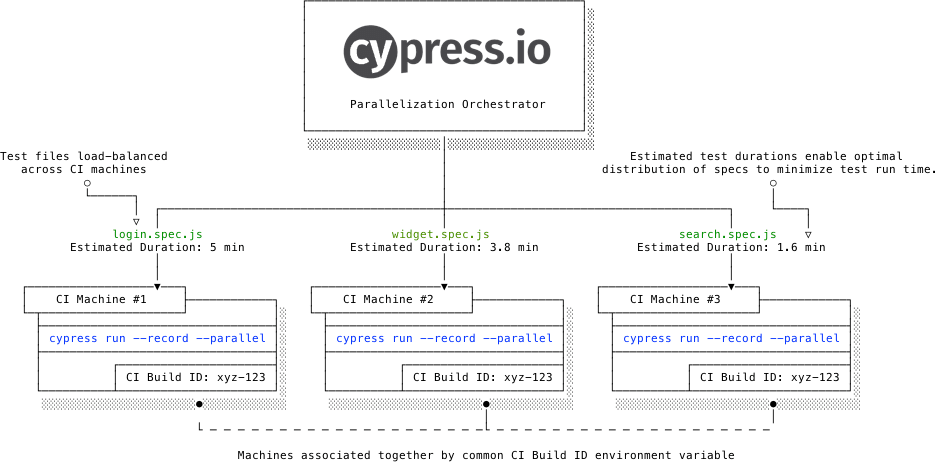
- It supports parallel testing (or parallelization) by default. Along with grouping test runs, it also lets you group tests by Browsers, test labels, and more. Here is a short depiction of parallel testing with Cypress:
- Selenium requires the installation of browser drivers so that the script can interact with the web elements on the page. However, installing Cypress does not have any additional dependencies, extra downloads since the test cases run directly inside the browser.
- Selenium is purely a test automation tool, whereas both developers and QA engineers use Cypress. It is built on JavaScript that is widely used for front-end development.
- There is no additional overhead of IDE in Cypress. Once you start Cypress, it prompts you to choose any IDE that can be used for making changes in the test script.
- Cypress processes respond to the application’s events and processes command in real-time. With real-time reloads in Cypress, tests are reloaded automatically as and when changes are made in the app.
- Compared to Selenium, the Cypress framework is more capable of delivering consistent results. This is because Cypress has tighter control over the entire automation process (from top to bottom), due to which it has a better understanding of things happening in and out of the browser.
- In Selenium (up to v 3.8), the communication between the script and browser driver happens through the JSON Wire protocol. In Cypress, there is no necessity for JSON Wire (or some other protocol). Since Cypress operates within the application, test code can access all the objects (not limited to DOM elements) that the application code can.
- There is no necessity for adding implicit and explicit wait statements in Cypress since Cypress automatically waits for the element to exist in the DOM. It also waits for commands and assertions before the execution moves to the next statement. As far as stale elements are concerned, Cypress never yields stale elements that are no longer a part of the DOM.
- There is no network lag and flakiness in tests executed with Cypress as tests are executed inside the browser and have complete visibility of everything happening in the application synchronously. It even knows when an element is animating and waits for it to stop animating. This makes Cypress tests more flake resistant compared to tests executed with other test automation tools.
- Cypress takes a snapshot at every test step. This enables the developer to check the state and activity at any particular step in the test script.
- Cypress lets you modify the DOM elements directly, for example –showing the hidden elements to be shown.
- Cypress is built on top of the Electron App, enabling the developers (or QA engineers) to control the application better. For example, Stubbing DOM APIs, which are possible in Cypress, is not possible with a Selenium framework.
- Stubs [i.e., cy.stub()] in Cypress are used to modify functions and delegate its control over to the developer. Spies [i.e. cy.spy()] in Cypress let you Spy on a function. The clock APIs [e.g., cy.clock()] in Cypress are useful for controlling the application’s data & time. This helps in scenarios where you want to override the application’s behavior or avoid slow tests.
- Developers can block or prevent analytics code like Google Analytics before the application undergoes testing, as Analytics might not be required for an activity like UI testing.
- Creating states for a certain situation can slow down the entire test process. To overcome this problem, Cypress lets developers create states artificially like it was done in a unit test.
- The rich and intuitive UI of Cypress Dashboard shows you every minute detail of test execution, i.e., assertions, network requests, page loads, stubs, spies, and more.
- It supports parallel testing (or parallelization) by default. Along with grouping test runs, it also lets you group tests by Browsers, test labels, and more. Here is a short depiction of parallel testing with Cypress:
- Like Selenium and other test automation frameworks, Cypress can also be integrated with popular CI/CD tools like Jenkins, Bamboo, Circle CI, Bitbucket, GitLab, and more.
Austin Siewert
CEO, Vercel
Discovered @TestMu AI yesterday. Best browser testing tool I've found for my use case. Great pricing model for the limited testing I do 👏
2M+ Devs and QAs rely on TestMu AI
Deliver immersive digital experiences with Next-Generation Mobile Apps and Cross Browser Testing Cloud
Take this certification to showcase your expertise with end-to-end testing using Cypress automation framework and stay one step ahead.
Here’s a short glimpse of the Cypress 101 certification from TestMu AI:
Shortcomings Of Cypress
That was a long list of advantages offered by Cypress. Does it mean that Cypress has all it takes to win the Cypress vs Selenium competition? Not yet since it does have its fair share of shortcomings:
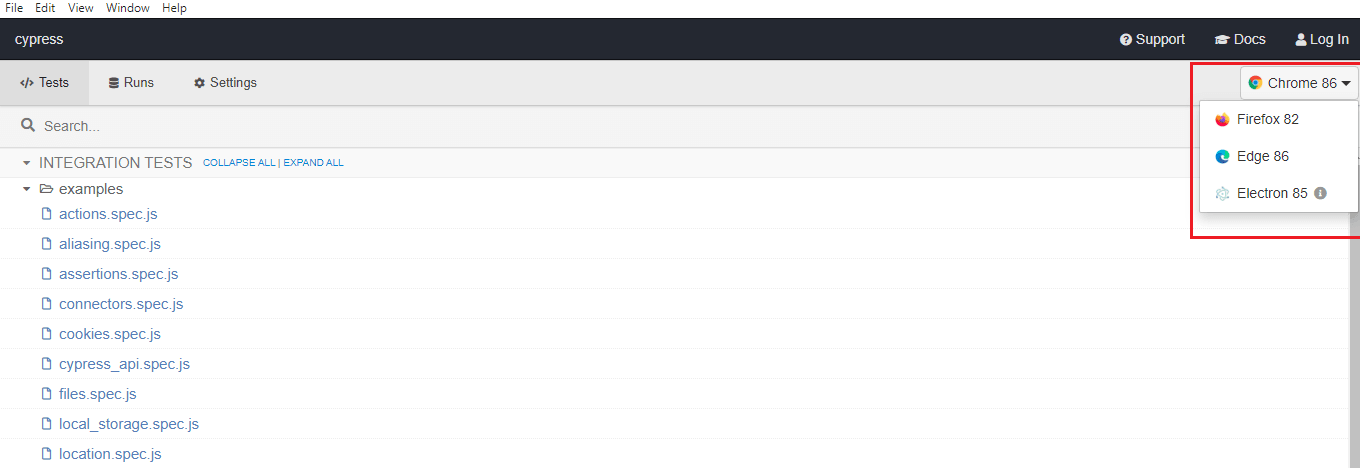
- Selenium can be used against different browsers and OS combinations, whereas Cypress is only available for Chrome, Firefox, Edge, Brave, and Electron browsers. This makes Cypress a less-preferred choice for cross browser testing.
- Selenium can be used against different browsers and OS combinations, whereas Cypress is only available for Chrome, Firefox, Edge, Brave, and Electron browsers. This makes Cypress a less-preferred choice for cross browser testing.
- It only supports the JavaScript framework for the creation of test cases.
- It does not support remote execution.
- As mentioned in the ‘Permanent Trade-Off section’ on the Cypress website, Cypress will never have support for handling multiple browser tabs. On the other hand, it is relatively easy to handle multiple browser tabs in Selenium.
- By default, Cypress does not support multiple-browser instances or control more than one open browser simultaneously. A workaround in Cypress is available to use two browser instances simultaneously or synchronize Cypress with other back-end processes (e.g., Selenium, Puppeteer, etc.) for driving the 2nd open browser.
- With Cypress, tests are limited to visiting domains that are determined to be of the same origin. By that rule, you can never visit two domains of different origins in the same test. However, it is possible to visit two or more domains that are arising from different origins in different tests.
Getting Started With Selenium Cross Browser Testing
Selenium is the de-facto test framework when it comes to cross browser testing. You have the option to use a local Selenium Grid or a more scalable option of testing on a cloud-based Selenium Grid like TestMu AI.
To get started with cross browser testing on a local Selenium Grid, you have to install the browser drivers on the machine. Since Selenium supports languages like C#, Java, Python, Ruby, etc., you can choose the language that you are comfortable with. For performing Selenium automation on cloud Selenium Grid, you have to create an account on that platform and use the appropriate browser capabilities in the code.
Here is the test scenario for demonstrating the use of Selenium and Cypress for automation testing:
- Navigate to the URL https://lambdatest.github.io/sample-todo-app/ in Chrome 86.0 (on Windows 10)
- Select the first two checkboxes
- Send ‘Happy Testing at TestMu AI’ to the textbox with id = sampletodotext
- Click the Add Button and verify whether the text has been added or not
- Assert if the title does not match with the expected window title
Here is the Java-based implementation with testing performed on TestMu AI’s cloud-based Selenium Grid:
package org.selenium4;

import org.openqa.selenium.By;
import org.openqa.selenium.JavascriptExecutor;
import org.openqa.selenium.WebDriver;
import org.openqa.selenium.remote.DesiredCapabilities;
import org.openqa.selenium.remote.RemoteWebDriver;
import org.testng.annotations.AfterClass;
import org.testng.annotations.BeforeClass;
import org.testng.annotations.Test;
import org.openqa.selenium.ie.InternetExplorerDriver;
import java.net.MalformedURLException;
import java.net.URL;

public class CrossBrowserTest {
    WebDriver driver = null;
    String URL = "https://lambdatest.github.io/sample-todo-app/";
    public static String status = "passed";
    String username = "user-name";
    String access_key = "access-key";

    @BeforeClass
    public void testSetUp() throws MalformedURLException {
        /*
        System.setProperty("webdriver.ie.driver", "C:\Setup-Folder\Selenium_Grid\IEDriverServer.exe");
        driver = new InternetExplorerDriver();
        */
        DesiredCapabilities capabilities = new DesiredCapabilities();
        capabilities.setCapability("build", "[Java] - Using Selenium IE Driver");
        capabilities.setCapability("name", "[Java] - Using Selenium IE Driver");
        capabilities.setCapability("platform", "Windows 10");
        capabilities.setCapability("browserName", "Internet Explorer");
        capabilities.setCapability("version","11.0");
        capabilities.setCapability("ie.compatibility",11001);

        driver = new RemoteWebDriver(new URL("http://" + username + ":" + access_key + "@hub.lambdatest.com/wd/hub"), capabilities);
        System.out.println("Started session");
    }

    @Test
    public void test_Selenium4_ToDoApp() throws InterruptedException {
        driver.navigate().to(URL);
        driver.manage().window().maximize();

        try {
            /* Let's mark done first two items in the list. */
            driver.findElement(By.name("li1")).click();
            driver.findElement(By.name("li2")).click();

            /* Let's add an item in the list. */
            driver.findElement(By.id("sampletodotext")).sendKeys("Happy Testing at LambdaTest");
            driver.findElement(By.id("addbutton")).click();

            /* Let's check that the item we added is added in the list. */
            String enteredText = driver.findElement(By.xpath("/html/body/div/div/div/ul/li[6]/span")).getText();
            if (enteredText.equals("Happy Testing at LambdaTest")) {
                System.out.println("Demonstration of Selenium IE is complete");
            }
        } catch (Exception e) {
            System.out.println(e.getMessage());
        }
    }

    @AfterClass
    public void tearDown() {
        if (driver != null) {
            driver.quit();
        }
    }
}
The following test will be executed on TestMu AI’s Grid and will perform the operations, as mentioned in the test scenario.

Getting Started With Cypress For Automation Testing
As the Mocha framework runs on Node.js, before installing Cypress, you need to install the dependent packages:
- Node JS
- IDE like Visual Studio Code
Once Node JS is installed, we install Mocha and Cypress from the terminal using npm, the Node package manager.
Run the following command on the terminal to install Mocha:
npm install mocha
Here is the installation snapshot which indicates that Mocha 8.2.1 was installed successfully:

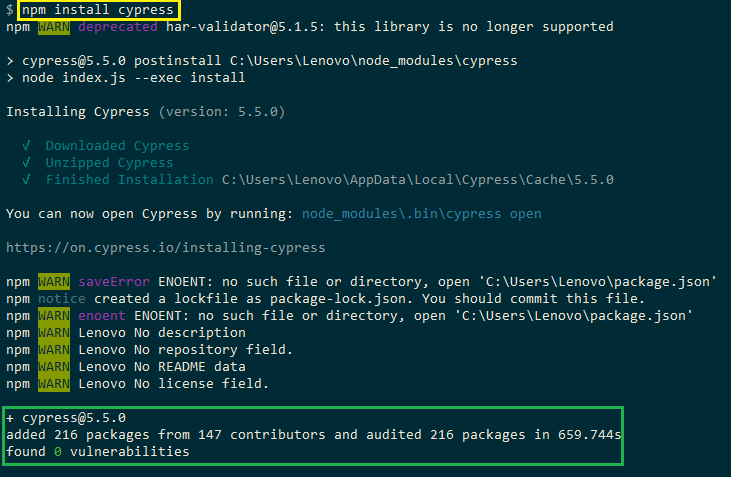
Run the following command on the terminal to install Cypress:
npm install cypress
As seen in the installation snapshot, Cypress 5.5.0 was installed successfully.
With Cypress installed on the machine, we start Cypress by running the following command:
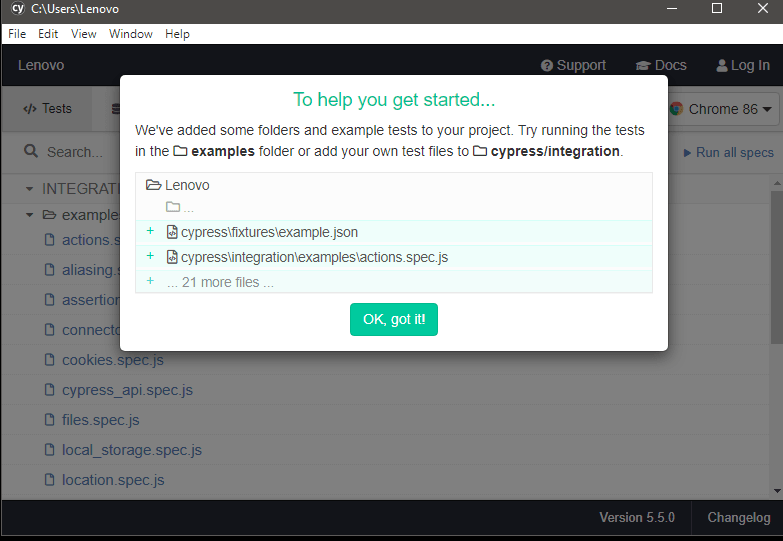
npx cypress open
This will open the Cypress Dashboard from where you can start running the test

Cypress provides example scripts in \integration\examples
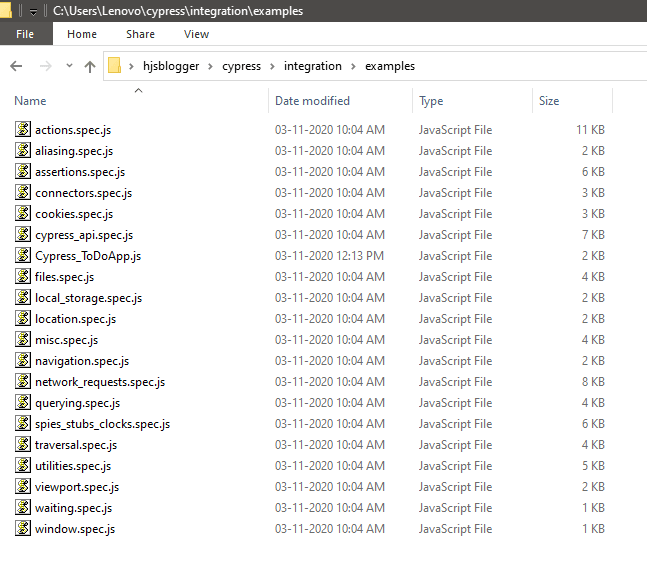
To quickly check the test script, you should place the script in the same folder. We implement the same test scenario that was shown with Selenium. As seen in the below implementation, we have to add wait using cy.wait() method. The cy.get() method is used for getting the required web element from the DOM.
describe('LambdaTest ToDo App',() => {
    it('LambdaTest ToDo App',() => {
    // Go to LambdaTest ToDo App Page
    cy.visit('https://lambdatest.github.io/sample-todo-app/');

    // Wait for 5000 ms (i.e. 5 seconds)
    cy.wait(5000)

    // Click on web element li1
    cy.get(':nth-child(1) > .ng-pristine').click()

    // Click on web element li2
    cy.get('.list-unstyled > :nth-child(2) > .ng-pristine').click()

    // Wait for 2000 ms (i.e. 2 seconds)
    cy.wait(2000)

    // Add a new item to be added in the text box
    cy.get('#sampletodotext').type('Happy Testing at LambdaTest')

    // Add a delay so that the focus can be shifted to the Add Button
    cy.wait(2000)

    // Click the Add Button to add the item
    cy.get('#addbutton').click()

    // Wait for 2000 ms (i.e. 2 seconds)
    cy.wait(2000)

    if (cy.contains('Happy Testing at LambdaTest'))
    {
      // If the new element is added, it would be a part of the DOM
      cy.log('Cypress LambdaTest ToDo App passed')
    }
    else
    {
      cy.log('Cypress LambdaTest ToDo App failed')
    }
  })
})
Cypress comes with an extensive set of APIs that are used for leveraging browser specific commands, e.g., performing button clicks, setting viewports, and more.
In the above implementation, cy.visit() is used for opening a particular URL. It is akin to driver.get in Selenium. The cy.get() method is used for locating a particular web element in the DOM. Once the element is accessed, appropriate action can be performed on the same. For example, we locate the element #sampletodotext and enter (or type) ‘Happy Testing at TestMu AI’ in the text box.’ The cy.log() method is used for printing the message to the Cypress console log.
In Selenium, checking the presence of a web element in the DOM can be difficult (as you need to enter the web element locator). In Cypress, getting a DOM element that contains a certain text is very easy, and cy.contains() method is used for the same.
cy.contains(content)
cy.contains(content, options)
cy.contains(selector, content)
cy.contains(selector, content, options)
We had Chrome 86, Firefox 82, Edge 86, and Electron 85 on the machine where Cypress was installed.
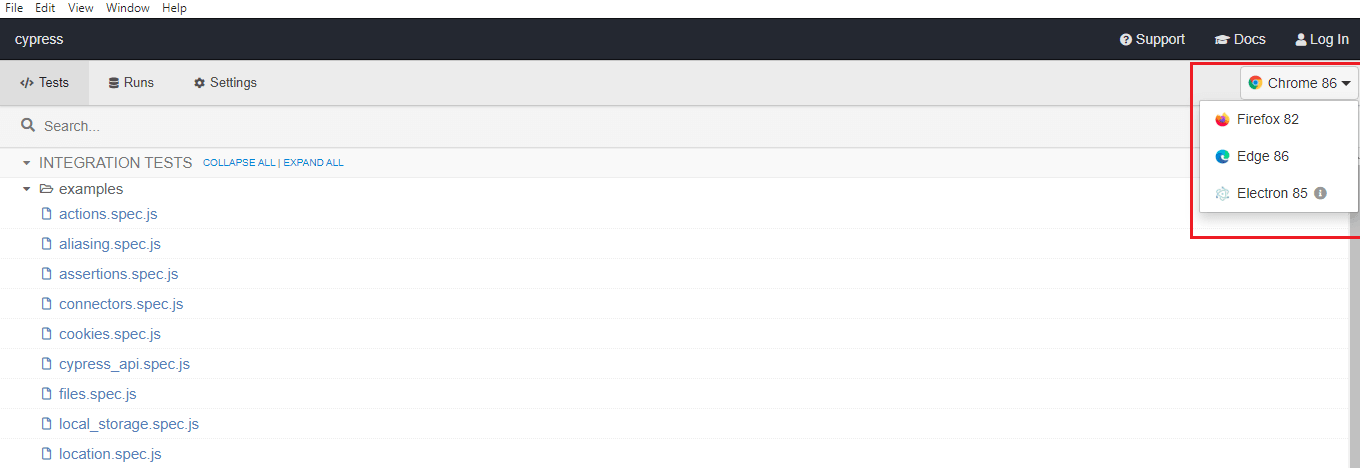
For executing the above test, just navigate to the test in the Cypress Dashboard, select the preferred browser (e.g., Chrome 86) for testing, and click on the test file (i.e., Cypress_ToDoApp.js).
Here is the snapshot of the test execution in progress:
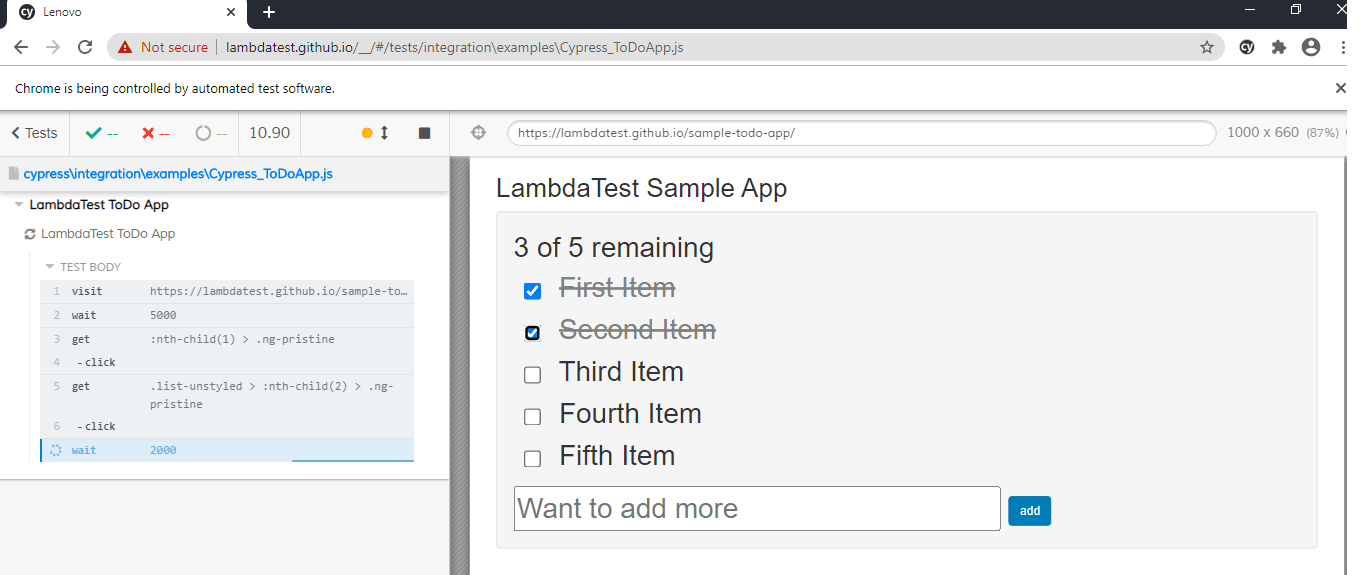
As shown below, the test was executed successfully:
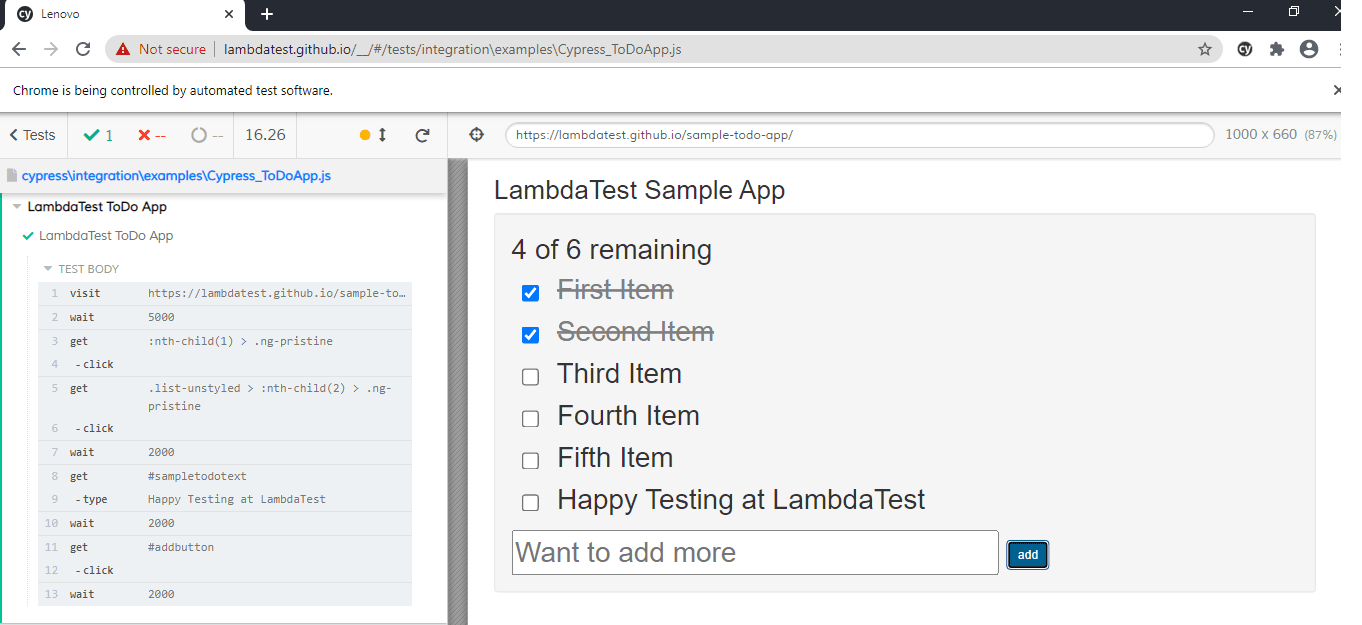
As seen in the execution snapshot (which was captured while testing was in progress), Cypress shows the execution status in real-time and prompts if there are issues with the code.
Get the best out of your Cypress tests with TestMu AI’s online Cypress automation tool. Check out how you can test your Cypress test scripts using TestMu AI’s online cloud.
Cypress Features That Simplify Web App Testing
In this section of Cypress vs Selenium comparison, we have a detailed look at some of Cypress’s breakthrough features that are not available in Selenium. Since Selenium and Cypress are architecturally different (i.e., Cypress tests execute inside the browser and Selenium scripts are executed outside the browser), Selenium might not be required to have these Cypress specific features. However, these Cypress features are worth a mention, as they simplify the lives of developers (and QA engineers) to a huge extent.
Finding Web Elements
As seen in the Cypress implementation, the web elements are not identified using the standard Selenium locators (i.e., XPath, Name, etc.). So, how does the script locate the element in the DOM?
Well, Cypress has an excellent feature called ‘Selector Playground’ in the test runner that lets you find web elements. On the URL under test, click on the ‘Open Selector Playground’’ button and hover over the element for which the requisite details are required.
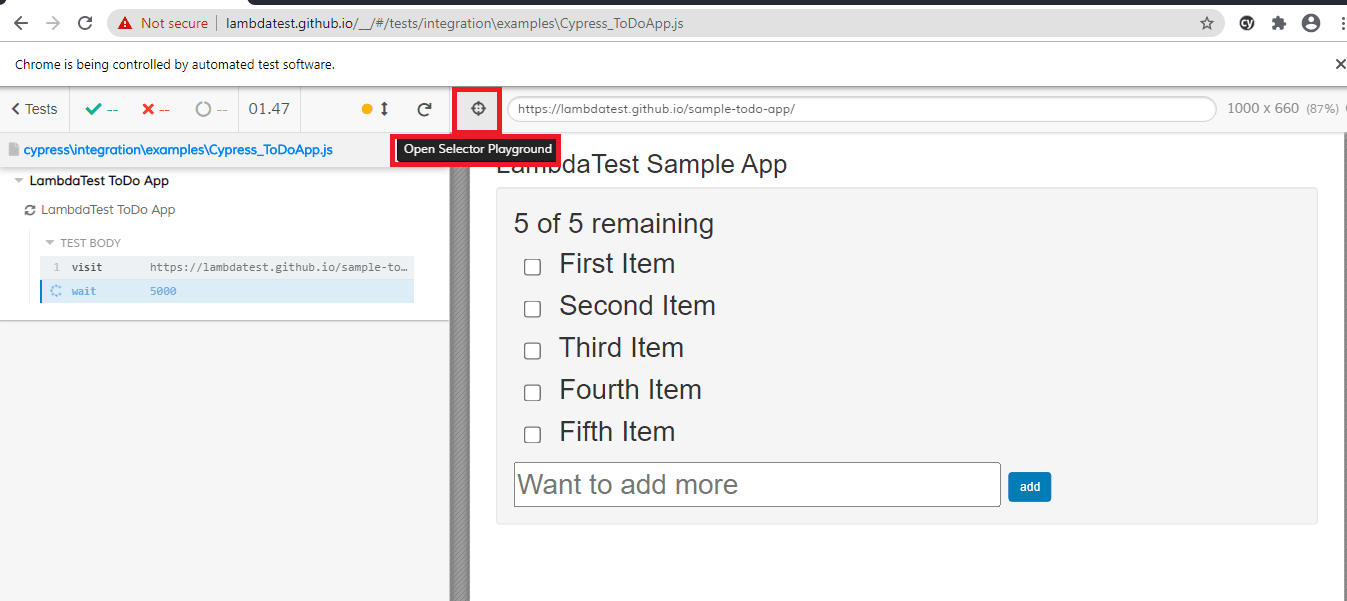
Next, hover over the required web element and click on that element. The details of the element would be populated in the section (just next to the area that displays the test file name) which shows ‘cy.get’ or ‘cy.contains’
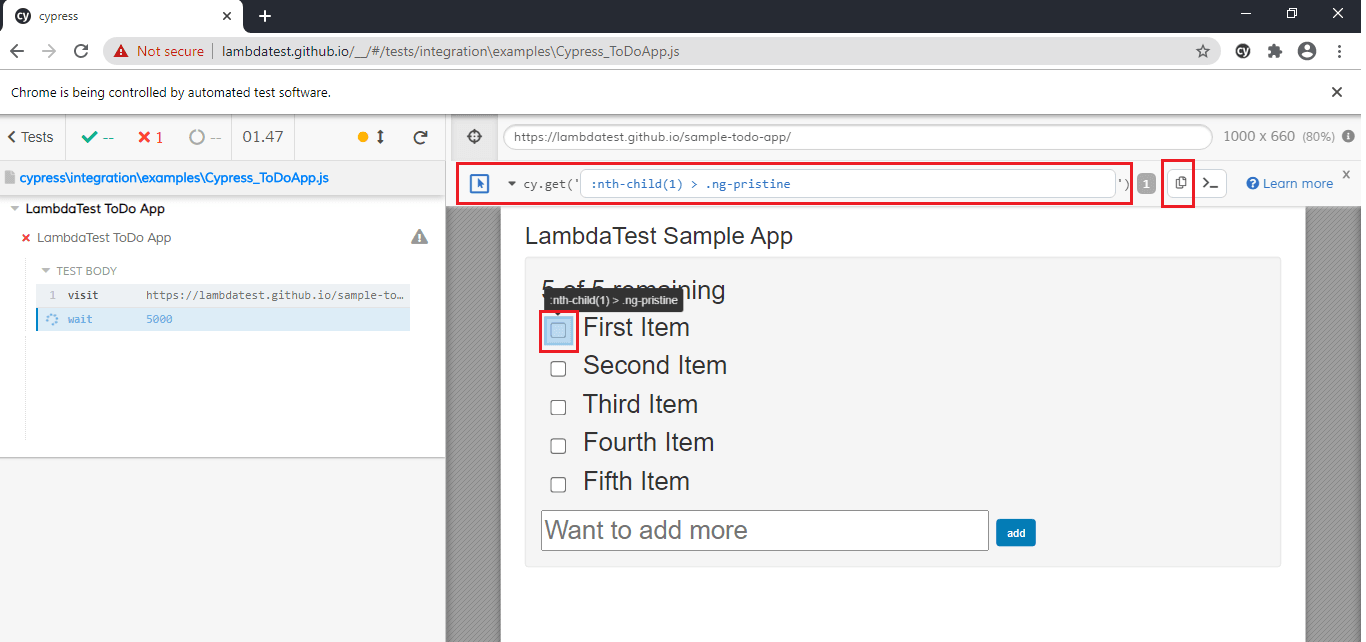
Since ‘Selector Playground’’ is similar to the Inspect tool in Chrome (or Firefox), there is no learning curve involved. With this feature, you can perform code changes and execute the same simultaneously.
Time Travel
As stated on the Cypress website, Time Travel is one of the game’s changing product features. Since Cypress takes snapshots of the tests when the test is running, it provides the flexibility to go back-in-time as far as the execution of commands is concerned.
To check what happened at a particular step, simply hover over the command in the Command Log and check what exactly happened at that step. Cypress keeps a maximum of 50 tests worth of snapshots and command data for time traveling by default.
Shown below are screenshots captured when a ‘Time Travel’ was performed for the click on the first element (i.e., li1) of TestMu AI ToDo Page.
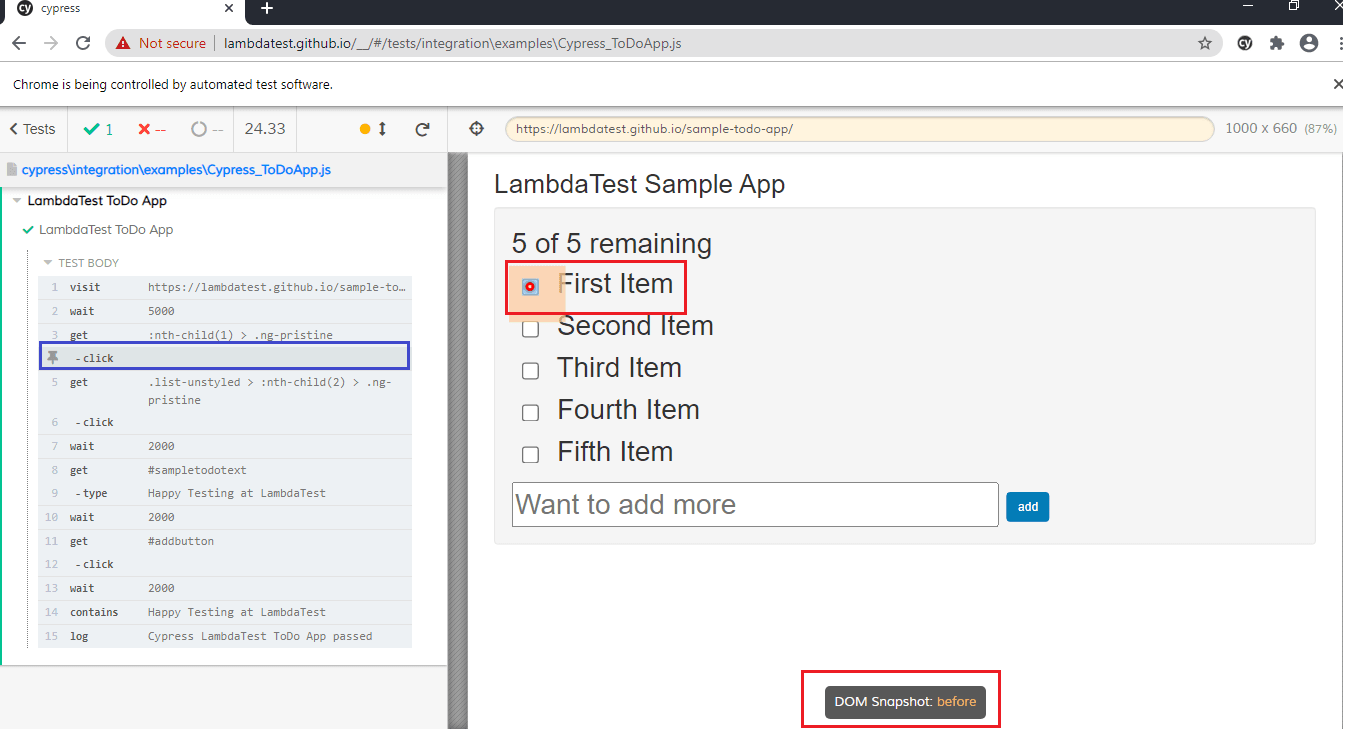
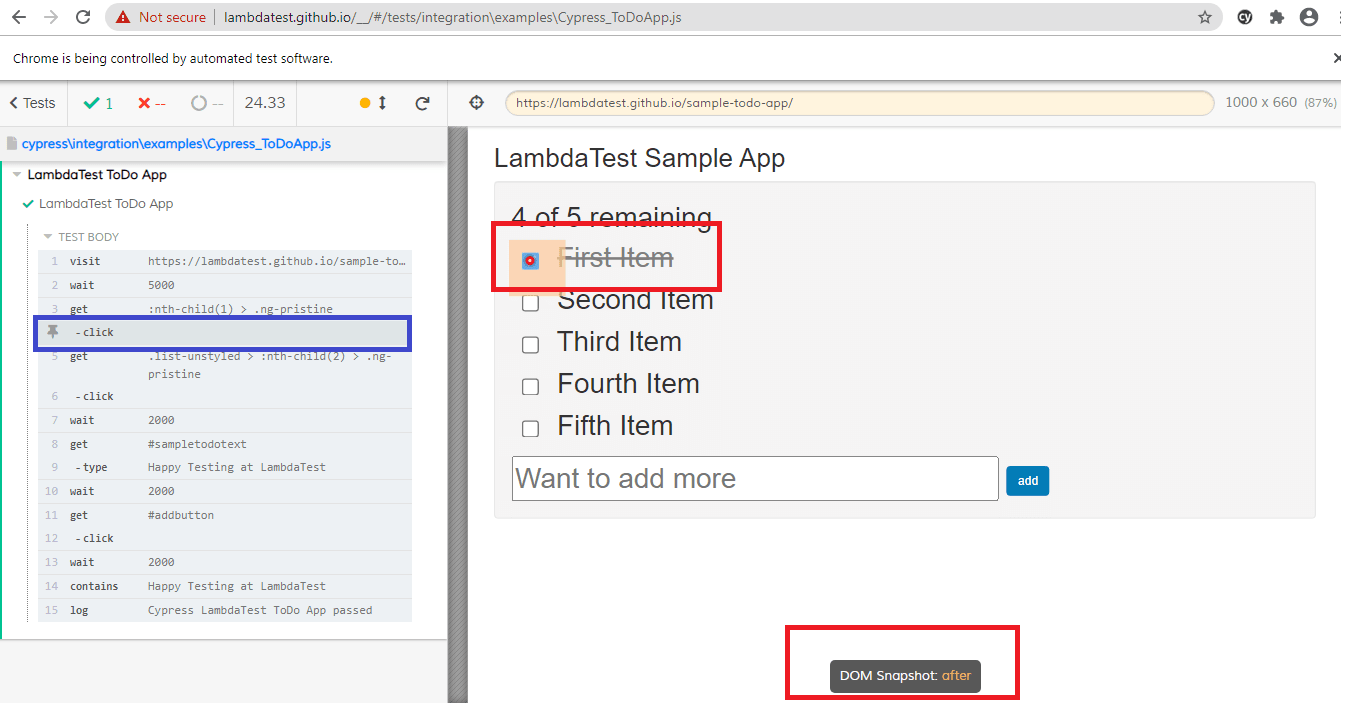
The ‘Time Travel’ feature can come in handy when you want to check the effect of a particular operation in the test script.
Test Execution
As stated earlier, the tests in Cypress are executed inside the browser. Since it is installed locally, it has access to everything happening inside and outside the web browser. This is the primary reason you may not witness network lags with Cypress tests.
Cypress uses the same DOM events which are generated by the browser, due to which the command execution is much faster. Owing to these advantages, test execution with Cypress is much faster in comparison to Selenium.
Read More– Get started with your Cypress Testing across 3000+ browsers & web apps!!!
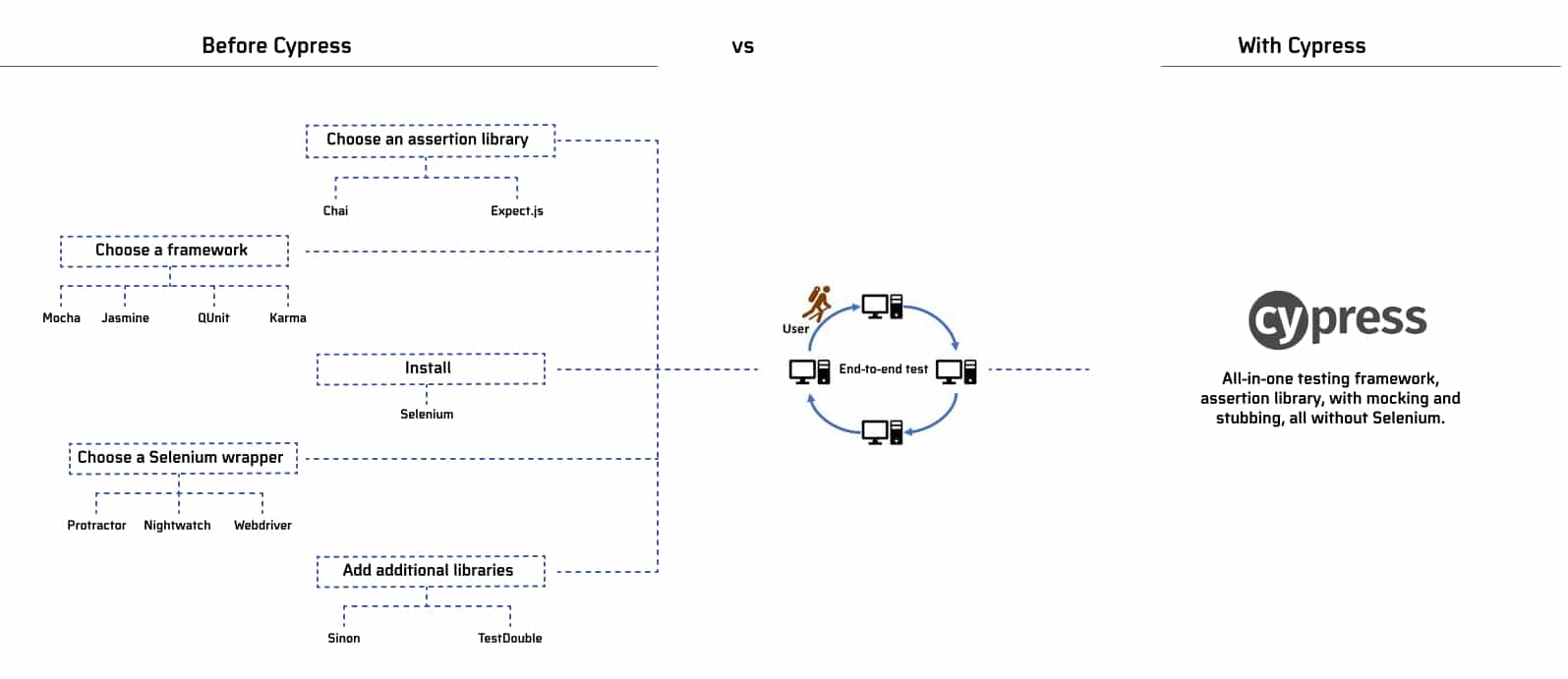
Though Selenium supports many programming languages and test automation frameworks, Cypress uses Mocha’s BDD syntax for realizing unit testing and integration testing. Mocha JS also gives excellent async support. Chai-jQuery, Sinon.JS, and Sinon-Chai provide Mocha the ability to write readable assertions with outstanding error messages.
The Final Showdown – Difference Between Cypress vs Selenium
Now that we have covered every nook and corner of Cypress vs Selenium, it is time to look at how they fare at the feature level in this comparison.
| Feature | Selenium | Cypress |
|---|---|---|
| Programming Languages | Python, C#, Java, Python, Ruby, JavaScript | JavaScript |
| Browser Support | Chrome, Firefox, Internet Explorer, Microsoft Edge, Safari | Brave, Chrome, Edge, Firefox, Electron |
| Test Frameworks | PyUnit, JUnit, TestNG, JBehave, Behave, Gauge, Specflow, NUnit, Robot, and more. | Mocha JS |
| Test Setup | Selenium Grid Server and browser drivers have to be installed in the test machine. Setup is different for a cloud-based Selenium Grid where only browser drivers have to be installed on the test machine. | Node JS, Mocha JS, and Cypress have to be installed on the test machine. |
| Arena of testing | Unit testing, security testing, and integration testing | Unit testing, security testing, and integration testing |
| Integrations | Wide range of integration options – CI/CD tools, reporting tools, and more. | Limited integration support with CI/CD tools when compared to Selenium. |
| Driver Dependencies | Appropriate browser driver has to be installed so that the test script can talk to the corresponding web browser. | No driver dependency. |
| Parallel testing | Supported | Supported |
| Multi Tabs | Supported | Not supported |
| Multiple browser instances | Supported | Not supported |
| Execution Speed | Slow | Fast as Cypress scripts are executed within the browser. |
| Time Travel | Not supported | Supported |
| Real time reloads | Not supported | Tests are reloaded when any change is made in the test implementation. |
| Automatic Waiting | Not supported | No requirement to add waits or sleep in the tests. Cypress automatically waits for commands and assertions before moving to the next instruction. |
| Default Screenshots and Videos | Not available by default, developer has to write code to achieve the same. | Available by default |
| Network Traffic Control | Not supported | No network lag as tests are executed within the browser. You can control, stub, and test edge cases without any involvement of the server. |
| Access to elements outside the DOM | Access only to the elements in the DOM | A unique DOM manipulation technique helps Cypress in getting access DOM elements, timers, service workers, and more. |
| Documentation, Community | Mature Community with multiple points of support. Average Documentation | Growing Community, Excellent Documentation |
| Remote Execution | Supported. Cloud-based Selenium Grid from LambdaTest can be used to expedite cross browser testing and automation testing. | Not supported |
| Spies, stubs, and clocks | Not available | Cypress lets you control the behavior of functions, timers, and server responses with ease. |
| Mobile Testing | Mobile Testing with Appium | Not supported |
| Test Flakiness | Tests can be flaky | With Cypress, tests are expected to be non-flaky. |
Cypress vs Selenium- Which One Should You Choose?
As seen from the head-to-head comparison, it is clear that Selenium and Cypress serve different purposes. Though Cypress can be used for web automation testing, it has a different target market. It differs from Selenium in every sense, including the architecture.
Cypress is a growing tool, whereas Selenium is an established one in the automation testing arena. If you are proficient in JavaScript and are looking for a tool that can perform automation testing with selenium on a local machine, you should check out Cypress. On the other hand, if you require that the code should be functional on a wide range of browsers and operating systems, you should go for Selenium. Selenium tests can also be executed on a cloud-based Selenium Grid like TestMu AI. You can leverage the advantages (e.g., parallel testing at scale) offered by the platform (i.e., TestMu AI).
If your web application is built using modern JavaScript frameworks like React, Angular, etc. and cross browser testing is not of high priority, Cypress might suit the bill. When it comes to cross browser testing, Selenium is still the de-facto framework used by many users.
There is no clear winner in the Cypress vs Selenium debate. A better approach would be evaluating both the tools and seeing how Selenium and Cypress can be used to improve test coverage for your project.
Wrapping up!

We had a detailed look at two top players – Cypress vs Selenium, where the emerging player (i.e., Cypress) is trying to prove the prowess in the web automation testing market. Cypress offers winning features like automatic scrolling; real-time reloads, time travel, top-notch execution speed, and more that are not available in Selenium. On the other hand, Selenium offers features like remote execution, cross browser testing support, provision to implement tests in various programming languages, and more.
Considering the numerous Cypress vs Selenium differneces, it is recommended that you should consider a tool that meets your project requirements, skill-sets, etc. Think from a long-term perspective and choose the best-suited tool that meets the needs of your project!
Happy Cross Browser Testing ☺
Austin Siewert
CEO, Vercel
Discovered @TestMu AI yesterday. Best browser testing tool I've found for my use case. Great pricing model for the limited testing I do 👏
2M+ Devs and QAs rely on TestMu AI
Deliver immersive digital experiences with Next-Generation Mobile Apps and Cross Browser Testing Cloud


Frequently asked questions
Did you find this page helpful?
More Related Hubs
TestMu AI forEnterprise
Get access to solutions built on Enterprise
grade security, privacy, & compliance
- Advanced access controls
- Advanced data retention rules
- Advanced Local Testing
- Premium Support options
- Early access to beta features
- Private Slack Channel
- Unlimited Manual Accessibility DevTools Tests