
Power Your Software Testing with AI Agents and Cloud
The Native AI-Agentic Cloud Platform to Supercharge Quality Engineering. Test Intelligently and Ship Faster.

- TestMu AI (Formerly LambdaTest)
- /
- Blog
- /
- OpenAI Codex Review: Plans, Models, and a Planted-Bug Test
OpenAI Codex Review: Plans, Models, and a Planted-Bug Test
OpenAI Codex review for November 2026: plans, GPT-6.1 models, sandboxing, and what its built-in code reviewer caught on a pull request with four planted bugs.
Published on:
In the Stack Overflow 2026 coding agent survey, 3,620 of 12,255 respondents (29.5%) had used OpenAI Codex in the past year, which ranks it third behind Claude Code and GitHub Copilot.
GPT-5.5 retired from Codex for ChatGPT sign-ins on October 14, 2026, GPT-5.3-Codex-Spark left a month earlier, and the original cloud setup now carries a legacy label in OpenAI's docs. A Codex review written before October describes models you can no longer pick.
This Codex review covers the product as it ships in November 2026 and tests its built-in reviewer: Codex reviewed a small pull request with four planted bugs twice, and TestMu AI's Kane CLI checked the same build in a real browser.
TL;DR
OpenAI Codex is OpenAI's coding agent for writing, running, and reviewing code from the ChatGPT desktop app, Codex CLI, IDE extension, Codex Cloud, and GitHub pull requests. It is a strong pick on ChatGPT Plus and higher plans, and its reviewer flagged all four planted bugs in a test pull request on both runs.
Is Codex free?
Yes, with limits. Free and Go plans get GPT-6 Luna at Standard speed in the ChatGPT desktop app, subject to rollout. OpenAI lists the CLI, IDE extension, web access, and automatic GitHub code review under the Plus plan.
Does Codex's built-in code review catch real bugs?
- Diff-level bugs: Yes. On a pull request with four planted bugs, codex review flagged a missing ownership check, an order note rendered as HTML, an off-by-one discount, and a dropped error check on both runs, each with a file, line range, and fix.
- Bugs on GitHub pull requests: Not always. Codex posts only P0 and P1 findings on GitHub, and the CLI ranked the two bugs users would see, the wrong discount and the missing quote error, as P2.
- Running the app: No. The Codex reviewer read the diff and files with git and never started the server or ran the tests. TestMu AI's Kane CLI checked the page in real Chrome, failed both visible bugs, and passed after the fixes.
Can you use Codex with an API key?
Yes. An OpenAI API key runs Codex in the CLI, SDK, and IDE extension at API rates. Cloud features such as GitHub code review and the Slack integration need a ChatGPT plan instead.
What Is OpenAI Codex?
OpenAI Codex is a coding agent that reads your repository, edits files, runs commands, and reviews changes. You reach it through one ChatGPT account across a desktop app, a terminal client, an editor extension, a cloud runner, and GitHub.
| Surface | Where it runs | Use it for |
|---|---|---|
| ChatGPT desktop app | macOS and Windows; on Windows it runs in PowerShell with a native sandbox, or inside WSL2 | Long-running chats, worktrees, the review pane, and the Code Review plugin for pull requests |
| Codex CLI | Your terminal, scripts, and CI through codex exec | Local edits, headless runs, and codex review against a base branch, commit, or uncommitted changes |
| IDE extension | VS Code, Cursor, and Windsurf; Xcode and JetBrains IDEs have their own integrations | Prompts that start from open files and selections, with diffs reviewed in place |
| Codex Cloud | OpenAI-managed environments, started from the web, mobile, or desktop app | Tasks that keep running while your computer sleeps and end in a commit or pull request |
| GitHub | Pull request comments on connected repositories (GitLab merge requests are in preview) | @codex review, automatic reviews on new pull requests, and @codex fix follow-ups |
The terminal client is open source: the openai/codex repository is Apache-2.0 licensed and has about 133k stars on GitHub.
For install steps, sandbox flags, and CI usage, see the Codex CLI guide. To connect Codex to tools outside the repository, see Codex MCP.
Codex Plans and Models in November 2026
The Codex pricing page says ChatGPT Work and Codex share usage: ChatGPT Work uses the same pricing, credits, and usage limits as Codex.
Dollar prices are on that page. The table below lists what each plan unlocks in Codex.
| Plan | Codex access | Models listed |
|---|---|---|
| Free and Go | The ChatGPT desktop app, subject to rollout | GPT-6 Luna at Standard speed |
| Plus | Web, CLI, IDE extension, and iOS, plus automatic code review and the Slack integration | GPT-6.1 Sol and GPT-6 Luna |
| Pro | Everything in Plus across several Pro tiers, with Ultrafast mode on the top tier | Everything in Plus |
| Business | Desktop and mobile apps, larger cloud machines, SAML SSO, and no training on business data by default | Workspace-managed |
| Enterprise and Edu | Business features plus SCIM, EKM, RBAC, audit logs through the Compliance API, and data residency | Workspace-managed |
| API key | CLI, SDK, and IDE extension at API rates; no GitHub code review or Slack | Whatever your API key can call |
OpenAI's Codex models page describes GPT-6 Astra as its most capable model and GPT-6.1 Sol as near-Astra performance at a lower cost. GPT-6.1 Terra is the fast choice for writing and computer use, and GPT-6 Luna handles focused, high-volume tasks.
- Retired in 2026 - gpt-5.4 and gpt-5.4-mini left Codex for ChatGPT sign-ins on August 31, GPT-5.3-Codex-Spark left the desktop app, CLI, and IDE extension on September 14, and GPT-5.5 left ChatGPT sign-ins on October 14.
- API-key sessions - GPT-5.5 stays available through the OpenAI API and in Codex sessions signed in with an API key, so CI jobs on a key were not cut off.
- Saved configs - Any script, custom agent, or scheduled task that names a retired model needs a new model name. Pin the model with -m so a retirement surfaces as a failed run instead of an unnoticed model switch.
The pricing page estimates local messages per five-hour period for Plus and standard Business, says Pro plans currently have no five-hour limit, and notes that weekly limits may also apply. The Codex usage guide shows how to check what is left with /usage and /status.
How Codex Sandboxes and Approves Commands
OpenAI's approvals and security guide says Codex runs with network access off by default. Locally, an OS-enforced sandbox limits what it can touch, and an approval policy decides when it must stop and ask you.
- read-only - Codex can read and plan but not edit. Switch to it with /permissions when you want a chat about the code without changes.
- workspace-write with on-request approvals - The Auto preset. Codex reads, edits, and runs commands inside the working directory, and asks before it edits outside it or runs a command that needs the network.
- danger-full-access - Codex is no longer limited to your project directory. OpenAI's Windows docs warn that full access can cause destructive actions and data loss, and suggest rules for targeted exceptions instead.
- The retired untrusted policy - approval_policy = "untrusted" no longer works. For interactive, read-only use, OpenAI suggests the read-only sandbox with on-request approvals.
For unattended runs, codex exec accepts --approve-for-me, which routes approval requests through automatic review inside the workspace-write sandbox. The Codex auto-review guide covers what that reviewer checks before it approves a command.

Testing Codex Review on a Planted-Bug Pull Request
The test gave Codex a pull request with known defects. A small Node order desk got a branch that adds a bulk discount, order notes, and order cancelling, with bugs planted on purpose and its unit tests still green.
The setup mirrors a normal code review: the reviewer sees the diff and the repository, including a written pricing spec in docs/pricing.md, and nothing else.
Test Setup
- Discount boundary - The spec gives 10% off a line of 10 or more units. The code applies it only above 10, and the new unit test checks 12 units, so it passes.
- Cancel route - A new DELETE /api/orders/:id handler removes any order by ID, while the existing GET handler returns 404 for another user's order.
- Order notes - The order history renders each customer note through innerHTML.
- Quote refactor - A new postJSON helper drops the res.ok check, so a rejected quote is formatted as a dollar total instead of showing the error.
- Tests - node --test passes 2 of 2 on main and 3 of 3 on the pull request branch.
Codex ran twice against the branch with GPT-6.1 Sol at its default reasoning effort, using an API key passed inline to the one command:
npm install -g @openai/codex
git checkout feature/bulk-pricing
CODEX_API_KEY=<your-api-key> codex exec review --base main -m gpt-6.1-sol -o codex-review.md
Codex Review Findings
Both runs flagged every planted bug, with the same priorities. In the last column, the two bugs users would notice are the two Codex ranked lowest.
| Planted bug | Run 1 | Run 2 | Priority | What a user sees |
|---|---|---|---|---|
| Cancel route skips the ownership check | Flagged | Flagged | P1 | Nothing, until one user cancels another user's order through the API |
| Order note rendered as HTML | Flagged | Flagged | P1 | Nothing, until a crafted note runs script when the order history loads |
| Discount starts above 10 units | Flagged | Flagged | P2 | Ten cold brews quote at $45.00 instead of $40.50 |
| Quote error replaced by a total | Flagged | Flagged | P2 | A quantity of 150 shows Total: $NaN and no error message |
Run 1's review, with repository paths shortened:
The patch introduces unauthorized order cancellation and stored HTML injection, along with regressions in discount boundaries and quote validation feedback.

Full review comments:

- [P1] Check ownership before cancelling an order - server.mjs:77-79
  A request with `X-User: ana` can delete Ben's seeded order via `DELETE /api/orders/2`. The new handler checks only the ID, unlike the GET handler's ownership check. Include the current user in the lookup and return 404 for orders belonging to someone else.

- [P1] Render order notes as text rather than HTML - public/app.js:56-59
  An order note such as `<img src=x onerror=alert(1)>` is stored unchanged and interpolated into `innerHTML`, causing script execution whenever history renders. The 200-character limit does not prevent this. Build the note using `textContent` or escape it before HTML interpolation.

- [P2] Apply the bulk discount at exactly ten units - pricing.mjs:7-7
  For a quantity of exactly 10, this condition charges full price despite both `docs/pricing.md` and the new promotional text promising the discount for 10 or more units. For example, ten cold brews cost $45 instead of $40.50. Use an inclusive threshold and cover the boundary in the pricing test.

- [P2] Restore quote error handling before formatting the total - public/app.js:33-34
When the user requests a quote with no selected items or an invalid quantity, the API returns an error without `total`. The removed error branch means the page now displays `Total: $NaN` and leaves the error message blank. Check the response for an error, clear the total, and display the API's validation message before formatting a successful quote.- Consistency - Run 1 took 267 seconds and run 2 took 200 seconds. Both returned the same four findings at the same priorities, and both cited the pricing spec when explaining the discount bug.
- Read-only behavior - Each run first looked in the repository and its parent folder for AGENTS.md files, then read the diff and changed files with git and file reads. Neither run executed npm test or started the server, and the working tree was unchanged afterward.
- Actionable comments - Every finding named a file and line range, a concrete trigger such as DELETE /api/orders/2 sent as user ana, and a fix.
- Exit code 0 with P1 findings - codex exec review exited 0 on both runs. A CI step has to read the review text, or request structured output with --output-schema, before it can block a merge.
OpenAI's GitHub code review docs say Codex flags only P0 and P1 issues on GitHub so review comments stay focused on high-priority risks.
The CLI ranked the discount and quote bugs P2. If the GitHub reviewer ranks them the same way, those two never appear on the pull request, and they are the two users hit first.
Browser Check Results
A diff review and a behavior check answer different questions, which is the gap AI code review vs verification lays out. The behavior side here was Kane CLI, TestMu AI's browser agent: it runs a plain-English objective in real Chrome and returns pass or fail with a sealed evidence pack of screenshots, network log, and console output.
Kane CLI exits 0 on a pass, 1 on a failed check, 2 on an environment error, and 3 on a timeout, and it records a confirmed product bug as result code 740. Each objective came straight from docs/pricing.md:
kane-cli run "Go to http://127.0.0.1:8741/. Set the Cold brew 1L quantity to 10 and click Get quote. Verify the total reads exactly Total: \$40.50, because docs say 10 or more units get 10% off the line." --agent --headless --timeout 300
echo $? # 1 on the pull request build, 0 after the fixes| Check | Build | Result | Triage verdict | Time and credits |
|---|---|---|---|---|
| 10 units quote $40.50 | Pull request | Failed, exit 1, result code 740 | Application issue, UI data defect, 0.98 confidence | 85 s, about 25 credits |
| 150 units show "Quantity must be 1-99" | Pull request | Failed, exit 1, result code 740 | Application issue, UI data defect, 0.96 confidence | 149 s, about 34 credits |
| Both checks in one objective | After applying the fixes Codex suggested | Passed, exit 0 | None needed | 91 s, about 25 credits |
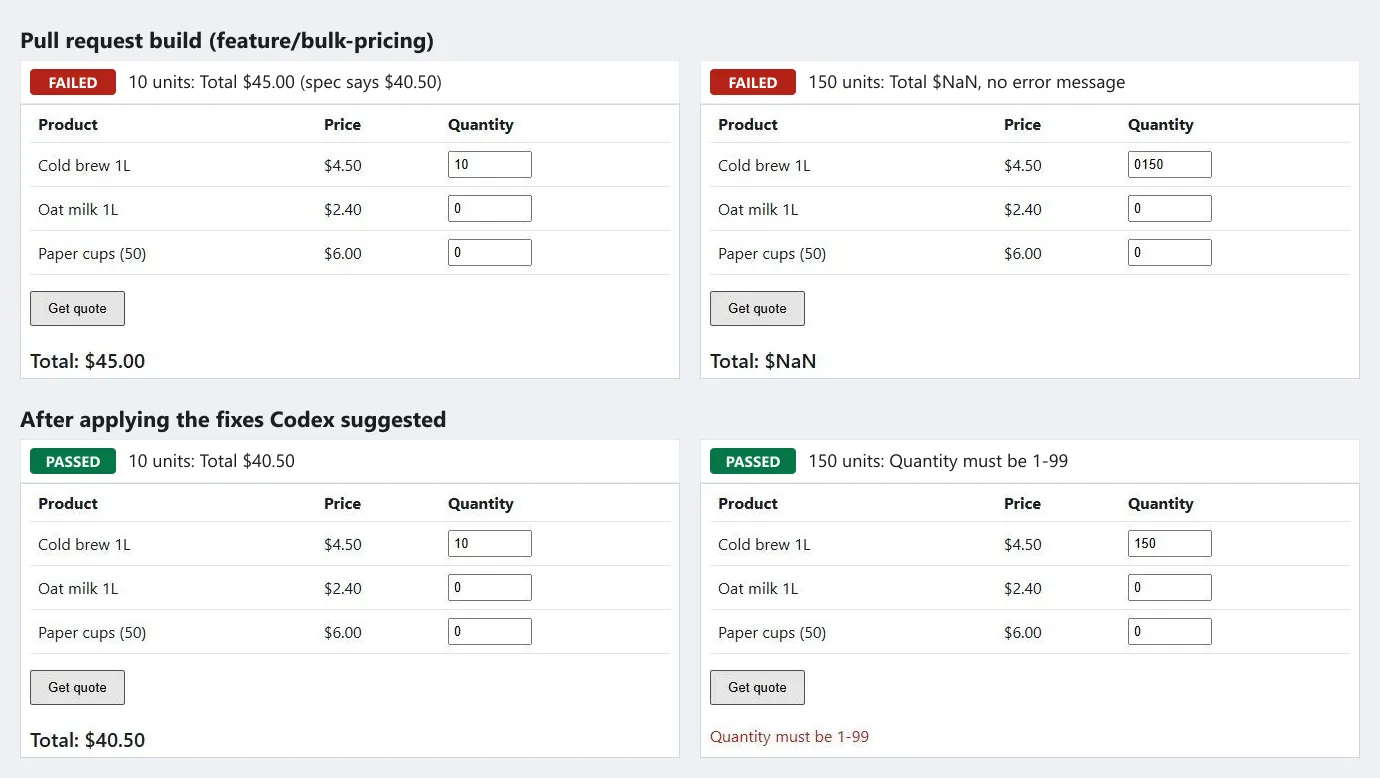
- Same bugs, different evidence - Kane CLI reached the two P2 bugs from the rendered page. For the quote check, its triage read the HTTP response and placed the fault in the page: the request correctly rejected 150, and the page displayed an invalid total instead of the message.
- Exit codes ignore priority - A failed browser check exits 1 whatever priority a reviewer assigned, so a P2 bug that GitHub would never show still stops the pipeline.
- What stayed with Codex - The ownership and HTML-injection bugs never surface on a normal page load, so a browser objective for the happy path would not find them. The diff review is the layer that catches those.
Codex Review on GitHub, the CLI, and CI
Codex reaches a pull request through several routes, and they differ in who can trigger them, what they show, and which sign-in they need.
| Route | Trigger | What you get | Sign-in |
|---|---|---|---|
| GitHub code review | @codex review in a comment, or Automatic review in Codex settings | A GitHub review with P0 and P1 findings only | ChatGPT plan with the repository connected |
| Security Review (research preview) | @codex security review, or Auto security review | Security findings on the pull request and a Security Report tab in the Codex task | ChatGPT plan with the repository connected |
| /review | Slash command in the desktop app, CLI, or IDE extension | Prioritized findings in the chat; your working tree is not changed | ChatGPT sign-in, or an API key in the CLI and IDE extension |
| codex exec review | --base, --commit, or --uncommitted, with optional custom instructions | All reported findings, P2 included, written to a file with -o or streamed as JSON | ChatGPT sign-in or CODEX_API_KEY |
| Codex GitHub Action | A workflow running openai/codex-action@v1 with your review prompt | The final message, which the sample workflow posts as a pull request comment | API key stored as a GitHub secret |
To steer what Codex flags, the GitHub review docs point to a ## Code Review Rules section in the AGENTS.md file closest to the code, with ### headings to group checks. Start with two or three concise rules, keep lint and formatting in CI, and see AGENTS.md for how Codex merges nested files. Rules for this order desk could look like this:
## Code Review Rules

### Pricing

- Discount thresholds must match docs/pricing.md. Flag any boundary that differs from the written rule.

### Order endpoints

- Every /api/orders/:id route must check that the order belongs to the requesting user, as the GET route does.- One-off focus - Add the focus to the trigger, such as @codex review for issues in the database migration.
- Fix follow-ups - Comment @codex fix the P1 issue, and Codex starts a chat with the pull request as context and can push a fix when it has permission.
- Rule scope - OpenAI's docs say review rules guide Codex but do not replace tests, branch protections, or required approvals.
To put lower-priority findings on a pull request, run Codex in CI and post its output yourself.
The Codex GitHub Action installs the CLI, runs codex exec with a review prompt you write, and its sample workflow posts the final message as a pull request comment. It needs a Linux or macOS runner, or safety-strategy: unsafe on Windows.

Note: Codex reviews the diff; Kane CLI by TestMu AI checks the running page in real Chrome and exits 1 on a failed objective, so a bug Codex ranks P2 can still stop the merge. Start free and add a browser check next to your Codex review.
Is Codex Good?
Yes, for teams already on a ChatGPT plan who want one agent across the terminal, editor, cloud, and GitHub, with a reviewer that gives specific and repeatable findings. Its limits are the GitHub severity filter, a reviewer that never runs the app, and fast model turnover.
- Reach - A Plus sign-in covers the desktop app, CLI, IDE extension, Codex Cloud, and GitHub review, so work started in one surface can be reviewed in another.
- A consistent reviewer - Two runs produced the same four findings with the same priorities, each with a reproduction and a fix.
- Safe defaults - Network access is off and writes stay inside the workspace unless you change the sandbox.
- The GitHub filter - Only P0 and P1 findings post to pull requests, which in this test would have left both P2 bugs off the review.
- No runtime check - The reviewer reads code. It did not run the tests or open the page, so behavior claims still need a separate check.
- Model churn - GPT-5.4, GPT-5.3-Codex-Spark, and GPT-5.5 all left Codex for ChatGPT sign-ins between August 31 and October 14, so scripts that name a model need upkeep.
In the same survey's want-to-use results, 2,152 of 12,255 respondents (17.6%) said they want to use OpenAI Codex in the next six months, third behind Claude Code and GitHub Copilot.
If you are choosing between agents rather than reviewing Codex alone, Claude Code vs Codex vs Cursor compares models, permissions, and plans side by side. This short from TestMu AI maps each agent to the job it fits:

- On Plus or higher with GitHub - Turn on Automatic review, add Code Review Rules to AGENTS.md, and read the full CLI review for anything the pull request does not show.
- CI on an API key only - Run codex exec review in the pipeline and parse its output, because API-key sign-in has no GitHub code review.
- Free or Go - Try Codex in the desktop app with GPT-6 Luna before paying for the CLI and review features.
- Shipping user-facing changes - Pair the review with a browser check that exercises the flows users rely on, written from your spec.
Conclusion
Run a Codex review with codex exec review --base main on your next pull request, and compare its P2 findings with what GitHub posted for the same change.
Then let Codex run a browser check on its own changes. The Kane CLI with AI coding agents guide installs the Kane CLI skill for Codex CLI with npx @testmuai/kane-cli-skill. How Codex then finds and selects that skill is covered in Codex skills.
Testing from the terminal? Kane CLI by TestMu AI lets SDETs and developers plan, write, run and debug tests from the command line.
Author

Himanshu Sheth
Blogs: 144


Himanshu Sheth is the Director of Marketing (Technical Content) at TestMu AI, with over 8 years of hands-on experience in Selenium, Cypress, and other test automation frameworks. He has authored more than 130 technical blogs for TestMu AI, covering software testing, automation strategy, and CI/CD. At TestMu AI, he leads the technical content efforts across blogs, YouTube, and social media, while closely collaborating with contributors to enhance content quality and product feedback loops. He has done his graduation with a B.E. in Computer Engineering from Mumbai University. Before TestMu AI, Himanshu led engineering teams in embedded software domains at companies like Samsung Research, Motorola, and NXP Semiconductors. He is a core member of DZone and has been a speaker at several unconferences focused on technical writing and software quality.
Reviewer

Srinivasan Sekar
Reviewer
Srinivasan Sekar is Director of Engineering at TestMu AI, where he leads engineering and open-source initiatives behind the Selenium and Appium automation grid and owns TestMu AI's MCP Server. A committer to Appium and a contributor to Selenium, WebdriverIO, Taiko, and AppiumTestDistribution, he brings over 15 years of experience in quality engineering and open-source technologies. He is the author of the Apress book 'The MCP Standard: A Developer's Guide to Building Universal AI Tools with the Model Context Protocol,' a Certified Kubernetes and Cloud Native Associate, and an international conference speaker. Before TestMu AI he spent over eight years at Thoughtworks as a Principal Consultant and Quality Architect. Srinivasan holds a B.Tech in Information Technology from Anna University.


OpenAI Codex Review FAQs
Did you find this page helpful?
More Related Blogs

TestMu AI forEnterprise
Get access to solutions built on Enterprise
grade security, privacy, & compliance
- Advanced access controls
- Advanced data retention rules
- Advanced Local Testing
- Premium Support options
- Early access to beta features
- Private Slack Channel
- Unlimited Manual Accessibility DevTools Tests