

Power Your Software Testing with AI Agents and Cloud
The Native AI-Agentic Cloud Platform to Supercharge Quality Engineering. Test Intelligently and Ship Faster.


- TestMu AI (Formerly LambdaTest)
- /
- Blog
- /
- Claude Code vs Codex vs Cursor: Which AI Coding Agent in 2026?
Choose Claude Code if you want a terminal-first agent with the deepest customization (hooks, skills, plugins, subagents), the most authentication options for enterprise and CI, and the strongest score on the newest terminal benchmark. Choose Codex if you want an open-source CLI, safe-by-default headless runs, generally available GitHub code review and the lowest cost per task in published measurements. Choose Cursor if you want to stay inside a full AI code editor, switch between Claude, GPT, Gemini, Grok and Cursor's own models, and review every change visually. Many developers combine them: Claude Code or Codex running inside Cursor is a common setup.
Claude Code vs Codex vs Cursor at a Glance
| Claude Code | OpenAI Codex | Cursor | |
|---|---|---|---|
| What it is | Agentic coding tool, terminal-first | Coding agent: CLI, cloud and app | AI code editor (IDE) with agents |
| Made by | Anthropic | OpenAI | Anysphere[1] |
| Where you use it | Terminal; VS Code and JetBrains extensions; Claude desktop app; web and mobile; Slack[2] | Terminal; VS Code/Cursor/Windsurf extension; ChatGPT desktop app; Codex Cloud; Slack[3] | Cursor editor; CLI (agent); cloud agents via web, iOS, Slack, GitHub, Linear[4] |
| Models | Claude only: Opus 5.5 default, Sonnet 5.5, Haiku 5.5, Fable 5.1[5] | OpenAI only: GPT-6.1 Sol recommended, GPT-6 and GPT-5.6 families[6] | Many: Claude, GPT-5.6, Gemini, Grok, Cursor's Composer 2.5[7] |
| Entry paid plan | Claude Pro, $20/month[8] | ChatGPT Plus, $20/month[9] | Cursor Pro, $20/month[7] |
| Heavy-use plans | Max from $100/month[8] | Pro at $100, $200 or $500/month[9] | Pro Plus $60, Ultra $200[7] |
| Team plans | Team Standard $25 / Premium $125 per seat (monthly)[8] | Business $25/user monthly ($20 annual)[9] | Teams $40 / $120 per user[7] |
| Pay as you go | Anthropic API, Bedrock, Google Cloud, Microsoft Foundry[10] | OpenAI API key (no cloud features)[9] | Third-party models billed at API rates[7] |
| CLI license | Proprietary[11] | Open source (Apache-2.0)[12] | Proprietary[1] |
| Safety controls | Permission modes incl. plan and auto; OS sandbox (macOS, Linux)[13] | Sandbox modes + approval policies; sandbox on macOS, Linux, Windows[14] | Agent, Plan and Ask modes; cloud agents in isolated VMs[15] |
| Headless / CI | claude -p[16] | codex exec (read-only by default)[17] | agent -p[18] |
| PR review | Code Review (research preview, Team/Enterprise, ~$15-25/review)[19] | GitHub code review (GA)[20] | Bugbot (GA, usage-based)[21] |
| Instruction files | CLAUDE.md (reads AGENTS.md)[22] | AGENTS.md[23] | Cursor rules files[24] |
| Best for | Deep customization, hard tasks, enterprise auth | Cost efficiency, open source, safe automation | Editor-centric work, model choice, visual review |
What's the Core Difference Between Claude Code, Codex and Cursor?
The biggest split is where you work and which models you get:
- Claude Code and Codex are agent-first. You describe a task, and the agent reads the codebase, edits files, runs commands and reports back, in your terminal, an IDE panel, a desktop app or the cloud. Each is tied to its maker's models.
- Cursor is editor-first. It's a full code editor with agents built in, so you see every diff in place. You can choose models from several providers, including Anthropic and OpenAI.
Claude Code vs Codex
These are the closest rivals: both are terminal-first agents from model makers, both at $20/month to start.[8][9]
Where Claude Code is stronger
- Higher task success on the newest terminal benchmark: Anthropic reports 66.4% for Opus 5.5 on Terminal-Bench 4.0.[25]
- A larger extension system: 33 hook events, skills, plugins and background subagents.[26]
- More ways to authenticate: subscription, API key, Bedrock, Google Cloud, Microsoft Foundry, and OIDC in GitHub Actions.[27][28]
Where Codex is stronger
- Much lower cost per task in published measurements: $1.04 vs $14.19 in Artificial Analysis's comparison.[29]
- An open-source (Apache-2.0) CLI.[12]
- Read-only sandbox by default for headless runs.[17]
- Generally available GitHub code review.[20]
- Sandboxing on Windows as well as macOS and Linux.[30]
Pick Claude Code when success on hard, long tasks matters most. Pick Codex when cost, throughput and conservative defaults matter most.
Claude Code vs Cursor
This is a choice between two ways of working, more than two products.
Where Claude Code is stronger
- Delegating whole tasks and walking away.
- Running headless in CI.
- Deep automation through hooks and subagents.
- Working the same way in any editor or none.
Where Cursor is stronger
- Staying in a visual editor where you review each change as it happens.
- Switching between Claude, GPT, Gemini, Grok and Cursor's own Composer models in one tool.[7]
- Tab completion and inline edits for hands-on coding.
Pick Claude Code if you want to hand off work. Pick Cursor if you want to steer every line. Many developers run Claude Code inside Cursor and get both.[31]
Codex vs Cursor
Where Codex is stronger
- Cheaper per seat for teams: ChatGPT Business is $25/user monthly ($20 annual), against $40 for Cursor Teams.[9][7]
- Cloud tasks bundled into ChatGPT plans from Plus upward.[3]
- An open-source CLI.
- OpenAI's newest models, such as GPT-6.1 Sol. Cursor's model list didn't include GPT-6.x as of October 10, 2026.[6][7]
Where Cursor is stronger
- A complete editor experience.
- Multi-vendor model choice.
- Cloud agents that plug into Slack, GitHub and Linear.[4]
Pick Codex if you live in ChatGPT and the terminal. Pick Cursor if your team wants one editor for everyone. The Codex extension also runs inside Cursor.[32]
How Much Do Claude Code, Codex and Cursor Cost?
All three start at $20/month. They diverge for heavy users and teams.[8][9][7]
| Claude Code | Codex | Cursor | |
|---|---|---|---|
| Free | No Claude Code on Claude Free[8] | Limited desktop access on Free and Go; no Codex Cloud[3] | Hobby (free)[7] |
| Individual | Pro $20/mo ($17/mo annually)[8] | Plus $20/mo[9] | Pro $20/mo[7] |
| Heavy individual | Max 5x from $100/mo (includes $100 API credits); Max 20x (includes $200 credits)[8] | Pro $100, $200 or $500/mo ("currently have no five-hour limit")[9] | Pro Plus $60/mo, Ultra $200/mo[7] |
| Teams | Standard $25/seat monthly ($20 annual); Premium $125 ($100 annual)[8] | Business $25/user monthly ($20 annual)[9] | Teams Standard $40, Premium $120 per user[7] |
| How limits work | Rolling 5-hour window plus weekly limits, shared with Claude web and desktop; optional usage credits at API rates[8] | Per-model 5-hour estimates (e.g. 15-160 local messages on GPT-6.1 Sol for Plus); weekly limits "may also apply"[9] | Two pools: Cursor's own models, and third-party models billed at API rates (Teams adds $0.25 per million tokens on third-party models)[7] |
Usage limits are the top complaint for all three. If you run agents for hours a day, compare the $100-$200 tiers, not the $20 ones.[8][9][7]
Which Is Best at Coding? What Do Benchmarks Say?
Benchmarks compare agent-and-model combinations, and the October 2026 numbers come mostly from the vendors:
- Terminal-Bench 4.0: Anthropic reports 66.4% for Claude Opus 5.5, against 57.9% for GPT-6 Astra (as reported by OpenAI). Vendor-published, September 22, 2026.[25]
- Artificial Analysis (third party), Claude Code (Sonnet 5.5) vs Codex (GPT-6.1 Sol):[29]
- Coding Agent Index: 68 vs 63.
- DeepSWE v1.1: 72% vs 73%.
- Terminal-Bench 4.0: 66% vs 55%.
- Cost per task: $14.19 vs $1.04.
- OpenAI reports GPT-6.1 Sol at $5.47 average cost per task on Terminal-Bench Science, against $23.21 for Opus 5.5. Vendor-published, September 29, 2026.[33]
- Cursor is harder to benchmark as one entity, because results depend on the model you pick inside it. It also offers its own Composer models alongside third-party ones.[7]
Bottom line: Claude Code leads on hard-task success in current measurements, Codex leads on cost, and Cursor's results track the model you choose. Many articles still quote SWE-bench Verified and Terminal-Bench 2.0 scores from early-2026 models; treat those as outdated.
How Does Each Keep an Agent From Breaking Things?
- Claude Code:
- Permission modes: default (asks), acceptEdits, plan (read and propose only), auto (a classifier approves routine actions; the default on Pro, Max and Team since August 2026, and in interactive sessions on every plan since late September), dontAsk and bypassPermissions.[13]
- OS-level sandbox for shell commands on macOS and Linux.[34]
- Codex:
- Cursor:
Which Works Best in CI/CD and Headless Automation?
All three have a headless mode:
| Command | Notes | |
|---|---|---|
| Claude Code | claude -p "..." | Text or JSON output. GitHub Action supports API key, subscription token, OIDC, Bedrock, Vertex and Foundry auth[28] |
| Codex | codex exec "..." | JSONL output and --output-schema. Read-only sandbox by default. GitHub Action uses an OpenAI API key[35] |
| Cursor | agent -p "..." | CLI with Agent, Plan and Ask modes. Cloud agents can be started from Slack, GitHub, Linear or an API[4] |
For the most conservative CI default, start with Codex. For cloud-identity-based auth without long-lived keys, Claude Code has the most options. For teams that want CI agents and editor agents from one vendor, Cursor covers both.
Which Has the Best Pull-Request Review?
- Codex: GitHub code review is generally available. It reviews automatically or when someone comments
@codex review.[20] - Claude Code: Code Review is a multi-agent research preview on Team and Enterprise. It averages $15-25 per review, billed outside plan usage, and never blocks a merge.[19]
- Cursor: Bugbot reviews pull requests for bugs, security issues and code quality problems. It has been generally available since July 2025 and is billed by usage, with an average run costing $1.00 to $1.50.[36][37][21]
Which Is Safest for Enterprise Use?
- Claude Code:
- Codex:
- Cursor: Teams and Enterprise plans add admin controls. Cursor holds ISO 27001, ISO 42001 and AIUC-1 certifications and a SOC 2 Type II attestation, and offers Privacy Mode.[42][43]
Whichever you shortlist, ask each vendor which products its SOC 2 report covers.
The Same Task in Claude Code, Codex and Cursor
The task: "Add a coupon-code field to checkout, validate it against /api/coupons, and update the tests." Here is each tool running it headless, the way teams run agents in CI.
# Claude Code
claude -p "Add a coupon-code field to checkout. Validate against /api/coupons. \
  Update unit tests. Do not touch payment provider code." \
  --permission-mode acceptEdits --output-format json > claude-result.json

# Codex (read-only by default, so grant workspace writes explicitly)
codex exec "Add a coupon-code field to checkout. Validate against /api/coupons. \
  Update unit tests. Do not touch payment provider code." \
  --sandbox workspace-write --json > codex-result.jsonl

# Cursor CLI
agent -p "Add a coupon-code field to checkout. Validate against /api/coupons. \
  Update unit tests. Do not touch payment provider code."
In the editor, the experience differs more than in CI:
- Cursor shows each proposed edit as a diff you accept or reject.
- Claude Code and Codex work through the task and report back, with permission prompts based on the mode you chose.
What happens next is the same for all three. The agent edits files, runs the unit tests it can find, and reports success. None of them, by default, opens the real checkout in a browser, applies a coupon and confirms the total changed. "Tests pass" and "task complete" are the agent's claims about its own work. The verification section below covers how to check them.
Can You Use Claude Code, Codex and Cursor Together?
Yes, and many teams do:
- Cursor as the editor, a terminal agent for big tasks. Claude Code has a Cursor extension, and Codex's IDE extension supports Cursor. Use Cursor for hands-on edits and hand larger, multi-file tasks to the agent.[31][32]
- One writes, another reviews. For example, Claude Code writes the change and Codex reviews the pull request (
@codex review), or the reverse. Different models catch different mistakes. - Route by cost. Send high-volume, well-specified tasks to the cheaper agent and hard refactors to the stronger one.
- Keep one set of project rules. Codex reads AGENTS.md, Claude Code can read it too, and Cursor has its own rules files. Keep test commands and conventions in one place and reference it from each.
Codex added an importer for Claude Code setups in June 2026 and extended it to Cursor in August, a sign of how often teams move between them.[44]
How Do You Verify What Claude Code, Codex or Cursor Ships?
Whichever you choose, the output needs an independent check. Coding agents grade their own work by running the tests they wrote. That catches broken functions, but not a signup button hidden behind a modal, a checkout total that never updates, or a flow that only breaks in Safari. Code that compiles can still break the product.
A verification layer has three parts. Each maps to a TestMu AI (formerly LambdaTest) product built to work alongside your coding agent, not replace it.
1. Kane CLI: The Testing Agent Your Coding Agent Calls
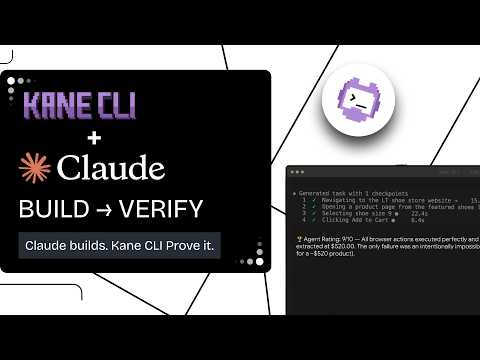
Kane CLI is a testing agent for the terminal. You describe a user flow in plain English, and it drives a real Chrome browser and returns a pass or fail with a replayable evidence pack: steps, screenshots, network and console logs. It doesn't write your app's code; it checks the app your coding agent just changed.
npm install -g @testmuai/kane-cli
kane-cli login
kane-cli run "apply coupon SAVE10 at checkout on staging and verify the total drops by 10%"
It's built for agent loops:
--agentmode returns structured NDJSON (including failure screenshots) that Claude Code, Codex or Cursor's agent can read.- Typed exit codes: 0 pass, 1 fail, 2 setup error, 3 timeout, so CI and agents can branch on the result.
- Ready-made instructions for each tool: a Kane CLI skill for Claude Code, and an agents.md you can point Codex or Cursor to (testmuai.com/kane-cli/agents.md).
- Scale and portability: runs in the cloud on HyperExecute with
--remote, and exports to native Playwright when you want a permanent regression test.
The loop: the coding agent makes the change, Kane CLI verifies the user flow in a real browser, and the agent fixes what failed before anyone opens the pull request.

2. KaneAI: End-to-End Checks on Every Pull Request
KaneAI is TestMu AI's GenAI-native testing agent for teams. It plans, writes and maintains end-to-end tests for web and mobile apps in plain English, from Jira tickets, PRDs or screenshots.
- Pull-request validation (beta): a comment on a GitHub pull request triggers test generation and a run, with results posted back to the thread. Every agent-written change gets the same end-to-end review, whichever tool wrote it.
- Runs on HyperExecute, TestMu AI's test orchestration cloud, across 3,000+ browsers and 10,000+ real devices.
3. If You're Using These Tools to Build AI Agents
Teams increasingly use Claude Code, Codex and Cursor to build agents: support bots, voice assistants, back-office automations. Those need agent-specific tests.
- Rook CLI (Agent Assurance): grades what your agent actually changed in tools, files and APIs, not what it claims.
- Generates adversarial tests (prompt injection, tool misuse).
- Reports Pass, Fail and Unable to Verify separately, so unverifiable results don't inflate the pass rate.
- Its /rook skill runs inside Claude Code and Codex CLI. Rook is pre-alpha and publicly installable.
- Agent Testing: autonomous AI evaluators test chat, voice, IVR/phone and video agents.
- Hundreds of voice profiles and accents, background noise and real phone calls.
- A go-live verdict before customers meet the agent.

Note: Install Kane CLI free. TestMu AI currently offers 10,000 Kane CLI credits free for a month.
Sources
- [1] Terms of service - Cursor, Anysphere
- [2] Claude Code overview - Claude Code Docs, Anthropic
- [3] Using Codex with your ChatGPT plan - OpenAI Help Center
- [4] Cloud agents - Cursor Docs, Anysphere
- [5] Model configuration - Claude Code Docs, Anthropic
- [6] Codex models - OpenAI
- [7] Models and pricing - Cursor Docs, Anysphere
- [8] Plans and pricing - Claude, Anthropic
- [9] Codex pricing - OpenAI
- [10] Enterprise deployment overview - Claude Code Docs, Anthropic
- [11] Claude Code license - anthropics/claude-code, GitHub
- [12] openai/codex - GitHub
- [13] Permission modes - Claude Code Docs, Anthropic
- [14] Agent approvals and security - Codex, OpenAI
- [15] Cursor CLI overview - Cursor Docs, Anysphere
- [16] Run Claude Code programmatically - Claude Code Docs, Anthropic
- [17] Non-interactive mode - Codex, OpenAI
- [18] Headless CLI usage - Cursor Docs, Anysphere
- [19] Code Review - Claude Code Docs, Anthropic
- [20] Code review - Codex, OpenAI
- [21] Bugbot is out of beta - Cursor blog, Anysphere (July 2025)
- [22] Manage Claude's memory (CLAUDE.md and AGENTS.md) - Claude Code Docs, Anthropic
- [23] AGENTS.md - Codex, OpenAI
- [24] Rules - Cursor Docs, Anysphere
- [25] Claude Opus 5.5 - Anthropic
- [26] Hooks reference - Claude Code Docs, Anthropic
- [27] Authentication - Claude Code Docs, Anthropic
- [28] Claude Code GitHub Actions - Claude Code Docs, Anthropic
- [29] Claude Code vs Codex: coding agent comparison - Artificial Analysis
- [30] Sandboxing - Codex, OpenAI
- [31] Use Claude Code in VS Code (and Cursor) - Claude Code Docs, Anthropic
- [32] Codex IDE extension - OpenAI
- [33] Introducing GPT-6.1 Sol - OpenAI
- [34] Sandboxing - Claude Code Docs, Anthropic
- [35] Codex GitHub Action - OpenAI
- [36] Bugbot usage-based billing - Cursor Help, Anysphere
- [37] Bugbot - Cursor Docs, Anysphere
- [38] Security - Claude Code Docs, Anthropic
- [39] Data usage - Claude Code Docs, Anthropic
- [40] Enterprise privacy - OpenAI
- [41] Enterprise admin setup - Codex, OpenAI
- [42] Security - Cursor, Anysphere
- [43] Pricing - Cursor, Anysphere
- [44] Codex changelog - OpenAI
Author

Anubhav Singhmaar
Blogs: 43

Anubhav Singhmaar is an AI Product Manager at TestMu AI driving Kane CLI, the command-line tool that brings browser automation to the terminal, turning natural-language flows into runs in a real Chrome browser that return pass or fail with shareable proof. He owns the roadmap and prioritization and works with engineering to ship developer-facing features. Before TestMu AI, he spent over four years at Sprinklr owning enterprise voice AI across APAC and EMEA. A mechanical engineer turned product manager, he grounds guidance in real QA workflows.
Reviewer

Srinivasan Sekar
Reviewer
Srinivasan Sekar is Director of Engineering at TestMu AI (formerly LambdaTest), where he leads engineering and open-source initiatives behind the Selenium and Appium automation grid and owns TestMu AI's MCP Server. A committer to Appium and a contributor to Selenium, WebdriverIO, Taiko, and AppiumTestDistribution, he brings over 15 years of experience in quality engineering and open-source technologies. He is the author of the Apress book 'The MCP Standard: A Developer's Guide to Building Universal AI Tools with the Model Context Protocol,' a Certified Kubernetes and Cloud Native Associate, and an international conference speaker. Before TestMu AI he spent over eight years at Thoughtworks as a Principal Consultant and Quality Architect. Srinivasan holds a B.Tech in Information Technology from Anna University.


Claude Code vs Codex vs Cursor FAQs
Did you find this page helpful?
More Related Blogs
TestMu AI forEnterprise
Get access to solutions built on Enterprise
grade security, privacy, & compliance
- Advanced access controls
- Advanced data retention rules
- Advanced Local Testing
- Premium Support options
- Early access to beta features
- Private Slack Channel
- Unlimited Manual Accessibility DevTools Tests