

Next-Gen App & Browser Testing Cloud
Trusted by 2 Mn+ QAs & Devs to accelerate their release cycles


On This Page
- What is Cypress?
- What Are Cypress Elements and Locators?
- Why Check the Presence of an Element on a Web Page?
- How to Verify the Existence of an Element Using Cypress?
- Strategic Approaches to Element Validation in Automated Testing
- How to Check if an Element Exists in Cypress for Interaction?
- How to Check if an Element Exists in Cypress Over the Cloud?

How To Check If An Element Exists In Cypress
Learn how to check if an element exists in Cypress, validate visibility on a web page, avoid flaky tests, and interact with dynamic web elements efficiently.

Enrique
January 30, 2026
Ensuring web application robustness and reliability is a primary objective in software testing. As QA engineers delve into the complexities of Cypress framework, a robust testing framework renowned for its simplicity and effectiveness, one fundamental principle emerges at the forefront: the validation of element presence/visibility.
When dealing with dynamic web elements, testers often need to check if an element exists in Cypress before interacting with it. This is crucial to avoid failure or flaky tests.
One common approach to addressing this challenge is to use specific methods to check if an element exists in Cypress on a web page before interacting with it by allowing you to use known methods in Cypress.
Cypress is a preferred automation testing framework known for its simplicity and effectiveness. One of its advantages is the ability to quickly check if an element exists in Cypress on a web page. The Cypress get() command retrieves elements based on a specified selector.
Overview
Ensuring the presence and visibility of elements is a key part of writing reliable Cypress tests. This guide explores various Cypress commands and strategies to verify element existence, handle dynamic content, and avoid flaky tests ensuring consistency across real-world testing scenarios.
Why Check If an Element Exists in Cypress?
Validating element presence helps prevent test failures and improves stability. Web applications often have dynamic content, where buttons, forms, or text fields appear based on user actions. By checking for element existence before interaction, testers can avoid unexpected errors and ensure smooth automation flows.
How To Verify the Existence of an Element in Cypress
Cypress provides multiple methods to confirm whether an element exists or is visible before performing any action.
Key Commands:
- cy.get() – Retrieves elements using selectors like ID, Class, or Attributes.
- cy.contains() – Finds elements by their text content.
- cy.find() – Locates nested elements within a parent container.
- Custom Assertions with .should() – Verifies element presence or specific attributes dynamically.
These methods allow testers to validate DOM states precisely, reducing false negatives and improving test reliability.
How To Check Element Visibility in Cypress
To ensure an element is both present and visible, Cypress uses the .should('be.visible') assertion. This avoids test flakiness by waiting for elements to appear before executing interactions leveraging Cypress’s built-in timeout feature instead of hard-coded waits.
Before we begin with how to check if an element exists in Cypress, it’s essential to understand what Cypress is and its core elements and locators.
What is Cypress?
Cypress is a popular end-to-end testing framework used by front-end developers and test automation engineers for web and API testing. Being JavaScript-based, it is highly favored among developers. It is unique because it uses a special DOM manipulation technique and runs directly in the browser. It supports multiple browser versions, including Google Chrome, Mozilla Firefox, Microsoft Edge (Chromium-based), and Electron.
To get started with Cypress and to learn more about its workings and various functions, features, and methods, watch the entire video tutorial for detailed insights.
In the section below, we will learn about Cypress elements and locators.
What Are Cypress Elements and Locators?
Understanding Cypress elements and locators is important for running effective test automation with Cypress.
Cypress Elements
While working with Cypress, elements are the components of a web page that you interact with using Cypress commands in your tests. Locators, such as ID, Class, Tag, CSS Selectors, or XPath, identify and target these elements in the DOM for actions like clicking, typing, or verifying their attributes.
The Cypress testing framework has components and features important for creating and executing tests for web applications; some are mentioned below.
- Test Runner: Cypress test runner helps developers and testers write, manage, and execute tests on web applications. Its user-friendly interface allows for running and viewing test results.
- Commands: It offers a wide range of commands that help developers and testers interact with elements on web pages, such as actions (clicking on elements, typing into the input field, and navigating between pages).
- Assertions: It provides built-in assertions that help developers verify the expected behavior of elements and interactions within their web applications.
- Fixtures: Fixtures are external files that contain static data in Cypress. They provide data for tests, making it more straightforward to simulate real-world scenarios.
- Plugins: Using plunging, developers can add new commands, assertions, or other features to the framework. These are used to customize the Cypress to suit the needs of your project.
- Hooks: It allows developers to run code at different pointers during the test execution cycle. For example, developers can use hooks to set the data before each test run or clean up the resources after completing all tests.
These features make Cypress the powerful and easy-to-use testing framework for web applications. Now, let’s learn about Cypress locators.
Cypress Locators
Selectors or locators in Cypress are search queries that help find and select the elements on a web page. These elements could be buttons, input fields, drop-downs, or any part of the web page that you want to interact with. These locators are essential because before performing any action on an element, you must first identify and locate it. Cypress supports various locators, such as Tags, IDs, Classes, Attributes, and Text. It also allows you to use XPath with the help of a third-party plugin called cypress-xpath(). It uses the cy.get() method to get the element from the DOM. It helps you locate and select elements based on your locator type.
However, you can consider implementing some Cypress best practices to use locators efficiently in the Cypress automation testing journey.
Now that you have learned about Cypress, its elements and locators, let us understand why it is essential to check if an element exists in Cypress before performing any operation on a web page.

Note: Ensure your web app’s robustness by validating element presence/visibility and avoiding flaky tests. Try TestMu AI Today!
Why Check the Presence of an Element on a Web Page?
In this section, we will learn more about how to check if an element exists in Cypress, but before that, it is important to know why to check the presence of an element on a webpage.
A web page or website comprises various components with interactive elements like buttons and forms. Testing ensures these elements are in the right place and function as expected. To check if an element exists in Cypress is crucial because parts of a website can change based on user actions.
For example, a “Save” or “Submit” button may appear after a user fills out a form. When testing a form, checking if this button exists on the web page is essential to catch any issues before users do, ensuring a smoother experience.That is why it is important to check if an element exists in Cypress so that users do not face issues when interacting with a web page.
How to Verify the Existence of an Element Using Cypress?
Cypress provides several methods that allow testers and developers to check if an element exists in Cypress to verify its visibility. These methods are essential for ensuring a smooth user experience and effective testing.
- cy.get() method: This method selects and retrieves elements on the page based on various selectors, such as ClassNames, IDs, Attributes, and more. Developers can use the Cypress should() command with the cy.get() method to check if an element exists in Cypress.
cy. get( ' . button-id-type' ) . should( ' exist ' ) ;
cy. get( ' #form-id_2 ' ) . should( ' exist ' ) ;
cy. get( ' [data-testid="save-button-"] ' ) . should( ' exist ' ) ;
cy. contains( ' Save ' ) . should( ' exist ' ) ;
cy. contains( 'Thank You ' ) . should( ' not. exist ' )
cy. get( ' . parent-element ' ) . find( ' . nested-element ' ) . should( 'exist ' )
cy. get( ' . custom-element-here ' ) . should( ($element)
expect($element) . to. have. attr( ' status-name ',' active');
With all these methods, let’s understand how to check if an element exists in Cypress, as shown in the example below.
How to Check Elements Visibility in Cypress?
To check if an element exists in Cypress and is visible before interacting with it on a web page, you can use the .should(‘be. visible’) assertion. This assertion helps avoid flakiness in your test scripts by ensuring that the element is present in the DOM and visible to the user.
It’s important to note that Cypress has a default timeout of 4000 ms for DOM-based commands, so there’s no need to use additional waits like hard, soft, or fluid waits in your code. This default timeout ensures that Cypress will wait a definite time for the command to execute before timing out.
Consider the example of the website eCommerce Playground. Some elements may not be visible initially when the page is still loading. We can write the following code to test for their visibility at any time.
//Element is visible
cy.get(`div:nth-of-type(1) > img[alt='iPod Nano']`)
            .then($body => {
            if ($body.is(':visible')) {
                cy.get(`div:nth-of-type(1) > img[alt='iPod Nano']`).click()
            }
            else{
                return
            }
        })
The code above snippet is to check if the element exists in Cypress. The callback function gets a return value $body, which returns null or the popup element object. If the element object is returned, the code clicks on the element. However, if null, the code exits at the return code block. Cypress’s conditional testing feature makes this possible.
How to Check if an Element Exists in Cypress Using Conditional Testing?
Conditional testing refers to the typical programming pattern of If Y Then I Else Z. In Cypress, this pattern is used to recover from a failure when an element cannot be found using cy.get(). By leveraging Cypress’s ability to query for elements, we can synchronize a control flow, allowing us to perform conditional testing using the DOM.
// click the button causing the new state
// elements to appear
cy.get('button').click()
cy.get('body')
  .then(($body) => {
    // synchronously query from body
    // to find which element
    if ($body.find('input').length) {
      // input was found, do something else here
      return 'input'
    }


    // else assume it was textarea
    return 'textarea'
  })
  .then((selector) => {
    // selector is a string that represents
    // the selector we could use to enter text
    cy.get(selector).type(`found the element by selector ${selector}`)
  })
Cypress is designed to create reliable tests, and the key to writing effective tests is to provide Cypress with as much “state” and “facts” as possible and to prevent it from issuing new commands until your application has reached the desired state.
However, conditional testing can introduce challenges, as QAs must still determine the current state. In such situations, consistently embedding this dynamic state in your tests is the most reliable approach.
Let’s use a small example to understand the workings of conditional testing below.
//Element Exists
cy.get('body')
.then($body => {
    if ($body.find('.compare-total').length) {
        return '.compare-total'
}
return '.both.text-reset'
})
.then(selector => {
cy.get(selector)
})
The code snippet above describes a method for querying an element within the body of a web page using the find() method, specifying the element’s ID or Class, and a callback function. If the element exists, the callback function will return true. If it does not exist, the callback function will return false, and another element at the top of the web page will be selected. This selected element is then clicked to determine if it exists.
This approach is helpful for conditional testing in Cypress, where different actions are taken based on the presence or absence of certain elements on the webpage.
Strategic Approaches to Element Validation in Automated Testing
Suppose you want to check if an element exists in Cypress without causing sudden or flaky test failures. In that case, you must approach it carefully. Automated testing is like solving a complex puzzle, requiring precise validation procedures to balance confirming the element’s presence (element visibility) and avoiding interruptions that disrupt the testing flow.
To check if an element exists in Cypress without causing test failures, you must understand how the web page is structured and how it changes during testing. Testers create conditional statements that adjust to these changes. For instance, if a web page loads images slowly, testers can use automation scripts to handle this without waiting indefinitely.
This approach requires a clear understanding of the web page’s structure and behavior during testing. Testers adapt their scripts to handle different scenarios, like slow-loading images, to prevent test failures and ensure accurate results.
Adaptive validation techniques like conditional testing help testers reduce the chances of unreliable (flaky) tests while ensuring the testing process remains reliable. This approach prevents unnecessary test failures and enhances automated test scripts’ overall reliability and efficiency. Additionally, a cloud-based platform like TestMu AI offers a solution to mitigate flaky tests, enhance your testing experience, and make it more stable and reliable.
TestMu AI is an AI-powered test orchestration and execution platform that lets you perform manual and automated testing at scale with more than 3000+ real devices, browsers, and OS combinations. It simplifies the creation, management, execution, and analysis of tests for web, API, desktop, and mobile applications across various environments, requiring minimal engineering and programming skills.
With this platform, you can access detailed test reports indicating the status of your test cases, whether they passed or failed. You can also debug failed test cases using different test logs.
For deeper insights into your test suites, you can leverage test analytics for comprehensive test insights, including test summaries, browser categorization, test trends, test status ratios, and more. It offers AI-infused Test Intelligence that helps identify issues using root cause analysis for quick resolution and efficient problem-solving.
To check if an element exists in Cypress without causing failures requires a careful balance of precision and adaptability in automated testing. It’s crucial to check element visibility before interacting with any element in the DOM. Updating your current approach is advisable if you’re not doing this already.
What Features Does TestMu AI Offer for Handling Dynamic WebElements?
- SmartWaits: It offers a SmartWait feature that intelligently waits for elements to appear on the web page, even if they have changing attributes. This ensures that your tests are more robust and less likely to encounter flaky test issues.
- Elements highlight: It is useful for testers and developers to debug the highlighted issues related to dynamic elements.
- Browser and device diversity: It allows you to run tests on a wide range of real browsers and devices for complete testing coverage.
- Parallel testing: It allows you to execute scripts concurrently on multiple environments, speeding up testing and validating dynamic elements across various configurations.
- Real-time testing: It enables you to observe the behavior of dynamic elements under various conditions as you interact with your application.
- Real device cloud testing: It allows you to test your web-based application on real devices, emulators, and simulators across various platforms and versions.
- Test Infrastructure scalability: It offers instant scalability, meeting the demands of handling dynamic elements without the need to manage physical hardware, ensuring a seamless testing experience.
To start with the TestMu AI platform, follow this complete video tutorial guide.
To explore automation testing concepts, subscribe to the TestMu AI YouTube Channel and access tutorials on Selenium, Playwright, Appium, and more.

How to Check if an Element Exists in Cypress for Interaction?
Consider a real-world example where elements on a web page are loading slowly, or there are specific issues, such as infrastructure or internet bandwidth problems. In such cases, it becomes crucial to check if an element exists in Cypress before trying to interact with it. This helps prevent test failures or flakiness, ensuring the reliability of your tests.
Let’s address the above problem statement by demonstrating how to check if an element exists in Cypress and how to interact with it using certain Cypress elements and methods.
Before executing the problem statement, we must set up and define some of the config files and build the project structure before executing the tests. To do so, follow the steps below.
Step 1: Start by creating a config.json file, in which you can include data and URLs relevant to your Cypress tests.
{
    "URL3": "https://ecommerce-playground.lambdatest.io/index.php?route=product/category&path=57"


}
Step 2: Organize your tests using the Cypress Page Object Model (POM) approach, which separates Cypress locators from tests.
Step 3: Use the following line of code to import the MainPage class from the MainPage module located in the components folder within the page-objects directory:
import MainPage from '../../page-objects/components/MainPage'
Step 4: Use the MainPage class to encapsulate Cypress locators and actions related to the application’s main page.
Step 5: Ensure that your file structure resembles the following.
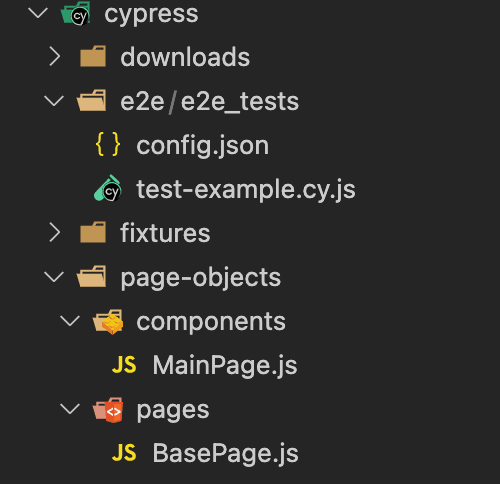
Now that you have your project structure let’s start with the code.
Step 6: Create a test-example.cy.js and add the following code.
import config from './config.json'
import MainPage from '../../page-objects/components/MainPage'
describe('Elements Exist', () => {
   it('Elements exist across the pages', () =>{
       cy.visit(`${config.URL3}`)
       //Element Exists
       cy.get('body')
           .then($body => {
               if ($body.find('.compare-total').length) {
                   return '.compare-total'
           }
           return '.both.text-reset'
           })
           .then(selector => {
           cy.get(selector)
       })
       //Improve Element Exist Method
       MainPage.elExists('.content-products.entry-content.flex-grow-0.order-5.order-md-4 > div > div:nth-of-type(1)')
   })
Step 7: Create another file called MainPage, which will contain the code to help us identify whether an element exists on the web page.
export default class MainPage {


    static elExists(text){
        cy.get('body')
            .then($body => {
                if ($body.find(text).length) {
                    return 'text'
            }
            return '.both.text-reset'
            })
            .then(selector => {
            cy.get(selector)
        })
    }
The above code snippet aims to encapsulate code to identify elements, allowing for reuse and easier maintenance of test scripts. This approach is particularly useful for elements that are slower to load, broken, or related to infrastructure issues. By creating a more robust method within the end-to-end (E2E) flow, we can simplify our test scripts and avoid spaghetti code (a code that is hard to understand because it has no defined structure).
Now, the entire code looks like it is shown below.
import config from './config.json'
import MainPage from '../../page-objects/components/MainPage'


describe('Elements Exist', () => {

    it('Elements exist across the pages', () =>{

        cy.visit(`${config.URL3}`)
        cy.on('window:confirm', cy.stub().as('confirm'))
        Cypress.on('uncaught:exception', (err, runnable) => {
            // returning false here prevents Cypress from
            // failing the test
        return false
        })


        //Element Exists
        cy.get('body')
            .then($body => {
                if ($body.find('.compare-total').length) {
                    return '.compare-total'
            }
            return '.both.text-reset'
            })
            .then(selector => {
            cy.get(selector)
        })


        //Improve Element Exist Method
    MainPage.elExists('.content-products.entry-content.flex-grow-0.order-5.order-md-4 > div > div:nth-of-type(1)')


    })


    it('Element is visible accross the pages', () =>{

        cy.visit(`${config.URL3}`)
        cy.on('window:confirm', cy.stub().as('confirm'))
        Cypress.on('uncaught:exception', (err, runnable) => {
            // returning false here prevents Cypress from
            // failing the test
        return false
        })


        //Improve Visible Method
        MainPage.elVisible(`div:nth-of-type(1) > img[alt='iPod Nano']`)


    })


})

Before we get to the result, let us understand what the entire code tries to perform in a step-by-step process.
Code Walkthrough:
- Import statement: It imports the config object from the config.json file, which contains URLs or other configuration data needed for the tests, and the MainPage class from the MainPage module, part of the POM approach for organizing locators and actions.
import config from './config.json'
import MainPage from '../../page-objects/components/MainPage'
describe('Elements Exist', () => { }
it('Element is visible across the pages', () =>{ }
cy.visit(`${config.URL3}`)
cy.on('window:confirm', cy.stub().as('confirm'))
Cypress.on('uncaught:exception', (err, runnable) => {
  })
// returning false here prevents Cypress from
            // failing the test
        return false
MainPage.elVisible(`div:nth-of-type(1) > img[alt='iPod Nano']`)
 Cypress.on('uncaught:exception', (err, runnable) => {
})
// returning false here prevents Cypress from
           // failing the test
       return false
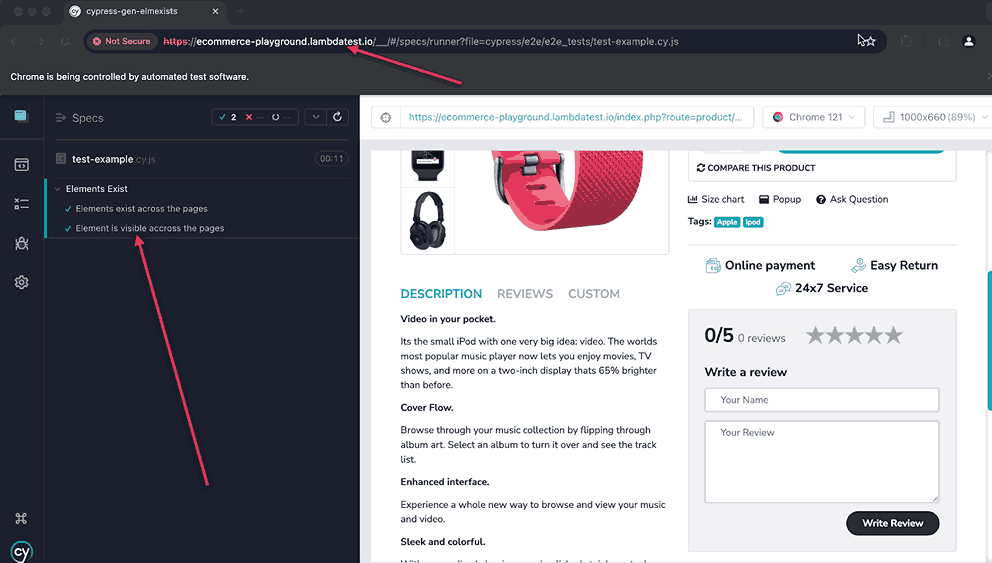
Result: On executing the above code, you can see the output below.
How to Check if an Element Exists in Cypress Over the Cloud?
Leveraging a cloud platform can help you identify and fix potential issues that might only occur in specific environments. Cloud testing also allows for parallel execution, which speeds up test cycles and improves overall efficiency.
This section will demonstrate how to check if an element exists in Cypress over the TestMu AI cloud platform. We will use the same code as in the previous tests without any changes. However, we will add some extra configuration to connect TestMu AI to your local code and enable you to check your execution results over the cloud platform.
Before executing the code, we must set up Cypress libraries and other requirements, such as the TestMu AI username and access key. Let’s get started.
To start with Cypress e2e testing, follow the following steps:
- Install TestMu AI Cypress CLI on your machine. Run the following command to install the same.
npm install -g lambdatest-cypress-cli
lambdatest-cypress init
"lambdatest_auth": {
    "username": "<Your LambdaTest username>",
    "access_key": "<Your LambdaTest access key>"
}
"browsers": [
    {
       "browser": "Chrome",
       "platform": "Windows 10",
       "versions": [
          "latest-1"
       ]
    },
    {
       "browser": "Chrome",
       "platform": "macOS Ventura",
       "versions": [
          "latest"
       ]
    },
    {
       "browser": "Chrome",
       "platform": "macOS Monterey",
       "versions": [
          "latest"
       ]
    },
    {
       "browser": "Firefox",
       "platform": "Windows 11",
       "versions": [
          "latest"
       ]
    }
 ],
"run_settings": {
    "reporter_config_file": "base_reporter_config.json",
    "build_name": "Element-exist-build",
    "parallels": 4,
    "specs": "./cypress/e2e/e2e_tests/*.cy.js",
    "ignore_files": "",
    "network": false,
    "headless": false,
    "npm_dependencies": {
       "cypress": "13"
    }
 },
"tunnel_settings": {
    "tunnel": false,
    "tunnel_name": null
 }
lambdatest-cypress run
Once the test is executed, you can view the results from the TestMu AI Web Automation Dashboard.
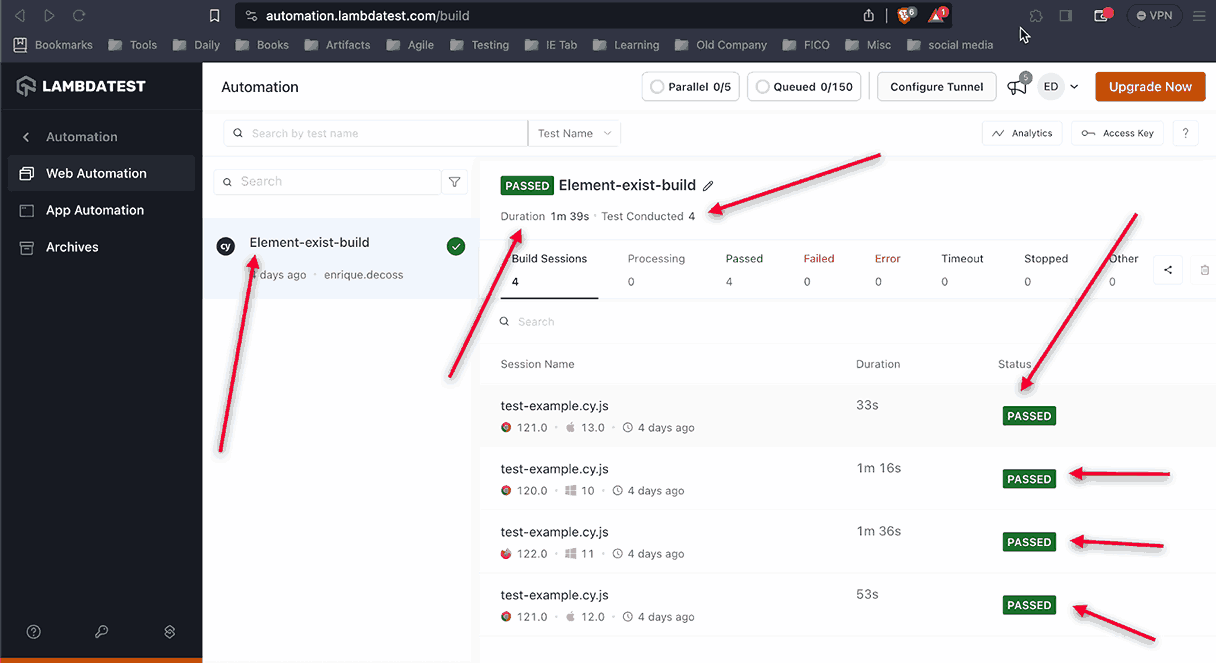
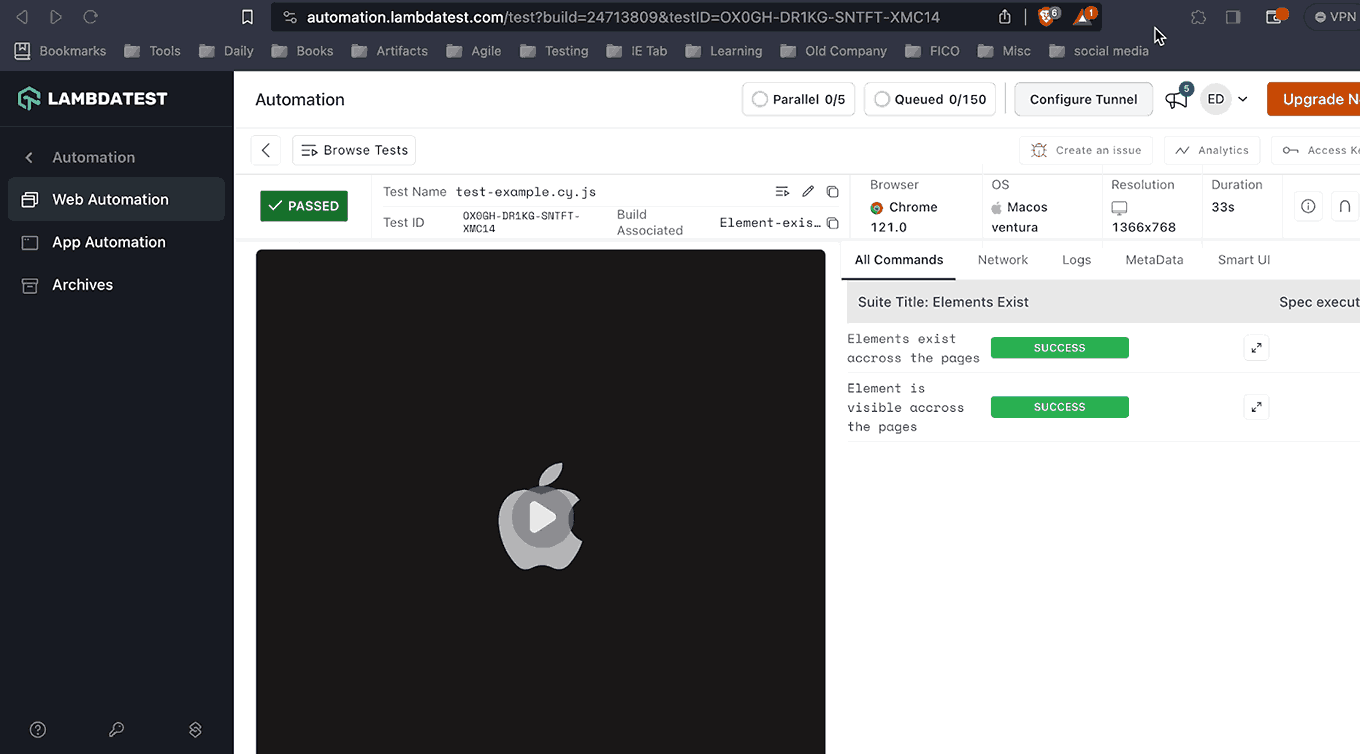
Now, let’s click on our tests for more details, including a video of the execution and the actual code executed in Cypress Grid. This is an excellent feature for reviewing and debugging test scripts.
Conclusion
Working with DOM elements could be a big deal with Cypress, but I hope this blog post helps you overcome common issues I ran into with them. Even though Cypress has limitations compared with other Automation tools, there are ways to work around them.
“We must create a positive impact on our Customers when we do Automation Testing.”—Enrique A. Decoss.
As we embark on our journey with Cypress, remember that every challenge presents an opportunity for growth and mastery. With determination and a willingness to explore innovative test approaches, we will uncover the keys to maximizing Cypress’s potential and elevating our automation testing endeavors to new heights. Here’s to overcoming obstacles, embracing possibilities, and forging to test excellence with Cypress.
cy.xpath("//button[@id='submit']").should('exist');
cy.get('button').invoke('click');


Frequently asked questions
Did you find this page helpful?
More Related Hubs
TestMu AI forEnterprise
Get access to solutions built on Enterprise
grade security, privacy, & compliance
- Advanced access controls
- Advanced data retention rules
- Advanced Local Testing
- Premium Support options
- Early access to beta features
- Private Slack Channel
- Unlimited Manual Accessibility DevTools Tests