

Power Your Software Testing with AI Agents and Cloud
The Native AI-Agentic Cloud Platform to Supercharge Quality Engineering. Test Intelligently and Ship Faster.


- TestMu AI (Formerly LambdaTest)
- /
- Blog
- /
- 9 Best Enterprise Accessibility Testing Platforms in 2026
9 Best Enterprise Accessibility Testing Platforms in 2026
Compare 9 enterprise accessibility testing platforms on six capabilities checked in vendor docs: site monitoring, CI/CD, mobile apps, manual testing and audits.
Published on:
An estimated 1.3 billion people, 16% of the world's population, experience significant disability, according to the World Health Organization. An enterprise accessibility testing platform is how a large organization checks thousands of pages and app screens for that audience on every release, not once a year.
I compared nine platforms on six capabilities, and marked a capability only when the vendor's own pages described it on October 9, 2026. TestMu AI publishes this article and is one of the nine; on that count it ties for second, and its limits are listed in its entry.
Overview
The best enterprise accessibility testing platform combines site-wide monitoring, CI/CD checks, native mobile app testing, manual testing support, program reporting and expert services. Level Access is the only one of nine whose pages document all six scored capabilities, and BrowserStack, Deque axe Platform and TestMu AI tie on five, so choose by which gap matters to you.
Which Enterprise Accessibility Testing Platform Fits Which Need?
- Best for tooling and services from one vendor: Level Access - pairs automated scanning, Level CI and native mobile testing with expert audits, VPATs and ACRs, and Level Access Academy training.
- Best for screen reader checks on real phones: BrowserStack - lists NVDA, VoiceOver on Mac and iOS, and TalkBack on Android, next to scheduled WCAG sitemap scans and CI checks.
- Best for guided manual audits on axe-core: Deque axe Platform - Axe Auditor walks testers through systematic manual testing, and Axe Monitor adds site-wide scanning and reporting.
- Best for scans inside existing test suites: TestMu AI - runs WCAG scans from Selenium, Playwright, Cypress and Appium tests on its cloud, plus scheduled sitemap scans, on one dashboard.
- Best for vendor-deployed fixes and legal support: AudioEye - combines 24/7 monitoring with automated fixes, expert audits and its AudioEye Assurance legal program.
- Best for clustering repeated issues: Evinced - uses visual AI to group related failures and tracks them across scans, with SDKs for web and native mobile test frameworks.
- Best for higher education and Canvas: Pope Tech - scans websites and Canvas LMS content with the WAVE engine and includes unlimited users and groups within each page tier.
- Best for monitoring web, PDFs and social together: Siteimprove - describes continuous monitoring across web, documents, social, apps and PDFs, including content behind VPNs.
- Best for executive trend reporting: Vispero ARC - centralized dashboards with regression detection, alerting and executive-level trend reports on top of ongoing automated scanning.
What Is an Enterprise Accessibility Testing Platform?
An enterprise accessibility testing platform is software that finds, tracks and reports accessibility failures across a whole organization's websites and apps, for many teams at once. A free browser extension checks the page in front of you; a platform keeps the history, assigns the work and shows whether it is getting better.
No platform replaces people. W3C's guidance on selecting evaluation tools states that tools "can not determine accessibility, they can only assist in doing so", and that they sometimes produce false or misleading results. What separates the enterprise tier from free tools is what happens around the scan:
- Scale - sitemap or crawler discovery covers thousands of URLs, where an extension covers one tab.
- Repetition - scans run on a schedule or in every pipeline run, so a regression shows up in the build that caused it.
- Coverage beyond web pages - native iOS and Android screens, PDFs and pages behind a login.
- Program evidence - dashboards, trend history and exports that legal, compliance and leadership teams can read.
If you only need single-page checks, the broader list of accessibility testing tools covers extensions, screen readers and command-line scanners.
How Were These Enterprise Accessibility Platforms Scored?
Each platform earned one point per capability its vendor's own product pages described on October 9, 2026. I did not score claims from review sites or third-party lists, and I did not rate quality. Ties are listed alphabetically.
- Monitoring - scheduled or continuous scanning across a site.
- CI/CD - checks that run in a pipeline or inside developer tools.
- Native mobile - testing of iOS and Android apps, not only mobile web.
- Manual support - guided manual testing, screen readers, or expert audits.
- Reporting - a stated central dashboard or program reporting.
- Expert services - audits, VPAT or ACR documents, or fixes written by vendor staff.
"Not stated" means the pages I checked did not describe the capability; it does not mean the product lacks it. Ask the vendor to show any "Not stated" item that matters to you in a demo.
| Platform | Monitoring | CI/CD | Native mobile | Manual support | Reporting | Expert services | Score |
|---|---|---|---|---|---|---|---|
| Level Access | Yes | Yes | Yes | Yes | Yes | Yes | 6 |
| BrowserStack | Yes | Yes | Yes | Yes | Yes | Not stated | 5 |
| Deque axe Platform | Yes | Yes | Yes | Yes | Yes | Not stated | 5 |
| TestMu AI | Yes | Yes | Yes | Yes | Yes | No | 5 |
| AudioEye | Yes | Yes | Not stated | Yes | Not stated | Yes | 4 |
| Evinced | Yes | Yes | Yes | Not stated | Not stated | Not stated | 3 |
| Pope Tech | Yes | Not stated | Not stated | Yes | Yes | Not stated | 3 |
| Siteimprove | Yes | Yes | Yes | Not stated | Not stated | Not stated | 3 |
| Vispero ARC | Yes | Not stated | Not stated | Not stated | Yes | Not stated | 2 |
What Are the Best Enterprise Accessibility Testing Platforms?
The nine platforms below are in score order. Each entry lists what the vendor's pages documented and the gaps worth raising in a demo.
1. Level Access
Level Access describes its platform as covering "Web. Mobile. Software. IoT. Documents." and groups it into Audit and Test, Build and Fix, and Governance and Reporting. It is the only platform here whose pages document all six scored capabilities.
- Testing - automated scanning plus manual evaluation, Level CI for pipeline checks, and native iOS and Android testing.
- Services - accessibility evaluations by experts, VPATs and ACRs, and automated remediation of common issues.
- Program support - monitoring and documentation under Governance and Reporting, Level Access Academy training, and LevelDocs for accessible PDFs from Microsoft Office files.
- What to ask - capabilities are sold as separate modules, so confirm which ones your contract includes.
Best for: programs that want audits, VPATs and tooling from one vendor.
2. BrowserStack
BrowserStack sells accessibility testing for websites alongside a separate App Accessibility Testing product for iOS and Android. Its page pairs a workflow scanner that de-duplicates issues across pages with a website scanner that schedules WCAG sitemap scans.
- Monitoring - on-demand and recurring sitemap scans.
- CI/CD - WCAG checks added to existing automated tests, described as a one-line code change.
- Screen readers - NVDA on Windows, VoiceOver on Mac and iOS, and TalkBack on Android.
- Reporting - a central dashboard with a conformance summary, shareable reports and CSV export.
- Gap - the page I checked did not describe expert audits or VPAT services.
Best for: QA teams that want screen reader checks on real phones next to automated scans.
3. Deque axe Platform
Deque maintains axe-core, the open-source rules engine that several platforms on this list build on, including TestMu AI. The axe Platform wraps it in separate products for developers, auditors and program managers.
- Axe DevTools - automated testing for web and mobile in the IDE, browser and CI/CD pipeline, including apps without source code access.
- Axe Monitor - site-wide scanning, reporting and business intelligence.
- Axe Auditor - systematic manual testing guided by question-and-answer prompts.
- Administration - central management of permissions, rulesets and integrations, with an on-premises deployment option and ISO 27001 certification.
- Gap - the pages I checked list Deque University training, but not audit or VPAT services.
Best for: teams standardizing on axe-core that want guided manual audits from the same vendor.
4. TestMu AI (Formerly LambdaTest)
TestMu AI Accessibility Testing runs axe-core scans from the same cloud that runs your functional tests, so accessibility results sit next to the Selenium, Playwright, Cypress or Appium session that produced them.
- Monitoring - continuous accessibility monitoring through scheduled scans that take URLs from a list, a CSV or a sitemap, including pages behind a login.
- CI/CD - a capability flag plus a lambda-accessibility-scan call adds WCAG scans to existing test suites.
- Native mobile - an App Scanner for screen-by-screen checks on real Android and iOS devices, and the same scan hook in Appium suites.
- Manual support - Keyboard Scan, plus NVDA, JAWS, VoiceOver and TalkBack for screen reader checks.
- Limits - TestMu AI does not produce VPAT or ACR documents or sell expert audits, and Playwright scans need branded Chrome rather than the bundled Chromium.
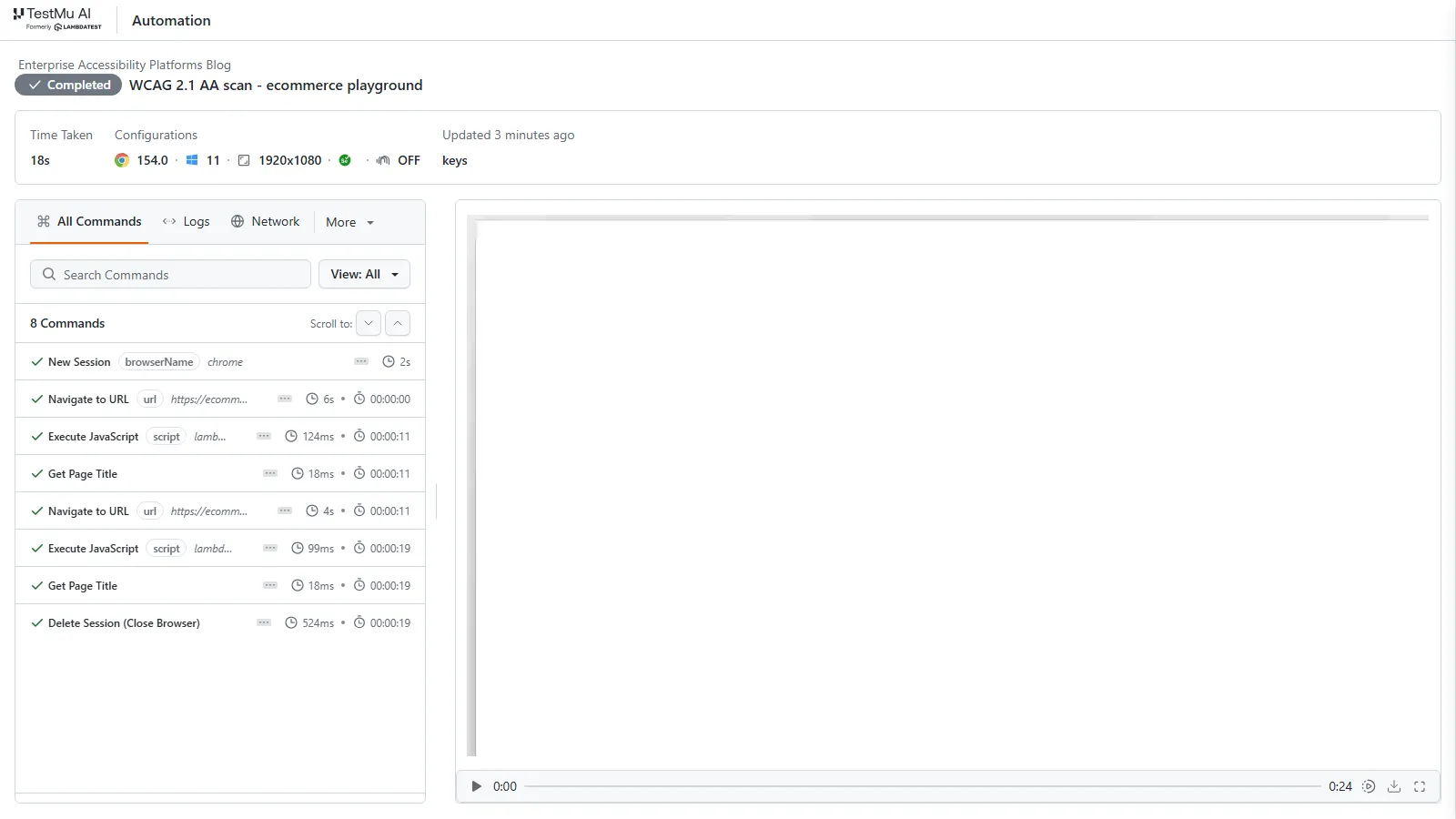
To check the setup, I ran a WCAG 2.1 AA scan on two pages of the TestMu AI e-commerce playground from Node with selenium-webdriver. The first attempt failed with "lambda is not defined": with the accessibility keys at the top level of the capabilities, the scan hook was not loaded. Moving the same keys inside LT:Options fixed it:
const { Builder } = require('selenium-webdriver');

const caps = {
  browserName: 'Chrome',
  browserVersion: 'latest',
  'LT:Options': {
    platform: 'Windows 11',
    build: 'Enterprise Accessibility Platforms Blog',
    name: 'WCAG 2.1 AA scan - ecommerce playground',
    user: process.env.LT_USERNAME,
    accessKey: process.env.LT_ACCESS_KEY,
    w3c: true,
    accessibility: true,
    'accessibility.wcagVersion': 'wcag21aa',
    'accessibility.bestPractice': false,
    'accessibility.needsReview': true,
  },
};

(async () => {
  const driver = await new Builder()
    .usingServer('https://hub.lambdatest.com/wd/hub')
    .withCapabilities(caps)
    .build();
  try {
    for (const url of [
      'https://ecommerce-playground.lambdatest.io/',
      'https://ecommerce-playground.lambdatest.io/index.php?route=account/login',
    ]) {
      await driver.get(url);
      const result = await driver.executeScript('lambda-accessibility-scan');
      console.log('scanned', url, 'title=', await driver.getTitle(), 'ret=', JSON.stringify(result));
    }
  } finally {
    await driver.quit();
  }
})();
The console output from that run:
session 3cd0652ff08e3aa3cdaa3c07fbf36625
scanned https://ecommerce-playground.lambdatest.io/ title= Your Store ret= "Lambda accessibility scan completed"
scanned https://ecommerce-playground.lambdatest.io/index.php?route=account/login title= Account Login ret= "Lambda accessibility scan completed"
The session ran for 18 seconds on Chrome and Windows 11. In the session view, both scans appear as Execute JavaScript commands, and the report sits under the session's Accessibility tab:
The web coverage checklist lists the WCAG success criteria the automated rules map to, so you can see what still needs manual testing.
Best for: engineering teams that want accessibility scans inside test suites they already run, across web and native mobile.
5. AudioEye
AudioEye combines automated monitoring with fixes that AudioEye deploys for you, and backs both with a legal program. Its pages put more weight on remediation than on testing inside your own pipeline.
- Monitoring - 24/7 accessibility monitoring through Active Monitoring.
- Fixes - AudioEye says it can fix up to 50% of detected issues within minutes of installation, and its experts write and deploy custom fixes.
- Developers - an Accessibility Testing SDK and an AudioEye MCP for testing before content goes live.
- Legal - AudioEye Assurance, which includes custom legal responses.
- What to ask - how deployed fixes are applied, and whether they survive your own releases.
Best for: organizations that want the vendor to carry most of the remediation work.
6. Evinced
Evinced analyzes the rendered interface with visual AI instead of the code alone, then clusters related failures so one root cause is not reported hundreds of times.
- Test frameworks - Automation SDKs for Selenium, Cypress, WebdriverIO, XCUITest, Espresso and Appium.
- Scanning - a Site Scanner plus Web and Mobile Flow Analyzers, with issues tracked across scans.
- Earlier stages - a Design Assistant, a Unit Tester and MCP tools.
- Gap - the page I checked did not describe manual testing support, a reporting dashboard or expert services.
Best for: teams buried in duplicate findings from large component libraries.
7. Pope Tech
Pope Tech builds on the WAVE testing engine and focuses on organizations with many sites and editors, especially higher education.
- Scanning - automated scans of all pages, plus scanning of Canvas LMS content.
- Organization - unlimited users, groups, websites and rescans within the page tier you buy.
- Manual work - scheduled manual testing with tracking, an Accessibility Help Desk, and quarterly training for training seat users.
- Pricing model - a free plan is offered, with paid tiers set by page count.
- Gap - the page I checked did not describe CI/CD checks or native mobile app testing.
Best for: universities and multi-site organizations with many content editors.
8. Siteimprove
Siteimprove treats accessibility as one part of managing a large digital estate. Its accessibility page describes "continuous, cross-channel monitoring and remediation" across web, documents, social, apps and PDFs, including content behind VPNs.
- Coverage - web pages, PDFs, documents and mobile apps.
- Developer workflows - agents that work in VS Code, Claude Code, Figma and CI/CD through Siteimprove's MCP server.
- Gap - the accessibility page I checked did not describe manual or screen reader testing, a reporting dashboard or expert services, which explains its low score here rather than missing features.
Best for: marketing and content teams that manage PDFs and many web properties.
9. Vispero ARC
ARC was sold under the TPGi name, and the old TPGi ARC page now redirects to Vispero, which calls ARC its "enterprise accessibility monitoring platform".
- Monitoring - ongoing automated scanning with regression detection and alerting.
- Reporting - centralized dashboards and executive-level trend reporting.
- Workflow - monitoring that integrates into development and QA workflows, according to Vispero.
- Gap - Vispero's own FAQ notes that automated monitoring does not replace manual testing, and the ARC page did not describe CI/CD checks or native app testing.
Best for: accessibility leads who report trends to executives.

Austin Siewert
Co-Founder, Steadfast Systems
Discovered @TestMu AI yesterday. Best browser testing tool I've found for my use case. Great pricing model for the limited testing I do 👏
2M+ Devs and QAs rely on TestMu AI
Deliver immersive digital experiences with Next-Generation Mobile Apps and Cross Browser Testing Cloud

What Are the Three Types of Accessibility Testing?
The three types are automated, manual and hybrid testing. W3C's tool-selection guidance states the reason hybrid exists: "Tools cannot check all accessibility aspects automatically. Human judgement is required."
- Automated - a rules engine checks pages or screens for machine-verifiable failures such as missing alt text, low contrast and unlabeled form fields. Every platform above does this.
- Manual - a person walks the flow with a keyboard and a screen reader and judges whether labels, focus order and announcements make sense. The guide to screen reader accessibility testing covers how to run these sessions.
- Hybrid - automation runs on every build and schedule, and people test the critical journeys, such as sign-in, checkout and forms, before release.
In the scoring table, the Manual support column shows which platforms help with the second type. Color contrast is one check you can verify by hand in seconds with the free color contrast checker.

Note: TestMu AI runs automated WCAG scans in your Selenium, Playwright, Cypress and Appium suites and gives you NVDA, JAWS, VoiceOver and TalkBack for the manual pass, on one dashboard. Start testing free with TestMu AI.
Which Standards Should an Enterprise Accessibility Testing Platform Check Against?
Most programs test against WCAG 2.1 Level AA, and many add the WCAG 2.2 criteria now. Confirm that a platform lets you set the WCAG version and level per scan or schedule, because different laws reference different versions.
- ADA Title II (US state and local government) - the Department of Justice web rule sets WCAG 2.1 Level AA as the technical standard. After an interim final rule published April 20, 2026, compliance is due April 26, 2027 for entities serving 50,000 or more people, and April 26, 2028 for smaller entities and special district governments.
- WCAG 2.2 - the current W3C Recommendation adds 9 success criteria to WCAG 2.1, including Target Size (Minimum) and Accessible Authentication (Minimum), and removes 4.1.1 Parsing.
- European Accessibility Act - the European Commission lists e-commerce, banking services, e-books and passenger transport services among the areas it covers.
For a closer look at the newer criteria and which tools test them, see the guide to the best platform for testing WCAG 2.2 compliance. A platform report is evidence for your program; legal advice on your own exposure still comes from counsel.
How Do You Choose an Enterprise Accessibility Testing Platform?
Start from who will fix the issues, then match the platform to where those people already work. W3C's tool guidance names the same three factors: your organization and development process, the size and complexity of your content, and your team's skills.
| If your situation is... | Look for | Platforms that document it |
|---|---|---|
| Developers fix issues in pull requests | Scans inside existing test frameworks and CI | TestMu AI, Deque axe Platform, BrowserStack, Evinced, Level Access |
| You ship native iOS and Android apps | App testing on real devices, not only mobile web | TestMu AI, BrowserStack, Deque axe Platform, Evinced, Level Access |
| Procurement asks for a VPAT | Expert audits and VPAT or ACR services | Level Access |
| Content editors publish daily | Scheduled site-wide scans and per-site reporting | Pope Tech, Siteimprove, Vispero ARC, TestMu AI |
| Leadership needs trend reports | Dashboards and exports over time | Vispero ARC, Level Access, Deque axe Platform, BrowserStack, TestMu AI |
- Run a pilot on your own pages - pick 20 to 50 high-traffic URLs and one critical flow, and compare how each shortlisted platform groups the same failures.
- Test behind the login - most enterprise risk sits in authenticated flows, so make the pilot include them.
- Check the exports - open a PDF or CSV export and confirm it shows WCAG references, dates and severity your compliance team can file.
Retail teams can see how this plays out on product, cart and checkout pages in accessibility testing for e-commerce platforms at enterprise scale.
How to Start Evaluating Enterprise Accessibility Testing Platforms
Shortlist two or three platforms from the scoring table that match your gaps, and run each on the same 20 to 50 URLs against WCAG 2.1 Level AA. If your team already runs functional tests on TestMu AI, add the accessibility capability to one suite and compare its report with the other pilots; the accessibility testing guide covers the fundamentals, and the Accessibility Testing 101 certification helps your testers prepare for the manual pass.
Author

Rahul Mishra
Blogs: 17

Rahul Mishra is a Lead Member of Technical Staff at TestMu AI (formerly LambdaTest), leading frontend engineering and accessibility testing across the quality engineering platform. He mentors frontend engineers, runs code reviews and sprint planning, optimizes React.js rendering performance, and makes product features accessible to users with disabilities through WCAG and ADA-compliant accessibility audits. He brings 10+ years of experience across React.js, VueJS, TypeScript, Swift, Objective-C, and AWS, with earlier work as a Technical Lead at VectoScalar Technologies. Rahul holds a B.E. in Information Technology.
Reviewer

Shubham Soni
Reviewer
Shubham Soni is a Senior Member of Technical Staff at TestMu AI (formerly LambdaTest), building the Real Device Cloud and real-time testing infrastructure. He optimized the WebRTC services that power live testing to sub-100ms latency with adaptive bitrate streaming, led a frontend migration from Angular to React that cut page load time from 5-6 seconds to 1-1.5 seconds, and contributes to the official Device SDK. He led a team of four to build an accessibility testing product covering manual and automated testing and mentored a team of six on a real-time testing product. He brings over eight years of experience and earlier scaled a cloud code platform to 200K+ monthly users. Shubham holds a B.Tech in Computer Science.


Enterprise Accessibility Platform FAQs
Did you find this page helpful?
More Related Blogs
TestMu AI forEnterprise
Get access to solutions built on Enterprise
grade security, privacy, & compliance
- Advanced access controls
- Advanced data retention rules
- Advanced Local Testing
- Premium Support options
- Early access to beta features
- Private Slack Channel
- Unlimited Manual Accessibility DevTools Tests