
Test on 50,000+ Real Android and iOS Devices
Live and Automated Real Device Testing on 50,000+ iOS and Android Devices. No Need to Buy or Maintain Device Lab

PDA App Testing: How to Test Logistics Apps on Zebra Devices
PDA app testing for logistics teams: test Zebra TC58 and TC77 scanner apps, DataWedge profiles, emulator limits, and the handoff to the customer tracking app.
Published on:
The U.S. Postal Service handled 6,837 million shipping and package pieces in fiscal 2025 and serves more than 172 million addresses, according to its fiscal year 2025 results. In any postal or courier network, the tracking history a customer reads is assembled from barcode scans taken on rugged handhelds along the way.
PDA app testing therefore covers two apps that share one parcel: the customer app that books and tracks it, and the frontline app on a Zebra handheld that scans it at every stage. This guide follows a single parcel through both, separates what an emulator can prove from what needs real hardware, and shows how to test the handoffs on real Zebra TC58 and TC77 devices with TestMu AI.
Key Takeaways
- PDA app testing checks the frontline app on a rugged handheld such as a Zebra TC58 or TC77 together with the customer tracking app that turns each scan into a status update, a proof-of-delivery view, or a missed-delivery notice.
- Zebra states that only apps built on DataWedge can be tested on an emulator, apps using EMDK still need a real device, and some DataWedge intent extras, including the raw decode_data payload, cannot be simulated through adb.
- DataWedge loads the profile associated with the foreground app and falls back to Profile0 for apps with no association, so a debug build with a different package name can receive scans in a different format than production.
- TestMu AI Image Injection replaces the images an app receives from its own camera APIs, which makes it a fit for camera scanning and proof-of-delivery photos rather than for DataWedge scans from the hardware imager.
- The most valuable tests cross both apps in one run, asserting that a scan on the PDA produces the matching status, timestamp, and notification in the customer app.
- TestMu AI's dedicated device cloud includes the Zebra TC77 on Android 10 and 13 and the TC58 on Android 13, and the customer app can run across 50,000+ real Android and iOS devices.
One Parcel, Two Apps: The Scan Chain Behind a Tracking Page
A parcel moves from collection to a local depot, a regional hub, a delivery office, and finally the delivery round, and each handover is recorded as a scan. That scan creates the tracking event, can trigger a customer notification, starts or stops a service-level clock, and becomes the evidence if a delivery is disputed later.
On a Zebra device, those scans pass through DataWedge, which Zebra's DataWedge documentation describes as a service that lets any app on the device collect data from barcode scanners, imagers, MSRs, RFID, voice, and serial ports. The two apps around that service fail in different ways and need different test coverage.
| Dimension | Customer tracking app | Frontline PDA app |
|---|---|---|
| Hardware | Consumer Android phones and iPhones, spread across thousands of models and OS versions | A small fleet of rugged Zebra models on the Android builds your device team approves |
| Primary input | Taps, the phone camera, GPS, and push notifications | The hardware scan trigger, the imager through DataWedge, and signature or photo capture |
| Cost of a failure | A wrong status, a support call, or a poor app review | A parcel that will not scan, a stalled sort line, or a missing proof of delivery |
| Coverage you need | Breadth across devices, OS versions, and network conditions | Depth on the exact models, Android builds, and DataWedge profiles the fleet runs |
A defect that starts on the PDA, such as a failed scan or a delayed sync, usually surfaces in the customer app as a wrong tracking status. Testing each app in isolation leaves exactly that class of defect uncovered, which is why the handoff tests later in this guide matter most.
Can You Test a Zebra Scanner App on an Emulator?
You can test it on an emulator only if the app reads scans through DataWedge, and only up to the point where the scan data reaches your code. Zebra's developer blog post on testing a Zebra scanning application on an emulator states that no emulator images exist for Zebra devices, that DataWedge apps can be tested on an emulator, and that apps using EMDK still have to be developed and tested on a real device.
DataWedge hands scan data to an app either as keystrokes or as an Android intent, so adb can imitate both. Keystroke output is simulated with adb shell input text, plus adb shell input keyevent 61 or 66 when the profile appends a TAB or ENTER. Intent output is simulated by sending the same extras DataWedge would send to your app's intent action:
# Simulate a DataWedge broadcast intent carrying a parcel ID
# Replace com.example.pda.SCAN with the intent action set in your DataWedge profile
adb shell am broadcast -a com.example.pda.SCAN \
  -c android.intent.category.DEFAULT \
  -e com.symbol.datawedge.data_string PKG0001234567 \
  -e com.symbol.datawedge.source scanner \
  -e com.symbol.datawedge.label_type LABEL-TYPE-CODE128 \
  -e com.symbol.datawedge.decoded_mode single_decode
Use am broadcast when the profile delivers a broadcast intent and am start when it delivers through startActivity. Zebra's post also lists the intent extras adb cannot express, because adb only supports the types defined in Android's intent spec:
| DataWedge output | Can adb simulate it? | What the emulator run leaves untested |
|---|---|---|
| data_string, source, label_type, decoded_mode | Yes, as string extras | Whether the imager actually decodes the printed label |
| decode_data (raw bytes) | No, DataWedge sends it as an ArrayList of byte arrays | Parsing of raw or binary payloads |
| barcodes and tokenized_data bundles | No | Multi-barcode and tokenized data handling |
| Keystroke output | Yes, with input text and keyevent | Which field has focus when a real scan arrives |
| EMDK Barcode APIs | No | All scanning behavior, so a real device is required |
An emulator suite like this is worth keeping in CI because it checks parsing, screen flow, and the backend call for every label type on each commit. For the wider trade-offs between virtual and physical devices, see this comparison of emulators, simulators, and real devices.
How to Test the Scan Path on a Real Zebra Device
On a real TC58 or TC77, DataWedge sits between the imager and your app, so half of the testing targets its configuration rather than your code. Zebra's guide to DataWedge profiles explains that one profile can serve several apps, but each app or activity can be associated with only one profile.
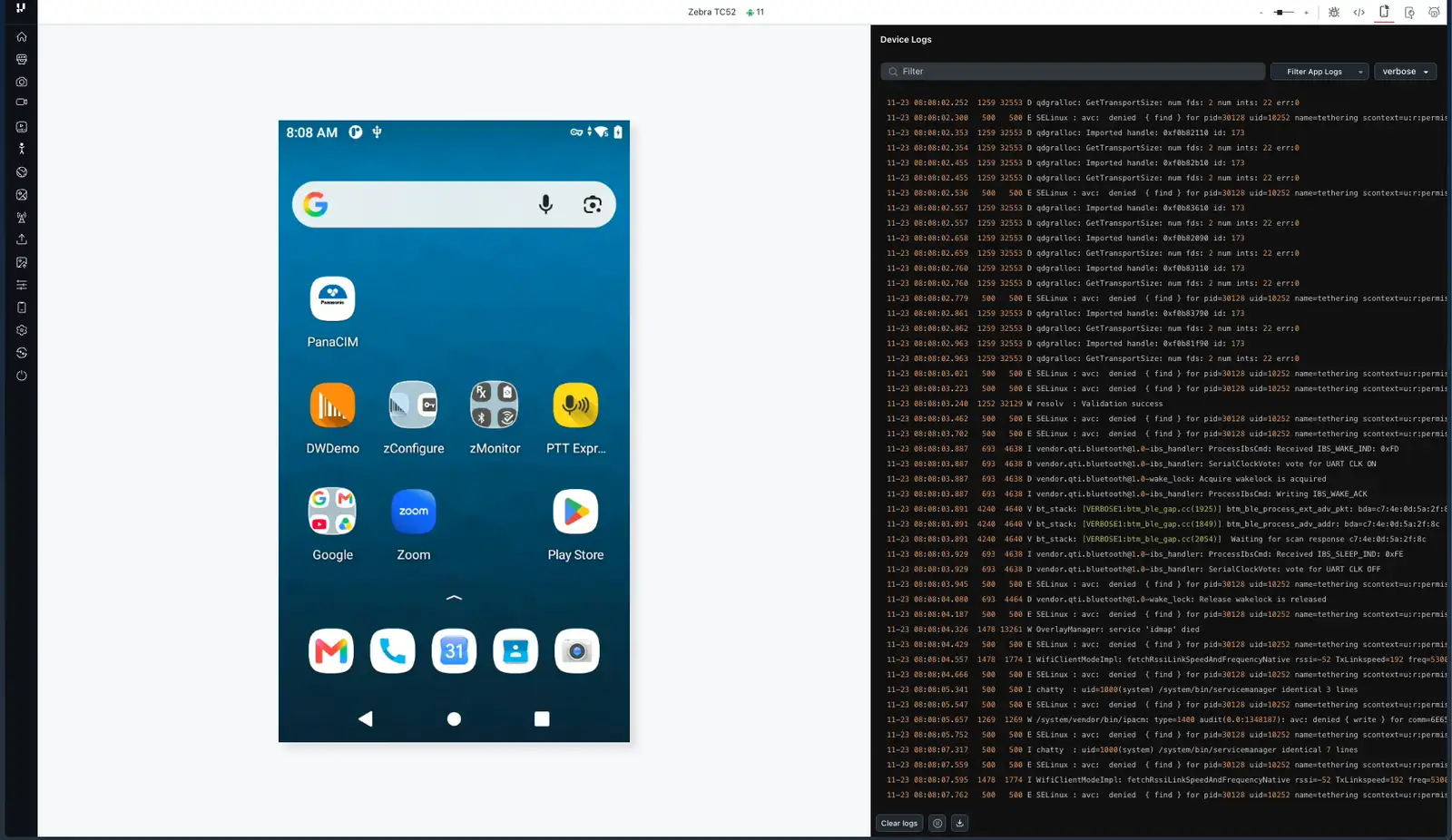
The session below runs on a Zebra TC52 with Android 11 in TestMu AI. DWDemo, the DataWedge Demo app that Zebra's profiles guide lists among the preconfigured profiles, sits on the home screen next to zConfigure and zMonitor, while the device log panel streams verbose logcat output beside the screen.
- Profile association - DataWedge applies Profile0 to any foreground app without an associated profile. A debug build with an applicationIdSuffix has a different package name from the release build, so it can silently run under Profile0 and receive keystrokes instead of intents. Test with the exact package name the fleet installs.
- Intent delivery method - Zebra's intent output guide warns that the startService option does not work for apps compiled for SDK 26 or above, and startForegroundService does not work for SDK 31 or above. Confirm the profile's delivery method still reaches the app after every SDK upgrade.
- Software scan trigger - The SOFT_SCAN_TRIGGER API starts, stops, or toggles scanning, works only when Barcode Input is enabled in the active profile, and may be ignored if the scanner is busy. Test rapid repeat triggers and the app's no-read timeout, which a courier hits whenever a label is torn.
- Decoder set - Enable only the symbologies your labels use, and test each one against real labels from your network.
- Physical label decode - A remote device cannot see a label in your hand, so keep a short bench test per model with printed, creased, wet, and low-contrast labels. Cloud sessions then cover everything that happens after the decode.
In an Appium session on a dedicated Zebra device, both the soft trigger and a known tracking ID can be sent from the test script through TestMu AI's lambda-adb command. The ADB commands support docs list adb shell am, which sends broadcast intents, under the private shell commands, so confirm it is enabled for your dedicated devices.
# driver is an Appium session on a dedicated Zebra TC58 or TC77

# 1. Fire DataWedge's software trigger (real imager, real profile)
driver.execute_script("lambda-adb", {
    "command": "shell",
    "text": "am broadcast -a com.symbol.datawedge.api.ACTION "
            "-e com.symbol.datawedge.api.SOFT_SCAN_TRIGGER START_SCANNING"
})

# 2. Deliver a known parcel ID through the app's DataWedge intent action
driver.execute_script("lambda-adb", {
    "command": "shell",
    "text": "am broadcast -a com.example.pda.SCAN "
            "-e com.symbol.datawedge.data_string PKG0001234567 "
            "-e com.symbol.datawedge.source scanner "
            "-e com.symbol.datawedge.label_type LABEL-TYPE-CODE128"
})
Device staging also matters, because a lab PDA configured differently from the fleet tests a device nobody carries. If your operations team stages devices through an MDM, the comparison of mobile device management tools covers how those tools push configuration to rugged Android fleets.

Note: Run your DataWedge and EMDK tests on dedicated Zebra TC58 and TC77 devices, with session video and logs available to debug every failed scan on TestMu AI. Try TestMu AI free!
Image Injection on PDAs: Camera Scans vs Imager Scans
TestMu AI's Camera Image Injection docs explain that the platform injects its camera module into the app through Sensor Instrumentation, which mocks the Android or iOS camera SDK the app calls. On Android, the supported APIs are CameraX, Camera, Camera2, and the ACTION_IMAGE_CAPTURE intent, on Android 9 and above.
That design decides where injection helps in a logistics stack:
- Customer app camera scans - A customer scanning a QR code on a parcel, locker, or returns label through CameraX can be tested with a clean image, then a blurred or partly covered one, on every run.
- Proof-of-delivery photos - If the PDA app captures the doorstep photo through CameraX, Camera2, or ACTION_IMAGE_CAPTURE, an injected photo lets the handoff test check that the same image reaches the customer app.
- Hardware imager scans - Scans decoded by DataWedge on the imager reach your app as intents or keystrokes, never through your app's camera calls, so injection does not apply. Use the simulated intents from the previous section for those flows.
- DataWedge camera scanning - When a profile uses the camera as its scanner, DataWedge opens the camera, so it is not an API call your app makes. Confirm with TestMu AI support before relying on injection for that mode.
Inject the image before the app opens the camera, because the camera captures the most recently injected image. The step-by-step setup with Appium capabilities is covered in this guide to camera and QR code testing on real devices.
How to Test the Customer Tracking App
The customer app is closer to conventional mobile QA, but a delivery tracker has sharp edges that a generic checklist misses. Each of the checks below maps to a capability you can control on a real device instead of waiting for field reports.
- Driver position and ETA - Set precise GPS coordinates for the phone and for the courier's last reported location, then check the map pin, the distance, and the ETA text. A courier shown further away than reality sends the customer out too late. This walkthrough on how to test geolocation covers GPS and IP location options.
- Push notifications - Verify that the out-for-delivery and missed-delivery messages arrive when the app is closed, that the deep link opens the right parcel, and that the timing matches the scan. The guide to push notification testing on real devices walks through each case.
- Weak and missing networks - Load the tracking page on 3G, 2G, and Offline network profiles and confirm the app shows the last known status with its timestamp instead of an endless spinner.
- Redelivery flows - The redelivery options a customer sees depend on the exception code the courier chose, so test every code your operations team uses, not only the happy path.
- Accessibility scope in the EU - The European Commission's European Accessibility Act page lists e-commerce among the covered services, while its transport entry is limited to air, bus, rail, and waterborne passenger transport. If your app sells postage or shipping online in the EU, check the e-commerce scope; this overview of European Accessibility Act compliance explains the obligations.
Testing the Handoffs Between the PDA and the Customer App
The two apps are two ends of one transaction, so the highest-value tests run both in a single scenario with one tracking ID. Each row below starts with an event on the PDA and ends with an assertion in the customer app.
| PDA event | Assert in the customer app | How to drive it in the test |
|---|---|---|
| Parcel scanned at the depot | A new status with the right location and scan time | Send a DataWedge intent with the tracking ID through lambda-adb |
| Out-for-delivery scan | Status change plus an out-for-delivery push notification | Same intent, then check the notification on the customer device |
| Signature and doorstep photo | Delivered status with the proof-of-delivery image | Draw the signature with Appium gestures and inject the photo |
| Exception code such as no answer | Missed-delivery notice with the correct redelivery options | Select the code in the PDA app with Appium |
| Scans taken while offline | Events in scan order with their original timestamps | Switch the PDA session to the Offline profile, scan, then restore the network |
Run the scenario as two Appium sessions in one test: the PDA app on a dedicated Zebra device and the customer app on a phone from the public cloud. Poll the customer app for each expected status against a time limit that matches your service level, and fail the test with both sessions' logs attached when it is missed.
Do not try to detect the capture method downstream. The intent output guide notes that DataWedge sets the source extra to scanner for the camera, the imager, or an external scanner alike, so record how a scan was taken in the PDA app itself if operations needs that data.
Running PDA and Customer App Tests on TestMu AI
TestMu AI's private real device cloud holds devices for one organization only, and its dedicated pool includes these rugged Zebra models for the PDA app:
| Device | Android version | Use it to test |
|---|---|---|
| Zebra TC77 | Android 10 | Older fleet builds that have not been upgraded yet |
| Zebra TC77 | Android 13 | The same hardware after an OS upgrade, side by side with Android 10 |
| Zebra TC58 | Android 13 | Current-generation handhelds on the newer Android build |
- Shift-length sessions - Private cloud sessions run for up to 12 hours and can retain or reset device state, compared with up to 6 hours and a reset after every public session.
- Bluetooth and settings - Bluetooth is supported on private devices, which matters for ring and paired scanners, and testers get full access to device settings, including SIM settings.
- Customer app coverage - The real device cloud runs the customer app across 50,000+ real Android and iOS devices with 2G, 3G, 4G, 5G, Offline, and custom network profiles and GPS coordinate simulation.
- Evidence for every failure - Sessions can capture a video recording, device logs, network logs, and crash and ANR reports, and Mark as Bug files an issue to JIRA, Azure DevOps, or Linear with the session details attached.
That evidence trail turns a courier's report that the app froze at a doorstep into a ticket with the device log and video of the failing session.
PDA App Release Checklist
Run this list before each release of either app, since a change on one side can break the other.
- The emulator suite passes simulated keystroke and intent scans for every label type you ship.
- The release package name is associated with the intended DataWedge profile on every model and Android build in the fleet.
- The profile's intent delivery method reaches the app at its current compile SDK.
- Soft trigger repeats, busy-scanner responses, and the no-read timeout behave as designed.
- The bench test decodes printed, creased, wet, and low-contrast labels on each model.
- Offline scans sync in scan order with their original timestamps.
- Proof-of-delivery photos and signatures appear in the customer app for the right parcel.
- Every exception code maps to the correct customer notice and redelivery options.
- The customer app passes on low-end Android phones, the latest iPhones, and the 3G and Offline profiles.
Getting Started With PDA App Testing
Start this sprint by adding the adb intent simulation to CI for every label type your network prints, since it costs nothing and catches parsing regressions on each commit. Then move profile, delivery-method, and handoff tests onto dedicated Zebra TC58 and TC77 devices so the scan path matches the fleet.
The real device app testing docs show how to upload both apps and open your first sessions on TestMu AI.
Author

Sai Krishna
Blogs: 35

Sai Krishna is Director of Engineering at TestMu AI, where he leads agentic AI for quality engineering, building AI agents that autonomously drive mobile and conversational test automation. His current focus is Agent Testing and Model Context Protocol (MCP) support for mobile. He is a core contributor and member of the Appium open-source project and the creator of AppiumTestDistribution and appium-device-farm. With over 14 years of experience including more than 9 years at Thoughtworks as a Principal Consultant, he holds a BSc in Electronics and speaks regularly at TestMu and Appium Conf on Appium, mobile automation, and agentic AI in testing.
Reviewer

Srinivasan Sekar
Reviewer
Srinivasan Sekar is Director of Engineering at TestMu AI, where he leads engineering and open-source initiatives behind the Selenium and Appium automation grid and owns TestMu AI's MCP Server. A committer to Appium and a contributor to Selenium, WebdriverIO, Taiko, and AppiumTestDistribution, he brings over 15 years of experience in quality engineering and open-source technologies. He is the author of the Apress book 'The MCP Standard: A Developer's Guide to Building Universal AI Tools with the Model Context Protocol,' a Certified Kubernetes and Cloud Native Associate, and an international conference speaker. Before TestMu AI he spent over eight years at Thoughtworks as a Principal Consultant and Quality Architect. Srinivasan holds a B.Tech in Information Technology from Anna University.


PDA App Testing FAQs
Did you find this page helpful?
More Related Learning Hubs

TestMu AI forEnterprise
Get access to solutions built on Enterprise
grade security, privacy, & compliance
- Advanced access controls
- Advanced data retention rules
- Advanced Local Testing
- Premium Support options
- Early access to beta features
- Private Slack Channel
- Unlimited Manual Accessibility DevTools Tests