

Power Your Software Testing with AI Agents and Cloud
The Native AI-Agentic Cloud Platform to Supercharge Quality Engineering. Test Intelligently and Ship Faster.


- TestMu AI (Formerly LambdaTest)
- /
- Blog
- /
- Test QR Codes: How to Get Started
Test QR Codes: How to Get Started
Learn how to test QR codes effectively, from generating and verifying codes to ensuring they work seamlessly across devices.
Last Updated on:
QR codes provide instant access to content, streamline navigation, and enable secure, contactless payments. Therefore, its important to test QR codes before adding them to websites, mobile apps or in-store displays. This ensures the QR code scan correctly, direct users to the intended destination, and function across a range of platforms.
Overview
To test QR codes effectively, validate their generation, scan them across diverse real devices to verify data accuracy, and use TestMu AI to perform online camera injection testing. This process ensures your QR codes scan correctly, handle errors like broken links, and integrate securely with backend systems.
How to Test QR Codes?
- TestMu AI: TestMu AI allows you to test QR codes remotely on real Android and iOS devices using its camera image injection feature.
- QR code verification: Performing QR code verification confirms that the QR code is correctly generated and not corrupted before proceeding to deeper functional scans.
- Accuracy scanning: Accuracy scanning tests whether the QR code successfully retrieves the intended data, links, or destination content across different platforms.
- Error scanning: Error scanning identifies how the system handles issues like broken links, poor internet connectivity, or invalid content to ensure a smooth user experience.
- Metric definition: Defining metrics involves listing and measuring key performance metrics, such as scan success rates and conversion, based on specific business goals.
- Multi-device scanning: Multi-device scanning tests QR codes across various physical devices, operating systems, and form factors to ensure consistent readability.
- Backend integration verification: Backend integration verification ensures that backend systems and data processing engines correctly log and process scan data, including geographical locations.
- Security validation: Security validation checks authentication setups and server-side infrastructure to protect the QR code system against potential vulnerabilities.
- Regression testing: Regression testing regularly validates QR codes after system or browser updates to prevent future scanning failures and maintain ongoing functionality.
Benefits of Testing QR Codes
- Compatibility assurance: Compatibility assurance ensures the QR code works smoothly across all devices, platforms, and environmental conditions like poor lighting.
- Early issue detection: Early issue detection identifies and fixes scanning or redirection problems before launch to avoid public failures.
- Data accuracy validation: Data accuracy validation confirms that backend tracking, analytics, and conversion metrics are recorded correctly to support business goals.
What Are QR Codes?
QR codes (or Quick Response codes) are barcodes containing black squares on a white background. Along with these squares, a lot of markers are also present that do not represent any shape but are readable by a reading device such as a camera.
This arrangement of squares and markers embeds information encoded in the form of numerics, alphanumeric, binary, or kanji. A popular example of a QR code is embedding URL information to open a website by scanning the code.

Note: Tests your QR code across 5000+ real devices. Try TestMu AI Now!
Benefits of Using QR Codes
From file-sharing links to payment-linked methods, QR codes have captured most domains that require sharing information, especially on a large scale.
Benefits:
- Instant Access: Provide instant access to a wide range of information, from product details and website links to contact information and social media profiles.
- User Convenience: Simplify accessing information and create a more seamless and engaging user experience.
- Contactless Interaction: Offer a contactless way to share information, make payments, or access services.
- Cost-Effective Marketing: Provide a cost-effective way to reach customers through marketing materials.
- Data Storage: Store various types of data such as text, URLs, location, contact details, and images.
How to Test QR Codes?
Testing QR codes is important to ensure they are accurately readable and redirect users to the intended information or action without errors. This helps enhance user experience and prevent potential issues. Testing QR codes involves several steps to ensure their functionality and readability.
In this section, we will look into some standard steps to test QR codes.
- Ensure the QR code Is Perfect: The first step of testing is to ensure that the QR code is valid.
- Scan for Verification: The next step is to start the scanning process on a higher level. The main aim at this level is to ensure that the data integrated into the QR code can be retrieved successfully.
- Scan for Errors: Many things can go wrong while scanning a QR code. Sometimes, the Internet connectivity is unpredictable, or the link is broken. Such errors should be handled by the team of testers and developers so that the user gets clarification on why things did not work.
- List Down Metrics: Once the primary check is completed, the tester needs to dive into the depth of QR code testing and list down all the metrics to be tested for performance. The metrics depend on the final aim of the QR code and its business association.
- Choose Diverse Scanning Devices: Next, test QR codes on a variety of devices, operating systems, and versions. Include tablets, TVs, and dedicated scanners if they’re likely to be used.
- Track Performance Metrics: The performance metrics should be tracked now against all the selected devices. The metrics should be analyzed, and if there are any issues, they should be reported back to the developers.
- Test the QR Code Associated With the Backend: The QR code is also related to the backend of the mobile application. For instance, some QR codes are involved in data metrics where a data processing engine takes note of how many QR codes were scanned, from which geographical locations, and whether the conversion occurred or not.
- Ensure the Security of the Setup: Two security holes can exist in QR codes. First, it is incorporated into the code for authentication purposes in which only select devices can access complete data. Second, the application infrastructure is associated with the QR code on the server side.
- Keep QR Code Tests in Regression: New software updates on browsers or operating systems can still impact QR code scanning, even if the QR-related infrastructure remains unchanged. To prevent issues, it’s best to include QR tests in regression testing or run them in separate automation cycles.
Testing QR Code Online Using Camera Injection
To test QR codes online, you can leverage cloud testing platforms such as TestMu AI. It provides a camera injection feature to test QR codes on a real device cloud of Android and iOS devices. The platform uses sensor instrumentation that facilitates hardware use in applications such as cameras. This can be done by enabling image injection for the session.

Follow the below steps to test QR codes with camera injection feature:
Step 1: Go to the Real Device section from the TestMu AI Home page.
Step 2: Choose your desired device for testing and upload your app.
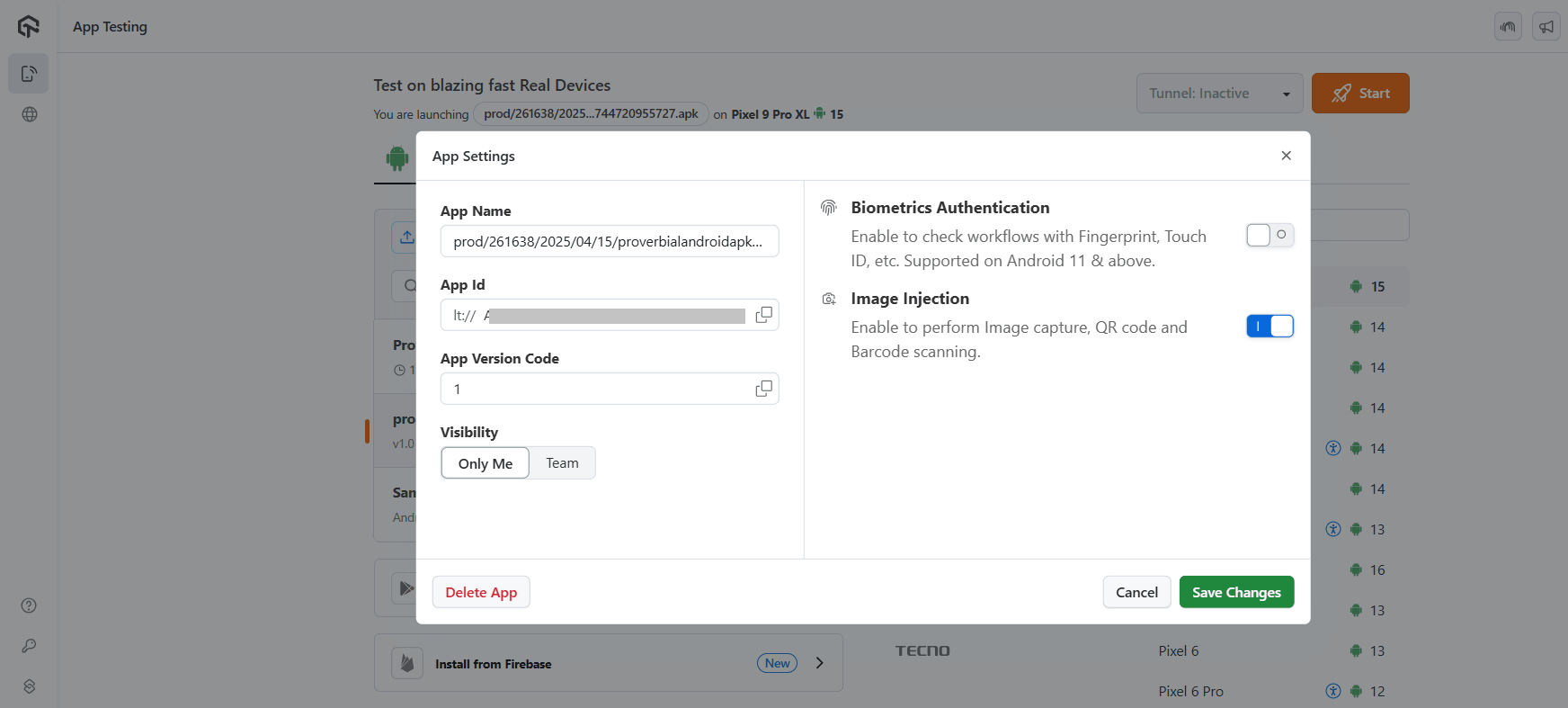
Step 3: Click on your app and then on the Settings icon that appears. After that, enable the Image Injection toggle button and click Save Changes.
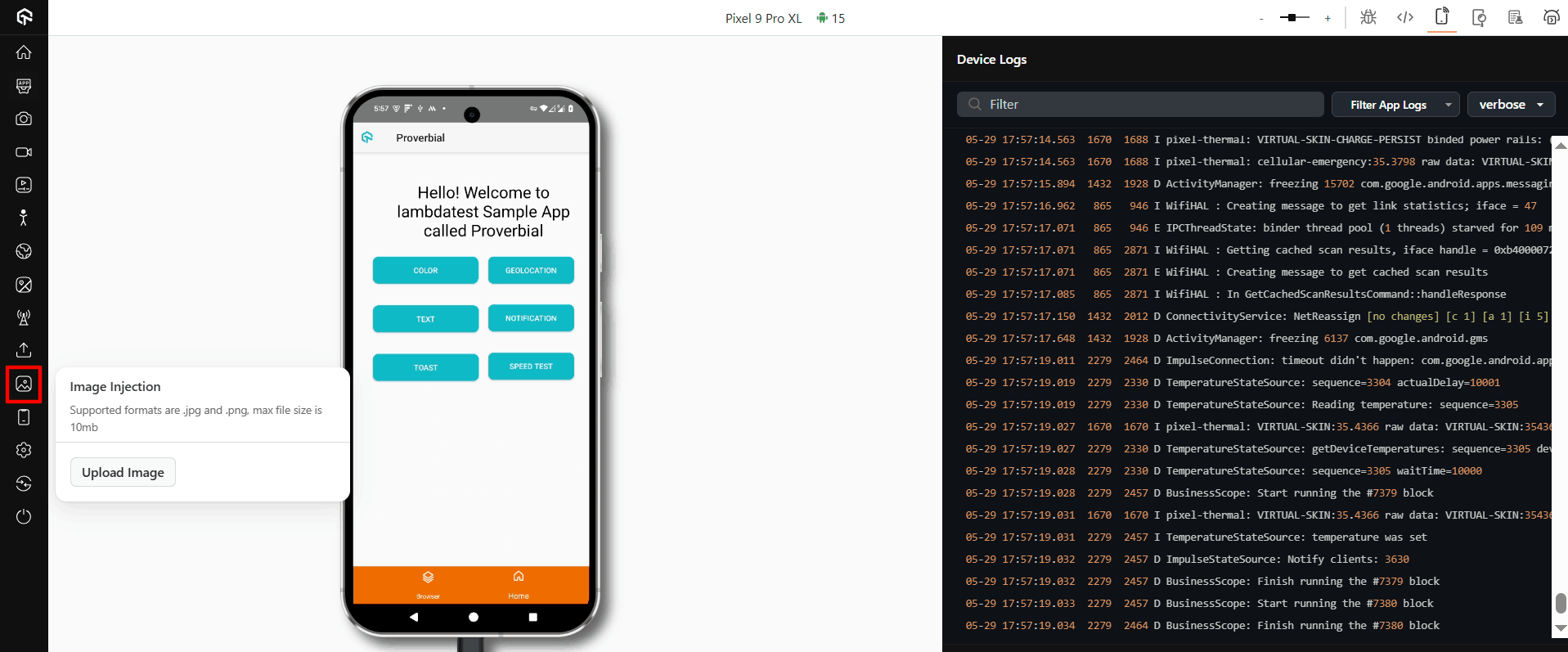
Step 4: Click Start to launch the test session. Next, click on the image injection icon, then click Upload Image.
Step 5: Upload the QR code that you want to test.
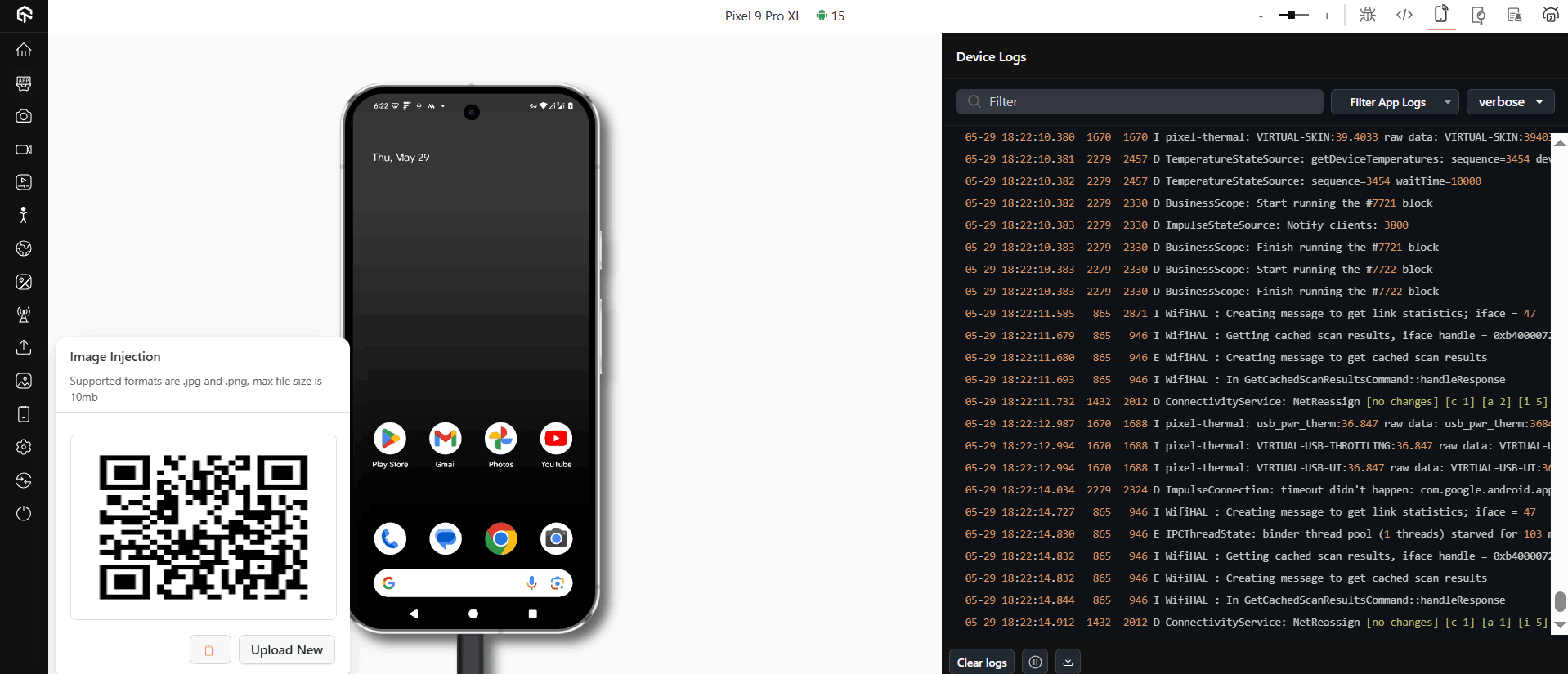
Once the QR code is uploaded, open your camera app. When the camera launches and you capture an image, a black screen may appear. Proceed by selecting that captured image, after which the black image will be replaced with the injected image (the QR code).
For more information, check out this documentation on QR code testing using camera image injection.
How Do You Test QR Code Size and Contrast for Reliable Scans?
A QR code can fail to scan even when the encoded data is correct. Size, contrast, and damage tolerance decide whether a scanner can read the code at all, and a tester should check each one.
- Scan Distance and Size: Test the QR code at the actual distance it will be scanned from, such as on a billboard, a poster, or a product label, not only up close on a screen. A code sized for a phone screen will not scan reliably from several meters away.
- Contrast Between Modules and Background: The dark modules must stay clearly distinct from the light background. Test the code on the actual print stock or screen background it will ship on, since a busy image, a colored background, or low print contrast can stop a scanner from locking on.
- Damage and Obstruction Tolerance: QR codes use one of four error correction levels, L, M, Q, and H, which can restore 7%, 15%, 25%, and 30% of the code if part of it is dirty, torn, or covered by a logo, according to QR code inventor Denso Wave. Test with the same error correction level your generator applied, not a stronger one.
- Quiet Zone Around the Code: Leave a plain, unobstructed border around the QR code. Text, images, or a busy background pressed right up to the edge can prevent a scanner from finding the position markers.
Best Practices to Test QR Codes
To ensure a confident release, here are some best practices that help you thoroughly validate every important test scenario for QR code:
- Consider All Age Groups: When testing a QR code, it’s crucial to consider all age groups to ensure everyone can scan it. Different age groups perceive QR codes differently.
- Consider All Devices: Devices vary in hardware and software configurations, making it hard to predict potential issues. Testing the QR code feature on a wide range of real devices is essential. Using online platforms like TestMu AI can reduce costs while providing accurate testing metrics.
- Consider Environmental Factors: QR codes can be scanned in various environments, from shops to billboards. Factors like poor lighting can affect scans. Testers must ensure QR codes work smoothly in different conditions, as users expect a seamless experience regardless of environmental challenges.
- Think Like a User: To improve QR code testing, testers should adopt an end-user perspective, identifying potential issues and creating a comprehensive list of test scenarios. This approach minimizes the chance of failures post-release.
Conclusion
QR codes are widely recognized and used by all end-users, therefore, it is expected to function flawlessly across all compatible web browsers and mobile devices. This is where QR code testers play a crucial role. They must ensure that each QR code fulfills its intended purpose.
Although this task can be challenging, our guide provides a step-by-step approach for effective QR code testing and best practices to ensure accuracy. Successful testing requires skill, keen observation, and platforms like TestMu AI, which allow you to test QR codes remotely without needing physical devices.
Citations
- Usability Testing on QR Code Scanner Application for Lecture Presence: https://www.researchgate.net/publication/341937670
Author

Harish Rajora
Blogs: 102


Harish Rajora is a software developer at TestMu AI with over 6 years of hands-on experience in Python and cross-platform application development across Windows, macOS, and Linux. He has authored 800+ technical articles and worked on large-scale projects, including GenAI applications and core engineering features used by millions. Harish has led DevOps initiatives building CI/CD pipelines with Jenkins, AWS, GitLab, and GitHub, and holds an M.Tech in Software Engineering from IIIT Allahabad.


Frequently asked questions
Did you find this page helpful?
More Related Blogs
TestMu AI forEnterprise
Get access to solutions built on Enterprise
grade security, privacy, & compliance
- Advanced access controls
- Advanced data retention rules
- Advanced Local Testing
- Premium Support options
- Early access to beta features
- Private Slack Channel
- Unlimited Manual Accessibility DevTools Tests