
Power Your Software Testing with AI Agents and Cloud
The Native AI-Agentic Cloud Platform to Supercharge Quality Engineering. Test Intelligently and Ship Faster.


- TestMu AI (Formerly LambdaTest)
- /
- Blog
- /
- How to Test Next.js Apps Without Code
How to Test Next.js Apps Without Code (2026 Guide)
Test your Next.js app end to end, SSR pages, hydration, client-side routing, and API routes, in plain English. No Selenium, no Playwright, no code.
Published on:
A Next.js app can be tested without writing Playwright code by describing a route change in plain English, such as clicking a dashboard link and confirming the URL updates and the heading renders, so both App Router and Pages Router navigations are covered without a script that hardcodes how long hydration is expected to take.
Why Next.js apps are hard to test
A route looks simple, but real coverage has to touch every rendering path and every way it can quietly fail:
- Server-side rendering and hydration, where the same page is produced twice, once on the server and once in the browser, and a mismatch between them only shows up at runtime
- Client-side route transitions, where the App Router or Pages Router swaps views without a full reload, so a broken navigation leaves the URL and the screen out of sync
- Data fetching spread across server components, route handlers, and getServerSideProps, each of which can fail on its own and render an empty page
- Streaming and Suspense boundaries, where parts of a page arrive late, so a test that checks too early sees a loading skeleton instead of content
- Middleware and redirects that run at the edge before the page renders, quietly rewriting or blocking a request
- Environment drift between a local dev build and the production build, where a page that works under npm run dev breaks after next build
And that is one route. Real coverage means testing server-rendered pages and client-navigated ones, cold first loads and warm in-app navigations, and every browser your customers actually use.
The old way: brittle end-to-end scripts
Here is what verifying a single client-side navigation and its hydrated content looks like in a typical Playwright setup:
const { chromium } = require("playwright");
const browser = await chromium.launch();
const page = await browser.newPage();
await page.goto("https://yourapp.com/");
await page.click("a[href='/dashboard']");
await page.waitForURL("**/dashboard");
await page.waitForSelector("[data-hydrated='true']");
const heading = await page.textContent("h1.dashboard-title");
if (!heading.includes("Dashboard")) {
  throw new Error("Expected a hydrated dashboard heading, got: " + heading);
}
await browser.close();
Around a dozen lines, and every one is a liability. The moment a developer renames the dashboard link, restructures the layout, or moves the heading into a server component, the test breaks. Maintenance like this is the dominant cost of a large automation suite: engineers spend a large share of every sprint re-pointing selectors and re-tuning waits instead of writing new coverage. And this approach still needs someone who writes JavaScript and who knows exactly when a Next.js page is hydrated enough to assert against, which is the hard part. It is the core tradeoff behind code-based vs. codeless test automation.
If you are a manual QA engineer, a PM, or a founder without a dedicated automation engineer, the code wall means your Next.js app usually gets tested by hand, slowly, inconsistently, and never at 2 a.m. before a release.
The no-code way: write the test the way you would explain it
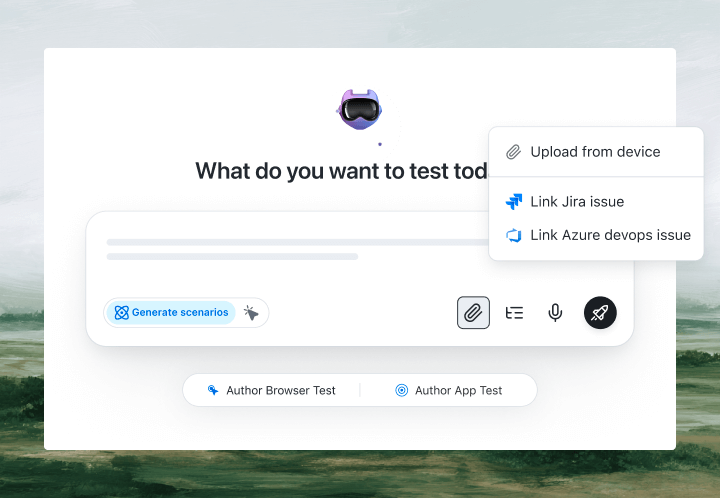
With KaneAI, you write the same test in plain English:
- Go to yourapp.com and wait for the home page to finish loading
- Click the Dashboard link in the navigation
- Verify the URL changes to /dashboard
- Verify the dashboard heading is visible and the page responds to a click
- Verify the first project card shows real data, not a loading skeleton
That is the entire test. KaneAI reads each step, finds the right elements on your live site the way a human tester would, by understanding the page rather than matching brittle CSS selectors, and executes the flow. Because it watches the rendered page instead of a fixed timer, it waits for server-side rendering to finish and for hydration to complete before it acts, so a view that becomes interactive a beat late does not fail the test. It follows client-side route transitions the way a real visitor does, and its vision-based waiting knows the difference between a loading skeleton and real content. When your developer renames a component or refactors the layout, the test adapts instead of breaking, and the same plain-English test runs across browsers and real devices on the TestMu AI grid with no per-browser rewrites.

The Next.js scenarios that actually break
Once the happy path works, real coverage is just more English. Here are the Next.js scenarios worth adding, each takes about two minutes to write:
Hydration on first load
- Load a server-rendered page with a fresh cache
- Verify the primary action button responds to a click, not only that it is visible
- Verify the interactive state matches what the server rendered, with no fallback to a blank screen
Client-side route transitions
- Navigate between three routes using in-app links, not full reloads
- Verify each view renders its own content and the browser back button restores the previous view
- Verify the same route opened as a direct deep link also renders correctly
Data fetching and empty states
- Open a page whose content comes from a server component or a route handler
- Verify real data renders instead of a permanent loading skeleton
- Verify a slow or failed fetch shows the intended error state, not a blank page
Middleware redirects and protected routes
- Visit a protected route while signed out
- Verify middleware redirects to the login page before the protected page renders
- Verify that after signing in, the original route loads with its data intact
Run all of them across Chrome, Safari, Firefox, and real mobile devices from the same plain-English steps, with no per-browser rewrites.
Putting it on autopilot
Next.js tests are most valuable when they run without you:
- Schedule the suite nightly, so a Friday deploy cannot silently break hydration over the weekend
- Trigger on deploy via CI, where Kane CLI runs the same tests from your pipeline right after next build and returns a clean exit code the pipeline can gate on
- Alert on failure in Slack, with a full replay of exactly what the AI saw when the step failed: screenshots, video, and the reason in plain English
When a test fails, you do not get a hydration warning buried in the console at line 200. You get a plain-English reason for the exact step that failed. Anyone on the team can read it, and anyone can fix the test, because the test is just English.
Try it on your own app in 10 minutes
- Sign up for KaneAI free, with no credit card
- Paste your Next.js app URL
- Write your first test in plain English, or let KaneAI suggest one from your site
- Run it and watch your app get tested end to end, hydration and all
Your Next.js app is too dynamic to test by hand and too layered for brittle scripts. Test it in the language you already speak. Working across the stack, you can apply the same approach to Vue apps and Flutter apps.

Note: Test your Next.js app without writing a line of code. Start with KaneAI free.
Author

Reshu Rathi
Blogs: 6


Reshu Rathi is a skilled content and marketing professional with expertise in content marketing for SaaS, tech, AI, and startup growth. She crafts strategies that drive engagement and growth, leveraging deep industry knowledge. Reshu excels in simplifying complex topics to create impactful, audience-focused content.
Reviewer

Saniya Gazala
Reviewer
Saniya Gazala is a Product Marketing Manager and Community Evangelist at TestMu AI with 2+ years of experience in software QA, manual testing, and automation adoption. She holds a B.Tech in Computer Science Engineering. At TestMu AI, she leads content strategy, community growth, and test automation initiatives, having managed a 5-member team and contributed to certification programs using Selenium, Cypress, Playwright, Appium, and KaneAI. Saniya has authored 15+ articles on QA and holds certifications in Automation Testing, Six Sigma Yellow Belt, Microsoft Power BI, and multiple automation tools. She also crafted hands-on problem statements for Appium and Espresso. Her work blends detailed execution with a strategic focus on impact, learning, and long-term community value.


Next.js Testing FAQs
Did you find this page helpful?
More Related Blogs

TestMu AI forEnterprise
Get access to solutions built on Enterprise
grade security, privacy, & compliance
- Advanced access controls
- Advanced data retention rules
- Advanced Local Testing
- Premium Support options
- Early access to beta features
- Private Slack Channel
- Unlimited Manual Accessibility DevTools Tests